If you’re building a high-performance Mac Studio desk, the right dock can simplify everything from displays to storage to power delivery. The best options balance speed, port selection, and Mac-friendly monitor support.
In this roundup of the best Thunderbolt 5 docks for Mac Studio, we focus on models that make a real difference for creators, multitaskers, and workstation users who want fewer adapters and a cleaner setup.
Best 8 Thunderbolt 5 Docks for Mac Studio Picks for 2026
Best for Power Users
WAVLINK Thunderbolt 5 Dock with 140W Charging

- Thunderbolt 5 with up to 120Gbps boosted bandwidth
- 140W charging plus downstream Thunderbolt expansion
- 8K display support, 2.5G Ethernet, and SD 4.0 reader
Best For: Mac Studio owners and pro users who want a high-powered Thunderbolt dock for demanding workflows.
Best for Multi-Display Setups
Satechi TB4 Dock with 100W Charging

- Up to 4 extended 4K/60Hz displays
- 40Gbps TB4 data with 100W USB-C charging
- Includes Ethernet, SD reader, and USB-A ports
Best For: Mac Studio users who want a versatile multi-monitor dock with strong charging and broad port selection.
Best for Speedy Expansion
OWC Thunderbolt 5 Hub for Mac & PC

- 80Gb/s Thunderbolt 5 bandwidth
- Up to three 8K displays
- 140W charging with fanless design
Best For: Mac Studio users who need fast Thunderbolt expansion and high-display support in a quiet hub.
Best for Thunderbolt 4 Upgrades
Belkin Connect 5-in-1 Thunderbolt Dock

- 40Gbps Thunderbolt 4 with daisy-chain support
- Dual 4K@60Hz or single 8K@30Hz display support
- 96W charging in a compact 5-in-1 hub
Best For: Mac Studio users who want a compact, reliable Thunderbolt dock with solid charging and dual-monitor support.
Best for Triple-Display Mac Power Users

- Triple 6K@60Hz support on compatible Mac Max models
- 3 Thunderbolt 5 ports plus 10 USB ports
- 140W power delivery with 2.5GbE and cooling fan
Best For: Mac power users building a high-bandwidth, multi-monitor workstation.
Best for Multi-Display Macs

- Up to one 8K or dual 5K/4K display support
- Three Thunderbolt 4 ports plus four USB ports
- 96W charging with GbE, SD, and audio
Best For: Mac Studio users who need a feature-rich Thunderbolt dock for dual monitors and everyday expansion.
Best for Multi-Display Workflows
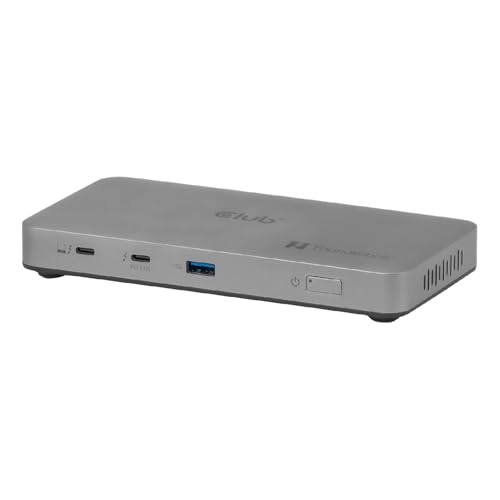
- Triple 5K@60Hz or single 8K@60Hz display support
- Thunderbolt 5 certified with up to 120Gbps transfer
- 180W power supply with 96W passthrough charging
Best For: Mac Studio and MacBook Pro users who need a high-speed dock for multiple monitors and demanding workflows.
Best for Mac Multi-Display

- Dual 6K 60Hz support on compatible Mac systems
- 140W charging with an extra 30W USB-C port
- 2.5GbE plus SD 4.0 and microSD 4.0 slots
Best For: Mac users who need a driverless dock with strong display support and fast workstation I/O.
Best for Power Users – WAVLINK Thunderbolt 5 Dock with 140W Charging
If you want a high-end desktop hub that pushes speed, charging, and display support as far as Thunderbolt allows, this WAVLINK model stands out in the current field of thunderbolt 5 docks for mac studio users. It’s built around Thunderbolt 5 bandwidth, strong laptop charging, and a dense port layout that suits demanding creators who run lots of accessories.
Best For: Mac Studio owners and pro users who want a feature-packed Thunderbolt dock for fast storage, strong charging, and a clutter-free workstation.
Pros:
- Thunderbolt 5 platform with up to 120Gbps boosted transfer speeds
- 140W power delivery and multiple downstream Thunderbolt ports for flexible expansion
- Excellent display support, including 8K output options for creative workflows
- Includes 2.5G Ethernet, SD 4.0 reader, and four USB-A ports for legacy gear
Cons:
- Thunderbolt 5 features depend on a compatible host system
- macOS does not support the triple-display mode advertised for Windows
- More dock than many casual users need, especially if you only want basic peripherals
This is a strong fit if you want one of the more advanced thunderbolt 5 docks for mac studio setups and plan to lean on fast storage, wired networking, and multi-device connectivity. Just make sure your workflow can actually benefit from its higher-end capabilities before paying for all that headroom.
Best for Multi-Display Setups – Satechi TB4 Dock with 100W Charging
If you’re comparing thunderbolt 5 docks for mac studio and want a more affordable Thunderbolt 4 alternative that still handles serious desk setups, this Satechi dock is worth a look. It focuses on multi-display output, strong charging, and a wide mix of ports, but it does require DisplayLink software for the HDMI monitor outputs.
Best For: Mac Studio owners and Mac/Windows users who need multiple external displays, fast data connections, and a dock that can double as a charging hub.
Pros:
- Supports up to 4 extended 4K/60Hz displays with Thunderbolt 4 and HDMI outputs.
- Offers 40Gbps Thunderbolt 4 performance plus two 10Gbps USB-A ports.
- Includes 100W USB-C charging, Gigabit Ethernet, and UHS-II SD card support.
- Works across Mac and Windows systems with broad Thunderbolt 4/USB4 compatibility.
Cons:
- HDMI display support depends on DisplayLink drivers.
- Mac M1/M2 systems have display limits compared with newer Macs.
- Not a true Thunderbolt 5 dock, so it won’t deliver TB5 speeds.
For buyers focused on practical expandability rather than bleeding-edge bandwidth, this dock lands in a useful middle ground. It won’t replace the newest thunderbolt 5 docks for mac studio if you need maximum future-proofing, but it does cover the multi-monitor and connectivity basics very well.
Best for Speedy Expansion – OWC Thunderbolt 5 Hub for Mac & PC
If you want one of the faster thunderbolt 5 docks for mac studio, this OWC hub is a strong fit for users who mainly need more high-bandwidth ports rather than a full workstation dock. It brings Thunderbolt 5 speed, broad backward compatibility, and silent fanless operation in a compact design that’s easy to place beside a Mac Studio.
Best For: Mac Studio users who want maximum Thunderbolt expansion, fast display support, and clean, quiet desktop performance without an Ethernet-heavy dock.
Pros:
- Up to 80Gb/s bandwidth with Thunderbolt 5 future-proofing
- Supports up to three 8K displays and daisy-chaining
- 140W charging and fanless aluminum build
- Works with Thunderbolt 5, 4, 3, USB4, and USB-C devices
Cons:
- No Ethernet port included
- More of a hub than a full-featured dock
- Three USB ports may be limiting for some setups
For buyers comparing thunderbolt 5 docks for mac studio, this model stands out when raw port speed, display flexibility, and quiet reliability matter more than extras like wired networking. It’s a focused expansion hub for power users who want strong TB5 performance in a simple package.
Best for Thunderbolt 4 Upgrades – Belkin Connect 5-in-1 Thunderbolt Dock
If you’re comparing thunderbolt 5 docks for mac studio but want a dependable, simpler dock today, this Belkin option is a solid middle-ground pick. It delivers 40Gbps Thunderbolt 4 connectivity, dual 4K display support, and 96W charging in a compact hub that works well for streamlined desk setups.
Best For: Mac users who want a compact Thunderbolt dock with strong charging, dual-monitor support, and easy everyday connectivity.
Pros:
- 40Gbps Thunderbolt 4 performance with up to 6 daisy-chained devices
- Supports dual 4K displays at 60Hz or one 8K display at 30Hz
- 96W power delivery helps keep a Mac Studio or laptop charged
- Compact 5-in-1 design is easy to fit on a crowded desk
Cons:
- Not a Thunderbolt 5 dock, so it won’t match the newest bandwidth tier
- Limited port count compared with larger workstation docks
For buyers who care more about proven stability than chasing the newest spec sheet, this Belkin dock is a practical choice. It won’t replace true thunderbolt 5 docks for mac studio, but it does cover the core needs most users actually rely on: fast data, dual displays, and dependable charging.
Best for Triple-Display Mac Power Users – iVANKY FusionDock Max 2
If you want one of the most feature-packed thunderbolt 5 docks for mac studio-style workflows, the iVANKY FusionDock Max 2 is built around high-bandwidth connectivity, triple-display support on the right Macs, and enough ports to replace a full desk hub. It is a strong fit for demanding creative setups, but it is limited to Mac only and is not a universal dock.
Best For: Mac users who need a high-end Thunderbolt 5 dock for multi-monitor productivity, fast storage, and wired networking.
Pros:
- Supports up to triple 6K@60Hz output on compatible Mac Max configurations
- Three Thunderbolt 5 ports and 10 USB ports give it excellent expansion
- 2.5GbE, SD/TF 4.0, and 140W power delivery cover pro workflows well
- Hybrid cooling design helps keep performance steady during long sessions
Cons:
- Mac-only; incompatible with Windows and ChromeOS laptops
- Display support varies by Mac chip, so buyers must verify compatibility
- Locked to one Mac and does not support switching between multiple Macs
For buyers comparing thunderbolt 5 docks for mac studio, this dock stands out for raw I/O and display flexibility, but only if your Mac model matches the supported monitor configuration. It is a serious desk dock for users who need more than a basic charging hub.
Best for Multi-Display Macs – OWC 11-Port Thunderbolt Dock
If you’re comparing thunderbolt 5 docks for mac studio and want a well-rounded Thunderbolt dock instead of a minimalist hub, the OWC 11-Port model is worth a close look. It gives you a strong mix of connectivity, up to 96W charging, and flexible multi-display support, making it a practical choice for Mac users who need more ports than a basic adapter can offer.
Best For: Mac Studio owners who want a reliable Thunderbolt dock for dual displays, fast peripherals, and everyday workstation expansion.
Pros:
- Supports up to one 8K display or dual 5K/4K setups for more flexible monitor workflows
- Three Thunderbolt 4 ports plus four USB ports cover drives, displays, and accessories
- 96W host charging is strong enough for many Mac notebooks and compact workstations
- Includes GbE, SD card reader, and audio for a complete desk setup
Cons:
- Not a true Thunderbolt 5 dock, so it won’t deliver the newest TB5 bandwidth benefits
- Display support depends on your Mac model, so some configurations are more limited than others
- Best suited to Thunderbolt 3/4 workflows rather than pure USB-C users chasing maximum value
This OWC dock makes sense if you want a dependable, port-rich expansion option for a Mac Studio and don’t need the latest Thunderbolt 5 headline specs. For buyers browsing thunderbolt 5 docks for mac studio, it stands out as a capable alternative when display output, charging, and connection variety matter more than raw next-gen speed.
Best for Multi-Display Workflows – Thunderbolt 5 5-in-1 Dock
If you need thunderbolt 5 docks for mac studio that can actually handle serious desktop expansion, this 5-in-1 hub stands out for its triple 5K@60Hz display support and high-speed 120Gbps bandwidth. It is built for demanding creative and technical setups where external monitors, fast storage, and reliable charging all need to work together without slowing the Mac down.
Best For: Mac Studio users, MacBook Pro owners, and power users who want one dock for multi-monitor editing, design, or analysis work.
Pros:
- Supports up to three 5K displays at 60Hz or one 8K@60Hz monitor
- Thunderbolt 5 certified with up to 120Gbps data transfer
- 180W power supply delivers up to 96W laptop charging
- Includes Thunderbolt Share for direct computer-to-computer file transfer
Cons:
- Only 5 ports, so it is not ideal if you need lots of USB-A connections
- Premium feature set likely puts it above basic docking-station budgets
- Triple-display output may be more than many everyday users need
For buyers comparing thunderbolt 5 docks for mac studio, this model is strongest when display expansion and transfer speed matter more than having a wide assortment of legacy ports. It is a performance-first dock for users who want a compact hub with serious external monitor support.
Best for Mac Multi-Display – StarTech Thunderbolt 5 Dock
If you want one of the most capable thunderbolt 5 docks for mac studio-style desktop workflows, this StarTech dock is built for high-end display expansion, fast networking, and serious power delivery. It’s a strong fit for creative users who need a cleaner desk without giving up USB4 compatibility, multi-monitor support, or fast card transfers.
Best For: Mac users who want a driverless dock with strong display support, 140W charging, and 2.5GbE networking.
Pros:
- Supports dual 6K 60Hz on compatible Mac systems for sharp, high-resolution workflows
- 140W laptop charging plus a 30W USB-C port for phones and tablets
- 2.5GbE, SD 4.0, and microSD 4.0 add fast networking and media offload
- Works with Thunderbolt 5, Thunderbolt 4, and USB4 devices with driverless setup
Cons:
- Premium pricing makes it harder to justify for basic single-monitor setups
- Mac display support is excellent, but not as expansive as the Windows triple-4K mode
- Large power brick may take up extra space under the desk
For buyers comparing thunderbolt 5 docks for mac studio setups, this model stands out for its mix of display headroom, fast I/O, and workstation-friendly charging. It makes the most sense when you need a dock that can replace several adapters at once.
How We Picked the Best Thunderbolt 5 Docks for Mac Studio
We prioritized docks that offer strong Thunderbolt bandwidth, reliable charging, and practical expandability for a Mac Studio workflow. Because many buyers use these docks for external displays, storage, audio interfaces, and fast peripherals, display compatibility and port mix mattered as much as raw transfer speed.
We also looked for clear Mac support, useful upstream and downstream Thunderbolt ports, and power delivery that makes desk setups simpler without sacrificing stability.
Quick Comparison: What Matters Most
Not every dock is built for the same job. Some Thunderbolt 5 Docks for Mac Studio are better for multiple high-resolution displays, while others are better as compact hubs with a few essential ports. If you need lots of USB-A connections and Ethernet, pick a more traditional dock. If you want maximum bandwidth for fast SSDs and future-ready expansion, a Thunderbolt 5 hub may be the better fit.
Key Buying Factors for Thunderbolt 5 Docks for Mac Studio
Display Support
Check how many monitors the dock supports and at what resolution and refresh rate. Mac workflows often depend on stable external display output, so confirm whether the dock supports dual 4K, dual 6K, or higher.
Charging and Power Delivery
Mac Studio itself does not need laptop-style charging, but many users still want a dock that powers connected devices efficiently. If you also use a MacBook in the same setup, higher wattage becomes more important.
Port Selection
Look for a mix of Thunderbolt, USB-A, Ethernet, SD or microSD, and audio if those are part of your daily workflow. The best dock is the one that reduces the number of separate dongles on your desk.
Bandwidth and Storage Workloads
For large media files, fast external drives, and pro apps, bandwidth matters. Thunderbolt 5 can help reduce bottlenecks when you are moving data between multiple high-speed accessories.
Who Should Buy Which Thunderbolt 5 Docks for Mac Studio?
If you want the most future-focused setup, choose a Thunderbolt 5 dock with strong display support and plenty of bandwidth. If you mainly need simple expansion for a few peripherals, a Thunderbolt 4 dock may still be enough and can be more affordable.
Creative professionals, developers, and power users should lean toward feature-rich models with multiple video outputs and several downstream ports. Minimalists or users with one display and a handful of accessories can save money by choosing a smaller hub that covers only the essentials.
In short, match the dock to your real workload: monitor count, storage speed, and peripheral needs matter more than headline specs alone.