If your desk doubles as an edit bay, a color-grading station, or a multi-screen workstation, the right dock can make everything feel faster and simpler.
This roundup focuses on Thunderbolt 5 options built for creator workflows: high-bandwidth connections, strong charging, and practical display support for modern laptops and desktops.
Best 10 Thunderbolt 5 Docks for Creator Desks Picks for 2026
Best for High-Volume Creator Setups
CalDigit TS5 Plus Thunderbolt 5 Dock

- 20 total ports with 3 TB5 connections and dual USB controllers
- 140W host charging backed by a 330W power supply
- 10Gb Ethernet and dual 8K-capable display support
Best For: Creators who need maximum port density, fast networking, and strong laptop charging.
Best for Triple 4K Workflows
TobenONE 20-in-1 Triple 4K Dock

- Triple 4K@60Hz support with 3 HDMI and 2 DisplayPort outputs
- 20-in-1 port selection with fast USB-C, USB-A, Ethernet, and card reader
- 150W power supply plus dual 45W USB-C charging ports
Best For: Creators and power users who want a high-port-count dock for triple-monitor productivity.
Best for High-Bandwidth Creator Setups
Lenovo ThinkPad Thunderbolt 5 Smart Dock 7500

- 120Gbps transfer speeds for heavy creative workflows
- 180W power delivery for docked laptop charging
- Multiple display support with 2.5Gbps Ethernet
Best For: Creators who want a high-bandwidth dock for fast transfers, strong charging, and multi-monitor workflows.
Best for Mac Power Users
iVANKY FusionDock Ultra 26-in-1

- Quad 6K or dual 8K display support for compatible Macs
- 10GbE Ethernet and multiple high-speed USB-C downstream ports
- 26-in-1 expansion with SD 4.0, audio, and charging
Best For: Mac creators who need a powerful multi-display dock with fast networking and lots of expansion.
Best for High-Refresh Creator Setups
Lenovo ThinkPad Thunderbolt 5 Smart Dock 7500

- Up to 120Gbps Thunderbolt 5 bandwidth
- Drives up to three 8K/60Hz displays
- 180W charging with 2.5Gbps Ethernet
Best For: Creators and power users running multiple high-resolution or high-refresh monitors.
Best for Thunderbolt 5 Speed
WAVLINK Intel Certified TB5 Dock 12-in-1

- 120Gbps Thunderbolt 5 upstream and three downstream TB5 ports
- 140W power delivery plus 2.5G Ethernet for busy creator setups
- SD 4.0 reader and four USB-A ports for camera and accessory workflows
Best For: Creators who need maximum TB5 bandwidth, charging, and multi-device expansion.
Best for Triple-Monitor Setups
TobenONE 13-in-1 Triple Display Dock

- Triple-display support with dual 4K output
- 13 ports for USB, Ethernet, cards, and audio
- 65W power adapter included for stable charging
Best For: Creators and remote workers who need multi-display productivity plus a full mix of legacy ports.
Best for High-Speed Creator Workflows
Anker Prime TB5 Docking Station

- 14-in-1 port selection with TB5, USB, card readers, and Ethernet
- 140W charging plus active cooling for demanding desk setups
- Up to 8K and dual-display support on compatible laptops
Best For: Creators who need a fast, high-port-count dock for a media-heavy workstation.
Best for Mac Creator Desks
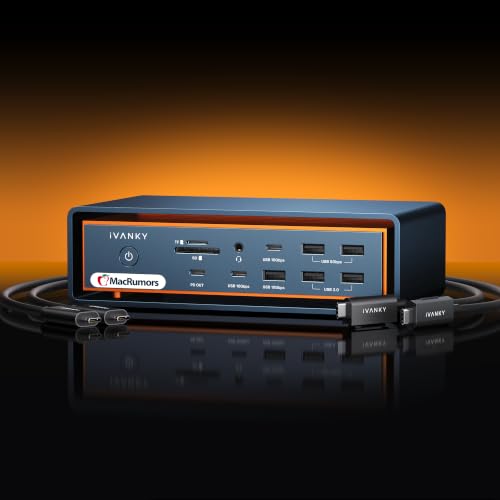
- Triple 6K@60Hz support on compatible Mac Max systems
- 3 Thunderbolt 5 ports and 10 USB ports
- 140W PD, 2.5GbE, and active cooling
Best For: Mac creators who need a high-bandwidth dock with multi-display support and strong cooling.
Best for High-Volume Creator Setups – CalDigit TS5 Plus Thunderbolt 5 Dock
If you want one dock that can anchor a demanding workstation, the CalDigit TS5 Plus is one of the most capable thunderbolt 5 docks for creator desks. It combines 20 total ports, 10Gb Ethernet, strong charging, and a huge mix of USB and display options for editors, photographers, and multi-device workflows.
Best For: Creators who need maximum port density, fast network access, and power for a high-end laptop.
Pros:
- 3 Thunderbolt 5 ports plus 10 USB ports give you serious expansion headroom
- 140W host charging and a 330W PSU make it well suited to power-hungry laptops
- 10GbE and dual USB controllers help keep storage, networking, and peripherals moving quickly
- Supports high-end display setups, including dual 8K 60Hz on compatible Macs and PCs
Cons:
- Overkill if you only need a few basic ports
- Full performance depends on a Thunderbolt 5 or USB4 v2 host
- Large power brick and high port count make it better for fixed desks than travel
For creators who want a desk dock that can handle fast storage, wired networking, and multiple peripherals at once, the TS5 Plus stands out as a no-compromise hub. It is especially appealing in thunderbolt 5 docks for creator desks where cable clutter and bandwidth bottlenecks are the main problems.
Best for Triple 4K Workflows – TobenONE 20-in-1 Triple 4K Dock
If you want one desk hub to handle displays, storage, networking, and charging, this TobenONE dock is a practical option among thunderbolt 5 docks for creator desks. It’s built around triple-monitor expansion, a hefty port mix, and strong laptop charging, but it does require driver installation and works best for users who need flexibility more than plug-and-play simplicity.
Best For: Creators, developers, and multi-device users who want triple 4K monitor support, lots of I/O, and a clutter-reducing single-cable setup on Windows, macOS, or Linux.
Pros:
- Supports triple 4K@60Hz output across 3 HDMI and 2 DisplayPort connections
- Generous 20-in-1 layout with fast USB-C, USB-A, SD/microSD, Ethernet, and audio
- 150W power supply plus dual 45W USB-C charging for busy creator desks
- Compatible with Thunderbolt 3/4/5, USB4, Windows, macOS, and Linux
Cons:
- Requires driver installation before use, so it is not truly plug-and-play
- Not compatible with Chrome OS
- Mac users may need to grant screen recording permissions for the driver
This is a strong fit if your priority is screen real estate and a dense port selection rather than a minimal dock. For thunderbolt 5 docks for creator desks, it stands out as a versatile workstation hub for multi-monitor setups with plenty of charging headroom.
Best for Dual 4K Creator Setups – Plugable Thunderbolt 4 Dock TBT4-UD5
For creators comparing thunderbolt 5 docks for creator desks, the Plugable TBT4-UD5 is a practical pick if you want a fast, well-equipped dock without stepping up to a pricier TB5 model. It delivers 40Gbps Thunderbolt 4 performance, 100W charging, dual 4K HDMI output, and enough ports to handle storage, peripherals, and a wired network on a busy editing desk.
Best For: Creators using dual monitors, high-speed USB accessories, and a laptop that needs one cable for charging and desktop expansion.
Pros:
- Dual 4K 60Hz HDMI or single 8K output for flexible monitor setups
- 100W laptop charging plus a 15W downstream Thunderbolt port
- 13 ports total, including USB, SD/microSD, audio, and Gigabit Ethernet
- Thunderbolt certified with strong cross-platform support for Windows and Mac
Cons:
- Not a true Thunderbolt 5 dock, so it tops out at TB4 speeds
- Mac dual-display support depends on the specific chip and mode
- Display output can be limited on non-Thunderbolt USB-C laptops
This is a solid creator-desk dock if your priority is reliable dual-monitor output and broad compatibility rather than chasing the newest spec sheet. For many thunderbolt 5 docks for creator desks shoppers, it still makes sense as a dependable, well-rounded workstation hub.
Best for High-Bandwidth Creator Setups – Lenovo ThinkPad Thunderbolt 5 Smart Dock 7500
If you need a dock that can keep up with fast storage, multiple displays, and a crowded desktop, this Lenovo option stands out among thunderbolt 5 docks for creator desks. It is built for power users who want a single connection to handle heavy file transfers, high-resolution monitors, wired networking, and laptop charging without turning the desk into a cable mess.
Best For: Creators who want a high-bandwidth dock for fast transfers, strong charging, and multi-monitor workflows.
Pros:
- 120Gbps data transfer is well suited for demanding creative workflows
- 180W power delivery helps support laptop charging and docked setups
- Multiple display support makes it easier to build a productive dual-screen desk
- 2.5Gbps Ethernet is a nice fit for fast, stable wired connections
Cons:
- Likely overkill if you only need basic peripherals and one monitor
- Premium capabilities may come at a higher price than simpler docks
For creators who regularly move large files and run a serious monitor setup, this is one of the more capable thunderbolt 5 docks for creator desks. It makes the most sense when bandwidth, charging, and desktop cleanliness matter more than keeping the setup minimal.
Best for Mac Power Users – iVANKY FusionDock Ultra 26-in-1
If you’re comparing thunderbolt 5 docks for creator desks, the iVANKY FusionDock Ultra stands out for Mac-first workflows that need serious display output, fast networking, and lots of ports in one chassis. It’s built for MacBook Pro users who want a high-end desk dock that can handle multi-monitor editing, external storage, and a cleaner cable setup.
Best For: Mac creators who need a feature-packed dock for multi-display editing, fast file transfers, and wired network access.
Pros:
- Supports up to quad 6K or dual 8K displays on compatible Mac setups
- Includes 10GbE Ethernet plus multiple high-speed downstream USB-C ports
- 26-in-1 layout adds SD 4.0, audio out, and extra charging options
- 140W power delivery helps keep a MacBook charged on a busy desk
Cons:
- Mac-only design makes it incompatible with Windows systems
- Its advanced display features depend on the right Mac model and monitor setup
- More dock than many users need if you only want basic peripherals
For Mac-based studios, this is one of the more ambitious thunderbolt 5 docks for creator desks, especially if your workflow benefits from multiple reference displays and 10GbE networking. It’s a strong fit when you want a single dock to replace several adapters and keep a production desk organized.
Best for High-Refresh Creator Setups – Lenovo ThinkPad Thunderbolt 5 Smart Dock 7500
If you want one of the most capable thunderbolt 5 docks for creator desks, the Lenovo ThinkPad Thunderbolt 5 Smart Dock 7500 stands out for sheer bandwidth, multi-display support, and serious charging power. It’s built for people running demanding laptops, multiple monitors, and a desk setup that needs to stay clean and connected.
Best For: Creators and power users who want a dock that can handle high-refresh displays, strong notebook charging, and plenty of expansion ports.
Pros:
- Thunderbolt 5 with up to 120Gbps data throughput for high-end workflows
- Supports up to three 8K/60Hz displays or multi-monitor high-refresh configurations
- 180W Power Delivery helps charge workstation-class laptops without a separate adapter
- Includes 2.5Gbps Ethernet plus HDMI 2.1, DisplayPort 2.1, and USB ports
Cons:
- Likely more dock than casual users need for basic office tasks
- Advanced display modes make the price less compelling if you only use one monitor
- Best features are most useful with a Thunderbolt 5-capable laptop
For creators who want a future-ready desk hub, this dock brings the kind of display flexibility and charging headroom that makes thunderbolt 5 docks for creator desks worth the upgrade. It’s especially appealing if your workflow depends on multiple screens, fast external I/O, and a tidy single-cable setup.
Best for Thunderbolt 5 Speed – WAVLINK Intel Certified TB5 Dock 12-in-1
If you want one of the fastest thunderbolt 5 docks for creator desks, the WAVLINK 12-in-1 is built around bandwidth first: a 120Gbps upstream TB5 connection, three downstream TB5 ports, 140W charging, and support for high-resolution multi-display setups on compatible Windows 11 and Mac laptops.
Best For: Creators who need a high-speed dock for laptops with heavy monitor, storage, and peripheral loads.
Pros:
- Thunderbolt 5 upstream plus three downstream ports for aggressive expansion
- 140W laptop charging and 2.5G Ethernet keep a creator desk powered and connected
- SD 4.0 reader and four USB-A ports cover cameras, accessories, and legacy gear
- Strong multi-display support on compatible Windows 11 and macOS systems
Cons:
- Triple-display support is limited to supported Windows 11 TB5 setups
- Mac users only get dual external displays through this dock
- Requires a Thunderbolt 4/5-capable USB-C port on the host device
This is a compelling pick if your workflow depends on raw throughput rather than just extra ports. Among thunderbolt 5 docks for creator desks, it stands out for combining serious charging, fast networking, and broad connectivity in a single hub.
Best for Triple-Monitor Setups – TobenONE 13-in-1 Triple Display Dock
If you want one dock to handle a busy creator desk without overcomplicating the setup, this TobenONE is a practical pick. It delivers triple-display support, lots of legacy I/O, and steady USB-C power in a single hub-like station—useful if you’re comparing thunderbolt 5 docks for creator desks but still need broad compatibility across Mac, Windows, and ChromeOS.
Best For: Creators, developers, and home-office users who need multiple external displays plus extra USB, card, and Ethernet connections in one dock.
Pros:
- Triple-display support with dual 4K output for multitasking and content workflows
- 13 ports total, including USB-A, USB-C, SD/TF, Ethernet, and audio
- 65W adapter provides stable charging with built-in protection
Cons:
- Requires driver setup for full multi-monitor functionality on supported systems
- Not a true Thunderbolt 5 dock, so top-end bandwidth and display flexibility are limited
- VGA feels dated if you only use modern displays
Overall, this is a strong desk-all-in-one for users who care more about ports and triple-screen productivity than cutting-edge Thunderbolt speed. If your shortlist of thunderbolt 5 docks for creator desks also needs wide compatibility and a built-in charging brick, this TobenONE offers a straightforward, budget-friendlier alternative.
Best for High-Speed Creator Workflows – Anker Prime TB5 Docking Station
If you want one of the most capable thunderbolt 5 docks for creator desks, the Anker Prime TB5 Docking Station is built for heavy file transfers, multi-device charging, and dual-display setups. Its 14-in-1 layout gives you a strong mix of Thunderbolt 5, USB, card readers, Ethernet, and video outputs in a single desktop hub.
Best For: Creators who move large media files often and want a fast, all-in-one dock for a busy workstation.
Pros:
- Thunderbolt 5 speeds and active cooling help sustain fast transfers under load
- Up to 140W charging plus multiple USB-C, USB-A, SD, and TF connections
- Flexible dual-display support with up to 8K output on compatible laptops
- 2.5GbE Ethernet is useful for fast network storage and production workflows
Cons:
- Full dual-8K output is limited to compatible Thunderbolt 5 Windows laptops
- Some USB-A hub chaining is not supported
- More dock than casual users need if you only want basic laptop expansion
This is a strong fit for thunderbolt 5 docks for creator desks when speed, charging, and port density matter more than keeping things minimal. It is especially appealing if you regularly work with large media files, external storage, and multiple peripherals at once.
Best for Mac Creator Desks – iVANKY FusionDock Max 2
If you’re shopping for thunderbolt 5 docks for creator desks, the iVANKY FusionDock Max 2 is built for Mac users who need a lot of displays and fast external I/O in one place. It combines Thunderbolt 5 bandwidth, strong port expansion, and active cooling, but it’s important to know that it only works with Macs and is not compatible with Windows or ChromeOS laptops.
Best For: MacBook Pro and Mac Studio-style workflows that need triple-display support, fast storage, and a clutter-free desk hub.
Pros:
- Triple 6K@60Hz display support on compatible Mac Max setups
- 3 Thunderbolt 5 ports plus 10 USB ports for a busy creator desk
- 140W power delivery and 2.5GbE for high-demand workstation use
- Hybrid cooling design helps maintain performance during long sessions
Cons:
- Mac-only, with no support for Windows or Chrome laptops
- Display limits vary by chip tier, so buyers must match their Mac carefully
- Locked to one Mac and does not support switching between different Macs
For Mac-based editors, designers, and producers, this is one of the more specialized thunderbolt 5 docks for creator desks because it prioritizes display output, bandwidth, and cooling over universal compatibility. If your setup fits the supported Mac lineup, it’s a powerful single-cable dock for a serious workstation.
How We Picked Thunderbolt 5 Docks for Creator Desks
We looked for docks that make sense for real creative work, not just spec-sheet bragging. Priority went to Thunderbolt 5 bandwidth, stable multi-display support, reliable host charging, and enough ports for fast external storage, peripherals, and network access. We also considered whether the dock suits Mac and Windows creator setups, since compatibility matters as much as raw speed.
Quick Comparison
When comparing Thunderbolt 5 Docks for Creator Desks, start with your workflow. If you edit from multiple NVMe drives and need the fastest possible transfers, bandwidth and port mix matter most. If your setup includes two or three displays, check the dock’s display output rules carefully, especially on Mac systems where monitor support can depend on chip generation and software limits. For portable laptops, charging wattage and cable length also affect daily usability.
Key Buying Factors for Thunderbolt 5 Docks for Creator Desks
Display Support
Confirm how many displays the dock can drive and at what resolution and refresh rate. Creator desks often benefit from dual- or triple-monitor setups, but the actual result depends on your laptop and operating system as well as the dock.
Charging Power
A dock with 90W to 140W or more can keep a workstation laptop topped up during heavy editing, rendering, or live sessions. Higher power delivery is especially useful for larger notebooks and all-day desk use.
Port Mix and Speed
Look for a balance of fast USB ports, front-access convenience, Ethernet, SD card options if needed, and dedicated high-speed connections for storage. For creators, one fast port is rarely enough; flexibility is the goal.
Network and Expansion
Ethernet speeds such as 2.5GbE or 10GbE can help large media files move more predictably over a wired network. If your workflow includes shared storage or backups, this can be a meaningful upgrade.
Compatibility and Driver Needs
Some docks are plug-and-play, while others rely on drivers or platform-specific features. Make sure the dock supports your laptop, monitor layout, and operating system before you buy.
Who Should Buy Which Thunderbolt 5 Docks for Creator Desks?
Choose a premium Thunderbolt 5 dock if you want the best mix of speed, power, and future-proofing for a creator desk. Pick a more budget-conscious or driver-based dock if you mainly need extra ports and basic multi-display support. Mac users should pay extra attention to display limitations, while Windows users often have more flexibility with high-resolution multi-monitor setups. If your desk setup includes fast external SSDs, large project files, and multiple peripherals, Thunderbolt 5 is the most capable category here.