Choosing a dock for dual 6K monitors is about more than port count. You need the right display support, enough power for your laptop, and stable bandwidth for everything else you plug in.
This roundup focuses on the best Thunderbolt 5 docks for dual 6K displays in 2026, with options for Mac and Windows users who want fewer compromises at the desk.
Best 10 Thunderbolt 5 Docks for Dual 6k Displays Picks for 2026
Best for Thunderbolt 5 Performance
UGREEN 13-in-1 Thunderbolt 5 Dock

- Dual 6K@60Hz or single 8K display support
- 120Gbps Thunderbolt 5 speeds for pro workflows
- 140W charging, 2.5GbE, and SD/TF 4.0 in one dock
Best For: Thunderbolt 5 laptop users who need dual 6K monitor support and strong all-in-one connectivity.
Best for MacBook Dual 6K
iVANKY FusionDock Pro 3 Thunderbolt 5 Dock

- Dual 6K@60Hz support on compatible MacBook Pro/Max systems
- Thunderbolt 5 certified with up to 120Gbps Bandwidth Boost
- 180W adapter with up to 140W laptop charging
Best For: MacBook Pro/Max users who need a Thunderbolt 5 dock for dual 6K monitors and strong charging.
Best for Dual 8K Thunderbolt Setups

- Dual high-resolution display support on compatible Thunderbolt 5 laptops
- 14-in-1 port selection with Ethernet, card readers, audio, and video
- 140W charging plus active cooling for heavy workloads
Best For: Power users with Thunderbolt 5 Windows laptops who need dual displays and a single-cable dock.
Best for High-Power Workstations
Dell Pro Thunderbolt 5 Smart Dock SD25TB5

- Thunderbolt 5 dock with wide display and peripheral support
- Dual DP 2.1 plus HDMI 2.1 for flexible monitor setups
- Modular, upgrade-friendly design for long-term use
Best For: Power users who want a high-wattage Thunderbolt 5 dock for demanding laptop setups and multi-display workflows.
Best for Mac Workstations
iVANKY FusionDock Ultra 26-in-1

- Dual 8K or quad 6K display support on compatible Macs
- 10GbE plus multiple high-speed USB-C downstream ports
- Active cooling and 140W power passthrough for demanding setups
Best For: MacBook Pro users who want a workstation-grade dock for dual 6K and multi-display setups.
Best Dell Upgrade Path
Dell SD25TB4 Pro Thunderbolt 4 Dock
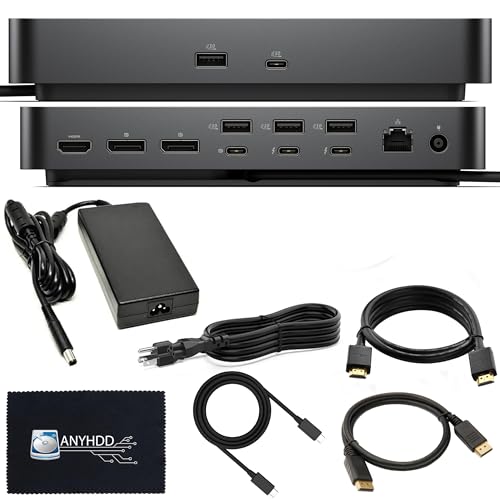
- Dual Thunderbolt 4 ports with broad display and peripheral support
- 180W adapter and included accessories for a cleaner setup
- Modular Dell design with 3-year warranty for long-term use
Best For: Dell users who want a well-rounded dock for productive multi-display work.
Best for Mac Dual-6K Power Users
iVANKY 23-in-1 Thunderbolt 5 FusionDock Max 2

- Dual 6K@60Hz support on compatible Macs
- 23-in-1 dock with 2.5GbE, SD/TF, and USB expansion
- 140W PD plus hybrid cooling for sustained use
Best For: Mac owners who want a high-port-count Thunderbolt 5 dock for dual 6K monitors and heavy desk setups.
Best for Mac Dual-6K

- Dual 6K 60Hz support on compatible Macs
- 140W laptop charging with 30W USB-C port
- 2.5GbE, SD 4.0, and microSD 4.0 included
Best For: Mac users who want dual 6K output, fast charging, and a polished single-cable desk setup.
Best for Thunderbolt 5 Performance – UGREEN 13-in-1 Thunderbolt 5 Dock
If you want one of the faster thunderbolt 5 docks for dual 6k displays, this UGREEN 13-in-1 dock is built for demanding creators who need high bandwidth and flexible display output. It supports up to dual 6K@60Hz or a single 8K display through its Thunderbolt 5 ports, while also adding fast storage, wired networking, and laptop charging in one desk-friendly unit.
Best For: Mac or Windows users with Thunderbolt 5 systems who need dual 6K monitor support, strong charging, and lots of expansion in a single dock.
Pros:
- Supports dual 6K@60Hz displays for high-resolution multitasking.
- 120Gbps Thunderbolt 5 bandwidth is ideal for large file transfers and pro workflows.
- 140W charging plus 2.5GbE, SD/TF 4.0, and multiple USB ports add real utility.
- Compact GaN power adapter and vertical/horizontal placement help it fit modern setups.
Cons:
- No built-in HDMI or DisplayPort, so display output relies on Thunderbolt connections.
- Not compatible with Thunderbolt 3 computers or devices.
- Overkill if you only need basic docking for one monitor.
For buyers comparing thunderbolt 5 docks for dual 6k displays, this model stands out for combining serious bandwidth, strong charging, and broad I/O in a single chassis. It is a better fit for high-end creative workstations than for simple office use.
Best for Thunderbolt 4/USB4 Mac and Windows Users – Plugable Thunderbolt 4 Dock with 100W Charging
If you’re comparing thunderbolt 5 docks for dual 6k displays, this Plugable dock is a practical choice for laptops that can use Thunderbolt 4, Thunderbolt 5, or USB4. It supports dual 4K HDMI output or a single 8K display, while adding 100W laptop charging and a full set of everyday ports for desks that need both displays and peripheral expandability.
Best For: Windows or Mac users who want a reliable Thunderbolt dock for dual monitors, strong charging, and a wide port selection without paying for a true Thunderbolt 5 flagship.
Pros:
- Supports dual 4K 60Hz displays or one 8K display on compatible systems
- 100W charging keeps most laptops powered through a single cable
- 13 ports cover HDMI, Thunderbolt, USB, Ethernet, SD/microSD, and audio
- Thunderbolt-certified with 40Gbps performance and 15W downstream power
Cons:
- Not a native dual 6K solution for most setups
- Mac dual-display support depends heavily on chip model and mode
- Thunderbolt 3 and standard USB-C systems are limited to one external display
This is a strong all-around dock for multi-monitor productivity, but buyers specifically shopping for thunderbolt 5 docks for dual 6k displays should verify their laptop’s display support before expecting 6K dual-output performance.
Best for MacBook Dual 6K – iVANKY FusionDock Pro 3 Thunderbolt 5 Dock
If you’re comparing thunderbolt 5 docks for dual 6k displays, the iVANKY FusionDock Pro 3 stands out for Mac users who need serious external monitor support and fast I/O in one desktop hub. It can drive dual 6K@60Hz on supported MacBook Pro/Max systems, while also delivering Thunderbolt 5 bandwidth, strong charging, and a premium metal build.
Best For: MacBook Pro/Max owners who want a Thunderbolt 5 dock built for dual 6K monitors, high-speed transfers, and all-day desk setup convenience.
Pros:
- Supports dual 6K@60Hz on a wide range of MacBook Pro/Max chipsets
- Thunderbolt 5 certified with up to 80Gbps and Bandwidth Boost to 120Gbps
- 180W power adapter with up to 140W laptop charging
- Premium metal design and 24-month warranty
Cons:
- Monitor setup may require USB-C to DisplayPort or HDMI adapters
- Full display support depends on your laptop chipset and OS
- More dock than casual users likely need
For buyers specifically shopping thunderbolt 5 docks for dual 6k displays, this is a strong Mac-first option that prioritizes display capability, power delivery, and next-gen bandwidth over budget pricing.
Best for Maximum Thunderbolt 5 Bandwidth – UGREEN Revodok Maxidok TB5 Dock
If you want one of the most capable thunderbolt 5 docks for dual 6k displays, the UGREEN Revodok Maxidok is built for high-bandwidth creative and multitasking setups. It combines dual 6K output support, 120Gbps Thunderbolt 5 performance, and generous port variety in a single dock that can handle both displays and everyday peripherals.
Best For: MacBook and Windows users who need dual 6K monitors, fast TB5 transfer speeds, and enough charging power for demanding workflows.
Pros:
- Supports dual 6K@60Hz displays, plus single 8K or triple 4K configurations.
- 120Gbps Thunderbolt 5 connectivity with backward compatibility for TB4/TB3 and USB4.
- Includes 10-in-1 expansion with USB-A, SD/TF 3.0, Ethernet, and DP 2.1.
- 140W total power delivery with up to 100W laptop charging.
Cons:
- Dual 6K support depends on a compatible host laptop and display setup.
- More advanced than many users need if you only want a basic docking station.
Overall, this is a strong pick for power users who care about display headroom, transfer speed, and port flexibility. If your buying list is centered on thunderbolt 5 docks for dual 6k displays, this UGREEN model stands out as a practical all-in-one option.
Best for Dual 8K Thunderbolt Setups – Anker Prime TB5 14-in-1 Dock
If you want one of the strongest thunderbolt 5 docks for dual 6k displays, the Anker Prime TB5 Docking Station is built for high-end laptops that need serious bandwidth, display flexibility, and fast charging. Its Thunderbolt 5 ports, 140W power delivery, and active cooling make it a compelling choice for demanding desk setups.
Best For: Power users with Thunderbolt 5 Windows laptops who want dual high-resolution displays, fast data transfers, and a single-cable dock.
Pros:
- Supports dual high-resolution external displays on compatible Thunderbolt 5 laptops, including up to 8K/60Hz output.
- Offers 14-in-1 expansion with multiple USB, card reader, Ethernet, audio, and video ports.
- 140W max charging is strong enough for many performance laptops and mobile workstations.
- Active cooling helps maintain performance under heavy multitasking and large file transfers.
Cons:
- Dual-display support is limited by laptop compatibility; many Macs and non-TB5 systems won’t get full dual-monitor output.
- Front USB-C ports share 45W total, so they are not ideal for powering multiple demanding accessories at once.
- Cannot support external USB-A hubs, which reduces downstream expansion flexibility.
This is a strong pick if you need thunderbolt 5 docks for dual 6k displays and want extra headroom for charging, storage, and peripherals in one dock. It’s especially appealing for Windows TB5 users who care more about performance and display capability than lowest price.
Best for High-Power Workstations – Dell Pro Thunderbolt 5 Smart Dock SD25TB5
Dell’s Pro Thunderbolt 5 Smart Dock SD25TB5 is a strong pick for thunderbolt 5 docks for dual 6k displays if you want a workstation-focused hub with generous port selection, fast 40Gb/s-class connectivity, and plenty of display flexibility. It’s built for users who need one-cable desk cleanup while still driving multiple high-resolution monitors and a full accessory stack.
Best For: Power users who want a high-wattage Thunderbolt 5 dock for demanding laptop setups, multi-display workflows, and lots of peripherals.
Pros:
- Thunderbolt 5 connectivity with strong 300W-class dock system support and fast data transfer
- Wide port mix, including dual DisplayPort 2.1, HDMI 2.1, Thunderbolt 5, USB-A, and USB-C
- Designed for heavy-duty productivity setups across Windows, macOS, and Ubuntu
- Modular design makes future upgrades easier than many fixed docks
Cons:
- Premium workstation-oriented pricing may be overkill for simpler home-office needs
- Large power and port count can make the dock less minimal than compact alternatives
For buyers comparing thunderbolt 5 docks for dual 6k displays, this Dell dock stands out more for its workstation feature set than for being the cheapest path to dual-screen output. If you want expandability, lots of I/O, and a more future-ready design, it’s an easy dock to shortlist.
Best for Mac Workstations – iVANKY FusionDock Ultra 26-in-1
If you need one of the most capable thunderbolt 5 docks for dual 6k displays on Mac, the iVANKY FusionDock Ultra is built for heavy creative workflows rather than general-purpose desk setups. It’s aimed at users who want serious multi-display output, fast networking, and a lot of I/O in a single dock.
Best For: MacBook Pro users with M1-M5 Pro/Max chips who need a high-end dock for dual 6K or other multi-monitor setups.
Pros:
- Supports up to dual 8K or quad 6K displays on compatible Mac systems.
- Includes 10GbE, multiple high-speed USB-C downstream ports, and 140W PD passthrough.
- 26-in-1 layout reduces the need for extra adapters and hubs.
- Built with active cooling to handle sustained high-bandwidth use.
Cons:
- Mac-only design; incompatible with Windows.
- Overkill if you only need a simple dual-monitor dock.
- Premium feature set makes it a niche, higher-cost choice.
This is a strong fit if you’re shopping thunderbolt 5 docks for dual 6k displays and want workstation-class expansion in the same dock, especially for demanding Mac video, photo, or server-connected workflows.
Best Dell Upgrade Path – Dell SD25TB4 Pro Thunderbolt 4 Dock
If you want a reliable desktop dock that keeps a Dell setup tidy, the SD25TB4 is a practical choice for users comparing thunderbolt 5 docks for dual 6k displays but who can work within Thunderbolt 4 limits. It offers a strong port mix, dual Thunderbolt 4 outputs, and a 180W adapter, making it a solid single-cable hub for demanding office and creative workflows.
Best For: Dell laptop owners who want a well-equipped dock with broad compatibility and easy expansion.
Pros:
- Dual Thunderbolt 4 ports plus HDMI, DisplayPort, USB-A, USB-C, and Ethernet
- 180W power adapter supports a more capable desktop-style setup
- Modular Dell design is built for easier upgrades over time
- Includes accessories like a Thunderbolt cable and 3-year warranty
Cons:
- Thunderbolt 4 bandwidth is not the same as native Thunderbolt 5
- Not the best pick if your main goal is maximum future-proof display output
- Some buyers may find the Dell-focused design less flexible than universal docks
For buyers prioritizing dependable connectivity over bleeding-edge specs, this dock is a sensible middle ground. It is especially appealing if you are researching thunderbolt 5 docks for dual 6k displays and want a more established option with strong day-to-day docking features.
Best for Mac Dual-6K Power Users – iVANKY 23-in-1 Thunderbolt 5 FusionDock Max 2
If you’re comparing thunderbolt 5 docks for dual 6k displays, the iVANKY FusionDock Max 2 is built for Mac users who need high-bandwidth display output, lots of wired peripherals, and fast charging in one desktop hub. It’s a strong fit for supported MacBook Pro setups where dual 6K@60Hz is the target and Windows compatibility is not required.
Best For: Mac users with M1/M2/M3/M4 Pro, M4/M5 base, or Max-series chips who want a high-end dock for dual 6K monitors, heavy peripheral use, and stable all-day workflow.
Pros:
- Supports dual 6K@60Hz on compatible Macs, with triple-display support on Max chips
- 23-in-1 layout includes Thunderbolt 5, 10Gbps USB ports, SD/TF 4.0, and 2.5GbE
- 140W power delivery helps keep demanding MacBooks charged through a single cable
- Hybrid cooling design adds a fan and heat-spreading structure for longer sessions
Cons:
- Not compatible with Windows or Chrome laptops
- Locked to one Mac and does not support switching between multiple Macs
- Triple-display mode is limited to Max-chip Macs; most buyers will use dual displays
As a specialized desktop dock, the FusionDock Max 2 makes sense when display bandwidth and port count matter more than cross-platform flexibility. For buyers narrowing down thunderbolt 5 docks for dual 6k displays, it stands out as a Mac-first option with serious connectivity and cooling.
Best for Mac Dual-6K – StarTech Thunderbolt 5 Dock
If you need one of the most capable thunderbolt 5 docks for dual 6k displays, this StarTech model is built for Mac users who want simple plug-and-play performance with serious display bandwidth. It supports dual 6K 60Hz on compatible Apple Silicon laptops, while also giving Windows users a strong multi-monitor option with up to three 4K displays.
Best For: MacBook Air and entry-level MacBook Pro users who want dual 6K output, strong charging, and a clean all-in-one desktop setup.
Pros:
- Dual 6K 60Hz support on compatible Mac systems
- Thunderbolt 5 / USB4 compatibility with driverless setup
- 140W laptop charging plus a 30W USB-C device port
- 2.5GbE, SD 4.0, microSD 4.0, and 10Gbps USB for fast workflows
Cons:
- Full display support depends heavily on host laptop and OS
- Likely more dock than casual users need
- Higher-end price expected for the feature set
This is a strong fit for buyers comparing thunderbolt 5 docks for dual 6k displays because it combines Mac-friendly monitor support with high-watt charging and modern connectivity. If your setup centers on dual 6K screens and you want fewer compromises, it is an easy dock to shortlist.
How We Picked These Thunderbolt 5 Docks for Dual 6k Displays
We prioritized docks that explicitly support dual 6K output or provide clear high-resolution multi-display capability, along with strong charging wattage, modern port selection, and current certification or brand support. We also looked at whether each dock is practical for real workstations, not just high headline specs.
For Thunderbolt 5 Docks for Dual 6k Displays, the most important factor is whether the dock can actually drive both panels at the refresh rate you need while still leaving room for peripherals, networking, and power delivery.
Quick Comparison: What to Expect
Most of the best options here fall into two camps: full-featured desktop docks with lots of ports and stronger power delivery, and more streamlined models that focus on display performance and core connectivity. If you need Ethernet, SD card support, multiple USB-A ports, and high charging output, a larger dock usually makes sense. If your priority is clean monitor connectivity and laptop charging, a simpler setup may be enough.
Key Buying Factors for Thunderbolt 5 Docks for Dual 6k Displays
Display Support and Host Compatibility
Confirm that the dock supports dual 6K at 60Hz on your specific computer. Mac and Windows systems can behave differently, and some docks offer stronger display configurations on one platform than the other. Check whether the dock depends on Thunderbolt 5, Thunderbolt 4, or USB4 host support for full performance.
Power Delivery
Match the dock’s charging output to your laptop’s needs. A dock with 100W may be fine for ultraportables, but a workstation-class notebook may benefit from 140W or more. If the dock underdelivers, you may see slower charging or battery drain under load.
Bandwidth and Peripheral Load
Dual 6K displays already use a significant share of the link budget. Add fast storage, networking, audio interfaces, and multiple accessories, and you want a dock with enough headroom to avoid bottlenecks. Thunderbolt 5’s higher bandwidth can help, but it does not remove the need to check the dock’s real-world display and data tradeoffs.
Port Mix and Desk Fit
Look at whether you need HDMI, DisplayPort, downstream Thunderbolt, 2.5GbE or 10GbE, and front-access ports for quick plug-ins. Also consider the dock’s physical footprint and cooling. A powerful dock that runs hot or is awkward to place can be a poor long-term fit.
Who Should Buy Which Thunderbolt 5 Docks for Dual 6k Displays?
If you want the simplest path to a dual 6K setup, choose a dock with explicit dual 6K support and strong laptop charging. If you use a Mac workstation and care about advanced display configurations, look closely at Mac-specific display support before buying. If you need heavy peripheral expansion, prioritize docks with more USB ports and wired networking. If your budget is tighter or your laptop only needs one high-resolution display, a Thunderbolt 4 dock may still be the better value.
In short, the best Thunderbolt 5 Docks for Dual 6k Displays are the ones that match your laptop, monitor layout, and power needs without forcing compromises you will notice every day.