If your photo library is growing faster than your laptop storage, a RAID enclosure can make editing, archiving, and backups far easier. The right setup delivers speed, redundancy, and room to expand.
Below, we focus on the best options for photographers who want dependable performance for large RAW files, multi-drive arrays, and smoother post-production workflows.
Best 10 Thunderbolt Raid Enclosures for Photographers Picks for 2026
Best for Large Photo Archives
OWC ThunderBay 8 8-Bay RAID Enclosure

- Eight bays for high-capacity photo and video storage
- Dual Thunderbolt 3 ports for fast connectivity and daisy-chaining
- SoftRAID Premium included for flexible RAID setup
Best For: Photographers building a large, expandable RAID array for active libraries and archives.
Best High-Capacity RAID

- Eight RAID modes for flexible workflows
- Up to 110TB with 22TB drive support
- Cooling fan and aluminum case for long sessions
Best For: Photographers and creators who need a large, configurable desktop RAID for backups and archives.
Best DIY RAID Enclosure
OWC Express 4M2 USB4 4-Slot Enclosure

- Up to 3200MB/s real-world performance
- USB4, Thunderbolt, and USB-C compatibility
- Supports user-selected NVMe M.2 SSDs
Best For: Photographers and editors who want a configurable four-slot RAID enclosure with serious speed.
Best Budget RAID Box

- RAID 0, RAID 1, JBOD/LARGE, and normal modes
- Tool-free setup for 2.5-inch SATA SSDs and HDDs
- Compact USB 3.0 enclosure with UASP support
Best For: Photographers who want an affordable dual-bay RAID enclosure for compact 2.5-inch storage and simple backups.
Best for Multi-Bay Thunderbolt Speed
JEYI 4-Bay NVMe RAID Enclosure

- 40Gbps Thunderbolt 3/4 and USB4 support
- RAID 0, 1, JBOD, and RAID 5 on Windows
- Turbo fan cooling with up to 32TB capacity
Best For: Photographers who want a fast 4-bay RAID enclosure for large working files and backups.
Best Hardware RAID Value
TERRAMASTER D2-320 2-Bay USB RAID Enclosure

- 10Gbps USB 3.2 Gen 2 DAS with hardware RAID
- RAID 0/1, JBOD, and Single support
- Tool-free trays with quiet cooling fan
Best For: Photographers who want an affordable RAID enclosure for fast backups and mirrored photo storage.
Best Hybrid Storage

- Dual HDD + dual NVMe bays in one unit
- Thunderbolt 3/4/5 and USB4 support
- RAID options for mirroring, speed, or capacity
Best For: Photographers who want one enclosure for backups, archives, and fast edit drives.
Best for Fast Dual-Drive Cloning
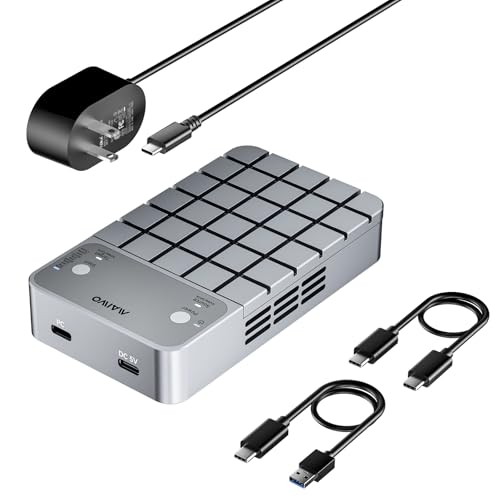
- RAID 0, RAID 1, and PM modes for flexible workflows
- Offline/online clone support for same-protocol drives
- 20Gbps USB-C with cooling fan and aluminum housing
Best For: Photographers who need fast SSD cloning, mirroring, and compact two-drive storage.
Best for Offline Cloning
Dual Bay M.2 SSD RAID Enclosure

- RAID 0, RAID 1, and JBOD support
- Offline clone mode for computer-free duplication
- 20Gbps-capable NVMe dual-bay design
Best For: Photographers who need portable backup, cloning, and flexible RAID storage.
Best for Large Photo Archives – OWC ThunderBay 8 8-Bay RAID Enclosure
If you need a high-capacity desktop array, the OWC ThunderBay 8 is one of the more capable thunderbolt raid enclosures for photographers managing big RAW libraries, video proxies, and long-term archives. Its eight bays, dual Thunderbolt ports, and SoftRAID Premium bundle make it easy to build a fast, flexible setup that can grow with your storage needs.
Best For: Photographers who want an expandable, RAID-ready enclosure for large working libraries and backups.
Pros:
- Eight universal bays support 2.5-inch SSDs or 3.5-inch HDDs for flexible builds
- Dual Thunderbolt 3 ports make daisy-chaining simple on Mac or Windows systems
- Includes SoftRAID Premium for RAID 0/1/4/5/10 configuration options
- Tool-free thumb-screw trays speed up drive swaps and maintenance
Cons:
- Enclosure only, so drives must be purchased separately
- Higher upfront cost than smaller desktop RAID options
- Overkill if you only need a simple two- or four-bay backup setup
For photographers who want serious expandability, the ThunderBay 8 stands out as a long-term storage workhorse. It fits especially well among thunderbolt raid enclosures for photographers who need both speed and room to scale.
Best for Thunderbolt 4 Speed – ACASIS 40Gbps NVMe Enclosure
If you want a fast, simple SSD enclosure for a laptop or desktop with the right port, this ACASIS model is a strong fit for photographers who need quick offloads and roomy scratch storage. It belongs in the conversation around thunderbolt raid enclosures for photographers because it prioritizes speed and portability, even though it is a single-drive enclosure rather than a multi-bay RAID.
Best For: Photographers using Thunderbolt 3/4 or USB4 Macs and PCs who want a quiet, tool-free NVMe drive for fast photo transfers and editing.
Pros:
- 40Gbps USB4/Thunderbolt-class performance for fast ingest and project work
- Tool-free setup makes SSD swaps quick and travel-friendly
- Fanless aluminum body keeps operation silent and helps with passive cooling
- Supports 2280 to 2230 NVMe drives and up to 8TB capacity
Cons:
- Not backward compatible with USB 3.2/3.0/2.0 ports
- Single-drive enclosure, so it is not a true RAID solution
- Top speeds depend on a native 40Gbps USB4 or Thunderbolt connection
For photographers who value silent, portable speed over RAID redundancy, this is a practical high-performance storage option. It is a narrower fit than full thunderbolt raid enclosures for photographers, but it can be the better choice when you only need a fast external NVMe drive for day-to-day editing and backup shuttling.
Best High-Capacity RAID – ORICO 5-Bay RAID Enclosure
For photographers who need lots of local storage without jumping straight to a full NAS, this ORICO enclosure is a practical option in the world of thunderbolt raid enclosures for photographers—even though it uses USB 3.0 rather than Thunderbolt. It gives you flexible RAID options, high capacity, and straightforward direct-attached storage for backups, active projects, and archive work.
Best For: Photo editors and creators who want a large, configurable RAID enclosure for fast desktop backup and media storage.
Pros:
- Eight RAID modes, including RAID 0/1/5/10, JBOD, CLONE, and CLEAR
- Up to 110TB total capacity with support for 22TB drives
- 80mm fan, front/rear vents, and aluminum housing for better cooling
- 150W internal power supply keeps the desktop cleaner than bulky adapters
Cons:
- USB 3.0 limits performance compared with true Thunderbolt RAID enclosures
- Mode switching requires caution and a backup before changes
- No drive cartridges or hot-swap style convenience mentioned
This is a strong fit if you care more about capacity, RAID flexibility, and dependable local storage than peak transfer speed. For photographers comparing thunderbolt raid enclosures for photographers, it’s a value-first alternative that prioritizes room to grow over workstation-class throughput.
Best DIY RAID Enclosure – OWC Express 4M2 USB4 4-Slot Enclosure
If you want a fast, flexible storage box for editing, the OWC Express 4M2 is a strong pick in thunderbolt raid enclosures for photographers who prefer to build their own SSD array. It supports USB4, Thunderbolt, and USB-C systems, can reach up to 3200MB/s in real-world use, and gives you RAID options that fit both backup and performance workflows.
Best For: Photographers and video creators who want a DIY four-bay NVMe enclosure for fast scratch, project, or RAID storage.
Pros:
- Up to 3200MB/s real-world performance for demanding photo and video workflows
- Supports USB4, Thunderbolt, and USB-C Macs and PCs for broad compatibility
- Works with NVMe M.2 2230, 2242, and 2280 SSDs, so you can choose your own drives
- Quiet, adaptive fan design helps keep temperatures under control during long transfers
Cons:
- Enclosure only, so you must buy NVMe SSDs separately
- Full RAID flexibility may require using OWC SoftRAID or configuring system RAID tools
- Faster than basic external drives, but more complex than a simple plug-and-play SSD
For photographers who want speed, expandability, and RAID versatility, this OWC unit stands out among thunderbolt raid enclosures for photographers. It is especially appealing if you are comfortable choosing your own SSDs and want a compact, high-performance enclosure for serious creative work.
Best Budget RAID Box – MAIWO Dual Bay RAID Enclosure
If you want a simple RAID enclosure for backups or a compact photo archive, the MAIWO Dual Bay is a practical pick to consider alongside thunderbolt raid enclosures for photographers. It uses USB 3.0 rather than Thunderbolt, but it still delivers a straightforward 2-bay RAID setup, tool-free installation, and support for SSDs or HDDs in a small desktop footprint.
Best For: Photographers who need an affordable, easy-to-use dual-bay RAID enclosure for 2.5-inch SATA drives and basic redundancy or speed-focused storage.
Pros:
- Supports RAID 0, RAID 1, JBOD/LARGE, and normal modes for flexible storage setups
- Tool-free design makes drive swaps and initial setup quick
- Compact 2.5-inch enclosure works with SSDs or HDDs up to 8TB per bay
- USB 3.0 with UASP support can improve performance on compatible systems
Cons:
- Not a Thunderbolt enclosure, so top-end transfer speeds are limited by USB 3.0
- Only fits 2.5-inch SATA drives, not 3.5-inch hard drives
- Plastic build is functional, but not as rugged as higher-end workstation options
For photographers building a low-cost editing or backup setup, this enclosure offers useful RAID flexibility without the price of premium thunderbolt raid enclosures for photographers. It is most appealing when you value simplicity, compact size, and mirrored protection more than maximum transfer speed.
Best for Multi-Bay Thunderbolt Speed – JEYI 4-Bay NVMe RAID Enclosure
If you want a compact four-drive setup with real high-speed potential, this JEYI enclosure is worth a look among thunderbolt raid enclosures for photographers. It supports Thunderbolt 3/4 and USB4 at up to 40Gbps, offers RAID options for Mac and Windows, and adds active cooling for longer sustained transfers.
Best For: Photographers who need a 4-bay NVMe RAID enclosure for fast scratch disks, photo libraries, and portable high-capacity workflows.
Pros:
- Supports Thunderbolt 3/4 and USB4 with up to 40Gbps throughput
- Flexible RAID modes, including RAID 0, RAID 1, JBOD, and RAID 5 on Windows
- Turbo fan, aluminum shell, and thermal pads help keep SSDs cool
- Up to 32TB total capacity with four 8TB NVMe drives
Cons:
- RAID setup requires a USB4/Thunderbolt connection
- AMD USB4/Thunderbolt compatibility may vary by system
- Drives are not included
For photographers building a fast, desktop-class working drive, this JEYI unit hits a strong mix of speed, capacity, and cooling. It is a practical pick in thunderbolt raid enclosures for photographers who want more bays without moving to a full-size NAS.
Best Hardware RAID Value – TERRAMASTER D2-320 2-Bay USB RAID Enclosure
If you’re comparing thunderbolt raid enclosures for photographers but don’t actually need Thunderbolt speeds, the TerraMaster D2-320 is a practical USB 3.2 Gen 2 DAS with real hardware RAID and lots of capacity. It’s a strong fit for photo libraries, working scratch space, and mirrored backups when you want fast transfers without paying for a more expensive bus.
Best For: Photographers who want an affordable 2-bay RAID enclosure with simple RAID 0/1/JBOD options and room for large photo archives.
Pros:
- USB 3.2 Gen 2 10Gbps connection for solid everyday transfer speeds
- Supports RAID 0, RAID 1, JBOD, and Single for flexible workflows
- Tool-free trays and push-lock design make drive swaps easy
- Quiet, temperature-controlled fan helps keep drives cool
Cons:
- Not a Thunderbolt enclosure, so it won’t match top-end TB performance
- Diskless, so you’ll need to supply your own drives
- Two-bay capacity is limited for very large multi-drive backups
For photographers who mainly need dependable RAID protection and fast USB transfers, this enclosure offers a smart middle ground. It won’t replace premium thunderbolt raid enclosures for photographers, but it delivers useful speed, redundancy, and capacity at a more approachable price.
Best Hybrid Storage – ACASIS 4-Bay RAID Enclosure
If you want one box that can handle both archive drives and faster working storage, this ACASIS unit is an interesting option among thunderbolt raid enclosures for photographers. It pairs HDD bays for backups with NVMe bays for active editing, and its USB4/Thunderbolt support makes it a practical fit for modern Mac and PC workflows.
Best For: Photographers who want a single hybrid enclosure for backup archives, project drives, and faster NVMe scratch or edit storage.
Pros:
- Combines dual 3.5/2.5″ SATA bays with dual NVMe bays in one enclosure
- Supports Thunderbolt 3/4/5 and USB4, with up to 40Gbps in the right RAID setup
- Useful RAID flexibility for mirroring, speed, or large unified storage
- Active cooling and included 96W power supply help maintain stability
Cons:
- Full 40Gbps performance depends on RAID mode and compatible ports
- HDD bays are much slower than the NVMe side for active editing
- Hybrid design is versatile, but not the simplest option for first-time setup
For photographers who need both dependable backup capacity and a faster lane for current jobs, this hybrid design stands out in the category of thunderbolt raid enclosures for photographers. It is less of a pure speed play and more of a workflow tool that tries to cover storage, mirroring, and editing in one chassis.
Best for Fast Dual-Drive Cloning – MAIWO Dual Bay RAID Enclosure
If you want a compact RAID box that can double as a clone dock, the MAIWO Dual Bay enclosure is a practical pick for photographers comparing thunderbolt raid enclosures for photographers but shopping on a tighter budget or on USB-C hardware. It supports both M.2 NVMe and M.2 SATA drives, offers RAID 0, RAID 1, and PM modes, and pushes up to 20Gbps over USB 3.2 Gen 2×2 for fast offloads and backup workflows.
Best For: Photographers and creators who need a two-slot SSD enclosure for fast ingest, offline cloning, and mirrored backups.
Pros:
- Supports RAID 0, RAID 1, and individual-drive mode for flexible storage workflows
- Offline and online cloning for same-protocol drives, useful for quick SSD duplication
- 20Gbps USB 3.2 Gen 2×2 connection with UASP and Trim support
- Cooling fan, thermal pads, and aluminum shell help manage heat during long transfers
Cons:
- Not a Thunderbolt enclosure, so top-end Mac/PC users may want a native TB option instead
- NVMe and SATA drives cannot be mixed for full dual-drive recognition
- Requires compatible USB 3.2 Gen 2×2 hardware to reach maximum speed
For photographers who prioritize cloning, mirroring, and fast two-drive workflows over Thunderbolt branding, this MAIWO enclosure covers a lot of ground. It is a strong utility choice among thunderbolt raid enclosures for photographers alternatives when the priority is dependable SSD management rather than the absolute fastest interface.
Best for Offline Cloning – Dual Bay M.2 SSD RAID Enclosure
If you want a compact storage tool that does more than simple dock duty, this dual-bay enclosure is a practical option to consider among thunderbolt raid enclosures for photographers. It supports RAID 0, RAID 1, and JBOD modes, plus clone mode for copying drives without a computer, making it handy for fast transfers and backup workflows.
Best For: Photographers who want a portable dual-SSD enclosure for backup, drive cloning, and flexible RAID setups.
Pros:
- RAID 0, RAID 1, and JBOD support for flexible storage setups
- Offline clone mode is useful for quick drive duplication in the field
- 20Gbps connection support aims for fast NVMe transfer performance
- Dual-bay design keeps two M.2 2280 SSDs in one compact unit
Cons:
- Not a true Thunderbolt enclosure, so compatibility and speed differ from native Thunderbolt options
- Clone and RAID features may be more than casual users need
- Designed for M.2 NVMe SSDs only, not standard 2.5-inch drives
For photographers who value redundancy, portable backups, and the ability to duplicate drives without a laptop, this enclosure offers a lot of utility. It is a strong fit for workflows where thunderbolt raid enclosures for photographers are being compared against more affordable USB-based alternatives.
How We Picked the Best Thunderbolt Raid Enclosures for Photographers
For Thunderbolt Raid Enclosures for Photographers, we prioritized sustained transfer speed, RAID flexibility, drive compatibility, cooling, and ease of setup. We also considered whether an enclosure makes sense for working photo pros versus users who mainly need economical backup storage.
Quick Comparison
In general, multi-bay Thunderbolt 4/USB4 models are best for demanding editing and larger image libraries, while USB 3.2 enclosures are better for budget-conscious storage expansion and backup duties. NVMe-based designs typically offer the highest responsiveness, while 3.5-inch HDD enclosures provide much larger capacity per dollar.
Key Buying Factors for Thunderbolt Raid Enclosures for Photographers
Speed Vs. Capacity
Choose NVMe if you want fast scratch-disk performance and rapid culling or batch exports. Choose HDD RAID if you need large-volume archive storage for RAW catalogs, video proxies, or completed jobs.
RAID Mode Support
RAID 0 boosts speed but offers no redundancy. RAID 1 mirrors data for safety. RAID 5, where available, gives a practical balance of capacity, speed, and protection for long-term photo storage.
Cooling and Noise
Photo editors often work beside their storage, so cooling matters. Fanless aluminum designs can be quiet, but multi-drive arrays may need active cooling to maintain performance under sustained transfers.
Drive Type and Bay Count
Match the enclosure to your workload. Two-bay units suit portable or secondary storage, while four- and eight-bay models are better for larger catalogs, shared projects, or future expansion.
Mac and Windows Compatibility
Check how the enclosure is managed and formatted on your system. If you switch between platforms, confirm that the RAID utility, file system support, and connection standard fit your workflow.
Who Should Buy Which Thunderbolt Raid Enclosures for Photographers?
Choose an eight-bay Thunderbolt RAID if you need serious capacity for a studio archive or multi-year client library. Pick a four-bay NVMe or mixed-media enclosure if speed matters most for active editing. Two-bay RAID units are ideal for photographers who want simple mirrored backups or a compact working drive. If you mainly need inexpensive storage, a USB RAID enclosure can still be a smart choice even if it is not the fastest option.