If you want fast external storage for editing, backups, or scratch-disk workflows, the right enclosure makes a huge difference on Mac Studio.
This roundup highlights NVMe RAID enclosures for Mac Studio that balance speed, thermal control, expansion, and real-world compatibility.
Best 10 Nvme Raid Enclosures for Mac Studio Picks for 2026
Best for Speed and Cooling
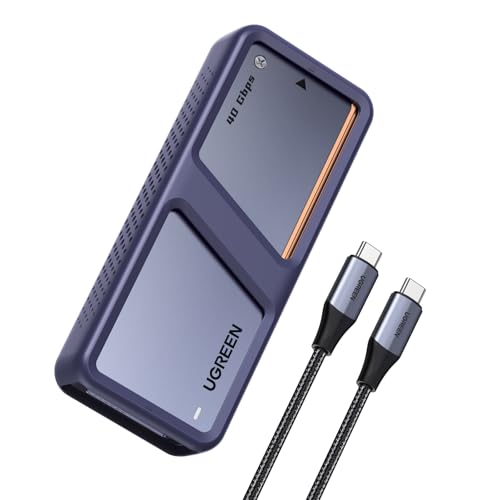
- 40Gbps bridge with up to 3600MB/s speeds
- Active fan and aluminum housing improve cooling
- Supports up to 8TB NVMe drives with TRIM/S.M.A.R.T.
Best For: Mac Studio users who want a fast, well-cooled single-drive enclosure for editing and backups.
Best for Dual-Drive Cloning
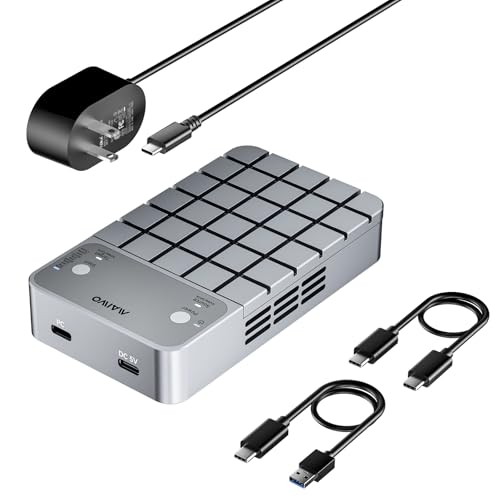
- 20Gbps USB 3.2 Gen 2x2 connection
- RAID 0, RAID 1, PM mode, and cloning
- Active cooling with fan and aluminum shell
Best For: Mac Studio users who want fast dual-SSD storage with cloning and RAID options.
Best for Four-Drive Builds
OWC Express 4M2 USB4 RAID Enclosure
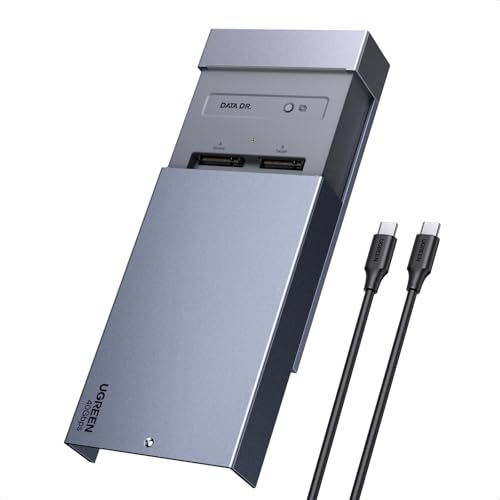
- Four NVMe slots for flexible RAID layouts
- USB4 40Gb/s suits Mac Studio workflows
- Supports 2230, 2242, and 2280 SSDs
Best For: Power users building a high-capacity RAID setup for Mac Studio.
Best for Fast Dual-Drive RAID
MAIWO Dual M.2 NVMe RAID Enclosure
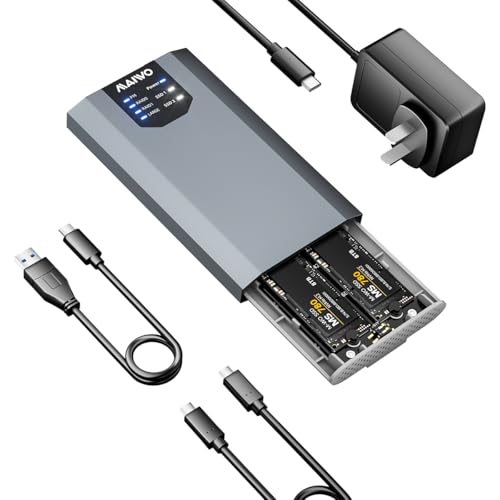
- Dual-bay NVMe enclosure with RAID 0/1 support
- Up to 20Gbps USB 3.2 Gen 2x2 transfer speed
- Simple plug-and-play setup for Mac Studio use
Best For: Mac Studio owners who want fast dual-drive external storage with RAID flexibility.
Best for Speedy DIY RAID
OWC Express 4M2 USB4 4-Slot Enclosure

- Four-slot NVMe enclosure for custom RAID builds
- USB4/Thunderbolt support with up to 3200MB/s performance
- Aluminum body and adaptive fans for cooling
Best For: Mac Studio users building a fast, flexible RAID array from their own NVMe drives.
Best Hybrid Storage Hub
ORICO MiniTower 2-Bay RAID Enclosure

- 10Gbps NVMe slot plus dual SATA bays
- RAID 0/1, JBOD, and single-disk support
- Built-in USB and SD/TF expansion hub
Best For: Mac users who want one enclosure to handle storage, RAID, and desktop expansion.
Best for Docking Hub Power

- Dual M.2 enclosure with RAID 0/1 and offline cloning
- 10-port hub adds HDMI, Ethernet, SD/TF, USB, and audio
- Tool-free aluminum design for a clean Mac Studio setup
Best For: Mac Studio owners who want storage expansion and a full USB-C docking hub in one device.
Best for Speed

- Up to 7000 MB/s with Thunderbolt 5/4/3 support
- Aluminum fin design boosts cooling for sustained transfers
- Supports M.2 2230/2242/2260/2280 SSDs up to 8TB
Best For: Mac Studio users who want a fast, cool-running external NVMe enclosure for pro workloads.
Best for RAID Flexibility

- RAID 0/1, JBOD, and clone mode support
- 20Gbps USB-C for fast transfers and backups
- Tool-free aluminum design with external power option
Best For: Mac Studio users who want a versatile dual-bay enclosure for speed, redundancy, and cloning.
Best for Speed and Cooling – UGREEN 40Gbps NVMe Enclosure
If you’re comparing nvme raid enclosures for mac studio and want single-drive storage that still behaves like a serious desktop accessory, this UGREEN enclosure is a strong fit. Its 40Gbps bridge, active fan, and aluminum shell aim to keep transfers fast and temperatures under control during sustained work.
Best For: Mac Studio users who want a high-speed external NVMe enclosure for editing, backups, and large project files without stepping up to a full RAID setup.
Pros:
- 40Gbps dual-chip design can reach up to 3600MB/s with the right Thunderbolt 4/USB4 setup
- Built-in fan and aluminum body help manage heat during long transfers
- Supports up to 8TB M.2 NVMe drives for large media libraries and backups
- TRIM and S.M.A.R.T. support add useful drive-management features
Cons:
- Only supports a single NVMe SSD, so it is not a true RAID enclosure
- Needs compatible Thunderbolt 4/USB4 hardware to reach top speeds
- Not compatible with SATA SSDs or PCIe 5.0 drives
For Mac Studio buyers who are really shopping nvme raid enclosures for mac studio but can live without multi-drive RAID, this is a practical high-speed option with better cooling than many basic enclosures. It makes the most sense when performance and thermal stability matter more than array flexibility.
Best for Dual-Drive Cloning – MAIWO Dual Bay RAID Enclosure
If you want one of the more flexible nvme raid enclosures for mac studio, this MAIWO dual-bay model is built around speed, cloning, and drive redundancy. It supports NVMe and SATA M.2 drives, offers RAID 0, RAID 1, and PM modes, and can work as an offline or online cloner when the two SSDs use the same protocol.
Best For: Mac Studio users who want a dual-bay enclosure for fast external storage, simple SSD duplication, and RAID-based backup options.
Pros:
- USB 3.2 Gen 2×2 interface with up to 20Gbps throughput
- Supports RAID 0, RAID 1, PM mode, and SSD cloning
- Built-in cooling fan plus aluminum housing for better heat control
- Includes dual data cables and a 5V/3A power adapter
Cons:
- Cloning only works with two SSDs using the same protocol
- Mixed NVMe and SATA installs are limited in recognition behavior
- Mac speed may depend on your Studio’s USB port and RAID support path
For buyers comparing nvme raid enclosures for mac studio, this MAIWO stands out for its combination of cloning tools, RAID modes, and active cooling. It is especially appealing if you want one enclosure that can handle both backup workflows and high-speed scratch or media storage.
Best for Four-Drive Builds – OWC Express 4M2 USB4 RAID Enclosure
If you want one of the most flexible nvme raid enclosures for mac studio, the OWC Express 4M2 is built for serious multi-drive storage. It supports four NVMe M.2 SSDs in a USB4 40Gb/s enclosure, giving Mac Studio users a fast, expandable way to set up RAID for editing, backups, or shared project libraries.
Best For: Creators and power users who want a four-slot RAID enclosure for high-capacity NVMe storage on Mac Studio.
Pros:
- Four M.2 slots let you build larger RAID arrays or split drives by workflow
- USB4 40Gb/s connection is a strong match for modern Mac Studio setups
- Works with 2230, 2242, and 2280 NVMe SSD sizes for added flexibility
- Enclosure-only design gives you freedom to choose the SSDs you want
Cons:
- Requires separate SSDs, so total cost can climb quickly
- Best value depends on how much speed and capacity you actually need
For buyers comparing nvme raid enclosures for mac studio, this OWC option stands out because it prioritizes drive count and USB4 performance over simplicity. It is a strong fit when you need room to grow into a faster, larger RAID setup rather than a basic single-drive enclosure.
Best for Fast Dual-Drive RAID – MAIWO Dual M.2 NVMe RAID Enclosure
If you want one of the more flexible nvme raid enclosures for mac studio, the MAIWO Dual M.2 NVMe RAID Enclosure is a strong fit thanks to its dual-bay design, RAID options, and 20Gbps USB 3.2 Gen 2×2 connection. It’s aimed at users who want fast external storage with either performance gains or built-in redundancy.
Best For: Mac Studio owners who want a compact dual-NVMe enclosure for RAID 0 speed or RAID 1 protection without a complicated setup.
Pros:
- Supports RAID 0, 1, PM, and Large modes for different workflows
- Up to 20Gbps transfer speed over USB 3.2 Gen 2×2 Type-C
- Dual M.2 NVMe bays with up to 8TB total capacity
- Plug-and-play design keeps setup simple
Cons:
- Requires two NVMe drives to take full advantage of RAID features
- 20Gbps speeds depend on host support and compatible cabling
- Not as portable as a single-drive enclosure
For Mac Studio users who want a practical balance of speed, capacity, and RAID flexibility, this MAIWO enclosure covers the main use cases well. Among nvme raid enclosures for mac studio, it stands out as a straightforward option for creatives and power users who need dual-drive storage without extra setup overhead.
Best for Speedy DIY RAID – OWC Express 4M2 USB4 4-Slot Enclosure
If you want one of the more flexible nvme raid enclosures for mac studio setups, the OWC Express 4M2 is a strong DIY pick. It supports four NVMe M.2 drives, USB4/Thunderbolt connectivity, and real-world speeds up to 3200MB/s, making it a practical match for creative workflows that need fast scratch, project, or media storage.
Best For: Mac Studio owners who want a configurable, high-speed RAID enclosure and don’t mind supplying their own NVMe SSDs.
Pros:
- Up to 3200MB/s real-world performance over USB4/Thunderbolt
- Supports 2230, 2242, and 2280 NVMe SSDs for flexible builds
- Compatible with Mac, Windows, and multiple RAID software options
- Aluminum chassis and adaptive fans help with cooling under load
Cons:
- Enclosure only, so SSDs must be purchased separately
- Best results depend on careful drive selection and RAID setup
- Not the simplest plug-and-play option for casual users
For buyers comparing nvme raid enclosures for mac studio, this OWC model stands out for speed, RAID flexibility, and broad compatibility. It’s especially appealing if you want a workstation-grade enclosure that can grow with your storage needs.
Best Hybrid Storage Hub – ORICO MiniTower 2-Bay RAID Enclosure
The ORICO MiniTower is a practical pick for buyers comparing nvme raid enclosures for mac studio who also want extra desk-side connectivity. It combines a 10Gbps M.2 NVMe slot, dual SATA bays with RAID modes, and a built-in hub, making it useful when you need one enclosure to handle storage and expansion together.
Best For: Mac users who want a hybrid NVMe plus RAID enclosure with added USB and card-reader ports for a cleaner workspace.
Pros:
- Supports a fast M.2 NVMe SSD plus two SATA drives for flexible storage layouts.
- RAID 0, RAID 1, JBOD, and single-disk modes add options for speed or redundancy.
- Built-in USB-A, USB 2.0, and SD/TF hub ports reduce cable clutter on a Mac setup.
- Aluminum housing and fan cooling help keep multiple drives running steadily.
Cons:
- The RAID controls can be confusing because the mode order is reversed.
- 10Gbps NVMe performance is solid, but not as fast as higher-end Thunderbolt enclosures.
- Its feature set is broader than a simple single-purpose drive enclosure.
If you want nvme raid enclosures for mac studio that do more than storage alone, this ORICO model stands out for its hybrid design and hub functionality. It is a sensible choice for creators or power users who need a compact desktop dock with flexible drive options.
Best Docking Pick – ACASIS 40Gbps Dual-Bay NVMe Enclosure
If you want one of the more feature-packed nvme raid enclosures for mac studio, this ACASIS dock stands out for combining dual NVMe storage with extra display and hub connections. It’s built around a 40Gbps connection, so it makes the most sense if your Mac Studio or other host device supports Thunderbolt 4/3 or USB4 at full speed.
Best For: Mac Studio users who want a dual-bay NVMe enclosure plus docking features for displays and peripherals.
Pros:
- Dual M.2 bays with support for software RAID 0 for faster storage performance
- Includes HDMI, USB-A, dual USB-C 40Gbps ports, and 100W power delivery
- Built-in fan and aluminum body help manage heat under heavier workloads
- Works with multiple SSD sizes from 2230 to 2280
Cons:
- Only works properly with 40Gbps host devices
- Not a simple storage-only enclosure, so it may be overkill if you just need RAID
- Performance depends on the SSDs you install and the host connection
For buyers comparing nvme raid enclosures for mac studio, this ACASIS model is appealing because it bundles storage expansion with real desktop-dock convenience. It’s strongest when you want one enclosure to do several jobs, but you’ll need a compatible high-speed Mac setup to unlock its full potential.
Best for Docking Hub Power – ORICO MiniRaid 10-in-1 Dock
If you want one of the more versatile nvme raid enclosures for mac studio, this ORICO MiniRaid combines dual-bay SSD storage with a full desktop dock. It adds RAID 0/1 support, offline cloning, HDMI output, Ethernet, card readers, and extra USB ports, making it a strong pick for a tidy Mac workstation.
Best For: Mac Studio users who want a dual-drive NVMe/SATA enclosure plus a 10-port USB-C hub in one compact unit.
Pros:
- Dual M.2 slots support NVMe or SATA drives, with up to 8TB per SSD
- RAID 0/1 plus offline cloning adds speed and backup flexibility
- Includes HDMI 4K@60Hz, 10Gbps USB, RJ45, SD/TF, audio, and PD60W
- Tool-free installation and aluminum construction suit a desk-friendly setup
Cons:
- Mixed NVMe and SATA use is limited, with only Slot 1 recognized in that mode
- PD60W is useful for accessories, but not enough for higher-wattage laptop charging
For creators who need storage expansion and a hub in one footprint, this is a practical option among nvme raid enclosures for mac studio. It is especially appealing if you want RAID features without adding a separate dock.
Best for Speed – UGREEN 80Gbps NVMe Enclosure
If you’re comparing nvme raid enclosures for mac studio and want a fast single-drive enclosure with strong thermals, this UGREEN model is a compelling pick. Its Thunderbolt 5/4/3 and USB4 compatibility, dual-chip design, and aluminum finned body make it a good fit for users who move large media files and want dependable sustained performance.
Best For: Mac Studio owners who want a high-speed, well-cooled NVMe enclosure for editing, backups, and portable pro storage.
Pros:
- Up to 7000 MB/s with Thunderbolt-focused dual-chip architecture
- Dual-sided aluminum fins improve heat dissipation and help sustain performance
- Wide M.2 support from 2230 to 2280, plus up to 8TB SSDs
- Compact, no-noise build is easy to carry and use near a desktop setup
Cons:
- Not compatible with SATA or mSATA drives
- Pre-installed heatsink SSDs are not supported
- May require a thinner thermal pad for some thicker SSDs
For buyers narrowing down nvme raid enclosures for mac studio, this is better thought of as a fast, stable external NVMe enclosure than a true multi-drive RAID unit. It makes the most sense when you want one very fast SSD with strong cooling and broad Mac compatibility.
Best for RAID Flexibility – Dual-Bay NVMe RAID Enclosure
If you’re comparing nvme raid enclosures for mac studio, this dual-bay enclosure stands out for its flexible RAID 0/1, JBOD, and clone modes, plus 20Gbps transfer support for heavier file workflows. It’s a practical fit if you want one box that can speed up scratch storage, mirror important data, or duplicate drives without extra software.
Best For: Mac Studio users who want a versatile dual-bay enclosure for fast storage, backups, and simple offline cloning.
Pros:
- RAID 0, RAID 1, JBOD, and clone mode give it unusual flexibility for the price.
- 20Gbps USB-C connection is well suited to large transfers and backup jobs.
- Tool-free access makes SSD swaps and cloning workflows easier.
- Aluminum body helps with heat dissipation in a compact desktop-friendly design.
Cons:
- Not the simplest pick if you only need a basic single-drive enclosure.
- Full performance depends on a compatible high-speed USB port and host setup.
- External power may be needed with larger drives or power-limited systems.
For buyers focused on nvme raid enclosures for mac studio, this model is more about versatility than pure plug-and-play simplicity. If you need one enclosure that can handle speed, redundancy, and cloning in a compact package, it’s a compelling option.
How We Picked the Best Nvme Raid Enclosures for Mac Studio
We focused on enclosures that make sense for Mac Studio users who need reliable high-speed storage, not just headline transfer numbers. That means prioritizing Thunderbolt 3/4 or USB4 performance where available, support for common NVMe form factors, usable RAID modes, and enclosures with better cooling and build quality. We also considered setup simplicity, since many buyers want a plug-and-work solution rather than a complicated workstation project.
Quick Comparison
In broad terms, the 10Gbps and 20Gbps models are best for budget-conscious storage expansion, backups, and general file transfers. The 40Gbps USB4 and Thunderbolt options are the stronger fit for creative pros who move large video, photo, or audio projects regularly. Multi-bay RAID enclosures offer more capacity and redundancy, while single-bay models are simpler and often quieter.
Key Buying Factors for Nvme Raid Enclosures for Mac Studio
Speed Interface
Match the enclosure to your workflow. If you edit ProRes, work with large RAW libraries, or need fast scratch storage, look for 40Gbps-class connectivity. For standard media storage and backups, 20Gbps can be enough.
RAID Modes
RAID 0 increases performance, RAID 1 adds redundancy, and JBOD or independent mode is useful when you want flexibility without locking both drives together. If your priority is safety, RAID 1 is usually the smarter choice. If your priority is throughput, RAID 0 is more attractive, but it increases risk.
Cooling and Noise
High-speed NVMe drives generate heat, especially in RAID enclosures. Look for aluminum bodies, thermal pads, heat sinks, or active fans if the enclosure will run for long sessions. Better cooling can also help maintain sustained performance.
Capacity and Drive Support
Check whether the enclosure supports one or two M.2 drives, plus the drive lengths you plan to use. If you want a long-term storage solution, consider total supported capacity and whether the enclosure is limited by lane sharing or controller design.
Mac Compatibility
For Mac Studio, native Mac compatibility matters more than marketing claims. Confirm support for macOS, proper USB4 or Thunderbolt behavior, and whether the enclosure needs special software for RAID management or cloning.
Who Should Buy Which Nvme Raid Enclosures for Mac Studio?
If you want the simplest setup, choose a single-bay enclosure with strong cooling and USB4 or Thunderbolt connectivity. If you need a fast working drive for video editing or large project files, a 40Gbps dual-bay unit is usually the best balance of speed and flexibility. If your main goal is maximum capacity for archives or shared libraries, a multi-bay RAID enclosure is the better investment. For users who value redundancy above all else, RAID 1 is the safest direction. For users chasing performance on a budget, a good 20Gbps dual-bay model can still deliver excellent everyday results.
In short, the best Nvme Raid Enclosures for Mac Studio are the ones that match your workflow, thermal needs, and storage strategy rather than just the highest advertised speed.