Looking for fast external storage that stays cool under load? The right enclosure can make a big difference in sustained transfer speeds, drive longevity, and day-to-day reliability.
This roundup focuses on the best options for buyers who want performance, thermal control, and practical RAID features without overpaying for hardware they will not use.
Best 10 Nvme Raid Enclosures with Cooling Fan Picks for 2026
Best for RAID + Cloning
MAIWO Dual Bay NVMe/SATA RAID Enclosure
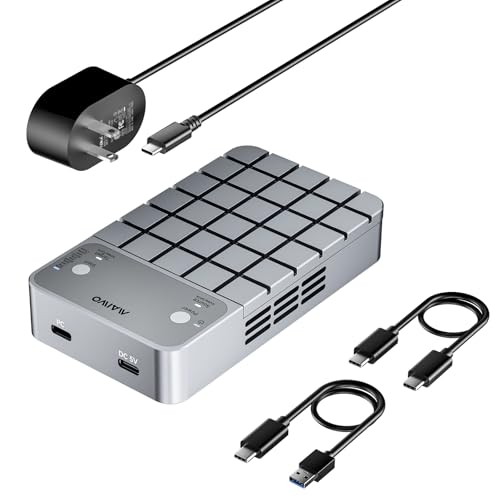
- RAID 0, RAID 1, clone mode, and PM mode
- Built-in fan with aluminum body and thermal pads
- USB 3.2 Gen 2x2 support up to 20Gbps
Best For: Users who want a dual-bay enclosure that can clone drives, run RAID modes, and keep thermals under control.
Best for Fast Cooling
ORICO 40Gbps M.2 NVMe SSD Enclosure

- 40Gbps USB4/Thunderbolt support for very fast transfers
- Silent fan plus aluminum body and heatsink help sustain speed
- Tool-free install and broad M.2 NVMe compatibility
Best For: Users who want a fast, portable NVMe enclosure with strong cooling and easy drive swaps.
Best for Offline Cloning
UGREEN 40Gbps Dual-Bay NVMe SSD Cloner
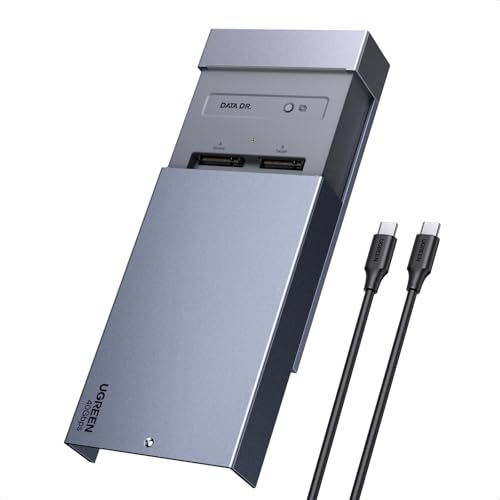
- One-click offline cloning without a computer
- Software RAID 0/1/PM/Union support
- 40mm cooling fan with aluminum top shell
Best For: Creators, IT users, and Mac owners who need fast cloning and RAID flexibility.
Best for Thunderbolt Speed
UGREEN 40Gbps NVMe Enclosure with Fan

- 40Gbps USB4/Thunderbolt-ready performance
- Active fan plus aluminum housing for cooling
- Fits 2280/2260/2242/2230 M.2 SSDs
Best For: MacBook and USB4/Thunderbolt users who want a compact, fast enclosure with active cooling.
Best for High-Speed Passive Cooling
ORICO X50PRO 80Gbps NVMe Enclosure
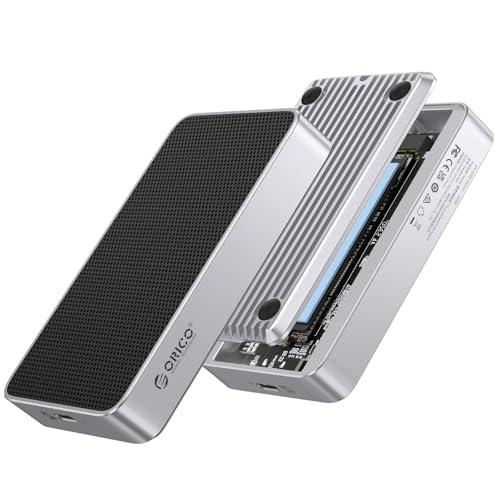
- 80Gbps USB4 support for fast external SSD transfers
- Fanless aluminum body helps keep noise out of your workspace
- Fits PCIe Gen 5/4 M.2 2280 NVMe drives up to 8TB
Best For: Creators and power users who want a quiet, fast NVMe enclosure for large-file workflows.
Best for Cooling
FIDECO M.2 NVMe/SATA SSD Enclosure

- Built-in fan helps reduce thermal throttling
- Supports NVMe and SATA M.2 drives
- Tool-free installation for fast swaps
Best For: People who want a compact, cooled external SSD enclosure for everyday high-speed storage.
Best for 80Gbps Speed
ACASIS 80Gbps M.2 NVMe SSD Enclosure

- 80Gbps USB4 V2.0 performance
- Built-in auto/ manual cooling fan
- Tool-less, plug-and-play setup
Best For: Creators and power users who want fast transfers with active cooling.
Best High-Speed Cooling
FIDECO 80Gbps M.2 NVMe Enclosure

- 80Gbps performance with up to 6000MB/s speeds
- Built-in fan helps reduce heat during long transfers
- Works with Thunderbolt 5, Thunderbolt 4, USB4, and USB 3.x
Best For: Creators and power users who need fast, cooled portable NVMe storage.
Best for RAID + Cloning – MAIWO Dual Bay NVMe/SATA RAID Enclosure
If you want one of the more flexible nvme raid enclosures with cooling fan, this MAIWO dual-bay model covers both fast storage and drive duplication in a single aluminum unit. It supports NVMe and SATA M.2 drives, offline/online cloning, RAID 0, RAID 1, and individual drive mode, making it a practical pick for backup workflows and performance testing.
Best For: Users who want a dual-bay enclosure that can clone drives, run RAID modes, and keep thermals under control.
Pros:
- Supports RAID 0, RAID 1, clone mode, and independent drive use
- Built-in cooling fan plus aluminum shell and thermal pads for better heat control
- USB 3.2 Gen 2×2 interface with up to 20Gbps transfer potential
- Includes dual data cables, power adapter, and tool-free magnetic cover
Cons:
- NVMe and SATA drives can’t be mixed freely in clone mode
- Full 20Gbps speeds depend on a compatible USB 3.2 Gen 2×2 host
- Best used with matching-drive pairs for the most reliable RAID/clone setup
This is a strong fit if you want nvme raid enclosures with cooling fan that do more than basic storage. It stands out for combining fast dual-drive handling, built-in cooling, and cloning features in one enclosure.
Best for Fast Cooling – ORICO 40Gbps M.2 NVMe SSD Enclosure
If you want one of the more speed-focused nvme raid enclosures with cooling fan-style features for a single NVMe drive, this ORICO enclosure is built to push performance while keeping temperatures in check. It supports up to 40Gbps over USB4 or Thunderbolt 3/4, and the tool-free design makes drive swaps quick for daily use or portable workflows.
Best For: Creators, power users, and travelers who need a fast, well-cooled external NVMe enclosure for large transfers and steady sustained performance.
Pros:
- Up to 40Gbps support with excellent real-world transfer speeds on compatible hosts
- Built-in silent fan, aluminum body, vents, thermal pad, and included heatsink help manage heat
- Tool-free push-and-slide installation makes SSD changes fast and simple
- Wide NVMe compatibility with 2230/2242/2260/2280 drives up to 8TB
Cons:
- Requires USB4 or Thunderbolt 3/4 hardware to reach top speed
- Not suitable for SSDs that already have a heatsink attached
- Some SSD models and older ports may not be fully compatible
Overall, this is a strong pick if cooling and speed matter more than raw storage expansion. Among nvme raid enclosures with cooling fan-style performance priorities, it stands out for its thermal design and easy setup, though it is really aimed at a single high-speed NVMe drive rather than RAID arrays.
Best for Offline Cloning – UGREEN 40Gbps Dual-Bay NVMe SSD Cloner
If you want one of the more practical nvme raid enclosures with cooling fan, this UGREEN dual-bay enclosure stands out for its one-click offline cloning and software RAID support. It’s a smart fit for users who need fast SSD duplication, flexible drive layouts, and steady thermal control in a compact USB-C setup.
Best For: Creators, IT users, and Mac owners who want easy offline cloning plus RAID options in a cooled dual-bay enclosure.
Pros:
- One-button offline cloning works without a PC
- Supports software RAID 0, 1, PM, and Union modes
- 40mm fan and aluminum shell help manage heat
- Wide compatibility with Windows, macOS, Linux, and ChromeOS
Cons:
- Target drive must be larger than the source data disk
- Not ideal if you only need a basic single-drive enclosure
For buyers comparing nvme raid enclosures with cooling fan, this model is especially appealing if cloning workflow matters as much as storage expansion. It’s less about minimalist portability and more about doing real work reliably, with RAID flexibility and active cooling included.
Best for Fast, Cool Operation – ORICO 40Gbps NVMe Enclosure with Fan
If you want one of the more practical nvme raid enclosures with cooling fan for high-speed external storage, this ORICO model is built around both performance and heat control. It pairs a Thunderbolt 3/4-style 40Gbps Type-C connection with a built-in fan, aluminum body, and thermal pad to help keep transfer speeds stable during long file moves, editing sessions, or gaming loads.
Best For: Creators, power users, and gamers who need a fast, tool-free NVMe enclosure with active cooling and wide device compatibility.
Pros:
- Up to 40Gbps throughput with strong real-world transfer speeds for large files
- Built-in fan, aluminum shell, and cooling pad improve sustained heat dissipation
- Tool-free design makes SSD installation quick and convenient
- Supports up to 8TB and includes USB-C to C and USB-C to A cables
Cons:
- Not compatible with SATA M.2 or mSATA drives
- Some SSD models are specifically not recommended
- Thunderbolt compatibility can vary by Intel platform generation
Overall, this is a strong pick if your priority is speed without thermal throttling, especially compared with many other nvme raid enclosures with cooling fan that focus on either portability or cooling, but not both. It is a good fit when you want a compact enclosure that can handle demanding workloads while staying easy to set up and carry.
Best for Thunderbolt Speed – UGREEN 40Gbps NVMe Enclosure with Fan
If you want one of the faster nvme raid enclosures with cooling fan for a single-drive setup, this UGREEN enclosure is built around 40Gbps connectivity, broad USB4/Thunderbolt compatibility, and active cooling to help keep sustained transfer speeds more consistent. It supports common M.2 sizes and uses an aluminum body with anti-drop design for added protection on the move.
Best For: MacBook users, creators, and travelers who need a compact high-speed enclosure with better thermal control.
Pros:
- 40Gbps interface with Thunderbolt 3/4, USB4, and USB 3.2/3.1 support
- Built-in cooling fan and aluminum shell for improved heat management
- Supports M.2 2280/2260/2242/2230 SSDs
- Anti-drop design adds extra portability confidence
Cons:
- Not a multi-drive RAID enclosure
- Fan adds some noise compared with passive models
- Best performance depends on a compatible high-speed host port
For buyers comparing nvme raid enclosures with cooling fan, this model stands out more as a high-speed single-drive enclosure than a true RAID option, but it does deliver the thermal headroom and portability many users want for fast external storage.
Best for High-Speed Passive Cooling – ORICO X50PRO 80Gbps NVMe Enclosure
If you want one of the faster nvme raid enclosures with cooling fan styling without the noise, the ORICO X50PRO is a strong pick for PCIe 5.0 and 4.0 SSDs. It focuses on high-speed USB4 performance, broad compatibility, and passive thermal control, making it a practical choice for creators and power users moving large files.
Best For: Users who want a fast, fanless NVMe enclosure for USB4/Thunderbolt workflows and large-capacity SSD storage.
Pros:
- Up to 80Gbps USB4 performance with backward compatibility for older USB standards
- Passive aluminum cooling design with Ice-Sense thermal film for quieter operation
- Supports PCIe Gen 5 and Gen 4 M.2 2280 NVMe drives up to 8TB
Cons:
- Not a true RAID enclosure, so it won’t suit multi-drive redundancy setups
- Thunderbolt 3 systems may fall back to slower USB speeds
- Requires compatible host hardware and cable to reach top speeds
For buyers comparing nvme raid enclosures with cooling fan options, this ORICO stands out more for speed and silent cooling than for multi-drive RAID features. It’s best if you want a compact, high-performance external SSD enclosure instead of a full RAID box.
Best for Cooling – FIDECO M.2 NVMe/SATA SSD Enclosure
If you want one of the more practical nvme raid enclosures with cooling fan-style options for keeping an external SSD running steady, this FIDECO enclosure is a solid pick. It supports both M.2 NVMe and M.2 SATA drives, offers tool-free installation, and adds active cooling to help reduce throttling during long transfers, backups, or editing sessions.
Best For: Users who want a compact, easy-to-use external SSD enclosure with a cooling fan for everyday high-speed storage and sustained workloads.
Pros:
- Built-in cooling fan helps improve airflow and thermal stability
- Supports M.2 NVMe and M.2 SATA drives in multiple sizes
- Tool-free setup makes drive swaps quick and simple
- USB 3.2 Gen 2 connection supports up to 10Gbps transfers
Cons:
- Does not support AHCI SSDs or drives with heatsinks
- Single-drive enclosure, so it is not a true RAID solution
- Best speeds depend on host device and cable compatibility
For buyers comparing nvme raid enclosures with cooling fan, this model stands out more for straightforward cooling and convenience than advanced multi-drive features. It makes the most sense if you want a portable enclosure that keeps a single SSD cooler under load without adding setup complexity.
Best for 80Gbps Speed – ACASIS 80Gbps M.2 NVMe SSD Enclosure
If you want one of the faster nvme raid enclosures with cooling fan for a single-drive setup, the ACASIS TB501 Pro is built for high-speed transfers, broad USB4 compatibility, and active thermal control. It’s a strong fit for users who move large video, photo, or game files and want a plug-and-play enclosure that can keep performance steadier under load.
Best For: Creators, power users, and laptop owners who want 80Gbps-class speed with active cooling and easy setup.
Pros:
- Supports up to 80Gbps over USB4 V2.0 for very fast transfers
- Built-in fan helps manage heat during heavy file movement
- Tool-less, plug-and-play design with no drivers needed
- Backward compatible with USB4 V1.0 and USB 3.2/3.1/3.0
Cons:
- Not compatible with Thunderbolt 3 devices
- Needs the right SSD and host setup to reach top speeds
- Fan noise and enclosure heat may be noticeable during long transfers
For buyers comparing nvme raid enclosures with cooling fan, this model stands out more for raw speed and thermal handling than RAID features, so it makes the most sense if you need a fast external NVMe enclosure rather than multi-drive redundancy.
Best High-Speed Cooling – FIDECO 80Gbps M.2 NVMe Enclosure
If you want one of the more capable nvme raid enclosures with cooling fan-style designs for fast single-drive transfers, this FIDECO enclosure is built for speed and sustained performance. It pairs Thunderbolt 5/USB4 V2.0 compatibility with active cooling, making it a strong fit for heavy media work, game libraries, and large backups.
Best For: Creators, power users, and anyone who needs a portable NVMe enclosure that stays cool during long, high-speed transfers.
Pros:
- Up to 80Gbps / 6000MB/s performance on compatible systems
- Built-in whisper-quiet fan helps prevent thermal throttling
- Wide compatibility with Thunderbolt 5, Thunderbolt 4, USB4, and USB 3.x
- Supports up to 8TB NVMe SSDs for large projects and backups
Cons:
- Top speeds require a compatible Thunderbolt 5 or USB4 V2.0 setup
- Not a true multi-drive RAID enclosure
- Advanced performance comes at a higher cost than basic USB enclosures
For buyers comparing nvme raid enclosures with cooling fan, this model stands out more for single-drive speed and thermal stability than for RAID functionality. If your priority is fast, reliable external NVMe storage that won’t bog down under long transfers, it’s an easy contender.
Best for Docking & Dual Displays – ACASIS 40Gbps Dual-Bay NVMe Dock
If you want one of the more feature-packed nvme raid enclosures with cooling fan, this ACASIS dock stands out for combining dual M.2 storage, dual-monitor output, and a 40Gbps host connection in one desktop-friendly unit. It is built for Thunderbolt 4/3 and USB4 systems, so it makes the most sense for users who already have a compatible high-speed laptop or Mac mini.
Best For: Creators, power users, and Mac/Windows owners who want fast dual-drive storage, active cooling, and extra docking ports in a single enclosure.
Pros:
- Built-in fan and aluminum body help keep dual NVMe drives cooler under load
- Supports software RAID 0 for higher throughput with two SSDs
- Includes HDMI, USB-A, dual USB-C, and 100W PD for a true dock-style setup
- Can drive dual monitors, including 8K single-display and 4K dual-display output
Cons:
- Requires a 40Gbps host; it will not work properly with slower non-40Gbps devices
- Best features depend on an advanced Thunderbolt 4/3 or USB4 computer
For buyers comparing nvme raid enclosures with cooling fan, this model is strongest when you want storage expansion and desk dock convenience in the same device. It is less of a simple portable enclosure and more of a workstation hub with serious connectivity.
How We Picked the Best Nvme Raid Enclosures with Cooling Fan
We prioritized enclosures that balance real-world speed, heat management, build quality, and compatibility. For Nvme Raid Enclosures with Cooling Fan, that means looking beyond peak benchmark claims and checking whether the enclosure can hold performance during long file transfers, video work, or backup jobs.
We also considered RAID support, setup complexity, supported drive sizes, host interface limits, and whether the fan design is likely to help in sustained workloads rather than just short bursts.
Quick Comparison
Think of these enclosures in three broad tiers: compact single-drive models for simple portability, dual-bay RAID models for redundancy or combined capacity, and higher-bandwidth USB4/Thunderbolt/next-gen options for users who need the fastest possible external SSD setup. Your host device matters as much as the enclosure because a 40Gbps or 80Gbps enclosure will not reach its full potential on a slower port.
Key Buying Factors for Nvme Raid Enclosures with Cooling Fan
Interface Speed
Match the enclosure’s rated speed to your computer’s port. USB 10Gbps is fine for general storage, but USB4, Thunderbolt 4, Thunderbolt 5, or 40Gbps-class enclosures are better for large media files, scratch storage, and frequent transfers.
RAID Mode and Drive Support
If you want redundancy, look for RAID 1. If you want maximum capacity or throughput, RAID 0 is the usual choice. Also confirm whether the enclosure supports NVMe only or both NVMe and SATA, and check drive length support such as 2230, 2242, 2260, or 2280.
Cooling Design
A fan is only useful if the enclosure also moves heat well through its chassis. Aluminum bodies, good internal contact, and sensible airflow matter. For high-performance drives, active cooling can help prevent throttling during long writes.
Tool-Free Access and Workflow
Tool-free designs are convenient for frequent swaps, cloning, or testing. If you plan to clone drives, make sure the enclosure supports offline duplication and that the process fits your workflow.
Who Should Buy Which Nvme Raid Enclosures with Cooling Fan?
Choose a dual-bay RAID enclosure if you need backup redundancy, mirrored storage, or a simple clone-and-deploy setup. Pick a 40Gbps model if you want a strong balance of speed, cooling, and broad compatibility for most modern laptops and desktops. Go for an 80Gbps or Thunderbolt 5/USB4 v2.0 option if you work with large video files, heavy creative projects, or PCIe 5.0-class SSDs and want the highest headroom for sustained performance.
If you just want reliable external storage, a simpler single-bay cooled enclosure may be enough. If you want the best long-term value, focus on compatibility first, then thermal design, and finally raw speed.