If your desktop PC struggles with weak signal, slow downloads, or dropouts, a better antenna or USB adapter can make a real difference. The right choice depends on your router, band support, and how far your PC sits from the access point.
Below, we’ve rounded up the best options for different setups, from simple USB upgrades to external magnetic-base antennas and newer WiFi 6E models.
Best 10 High Gain Wifi Antennas for Desktop PC Picks for 2026
Best for Easy Windows Setup
TP-Link AC600 USB WiFi Adapter

- 5dBi adjustable high-gain antenna
- Dual-band AC600 wireless support
- Easy USB upgrade for Windows desktops
Best For: Windows desktop users who want a simple plug-in Wi-Fi adapter with a high-gain antenna.
Best Tri-Band Wi‑Fi 6E Range
External WiFi 6 6E Tri-Band Antenna

- 9dBi gain for stronger desktop reception
- Supports 2.4GHz, 5.8GHz, and 6GHz bands
- Magnetic base with dual 6.5-foot cables
Best For: Desktop PCs and Wi‑Fi 6E motherboards that need stronger multi-band signal coverage.
Best for Easy Setup
1300Mbps Dual-Band USB WiFi Adapter

- Two 5dBi high-gain antennas for improved reception
- AC1300 dual-band speeds with USB 3.0
- Simple Windows plug-and-play installation
Best For: Windows desktop users who want a quick, adjustable antenna-based WiFi upgrade.
Best for Wi‑Fi 6E Upgrades
Eightwood Tri-Band WiFi 6E Antenna

- Tri-band 2.4GHz/5GHz/6GHz support
- 6.5ft cable for flexible placement
- Magnetic base for easy mounting
Best For: Desktop PC users upgrading to Wi‑Fi 6E who want better placement and steadier signal.
Best for Everyday Use
TP-Link Archer T3U Plus AC1300 USB Adapter

- 5 dBi external high-gain antenna
- AC1300 dual-band with MU-MIMO
- USB 3.0 plug-in desktop upgrade
Best For: Desktop PC users who want a quick USB WiFi upgrade with stronger antenna reception.
Best for Long-Range Reception
BrosTrend AX1800 WiFi 6 USB Adapter

- Two 5dBi antennas for stronger signal pickup
- AX1800 dual-band WiFi 6 speeds up to 1201Mbps on 5GHz
- USB 3.0 extension cable helps optimize placement
Best For: Desktop PCs that need a simple long-range WiFi upgrade on Windows 11/10.
Best for Long-Range Coverage
BrosTrend 1200Mbps Dual-Band USB Adapter
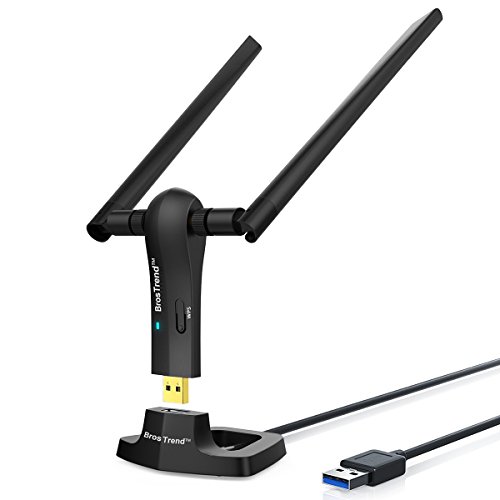
- 2x 5dBi antennas for stronger reception
- USB 3.0 cradle with 5-foot extension
- Dual-band speeds up to 867Mbps on 5GHz
Best For: Desktop users who want stronger long-range Wi‑Fi and flexible antenna placement.
Best Tri-Band Upgrade
BrosTrend AXE5400 WiFi 6E USB Adapter

- Tri-band Wi‑Fi 6E with up to 5.4 Gbps rated speeds
- Two external adjustable antennas with beamforming
- Easy Windows 11/10 setup with pre-loaded driver
Best For: Users who want a simple USB Wi‑Fi upgrade with stronger signal and modern tri-band support.
Best Heavy-Duty Pick
Tenda AX900 WiFi 6 USB Adapter

- 6dBi external antenna improves weak-signal reception
- Wi‑Fi 6 dual-band support for smoother everyday use
- Preloaded drivers simplify installation on Windows PCs
Best For: Desktop users who want a quick USB Wi‑Fi 6 upgrade with better signal pickup and minimal setup.
Best for MSI Motherboards
WiFi 6 Antennas for MSI Motherboards

- RP-SMA 2T2R compatibility for MSI boards
- Dual-band WiFi 6/6E support
- Magnetic base for easier placement
Best For: MSI desktop owners replacing or upgrading motherboard Wi-Fi antennas.
Best for Easy Windows Setup – TP-Link AC600 USB WiFi Adapter
If you want one of the simplest high gain wifi antennas for desktop pc use, the TP-Link Archer T2U Plus is a straightforward USB upgrade that adds dual-band wireless without opening your case. Its 5dBi adjustable antenna can help improve reception, especially when your router is not in the same room.
Best For: Windows desktop users who want an easy plug-in Wi-Fi upgrade with a high-gain antenna and dual-band support.
Pros:
- 5dBi high-gain antenna improves signal reception and can be rotated toward your router
- Dual-band AC600 speeds support both 2.4GHz and 5GHz networks
- Simple USB design makes it easy to upgrade a desktop without internal installation
- Works with a wide range of Windows versions, including Windows 11 and older systems
Cons:
- Windows-only support limits flexibility for Mac and Linux users
- Performance depends on distance, walls, and router placement
For buyers comparing high gain wifi antennas for desktop pc setups, this adapter is a practical middle-ground pick: compact, easy to install, and strong enough for everyday browsing, streaming, and light gaming.
Best Tri-Band Wi‑Fi 6E Range – External WiFi 6 6E Tri-Band Antenna
If you want one of the more capable high gain wifi antennas for desktop pc setups, this 9dBi tri-band model is built for Wi‑Fi 6/6E systems that need stronger reception on 2.4GHz, 5.8GHz, and 6GHz bands. The magnetic base and dual 6.5-foot cables make it easier to place the antenna higher and farther from your tower for a cleaner signal path.
Best For: Desktop gamers and PC builders using ASUS ROG or Gigabyte Wi‑Fi motherboards, PCIe Wi‑Fi cards, or 6E-ready systems that need stronger multi-band reception.
Pros:
- 9dBi gain with tri-band support for 2.4GHz, 5.8GHz, and 6GHz
- Dual 6.5-foot leads help with better antenna placement
- Magnetic base and 180° rotation make setup simple
- Works with many Wi‑Fi 6/6E desktop motherboards and cards
Cons:
- Requires an RP-SMA-compatible desktop Wi‑Fi connection
- Bulkier than small stock antennas
- Performance depends on router placement and interference
This is a strong pick if you need high gain wifi antennas for desktop pc use and want better flexibility than the short antennas bundled with many boards. It is especially useful when you can mount it away from the case for improved line-of-sight and steadier wireless performance.
Best for Easy Setup – 1300Mbps Dual-Band USB WiFi Adapter
If you want a simple upgrade with high gain wifi antennas for desktop pc use, this dual-band USB adapter is a practical pick. It combines AC1300 speeds, two 5dBi antennas, and USB 3.0 for a stronger wireless link on Windows desktops without needing a full internal card install.
Best For: Windows desktop users who want an easy plug-in WiFi upgrade with adjustable antennas and solid dual-band performance.
Pros:
- Two 5dBi high-gain antennas help improve signal reception and placement flexibility
- USB 3.0 and AC1300 dual-band support suit streaming, browsing, and light gaming
- Plug-and-play setup on Windows 10/11 makes installation straightforward
- WPA3 support adds stronger wireless security protection
Cons:
- Windows 7 may require manual driver installation
- Not compatible with Mac OS or Linux
- USB adapter design may not match the stability of a PCIe internal card
For shoppers comparing high gain wifi antennas for desktop pc setups, this model stands out for convenience more than raw enthusiast performance. It is a sensible choice if you want better reception, quick setup, and dual-band flexibility in one affordable dongle.
Best for Wi‑Fi 6E Upgrades – Eightwood Tri-Band WiFi 6E Antenna
If you’re comparing high gain wifi antennas for desktop pc setups, this Eightwood tri-band antenna is a practical upgrade for anyone trying to improve range, stability, and low-latency performance. It supports 2.4GHz, 5GHz, and 6GHz bands, and the magnetic base plus 6.5ft cable make it easier to place the antenna where reception is strongest.
Best For: Desktop PCs with PCIe WiFi 6E cards, especially for gaming, streaming, and crowded wireless environments.
Pros:
- Tri-band support includes 6GHz for Wi‑Fi 6E devices
- 6.5ft extension cable helps with better antenna placement
- Magnetic base makes desk or case mounting simple
- Works with desktops, routers, and other RP-SMA compatible gear
Cons:
- Only fits RP-SMA female ports, so compatibility must be checked
- Single-antenna design may not match the range of larger multi-antenna kits
This is a smart pick if you want a straightforward way to boost wireless performance without changing your whole setup. For high gain wifi antennas for desktop pc users who need better placement and Wi‑Fi 6E support, it offers a strong mix of flexibility and convenience.
Best for Everyday Use – TP-Link Archer T3U Plus AC1300 USB Adapter
If you want high gain wifi antennas for desktop pc without opening your tower, the TP-Link Archer T3U Plus is a simple USB upgrade that adds stronger dual-band connectivity, MU-MIMO support, and an external 5 dBi antenna for better reception in busy rooms.
Best For: Desktop users who want an easy plug-in WiFi upgrade with a stronger antenna and broad OS support.
Pros:
- 5 dBi high-gain external antenna helps improve signal pickup and range
- AC1300 dual-band speeds for better performance on 5 GHz and 2.4 GHz networks
- USB 3.0 and MU-MIMO support make it a solid fit for modern desktops
- Adjustable antenna lets you aim for a better connection
Cons:
- Bulky external antenna may be less convenient than ultra-compact adapters
- Top speeds depend on router quality, placement, and interference
Overall, this is a practical pick if you need high gain wifi antennas for desktop pc and want a straightforward way to improve wireless reception without a PCIe install.
Best for Long-Range Reception – BrosTrend AX1800 WiFi 6 USB Adapter
If you need high gain wifi antennas for desktop pc use, this BrosTrend WiFi 6 USB adapter is built for stronger reception and faster dual-band connectivity. It combines two 5dBi antennas, beamforming, and a USB 3.0 extension cable to help you place the adapter where the signal is best.
Best For: Desktop users on Windows 11/10 who want an easy plug-in upgrade for better range, fewer dropouts, and solid 5GHz performance.
Pros:
- 2x 5dBi high-gain antennas help improve reception through walls and floors
- AX1800 WiFi 6 speeds are strong for streaming, calls, and gaming
- USB 3.0 extension cable makes it easier to find an optimal signal spot
- Pre-loaded driver simplifies setup on supported Windows systems
Cons:
- Windows 11/10 only, so it is not a fit for Mac or Linux users
- It is a dongle-style adapter, not an internal PCIe card
For buyers comparing high gain wifi antennas for desktop pc setups, this model stands out for its mix of range, WiFi 6 speed, and flexible placement. It is a practical pick if your desktop struggles with weak wireless signals and you want a straightforward upgrade without opening the PC.
Best for Long-Range Coverage – BrosTrend 1200Mbps Dual-Band USB Adapter
If you want high gain wifi antennas for desktop pc use without replacing your router, this BrosTrend adapter is a practical upgrade. Its dual 5dBi antennas, USB 3.0 cradle, and dual-band support make it a solid pick for improving signal reach, stability, and day-to-day wireless speed on a desktop or laptop.
Best For: Desktop users who need stronger reception, flexible antenna placement, and better long-range Wi‑Fi in a simple USB setup.
Pros:
- Two 5dBi high-gain antennas help extend range and improve stability
- Dual-band speeds support faster 5GHz connections and reliable 2.4GHz coverage
- USB 3.0 cradle with a 5-foot cable makes placement easier for better signal reception
- Supports WPA3 security and Windows 11/10/8.1/8/7
Cons:
- Linux is not supported
- Best performance depends on installing the latest driver
- Bulky antenna design may not suit minimalist setups
For shoppers comparing high gain wifi antennas for desktop pc setups, this model stands out for range and placement flexibility rather than size. It’s a strong choice if you want a straightforward desktop adapter that can pull in a better signal from farther away.
Best Tri-Band Upgrade – BrosTrend AXE5400 WiFi 6E USB Adapter
If you’re comparing high gain wifi antennas for desktop pc setups, this BrosTrend adapter is a strong pick for users who want better range plus modern Wi‑Fi 6E speeds without opening their tower. The two external antennas and beamforming help focus the signal, while the tri-band design gives you more headroom for streaming, downloads, and video calls.
Best For: Desktop or laptop users who want an easy USB upgrade for faster, more reliable Wi‑Fi in a crowded network.
Pros:
- Tri-band Wi‑Fi 6E support with up to 5.4 Gbps total rated speeds
- Two adjustable external antennas plus beamforming for stronger reception
- Pre-loaded driver makes setup simpler on Windows 11/10
- WPA3 support adds a newer layer of wireless security
Cons:
- 6 GHz connectivity requires Windows 11
- USB adapter form factor may not match the reach of a full external antenna kit
For buyers shopping high gain wifi antennas for desktop pc alternatives, this model stands out because it combines external antennas with faster tri-band performance in a compact plug-in design. It is a practical choice if you want better signal capture and easier setup than a typical internal card.
Best Heavy-Duty Pick – Tenda AX900 WiFi 6 USB Adapter
If you want one of the easier high gain wifi antennas for desktop pc, this Tenda AX900 is a simple upgrade path: plug it in, let the preloaded drivers do the work, and get stronger dual-band Wi‑Fi without opening your case. The external 6dBi antenna is aimed at improving reception in rooms where the built-in adapter struggles.
Best For: Desktop users who want a quick USB Wi‑Fi 6 upgrade with better signal pickup and minimal setup.
Pros:
- 6dBi external antenna helps improve reception over built-in desktop Wi‑Fi
- Wi‑Fi 6 dual-band support for faster 5GHz and reliable 2.4GHz connections
- Preloaded drivers make setup fast on Windows 11, 10, and 7
- AP mode adds hotspot functionality for sharing your connection
Cons:
- 5GHz top speed is modest compared with higher-end Wi‑Fi 6 adapters
- AP mode is limited to the 5GHz band
- USB design is less discreet than an internal PCIe card
Overall, this is a practical pick if you care more about easy setup and better range than chasing top-tier speed numbers. For shoppers comparing high gain wifi antennas for desktop pc, it stands out as a straightforward plug-and-play option with a useful external antenna.
Best for MSI Motherboards – WiFi 6 Antennas for MSI Motherboards
If you need a simple upgrade path for high gain wifi antennas for desktop pc, this MSI replacement antenna set is aimed at restoring or improving wireless reception on compatible boards without adding a separate USB adapter. The magnetic base makes placement easier, while the dual-band WiFi 6/6E design is a practical fit for desktops that need stronger, more flexible antenna positioning.
Best For: MSI desktop users who want a direct RP-SMA antenna replacement with an easy magnetic base setup.
Pros:
- Built for MSI motherboard RP-SMA 2T2R connections
- Dual-band WiFi 6/6E support for modern desktop networking
- Magnetic base helps with quick, flexible placement
- Compact black design suits most PC setups
Cons:
- Only useful if your motherboard uses compatible RP-SMA ports
- Best gains depend on antenna positioning and local signal conditions
For MSI users, this is a straightforward option if your stock antennas are weak, missing, or awkward to position. It won’t replace a full networking upgrade, but as high gain wifi antennas for desktop pc go, it offers a convenient compatibility-first solution for better reception.
How We Picked the Best High Gain Wifi Antennas for Desktop PC
We focused on real-world desktop use: signal strength, band support, connector compatibility, installation ease, and whether the product is a true upgrade for a stationary PC. For High Gain Wifi Antennas for Desktop PC, the most important factor is not just peak speed on the box, but whether the antenna or adapter can improve reception in your actual room layout.
We also prioritized options that cover common needs: legacy dual-band WiFi, WiFi 6 performance, and WiFi 6E tri-band support for users with newer routers. Models with magnetic bases, extension cables, or adjustable antennas earned extra consideration because placement often matters as much as gain.
Quick Comparison
Choose a USB adapter if you want the simplest plug-and-play upgrade. Choose a magnetic-base external antenna if your motherboard or PCIe WiFi card already has RP-SMA antenna ports. WiFi 6 and WiFi 6E models are best for newer routers, while older dual-band adapters still make sense for basic browsing, streaming, and general office work.
Key Buying Factors for High Gain Wifi Antennas for Desktop PC
Connector Type and Compatibility
Check whether your desktop uses a USB adapter, an internal WiFi card, or motherboard antenna ports. Many external antennas require RP-SMA connectors, and not every desktop can use them without the right hardware.
Band Support
Dual-band 2.4GHz/5GHz is enough for most homes, but tri-band 6GHz support can help in crowded networks and with compatible WiFi 6E routers. If your router is older, 6GHz will not add value.
Antenna Placement
Gain is only useful if the antenna can sit in a better position. Magnetic bases, extension cables, and adjustable external antennas can help move the antenna away from metal cases and behind-desk obstructions.
Speed Needs and Range
Higher rated speeds are helpful, but range and stability matter more for many desktops. If your PC is far from the router, focus on stronger reception and cleaner placement before chasing the highest Mbps number.
Who Should Buy Which High Gain Wifi Antennas for Desktop PC?
If you want a quick and affordable fix, a high-gain USB adapter is usually the easiest answer. If your desktop already has WiFi hardware and you simply need better reception, a replacement external antenna may be the smarter upgrade. Gamers, streamers, and heavy downloaders should look at WiFi 6 or WiFi 6E models, especially when paired with a compatible router. Budget shoppers can stick with dual-band options, while users in dense apartment buildings or large homes may benefit most from tri-band antennas and adapters.