If your desktop PC’s built-in wireless keeps dropping, a better antenna can make a bigger difference than you might expect. The right replacement can improve signal stability, range, and throughput without changing the motherboard.
This roundup focuses on replacement Wi-Fi antennas for desktop motherboards, including modern Wi-Fi 6, 6E, and Wi-Fi 7 options with the right connector type, gain, and base design for cleaner placement.
Best 10 Replacement Wifi Antennas for Desktop Motherboard Picks for 2026
Best for Wi‑Fi 6E Coverage
External WiFi 6E Tri-Band Antenna

- 9dBi tri-band support for 2.4GHz, 5GHz, and 6GHz
- Dual 6.5-foot leads for flexible desktop placement
- Magnetic, omni-directional design for easy setup
Best For: Desktop users replacing RP-SMA Wi‑Fi antennas on a Wi‑Fi 6 or 6E motherboard.
Best for ASUS WiFi Boards
External WiFi 6E Magnetic Antenna
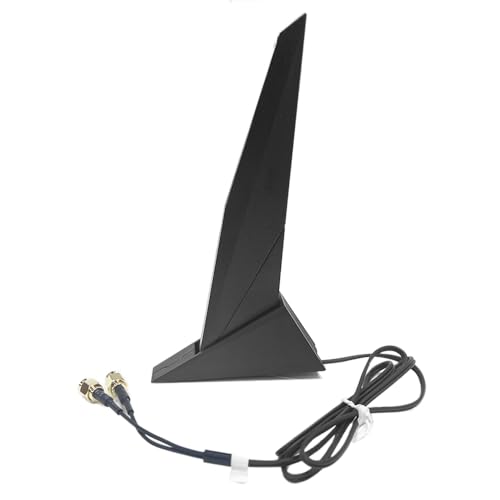
- Magnetic base for flexible placement
- Compatible with many Wi-Fi motherboards and Intel cards
- 80cm cable with Wi-Fi and Bluetooth support
Best For: Desktop builders replacing a stock antenna on an ASUS or similar Wi-Fi motherboard.
Best for Gigabyte EZ-Plug Upgrades
WiFi 7 Antenna for Gigabyte B850/X870/Z890

- No-thread EZ-Plug connector for tool-free installation
- 12dBi tri-band WiFi 7 performance with 6GHz support
- Magnetic base and 80cm cable for flexible positioning
Best For: Gigabyte B850, X870, and Z890 users who need an easy antenna replacement with modern WiFi 7 support.
Best for MSI Dual-Band Upgrades
MSI WiFi 6E 2T2R RP-SMA Antenna

- Direct RP-SMA replacement for many MSI boards
- High-gain design for stronger Wi‑Fi and Bluetooth
- Magnetic base plus extension cable for flexible placement
Best For: MSI desktop users who want an easy antenna swap with better reception.
Best for ASUS Board Compatibility
Tri-Band WiFi 7 Motherboard Antenna

- Non-RP-SMA connector for compatible ASUS boards
- Supports 2.4GHz, 5.8GHz, and 6GHz bands
- Magnetic base for simple desktop placement
Best For: ASUS desktop builds that need a compatible tri-band antenna replacement.
Best for Stronger Signal Range
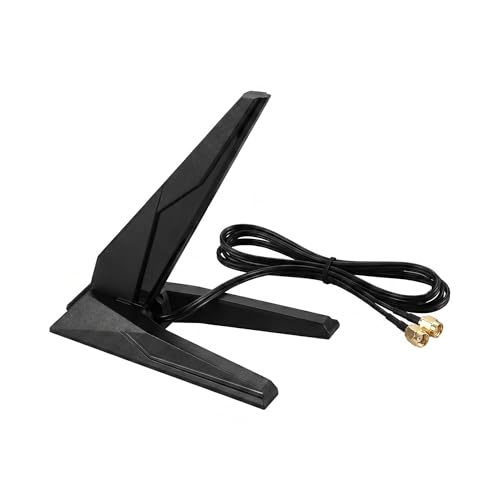
- 8dBi gain helps improve weak desktop Wi-Fi
- Magnetic base + cable allow better placement
- Supports 2.4GHz, 5GHz, and 6GHz bands
Best For: MSI desktop users who want a stronger, repositionable antenna upgrade for better Wi-Fi stability.
Best for Wi‑Fi 6E Upgrades
WiFi 6E Tri-Band Magnetic Antenna

- Supports 2.4GHz, 5GHz, and 6GHz bands
- Magnetic base with flexible 180° swivel
- Dual 2m cables help improve antenna placement
Best For: PC users upgrading or replacing antennas on a Wi‑Fi 6/6E desktop motherboard.
Best for Wi‑Fi 6E Coverage – External WiFi 6E Tri-Band Antenna
If you’re shopping for replacement wifi antennas for desktop motherboard setups, this tri-band model is a straightforward upgrade for compatible ASUS ROG, GIGABYTE AORUS, and other RP-SMA desktop Wi‑Fi boards. The 9dBi gain, dual 6.5-foot leads, and support for 2.4GHz, 5GHz, and 6GHz make it a practical pick for improving reception without a complicated install.
Best For: Desktop PC builders and upgraders who want stronger Wi‑Fi 6/6E signal coverage from a motherboard or PCIe card with RP-SMA connectors.
Pros:
- Tri-band support covers 2.4GHz, 5GHz, and 6GHz Wi‑Fi 6E networks
- 9dBi gain and magnetic base help place the antenna for better signal
- Dual 6.5-foot cables add flexibility for desk or tower placement
- Omni-directional design is simple to use, with no aiming required
Cons:
- Only works with hardware that has RP-SMA antenna connectors
- Gain and range benefits depend on your router, room layout, and interference
For replacement wifi antennas for desktop motherboard installations, this is a good fit if you want an easy, wire-free-looking upgrade with modern 6E compatibility. It’s especially useful when the stock antenna is missing, too short, or not giving you the signal strength you need.
Best for MSI New-Interface Builds – High Gain 9dBi WiFi 7 Antenna
If you need replacement wifi antennas for desktop motherboard upgrades, this MSI-focused WiFi 7 antenna is a practical fit for newer boards that use the new EZ connector style instead of standard RP-SMA. The 9dBi dual-band design aims to improve signal strength, while the magnetic base and 80cm cable make placement easier around a metal PC case.
Best For: MSI X870, B850, B860, Z890 desktop builds that need a tool-free antenna replacement with stronger reception.
Pros:
- New EZ-plug interface for compatible MSI motherboards
- High-gain 9dBi design for stronger wireless reception
- Magnetic base helps with stable, flexible positioning
- Dual-band support for 2.4GHz, 5GHz, and 6GHz use
Cons:
- Not compatible with standard RP-SMA antenna ports
- Must match the motherboard’s new connector style exactly
For buyers comparing replacement wifi antennas for desktop motherboard setups, this model stands out if your board supports the new MSI interface and you want a simple, no-tool swap with a stronger signal profile.
Best for ASUS WiFi Boards – External WiFi 6E Magnetic Antenna
If you need replacement wifi antennas for desktop motherboard setups, this magnetic-base antenna is a practical swap for many ASUS and other Wi-Fi-equipped boards. It uses an SMA/RP-SMA-compatible connection, supports dual-band and Bluetooth use, and comes with an 80cm cable for easier positioning on a desk or case.
Best For: Desktop builders and upgraders replacing the factory antenna on ASUS ROG, Z690, H670, H610, B460, and similar Wi-Fi motherboards.
Pros:
- Magnetic base makes placement simple on a metal case or nearby surface.
- Works with many ASUS, Gigabyte, MSI, ASRock, and Biostar Wi-Fi motherboards.
- Compatible with common Intel wireless cards like AX200, AX210, AX211, and 9260.
- Supports Wi-Fi and Bluetooth connections with an 80cm extension cable.
Cons:
- Designed for boards with two SMA inner-pin ports, so fitment matters.
- Not a performance upgrade if your current antennas already have strong reception.
For buyers comparing replacement wifi antennas for desktop motherboard use, this is a straightforward universal-style option with broad compatibility and easy positioning. It’s most useful when the original antenna is missing, damaged, or inconvenient to place.
Best for Gigabyte EZ-Plug Upgrades – WiFi 7 Antenna for Gigabyte B850/X870/Z890
If you need replacement wifi antennas for desktop motherboard setups on newer Gigabyte boards, this model is built around the newer EZ-Plug connector and is aimed at a simple, tool-free swap. The magnetic base and 80cm cable make it easier to place the antenna for a cleaner desk and better reception, while tri-band WiFi 7 support gives you headroom for fast home networks and low-latency gaming.
Best For: Gigabyte B850, X870, and Z890 owners who want a quick, no-thread antenna replacement with strong signal performance.
Pros:
- EZ-Plug no-thread connector makes installation fast and screwdriver-free
- 12dBi tri-band WiFi 7 design supports 2.4GHz, 5GHz, and 6GHz networks
- Magnetic base and long cable help optimize antenna placement
Cons:
- Only fits motherboards with the newer Gigabyte EZ-Plug antenna port
- Higher-spec features may be overkill for basic browsing or older routers
For buyers specifically shopping for replacement wifi antennas for desktop motherboard upgrades, this is a strong fit if your Gigabyte board uses the newer quick-release style. It focuses less on universal compatibility and more on easy setup plus modern WiFi 7 performance.
Best for MSI Dual-Band Upgrades – MSI WiFi 6E 2T2R RP-SMA Antenna
If you need replacement wifi antennas for desktop motherboard installs, this MSI-compatible RP-SMA set is a practical plug-in fix for better signal strength and Bluetooth support. The magnetic base and 75cm extension cable make it easier to place the antennas where they can actually catch a stronger connection, which helps for gaming, streaming, and general stability.
Best For: MSI motherboard owners who want a simple, tool-free antenna replacement with stronger reception and flexible placement.
Pros:
- Direct RP-SMA replacement for many MSI dual-antenna motherboards
- High-gain design improves Wi‑Fi range and signal stability
- Magnetic base and extension cable make placement more flexible
- No drivers or software needed for installation
Cons:
- Compatibility depends on your motherboard’s antenna interface
- Primarily tuned for MSI boards, so it may not suit every desktop
- Performance gains vary based on room layout and router distance
For buyers comparing replacement wifi antennas for desktop motherboard upgrades, this is a straightforward choice if your board uses standard RP-SMA ports and you want an easy way to improve reception without extra hardware. It’s especially appealing if you want a cleaner desk setup while keeping Wi‑Fi and Bluetooth connected.
Best for ASUS Board Compatibility – Tri-Band WiFi 7 Motherboard Antenna
If you need replacement wifi antennas for desktop motherboard setups and your ASUS board uses a non-RP-SMA connector, this tri-band antenna cable is built for that exact fit. It supports 2.4/5.8/6GHz WiFi 7 gear and uses a magnetic base, making it a practical swap-in for damaged or missing stock antennas.
Best For: ASUS ROG Strix and other compatible motherboards that need a non-RP-SMA replacement antenna with tri-band support.
Pros:
- Designed for non-RP-SMA motherboard antenna ports
- Tri-band support covers 2.4GHz, 5.8GHz, and 6GHz networks
- Magnetic base helps with stable placement on a desk or PC case
- Useful replacement for lost, broken, or weak factory antennas
Cons:
- Only works with compatible ASUS-style non-RP-SMA connectors
- Not a universal antenna for all desktop motherboards
- Best value depends on whether your board actually supports WiFi 7 bands
For buyers comparing replacement wifi antennas for desktop motherboard upgrades, this is a niche but well-matched option if your system needs the right connector and modern band support. The main advantage is fitment: if your motherboard matches, it’s an easy way to restore wireless performance without replacing the whole WiFi setup.
Best for WiFi 7 Upgrades – Eightwood Tri-Band RP-SMA Antenna
If you need replacement wifi antennas for desktop motherboard setups that can actually support newer wireless standards, this Eightwood tri-band model is built for the job. It covers 2.4GHz, 5GHz, and 6GHz bands, and the long cable plus magnetic base make it easy to place for a cleaner, stronger signal.
Best For: Desktop users with RP-SMA WiFi ports who want a flexible antenna upgrade for WiFi 6E or WiFi 7 motherboards, PCIe cards, routers, or modems.
Pros:
- Tri-band support for 2.4GHz, 5GHz, and 6GHz devices
- 6.5-foot cable gives you better placement options
- Magnetic base helps keep the antenna stable on metal surfaces
- Works with many PCs, gaming motherboards, and PCIe WiFi cards
Cons:
- Not compatible with ASUS/MSI push-on antenna connectors
- Only fits standard threaded RP-SMA ports
As a practical upgrade for replacement wifi antennas for desktop motherboard builds, this Eightwood antenna makes the most sense when you already have the right threaded connector and want stronger, more flexible reception for modern wireless bands. Just verify your motherboard or card uses RP-SMA before buying.
Best for MSI X870 Boards – MSI X870 Wi‑Fi 7 Magnetic Antenna
If you need replacement wifi antennas for desktop motherboard setups, this magnetic-base Wi‑Fi 7 antenna is a solid fit for supported MSI MAG, MPG, and PRO X870-series boards. It’s designed to improve wireless range and Bluetooth stability while giving you more placement flexibility thanks to the long cable and magnetic base.
Best For: MSI X870/X870E owners who want a direct-fit Wi‑Fi 7 antenna upgrade with easier positioning and stronger reception.
Pros:
- Wi‑Fi 7 support for faster, more responsive wireless performance
- Dual 9dBi antennas help improve signal strength and coverage
- Magnetic base and 80cm cable make placement simple
- Also supports better Bluetooth 5.4 connectivity
Cons:
- Only works with compatible MSI motherboard connector types
- Not a universal RP-SMA replacement
For builders using supported MSI boards, this is a practical upgrade among replacement wifi antennas for desktop motherboard setups because it combines easy mounting, strong gain, and modern Wi‑Fi 7 features in one compact package.
Best for Stronger Signal Range – WiFi 6E MSI Magnetic Antenna
If you want one of the most practical replacement wifi antennas for desktop motherboard setups, this WiFi 6/6E antenna is built to improve reception without adding setup hassle. The 8dBi gain, magnetic base, and included extension cable make it easier to move the antenna out of the back of the PC case and into a better position for cleaner signal.
Best For: MSI motherboard owners and desktop PC users who want a higher-gain, easy-to-place antenna upgrade for gaming, streaming, and everyday Wi-Fi stability.
Pros:
- 8dBi high-gain design helps boost weak or inconsistent Wi-Fi signals
- Magnetic base and extension cable make placement much more flexible
- Supports 2.4GHz, 5GHz, and 6GHz for Wi-Fi 6E setups
- Compatible with MSI boards and other RP-SMA devices
Cons:
- 6GHz support only matters if your router and adapter also support Wi-Fi 6E
- Compatibility depends on having the correct RP-SMA antenna connector
- Included cable length may still be limiting for some desk layouts
For buyers comparing replacement wifi antennas for desktop motherboard use, this model stands out because it focuses on signal strength and placement flexibility rather than just matching the stock antenna. It is a smart upgrade if your current antenna sits behind a metal case and struggles to hold a stable connection.
Best for Wi‑Fi 6E Upgrades – WiFi 6E Tri-Band Magnetic Antenna
If you need replacement wifi antennas for desktop motherboard setups, this tri-band external antenna is a straightforward way to restore or improve wireless range on a compatible PC. It supports 2.4GHz, 5GHz, and 6GHz bands, so it is aimed at Wi‑Fi 6 and Wi‑Fi 6E systems that can benefit from lower latency and better throughput.
Best For: Desktop gamers and PC builders with Asus ROG Strix, Gigabyte Aorus, or other Wi‑Fi 6/6E motherboards who want an easy antenna upgrade.
Pros:
- Tri-band support covers 2.4GHz, 5GHz, and 6GHz for Wi‑Fi 6E use.
- Magnetic base and 180° swivel design make positioning easy.
- Dual 2m cables give you flexibility to place the antenna higher and farther from the PC.
- Omnidirectional design reduces the need for precise aiming.
Cons:
- Only useful if your motherboard or Wi‑Fi card has RP-SMA antenna ports.
- Performance gains depend on your router and Wi‑Fi 6E support.
As replacement wifi antennas for desktop motherboard use, this is a practical pick if your original antenna is weak, missing, or badly placed. The long cables and magnetic base make it easier to find a stronger signal spot, while the 6GHz band adds headroom for newer networks.
How We Picked the Best Replacement Wifi Antennas for Desktop Motherboard
We prioritized compatibility first, then signal design and placement flexibility. For Replacement Wifi Antennas for Desktop Motherboard use, the most important details are the connector standard, supported bands, antenna gain, and whether the base can sit away from the PC case for better reception.
We also favored models that fit common desktop setups from ASUS, MSI, and Gigabyte boards, since many buyers are replacing a lost or weak factory antenna rather than building a custom wireless setup.
Quick Comparison
In this category, the main split is between standard RP-SMA antennas and newer no-thread or proprietary-style connectors used on some Wi-Fi 7 motherboards. Another practical difference is dual-band versus tri-band support: dual-band is fine for most Wi-Fi 5/6 networks, while tri-band is the better match for Wi-Fi 6E and Wi-Fi 7 systems that can use 6GHz.
Magnetic-base designs are especially useful on desktops because they let you move the antenna away from metal interference, which can improve stability more than gain alone.
Key Buying Factors for Replacement Wi-Fi Antennas for Desktop Motherboard
Connector Compatibility
Start with the motherboard’s antenna interface. If your board uses RP-SMA, choose that exact style. If it uses a newer EZ-plug or no-thread connector, standard RP-SMA will not fit correctly. This is the most common mistake when shopping for Replacement Wifi Antennas for Desktop Motherboard upgrades.
Band Support
Match the antenna to your Wi-Fi hardware and router. Dual-band models cover 2.4GHz and 5GHz, while tri-band models add 6GHz for Wi-Fi 6E and Wi-Fi 7. If your network does not support 6GHz, tri-band is still usable, but it may not offer a noticeable advantage.
Gain and Placement
Higher gain can help, but placement often matters more. A magnetic base on top of a case, desk, or nearby metal surface can reduce blockage and improve line of sight. Very high-gain antennas may be helpful in larger rooms, but they are not automatically better in every setup.
Cable Length and Base Design
Longer leads add flexibility, especially if your PC is under a desk. A stable base makes it easier to position the antenna away from other cables, monitors, and the case itself.
Who Should Buy Which Replacement Wifi Antennas for Desktop Motherboard?
Choose an RP-SMA tri-band antenna if you have a standard desktop motherboard and want the widest compatibility. Pick a newer-interface Wi-Fi 7 antenna if your board specifically requires it. If you mainly want a simple, reliable replacement for a lost factory antenna, a dual-band magnetic model is often enough. If your goal is maximum flexibility for a modern gaming PC, a tri-band magnetic design is the most future-ready option.