When you’re venturing into VR development, the right workstation PC can make all the difference. You need a powerful machine that can handle intricate graphics and multitasking seamlessly. In this guide, you’ll discover some of the top workstation PCs that cater to these needs, each designed to elevate your immersive experiences. What sets these models apart? Let’s explore the features that define their power and performance.
Dell Precision 7920 Tower Workstation (Renewed)

The Dell Precision 7920 Tower Workstation is an excellent choice for VR developers and content creators who need powerful performance without breaking the bank. With dual Intel Xeon Gold processors and 32 cores, you’ll handle demanding tasks like 4K editing and rendering with ease. Its 192GB of DDR4 memory—upgradable to a whopping 1.5TB—ensures smooth multitasking. The Quadro P2000 graphics card delivers vivid visuals, while the 2TB SSD and 8TB HDD offer ample storage. Plus, this renewed model has been professionally tested, giving you a reliable workstation at a fraction of the original price. It’s a smart investment for serious creators.
Best For: VR developers and content creators who require high-performance computing for demanding tasks like 4K editing and rendering.
Pros:
- Powerful Performance: Equipped with dual Intel Xeon Gold processors and 32 cores for handling intense workloads.
- Upgradable Memory: Comes with 192GB of DDR4 RAM, which is upgradeable to 1.5TB for enhanced multitasking capabilities.
- Ample Storage Options: Features a combination of 2TB SSD and 8TB HDD, providing extensive storage for large files and projects.
Cons:
- Weight and Size: The workstation is quite large and heavy, which may not be suitable for all desk setups.
- Mixed Customer Ratings: With a 3.3 out of 5 stars rating, there may be concerns regarding product condition and performance upon delivery.
- Limited Graphics Performance: The Quadro P2000 may not meet the needs of users requiring the latest high-end graphics performance for the most demanding applications.
Dell Precision Tower 5820 Workstation (Renewed)

For VR developers seeking a reliable and powerful machine, the Dell Precision Tower 5820 Workstation (Renewed) stands out with its Intel Xeon W-2123 processor and 64GB of DDR4 RAM. This workstation packs a 1TB NVMe SSD for speedy storage and features the NVIDIA Quadro P2000 graphics card, ensuring smooth rendering for immersive experiences. Running on Windows 11 Pro, it offers excellent performance for demanding applications. Weighing just 11.41 pounds and measuring 24 x 24 x 12 inches, it’s easy to fit into your workspace. Users appreciate its quick setup and value, making it a solid choice for your VR development needs.
Best For: VR developers and professionals seeking a powerful and reliable workstation for demanding applications.
Pros:
- Excellent performance with Intel Xeon W-2123 processor and 64GB of RAM for multitasking.
- Fast storage capabilities with a 1TB NVMe SSD, enhancing load times and data access.
- Positive user feedback regarding quick setup and overall value, making it suitable for home labs and file servers.
Cons:
- Some users reported discrepancies in RAM speed, with actual speeds being lower than advertised.
- Occasional startup issues noted by a few customers, potentially affecting usability.
- Being a renewed product, there might be variability in refurbishment quality compared to new units.
HTC Vive Focus Vision Mixed Reality Headset with Controllers

Experience seamless immersion with the HTC Vive Focus Vision Mixed Reality Headset, perfect for VR developers looking to create enthralling environments. This all-in-one solution offers both standalone and PC VR experiences, featuring high-resolution displays and precision tracking technology. You can connect up to five VIVE Ultimate Trackers for full-body tracking, ensuring your real-world movements translate seamlessly into virtual domains. Enjoy low-latency gameplay on VIVEPORT and SteamVR, along with lossless visuals via DisplayPort. Although it has mixed customer feedback, it stands as a powerful tool for any developer aiming to push the boundaries of immersive experiences.
Best For: VR developers and enthusiasts seeking an all-in-one solution for creating immersive experiences.
Pros:
- All-in-one VR solution with standalone and PC compatibility.
- High-resolution displays with precision tracking technology for enhanced immersion.
- Supports full-body tracking with up to five VIVE Ultimate Trackers for realistic movement integration.
Cons:
- Mixed customer feedback with a low average rating of 3.0 out of 5 stars.
- Relatively new product, which may have limited initial support and user reviews.
- Requires additional accessories for optimal full-body tracking experience.
VR Headset for iPhone and Android, Adjustable 3D Glasses with Controller

If you’re looking to plunge into the world of virtual reality without breaking the bank, the VR headset compatible with iPhone and Android devices is a fantastic choice. It offers adjustable 3D glasses with a controller, enhancing your gaming and movie-watching experiences. With its field of view adjustments, you’ll enjoy minimal distortion. The included controller, perfect for music playback and volume controls, boosts interactivity, though it requires a AAA battery. Designed for comfort, it features an adjustable head strap and soft nose piece, making it great for both kids and adults. Share immersive VR moments with friends and family effortlessly!
Best For: This VR headset is best for budget-conscious individuals and families looking to explore virtual reality gaming and movie experiences.
Pros:
- Immersive viewing experience with adjustable field of vision and minimal distortion.
- Wide compatibility with various smartphone models, including the latest iPhone and Galaxy series.
- Comfortable design featuring an adjustable head strap and soft nose piece, suitable for prolonged use.
Cons:
- Controller requires AAA battery, which is not included in the package.
- Limited to smartphones with a screen size of 5.0-7.0 inches, which may exclude some larger devices.
- May not provide the same level of immersion as high-end VR headsets due to its budget-friendly design.
Oculus Rift PC-Powered VR Gaming System (Refurbished) – PC
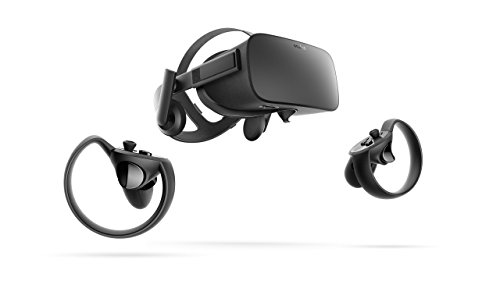
The Oculus Rift PC-Powered VR Gaming System (Refurbished) stands out as an ideal choice for developers and gamers enthusiastic to plunge into virtual reality without breaking the bank. These refurbished units are thoroughly inspected, cleaned, and tested, ensuring they function and look like new. To enjoy this immersive experience, you’ll need an Oculus-ready gaming PC compatible with Windows 10. Plus, you’ll need a Facebook account to log in, allowing you to connect with friends and explore global VR communities. With limited supply available, don’t miss the chance to elevate your VR gaming experience at a fraction of the cost!
Best For: Gamers and developers looking for an affordable entry into virtual reality with a reliable refurbished headset.
Pros:
- Affordable option for experiencing high-quality virtual reality gaming.
- Thoroughly inspected and tested to ensure functionality and appearance like new.
- Connects users with friends and global communities through Facebook integration.
Cons:
- Requires a Facebook account for login, which may not appeal to all users.
- Limited supply may result in difficulty finding available units.
- Compatibility restricted to Oculus-ready gaming PCs and Windows 10 operating system.
NUC 13 Extreme Gaming Mini PC (i5-13600K)
For developers seeking a powerful yet compact solution for VR development, the NUC 13 Extreme Gaming Mini PC (i5-13600K) stands out with its impressive 14-core processor, capable of reaching speeds up to 5.1GHz. This mini PC delivers exceptional gaming and multitasking performance in a sleek design. You can enhance your experience further by installing full-length NVIDIA GeForce RTX 4070 Ti or 4080 graphics cards for stunning ray tracing and smooth VR gameplay. With efficient cooling from three PWM fans and robust connectivity options, including Thunderbolt 4 and Intel Wi-Fi 6E, it’s perfect for intensive workloads and gaming alike.
Best For: Developers and gamers looking for a powerful, compact solution for high-performance gaming and VR development.
Pros:
- Exceptional multitasking performance with a 14-core processor and speeds up to 5.1GHz.
- Supports high-end NVIDIA GeForce RTX 4070 Ti/4080 graphics cards for stunning visuals.
- Advanced cooling system with three PWM fans ensures quiet and efficient operation.
Cons:
- Graphics card is sold separately, which may increase overall cost.
- Limited upgrade options compared to larger gaming desktops.
- Compact design may lead to potential thermal constraints with extensive use.
VR Headset for Phone with Controller (Compatible with iPhone and Samsung Android)

Designed to elevate your virtual reality experience, the VR headset for phones is an excellent choice for both kids and adults seeking an immersive adventure. Compatible with various iPhone models and Samsung Galaxy devices with screens between 4.5 and 6.7 inches, this headset transforms your phone into a VR powerhouse. Enjoy vast worlds and epic battles with adjustable lenses for clear viewing and a customizable headband for comfort. However, it won’t fit phones longer than 6.3 inches, so be mindful of compatibility. With its blend of comfort and immersion, this headset is perfect for anyone ready to plunge into virtual reality.
Best For: Those seeking an immersive virtual reality experience, including kids and adults with compatible iPhone and Samsung devices.
Pros:
- Adjustable lenses and headband for a customizable and comfortable fit suitable for all head sizes.
- Transforms phones into a VR powerhouse, enhancing gaming experiences with vast worlds and epic battles.
- Compatible with a wide range of iPhone and Samsung Galaxy models with screens between 4.5 and 6.7 inches.
Cons:
- Not compatible with larger phones over 6.3 inches, including certain iPhone Pro Max and Samsung Galaxy models.
- May not be suitable for users under the age of 8 due to size and comfort considerations.
- The immersive experience may vary based on the phone’s capabilities and performance.
DESTEK V5 VR Headset for Phone with Controller
Looking to immerse yourself in the world of virtual reality without breaking the bank? The DESTEK V5 VR Headset for Phone with Controller is your ideal choice. Compatible with a variety of iPhone and Samsung models featuring a gyro sensor, it offers a 110° field of view for an immersive experience. Weighing only 13oz, its T-shaped headband and adjustable buckles guarantee comfort for everyone. Plus, the HD lenses protect your eyes while delivering sharp images. It’s a fantastic gift for friends and kids, letting them explore VR without the hefty price tag of premium headsets. Experience the excitement today!
Best For: Those looking for an affordable introduction to virtual reality, especially families and kids eager to explore immersive experiences.
Pros:
- Wide compatibility with many iPhone and Samsung models featuring a gyro sensor.
- Comfortable design with adjustable headband and buckles, suitable for various head sizes.
- Eye protection features including HD lenses with anti-reflective and anti-blue light coating.
Cons:
- Limited compatibility with newer phone models like iPhone 16 Plus/16 Pro Max and Samsung Galaxy S24 Ultra.
- Requires breaks every half hour to maximize eye protection, which may interrupt usage.
- Not suitable for users with larger glasses exceeding the maximum size limit.
Virtual Reality Galaxy Gift Box – Illustrated Interactive VR Book and STEM Learning Activity Set

The Virtual Reality Galaxy Gift Box serves as an exceptional tool for young learners and educators alike, blending entertainment with STEM education. With over 80 pages of interactive content, you can immerse yourself in the mysteries of the universe. Climb aboard a virtual reality space shuttle and explore black holes, the International Space Station, and more through 30 immersive experiences. The set includes a customizable planetarium model and hands-free VR goggles compatible with most smartphones. This engaging package not only sparks curiosity but also enhances your understanding of space and science, making learning both fun and impactful.
Best For: The Virtual Reality Galaxy Gift Box is best for young learners, educators, and families interested in combining entertainment with STEM education.
Pros:
- Engaging interactive experiences that foster curiosity about space and science.
- Includes a customizable planetarium model, enhancing hands-on learning.
- Compatible with most smartphones, allowing for versatile use.
Cons:
- Not compatible with tablets, limiting some users’ options.
- May require additional supervision for younger children during use.
- The immersive experience may not appeal to all learning styles.
Virtual Reality 4 in 1 Deluxe VR Lab – Illustrated Interactive VR Book and STEM Learning Activity Set for Ages 8 and Up

For kids ages 8 and up, the Virtual Reality 4 in 1 Deluxe VR Lab offers an engaging blend of education and play. This STEM learning activity set lets you dig out a T-Rex fossil, erupt a volcano, build a solar system, and grow crystals, all while enjoying over 35 immersive VR experiences. With a 50-piece set and included VR goggles, it’s compatible with smartphones, making it easy to engage in interactive projects. This layered learning experience boosts retention and knowledge absorption, ensuring your child has fun while developing essential skills. It’s perfect for those curious minds ready to explore!
Best For: children ages 8 and up who are eager to learn through interactive STEM activities.
Pros:
- Engages children with hands-on projects that enhance learning and retention.
- Offers a variety of over 35 immersive VR experiences, encouraging exploration and curiosity.
- Includes VR goggles compatible with most smartphones for a seamless interactive experience.
Cons:
- Not compatible with tablets, limiting use for some devices.
- May require adult supervision for younger children to ensure safe and effective use.
- Some users may find the initial setup and app installation challenging.
Factors to Consider When Choosing Workstation PCs for VR Development
When you’re choosing a workstation PC for VR development, several key factors come into play. You need to evaluate processor performance, graphics card selection, memory capacity, storage solutions, and cooling efficiency. Each element impacts your system’s ability to handle demanding VR applications effectively.
Processor Performance Requirements
Choosing the right processor is essential for VR development, as it directly impacts your workflow and efficiency. Look for processors with multiple cores—ideally, 8-12 cores—to handle rendering and real-time simulations effectively. This core count allows you to multitask without performance degradation, which is critical in complex VR environments. Intel Xeon processors, especially from the Gold series, are excellent options, boasting up to 32 cores and clock speeds reaching 3.7GHz. Don’t overlook single-thread performance; many tasks benefit from faster single-core speeds as well. Finally, consider the thermal design power (TDP) of your processor, as efficient cooling solutions are important for maintaining peak performance during intensive VR sessions.
Graphics Card Selection
After securing a powerful processor, the next step is selecting a graphics card that meets the demands of VR development. Prioritize models that support real-time ray tracing and high frame rates to guarantee smooth, immersive experiences. Look for cards with at least 6GB of VRAM, as VR applications often require more memory for complex textures and high-resolution displays. Confirm compatibility with major VR platforms and support for technologies like NVIDIA’s DLSS or AMD’s FSR, which enhance performance without sacrificing visual quality. Consider graphics cards with robust thermal management solutions, since VR development can generate significant heat during extended sessions. Finally, opt for options that provide multiple display outputs, including HDMI and DisplayPort, to accommodate various VR headset requirements.
Memory Capacity Considerations
Memory capacity plays an essential role in VR development, ensuring you can handle complex simulations and large assets efficiently. For ideal performance, aim for a minimum of 64GB of RAM. This amount allows for smoother multitasking and quicker loading of high-resolution textures without encountering performance bottlenecks. Consider workstations with expandable memory options, as they let you upgrade beyond 64GB when project demands grow, with some systems supporting up to 1.5TB of RAM. Additionally, choose high-speed memory like DDR4 or newer to enhance data transfer rates, which boosts overall performance during development and testing. Adequate memory capacity also helps prevent crashes and slowdowns when running multiple applications, a common scenario in VR development workflows.
Storage Solutions and Speed
When it comes to VR development, selecting the right storage solutions can greatly impact your workflow and project efficiency. Opt for NVMe SSDs, which offer considerably faster read and write speeds compared to traditional HDDs, reducing load times during intensive tasks. A workstation with multiple M.2 PCIe 4.0 NVMe slots allows for efficient RAID configurations, enhancing data access and redundancy for large VR project files. Aim for at least 64GB of DDR4 RAM to help manage multiple applications and large datasets seamlessly. Hot-swappable drive bays let you upgrade or replace drives quickly without shutting down, keeping your workflow intact. Combining SSDs for your OS and frequently accessed applications with larger HDDs for data storage strikes the perfect balance between speed and capacity.
Cooling and Thermal Management
As you immerse yourself in VR development, remember that efficient cooling and thermal management are crucial for maintaining your workstation’s performance. High-performance components, like CPUs and GPUs, generate significant heat during rendering and simulations. To combat this, choose workstations with advanced cooling systems, including multiple fans, liquid cooling solutions, or heat sinks, to keep temperatures in check and prevent thermal throttling. Utilize monitoring software to track the temperature levels of critical components, ensuring they remain within safe limits. Pay attention to your workstation case’s design and airflow; proper ventilation enhances cooling efficiency. Finally, regular maintenance—like dust cleaning and cable management—is essential for sustaining airflow and cooling performance, especially in the demanding environment of VR development.
Connectivity Options Available
After verifying your workstation’s cooling and thermal management are up to par, it’s time to focus on connectivity options that can greatly impact your VR development experience. First, look for multiple USB ports (USB 3.0 or higher) to connect various VR peripherals like headsets and motion controllers. Thunderbolt 4 connectivity is essential for high-speed data transfer and supporting multiple displays. Don’t forget about an Ethernet connection for stable, low-latency internet access—crucial when downloading large assets or collaborating with remote teams. Additionally, confirm your workstation has HDMI or DisplayPort outputs to connect to VR headsets with high-resolution video. Finally, check for compatibility with Wi-Fi 6E for seamless online connectivity during your development process.
Upgrade Potential and Longevity
Choosing a workstation PC with solid upgrade potential and longevity is vital for successful VR development. Look for systems that allow significant RAM upgrades, ideally supporting expansions up to 1.5TB, to meet growing VR application demands. High-performance multi-core processors, especially those with 32 cores, will guarantee your workstation handles complex rendering and multitasking efficiently. Multiple storage options, including removable hot-swap drive bays and SSD support, enhance data access speeds and simplify upgrades as your storage needs increase. Don’t overlook powerful graphics cards with dedicated VR capabilities, as they’ll improve your development and testing experiences. Finally, advanced cooling solutions are essential for maintaining stable performance and prolonging the lifespan of your hardware during intensive VR sessions.