As you prepare for the evolving demands of scientific computing in 2025, choosing the right workstation PC becomes essential. With advancements in processors and graphics technology, the options are vast. You’ll want a machine that not only meets performance needs but also enhances your workflow. Let’s explore ten of the best workstation PCs that promise reliability and efficiency for your complex tasks. What features should you prioritize to guarantee you make the right choice?
NOVATECH Apex WS9995X AI Workstation & Gaming PC

The NOVATECH Apex WS9995X AI Workstation & Gaming PC is an exceptional choice for researchers and professionals in scientific computing who demand top-tier performance. With its AMD Ryzen Threadripper PRO 9995WX boasting 96 cores and 192 threads, you’ll tackle even the most challenging tasks effortlessly. The RTX PRO 6000’s 96GB VRAM guarantees stunning visuals for 4K/8K content creation and high-end gaming. Plus, the 512GB DDR5 ECC memory and 10TB NVMe Gen 5 SSD provide ample speed and storage for your big data projects. Backed by a 3-year warranty and Novatech support, you can trust this workstation to deliver reliability.
Best For: Researchers and professionals in scientific computing, AI training, and high-end content creation who require unparalleled performance.
Pros:
- Exceptional multi-core performance with 96 cores and 192 threads for efficient multitasking and processing.
- Outstanding graphics capabilities with RTX PRO 6000 and 96GB VRAM for stunning 4K/8K visuals.
- Ample storage and speed provided by 10TB NVMe Gen 5 SSD and 512GB DDR5 ECC memory.
Cons:
- High initial investment may be prohibitive for smaller organizations or individual users.
- Size and power requirements may not be suitable for all workspaces.
- Limited gaming optimization compared to consumer-grade gaming PCs, despite high-end specs.
Lenovo ThinkStation P360 Workstation Desktop

For researchers and professionals in scientific computing, the Lenovo ThinkStation P360 Workstation Desktop stands out with its powerful 12-Core Intel i7-12700 processor. This workstation boasts a base clock of 2.10 GHz, turbocharging up to 4.9 GHz, with 25MB cache to handle demanding tasks efficiently. You’ll appreciate the 64GB DDR5 RAM and 2TB PCIe NVMe SSD for speedy data access and storage. Connectivity options like Wi-Fi 6E, Bluetooth 5.1, and multiple display ports enhance productivity. With a robust 750W power supply and air cooling, this workstation guarantees reliable performance, making it an excellent choice for your scientific computing needs.
Best For: Researchers and professionals in scientific computing who require high processing power and efficient data management.
Pros:
- Powerful 12-Core Intel i7-12700 processor with high clock speeds for demanding tasks.
- Ample 64GB DDR5 RAM and 2TB PCIe NVMe SSD for fast data access and storage capabilities.
- Robust connectivity options including Wi-Fi 6E and multiple display ports for enhanced productivity.
Cons:
- No dedicated graphics card, which may limit performance for graphics-intensive applications.
- Lacks a built-in webcam and optical drive, potentially requiring additional purchases for video conferencing or media playback.
- Heavy and bulky design may not be suitable for users with limited workspace.
PCSP Z4 G4 Workstation (Renewed)

Engineered for professionals tackling complex simulations and advanced machine learning, the PCSP Z4 G4 Workstation (Renewed) stands out with its impressive Intel Xeon W-2133 processor and robust 64GB DDR4 memory. You’ll appreciate the 512GB NVMe SSD for speedy boot times and a spacious 2TB HDD for data storage. The Nvidia Quadro M4000 graphics card delivers stunning visuals, making it perfect for 4K video editing. Plus, Windows 11 Pro guarantees a smooth user experience. With a certified renewed status and a minimum 90-day warranty, you can trust its performance for demanding tasks. Get ready to elevate your scientific computing capabilities!
Best For: Professionals engaged in complex simulations, advanced machine learning, and 4K video editing who require high-performance computing.
Pros:
- Powerful Processor: Equipped with an Intel Xeon W-2133, providing excellent performance for demanding applications.
- Ample Memory and Storage: Features 64GB DDR4 RAM and a combination of 512GB NVMe SSD with a 2TB HDD for fast access and large data storage.
- High-Quality Graphics: The Nvidia Quadro M4000 ensures stunning visuals, making it ideal for tasks like 4K video editing.
Cons:
- Weight and Size: Workstations like this can be heavier and bulkier than standard desktops, which may affect portability.
- Price Point: As a high-performance machine, it may be more expensive compared to entry-level systems.
- Limited Upgrade Options: Depending on the configuration, there may be restrictions on further hardware upgrades.
Lenovo ThinkStation P520 Workstation

When it comes to demanding tasks in scientific computing, the Lenovo ThinkStation P520 Workstation stands out with its powerful Intel Xeon W-2123 processor and robust graphics capabilities. You can choose from memory options up to 256GB DDR4, ensuring efficient multitasking. The Quadro M2000 graphics card, with 4GB RAM, supports intensive graphics and multimedia tasks. With a 512GB NVMe SSD, your data access is swift. It’s built for professionals across various fields, offering reliability and quiet operation. Plus, with a renewed condition, you get a minimum 90-day warranty, making it a smart investment for your computing needs.
Best For: Professionals such as architects, engineers, and software designers who require a high-performance workstation for demanding tasks.
Pros:
- Powerful Performance: Equipped with an Intel Xeon processor and options for up to 256GB DDR4 memory, ensuring efficient multitasking and processing power.
- High-Quality Graphics: The Quadro M2000 graphics card provides robust support for intensive graphics and multimedia applications.
- Quiet Operation: Designed for reliability with minimal noise, making it suitable for professional environments.
Cons:
- Potential Cosmetic Blemishes: As a renewed product, it may have some cosmetic imperfections.
- Power Supply Issues: Some users have reported problems with the power supply that may affect performance.
- Limited Gaming Capability: While it can handle light gaming, it’s primarily designed for professional applications, which may not satisfy hardcore gamers.
Dell Precision Tower 5820 Workstation (Renewed)

The Dell Precision Tower 5820 Workstation (Renewed) stands out as an ideal choice for professionals in scientific computing, especially those who require powerful processing capabilities and extensive RAM. With its Intel Xeon W-2123 processor, featuring four cores at 3.6 GHz, and 64GB DDR4 RAM, you’ll experience impressive performance. The 1TB NVMe SSD guarantees fast data access, while the NVIDIA Quadro P2000 graphics card supports detailed visualizations. Running on Windows 11 Pro, this workstation is perfect for home labs and file servers. Users note quick setup and excellent value, making it a reliable option for your computing needs.
Best For: Professionals in scientific computing and home labs who require powerful processing capabilities and extensive RAM.
Pros:
- Excellent performance with Intel Xeon W-2123 processor and 64GB DDR4 RAM.
- Fast data access with 1TB NVMe SSD and detailed visualizations supported by NVIDIA Quadro P2000.
- Positive user experience with quick setup and good refurbishment quality.
Cons:
- Some discrepancies reported in RAM speed (2133MHz instead of 3200MHz).
- Issues with startup reported by a few users.
- As a renewed product, there may be concerns regarding long-term reliability.
Dell Precision 5820 Tower Workstation
For professionals tackling complex projects in AI, virtual reality, or demanding CAD tasks, the Dell Precision 5820 Tower Workstation stands out as a powerful ally. With its Intel Xeon W-2133 processor and 128GB of DDR4 memory, you’ll experience seamless multitasking. The 512GB M.2 NVMe SSD, coupled with a 3TB HDD, offers impressive storage flexibility. The Nvidia Quadro M5000 graphics card supports stunning 4K visuals across multiple displays. Designed for high-performance workflows, it boasts excellent memory bandwidth and expandability options. Plus, its build quality and fast boot times make it a reliable choice for your most intensive projects.
Best For: Professionals who require high processing power and graphical performance for complex projects in AI, virtual reality, or CAD tasks.
Pros:
- Superior build quality and performance, making it ideal for demanding applications.
- Fast boot times and support for multiple monitors enhance productivity.
- Excellent storage flexibility with options for expandability up to 60TB.
Cons:
- Some users report issues with boot reliability.
- Hot-swappable drive functionality may not work as expected for all users.
- No optical drive or peripherals included, which may require additional purchases.
HP Z440 Business WorkStation Desktop PC
Engineered for professionals in scientific computing, the HP Z440 Business WorkStation Desktop PC stands out with its powerful Intel Xeon E5 processor. With 32 GB of DDR4 ECC RAM and a 2 TB HDD, it provides ample performance for demanding applications. The NVIDIA Quadro K420 graphics card guarantees reliable visual processing. Users report successful upgrades, allowing you to customize CPU and RAM for enhanced efficiency. While some have faced challenges with Windows 10 updates, the overall performance and upgrade potential make it a solid choice. At 24.3 pounds, it’s a robust workstation that balances power and affordability for your computing needs.
Best For: Professionals in need of a reliable workstation for demanding applications such as graphic design, scientific computing, and server management.
Pros:
- Solid performance with Intel Xeon E5 processor and 32 GB DDR4 ECC RAM.
- Upgradeable components allow for customization and enhanced efficiency.
- Budget-friendly option for users seeking a reliable workstation or server.
Cons:
- Some users report issues with Windows 10 updates and driver compatibility.
- Initial setup challenges may be encountered by some users.
- Occasional slow performance noted by a minority of customers.
Dell T3620 Precision Mid Tower Workstation PC (Renewed)
Designed for professionals in scientific computing, the Dell T3620 Precision Mid Tower Workstation PC (Renewed) combines powerful processing capabilities with robust memory and storage options. Featuring an Intel Xeon E3-1220 v5 processor and 32GB of DDR4 RAM, this workstation guarantees efficient multitasking. The 512GB NVMe M.2 SSD offers speedy data access, while the Nvidia Quadro K620 graphics card supports high-resolution displays. Connectivity is a breeze with multiple USB ports and HDMI outputs. Certified for high-performance applications and equipped with Dell Precision Optimizer, this renewed model provides dependability with a minimum 90-day warranty, making it a smart choice for your computing needs.
Best For: Professionals in scientific computing and those requiring high-performance workstations for multitasking and demanding applications.
Pros:
- High processing power: Equipped with an Intel Xeon E3-1220 v5 processor, ensuring efficient performance.
- Ample memory and storage: 32GB of DDR4 RAM and a 512GB NVMe M.2 SSD provide fast data access and effective multitasking capabilities.
- Certified for performance: Tested and certified for high-performance applications, along with Dell Precision Optimizer for enhanced efficiency.
Cons:
- Limited graphics capabilities: The Nvidia Quadro K620 may not meet the demands of more advanced graphic-intensive tasks or gaming.
- Renewed product: While it comes with a warranty, some users may prefer new products over renewed ones.
- Maximum RAM upgrade limited: The maximum RAM capacity is 64GB, which may not be sufficient for very resource-heavy applications.
PCSP P520 Workstation with Intel Xeon W-2135 Processor (Renewed)
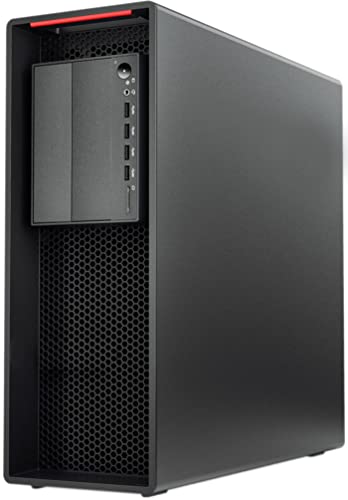
The PCSP P520 Workstation, powered by the Intel Xeon W-2135 processor, stands out as an excellent choice for professionals engaged in scientific computing. With a robust 6-core architecture and a clock speed of 3.70GHz, it delivers impressive performance. You’ll appreciate the 64GB DDR4 RAM, ensuring your applications run smoothly. Although storage and graphics aren’t included, you can customize it with your preferred drives and GPU. Featuring a 900W Platinum-certified power supply, it’s designed for efficiency. Rated 4.8 out of 5 stars by users, this workstation is reliable, making it a solid investment for your computational needs.
Best For: Professionals engaged in scientific computing who require a customizable and high-performance workstation.
Pros:
- High-performance with Intel Xeon W-2135 6-core processor and 64GB DDR4 RAM for smooth operation.
- Customizable storage and graphics options allow users to tailor the workstation to their specific needs.
- Efficient power supply with 900W Platinum certification ensures reliable performance and energy savings.
Cons:
- No storage or graphics included, requiring additional investment for drives and GPU.
- Limited customer feedback with only 9 ratings, which may not fully represent user experiences.
- Minor cosmetic issues noted by some users, which could affect aesthetic appeal.
MINISFORUM 795S7 Mini PC with AMD Ryzen 9 7945HX

For those in need of a powerful yet compact solution for scientific computing, the MINISFORUM 795S7 Mini PC stands out with its AMD Ryzen 9 7945HX processor, featuring 16 cores and 32 threads. With a base clock of 2.5GHz and a max boost of 5.4GHz, it delivers impressive performance alongside 32GB of DDR5 RAM and a 1TB PCIe 4.0 SSD. The integrated AMD Radeon 610M graphics handle visual tasks efficiently. Despite its small size, it accommodates future upgrades with additional slots, making it a versatile choice for demanding workloads while maintaining quiet operation and minimal noise.
Best For: Users seeking a powerful, compact mini PC for gaming, content creation, and scientific computing.
Pros:
- High-performance AMD Ryzen 9 7945HX processor with 16 cores and 32 threads.
- Ample upgrade options with additional RAM and storage slots for future needs.
- Quiet operation and efficient cooling, ideal for extended use.
Cons:
- Some users report issues with WiFi driver support on Linux.
- Internal assembly quality concerns and potential for errant screws.
- USB power output issues noted by some users.
Factors to Consider When Choosing Workstation PCs for Scientific Computing
When you’re choosing a workstation PC for scientific computing, several key factors come into play. You’ll want to take into account processor performance and cores, memory capacity and speed, as well as graphics card specifications. Additionally, think about storage options, speed, and effective cooling and power supply to guarantee peak performance.
Processor Performance and Cores
Choosing the right processor for your workstation is vital, as performance directly impacts your ability to tackle complex scientific computations. Opt for processors with higher clock speeds and more cores, as these will enhance your processing power for intricate calculations and simulations. Multi-core processors, featuring 12, 24, or even 96 cores, excel at parallel processing, allowing you to execute workloads faster in scientific applications. Also, consider the number of threads; more threads enable better multitasking, essential for running multiple simulations or data analyses at once. If your work involves AI or machine learning, specialized processors can dramatically speed up data processing and model training. Finally, newer processor architectures generally offer better efficiency and tailored instruction sets for scientific tasks.
Memory Capacity and Speed
Memory capacity and speed play a pivotal role in scientific computing, directly influencing your workstation’s performance. Large datasets demand significant RAM, so consider configurations between 32GB and over 512GB based on your tasks’ complexity. The speed of memory, measured in MHz, impacts data transfer rates and overall efficiency, with DDR4 and DDR5 options offering substantial bandwidth improvements. For critical calculations, ECC (Error-Correcting Code) memory is a solid choice, as it detects and corrects data corruption, ensuring reliability. Additionally, multi-channel memory configurations, like dual-channel or quad-channel setups, can enhance performance by facilitating simultaneous data access. Ultimately, your memory choice affects processing speed and the ability to run multiple applications efficiently, making it essential for your scientific workloads.
Graphics Card Specifications
Selecting the right graphics card is essential for enhancing your workstation’s performance in scientific computing. First, prioritize a GPU with a high amount of VRAM to handle large datasets and complex simulations without lag. Look for models supporting CUDA or OpenCL, as they enable parallel processing, speeding up computations considerably. Also, consider the architecture; newer designs often provide better performance per watt and improved features for AI and machine learning tasks. If you work with multiple monitors, a graphics card with several display outputs can boost your productivity. Finally, verify compatibility with the software and frameworks you use, as some applications are optimized for specific graphics card models or brands.
Storage Options and Speed
When it comes to scientific computing, having fast and reliable storage can make all the difference in your workstation’s performance. Opt for high-speed storage options like NVMe SSDs, which offer considerably faster data transfer speeds than traditional HDDs. A minimum of 1TB NVMe SSD storage is essential for efficiently managing large datasets and ensuring quick read/write operations during simulations. If your workstation has multiple drive bays, you can expand storage by combining high-capacity HDDs for archival purposes with fast SSDs for active tasks. Remember, slow storage can bottleneck CPU performance, so choose SSDs with high IOPS ratings. Additionally, consider utilizing RAID configurations to enhance data redundancy and speed, improving reliability in your scientific computations.
Cooling and Power Supply
As you engage in scientific computing, effective cooling and a reliable power supply are essential for maintaining peak performance. High thermal output during intensive tasks can cause throttling, so opt for workstations with efficient cooling systems that combine active methods like fans and passive solutions like heat sinks. You’ll also need a power supply rated between 750W to 950W to support your high-performance components, guaranteeing stability under heavy workloads. Look for units with an 80 PLUS Platinum rating, which minimizes energy waste and heat production. Finally, make certain your workstation’s airflow is optimized; good airflow prevents hotspots and guarantees all components receive adequate cooling, allowing your system to perform at its best during demanding computations.