When it comes to building your PC, the right case can make all the difference. Modular open frame PC cases offer flexibility in design and superior cooling efficiency, allowing you to showcase your components while optimizing airflow. Whether you’re a DIY enthusiast or a gamer, selecting the ideal chassis is essential. Let’s explore the top options available that cater to various motherboard sizes and offer unique features for your next build.
Stackable Open Air Computer Case Rack for ATX/MATX/ITX Motherboards
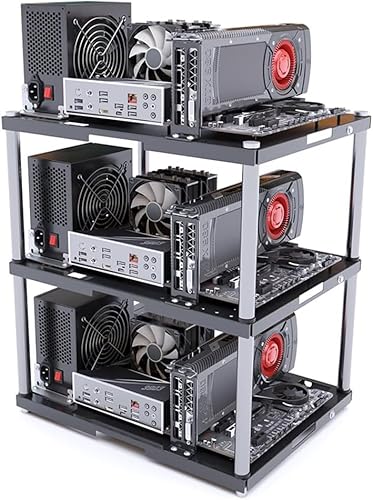
If you’re a DIY enthusiast or a gamer looking to build a custom rig, the Stackable Open Air Computer Case Rack for ATX/MATX/ITX motherboards is a perfect choice. This modular PC frame chassis supports up to 10 layers, promoting superior airflow for effective heat dissipation. Its heavy-duty metal construction can hold up to 20kg per layer, ensuring durability. The design is compatible with various motherboards, making it suitable for gaming rigs or professional workstations. With easy assembly and all necessary accessories included, you’ll find setting up a breeze, even if you’re a beginner. Enjoy the efficiency and flexibility this case offers!
Best For: DIY enthusiasts and gamers looking for a customizable and efficient computer case solution.
Pros:
- Modular design allows for stacking up to 10 layers, enabling customization for various projects.
- Heavy-duty metal construction supports up to 20kg per layer, ensuring stability and durability for heavy components.
- Easy assembly with included accessories makes it beginner-friendly for those new to building PCs.
Cons:
- Limited customer ratings (3.0 out of 5 stars) suggest mixed feedback on quality and performance.
- Price includes only one layer, with additional layers sold separately, which may increase overall costs for larger setups.
- Open air design may expose components to dust and debris, potentially requiring more maintenance.
E02 DIY Computer Case PC Frame Chassis

The E02 DIY Computer Case PC Frame Chassis is perfect for builders who prioritize versatility and cooling efficiency. Its stackable design allows you to arrange up to ten layers horizontally or vertically, fitting ATX, MATX, and E-ATX motherboards. With dimensions of 435mm x 430mm x 195mm, it offers ample space for cooling, featuring eight 120mm fan mounts and room for multiple radiators, including a 360mm option. You’ll also find two HDD and four SSD mounting positions for your storage needs. Included accessories like a power switch and motherboard spacer wrench guarantee a smooth build experience.
Best For: Builders seeking a versatile and efficient cooling solution for their custom PC setups.
Pros:
- Stackable design allows for up to ten layers, optimizing space in various configurations.
- Ample cooling options with eight 120mm fan mounts and multiple radiator positions for superior thermal management.
- Compatibility with multiple motherboard sizes (ATX, MATX, E-ATX) provides flexibility for different builds.
Cons:
- Open air design may not be suitable for environments with dust or pet hair, requiring regular maintenance.
- No enclosed structure can result in higher noise levels compared to traditional cases.
- Limited storage options with only two HDD and four SSD mounting positions, which may not meet the needs of storage-heavy users.
DIY PC Test Bench Open Chassis Case Rack for ATX/M-ATX/ITX Motherboards

For those seeking a versatile and accessible way to build or test their PC components, the ALAMENGDA DIY PC Test Bench stands out as an ideal choice. This open chassis case rack supports ATX, M-ATX, and ITX motherboards, featuring a robust 0.8mm SPCC steel construction. Weighing only 2.6 pounds, it offers a minimalist design that highlights your components while ensuring excellent airflow. Assembly is straightforward, although some instructions are in Chinese. Priced around $18.99, it delivers great value for custom builds and component swapping, making it a popular choice among PC enthusiasts with an average rating of 4.4 stars.
Best For: PC enthusiasts and builders looking for an affordable and efficient open chassis solution for testing and custom builds.
Pros:
- Sturdy construction with high-quality 0.8mm SPCC steel for durability.
- Excellent airflow design promotes effective cooling during tests and builds.
- Easy assembly process, ideal for both novice and experienced users.
Cons:
- Assembly instructions are partially in Chinese, which may be confusing for some users.
- Limited space for water cooling setups, requiring potential modifications.
- Open-air design may not suit those looking for a traditional enclosed case aesthetic.
Geeek Open Type Computer Case (Min-ITX)

Designed for enthusiasts seeking flexibility and creativity in their builds, the Geeek Open Type Computer Case (Min-ITX) offers a compact, modular framework that enhances functionality. With dimensions of 210 x 150 x 410 mm, it occupies minimal space while providing an open chassis design for superior heat dissipation. Weighing just 1.1 kg, its lightweight acrylic construction makes assembly a breeze. You’ll find compatibility with 17 x 17 cm Min-ITX motherboards and SFX power supplies up to 100 mm in length. For added convenience, you can reach out to the seller for hardware assistance, ensuring your build meets your needs.
Best For: Enthusiasts seeking a compact and modular chassis for creative PC builds.
Pros:
- Lightweight and compact design makes it easy to fit in small spaces.
- Open frame structure improves airflow and heat dissipation during operation.
- User-friendly assembly allows for straightforward setup and customization.
Cons:
- Limited compatibility with specific motherboard and power supply sizes.
- Lacks enclosed design, which may not appeal to those who prefer a traditional case.
- Additional components such as PCIE-riser and power supply are not included, potentially increasing overall costs.
Open Air PC Case for ATX MATX ITX Motherboards

Looking for a versatile PC case that caters to various motherboard sizes? The Open Air PC Case is perfect for you, supporting ATX, Micro ATX, and ITX motherboards. With graphics card dimensions unrestricted, you can fit powerful components without worrying about space. It accommodates standard ATX power supplies and allows for one HDD and SSD installation. Constructed from durable 0.8 mm SPCC and finished with a sleek black sandblasted paint, this case not only looks great but also guarantees peak airflow. Its compact size makes it easy to fit in any setup, enhancing your customization and cooling efficiency.
Best For: DIY PC builders and enthusiasts looking for a flexible and efficient cooling solution for various motherboard sizes.
Pros:
- Supports multiple motherboard sizes (ATX, Micro ATX, ITX) and unrestricted graphics card dimensions for enhanced compatibility.
- Made of durable 0.8 mm SPCC material with a stylish black sandblasted finish, ensuring both strength and aesthetics.
- Provides excellent airflow and easy access for upgrades and maintenance, making it ideal for overclocking and testing setups.
Cons:
- Open air design may expose components to dust and debris, requiring more frequent cleaning.
- Lacks a traditional enclosure, which might not appeal to users preferring a more enclosed and secured case.
- Limited storage options with support for only one HDD and SSD, which may not be sufficient for users with extensive storage needs.
DIY Open Frame PC Chassis, Aluminum Computer Case

Modular Open Frame PC Cases are perfect for DIY enthusiasts who crave customization and superior airflow in their builds. The DIY Open Frame PC Chassis, made from aluminum, supports various motherboard sizes, including ATX, MATX, and EATX. You’ll enjoy the flexibility to personalize your setup with unlimited length graphics cards and multiple power supply formats like ATX and SFX. Plus, it accommodates both air and water cooling solutions, ensuring excellent heat dissipation for even the most demanding systems. This case provides everything you need to create a powerful, efficient, and unique gaming or workstation rig.
Best For: DIY enthusiasts looking for a customizable and high-performance PC chassis that supports advanced cooling solutions.
Pros:
- Supports a wide range of motherboard sizes (ITX, MATX, ATX, EATX), allowing for diverse build options.
- Unlimited length graphics card accommodation provides flexibility for high-end GPU setups.
- Compatible with various power supply formats (ATX, SFX, 1U), enhancing versatility for different configurations.
Cons:
- Open frame design may expose components to dust and damage, requiring more maintenance.
- Lack of enclosed structure may not appeal to users seeking a more traditional case aesthetic.
- Potential for noise from components being more audible in an open setup compared to enclosed cases.
PC Creative Assembly Frame Test Bench (EATX)

For those seeking high compatibility and flexibility in their PC builds, the PC Creative Assembly Frame Test Bench (EATX) stands out as an excellent choice. It supports various motherboard sizes, including EATX, ATX, M-ATX, and ITX, along with ATX and SFX power supplies. Its aluminum alloy construction guarantees stability, and the open design promotes efficient heat dissipation. You can install up to two water-cooling systems, with adjustable positions for added versatility. Just keep in mind that air-cooled CPUs may face height restrictions. With independent graphics card support, this frame offers the ultimate customization for your setup.
Best For: Enthusiasts looking for a highly customizable and versatile PC build experience.
Pros:
- Supports multiple motherboard sizes (EATX, ATX, M-ATX, ITX) for wide compatibility.
- Open design enhances heat dissipation, ensuring optimal performance.
- Adjustable water cooling positions allow for personalized cooling solutions.
Cons:
- Air-cooled CPUs are incompatible with ITX and M-ATX due to height restrictions.
- Repositioning of water cooling components may be necessary for longer graphics cards.
- Independent graphics card support requires optional accessories for full functionality.
DIY Computer Case PC Frame Stackable Rack Stand for ATX ITX Motherboards

If you’re a DIY enthusiast or a tech-savvy user seeking flexibility in your PC build, the Yeiwenl DIY Computer Case PC Frame is an ideal choice. This stackable rack stand supports various motherboard sizes, including ATX and ITX, and features an open-air design for easy access and customization. You can stack up to 10 layers, perfect for multi-system setups. With ample cooling options, including 8 fan mounts and various radiator placements, you’ll keep your components chill. While assembly is straightforward, some users report confusing instructions. Nonetheless, its durability and functionality make it a solid investment for any PC builder.
Best For: DIY enthusiasts and tech-savvy users looking for a flexible and customizable PC building experience.
Pros:
- Supports a wide range of motherboard sizes (ATX, ITX, E-ATX).
- Stackable design allows for multi-system setups and future expansion.
- Ample cooling options with multiple fan and radiator mounting positions.
Cons:
- Instructions can be confusing for some users during assembly.
- Issues reported with motherboard standoff threads.
- Limited HDD storage capacity compared to traditional cases.
DIY Gaming Computer Case for E-ATX/ATX/M-ATX/ITX Motherboards

Designed for enthusiasts who crave flexibility, the DIY Gaming Computer Case accommodates a range of motherboard sizes, including E-ATX, ATX, M-ATX, and ITX. Weighing just 3.08 pounds, it’s lightweight and easy to assemble with a Phillips head screwdriver. This open chassis supports standard ATX power supplies and offers space for two SSDs and two HDDs. You won’t face limits on GPU length or CPU cooler height, making customization a breeze. Plus, you can even wall-mount it to save space. With an average rating of 4.4 stars, it’s a top choice for gamers and builders alike.
Best For: Gamers and PC builders seeking a versatile and customizable case for various motherboard sizes.
Pros:
- Sturdy construction and lightweight design for easy handling.
- Ideal for bench testing components with straightforward assembly.
- Wall-mountable option for enhanced space-saving and aesthetics.
Cons:
- Minimal instructions provided may pose a challenge for beginners.
- Limited screws included for securing hard drives.
- Potential fitment issues with power supply installations.
PC Frame Test Bench for ITX ATX MATX Motherboards

The PC Frame Test Bench is an excellent choice for tech enthusiasts and professionals who frequently swap components or run multiple configurations. This open-air case supports ITX, ATX, and MATX motherboards, ensuring versatility. Its fully open design promotes rapid heat dissipation, safeguarding your components and prolonging their lifespan. Built from robust 20 aluminum and thick acrylic, it guarantees durability and stability. With two fan bays, one hard drive bay, and one PCI bay, you can customize your setup easily. Its compact size fits seamlessly on or under desks, making it ideal for various environments like offices, cafés, and homes.
Best For: Tech enthusiasts and professionals who frequently swap components or run multiple configurations.
Pros:
- Fully open design promotes rapid heat dissipation, enhancing component longevity.
- Constructed from durable materials, ensuring stability and resistance to rust.
- Compact size allows for easy placement in various environments without taking up much space.
Cons:
- Open-air design may expose components to dust and debris.
- Limited storage options due to compact design, which may not suit all users’ needs.
- Assembly may require additional effort compared to fully enclosed cases.
Factors to Consider When Choosing Modular Open Frame PC Cases:
When you’re choosing a modular open frame PC case, several key factors come into play. You’ll want to evaluate compatibility with your motherboard, available cooling options, and how easy it is to assemble. Additionally, think about the durability of the materials and whether the case offers stackability and expansion potential for future upgrades.
Compatibility With Motherboards
How do you guarantee that your modular open frame PC case fits your motherboard perfectly? Start by checking the case’s specifications for compatibility with various motherboard sizes—ATX, MATX, ITX, and E-ATX. It’s essential to verify the maximum dimensions of the case to make certain it accommodates your specific motherboard. Some cases offer horizontal and vertical stacking options, giving you flexibility for assembly and future upgrades. Don’t forget to examine the mounting options; different cases have unique motherboard standoff configurations that can affect installation ease. Finally, consider compatibility with your power supplies and cooling solutions, as these components must fit alongside your motherboard for peak performance. A careful review guarantees a smooth and efficient build process.
Cooling Options Availability
Choosing the right cooling options for your modular open frame PC case can greatly impact your system’s performance. Many of these cases feature multiple fan mounting options, with some supporting up to 8x 120mm fans, which enhances airflow and cooling efficiency. If you prefer water cooling, look for models that accommodate various radiator sizes, such as 1x 360mm and 2x 240mm, for advanced thermal management. The open-air design promotes superior heat dissipation, essential during intensive tasks. Additionally, some cases offer adjustable water cooling installation positions for flexibility in your cooling configurations. Don’t forget to check the maximum CPU cooler height, as some models allow up to 165mm, ensuring compatibility with a wide range of cooling solutions.
Assembly Ease and Process
As you immerse yourself in the world of modular open frame PC cases, it’s vital to reflect on how easily you can assemble your system. Look for cases that include all necessary accessories—like screws, standoffs, and tools—to simplify the process, especially if you’re a beginner. Clear and concise assembly instructions are a must; confusing guides can really slow you down. Also, consider cases that allow easy access to components, making modifications and upgrades a breeze. Evaluate the design for modularity; stackable frames can enhance customization while easing the assembly when adding layers. Finally, keep an eye on the overall weight of the case, as lighter frames are generally easier to handle during assembly.
Durability and Material Quality
Durability is a key factor when selecting a modular open frame PC case, as the materials used can greatly affect its longevity and performance. Look for cases made from heavy-duty metal or aluminum alloy; these materials can handle wear and tear while supporting heavier components. A thickness of at least 0.8 mm in steel plates is ideal for stability, resisting bending or flexing during use. Rust-resistant coatings, like black sandblasted paint, protect against corrosion and enhance durability. Guarantee the case has secure screw assembly and reinforced joints for structural integrity, providing a solid foundation for your hardware. While high-quality acrylic can add aesthetics and aid heat dissipation, pairing it with durable metal frames ensures overall strength and resilience.
Stackability and Expansion Potential
When considering a modular open frame PC case, stackability and expansion potential can greatly enhance your setup. You can support configurations of up to 10 layers, allowing ample room for multi-system setups or future upgrades. This design offers easy access to components while improving airflow, which is essential for cooling performance in stacked configurations. Many cases also accommodate various motherboard sizes, including ATX, MATX, and ITX, giving you flexibility for different builds. You can customize the stacking orientation, whether horizontal or vertical, optimizing space and enhancing aesthetics. Additionally, some models come with extra fan mounts and water cooling support, ensuring efficient thermal management even when stacked. This versatility makes stackable cases a smart choice for any enthusiast.