Good desktop speakers can make music, games, and creative work more enjoyable without taking over your desk. The right pair depends on your space, how you connect your PC, and whether you want convenient listening or a more analytical sound.
These 10 picks span compact multimedia speakers, Bluetooth bookshelf models, and powered nearfield monitors. Use the guide below to narrow down which type fits your setup.
Best 10 Studio Speakers for PC Picks for 2026
Best Compact Wireless Pick

- 66W RMS stereo pair
- USB-C, AUX, and Bluetooth 5.3
- Angled desktop stands included
Best For: Small desks and flexible PC playback
Best Black Monitor with USB Audio

- Built-in 24-bit USB DAC
- Balanced TRS and front headphone jack
- Bluetooth 5.3 for casual playback
Best For: PC audio and compact production setups
Best White Desk Setup Pick

- White monitor cabinets
- 24-bit USB DAC and balanced TRS
- Front headphone output
Best For: White PC desks with mixed audio sources
Best for Room Tuning

- Adjustable high and low frequencies
- Balanced TRS, RCA, and front AUX
- Front headphone jack
Best For: Wired desktop listening with tonal control
Compact USB Pick
Sanyun SW208 Bookshelf Speakers
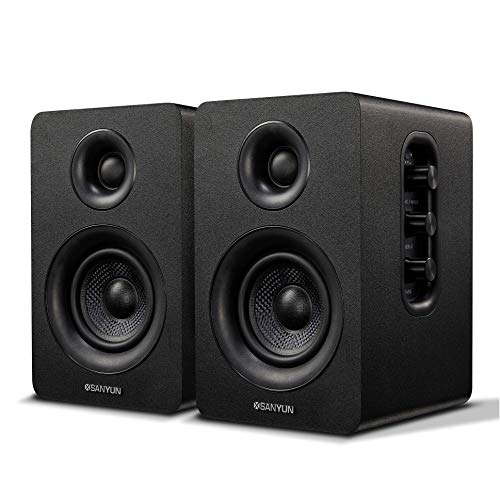
- Built-in 24-bit USB DAC
- Bluetooth 5.0 and 3.5 mm input
- Volume, bass, and treble controls
Best For: Compact PC desks and flexible everyday listening
Wired Studio Pick

- XLR/TRS, RCA, and stereo mini inputs
- Room control and high trim
- Compact 3.5-inch two-way design
Best For: Wired desktop music production and recording
Flexible Monitor Pick

- Balanced TRS plus RCA and AUX
- Bluetooth with multipoint support
- Three modes and app-based EQ
Best For: Mixed PC audio work and everyday listening
Compact Mixing Pick

- 3.5-inch desktop monitor pair
- Tone Knob and placement switch
- Pads and startup cables included
Best For: Small desks used for mixing and listening
Flexible Connection Pick

- Balanced TRS, RCA, AUX, and Bluetooth
- Three listening modes
- App-based EQ adjustments
Best For: PC setups shared across audio work and casual listening
Simple Wired Pick
Edifier R1280T Bookshelf Speakers
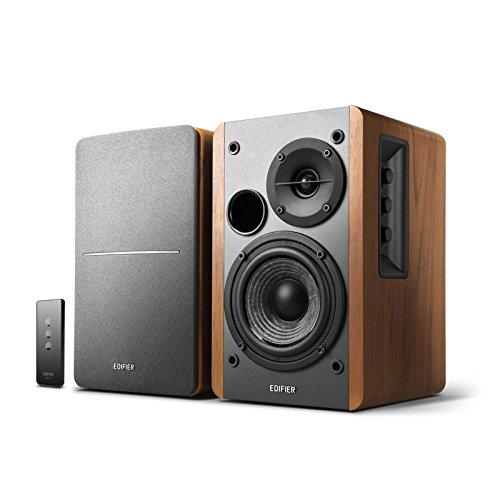
- Two wired audio inputs
- Side-panel bass and treble controls
- Remote volume control
Best For: Desktop listening with two wired sources
Best Compact Wireless Pick – Edifier M60
The Edifier M60 is a compact choice among studio speakers for pc setups where desk space and flexible playback matter. Its 66W RMS stereo pair combines 3-inch mid-low drivers, 1-inch silk-dome tweeters, and built-in DSP.
Best For: Small desks that need USB-C audio and high-resolution Bluetooth streaming.
Pros:
- Compact cabinets come with angled aluminum desktop stands.
- USB-C, AUX, and Bluetooth 5.3 offer several connection options.
- Supports LDAC streaming from compatible Android devices.
Cons:
- No balanced TRS input is listed for studio equipment.
- Touch controls may not suit buyers who prefer physical knobs.
Choose the M60 for a tidy, versatile PC setup rather than one built around balanced studio connections.
Best Black Monitor with USB Audio – Ortizan C7 Black
The black Ortizan C7 pairs practical studio speakers for pc use with a built-in 24-bit USB DAC. Its 3.5-inch carbon-fiber drivers, 0.75-inch silk-dome tweeters, and electronic two-way crossover are designed for balanced desktop listening.
Best For: PC users who want USB audio alongside connections for compact music-production gear.
Pros:
- USB audio, balanced 6.35mm TRS, RCA, AUX, and Bluetooth 5.3 provide connection flexibility.
- Front headphone output makes private monitoring convenient.
- Manufacturer describes tuning aimed at a flat response.
Cons:
- Bluetooth is convenient for playback, but wired inputs are the more practical choice for monitoring.
- The supplied notes do not specify frequency-response measurements.
The C7 stands out when one black desktop pair needs to handle both everyday PC audio and wired production equipment.
Best White Desk Setup Pick – Ortizan C7 White
The white Ortizan C7 gives buyers looking for studio speakers for pc a lighter-looking desktop option without giving up wired input choices. It combines 3.5-inch carbon-fiber drivers, 0.75-inch silk-dome tweeters, and a built-in 24-bit USB DAC.
Best For: White PC setups that also need inputs for an audio interface or mixer.
Pros:
- Balanced 6.35mm TRS inputs accommodate compatible studio gear.
- USB, RCA, AUX, and Bluetooth 5.3 support varied audio sources.
- Front headphone output allows quick switching to private listening.
Cons:
- The supplied notes do not provide measured frequency-response figures.
- Bluetooth is better suited to convenient listening than critical wired monitoring.
If cabinet color matters as much as flexible connections, this C7 offers the listed monitoring-oriented features in white.
Best for Room Tuning – PreSonus Eris 3.5
The PreSonus Eris 3.5 is a wired stereo pair of studio speakers for pc desks where adjusting sound to the room is useful. Its 3.5-inch woven-composite woofers, 1-inch silk-dome tweeters, and 50W built-in amplification suit close-up listening.
Best For: Desktop music work, gaming, and everyday audio where manual tonal adjustment matters.
Pros:
- High- and low-frequency controls let you adjust the sound for your space.
- Balanced 1/4-inch TRS, RCA, and front AUX inputs cover common wired sources.
- Front volume control and headphone jack are convenient at a desk.
Cons:
- No Bluetooth connection is described in the product bullets or listed inputs.
- The specified 80 Hz–20 kHz range may leave listeners wanting more low bass.
Pick the Eris 3.5 when straightforward wired monitoring and hands-on room tuning matter more than wireless playback.
Compact USB Pick – Sanyun SW208 Bookshelf Speakers
The Sanyun SW208 is a compact option for shoppers comparing studio speakers for pc who want easy desktop connectivity. Its built-in 24-bit DAC handles digital audio over USB, while Bluetooth 5.0 and a 3.5 mm input offer other ways to listen.
Best For: Small PC desks where USB audio and adjustable sound matter more than dedicated studio-monitor inputs.
Pros:
- USB connection uses a built-in 24-bit DAC.
- Bluetooth 5.0 and 3.5 mm auxiliary input add flexibility.
- On-speaker volume, bass, and treble controls.
Cons:
- No balanced studio inputs are listed.
- Requires AC power.
Choose the SW208 for convenient everyday PC listening and hands-on tone adjustment; its listed connections make it a less direct fit for a balanced studio setup.
Wired Studio Pick – Yamaha HS3 Powered Monitors
The Yamaha HS3 pair suits buyers seeking studio speakers for pc with wired monitoring connections. Each compact two-way speaker design uses a 3.5-inch woofer and 0.75-inch tweeter, while room control and high trim let you adjust its response for your space.
Best For: Desktop music production and studio recording setups that need wired inputs.
Pros:
- XLR/TRS combo, RCA, and stereo mini inputs accommodate different sources.
- Room control and high trim provide response adjustments.
- Includes a stereo mini-to-RCA cable, speaker cable, and anti-slip pads.
Cons:
- No wireless connectivity is listed.
- Its stated frequency response starts at 70 Hz (-10 dB), so deep bass may call for another solution.
The HS3 is the straightforward wired choice here if monitoring controls and connection options take priority over Bluetooth convenience.
Flexible Monitor Pick – Edifier MR3 Powered Monitors
The Edifier MR3 blends monitoring features with everyday convenience for buyers comparing studio speakers for pc. It offers balanced TRS, RCA, and AUX inputs alongside Bluetooth, plus Music, Monitor, and Custom sound modes.
Best For: PC users who switch between audio work and casual listening and want both wired and Bluetooth connections.
Pros:
- Balanced TRS, RCA, AUX, and Bluetooth support varied sources.
- Monitor, Music, and Custom modes offer listening choices.
- EDIFIER ConneX app provides EQ adjustments.
- Headphone output adds a convenient private-listening option.
Cons:
- Detailed EQ adjustments rely on the app.
- Requires corded power.
The MR3 is a versatile middle ground when you want monitor-oriented wired inputs without giving up Bluetooth or adjustable listening modes.
Compact Mixing Pick – Mackie CR3.5 Studio Monitors
The Mackie CR3.5 pair is a practical choice for studio speakers for pc when desk space is limited. Its 3.5-inch woofers and 1-inch tweeters suit a small workstation, while the Tone Knob lets you adjust the voicing without opening a menu.
Best For: Small-desk setups that alternate between mixing and everyday listening.
Pros:
- Tone Knob provides quick voicing adjustments.
- Location Switch adjusts bass for placement near a wall or farther into the room.
- Includes isolation pads and cables to get started.
Cons:
- Compact 3.5-inch woofers may not suit listeners who want a larger monitor.
- Listed connections are wired RCA and TRS, with no Bluetooth specified.
The placement switch is especially useful if your desk forces the speakers close to a wall. Choose this pair for hands-on sound controls and an included setup kit rather than wireless convenience.
The Edifier MR3 is a versatile option among studio speakers for pc if you want both wired monitoring inputs and Bluetooth listening. The powered pair combines 3.5-inch mid-low drivers with balanced TRS, RCA, and AUX inputs, plus a headphone output.
Best For: PC users who switch between audio work, casual listening, and multiple devices.
Pros:
- Balanced TRS, RCA, AUX, and Bluetooth 5.4 offer several connection options.
- Music, Monitor, and Custom modes let you change the sound for different uses.
- EDIFIER ConneX app provides additional EQ adjustments.
Cons:
- App-based adjustments may be less convenient if you prefer all sound controls on the speakers.
- The 3.5-inch drivers may not be your preference if you want larger monitors.
The MR3 makes sense when connection flexibility matters as much as monitoring features. Its modes also give you a straightforward way to move between editing and everyday playback.
The Edifier R1280T offers a straightforward wired option for shoppers comparing studio speakers for pc. Its powered bookshelf design uses a 4-inch full-range unit and 13mm silk-dome tweeter, with side-panel bass and treble controls for quick adjustments.
Best For: Desktop listening setups that need two wired audio sources and simple controls.
Pros:
- Two inputs allow two devices to remain connected.
- Side-panel knobs adjust volume, bass, and treble.
- Included remote makes volume changes convenient from your seat.
Cons:
- Listed audio inputs are wired; Bluetooth is not specified.
- No balanced TRS input is listed for an audio interface.
Pick the R1280T if easy source switching and accessible tone controls matter more than balanced monitoring connections. Its wood-effect finish also suits a setup where the speakers stay visible.
How We Picked the Best Studio Speakers for PC
We focused on powered pairs and compact desktop speakers that can serve a PC setup without a separate amplifier. The selection covers different priorities: small footprints, wireless convenience, flexible wired connections, and nearfield designs suited to sitting close to the speakers. We also included both budget-oriented choices and models aimed at listeners who put more weight on accurate sound. Manufacturer specifications help identify features, but they do not replace listening in your own room.
Quick Comparison: Which Type Fits Your Desk?
If you want a straightforward upgrade for music, video, and games, start with multimedia or bookshelf speakers such as the Edifier M60, Sanyun SW208, or Edifier R1280T. If you also edit audio or want a more monitor-oriented setup, compare the PreSonus Eris 3.5, Yamaha HS3, Mackie CR3.5, Edifier MR3, and Ortizan C7 options. The Ortizan C7 appears in both black and white, while two selected Edifier MR3 listings may describe different configurations or listings; check the exact seller page before assuming their included features are identical.
Key Buying Factors for Studio Speakers for PC
Connections and Daily Use
Check your computer’s outputs before choosing speakers. A wired analog connection is usually the simplest option for a desktop PC; USB audio, if offered on the specific model, can be handy when your computer’s headphone jack is noisy. Bluetooth is convenient for switching to a phone or laptop, but a wired connection is generally the safer choice when you need consistent timing for editing or gaming. Look for accessible volume controls and a headphone output if you use headphones regularly.
Desk Size and Placement
Measure the space available on both sides of your monitor, including room for cables and rear-facing ports. Position the speakers at roughly equal distances from your listening position, with their tweeters near ear height where practical. Stands or isolation pads can help with placement and reduce desk vibrations, but they cannot fix a cramped or heavily reflective room.
Sound Priorities
Small speakers can deliver clear mids and useful stereo separation, but their bass depth is limited by cabinet size. For dialogue, calls, and casual listening, convenience and tonal balance may matter more than maximum output. For mixing or detailed editing, prioritize a consistent wired setup and learn how the speakers sound with familiar reference tracks. A monitor label alone does not guarantee neutral sound.
Who Should Buy Which Studio Speakers for PC?
Choose compact multimedia speakers if you want simple everyday PC audio and minimal desk clutter. Choose Bluetooth-equipped models if you regularly play audio from more than one device. Choose powered nearfield monitors if you sit close to your speakers and value detail for creative work. If your desk is large or you expect strong low bass, consider whether a larger speaker setup will fit; do not rely on wattage figures alone to predict how a pair will sound.