If you’re looking to enhance your audio quality, investing in a balanced XLR audio interface for your PC could be the solution you need. These devices offer superior sound fidelity and low latency, making them perfect for musicians, podcasters, and content creators alike. With so many options available, it’s essential to know which models stand out. Let’s explore the top contenders that can elevate your audio experience to new heights.
Focusrite Scarlett Solo 3rd Gen USB Audio Interface

If you’re a guitarist, vocalist, podcaster, or producer looking for an affordable yet high-quality audio interface, the Focusrite Scarlett Solo 3rd Gen USB Audio Interface is an excellent choice. It records and plays back studio-quality sound thanks to its 24-bit/192kHz AD-DA converters. With USB-C connectivity, it connects easily to your Mac or PC without needing external power. The high-performance mic pre-amps, including a switchable Air mode, guarantee your recordings sound bright. Plus, its compact design makes it portable. You’ll appreciate the included software bundle, featuring tools like Pro Tools Intro+ and Ableton Live Lite, enhancing your creative workflow.
Best For: Guitarists, vocalists, podcasters, and producers seeking an affordable, high-quality audio interface for recording and playback.
Pros:
- High-Quality Sound: 24-bit/192kHz AD-DA converters ensure professional audio quality.
- User-Friendly Design: Intuitive physical volume knobs and compact, portable build.
- Comprehensive Software Bundle: Includes popular tools like Pro Tools Intro+ and Ableton Live Lite for enhanced creativity.
Cons:
- Software Issues: Some users have reported driver and software compatibility problems with certain applications.
- Limited Outputs: Only two outputs may not be sufficient for more complex setups.
- No MIDI Support: Lacks MIDI connectivity for users needing to integrate MIDI devices.
MAONO USB Audio Interface for PC (PS22 Lite Black)

The MAONO USB Audio Interface for PC (PS22 Lite Black) is an excellent choice for musicians and content creators seeking high-quality audio recording without the complexity of professional setups. With 24-bit/192kHz recording and a dynamic range of 106dB, it captures sound with impressive clarity. You’ll enjoy the flexibility of using both condenser and dynamic microphones, thanks to the 48V phantom power. Plus, it comes with ProStudio Routing Software for seamless live streaming. Its compact design is perfect for portability, and plug-and-play functionality makes setup a breeze. Compatible with major DAWs, this interface elevates your sound effortlessly.
Best For: Musicians and content creators looking for a high-quality, portable audio interface for recording and live streaming.
Pros:
- High-resolution 24-bit/192kHz recording for clear and realistic sound.
- Supports both condenser and dynamic microphones with 48V phantom power.
- Compact and lightweight design with plug-and-play functionality for easy setup.
Cons:
- Limited to USB connectivity, which may not suit all setups.
- Some users may require additional cables for specific microphone types.
- The software may have a learning curve for those unfamiliar with audio routing.
Focusrite Scarlett Solo 4th Gen USB Audio Interface

For guitarists, vocalists, and producers seeking a high-quality recording solution, the Focusrite Scarlett Solo 4th Gen USB Audio Interface stands out with its impressive 120dB dynamic range. You’ll love the improved Air mode that enhances your vocals and guitars, adding presence and harmonic drive. Its lightweight design feels premium, while USB-C connectivity guarantees compatibility with various devices. You’ll appreciate the included software bundle with Pro Tools Intro+, Ableton Live Lite, and FL Studio Producer Edition, along with 24/7 support and a three-year warranty. With excellent sound quality and low latency, it’s perfect for all your recording needs.
Best For: Guitarists, vocalists, and producers looking for a high-fidelity recording interface with enhanced features.
Pros:
- Excellent sound quality and low latency for professional recordings.
- Includes a comprehensive software bundle with popular DAWs and effects.
- Lightweight design with premium build quality and USB-C connectivity.
Cons:
- Some users reported driver issues with specific games.
- Limited physical inputs for more complex recording setups.
- The Air mode may not suit all recording styles or preferences.
M-AUDIO M-Track Solo USB Audio Interface for Recording and Podcasting

Designed with portability and ease of use in mind, the M-Audio M-Track Solo USB Audio Interface is perfect for budding podcasters and musicians alike. It delivers 48 kHz audio resolution, ensuring high-quality recordings on both Mac and PC. With one combo XLR/Line input and one Line/Instrument input, you can easily connect various devices. The zero-latency monitoring feature enhances your recording experience, while the included MPC Beats software provides essential production tools. Weighing just 10.6 ounces, it’s durable and ready for on-the-go sessions. Ideal for beginners, it offers great value and positive sound quality ratings from users.
Best For: The M-Audio M-Track Solo is best for beginner podcasters and musicians looking for an affordable, high-quality audio interface for recording and streaming.
Pros:
- High audio resolution: Delivers 48 kHz audio quality for professional-sounding recordings.
- Portability: Weighing only 10.6 ounces, it’s easy to take on the go for recording sessions.
- User-friendly: Zero-latency monitoring and included software make it ideal for beginners.
Cons:
- Limited loopback functionality: Lacks the ability to record multiple tracks simultaneously.
- Basic features: May not meet the needs of advanced users looking for more complex functionalities.
- Compatibility issues: Some users may experience difficulties with specific software or devices.
USB Audio Interface for Recording Music
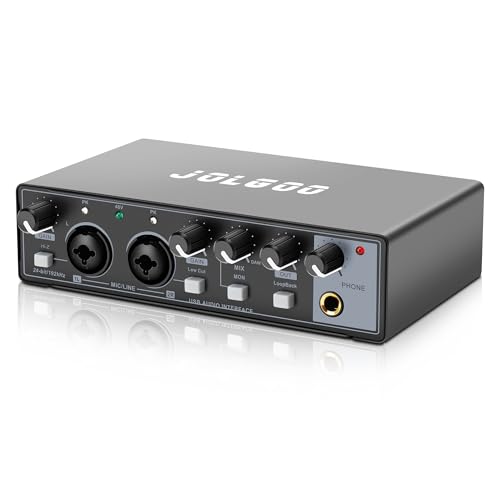
If you’re a musician or content creator looking to achieve studio-quality recordings at home, a USB audio interface is your best bet. With a resolution of 24-Bit/192kHz, it delivers studio-grade sound and high-fidelity audio conversion. Its plug-and-play compatibility makes setup a breeze on PCs, Macs, and smartphones. You’ll enjoy ultra-low latency and real-time monitoring, ensuring smooth feedback during recording sessions. Plus, dual combo XLR/LINE inputs with 48V phantom power cater to both dynamic and condenser mics. Compact and durable, this interface is perfect for beginners and home studio pros seeking professional results without the hassle.
Best For: Musicians, content creators, and producers seeking high-quality recordings at home without complex setups.
Pros:
- High-resolution 24-Bit/192kHz audio for studio-grade sound.
- Plug-and-play compatibility with PC, Mac, and smartphones for easy setup.
- Compact and durable design suitable for both beginners and professionals.
Cons:
- Limited to USB connectivity; may not suit users needing other connection types.
- Phantom power may not be necessary for users only using dynamic mics.
- Compact size might limit the number of inputs for larger recording setups.
M-AUDIO M-Track Duo USB Audio Interface for Recording and Podcasting

The M-AUDIO M-Track Duo USB Audio Interface is an excellent choice for anyone looking to elevate their recording, streaming, or podcasting game. With two combo XLR/line/instrument inputs and 48 kHz audio resolution, it delivers high-quality sound. Its compact size (4.34 x 7.5 x 2.13 inches) makes it portable, while the USB plug-and-play setup guarantees you can get started quickly on both Mac and PC. You’ll appreciate the zero-latency monitoring and the included software like MPC Beats. Just keep in mind that gain adjustments might be needed for different inputs, and its plastic build may not withstand heavy use.
Best For: The M-AUDIO M-Track Duo USB Audio Interface is best for aspiring musicians, podcasters, and streamers seeking a user-friendly and portable solution for high-quality audio recordings.
Pros:
- High-quality sound with 48 kHz audio resolution and crystal preamps for optimal clarity.
- Portable design at a compact size, making it easy to transport for on-the-go recording.
- User-friendly setup with plug-and-play compatibility for both Mac and PC, along with included software.
Cons:
- Frequent gain adjustments may be necessary for different inputs, which can be inconvenient.
- Limited output options as outputs are combined into a single signal, potentially unsuitable for all recording scenarios.
- Plastic construction may raise durability concerns for users who require heavy-duty equipment.
Elgato Wave XLR Audio Mixer and Preamp for XLR Mic to USB-C

For streamers and podcasters seeking a seamless connection between their XLR microphones and PCs, the Elgato Wave XLR stands out with its USB-C interface and advanced features. This compact audio mixer and preamp offers up to 75 dB of ultra-low-noise gain and 48V phantom power, ensuring crystal-clear audio. The Wave Link app allows you to manage multiple audio sources effortlessly. Plus, Clipguard technology prevents distortion, keeping your sound pristine. The tap-to-mute button provides quick access, while its lightweight design makes it portable. Just keep in mind it only supports one mic input, so plan accordingly!
Best For: Streamers and podcasters looking for a high-quality audio mixer and preamp with easy USB-C connectivity for their XLR microphones.
Pros:
- Offers up to 75 dB ultra-low-noise gain for clear audio quality.
- Clipguard technology effectively prevents microphone distortion.
- Wave Link app simplifies audio management for multiple sources.
Cons:
- Limited to a single mic input, which may require an XLR splitter for multiple microphones.
- Some users find the Wave Link app complex to navigate.
- Build quality primarily in plastic may not withstand heavy use.
FIFINE Gaming Audio Mixer with XLR Microphone Interface

Offering a robust XLR mic input with 48V phantom power, the FIFINE Gaming Audio Mixer (Model: AmpliGame SC3) is perfect for streamers and podcasters looking to elevate their audio quality. Weighing just 1.1 pounds, this compact mixer features four independent channels, allowing you to adjust your microphone, line in, headphone, and line out effortlessly. The front mute and monitor buttons provide easy access to manage background noise. With customizable sound effects and vibrant RGB lighting, you can enhance your streaming experience. It’s plug-and-play compatible with both Mac and Windows, making setup a breeze for any audio project.
Best For: Streamers and podcasters looking for an affordable audio mixer that combines ease of use with quality features.
Pros:
- Supports XLR microphones with 48V phantom power for enhanced audio quality.
- Four independent channels for precise audio control and adjustments.
- Plug-and-play compatibility with Mac and Windows for effortless setup.
Cons:
- Some users reported issues with static during playback.
- Non-linear volume control can be a concern for specific audio needs.
- Quality of customizable sound effects may vary among users.
Behringer U-PHORIA UM2 USB Audio Interface

Designed with aspiring musicians in mind, the Behringer U-PHORIA UM2 USB Audio Interface combines a studio-grade XENYX mic preamp with an impressive dynamic range, making it an outstanding choice for anyone looking to elevate their home recording setup. Weighing just 9.1 ounces and measuring 6.3 x 8.27 x 3.54 inches, it’s portable and easy to transport. With 48 kHz resolution and compatibility with popular DAWs like Pro Tools and Ableton Live, setup is a breeze. Users rave about its crystal-clear sound quality and intuitive controls, ensuring a seamless recording experience whether you’re at home or on the go.
Best For: Beginners and aspiring musicians looking for an affordable, portable audio interface that delivers high-quality sound.
Pros:
- Studio-grade XENYX mic preamp provides excellent sound quality with a wide dynamic range.
- Compact and lightweight design makes it easy to transport for recording on the go.
- Compatible with major DAWs and features plug-and-play functionality for quick setup.
Cons:
- Limited recording resolution at 48 kHz, which may not meet the needs of professional users.
- Only two inputs may be restrictive for users needing to record multiple sources simultaneously.
- Some users might prefer more advanced features and connectivity options found in higher-end models.
NearStream Audio Interface with Pro Preamp (AMIX40U)

The NearStream Audio Interface with Pro Preamp (AMIX40U) stands out as an ideal choice for musicians and content creators seeking a versatile and compact solution for their audio needs. This all-in-one interface features two XLR/6.35mm combo inputs, allowing you to connect microphones and instruments effortlessly. You’ll enjoy high-quality sound control with ultra-low-noise preamps, gain adjustments, and selectable sound modes. The 2-inch HD LCD screen makes navigation a breeze, while real-time monitoring guarantees precise audio adjustments. Compatible with various recording software, it’s perfect for PC and Mac users. Plus, it comes with essential cables and adapters for seamless setup.
Best For: Musicians, podcasters, and content creators looking for a compact and versatile audio interface for high-quality recordings and live streaming.
Pros:
- High-quality ultra-low-noise preamps with adjustable gain and sound modes for enhanced audio control.
- Real-time monitoring with low latency ensures precise adjustments during recording sessions.
- Compatible with various microphones and recording software, making it suitable for both PC and Mac users.
Cons:
- Requires an external power source for operation, which may limit portability.
- Limited to two XLR/6.35mm combo inputs, which may not be sufficient for larger setups.
- Some users may find the interface’s features overwhelming if they are new to audio recording.
Factors to Consider When Choosing Balanced XLR Audio Interfaces for PC
When you’re choosing a balanced XLR audio interface for your PC, there are several key factors to keep in mind. Audio quality standards, input and output options, and compatibility with your devices can make a big difference in your recording experience. Don’t forget to take into account portability, design, and any software features that could enhance your setup.
Audio Quality Standards
Choosing a balanced XLR audio interface for your PC involves several key audio quality standards that can greatly impact your recordings. Aim for interfaces rated at 24-bit resolution and sample rates up to 192 kHz, as these guarantee professional-grade sound. A dynamic range of at least 100 dB is important for capturing subtle details, allowing you to record both loud and soft sounds clearly. Low latency is vital too; look for interfaces with latency under 10 milliseconds for real-time monitoring. High-quality preamps with low noise and sufficient gain (50-75 dB) optimize sound capture from various mics. Plus, features like 48V phantom power are essential for powering condenser microphones effectively. These standards will elevate your audio quality considerably.
Input and Output Options
Selecting the right input and output options is vital for maximizing the functionality of your balanced XLR audio interface. First, consider the number of input options available, like combo XLR/Line inputs, which allow you to connect microphones and instruments simultaneously for diverse recording setups. Look for interfaces that provide phantom power (typically 48V) to support condenser microphones, enhancing your audio quality. Confirm your interface has headphone outputs for real-time monitoring, essential for making precise audio adjustments. Also, verify the types of output options, such as balanced TRS outputs, which deliver cleaner signals to speakers or mixers. Finally, evaluate additional features like USB/Direct monitoring switches for improved workflow between input monitoring and playback from your computer.
Compatibility With Devices
Understanding compatibility with various devices is essential for ensuring your balanced XLR audio interface performs at its best. First, make sure the interface works with your operating system, whether it’s Windows or macOS. This compatibility helps maintain seamless connectivity and functionality. Look for plug-and-play options that simplify installation, sparing you from lengthy driver downloads. It’s important to check if the interface integrates well with popular digital audio workstations (DAWs) you use. Additionally, consider interfaces that feature USB-C connectivity for better compatibility with modern devices and faster data transfer. Finally, verify that your chosen audio interface supports different microphone types, including dynamic and condenser mics, to meet your recording needs effectively.
Portability and Design
When you’re on the go, portability and design become essential factors in picking a balanced XLR audio interface for your PC. Aim for lightweight options weighing around 10-15 ounces to make transport easy. Compact dimensions, ideally between 1.5 to 5.5 inches, fit snugly in bags or backpacks. Durability matters too; choose interfaces made from sturdy materials that can handle frequent travel. A user-friendly layout with physical volume knobs and intuitive controls can considerably enhance your experience, making it easier to set up on the fly. Additionally, interfaces featuring USB-C connectivity allow for seamless connections to modern laptops, eliminating the hassle of extra adapters. Prioritize these features to guarantee you get the best portable audio solution.
Software and Features
As you explore balanced XLR audio interfaces for your PC, pay close attention to the software and features they offer, since these elements can greatly impact your recording experience. Look for interfaces that include a thorough software bundle, featuring popular DAWs like Pro Tools or Ableton Live. This enhances your versatility in recording and production. Confirm compatibility with ASIO drivers for low-latency output, essential for real-time monitoring. Consider dedicated routing software for effective audio management and intuitive modes tailored for recording, live broadcasting, or instrument input. Finally, check for extra features like phantom power for condenser mics, adjustable impedance settings, and customizable sound effects to elevate your recording quality and flexibility.