If you’re looking to boost your audio quality, choosing the right USB-C audio interface for your PC is essential. With options ranging from beginner-friendly models to professional-grade interfaces, you’ll find something that fits your needs. Each of these devices offers unique features designed to enhance your recording experience. So, what makes them stand out? Let’s explore the top contenders that can transform your sound production.
Focusrite Scarlett Solo 3rd Gen USB Audio Interface

The Focusrite Scarlett Solo 3rd Gen USB Audio Interface is an excellent choice for guitarists, vocalists, podcasters, and producers who want to capture studio-quality sound effortlessly. With high-performance mic pre-amps and 24-bit/192kHz converters, your recordings will shine. You’ll appreciate the two high-headroom inputs for your guitar or bass, along with Gain Halo metering that prevents distortion. It connects easily to your Mac or PC via USB-C, requiring no external power. Plus, the included software bundle, including Pro Tools Intro+ and Ableton Live Lite, provides you with everything you need to get started right away.
Best For: Guitarists, vocalists, podcasters, and producers looking for an easy-to-use audio interface that delivers studio-quality sound.
Pros:
- High-performance mic pre-amps with switchable Air mode for enhanced vocal clarity.
- 24-bit/192kHz audio quality ensures professional-grade recordings.
- Compact and portable design makes it ideal for travel and home studios.
Cons:
- Some users report software and driver compatibility issues with certain applications.
- Limited number of inputs may not be sufficient for larger recording setups.
- The included software may have a learning curve for beginners.
MAONO USB Audio Interface for PC (PS22 Lite Black)

For musicians and podcasters seeking high-quality audio without breaking the bank, the MAONO USB Audio Interface (PS22 Lite Black) stands out as an excellent choice. With 24-bit/192kHz recording and a dynamic range of 106dB, it captures sound with impressive clarity. You’ll appreciate its compatibility with both condenser and dynamic microphones, offering 48V phantom power and a dedicated guitar input. The compact design is portable and user-friendly, featuring a dynamic light ring for sound status and side headphone monitoring to reduce clutter. Plus, it’s plug-and-play compatible with Mac, Windows, and iPads, making setup a breeze.
Best For: Musicians and podcasters looking for an affordable yet high-quality audio interface for recording and streaming.
Pros:
- High-resolution recording at 24-bit/192kHz for clear sound quality.
- Compact and lightweight design makes it easy to transport and set up.
- Compatible with popular DAW software, ensuring versatility for various recording needs.
Cons:
- Limited advanced features compared to higher-end audio interfaces.
- No onboard effects or processing, which may require additional software for editing.
- May require additional adapters for specific microphone setups not supported directly.
IK Multimedia iRig USB Guitar Audio Interface

Looking for a compact audio interface that delivers high-quality sound without breaking the bank? The IK Multimedia iRig USB Guitar Audio Interface is your go-to solution. With studio-grade 24-bit 48 kHz resolution, it captures every note and nuance of your playing. Its universal compatibility allows you to connect easily to Mac, PC, iPad, and iPhone 15, thanks to the included USB-C cable. Plus, the headphone output and direct monitoring feature make silent practice a breeze. With a robust, portable design and a suite of recording software at your fingertips, you’re all set for creativity on the go.
Best For: Musicians and guitarists seeking a portable, high-quality audio interface for recording on Mac, PC, iPad, and iPhone 15.
Pros:
- High-quality sound with studio-grade 24-bit 48 kHz resolution captures every detail of your playing.
- Universal compatibility with various devices using the included USB-C cable for easy connectivity.
- Portable design makes it ideal for both studio use and on-the-go creativity.
Cons:
- Not compatible with lightning cable, limiting connectivity options for some iPhone models.
- Limited features compared to more advanced audio interfaces, which may not satisfy professional users.
- Requires additional software installation for optimal use, which may be a hurdle for beginners.
MOTU M2 USB-C Audio Interface

With its impressive 24-bit/192kHz audio resolution and two high-quality preamps, the MOTU M2 USB-C Audio Interface stands out as a top choice for both aspiring musicians and seasoned audio professionals. You’ll appreciate the clean, low-noise performance and warm, tube-like tonality, making it perfect for condenser mics. Its simple plug-and-play setup with Windows and macOS guarantees you can start recording in no time. Users rave about the clarity and build quality, while the loopback functionality makes streaming effortless. Weighing just 1.35 pounds, it’s portable yet robust, making it a solid investment for anyone serious about sound.
Best For: The MOTU M2 USB-C Audio Interface is best for aspiring musicians and seasoned audio professionals seeking high-quality audio performance in a portable design.
Pros:
- Excellent audio quality with 24-bit/192kHz resolution and low-noise preamps.
- Simple plug-and-play setup for both Windows and macOS, making it user-friendly.
- Robust build quality and portable design, ideal for on-the-go recording and streaming.
Cons:
- Some users may desire more control over input channels for complex setups.
- Lacks a complex software mixer, which may limit advanced users.
- The price point may be higher compared to entry-level interfaces.
Elgato Wave XLR Audio Mixer and Preamp

The Elgato Wave XLR Audio Mixer and Preamp stands out as an ideal choice for streamers and podcasters who demand high-quality audio without the hassle of complicated setups. This compact device connects via XLR to USB-C and offers compatibility with both Mac and PC. With features like Clipguard technology and a preamp gain of up to 75 dB, you’ll enjoy clear, distortion-free sound. The Wave Link app lets you manage multiple audio sources effortlessly. Plus, the capacitive tap-to-mute function guarantees quick access. While it has a single mic input, it remains a top pick for quality audio production.
Best For: Streamers and podcasters seeking high-quality audio with an easy-to-use setup.
Pros:
- High-quality audio with Clipguard technology preventing distortion.
- Easy integration with the Wave Link app for managing multiple audio sources.
- Convenient tap-to-mute function for quick audio control.
Cons:
- Limited to a single mic input, which may require additional equipment for multiple mics.
- Some users find the Wave Link app complicated to navigate.
- Build quality is primarily plastic, which may raise durability concerns.
USB Audio Interface for Recording Music (24-Bit/192kHz)
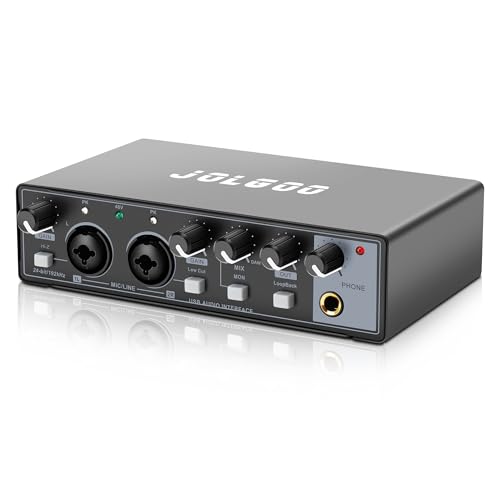
For musicians and content creators aiming for professional-quality recordings at home, a USB audio interface offering 24-Bit/192kHz resolution is an essential tool. With plug-and-play compatibility across PC, Mac, and smartphones, you can dive right into your projects without hassle. Experience studio-grade sound with ultra-low latency and real-time monitoring, perfect for tracking vocals or instruments. The dual combo XLR/LINE inputs support both dynamic and condenser mics, while LED peak indicators help you avoid clipping. Its compact design and sturdy metal housing make it a reliable choice, earning rave reviews for sound quality and ease of use from satisfied customers.
Best For: Musicians, content creators, and producers seeking professional-quality recordings in a home studio environment.
Pros:
- High-resolution 24-Bit/192kHz audio for professional sound quality.
- Plug-and-play compatibility with various devices, ensuring ease of use.
- Compact and durable design, ideal for portability and long-term reliability.
Cons:
- Limited to two inputs, which may not suffice for larger setups.
- Phantom power may not be suitable for all microphones, requiring additional equipment for some users.
- USB-C connectivity may require adapters for older devices without USB-C ports.
Shure MVX2U XLR-to-USB Digital Interface

Ideal for podcasters and musicians alike, the Shure MVX2U XLR-to-USB Digital Interface brings professional-grade features to your home studio setup. With an integrated pre-amp offering 60dB gain control and 48V phantom power, you’ll easily connect both dynamic and condenser mics. Its zero-latency monitoring via the built-in 3.5mm headphone jack guarantees you hear your audio in real-time. Plus, the compact design allows for versatile setups; you can plug it directly onto your mic or use it inline with an XLR cable. Compatibility with MAC and Windows makes it a future-proof choice for your audio needs.
Best For: Podcasters and musicians looking for a professional-grade audio interface that easily connects dynamic and condenser microphones to their home studio setup.
Pros:
- Integrated pre-amp with 60dB gain control, suitable for various microphone types.
- Zero-latency monitoring through a built-in 3.5mm headphone jack for real-time audio feedback.
- Compact design allows for versatile setup options, either directly on the mic or with an XLR cable.
Cons:
- Limited to USB connectivity, which may not suit users looking for more traditional audio interfaces.
- Dependent on power supply, requiring 48V phantom power for condenser mics.
- In-app updates may not be available immediately, limiting access to new features.
MOTU M4 4×4 USB-C Audio Interface

With its exceptional 4-in/4-out configuration and two high-quality microphone preamps, the MOTU M4 4×4 USB-C Audio Interface stands out as a top choice for musicians, podcasters, and gamers alike. You’ll appreciate its low latency and direct monitoring, ensuring real-time audio without delay. The built-in loopback functionality is great for streaming or capturing audio effortlessly. Plus, it’s bus-powered via USB-C, so you won’t need extra cables. Users rave about its sound quality and intuitive setup, making it a reliable option for both Mac and PC. With a solid construction and high-quality display, your audio experience will be elevated.
Best For: Musicians, podcasters, and gamers looking for a high-quality audio interface with low latency and intuitive setup.
Pros:
- High-quality sound with very low noise floor and excellent preamps.
- Easy to set up and compatible with Mac, PC, and iOS without driver issues.
- Built-in loopback functionality for seamless audio capture during streaming.
Cons:
- Some users report low gain levels for high-impedance headphones.
- Windows users may need to disable fast startup for optimal performance.
- Slightly more expensive than some other entry-level audio interfaces.
M-AUDIO M-Track Duo HD Audio Interface for Recording and Streaming

The M-AUDIO M-Track Duo HD Audio Interface stands out as a top choice for aspiring musicians and content creators seeking affordable, high-quality sound recording. With its compact design and lightweight build, it’s easy to integrate into your setup. You’ll appreciate the 24-bit/192kHz audio resolution, enabling crystal-clear recordings. The two combo inputs support various devices, from guitars to microphones, while phantom power lets you use condenser mics. Plus, zero-latency monitoring guarantees you hear exactly what you’re recording. With a user-friendly setup and included software bundle, you’ll be ready to create stunning audio right away.
Best For: The M-AUDIO M-Track Duo HD Audio Interface is best for beginner producers, session musicians, and podcasters looking for an affordable solution to achieve high-quality recordings.
Pros:
- Versatile inputs accommodate a wide range of devices including guitars, microphones, and keyboards.
- High audio resolution of 24-bit/192kHz ensures clear and detailed sound capture.
- Easy setup and integration with popular DAWs and recording software make it user-friendly.
Cons:
- Clipping adjustments can be challenging for some users.
- The sensitivity of the gain knob may lead to inconsistent adjustments.
- Some users have reported compatibility issues with older PC systems.
PreSonus Studio 24c USB Audio Interface

For musicians and podcasters seeking a reliable and compact solution, the PreSonus Studio 24c USB Audio Interface stands out with its 192 kHz recording capability and two XMAX-L mic preamps. This 2×2 interface offers simultaneous I/O, allowing you to connect your mic and instruments effortlessly. You’ll enjoy clean, ultra-high-def sound with superior 24-bit quality. The compact design is bus-powered and USB-C compatible, making it perfect for tight spaces. Plus, it comes with Studio One 6 Artist Edition and works seamlessly with popular DAWs. With a 4.6-star rating, users praise its sound quality and ease of use.
Best For: Musicians and podcasters looking for a compact and high-quality audio interface for recording and streaming.
Pros:
- Superior 24-bit, 192 kHz recording quality with XMAX-L mic preamps for clean sound.
- Compatible with popular DAWs and includes Studio One 6 Artist Edition for easy setup.
- Compact, bus-powered design makes it ideal for on-the-go recording and tight spaces.
Cons:
- Headphone jack location may be inconvenient for some users.
- Gain control layout might not be ideal for everyone.
- Limited to 2 inputs/2 outputs, which may not suffice for larger recording setups.
Factors to Consider When Choosing USB C Audio Interfaces for PC
When choosing a USB-C audio interface for your PC, you should consider several key factors. Audio quality resolution, input and output options, and device compatibility are all essential to guarantee the best performance for your setup. Additionally, think about the software bundles included and the build quality for long-lasting use.
Audio Quality Resolution
Choosing the right audio quality resolution is essential for achieving professional sound in your recordings, especially if you’re working with a USB-C audio interface. Audio quality resolution is measured in bits and kilohertz (kHz), with higher values indicating better fidelity. For example, 24-bit/192kHz is a standard in professional settings. The bit depth affects the dynamic range; 24-bit can deliver approximately 144 dB, capturing more detail in soft sounds and preventing clipping in louder signals. Meanwhile, a higher sample rate, like 192kHz, captures more audio detail than lower rates such as 44.1kHz. By opting for an interface that supports at least 24-bit/96kHz, you’ll guarantee ideal recording quality for your music production needs.
Input and Output Options
Achieving high-quality audio involves selecting the right USB-C audio interface, and one of the key aspects to evaluate is the input and output options. Consider how many inputs and outputs you need; interfaces usually range from 2-in/2-out to 4-in/4-out, giving you flexibility for connecting multiple instruments or microphones. Look for dual combo XLR/line inputs to accommodate both dynamic and condenser mics, and check for phantom power if you plan to use condenser mics. A headphone output with independent level control is essential for real-time monitoring during recordings. Additionally, evaluate MIDI inputs and outputs if you’re integrating MIDI devices, and verify the interface features zero-latency monitoring for ideal performance during recording sessions.
Compatibility With Devices
While selecting a USB-C audio interface, it’s essential to take into account its compatibility with your devices to guarantee a smooth recording experience. Most USB-C audio interfaces work well with various platforms, including Mac, PC, and iOS systems. Look for models that support plug-and-play functionality, allowing you to connect easily without extra drivers. Verify your operating system version, like Windows 10 or macOS 10.15 and newer, meets the interface’s requirements for peak performance. Additionally, check compatibility with popular digital audio workstations (DAWs), such as Pro Tools, Ableton Live, and FL Studio. If you use MIDI hardware, consider interfaces with MIDI connectivity to expand your recording options further.
Software Bundles Included
When selecting a USB-C audio interface, the included software bundles can greatly influence your recording experience. Many interfaces come with extensive packages like Pro Tools Intro+, Ableton Live Lite, and FL Studio Producer Edition, giving you essential tools for music production. You should also consider additional plug-in expansions that feature popular tools like Autotune and virtual instruments, which can enhance your creative possibilities. Software compatibility is vital; make sure your chosen interface integrates seamlessly with major digital audio workstations like Logic Pro and Cubase. Look for those that offer routing software for live streaming and extra virtual channels, as this versatility can greatly expand your audio applications. Ultimately, the quality of the included software impacts the overall value of your audio interface.
Build Quality and Durability
The software bundles included with your USB-C audio interface set the stage for your recording experience, but the build quality and durability of the device play a significant role in its long-term performance. When you’re choosing an interface, prioritize robust construction; metal designs typically offer more reliability than plastic counterparts. If you travel frequently, opt for a compact and lightweight model that doesn’t sacrifice functionality. User-friendly physical controls, like volume knobs and gain indicators, can enhance your experience while minimizing wear on components. Check customer feedback for insights on durability; higher-rated products often receive praise for their resilience under regular use. Investing in quality guarantees your audio interface stands the test of time, maintaining performance without degradation.
Latency and Monitoring Features
Choosing the right USB-C audio interface involves considering latency and monitoring features, as these factors directly impact your recording experience. Latency, the delay between audio input and output, is essential for real-time monitoring; lower latency is generally preferred for seamless performance. Many USB-C audio interfaces offer zero-latency monitoring, allowing you to hear your input signal instantly while recording. Interfaces with hardware monitoring capabilities help reduce your computer’s processing load, resulting in more stable performance. Look for adjustable monitoring options that let you blend your input signal with playback from your DAW, ensuring ideal recording conditions. Additionally, dedicated headphone outputs with sufficient power can enhance monitoring quality, providing clearer sound reproduction during your sessions.
User-Friendly Interface Design
Recording with a USB-C audio interface is more enjoyable and efficient when the design is user-friendly. Look for intuitive physical controls like volume knobs and switches, allowing you to make quick adjustments without getting lost in complex software. Clear visual indicators, such as LED peak meters, help you monitor audio levels and avoid clipping, enhancing your recording experience. A compact, lightweight design guarantees portability, making it easy to set up anywhere. Plug-and-play functionality means you can connect and start recording immediately, no complicated installations needed. Finally, an intuitive software interface complements the hardware, giving you straightforward access to settings and features, ultimately improving your efficiency during recording sessions. Choose wisely, and elevate your sound quality!