If you’re looking to enhance your audio setup, choosing the right 2-in/2-out audio interface can make a significant difference. Whether you’re a musician, podcaster, or content creator, the right interface can elevate your sound quality and streamline your workflow. With a variety of options out there, it’s essential to know what features matter most for your needs. Let’s explore some of the top choices that can transform your audio experience.
M-AUDIO M-Track Duo USB Audio Interface for Recording and Streaming

If you’re a budding musician, podcaster, or streamer looking for an affordable yet reliable audio interface, the M-AUDIO M-Track Duo USB Audio Interface might just be your perfect match. This compact device packs a punch with high-quality 48 kHz audio resolution, ensuring your recordings sound professional. It features two combo XLR/Line/Instrument inputs with phantom power, allowing you to connect various microphones and instruments. With zero-latency monitoring and included software like MPC Beats, setup is straightforward. Weighing only 12.7 ounces, it’s portable, making it ideal for on-the-go creators. Elevate your sound game effortlessly with the M-Track Duo!
Best For: Budding musicians, podcasters, and streamers seeking an affordable and reliable audio interface for high-quality recordings.
Pros:
- High-Quality Audio: Offers 48 kHz audio resolution for professional-sounding recordings.
- Easy Setup: Plug-and-play functionality with included software makes it user-friendly.
- Portability: Lightweight and compact design is perfect for creators on the go.
Cons:
- Gain Control Issues: May require frequent adjustments to avoid clipping with different inputs.
- Output Limitations: Combines outputs into a single signal, which may not suit all recording scenarios.
- Durability Concerns: Plastic construction may raise concerns about long-term durability for heavy use.
Universal Audio Volt 2 USB Recording Studio Audio Interface

The Universal Audio Volt 2 USB Recording Studio Audio Interface is perfect for musicians and podcasters seeking high-quality sound without breaking the bank. This 2-in/2-out interface supports up to 24-bit/192 kHz recording quality, ensuring your audio shines. With its vintage Mic Preamp mode inspired by UA’s 610 tube preamp, you’ll capture rich tones effortlessly. Plus, it comes bundled with the award-winning LUNA Digital Audio Workstation and access to UAD plug-ins. Users praise its sound quality and ease of use, though some report occasional power issues. Overall, it’s a solid choice for elevating your audio experience.
Best For: Musicians and podcasters seeking a high-quality, affordable audio interface for recording and streaming.
Pros:
- High-quality sound with 24-bit/192 kHz recording capability.
- Vintage Mic Preamp mode for rich tone capture.
- Bundled with LUNA DAW and access to UAD plug-ins for enhanced audio production.
Cons:
- Some users report power issues after extended use.
- Mixed experiences with customer support response times.
- Occasional app functionality problems reported by users.
AKLOT USB Audio Interface (24-bit/192 kHz)
Looking for a reliable audio interface that delivers professional sound quality without breaking the bank? The AKLOT USB Audio Interface is your answer. With a recording quality of 24-bit/192 kHz, this 2 In/2 Out interface is compatible with PC, Windows, and Mac. Weighing just 1.79 pounds and measuring 8.23 x 6.26 x 2.91 inches, it’s portable and easy to set up—no drivers needed for Mac users. Enjoy low-noise outputs and versatile instrument support. While some users report USB connection issues, most appreciate its solid build and sound quality, making it a smart choice for musicians and podcasters alike.
Best For: The AKLOT USB Audio Interface is best for musicians and podcasters looking for an affordable solution that provides professional sound quality.
Pros:
- Plug and Play functionality for Mac users, allowing for easy setup without the need for drivers.
- High recording quality of 24-bit/192 kHz, ensuring professional sound performance.
- Versatile inputs suitable for various instruments, including guitar, bass, and vocals.
Cons:
- Some users report USB connection reliability issues, which can affect performance.
- Occasional noise in output has been noted by certain users, impacting audio clarity.
- Driver setup challenges on Windows may create hurdles for some users.
Mackie Onyx Producer 2X2 USB Audio Interface

For musicians and content creators on the move, the Mackie Onyx Producer 2X2 USB Audio Interface stands out with its portable, bus-powered design, ensuring you can record high-quality audio anywhere without the hassle of carrying extra equipment. With two boutique-quality Onyx mic preamps and 24-bit/192kHz recording, it delivers impressive sound fidelity. The XLR/TRS combo inputs cater to various sources, while MIDI I/O allows seamless integration with controllers. Weighing just 1.3 pounds, it’s built to last. Users appreciate its reliability and ease of use, making it a solid choice for home studios or mobile setups. Elevate your audio experience with Mackie!
Best For: Musicians and content creators seeking a portable, high-quality audio interface for mobile recording and home studio setups.
Pros:
- Durable design: Built-Like-A-Tank construction ensures long-lasting use.
- High sound quality: Features boutique-quality Onyx mic preamps for impressive audio fidelity.
- Easy integration: Compatible with major DAWs and offers MIDI I/O for seamless connectivity with controllers.
Cons:
- Limited inputs: Only two inputs may not meet the needs of users requiring more channels.
- Output volume issues: Some users report lower output volume and gain levels compared to other interfaces.
- Compatibility concerns: Primarily designed for Windows users, which may limit options for Mac users.
MOTU M2 USB-C Audio Interface

With its impressive 24-bit/192kHz audio resolution, the MOTU M2 USB-C Audio Interface stands out as an ideal choice for audiophiles and content creators alike. You’ll appreciate the clean preamps and warm, tube-like tonality, perfect for condenser mics. The integrated ESS DAC guarantees vibrant sound without unwanted coloration. Plus, its 3x powerful headphone output easily drives low-impedance headphones. Setup is a breeze with plug-and-play functionality on both Windows and macOS. Users rave about its build quality and seamless operation, making it a top pick for recording and streaming. If you’re serious about sound, the M2 is worth considering.
Best For: The MOTU M2 USB-C Audio Interface is best for audiophiles and content creators seeking high-quality audio performance and seamless usability.
Pros:
- Excellent 24-bit/192kHz audio resolution providing clear and vibrant sound.
- User-friendly setup with plug-and-play functionality for both Windows and macOS.
- Robust build quality and design, praised for durability and professional feel.
Cons:
- Limited control over input channels may not satisfy users needing more flexibility.
- Basic software options might be too simplistic for advanced users.
- Slightly heavier than some competitors, which may affect portability.
USB Audio Interface for Recording Music
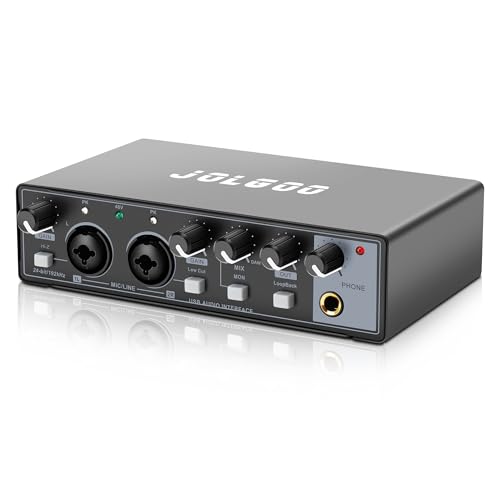
If you’re a musician or content creator seeking professional audio quality at home, a USB audio interface for recording music is an essential tool. With 24-bit/192kHz resolution and plug-and-play compatibility, you can easily connect it to your PC, Mac, or smartphone. Enjoy studio-grade sound with ultra-low latency and real-time monitoring. The dual combo XLR/line inputs support both dynamic and condenser mics, while LED peak indicators prevent clipping. Its compact design makes it portable, and it’s highly rated for sound quality and durability. This interface is perfect for achieving professional results in your home studio.
Best For: Musicians, content creators, and producers seeking professional audio quality in a home studio setup.
Pros:
- High-resolution audio with 24-bit/192kHz for studio-grade sound.
- Plug-and-play compatibility with various devices, making setup effortless.
- Compact and durable design, ideal for portability and reliable performance.
Cons:
- Limited to two inputs, which may not suffice for larger recording sessions.
- The reliance on USB power could be a limitation for some users.
- Some users may prefer additional control features that are not included.
RHM 2 In 2 Out USB Audio Interface (Model 2)

The RHM 2 In 2 Out USB Audio Interface (Model 2) stands out as an excellent choice for guitarists and vocalists looking to elevate their recording experience. With 48V phantom power, you can easily connect microphones and instruments through its combo input sockets. Enjoy professional studio quality at 24Bit/192kHz, enhancing your recordings while avoiding clipping and distortion. Real-time monitoring with zero latency guarantees accurate sound processing, making it perfect for podcasting, recording, and live streaming. This all-in-one interface also includes a studio-quality headphone amp and MIDI connections, providing everything you need for a seamless audio experience.
Best For: The RHM 2 In 2 Out USB Audio Interface is best for guitarists, vocalists, and podcasters seeking high-quality audio recording and monitoring capabilities.
Pros:
- Professional studio quality audio at 24Bit/192kHz enhances recordings.
- Real-time monitoring with zero latency ensures accurate sound processing during recording.
- Versatile connectivity options with combo input sockets for microphones and instruments.
Cons:
- May require additional setup for users unfamiliar with audio interfaces.
- Limited to 2 inputs and outputs, which may not be sufficient for larger projects.
- The reliance on phantom power may limit compatibility with certain microphones.
AKLOT 2 In 2 Out USB Audio Interface

For musicians and podcasters seeking high-quality sound on a budget, the AKLOT 2 In 2 Out USB Audio Interface stands out as a top choice. With its 24-bit/192 kHz sound card, you’ll achieve professional-sounding recordings. It features two high-headroom instrument inputs and outputs, accepting both XLR and ¼” jacks, so you can easily connect various instruments. The built-in headphone amplifier guarantees loud and detailed monitoring, while direct monitoring provides delay-free sound. Compatible with both Mac and Windows, it’s simple to set up, making it the perfect tool to elevate your audio game without breaking the bank.
Best For: Musicians and podcasters looking for an affordable audio interface that delivers high-quality sound.
Pros:
- 24-bit/192 kHz recording quality ensures professional sound for various audio projects.
- Multiple input options (XLR and ¼” jacks) offer versatility for connecting different instruments.
- Built-in headphone amplifier provides loud and clear monitoring for precise audio evaluation.
Cons:
- Windows setup requires additional software download, which may be inconvenient for some users.
- Limited to 2 inputs and outputs, which may not be sufficient for larger recording setups.
- Plastic casing may feel less durable compared to metal-bodied alternatives.
M-AUDIO M-Track Solo USB Audio Interface for Recording and Podcasting

Designed specifically for recording, streaming, and podcasting, the M-Audio M-Track Solo USB Audio Interface stands out as an ideal choice for beginners and intermediate users looking for a reliable, portable solution. With 48 kHz audio resolution, it guarantees high-quality recordings on both Mac and PC. You’ll appreciate the combo XLR/Line input with phantom power and an additional Line/Instrument input for versatility. It also features zero-latency monitoring for seamless tracking. Plus, it’s compatible with various devices and includes MPC Beats software, making it perfect for your audio projects. Weighing just 10.6 ounces, it’s easy to take wherever you go.
Best For: Beginners and intermediate users seeking a portable, high-quality audio interface for recording, streaming, and podcasting.
Pros:
- Compact and lightweight design for easy portability.
- High-quality 48 kHz audio resolution ensures clear recordings.
- Zero-latency monitoring allows for seamless tracking during recordings.
Cons:
- Limited capabilities for loopback recording of multiple tracks simultaneously.
- Some users may find the features basic compared to more advanced models.
- Phantom power is available only on one input, which may restrict certain setups.
Focusrite Scarlett 2i2 4th Gen USB Audio Interface

Offering studio-quality sound and advanced functionalities, the Focusrite Scarlett 2i2 4th Gen USB Audio Interface is an exceptional choice for musicians, podcasters, and streamers alike. With a 120dB dynamic range and ultra-low-noise mic preamps, it captures your audio beautifully. The Air mode enhances your vocals and guitars, delivering rich harmonics. It connects via USB-C, making it versatile for various devices. You’ll also enjoy a robust software bundle, including Pro Tools Intro+ and FL Studio. Users rave about its ease of use and sound quality, making the Scarlett 2i2 a top pick for achieving professional recordings without breaking the bank.
Best For: Musicians, podcasters, and streamers seeking high-quality audio recording and production without a hefty investment.
Pros:
- Studio-quality sound with a 120dB dynamic range and ultra-low-noise mic preamps.
- User-friendly software bundle including Pro Tools Intro+ and FL Studio, making it ideal for beginners.
- Durable design with a premium aluminum body and intuitive physical controls for easy operation.
Cons:
- Some users report occasional driver crashes with certain software, requiring a reboot.
- Limited support for advanced routing capabilities compared to higher-end models.
- The amp output may not be powerful enough for some professional headphones.
Factors to Consider When Choosing 2 in 2 Out Audio Interfaces for PC
When you’re choosing a 2 in 2 out audio interface for your PC, you’ll want to focus on a few key factors. Consider audio quality standards, connectivity options, and build durability to guarantee it meets your needs. Don’t forget about software compatibility and monitoring features, as these can greatly impact your recording experience.
Audio Quality Standards
As you plunge into choosing a 2 in 2 out audio interface for your PC, understanding audio quality standards is fundamental. Look for interfaces that support higher bit depths and sample rates, like 24-bit/192 kHz, which deliver superior sound fidelity. A dynamic range of 120dB or more is ideal since it guarantees clarity in both soft and loud recordings. Pay attention to the type of preamps; high-quality ones minimize noise and provide clearer signals. Low latency is essential for real-time monitoring, so aim for interfaces with latency below 10ms. Features like zero-latency monitoring and high-performance converters can elevate your sound quality, making them significant for music production and podcasting. Choose wisely for the best audio experience!
Connectivity Options Available
Choosing the right connectivity options can greatly impact your experience with a 2 in 2 out audio interface for your PC. Many interfaces support USB connectivity, ensuring compatibility with various devices like PCs, Macs, and mobile gadgets. If speed matters to you, look for USB-C connections that offer faster data transfer rates and improved power delivery. MIDI I/O capabilities also enhance your setup, letting you connect external MIDI controllers and synthesizers for versatile music production. Additionally, consider interfaces with zero-latency monitoring options, so you can hear your input signals in real-time during recording. Finally, multiple input options, such as combo XLR/line inputs, provide the flexibility you need for different microphones and instruments, catering to diverse recording needs.
Build Durability Considerations
Build durability is essential for guaranteeing your 2 in 2 out audio interface withstands the rigors of regular use and transportation. When evaluating options, consider the materials used in construction; metal interfaces typically offer better longevity than plastic ones. The weight of the interface can also be a good indicator of durability—heavier models often include robust components that resist wear and tear. Don’t forget to check user feedback for insights into long-term performance under regular use. Look for designs labeled as “Built-Like-A-Tank,” signaling ruggedness. Finally, pay attention to warranty periods; longer warranties often reflect the manufacturer’s confidence in their product’s durability. Choosing wisely will help guarantee your interface stands the test of time.
Software Compatibility Requirements
When selecting a 2 in 2 out audio interface for your PC, guaranteeing software compatibility is essential for a smooth recording experience. First, check that the interface supports popular Digital Audio Workstations (DAWs) like Ableton Live, Pro Tools, and Logic Pro. This guarantees seamless integration into your workflow. Next, verify compatibility with your operating system, whether it’s Windows, macOS, or mobile devices, to avoid any driver issues. Look for plug-and-play functionality that simplifies the setup process, allowing you to get started immediately. Additionally, some interfaces come with software bundles that can enhance your recording capabilities. Finally, guarantee the interface supports high-resolution audio formats like 24-bit/192 kHz for the best sound quality during recordings.
Monitoring Features Importance
After confirming your audio interface is compatible with your software and operating system, it’s time to focus on monitoring features that can greatly impact your recording experience. Zero-latency monitoring is vital, allowing you to hear input signals in real-time without delay, which is fundamental for precise performances. Look for direct monitoring options that let you switch between input signals and playback, enhancing flexibility during sessions. High-quality headphone outputs guarantee clear sound, aiding your mixing and recording decisions. Additionally, LED peak indicators help you avoid clipping by keeping audio levels ideal. Interfaces with dedicated outputs for studio monitors elevate your sound monitoring and mixing, making it easier to achieve professional-quality recordings. Choose wisely for the best results!