When your workstation needs serious storage, capacity, reliability, and interface speed matter more than flashy features. The right drive can keep large project files, media libraries, backups, and archives organized without constant juggling.
Below, we focus on large-capacity options that make sense for workstation use, whether you need plug-and-play external storage or a higher-end internal HDD for sustained workloads.
Best 10 Large Capacity Hard Drives for Workstation Storage Picks for 2026
Best High-Capacity Add-On Storage
WD Elements 18TB Desktop Drive

- 18TB of storage for backups and large archives
- USB 3.0 for fast transfers and easy compatibility
- Plug-and-play setup for Windows desktop use
Best For: Users who need a straightforward high-capacity external drive for workstation backups and archives.
Best Recertified Enterprise Value
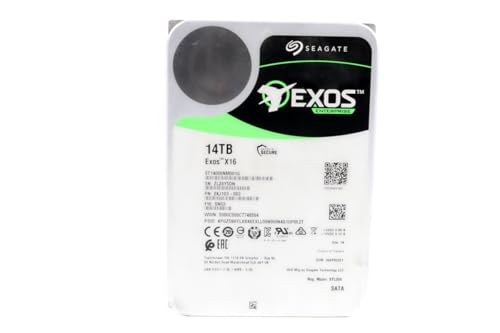
- 14TB enterprise-class storage
- 7200 RPM with 256MB cache
- Zero-hours recertified with 2-year warranty
Best For: Workstations needing affordable, high-capacity storage for archives, backups, and large project files.
Best for High-Capacity Desktop Storage
UnionSine 10TB Desktop Hard Drive

- 10TB capacity for backups and archived projects
- USB 3.0 desktop HDD with included power adapter
- Broad compatibility across PCs, Macs, TVs, and consoles
Best For: Workstation users who need a simple, high-capacity external drive for backups and media storage.
Best for Surveillance Workloads
Seagate SkyHawk AI 16TB Surveillance HDD

- 16TB high-capacity SATA storage
- Built for 24/7 write-heavy workloads
- Includes Health Management and Rescue Services
Best For: Workstations or storage systems that need dependable bulk storage for continuous recording or archiving.
Best for Easy Plug-and-Play Backups
Seagate Expansion Desktop 16TB

- 16TB desktop external drive for bulk storage
- USB 3.0 for quick drag-and-drop transfers
- Simple Windows/Mac setup with included recovery support
Best For: People who need a hassle-free external drive for workstation backups and large file archives.
Best High-Capacity Desktop Pick
UnionSine 16TB Desktop External HDD
- 16TB desktop external drive for backups and archives
- USB 3.0 with claimed 130-270MB/s transfer speeds
- External power and wide device compatibility
Best For: Workstation users who need a large, simple external storage drive for stationary backup and archive tasks.
Best High-Capacity SATA Pick
Seagate BarraCuda 8TB Internal HDD

- 8TB of storage for large projects and backups
- 5,400 RPM for quieter, lower-power desktop use
- 256MB cache and SATA 6 Gb/s support
Best For: Workstations and desktop PCs needing a simple high-capacity secondary storage drive.
Best Bus-Powered Desktop Drive
Seagate One Touch 8TB Desktop HDD

- 8TB capacity for backups, archives, and project files
- USB-C bus-powered design keeps the desk uncluttered
- Includes Rescue Data Recovery Services and 2-year warranty
Best For: Workstations that need high-capacity external storage with a single-cable setup.
Best Portable Pick
UnionSine 1TB Portable External Hard Drive

- Slim 2.5-inch build for easy portability
- USB 3.0 + Type-C for broad device compatibility
- Simple plug-and-play expansion for files and backups
Best For: Portable everyday storage for users who need quick expansion across multiple devices.
Best High-Capacity Add-On Storage – WD Elements 18TB Desktop Drive
For anyone comparing large capacity hard drives for workstation storage, the WD Elements 18TB desktop drive is a simple, no-fuss option that prioritizes space and reliability over extras. It connects over USB 3.0 for quick transfers, works as a plug-and-play drive on Windows PCs, and gives you plenty of room for backups, project files, and media libraries.
Best For: Users who need a straightforward 18TB external drive for backups, archive storage, and everyday workstation expansion.
Pros:
- Huge 18TB capacity for backup sets and large media or project archives
- USB 3.0 support for fast data transfers and broad compatibility
- Plug-and-play setup makes it easy to start using on Windows PCs
- Simple desktop design from a well-known storage brand
Cons:
- Desktop external drive, so it is not meant for portable use
- Focused on storage only, with no advanced features or hardware encryption
- Performance depends on USB connection and workflow needs
This WD Elements model is a strong fit if you want large capacity hard drives for workstation storage without paying for extra features you may not use. It is best suited to users who need dependable, high-volume add-on space for backups and archives.
Best Recertified Enterprise Value – Seagate Exos X16 14TB HDD
If you want large capacity hard drives for workstation storage without paying full new-drive pricing, this recertified Seagate Exos X16 delivers a lot of space and proven enterprise hardware. Its 14TB capacity, 7200 RPM speed, and SATA 6Gb/s interface make it a practical choice for bulk project files, media libraries, backups, and scratch storage.
Best For: Workstations that need affordable high-capacity storage for large datasets, archives, and backup-heavy workflows.
Pros:
- 14TB capacity is ideal for big local storage needs
- 7200 RPM and 256MB cache support solid desktop/workstation performance
- Manufacture recertified with zero hours usage
- 2-year warranty adds extra peace of mind
Cons:
- Recertified drive may not appeal to buyers who only want new hardware
- Enterprise design can be louder than consumer desktop drives
For buyers comparing large capacity hard drives for workstation storage, this model stands out as a value-oriented way to get enterprise-class capacity and speed. It is especially attractive when your priority is maximizing terabytes per dollar for reliable local storage.
Best for High-Capacity Desktop Storage – UnionSine 10TB Desktop Hard Drive
If you need large capacity hard drives for workstation storage without moving to a NAS, this UnionSine 10TB desktop HDD is built for bulk files, backups, and media libraries. Its 3.5-inch desktop design, USB 3.0 connection, and included power adapter make it a straightforward expand-and-store option for everyday office and creative workloads.
Best For: Users who want a simple, high-capacity external drive for workstation backups, project archives, and large media files.
Pros:
- 10TB capacity gives plenty of room for backups, footage, and archived projects
- USB 3.0 support helps move large files at practical everyday speeds
- Wide compatibility with Windows, Mac, Linux, Android, TV, DVD, and Xbox
- Desktop-style power adapter supports stable use for larger storage tasks
Cons:
- Requires external power, so it is less portable than a bus-powered drive
- Not the best choice if you need SSD-level performance for editing workflows
- Best suited to stationary setups rather than grab-and-go use
For buyers comparing large capacity hard drives for workstation storage, this model stands out as a no-frills, high-volume option that favors simplicity and compatibility over speed. It is a sensible pick when your priority is dependable space for backups, recordings, and long-term file storage.
Best for Surveillance Workloads – Seagate SkyHawk AI 16TB Surveillance HDD
If you need large capacity hard drives for workstation storage and your workflow includes constant writes, this 16TB Seagate SkyHawk AI is built more like a surveillance-grade utility drive than a general-purpose desktop disk. It’s a strong fit when you want high capacity, steady 24/7 operation, and hardware designed to keep up with heavy media or recording workloads.
Best For: Workstations or storage systems that need a high-capacity SATA drive for continuous, write-heavy use.
Pros:
- 16TB capacity with a 512MB cache for large storage pools
- Built for heavy workloads with support for up to 64 HD video streams and 32 AI streams
- SkyHawk Health Management and RAID RapidRebuild add useful protection features
- Includes a 5-year warranty plus 3 years of in-house Rescue Data Recovery Services
Cons:
- Surveillance-tuned design may be overkill for ordinary desktop storage
- Not the best choice if you want a fast SSD-like workstation boot drive
For buyers comparing large capacity hard drives for workstation storage, this model stands out more for reliability and sustained writes than for raw speed. It makes the most sense when your priority is dependable bulk storage for recording, archiving, or always-on systems.
Best for Easy Plug-and-Play Backups – Seagate Expansion Desktop 16TB
If you want a simple, high-capacity pick among large capacity hard drives for workstation storage, the Seagate Expansion Desktop 16TB is built for straightforward desktop backup and bulk file holding. It connects over USB 3.0, works out of the box with Windows and Mac, and keeps setup to a minimum for users who just need reliable extra space.
Best For: Users who want an easy external drive for archiving projects, backups, and overflow workstation files without a complicated setup.
Pros:
- 16TB of storage gives plenty of room for large media, project archives, and backups
- USB 3.0 support enables fast drag-and-drop transfers
- Plug-and-play design keeps installation simple on Windows and Mac
- Includes Rescue Data Recovery Services and a limited warranty
Cons:
- Requires external power, so it is not as portable as a bus-powered drive
- Needs reformatting for Time Machine use on Mac
For workstation users who care more about easy expansion than advanced features, this drive is a practical storage add-on. It fits well in a shortlist of large capacity hard drives for workstation storage when the goal is simple, dependable capacity for backups and files.
Best for NAS Workstations – Seagate IronWolf 12TB NAS HDD
If you need large capacity hard drives for workstation storage, the Seagate IronWolf 12TB is a strong fit for multi-user NAS setups that need steady performance and reliable uptime. Its CMR design, 7200 RPM speed, and 256MB cache make it a practical choice for shared files, projects, and backup-heavy workflows.
Best For: Teams, creators, and small offices building a high-capacity NAS for dependable shared storage.
Pros:
- 12TB capacity is well-suited to growing workstation storage needs
- CMR recording and 7200 RPM support consistent RAID/NAS performance
- IronWolf Health Management helps monitor drive condition over time
- Includes a 5-year limited warranty and Rescue Data Recovery service
Cons:
- Built for NAS use, so it’s not the cheapest option for basic storage
- May be more drive than you need if you only want a simple desktop backup disk
For buyers comparing large capacity hard drives for workstation storage, this model stands out for its NAS-first tuning and long-term reliability. It’s a better match for shared, always-on environments than for casual single-PC storage.
Best High-Capacity Desktop Pick – UnionSine 16TB Desktop External HDD
If you need large capacity hard drives for workstation storage without moving to a full NAS, this 16TB UnionSine desktop drive is built for bulk backups, media libraries, and project archives. It uses a 3.5-inch desktop form factor with external power, which is better suited to stationary setups that need lots of space and steady throughput.
Best For: Workstation users who want a simple, high-capacity external drive for backups, video files, and large project storage.
Pros:
- Generous 16TB capacity for archives, backups, and large media collections
- USB 3.0 support with claimed 130-270MB/s transfer rates for faster file moves
- Wide compatibility across Windows, Mac, Linux, Android, TV, DVD, and Xbox
- External power and anti-vibration design help support more stable desktop use
Cons:
- Not portable like a bus-powered 2.5-inch drive
- Requires both power and USB connections, so setup is less minimal
- Performance will not match SSD-based workstation storage
For buyers comparing large capacity hard drives for workstation storage, this model makes sense when space and simplicity matter more than speed. It is a practical choice for keeping big files accessible at a desk, especially if you want a straightforward plug-and-play archive drive.
Best High-Capacity SATA Pick – Seagate BarraCuda 8TB Internal HDD
If you need large capacity hard drives for workstation storage without moving to an enterprise-priced model, the Seagate BarraCuda 8TB is a straightforward desktop SATA option. It offers plenty of room for project files, media libraries, backups, and active work data, with a proven design that fits standard 3.5-inch bays.
Best For: Workstations and desktop PCs that need a simple, high-capacity secondary drive for storage-heavy tasks.
Pros:
- 8TB capacity is well suited for large file libraries and backup storage
- 5,400 RPM design helps keep power use and noise lower than faster desktop drives
- 256MB cache and SATA 6 Gb/s support make it a solid everyday storage drive
- Good fit for editing, gaming libraries, and general workstation expansion
Cons:
- Slower than higher-RPM drives for demanding scratch-disk workloads
- Frustration Free Packaging may not include extra accessories or cables
- Not ideal if you want an SSD-like response time
Overall, this BarraCuda is a practical choice if your priority is capacity first and speed second. For buyers comparing large capacity hard drives for workstation storage, it stands out as a budget-friendly, high-space SATA drive for everyday desktop expansion.
Best Bus-Powered Desktop Drive – Seagate One Touch 8TB Desktop HDD
If you want large capacity hard drives for workstation storage without adding another power brick to your desk, the Seagate One Touch 8TB Desktop HDD is built for simple, single-cable storage. Its USB-C bus-powered design keeps setup clean while giving you plenty of room for project files, backups, and archived work.
Best For: Creators, office users, and workstation owners who want a roomy external drive with minimal desk clutter.
Pros:
- 8TB of storage suits big backups and long-term file libraries
- Bus-powered USB-C means no wall adapter or extra outlet
- Works with most Windows and macOS setups
- Includes Rescue Data Recovery Services and a 2-year warranty
Cons:
- Hard drive speed is not as fast as an SSD for active editing
- Desktop form factor is less portable than compact pocket drives
As a practical pick among large capacity hard drives for workstation storage, this Seagate model focuses on convenience, capacity, and dependable backup rather than raw speed. It’s a smart fit if you want an affordable, clutter-free way to store large project libraries and archives.
Best Portable Pick – UnionSine 1TB Portable External Hard Drive
If you want a compact add-on rather than a heavy-duty desktop drive, the UnionSine 1TB portable HDD is a simple way to expand everyday file storage. It’s a practical fit for buyers comparing large capacity hard drives for workstation storage when portability, broad compatibility, and easy setup matter more than raw internal-drive performance.
Best For: Users who need a lightweight external drive for documents, media, backups, and quick transfers across PC, Mac, and consoles.
Pros:
- Thin 2.5-inch design makes it easy to carry between setups
- USB 3.0 and Type-C support improves compatibility with modern devices
- Plug-and-play setup keeps storage expansion fast and simple
- 1TB capacity is enough for routine backups, photos, videos, and project files
Cons:
- 1TB is modest for users with very large workstation archives
- Portable HDD speeds are slower than SSD-based storage
- Best suited to external file storage, not demanding scratch-disk workloads
Overall, this UnionSine drive makes sense if you need an affordable, grab-and-go storage layer rather than a high-end workstation array. For shoppers prioritizing large capacity hard drives for workstation storage in a compact form, it’s a straightforward pick for backups and general file management.
How We Picked the Best Large Capacity Hard Drives for Workstation Storage
For this roundup of Large Capacity Hard Drives for Workstation Storage, we prioritized usable capacity, workload suitability, interface type, spindle speed, cache, and overall value. We also looked at whether each drive is better suited to backup, active project storage, NAS-style use, or surveillance-style continuous recording.
Because workstation needs vary, we included a mix of external desktop drives and internal 3.5-inch HDDs so you can match the drive to your setup rather than forcing one category to do everything.
Quick Comparison
External desktop drives are the easiest choice if you want fast setup, simple backups, or portable handoff between systems. Internal drives generally make more sense if you are building a dedicated workstation bay, NAS, or always-on storage array. Higher-capacity models usually offer better cost per terabyte, while enterprise and NAS-class drives tend to be stronger choices for heavy write cycles.
Key Buying Factors for Large Capacity Hard Drives for Workstation Storage
Capacity and Growth Room
Choose more capacity than you need today. Workstation files tend to expand quickly with RAW photos, video projects, CAD assets, VMs, and backups. An 8TB drive may be enough for light use, while 12TB to 18TB gives more breathing room for long-term storage.
Internal Vs. External
External desktop HDDs are ideal for quick deployment and backup jobs. Internal drives are better for systems that need permanent storage, RAID, or round-the-clock access. If your workflow depends on repeated large transfers, internal enterprise or NAS drives are often the more durable choice.
Workload Type
For general desktop storage, a standard desktop HDD can be fine. For heavier multitasking, shared storage, or continuous operation, look for NAS, enterprise, or surveillance-oriented models designed for sustained workloads.
Speed and Connection
Most HDDs in this category use SATA internally and USB 3.0 or USB-C externally. These interfaces are the main limit on real-world transfer speed, so a faster connection and a healthy cache can help with larger file transfers, even though HDDs will not match SSD performance.
Who Should Buy Which Large Capacity Hard Drives for Workstation Storage?
If you want easy backup storage, choose an external desktop drive. If you need a primary internal archive or project repository, pick a large internal 3.5-inch HDD. If your workstation runs long sessions, serves files to multiple users, or stays on most of the time, prioritize NAS or enterprise-class options. For simple media libraries or occasional offloading, a standard high-capacity desktop drive is usually the most cost-effective path.
The best choice depends less on the biggest number on the box and more on how you use the drive day to day. Matching the drive class to your workload will improve reliability and make your workstation storage easier to manage over time.