A 32-inch 4K monitor gives your Mac mini room for side-by-side windows, detailed creative work, and a more comfortable desktop setup. The right choice depends less on the biggest feature list than on how you actually work.
These ten options cover everyday displays, faster 120Hz models, and color-focused screens. Below, we break down the trade-offs that matter most for a Mac mini.
Best 10 32 Inch 4K Monitors for Mac Mini Picks for 2026
Best for Smooth Creative Work

- 4K IPS at up to 120Hz
- Delta E < 1 factory calibration
- HDMI 2.1 and adjustable stand
Best For: Color-focused work with smoother desktop motion
Best Matte Mac-Matched Display

- Matte 4K IPS panel
- Mac-oriented P3 color tuning
- Two HDMI ports and adjustable stand
Best For: Matte-screen Mac mini desks that also serve a MacBook
Best for Work and Casual Gaming

- 4K at up to 120Hz
- Built-in speakers
- HDMI and DisplayPort inputs
Best For: Everyday work, entertainment, and casual gaming
Best Glossy Mac-Matched Display

- Glossy 4K IPS panel
- Mac-oriented P3 color tuning
- Two HDMI ports and adjustable stand
Best For: Glossy-screen Mac mini setups
Simple HDMI Pick
Samsung ViewFinity S7 32-Inch 4K

- 32-inch 4K IPS panel
- HDMI and DisplayPort inputs
- HDR10 and Eye Saver Mode
Best For: A straightforward HDMI-connected Mac mini workspace
Flexible Desk Setup

- HDMI, DisplayPort, and USB-C
- 65W USB-C laptop charging
- Adjustable stand and VESA support
Best For: A Mac mini desk shared with a USB-C laptop
Color-Critical Pick

- Factory-calibrated, 98% P3 color
- IPS Black with 2000:1 contrast
- Thunderbolt 3, USB hub, and KVM
Best For: Color-focused creative work on a Mac mini
Best Adjustable VA Pick

- 31.5-inch 4K VA display
- Height, tilt, and pivot stand
- HDMI and DisplayPort; no listed USB-C
Best For: Adjustable desktop setups that favor specified contrast
Best USB-C IPS Pick

- 31.5-inch 4K IPS display
- USB-C video and data connection
- Height, tilt, and pivot stand
Best For: IPS viewing and flexible connectivity
Best Slim Media Pick
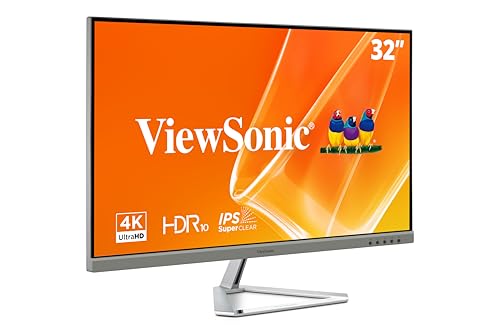
- 32-inch 4K MVA display
- HDMI, DisplayPort, and Mini DisplayPort
- HDR10 and task-specific presets
Best For: Slim work-and-media setups with varied video inputs
Best for Smooth Creative Work – INNOCN CB32U1
Among 32 inch 4k monitors for mac mini, the INNOCN CB32U1 stands out for pairing a 4K IPS panel with up to 120Hz refresh and factory-calibrated Delta E < 1 color accuracy. Its matte screen and adjustable stand suit a desk used for both creative work and everyday tasks.
Best For: Mac mini users who want accurate color and smoother-than-60Hz desktop motion.
Pros:
- Up to 120Hz at 4K, with a separate FHD 240Hz mode.
- Factory-calibrated Delta E < 1; specified 100% sRGB and 98% DCI-P3 coverage.
- HDMI 2.1, DisplayPort 1.4, USB-C with 90W power delivery, and height, swivel, tilt, and pivot adjustments.
Cons:
- Its 240Hz maximum applies to FHD, not 4K.
- The 90W charging feature is of limited use with a desktop Mac mini.
Choose this one if refresh rate and color specifications matter more to you than Mac-specific keyboard controls. Connect the Mac mini through a compatible video input; the USB-C charging benefit is primarily for laptops.
Best Matte Mac-Matched Display – BenQ MA320U
The BenQ MA320U is a matte-screen option among 32 inch 4k monitors for mac mini. Its 4K IPS panel offers P3 wide color and BenQ’s Mac-oriented color tuning, while two HDMI ports give a Mac mini a stated connection option.
Best For: Mac mini owners who prefer a matte 4K display and may also connect a MacBook.
Pros:
- Mac-oriented color tuning and P3 wide color gamut.
- Two HDMI ports plus two USB-C ports, including 90W and 15W power delivery.
- Height, tilt, swivel, and pivot stand adjustments.
Cons:
- Limited to 60Hz.
- The advertised single-cable charging and keyboard controls are described for MacBooks; do not assume the same experience with a Mac mini.
This is the practical pick if a matte finish and Mac-focused color presentation take priority over high refresh rates. Its laptop charging features add more value if your desk also hosts a MacBook.
Best for Work and Casual Gaming – Dell S3225QS
The Dell S3225QS gives shoppers comparing 32 inch 4k monitors for mac mini a 4K, up-to-120Hz option with a matte VA panel. Its HDMI and DisplayPort connections suit a desktop setup, and built-in speakers keep basic audio on the monitor.
Best For: Mac mini users who split their screen time between everyday work, video, and casual gaming.
Pros:
- Up to 120Hz refresh and AMD FreeSync Premium support.
- Specified 99% sRGB and 95% DCI-P3 coverage.
- Built-in speakers, height and tilt adjustment, and ComfortView Plus.
Cons:
- No USB-C connection is listed.
- The stand specifications list height and tilt, but not swivel or pivot.
Pick the Dell when you want smoother 4K motion and integrated sound without relying on USB-C. Its VA panel and feature mix make it a general-purpose choice rather than a Mac-specific display.
Best Glossy Mac-Matched Display – BenQ MA320UP
If you prefer a glossy finish, the BenQ MA320UP is a distinct choice among 32 inch 4k monitors for mac mini. It combines a 4K IPS panel, P3 wide color, and BenQ’s Mac-oriented color tuning, with two listed HDMI ports for desktop connectivity.
Best For: Mac mini users who specifically want a glossy 32-inch 4K screen with Mac-oriented color tuning.
Pros:
- Glossy 4K IPS panel with P3 wide color gamut.
- Two HDMI ports and two USB-C ports with 90W and 15W power delivery.
- Height, tilt, swivel, and pivot adjustments.
Cons:
- 60Hz refresh is less fluid than the 120Hz options here.
- A glossy screen may show more reflections in bright rooms.
- MacBook-focused charging and keyboard controls should not be assumed to work the same way with a Mac mini.
The MA320UP makes the most sense when the glossy screen is the deciding factor. If reflections are a concern, the matte MA320U offers a similar Mac-focused feature set.
Simple HDMI Pick – Samsung ViewFinity S7 32-Inch 4K
Among 32 inch 4k monitors for mac mini, the Samsung ViewFinity S7 is a straightforward choice if you want a large IPS workspace without paying for USB-C features you may not use. Its 3840 × 2160 resolution, matte screen, and 178-degree viewing angles suit everyday work and detailed projects.
Best For: Mac mini users who want a simple 4K display connected over HDMI.
Pros:
- 32-inch 4K IPS panel provides room for documents, diagrams, and editing timelines.
- HDMI and DisplayPort connections offer two display-input options.
- HDR10 support and Eye Saver Mode add useful viewing options.
Cons:
- No USB-C connection is listed.
- 60Hz refresh rate is less suited to buyers prioritizing high-refresh gaming.
Choose the S7 for screen space and uncomplicated connectivity; look elsewhere if a single-cable USB-C setup or faster refresh rate is essential.
Flexible Desk Setup – CUNPU Z32UI06-TE 32-Inch 4K
If you are comparing 32 inch 4k monitors for mac mini and also use a laptop, the CUNPU Z32UI06-TE offers several ways to connect. Its 4K IPS panel pairs HDMI 2.0 and DisplayPort 1.4 inputs with USB-C, while the adjustable stand helps tailor the viewing position.
Best For: Shared Mac mini and laptop desks that need flexible inputs and ergonomic adjustment.
Pros:
- HDMI, DisplayPort, and USB-C support different desk setups.
- USB-C carries video and provides up to 65W Power Delivery for a compatible laptop.
- Height, tilt, and swivel adjustment plus VESA 100 × 100 mm compatibility allow flexible placement.
- 4K IPS panel is specified with 100% DCI-P3 coverage.
Cons:
- Refresh rate tops out at 60Hz.
- The 65W laptop-charging feature offers no charging benefit to a Mac mini.
This is the more adaptable pick for a mixed-device workspace, especially when you can put its USB-C laptop connection and adjustable stand to use.
Color-Critical Pick – BenQ PD3225U 32-Inch 4K
For creatives shopping for 32 inch 4k monitors for mac mini, the BenQ PD3225U emphasizes color control over gaming speed. Its 4K IPS Black panel is specified at 2000:1 contrast, with 98% P3 coverage, factory calibration, and an M-Book mode designed for Mac-compatible color matching.
Best For: Mac mini-based graphic designers, photographers, and video editors who prioritize calibrated color.
Pros:
- Factory-calibrated color with 98% P3, 100% sRGB, and stated Delta E ≤ 2.
- IPS Black panel has a specified 2000:1 contrast ratio.
- Thunderbolt 3, daisy chaining, a USB hub, and KVM switching support a more connected workspace.
- Height, tilt, swivel, and pivot adjustments help with positioning.
Cons:
- 60Hz refresh rate is not aimed at high-refresh gaming.
- Specified brightness is 250 nits, worth considering for a brightly lit room.
The PD3225U makes the strongest case here for color-focused work. Its connectivity is useful for multi-device setups, though a Mac mini does not need the monitor’s laptop-charging capability.
Best Adjustable VA Pick – LG 32UR550K-B
Among 32 inch 4k monitors for mac mini, the LG 32UR550K-B is a practical choice if you want a spacious 4K screen with an adjustable stand. Its 31.5-inch VA panel, matte finish, and 3000:1 specified contrast ratio suit everyday work and entertainment.
Best For: Mac mini users who prioritize stand flexibility and strong specified contrast over USB-C connectivity.
Pros:
- Height, tilt, and pivot adjustments help position the screen comfortably.
- HDMI and DisplayPort inputs provide connection options.
- Supports HDR10 and up to 90% DCI-P3 color coverage.
Cons:
- No USB-C input is listed, so plan on an appropriate HDMI or DisplayPort connection.
- 60Hz refresh rate is less suited to buyers seeking high-refresh gaming.
This model makes the most sense when desk ergonomics and VA-panel contrast matter more than a single-cable setup. Its listed 250 cd/m² brightness is worth considering if your workspace is especially bright.
Best USB-C IPS Pick – LG 32UP83AK-W
If you’re comparing 32 inch 4k monitors for mac mini, the LG 32UP83AK-W stands out for its 31.5-inch IPS panel and USB-C input. It combines 4K display and data connectivity with up to 60W charging for supported devices, alongside HDMI and DisplayPort options.
Best For: Mac mini owners who want an IPS screen with USB-C connectivity and an adjustable stand.
Pros:
- IPS panel offers consistent viewing from a wide range of angles.
- USB-C supports 4K video and data transfer; an included USB-C cable simplifies setup.
- Height, tilt, and pivot adjustments make the white monitor easier to position.
Cons:
- Limited to a 60Hz refresh rate.
- Its 1000:1 specified contrast ratio is lower than the LG VA model listed here.
The USB-C port adds flexibility, though its 60W charging capability is more relevant to a laptop than a Mac mini. Choose this model chiefly for its IPS viewing characteristics and connection options.
Best Slim Media Pick – ViewSonic VX3276-4K-MHD
For shoppers considering 32 inch 4k monitors for mac mini, the ViewSonic VX3276-4K-MHD offers a slim 32-inch 4K display geared toward mixed work and media use. Its MVA panel supports HDR10, while built-in viewing presets let you switch between tasks such as text, web browsing, and movies.
Best For: Mac mini setups that need a slim 4K screen with multiple video inputs and viewing presets.
Pros:
- HDMI, DisplayPort, and Mini DisplayPort offer several connection choices.
- HDR10 support and Game, Movie, Web, Text, and Mono presets suit varied content.
- Flicker-Free technology and a Blue Light Filter provide viewing-comfort options.
Cons:
- No USB-C connection is listed.
- The supplied details do not specify height, tilt, or pivot adjustments.
This is a straightforward option if you value a slim profile and video-input variety. Check which cable your Mac mini setup needs, and don’t assume the stand offers ergonomic adjustments that aren’t specified.
How We Picked the Best 32 Inch 4K Monitors for Mac Mini
We prioritized 32-inch 4K models with a useful range of prices and features, then compared their stated panel type, refresh rate, connections, color-oriented features, and stand adjustability. We also considered whether each monitor makes sense with a desktop Mac mini rather than assuming laptop-focused features, such as high-wattage USB-C charging, are essential. Specifications alone cannot establish real-world color accuracy or HDR performance, so check independent measurements if those are critical to your work.
Quick Comparison
Start by matching the display to your main task. For design and color work, the BenQ PD3225U has the strongest stated creator-focused feature set, including IPS Black, Thunderbolt, and specified color coverage. The BenQ MA320U and MA320UP emphasize Mac-oriented controls and USB-C convenience. If smoother scrolling or gaming matters, compare the 120Hz INNOCN and Dell S3225QS; the INNOCN’s advertised 240Hz mode is at FHD rather than 4K. For general productivity, the Samsung ViewFinity S7, CUNPU, LG models, and ViewSonic offer alternatives worth comparing by price, ports, and stand features.
Key Buying Factors for 32-Inch 4K Monitors for Mac Mini
Text Size and Sharpness
At 32 inches, 4K gives you substantial workspace, but macOS scaling is a personal choice. Try a comfortable scaled setting rather than assuming the default will make text the right size. If especially crisp small text is your top priority, compare a 32-inch 4K display in person with higher-density options before buying.
Ports and Refresh Rate
Confirm that your particular Mac mini supports the resolution and refresh rate you want through the monitor input you plan to use. Check the Mac mini’s generation, the monitor’s HDMI, DisplayPort, USB-C, or Thunderbolt specifications, and your cable or adapter. A monitor’s USB-C power delivery charges laptops; it does not power a Mac mini. A built-in USB hub may still reduce desk clutter.
Panel, Color, and Comfort
IPS panels are a sensible starting point for shared viewing and color-sensitive tasks, while the Dell’s VA panel may appeal if you prefer stronger perceived contrast. HDR10 or HDR400 support does not, by itself, guarantee impactful HDR; evaluate brightness and local-dimming capability if HDR is a priority. Also check height adjustment and VESA-mount compatibility: a comfortable screen position can matter more day to day than extra charging wattage.
Who Should Buy Which 32 Inch 4K Monitors for Mac Mini?
Choose the PD3225U if documented color features and Thunderbolt connectivity justify the cost for your workflow. Consider the MA320U or MA320UP if Mac-focused display controls are more useful to you than gaming speed; compare their current prices and exact specifications before deciding between them. Pick the Dell or INNOCN if you specifically want a 120Hz 4K option, checking panel preference and input support first. For office work and media, shortlist the Samsung, CUNPU, LG 32UR550K-B, LG 32UP83AK-W, and ViewSonic, then buy based on the ports, adjustability, and price you actually need.