Choosing the right printer for a remote office is about more than print speed. You need dependable wireless connectivity, sensible running costs, and features your team will actually use.
This roundup of business laser printers for remote offices focuses on models that balance productivity, print quality, and simple day-to-day management for home offices and small distributed teams.
Best 10 Business Laser Printers for Remote Offices Picks for 2026
Best for Secure Workgroups
Brother MFC-L8930CDW Color Laser All-in-One

- Fast 33 ppm print/copy speeds for busy teams
- Triple Layer Security plus NFC badge authentication
- Low-cost printing with standard and high-yield toner options
Best For: Remote offices and small workgroups that need secure, high-volume color printing with scanning and copying.
Best for Compact Remote Offices
Brother HL-L2405W Wireless Mono Laser Printer

- Compact design suits tight workspaces
- Fast black-and-white printing up to 30 ppm
- Wireless, USB, and mobile app connectivity
Best For: Remote workers and small offices needing a compact monochrome laser printer for daily documents.
Best for Color Productivity
HP Color LaserJet Pro MFP 3301sdw

- Fast 26 ppm black/color printing
- All-in-one with scan, copy, ADF, and duplex
- 250-sheet tray suits small team workloads
Best For: Remote teams that need a reliable color laser all-in-one for everyday office documents.
Best for Low-Cost Color Printing
Brother HL-L8430CDW Color Laser Printer

- Up to 33 ppm with crisp text and vivid color output.
- High-yield toner options help lower long-term printing costs.
- Wireless, cloud, NFC, duplex, and expandable paper capacity.
Best For: Remote offices and small teams that need fast, secure color printing on a budget.
Best for Small Teams
HP LaserJet Pro MFP 3101sdw All-in-One Laser Printer

- Prints up to 35 ppm in black and white
- Auto duplex printing and 50-sheet ADF
- 250-sheet tray and reliable Wi-Fi for shared use
Best For: Remote teams that need a dependable monochrome all-in-one for everyday office tasks.
Best for Small Team Workflow
Brother MFC-L3720CDW Color Laser All-in-One

- 19 ppm color printing with laser-quality output
- Dual-band Wi-Fi, Wi-Fi Direct, and USB connectivity
- 50-sheet ADF, auto duplex, and cloud app shortcuts
Best For: Remote offices and small teams that need a capable color laser all-in-one.
Best for Comfort
Brother DCP-L2640DW Compact Monochrome 3-in-1

- Fast 36 ppm print speed for everyday office documents
- 3-in-1 copy, scan, and print with 50-page ADF
- Dual-band Wi-Fi, Ethernet, USB, and mobile app support
Best For: Remote offices and small teams that need a compact monochrome multifunction printer.
Best for Portable Thermal Document Printing
Fan-Fold Thermal Paper for P1 Pro
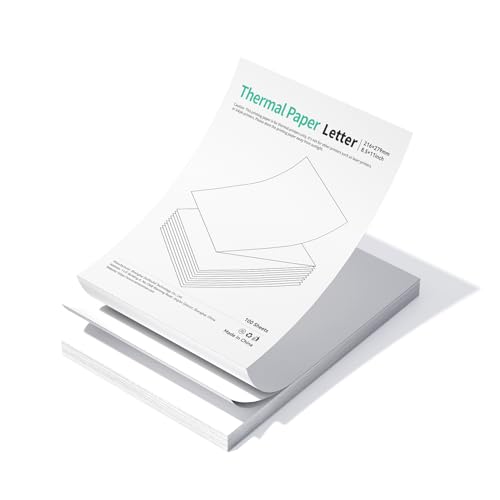
- 300 DPI output for sharp, scan-ready text and codes
- BPA-free, fade-resistant coating for longer document life
- Fan-fold sheets feed smoothly and tear cleanly
Best For: Remote workers and mobile professionals using a CamScanner P1 Pro for durable business document printing.
Best Portable Option
P1 Pro Portable Inkless Thermal Printer

- 300 DPI text clarity for basic business documents.
- Inkless thermal printing helps reduce running costs.
- Lightweight, battery-powered design for travel and remote work.
Best For: Remote workers and traveling professionals who need a compact document printer.
Best for Portable Archiving
Ultra-Clear Thermal Paper Roll for CamScanner P1 Pro
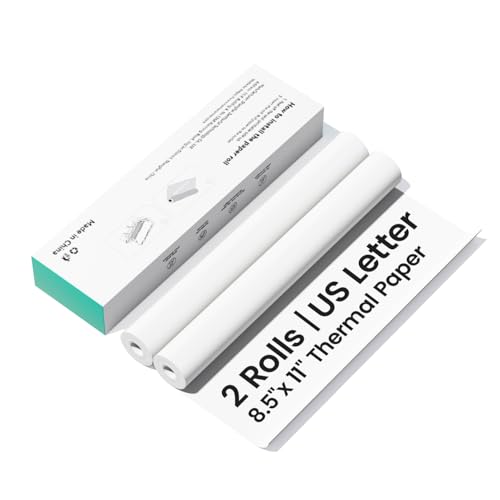
- 300 dpi output for crisp text, charts, and codes
- Light-blocking, BPA-free paper with fade resistance
- Compact 2-pack for easy carry and neat tearing
Best For: Remote workers who need portable, archive-friendly printing for a CamScanner P1 Pro.
Best for Secure Workgroups – Brother MFC-L8930CDW Color Laser All-in-One
If you’re comparing business laser printers for remote offices, the Brother MFC-L8930CDW is a practical fit when you need fast color output, scanning, and stronger document protection in one compact unit. It’s built for team environments that want reliable everyday printing without giving up low running costs or flexible network connections.
Best For: Remote offices and small workgroups that need secure, high-volume color printing with scanning and copying built in.
Pros:
- Fast print and copy speeds up to 33 ppm help keep shared office tasks moving.
- Triple Layer Security and NFC badge authentication add useful protection for business settings.
- Included toner plus high-yield replacement options help keep color printing costs in check.
- Wireless, Ethernet, and mobile-friendly connectivity make it easy to share across a remote team.
Cons:
- Color laser AIOs like this take up more space and cost more upfront than basic mono printers.
- Advanced features may be more than solo users or very small home offices need.
Overall, the MFC-L8930CDW makes sense if you want business laser printers for remote offices that can handle secure printing, quick scanning, and consistent color output without constant maintenance. It’s a strong workhorse for teams that value productivity and control over bare-bones simplicity.
Best for Compact Remote Offices – Brother HL-L2405W Wireless Mono Laser Printer
The Brother HL-L2405W is a practical pick for business laser printers for remote offices when you need dependable black-and-white output without taking up much desk space. It’s built for everyday document printing, with fast speeds, a large paper tray, and wireless/mobile connectivity that makes it easy to share across a small team or home workspace.
Best For: Remote workers and small office setups that want a compact, affordable monochrome laser printer for routine business documents.
Pros:
- Compact footprint fits easily on a desk or shelf
- Up to 30 ppm for quick everyday printing
- Dual-band Wi-Fi, USB, and mobile app support for flexible use
- 250-sheet tray helps reduce refill interruptions
Cons:
- Monochrome only, so it won’t handle color documents
- Single-sided printing only
- Basic feature set compared with higher-end office printers
If you want an affordable, space-saving workhorse for business laser printers for remote offices, this Brother model covers the essentials well. It’s especially appealing when reliability, speed, and simple wireless access matter more than advanced finishing features.
Best for Color Productivity – HP Color LaserJet Pro MFP 3301sdw
If you need one of the more capable business laser printers for remote offices, the HP Color LaserJet Pro MFP 3301sdw is a practical all-in-one pick for printing, scanning, copying, and handling everyday team documents. It adds auto duplexing, an auto document feeder, and a 250-sheet tray, while keeping color output fast enough for small-office workloads.
Best For: Remote teams and small offices that want a reliable color laser all-in-one for reports, scans, and everyday admin work.
Pros:
- Prints up to 26 ppm in black and color for steady office throughput
- All-in-one design includes scan, copy, ADF, and auto 2-sided printing
- TerraJet toner helps produce more vivid-looking business color documents
- 250-sheet input tray supports longer work sessions with fewer reloads
Cons:
- Requires HP chips or circuitry in compatible cartridges
- Running costs can be higher if you print a lot of color pages
- Not ideal if you only need a basic single-function printer
For business laser printers for remote offices, this model makes the most sense when your team needs dependable color output plus built-in scanning and copying in one device. It is a strong fit for document-heavy workflows, though cartridge restrictions are worth factoring into long-term ownership.
Best for Low-Cost Color Printing – Brother HL-L8430CDW Color Laser Printer
Brother HL-L8430CDW Business Color Laser Printer with Low-Cost Printing and Wireless Networking
Check Price On AmazonIf you need one of the more practical business laser printers for remote offices, the Brother HL-L8430CDW is built to balance speed, color quality, and long-term running costs. It’s a solid fit for teams that want dependable everyday printing without sacrificing security or expandability.
Best For: Remote offices and small teams that want fast, secure color printing with low operating costs.
Pros:
- Prints up to 33 ppm with sharp black text and vibrant color output.
- Includes high-yield toner options that can help reduce cost per page.
- Expandable paper capacity up to 1,340 sheets for busier workgroups.
- Wireless connectivity, cloud printing, NFC badge authentication, and duplex printing.
Cons:
- Color laser printers take up more space than compact desktop models.
- Advanced features may be more than a very small solo office needs.
For remote teams that print frequently, this Brother model stands out because it combines business-grade speed with budget-friendly consumables and strong security. It’s a smart middle ground in business laser printers for remote offices, especially when reliability and low operating costs matter more than a minimalist footprint.
Best for Small Teams – HP LaserJet Pro MFP 3101sdw All-in-One Laser Printer
If you need one of the more practical business laser printers for remote offices, the HP LaserJet Pro MFP 3101sdw is built around everyday black-and-white productivity. It prints, scans, and copies, includes auto duplexing, and adds the paper handling and Wi-Fi stability small teams usually want without overcomplicating the setup.
Best For: Remote teams and small offices that need a dependable monochrome all-in-one for reports, forms, and shared day-to-day printing.
Pros:
- Fast black-and-white printing up to 35 ppm
- Auto 2-sided printing plus 50-sheet ADF for efficient scanning
- 250-sheet input tray helps reduce refill frequency
- Reliable Wi-Fi and business-focused performance for shared use
Cons:
- Black-and-white only, so it won’t handle color jobs
- HP cartridge restrictions may limit third-party toner use
For business laser printers for remote offices, this model makes sense when uptime, document quality, and simple shared workflows matter more than color or advanced enterprise features. It’s a solid fit for teams that want a straightforward workhorse.
Best for Small Team Workflow – Brother MFC-L3720CDW Color Laser All-in-One
If you need one of the more capable business laser printers for remote offices, the Brother MFC-L3720CDW is built to handle everyday printing, scanning, copying, and faxing without slowing down a small team. It adds fast 19 ppm color output, automatic duplexing, and flexible wireless options so multiple users can stay productive from different devices.
Best For: Remote offices and small teams that want a compact color laser all-in-one with strong workflow tools and easy wireless sharing.
Pros:
- Fast 19 ppm color printing with laser-sharp output
- Dual-band Wi-Fi, Wi-Fi Direct, and USB for flexible connectivity
- 50-sheet ADF plus auto duplexing to save time on multi-page jobs
- 3.5-inch touchscreen with cloud shortcuts for quick document access
Cons:
- Smaller 250-sheet tray may need refills in busier offices
- Color laser costs can be higher than inkjet for light-duty use
Overall, this Brother is a strong fit if you want reliable, all-in-one performance without overbuying for a small workspace. Among business laser printers for remote offices, it stands out for practical connectivity, simple management, and dependable everyday output.
Best for Comfort – Brother DCP-L2640DW Compact Monochrome 3-in-1
If you need one of the most practical business laser printers for remote offices, the Brother DCP-L2640DW is built to handle everyday black-and-white printing, scanning, and copying without taking up much desk space. It adds fast output, duplex printing, and flexible wired or wireless connectivity, making it a solid fit for distributed teams that still want office-grade reliability.
Best For: Remote offices and small business teams that need a compact, workhorse monochrome multifunction printer for frequent document handling.
Pros:
- Fast 36 ppm print speed keeps small-office workflows moving
- 3-in-1 design with copy, scan, and a 50-page ADF saves time on multi-page jobs
- Dual-band Wi-Fi, Ethernet, and USB make setup flexible for shared or single-user spaces
- Mobile app support helps you print and scan from almost anywhere
Cons:
- Monochrome only, so it is not suited for color printing needs
- No automatic two-sided scanning, which may slow down larger scan jobs
For remote teams that mainly print contracts, invoices, reports, and internal paperwork, this Brother model offers a balanced mix of speed, compact size, and connectivity. It is an easy recommendation among business laser printers for remote offices when black-and-white output is all you need.
Best for Portable Thermal Document Printing – Fan-Fold Thermal Paper for P1 Pro
If your remote team relies on compact, on-the-go document output, this fan-fold thermal paper is a practical consumable to keep a portable printer running smoothly. It is especially useful alongside business laser printers for remote offices when you need crisp contracts, forms, labels, or archived copies without dealing with smudging or fading.
Best For: Remote workers and mobile professionals using a CamScanner P1 Pro who need clean, durable, easy-to-feed thermal paper for business documents.
Pros:
- 300 DPI output helps keep text, charts, and codes sharp and scan-ready.
- BPA-free, fade-resistant coating is built for safer long-term document storage.
- Fan-fold format with perforations supports smooth feeding and easy tearing.
- Thick, light-blocking paper creates a more professional, paper-like finish.
Cons:
- Only compatible with the CamScanner P1 Pro, not other printers.
- Limited to thermal printing use cases, not a general office paper substitute.
- May be unnecessary if your office already relies on traditional laser printing.
For remote offices that need portable, dependable document output, this is a smart niche supply rather than a universal paper choice. It fits well when business laser printers for remote offices are complemented by a compact thermal setup for travel, field work, or quick-form printing.
Best Portable Option – P1 Pro Portable Inkless Thermal Printer
If you need a mobile printer that can keep up with travel, site visits, and hybrid work, the P1 Pro is a practical alternative to bulkier business laser printers for remote offices. It focuses on fast document output, low-maintenance inkless printing, and easy phone-to-PC compatibility for everyday paperwork on the go.
Best For: Remote workers, traveling professionals, and small teams that need a lightweight document printer for quick, portable use.
Pros:
- 300 DPI output is sharper than many basic portable thermal printers.
- Inkless design eliminates toner and cartridge replacement costs.
- Works with iPhone, Android, Windows, and Mac for flexible printing.
- Lightweight build and included carrying bag make it easy to transport.
Cons:
- Uses thermal paper only, so it is not a true laser printer replacement.
- Best suited to documents and receipts, not color or high-volume office output.
- Requires compatible thermal paper for the best long-term legibility.
The P1 Pro makes sense when portability matters more than traditional laser features, especially for remote teams that print contracts, receipts, and forms away from a main office. For shoppers comparing business laser printers for remote offices, this is the more mobile, lower-maintenance choice when you want simple document printing without toner.
Best for Portable Archiving – Ultra-Clear Thermal Paper Roll for CamScanner P1 Pro
If you need dependable consumables for business laser printers for remote offices, this 2-pack thermal paper roll is a practical fit for mobile document workflows. It focuses on sharp 300 dpi output, light-blocking paper, and smooth feeding, making it a better match for on-the-go contracts, receipts, and scan-ready records than generic rolls.
Best For: Remote teams, mobile professionals, and anyone using a CamScanner P1 Pro printer for crisp, archive-friendly black-and-white output.
Pros:
- 300 dpi printing delivers sharp text, clean charts, and readable QR codes.
- Thick, light-blocking paper helps documents look more professional.
- BPA-free, fade-resistant coating supports safer, longer-lasting storage.
- Compact 2-roll pack is easy to pack, carry, and tear neatly.
Cons:
- Only compatible with the CamScanner P1 Pro, not other printer models.
- Thermal paper is less versatile than standard office paper for broader business use.
- Not a substitute for a full-featured laser printer in higher-volume offices.
For remote-office setups that rely on compact printing hardware, this roll stands out for clarity, portability, and reliable feeding. It is a niche consumable, but for business laser printers for remote offices-style document handling, it supports the kind of tidy, scan-friendly output that traveling teams often need.
How We Picked the Best Business Laser Printers for Remote Offices
We prioritized Business Laser Printers for Remote Offices that are practical for shared use, easy to connect over Wi-Fi, and built to keep operating costs under control. We also looked for duplex printing, scan/copy capabilities where useful, strong paper handling, and security features that matter when devices are used outside a traditional office network.
Quick Comparison
In this group, color all-in-ones make the most sense for teams that scan, copy, and print client-facing materials. Monochrome models are the better fit for document-heavy workflows where speed and cost per page matter most. Compact single-function printers work well for tight spaces, while MFPs are the better value if your remote team needs one device to do everything.
Key Buying Factors for Business Laser Printers for Remote Offices
Print Volume and Duty Cycle
Match the printer to your actual workload. A small team printing contracts, invoices, and internal documents can often get by with a compact monochrome unit, while higher-volume offices should favor models with larger paper trays and stronger duty cycles.
Color Versus Monochrome
Choose color only if it adds real value for presentations, branding, or customer-facing documents. Otherwise, monochrome laser printers usually deliver lower running costs and simpler upkeep.
Wireless and Mobile Access
For remote offices, stable Wi-Fi and mobile printing support are essential. Look for straightforward setup, support for laptops and smartphones, and features that reduce dependence on a single computer.
Duplex, Scan, and Copy Features
Automatic duplex printing saves paper and looks more professional. If your team handles forms, receipts, or signed documents, scan and copy functions can remove the need for separate equipment.
Security and Shared Use
If multiple people use the printer, security settings matter. Device access controls, secure print options, and firmware support are especially helpful for Business Laser Printers for Remote Offices that may sit in less controlled environments.
Who Should Buy Which Business Laser Printers for Remote Offices?
Buy a color multifunction laser printer if your team needs one central device for documents, scans, and copies. Choose a monochrome laser printer if your priority is low-cost, high-frequency text printing. Pick a compact model if desk space is limited, and choose a higher-capacity office MFP if several people share the same printer every day.
If your remote office occasionally needs portable document output, consider the thermal options separately, but for everyday business printing, a traditional laser model remains the more versatile choice.