Scanning a stack of double-sided contracts should not mean flipping every sheet by hand. The right laser all-in-one can capture both sides through its document feeder while keeping everyday printing, copying, and sharing moving.
These 10 picks span compact monochrome machines, faster office workhorses, and color models. Before choosing, check the exact scanning specifications: automatic duplex printing does not always mean automatic duplex scanning.
Best 10 Business Laser Printers with Duplex Scanning Picks for 2026
Best for High-Volume Color Scanning

- Up to 104 ipm two-sided scanning
- 33 ppm color and black printing
- 80-page ADF and 7-inch touchscreen
Best For: Busy offices scanning large color-document batches
Best for Fast Monochrome Workflows

- 42 ppm monochrome printing
- 50-sheet one-pass duplex ADF
- Up to 900-sheet capacity with optional cassette
Best For: Offices with frequent black-and-white printing and scanning
Best for Small-Business Color

- 31 ppm color and black printing
- Single-pass duplex copy and scan
- Wi-Fi, Ethernet, Wi-Fi Direct, and USB
Best For: Small teams needing color output and everyday duplex capture
Best for Expandable Paper Capacity

- 42 ppm monochrome printing
- Listed capacity up to 900 sheets
- Duplex scanning not confirmed in notes
Best For: Offices prioritizing fast monochrome output and paper capacity
Best Compact Monochrome Pick

- 36 ppm monochrome printing
- 50-page feeder with single-pass duplex scanning
- Dual-band Wi-Fi, Ethernet, and USB
Best For: Small teams handling everyday black-and-white documents
Best Color Workflow Pick
Brother MFC-L3780CDW Renewed Premium
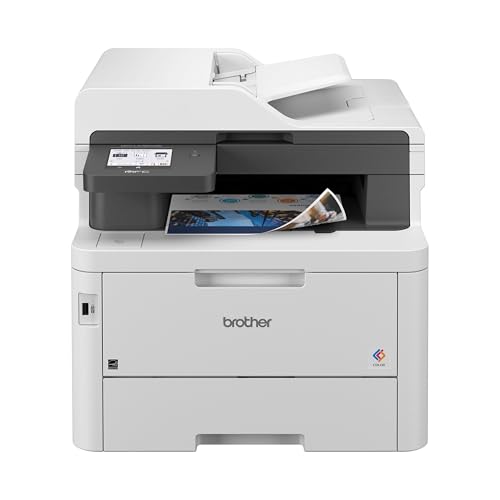
- Up to 31 ppm color printing
- 50-sheet feeder and single-pass duplex scanning
- Touchscreen shortcuts and NFC authentication
Best For: Small businesses producing color documents and scanning two-sided pages
Best High-Volume Scanning Pick

- Up to 50 ppm monochrome printing
- 70-page feeder; duplex scans up to 56 ipm
- Gigabit Ethernet and dual-band Wi-Fi
Best For: Busy offices with sizable two-sided document batches
Best Compact Value

- Up to 4,200 pages of toner included
- Single-pass duplex scanning via 50-page feeder
- Up to 36 ppm monochrome printing
Best For: Small offices seeking compact duplex handling and generous included toner
Best Busy-Office Balance

- Up to 48 ppm printing and copying
- Single-pass duplex scanning up to 60 ipm
- Gigabit Ethernet and dual-band Wi-Fi
Best For: Busy offices handling frequent double-sided documents
Best for High-Volume Workgroups

- Single-pass duplex scanning up to 200 ipm
- 80-page feeder and 620-sheet standard paper capacity
- 8,000-page toner cartridge included
Best For: Mid-to-large teams with heavy scanning and printing workloads
Best for High-Volume Color Scanning – Brother MFC-L8930CDW
Among business laser printers with duplex scanning, the Brother MFC-L8930CDW stands out for busy teams handling color documents and large scan batches. It prints in color or black at up to 33 ppm and scans two-sided originals at up to 104 images per minute.
Best For: Offices that need fast color output, high-volume duplex scanning, and controlled access to shared printing.
Pros:
- 80-page automatic document feeder and legal-size scanner glass.
- 7-inch touchscreen supports scan previews and up to 64 shortcuts.
- Gigabit Ethernet, dual-band Wi-Fi, and NFC badge authentication.
- Supports optional super-high-yield toner cartridges.
Cons:
- At 71.2 pounds, it is the heaviest printer in this group.
- Offices needing fax should note that fax is not listed among its supplied functions.
Choose this model when scanning throughput and shared-office features matter more than a lightweight footprint. Its touchscreen shortcuts can also simplify recurring scan destinations.
Best for Fast Monochrome Workflows – Canon imageCLASS MF465dw
If your search for business laser printers with duplex scanning is focused on black-and-white output, the Canon imageCLASS MF465dw pairs up to 42 ppm printing with a one-pass, two-sided document feeder. It also handles copying and faxing.
Best For: Offices processing multi-page forms and reports that do not require color printing.
Pros:
- 50-sheet one-pass feeder scans two-sided letter documents at up to 100 ipm in black and white or 80 ipm in color.
- Automatic two-sided printing and a first-print time of approximately five seconds.
- Standard 250-sheet cassette plus 100-sheet multipurpose tray; optional cassette raises capacity to 900 sheets.
- Three-year limited warranty.
Cons:
- Prints only in black and white, despite its ability to scan in color.
- Reaching the stated 900-sheet capacity requires an optional cassette.
This is a strong fit for fast, paper-heavy monochrome work. The expandable input capacity is useful if your team regularly runs through the standard trays.
Best for Small-Business Color – Brother MFC-L3780CDW
For small businesses comparing business laser printers with duplex scanning, the Brother MFC-L3780CDW combines color printing with single-pass two-sided copying and scanning. It prints at up to 31 ppm and includes fax capability.
Best For: Small teams that need everyday color documents, duplex document capture, and flexible network connections.
Pros:
- Single-pass duplex copy and scan saves manual page flipping.
- Up to 31 ppm printing in color or black.
- Dual-band Wi-Fi, Gigabit Ethernet, Wi-Fi Direct, and USB connectivity.
- Supports standard-, high-, and super-high-yield TN229 toner options.
Cons:
- Listed scan speeds of up to 29 ipm in black and white and 22 ipm in color are lower than those of the other models with specified scan rates here.
- At 47.8 pounds, it still needs a sturdy placement spot.
Its mix of color output, faxing, and single-pass duplex scanning suits a general-purpose small office. Check whether its stated scan pace matches your daily document volume.
Best for Expandable Paper Capacity – Canon imageCLASS MF465dw II
The Canon imageCLASS MF465dw II offers up to 42 ppm black-and-white printing, automatic duplex printing, and an automatic document feeder. If duplex scanning is essential to your search for business laser printers with duplex scanning, verify its two-sided scan capability before buying: the supplied notes do not confirm it.
Best For: Offices prioritizing fast monochrome printing, faxing, and room to expand paper capacity.
Pros:
- Print, copy, scan, and fax functions in one device.
- Up to 42 ppm printing and a listed 4.9-second first-print time.
- Paper capacity is listed at up to 900 sheets.
- 5-inch touchscreen, Wi-Fi, Ethernet, and a three-year manufacturer warranty.
Cons:
- Duplex scanning is not explicitly specified in the supplied notes.
- Prints in black and white only.
Consider this model for high-volume monochrome output, but do not assume its automatic duplex specification applies to scanning. Confirm feeder and scanning details if two-sided capture drives your purchase.
Best Compact Monochrome Pick – Brother MFC-L2900DW
Among business laser printers with duplex scanning, the Brother MFC-L2900DW is a practical choice for small offices that mostly print black-and-white documents. It pairs 36 ppm printing with a 50-page automatic document feeder and single-pass two-sided scanning.
Best For: Small teams that need everyday monochrome printing and fast scanning of double-sided paperwork.
Pros:
- Single-pass duplex scanning and automatic duplex printing streamline document handling.
- Dual-band Wi-Fi, Ethernet, USB, and mobile connectivity offer flexible setup.
- 3.5-inch touchscreen provides access to supported cloud services.
Cons:
- Monochrome output cannot produce color documents.
- Included starter toner is rated for 700 pages.
Its combination of duplex features and connectivity fits routine office work well; choose a color model if client-facing color materials are essential.
Best Color Workflow Pick – Brother MFC-L3780CDW Renewed Premium
If your shortlist of business laser printers with duplex scanning also needs color output, this Renewed Premium Brother MFC-L3780CDW is worth considering. It prints up to 31 ppm and combines a 50-sheet feeder with single-pass duplex copying and scanning.
Best For: Small businesses that need color documents alongside frequent two-sided scanning.
Pros:
- Color printing, copying, scanning, and faxing cover varied office tasks.
- 50-sheet feeder and single-pass duplex scanning help process multipage jobs.
- 3.5-inch touchscreen supports shortcuts and listed cloud apps; NFC badge authentication adds a security option.
Cons:
- This listing is for a Renewed Premium unit, not a new one.
- At 47.8 pounds, it is relatively heavy to reposition.
The appeal is its mix of color output and scanning tools. Check whether a renewed unit suits your purchasing requirements before ordering.
Best High-Volume Scanning Pick – Brother MFC-L5915DW
For busier offices comparing business laser printers with duplex scanning, the Brother MFC-L5915DW emphasizes speed: up to 50 ppm monochrome printing and copying, plus single-pass two-sided scanning rated up to 56 images per minute.
Best For: Offices processing larger batches of black-and-white print jobs and double-sided documents.
Pros:
- 70-page automatic document feeder handles sizable scan batches.
- Single-pass duplex scanning and automatic two-sided printing and copying support efficient workflows.
- Gigabit Ethernet and dual-band Wi-Fi provide wired and wireless networking options.
- Compatible 18,000-page replacement toner is available for high-volume use.
Cons:
- Monochrome-only printing does not suit color materials.
- Its 18.6-by-19.5-inch footprint needs more desk space than a compact printer.
The larger feeder and faster rated output make this the strongest fit here for sustained document work, provided color printing is unnecessary.
Best Compact Value – Brother MFC-L2900DW XL
For small businesses comparing business laser printers with duplex scanning, the Brother MFC-L2900DW XL pairs a compact monochrome all-in-one with a 50-page feeder for single-pass, two-sided scans. It also prints, copies, and faxes.
Best For: Small offices that want duplex document handling and plenty of toner included.
Pros:
- Includes toner rated for up to 4,200 pages.
- Prints up to 36 pages per minute and has a 250-sheet paper capacity.
- Offers dual-band Wi-Fi, Ethernet, USB, and a 3.5-inch touchscreen.
Cons:
- Prints in black and white only.
- Its 50-page feeder is smaller than the 80-page feeder on the MFC-L6810DW.
The XL package stands out for its included toner and compact footprint. Choose it when routine office paperwork matters more than the faster print and scan speeds of the larger models.
Best Busy-Office Balance – Brother MFC-L5710DW
Among business laser printers with duplex scanning, the Brother MFC-L5710DW suits offices that need quicker black-and-white output without stepping up to the largest workgroup model here. Its 50-page feeder scans both sides in one pass at up to 60 images per minute.
Best For: Busy offices that regularly print and digitize double-sided documents.
Pros:
- Prints and copies at up to 48 pages per minute.
- Supports scan destinations including email, cloud services, SharePoint, and SFTP.
- Includes a 3,000-page toner cartridge and supports an 11,000-page replacement cartridge.
Cons:
- Monochrome output cannot handle color printing.
- The standard paper capacity is 250 sheets, versus 620 sheets across the MFC-L6810DW’s supplied trays.
This model is a practical middle ground: substantially faster printing and scanning than the compact MFC-L2900DW XL, with network and scan-destination options suited to shared office workflows.
Best for High-Volume Workgroups – Brother MFC-L6810DW
For mid-to-large workgroups shopping for business laser printers with duplex scanning, the Brother MFC-L6810DW combines an 80-page feeder with single-pass, two-sided scanning rated up to 200 images per minute. It also prints and copies in monochrome at up to 52 pages per minute.
Best For: Teams processing large batches of double-sided documents and substantial print volumes.
Pros:
- Comes with an 8,000-page toner cartridge; an 18,000-page replacement option is available.
- Has a 520-sheet main tray plus a 100-sheet multipurpose tray, expandable to 1,660 sheets with optional trays.
- Offers triple-layer security features and an integrated NFC card reader for badge authentication.
Cons:
- Prints only in black and white.
- At 19.5 x 19.5 x 20.4 inches and 43.2 pounds, it requires more space than the other two models.
Its larger feeder, faster scanning, and expandable paper capacity make the strongest case when multiple people share demanding workflows. Smaller teams may not need its size or high-volume features.
How We Picked the Best Business Laser Printers with Duplex Scanning
We focused on laser and laser-class all-in-ones aimed at business documents, then weighed document-feeder scanning, print speed, paper handling, connectivity, security, and expected toner costs. The selected products include closely related listings and differently specified configurations, so a model name alone is not enough to establish its exact features. Confirm the manufacturer’s specifications for the listing and region you plan to buy.
Quick Comparison: Match the Printer to the Workload
Start with color versus monochrome. The Brother MFC-L8930CDW and MFC-L3780CDW listings suit teams that regularly print color presentations or marked-up documents. Canon’s imageCLASS MF465dw listings and Brother’s monochrome options fit offices that mainly produce text, forms, and invoices. For a smaller footprint, consider the Brother MFC-L2900DW XL; for heavier shared use, compare the MFC-L5710DW and MFC-L6810DW alongside the higher-speed Brother listings. Treat listed page-per-minute figures as print-speed claims, not scan-speed promises.
Key Buying Factors for Business Laser Printers with Duplex Scanning
Verify What “Duplex” Actually Covers
Look for explicit automatic two-sided scanning through the automatic document feeder (ADF). Some machines only print on both sides; others scan both sides by reversing each sheet rather than capturing them in a single pass. Single-pass scanning can save time on large batches. Also check ADF capacity and whether two-sided copying is supported if you routinely duplicate contracts or records.
Size for Paper and Toner Costs
Choose a tray and ADF that accommodate a typical job without frequent refills. If printing volume is high, check the recommended monthly volume rather than relying only on a maximum duty-cycle figure. Compare replacement toner yield and cost per page, including all required color cartridges and any separately replaced drum. Starter cartridges and subscription offers can change the initial economics.
Check Workflow and Security
For shared offices, confirm the connections you need, such as Ethernet, Wi-Fi, or mobile printing, and the scan destinations staff actually use. If documents contain sensitive information, look for applicable access controls, secure-print options, and update policies. Fax support matters only if your workflows still require it.
Who Should Buy Which Business Laser Printers with Duplex Scanning?
Choose a color Brother model if color output is frequent enough to justify its consumable costs. Choose a compact monochrome option for a small office with mostly text-based work. Compare the MFC-L5710DW, MFC-L6810DW, and faster Brother monochrome configurations for busier teams, prioritizing usable paper capacity and scanning throughput. If considering either Canon MF465dw listing or either MFC-L3780CDW listing, compare the exact SKU, included supplies, and duplex-ADF specifications before paying extra for what may be a bundle or revision rather than a meaningful workflow upgrade.