Finding the right keyboard can make a bigger difference than most people expect. The best wireless mechanical keyboards for Windows PC combine reliable connectivity, comfortable switches, and layouts that fit the way you work or play.
In this roundup, we focused on practical choices for everyday Windows users, from compact desks to full-size setups, with options that prioritize battery life, hot-swappability, and useful extras like knobs and backlighting.
Best 10 Wireless Mechanical Keyboards for Windows PC Picks for 2026
Best for Multi-Device Switching
AULA F99 Tri-Mode Wireless Keyboard

- Tri-mode connectivity for PC, tablet, and console use
- Hot-swappable switches with included puller tools
- 8000mAh battery and PBT keycaps for longer-term use
Best For: Windows PC users who want one keyboard for work, gaming, and multiple devices.
Best for Features
AULA S98 Pro Wireless Keyboard

- LCD screen and multi-function knob for quick controls
- Tri-mode wireless plus USB-C wired connectivity
- Hot-swappable, pre-lubed switches with PBT keycaps
Best For: Windows PC users who want a customizable wireless mechanical keyboard with extra features.
Best for Quiet Low-Profile Typing
LeadsaiL 98-Key Wireless Mechanical Combo

- Quiet low-profile red switches for smoother typing
- 2.4GHz wireless with one shared USB receiver
- Compact 98-key layout saves desk space
Best For: Windows users who want a quiet, slim mechanical keyboard and mouse combo for everyday work.
Best for Feature-Rich Setup
AULA F108 Pro Wireless Keyboard
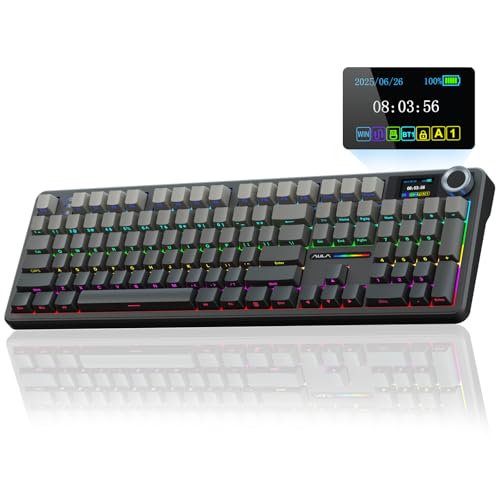
- Built-in screen and knob add extra control
- 8000mAh battery for extended wireless use
- Hot-swappable switches with PBT keycaps
Best For: Windows users who want a full-size wireless board with extra controls and long battery life.
Best for Quiet Typing
Logitech MX Mechanical Wireless Keyboard

- Quiet tactile switches with real mechanical feedback
- Low-profile full-size layout for comfortable daily typing
- Auto backlighting plus multi-device wireless support
Best For: Quiet, premium everyday typing on a Windows PC with easy device switching.
Best for Comfort
AULA F106 Pro Wireless Mechanical Keyboard

- TFT display and knob for quick control
- Tri-mode wireless plus USB-C support
- Hot-swappable full-size 104-key layout
Best For: Windows users who want a feature-rich full-size wireless board with customization.
Best Compact Pick
Newmen GM611 60% Mechanical Keyboard

- Space-saving 60% layout for small desks
- Rainbow backlighting with adjustable effects
- Anti-ghosting and macro support for gaming
Best For: Windows users who want a compact, portable mechanical keyboard with gaming-friendly features.
Best for Customization
AULA F75 Pro 75% Wireless Keyboard

- Tri-mode wireless plus USB-C wired support
- Hot-swap design with pre-lubed switches
- 75% layout with knob, RGB, and 4000mAh battery
Best For: Windows PC users who want a compact, customizable wireless keyboard with gaming features.
Best for Wired RGB Enthusiasts
Newmen GM325Pro Mechanical Keyboard

- Full-size 104-key layout with metal top plate
- Smooth red switches with full-key rollover
- Rainbow effects plus RGB side lighting
Best For: Windows PC users who want a durable, lighting-heavy full-size mechanical keyboard for gaming and typing.
Best for Multi-Device Switching – AULA F99 Tri-Mode Wireless Keyboard
If you want one of the more flexible wireless mechanical keyboards for windows pc, the AULA F99 is built for switching between a desktop, laptop, tablet, or console without much hassle. Its tri-mode connectivity, hot-swap design, and compact 96% layout make it a practical pick for work, gaming, and everyday typing.
Best For: Windows PC users who need a wireless mechanical keyboard that can jump between multiple devices and still handle gaming, typing, and customization.
Pros:
- Supports Bluetooth 5.0, 2.4GHz wireless, and USB-C wired use
- Hot-swappable PCB works with 3-pin and 5-pin switches
- Pre-lubed linear switches and gasket mounting deliver a smoother feel
- 8000mAh battery and PBT keycaps add long-term value
Cons:
- 96% layout is compact, but not everyone wants a condensed number pad area
- RGB and macro features may be more than casual users need
Overall, the AULA F99 stands out as a versatile choice among wireless mechanical keyboards for windows pc, especially if you care about device switching, sound dampening, and upgrade potential in one board.
Best for Mac-to-Windows Switching – Keychron K8 Tenkeyless Wireless Mechanical Keyboard
If you want one of the more flexible wireless mechanical keyboards for windows pc, the Keychron K8 is a strong pick thanks to its TKL layout, Bluetooth 5.1 pairing for up to three devices, and included Windows keycaps. It keeps the desk footprint manageable while still giving you dedicated navigation keys, making it a practical everyday board for work and light gaming.
Best For: Users who move between Mac and Windows setups and want a compact mechanical keyboard with both wireless convenience and wired fallback.
Pros:
- Bluetooth 5.1 supports up to 3 devices with quick switching
- Tenkeyless layout saves space but still includes navigation keys
- Brown switches provide tactile feedback without being too loud
- USB-C wired mode and Windows keycaps add flexibility
Cons:
- No numpad, which some office users may miss
- Wireless mode drops to 6KRO instead of full NKRO
- White backlight is simple rather than feature-rich RGB
Overall, the K8 is a well-balanced option if you want wireless mechanical keyboards for windows pc that can also handle a Mac workflow without extra hassle. It is especially appealing for buyers who value a familiar tactile switch, solid battery life, and the option to go wired when needed.
Best for Features – AULA S98 Pro Wireless Keyboard
If you want a feature-packed board among wireless mechanical keyboards for windows pc, the AULA S98 Pro stands out with its LCD screen, multi-function knob, and tri-mode connectivity. It blends gaming-style RGB, hot-swappable switches, and a compact full-size layout for users who want customization without losing everyday practicality.
Best For: Windows PC users who want a highly customizable wireless mechanical keyboard with extra controls and display features.
Pros:
- LCD screen and knob add quick access to system info, volume, and lighting controls
- Tri-mode connectivity supports 2.4GHz, Bluetooth 5.0, and USB-C wired use
- Hot-swappable design with pre-lubed linear switches for easy customization and smoother typing
- PBT side-printed keycaps and sound-dampening layers help improve durability and feel
Cons:
- Screen GIF setup and full software features require Windows and wired mode
- More feature-heavy than a simple plug-and-play keyboard
- Its gaming-forward design may not suit a minimalist office setup
For buyers comparing wireless mechanical keyboards for windows pc, this model is a strong pick if you value customization, display features, and a satisfying typing sound over a plain, no-frills layout. It offers a lot of hardware flair for the price, but the software limitations matter if you want advanced setup on non-Windows systems.
Best for Quiet Low-Profile Typing – LeadsaiL 98-Key Wireless Mechanical Combo
If you want one of the more compact wireless mechanical keyboards for windows pc that still feels responsive, the LeadsaiL FA98 is built for office-style use. Its low-profile red switches aim to deliver the mechanical feel without the loud click, while the 2.4GHz connection keeps setup simple with a single USB receiver for both keyboard and mouse.
Best For: Windows users who want a slim, quiet mechanical keyboard-mouse combo for everyday typing, travel, or a tidy desk setup.
Pros:
- Low-profile red switches offer a quieter, smoother typing feel than many full-height mechanical boards
- 2.4GHz wireless connection uses one USB receiver for both the keyboard and mouse
- Compact 98-key layout helps save desk space without losing a practical number pad
- Works with Windows PCs, laptops, and other USB-equipped systems
Cons:
- Uses a USB receiver, so it is not a Bluetooth-first option
- Combo format may be less appealing if you only need a keyboard
- Slim, low-profile design may not satisfy users who prefer taller mechanical keys
For shoppers comparing wireless mechanical keyboards for windows pc, this LeadsaiL set stands out most for quiet typing, compact sizing, and easy plug-and-play operation. It is a sensible pick if you want a clean desktop setup and don’t need advanced gaming features or wireless customization.
Best for Feature-Rich Setup – AULA F108 Pro Wireless Keyboard
If you want one of the more feature-packed wireless mechanical keyboards for windows pc, the AULA F108 Pro stands out with a built-in screen, a control knob, and a full-size layout that keeps every key within reach. It also pairs a large 8000mAh battery with hot-swappable switches and PBT keycaps, making it a strong pick for users who want customization without giving up convenience.
Best For: Windows users who want a full-size wireless board with extra controls, long battery life, and easy customization.
Pros:
- Built-in display and knob add quick control and useful status feedback
- 8000mAh battery supports longer wireless use between charges
- Hot-swappable design and pre-lubed switches make upgrades easier
- Side-printed PBT keycaps and RGB lighting give it a polished look
Cons:
- Full-size layout takes up more desk space than compact options
- Feature set may be more than casual users need
- Heavier, more complex design may not suit minimal setups
Overall, the AULA F108 Pro is a compelling choice if you want wireless mechanical keyboards for windows pc that feel more like a desktop control center than a simple typing tool. Its extras make sense for users who value convenience, customization, and a fuller typing experience.
Best for Quiet Typing – Logitech MX Mechanical Wireless Keyboard
If you want one of the more polished wireless mechanical keyboards for windows pc, the Logitech MX Mechanical is built for comfort, low noise, and flexible multi-device use. Its tactile quiet switches give you mechanical feedback without the loud click, while the low-profile layout and smart backlighting make it a strong fit for everyday work.
Best For: Professionals and home-office users who want a quieter mechanical typing experience with easy switching between Windows and other devices.
Pros:
- Tactile Quiet switches deliver a satisfying feel with less typing noise.
- Low-profile full-size design is comfortable for long work sessions.
- Backlit keys auto-adjust to lighting changes and wake when your hands approach.
- Supports up to 3 devices with Bluetooth or the included Logi Bolt receiver.
Cons:
- Pricier than many basic wireless keyboards.
- Low-profile switches may not appeal to fans of taller mechanical keys.
- Customization is best used with Logi Options+ software.
This is a well-rounded pick if you want wireless mechanical keyboards for windows pc that feel premium, stay quiet, and handle multi-device productivity well. It’s especially appealing for users who type all day and want a cleaner, more refined desk setup.
Best for Comfort – AULA F106 Pro Wireless Mechanical Keyboard
If you want a feature-packed pick among wireless mechanical keyboards for windows pc, the AULA F106 Pro stands out with its TFT screen, multi-function knob, tri-mode connectivity, and full-size 104-key layout. It’s aimed at users who want a practical everyday board with a little extra customization and a creamy typing sound.
Best For: Windows users who want a full-size wireless mechanical keyboard with a display, knob controls, and hot-swap flexibility.
Pros:
- Built-in TFT screen and knob for volume, battery, lighting, and mode changes
- Tri-mode connection supports Bluetooth, 2.4GHz wireless, and USB-C
- Hot-swappable switches with pre-lubed parts for easier customization
- Full-size 104-key layout with RGB lighting and PBT keycaps
Cons:
- Customization software is Windows-based for the best experience
- Large full-size layout takes up more desk space than compact boards
Overall, this is a strong choice if you want one of the more feature-rich wireless mechanical keyboards for windows pc without giving up a standard layout. The screen-and-knob setup adds convenience, while the hot-swap design makes it easier to tailor the feel over time.
Best Compact Pick – Newmen GM611 60% Mechanical Keyboard
If you want one of the more space-saving wireless mechanical keyboards for windows pc alternatives in a wired form, the Newmen GM611 is a compact 60% board built for smaller desks and fast gaming. It keeps the essentials accessible, adds RGB-style rainbow lighting, and supports Windows-friendly customization for users who want a simple, portable mechanical keyboard.
Best For: Windows users who want a compact, portable mechanical keyboard with gaming-friendly features and customizable lighting.
Pros:
- 60% layout saves desk space without giving up core typing and gaming controls
- 19 rainbow backlight effects with adjustable brightness and speed
- N-key rollover and anti-ghosting help with accurate key registration
- Detachable cable and macro support add convenience and flexibility
Cons:
- Wired-only design, so it is not a true wireless option
- Compact layout may take adjustment for users who rely on a full-size keyboard
For shoppers comparing wireless mechanical keyboards for windows pc, this model stands out more for its compact layout and gaming-ready features than for cable-free convenience. It is a good fit if you value portability, lighting, and responsive switches over a wireless connection.
Best for Customization – AULA F75 Pro 75% Wireless Keyboard
If you want wireless mechanical keyboards for windows pc with a compact layout and a more customizable feel, the AULA F75 Pro is a strong pick. It combines tri-mode connectivity, hot-swap support, and a knob for quick control, making it a flexible option for both work and gaming on a Windows setup.
Best For: Windows PC users who want a compact, hot-swappable wireless keyboard with gaming-friendly controls and RGB lighting.
Pros:
- Tri-mode connection with Bluetooth 5.0, 2.4GHz, and USB-C wired support
- Hot-swappable switches and pre-lubed components for easy customization
- 75% layout saves desk space while keeping arrow keys and a multi-function knob
- 4000mAh battery and RGB backlighting add convenience and style
Cons:
- Side-printed keycaps may take some adjustment if you prefer standard legends
- RGB and knob features may be more than casual typists need
- Windows-focused software features may matter more than broad plug-and-play simplicity
This is a smart fit if you want wireless mechanical keyboards for windows pc that feel more like a hobbyist board than a basic office peripheral. It stands out for users who value customization, compactness, and a satisfying typing sound in one package.
Best for Wired RGB Enthusiasts – Newmen GM325Pro Mechanical Keyboard
If you’re comparing wireless mechanical keyboards for windows pc but don’t mind a wired setup, the Newmen GM325Pro stands out with full-size coverage, hot-swap support, and eye-catching rainbow lighting. It’s a practical pick for users who want a Windows-friendly mechanical board with a metal top plate and straightforward performance.
Best For: Windows PC users who want a full-size mechanical keyboard with bright lighting, red switches, and a durable wired design for gaming or everyday typing.
Pros:
- 13 lighting effects plus RGB side illumination for a more vivid desktop look
- Full-size 104-key layout with metal panel for durability and comfortable daily use
- Smooth linear red switches and full-key rollover for gaming responsiveness
- Detachable USB cable and software support for macros, remapping, and lighting tweaks
Cons:
- It is wired only, so it won’t suit buyers who need true wireless use
- RGB is limited to the side lighting rather than full-key per-key lighting
- Full-size design takes up more desk space than compact keyboards
For buyers browsing wireless mechanical keyboards for windows pc, this model is better viewed as a feature-rich wired alternative: dependable, customizable, and built for users who prioritize feel and visibility over cable-free convenience.
How We Picked the Best Wireless Mechanical Keyboards for Windows PC
We looked for Wireless Mechanical Keyboards for Windows PC that balance connection stability, typing feel, and layout usefulness. Priority went to models with Bluetooth and 2.4GHz support, strong battery capacity, Windows-friendly key layouts, and features that add real value rather than novelty.
We also considered build quality, switch options, hot-swap support, and whether the design makes sense for gaming, office work, or mixed use. For this kind of roundup, usability matters more than spec sheets alone.
Quick Comparison
Full-size keyboards suit users who want a numpad and more shortcut access. Tenkeyless and 75% boards are better for smaller desks and mouse-heavy setups. If you want the most flexible experience, look for tri-mode connectivity, hot-swappable switches, and a battery large enough to handle wireless use without frequent charging.
Key Buying Factors for Wireless Mechanical Keyboards for Windows PC
Connectivity
Check whether the keyboard supports Bluetooth, 2.4GHz wireless, and USB-C wired mode. For Windows PCs, 2.4GHz usually offers the most responsive wireless performance, while Bluetooth is useful for switching between devices.
Layout and Size
Choose based on desk space and workflow. Full-size boards are best for spreadsheets and number entry. Tenkeyless and 75% layouts are popular for gaming and general use because they save space without feeling too minimal.
Switch Feel and Sound
Linear switches feel smooth, tactile switches provide a bump, and low-profile designs reduce travel. If you share a workspace, quieter switches are usually the safer choice.
Custom Features
Hot-swap support makes it easier to change switches later. Knobs and screens can be useful for media control or at-a-glance information, but they should not outweigh fundamentals like typing comfort and wireless reliability.
Battery Life and Build
Long battery life is especially important on wireless boards with RGB lighting. A solid case, stable keycaps, and well-tuned stabilizers help the keyboard feel better over time, not just on day one.
Who Should Buy Which Wireless Mechanical Keyboards for Windows PC?
Gamers and power users often do best with a compact or tenkeyless board that leaves more room for mouse movement. Office users and spreadsheet-heavy buyers may prefer a full-size model with a numpad. If you want a simple upgrade for daily typing, choose a quieter, more restrained keyboard with dependable wireless modes. If you enjoy customization, look for hot-swappable models with RGB and extra controls so you can tune the board to your preferences.