If you want faster control over volume, media, and workflow, mechanical keyboards with knob for PC can be a smart upgrade. They combine the tactile feel of mechanical switches with a built-in dial that makes everyday adjustments easier.
From compact gaming boards to larger layouts with number pads, the best options in 2026 balance comfort, customization, and practical features like hot-swap sockets, wireless connectivity, and RGB lighting.
Best 10 Mechanical Keyboards with Knob for PC Picks for 2026
Best for Knob Control
AULA F75 Pro Wireless Mechanical Keyboard

- Multi-function knob for volume, lighting, and mode changes
- Tri-mode wireless plus USB-C connectivity
- Hot-swappable 75% layout with PBT keycaps
Best For: PC users who want a compact wireless mechanical keyboard with a useful control knob.
Best for Compact Full-Size Control
GEEZER 96-Key Mechanical Keyboard
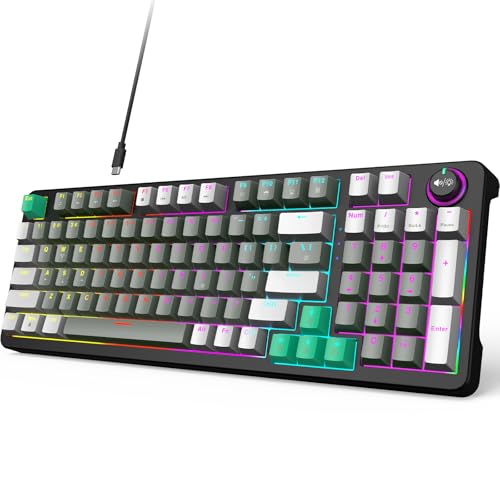
- 96-key layout keeps the numpad in a smaller footprint
- Dedicated volume knob for fast audio adjustments
- Blue switches offer a clicky, tactile typing feel
Best For: PC users who want a space-saving keyboard with a numpad and volume knob.
Best for Knob + Screen Controls

- TFT screen and knob for fast media control
- Hot-swappable 75% layout with RGB lighting
- Gasket-mount build for smoother, quieter typing
Best For: PC users who want a compact keyboard with a knob, screen, and customization features.
Best Retro Typing Feel
AULA F2088 Typewriter Mechanical Keyboard

- Knob switches between media and lighting modes
- Clicky blue switches with retro round keycaps
- Full-size wired board with wrist rest and anti-ghosting
Best For: Retro-minded PC users who want tactile typing and simple dial controls.
Best for Media Control
Redragon K673 PRO 75% Wireless

- Dedicated knob for volume and media control
- Tri-mode connection: USB-C, Bluetooth, and 2.4GHz
- Gasket mount with 5-layer noise dampening
Best For: PC users who want a compact wireless board with quick media control and a softer typing sound.
Best Space-Saving TKL Pick
Keychron C1 TKL Wired Mechanical Keyboard

- Compact 80% layout fits smaller desks.
- Smooth Gateron Red switches suit gaming and typing.
- Wired USB-C connection works with Mac and Windows.
Best For: PC users who want a compact, dependable mechanical keyboard without extra controls.
Best for Compact Knob Control
Newmen GM326 75% Mechanical Keyboard

- Includes a multi-function volume knob
- Hot-swappable 3-pin switch support
- Compact 75% layout saves desk space
Best For: PC gamers and typists who want a compact keyboard with knob control and switch customization.
Best for Numpad & Knob Control
RK R98 Pro Wired Mechanical Keyboard

- 96% layout keeps numpad and navigation keys
- Detachable aluminum knob for fast volume control
- Hot-swappable, gasket-mounted, and foam-damped
Best For: PC users who want a compact board with a numpad, volume knob, and creamy typing feel.
Best Hot-Swappable Option
Keychron C1 Hot-Swappable Wired Mechanical Keyboard

- Hot-swappable switches without soldering
- Tenkeyless 87-key layout with USB-C wired connection
- Mac and Windows compatibility with included keycaps
Best For: PC users who want a customizable typing-focused keyboard and don’t need a knob.
Best for Knob Control – AULA F75 Pro Wireless Mechanical Keyboard
If you want one of the more feature-packed mechanical keyboards with knob for pc, the AULA F75 Pro stands out with tri-mode connectivity, hot-swap support, and a handy control dial for both media and lighting. Its 75% layout keeps arrow keys and core functions while saving desk space, making it a practical fit for gaming setups and everyday work.
Best For: PC users who want a compact wireless keyboard with an easy-to-use knob for volume, lighting, and mode switching.
Pros:
- Multi-function knob makes it easy to adjust volume, RGB, and modes
- Tri-mode connection supports Bluetooth, 2.4GHz, and USB-C wired use
- Hot-swappable design works with 3-pin and 5-pin switches
- Compact 75% layout saves space without losing arrow keys
Cons:
- RGB and driver features may be more than casual users need
- 75% layout takes a little adjustment if you prefer a full-size board
Overall, the AULA F75 Pro is a strong pick if you want mechanical keyboards with knob for pc that feel versatile rather than basic. The mix of wireless flexibility, hot-swap customization, and a useful control knob gives it broad appeal for both gaming and productivity.
Best for Compact Full-Size Control – GEEZER 96-Key Mechanical Keyboard
If you want one of the more practical mechanical keyboards with knob for pc, this GEEZER board is built around a compact 96-key layout that keeps the number pad while trimming desk space. The volume knob is the main convenience feature, making it easy to adjust sound on the fly without hunting for function keys. Blue switches and LED backlighting give it a more tactile, clicky gaming feel, while the wired USB connection keeps setup simple for Windows, laptops, Macs, and everyday office use.
Best For: PC users who want a smaller footprint than a full-size board but still need a number pad and a dedicated volume knob.
Pros:
- 96-key layout saves space without dropping the numpad
- Dedicated volume knob adds quick audio control
- Blue switches deliver a tactile, clicky typing feel
- Wired USB connection is straightforward for PC and laptop use
Cons:
- Blue switches can be loud for shared spaces
- Compact layout may take a little adjustment for full-size users
- LED backlighting is functional, but not a high-end RGB setup
Overall, this is a strong pick if you want mechanical keyboards with knob for pc and prefer a balanced mix of desk efficiency, tactile feedback, and easy media control. It is especially appealing if you use a numpad often but do not want a bulky keyboard taking over your workspace.
Best for Knob + Screen Controls – EPOMAKER Aula F75 MAX
If you want one of the more feature-rich mechanical keyboards with knob for pc, the EPOMAKER X Aula F75 MAX stands out with its TFT screen, volume knob, and flexible 75% layout. It’s aimed at users who want quick media control, custom lighting, and a compact board that still feels substantial on a desk.
Best For: PC users who want an all-in-one keyboard with a knob, screen, and hot-swappable customization for gaming or daily work.
Pros:
- Built-in volume knob and TFT screen add quick control and useful system info
- Hot-swappable 75% layout supports switch experimentation and saves desk space
- Gasket-mount design, foams, and tuned stabilizers deliver a smoother, quieter feel
- Wireless, Bluetooth, and wired modes work across PC, Mac, and Linux
Cons:
- Feature set may be more than casual buyers need
- Compact layout still requires adjustment if you prefer full-size keyboards
This is a strong pick if you want mechanical keyboards with knob for pc that do more than basic typing. The added screen and media control make it especially appealing for gaming setups and productivity-focused desks.
Best Retro Typing Feel – AULA F2088 Typewriter Mechanical Keyboard
If you want one of the more distinctive mechanical keyboards with knob for pc, the AULA F2088 blends a typewriter look with a practical media/backlight dial. It’s a wired full-size board with blue switches, round keycaps, and RGB-style lighting effects, making it a strong fit for users who want both style and everyday control without extra software hassles.
Best For: PC users who want a retro-styled mechanical keyboard with an easy-to-use knob for volume and lighting control.
Pros:
- Dedicated knob toggles between media control and lighting adjustments
- Blue switches and round keycaps deliver a classic clicky typing feel
- Metal panel, wrist rest, and anti-ghosting support comfortable gaming and work
Cons:
- Blue switches are loud and may not suit shared spaces
- Wired-only design won’t appeal to wireless setups
- Retro round keycaps are more style-forward than minimalist
This is a good pick if you value personality and quick controls over a plain office look. Among mechanical keyboards with knob for pc, it stands out for offering a full-size layout, tactile feedback, and easy dial-based control in one affordable retro package.
Best for Media Control – Redragon K673 PRO 75% Wireless
If you want one of the more versatile mechanical keyboards with knob for pc, the Redragon K673 PRO is built around a handy volume/media dial, tri-mode connectivity, and a compact 75% layout that frees up desk space without dropping the function row.
Best For: PC users who want a compact wireless mechanical keyboard with easy media control, hot-swap flexibility, and a softer typing feel.
Pros:
- Dedicated knob makes volume and media control quick and intuitive
- 3-mode connectivity supports USB-C, Bluetooth, and 2.4GHz wireless
- 5-layer noise dampening and gasket mount help create a softer, cleaner sound
- 75%/81-key layout keeps function keys while saving desk space
Cons:
- Compact layout still leaves out the numpad
- Linear red switches may feel too light for users who prefer tactile feedback
For shoppers comparing mechanical keyboards with knob for pc, this model stands out for blending practical media control with a quiet, cushioned typing feel and flexible wireless use. It is a strong pick if you want convenience first, rather than a full-size board.
Best for Multi-Device Control – AULA 99-Key Purple Knob Keyboard
If you want one of the more flexible mechanical keyboards with knob for pc, the AULA 99-Key blends a compact 96% layout with tri-mode connectivity and a handy rotary control for volume, lighting, and media adjustments. It’s aimed at users who want a full number pad without giving up too much desk space, plus macro support for gaming shortcuts and everyday productivity.
Best For: PC users who want a compact full-size-style keyboard with a knob, wireless options, and macro-friendly controls for gaming or work.
Pros:
- Tri-mode connectivity: Bluetooth 5.0, 2.4GHz wireless, and USB-C wired
- Rotary knob makes media and volume control quick and convenient
- 96% layout keeps the numpad while saving desk space
- Full-key macro programming plus three shortcut keys
Cons:
- It’s a membrane board, not a true mechanical keyboard
- No hot-swappable switch support
- Purple styling and creamy design won’t suit every setup
For buyers comparing mechanical keyboards with knob for pc, this model stands out more for versatility than switch feel, but it still offers a strong feature set for gaming, office use, and multi-device setups. If you care about a knob, a numpad, and easy switching between devices, it’s a practical pick.
Best Space-Saving TKL Pick – Keychron C1 TKL Wired Mechanical Keyboard
If you want one of the more practical mechanical keyboards with knob for pc searches but don’t actually need a dial, the Keychron C1 stands out as a clean, compact TKL option. It keeps the numpad-free footprint that frees up desk space while still giving you full-size function and navigation keys for everyday work and gaming.
Best For: PC users who want a reliable wired mechanical keyboard for gaming, typing, and minimalist setups.
Pros:
- 80% TKL layout saves space without dropping essential keys.
- Gateron G Pro Red switches deliver smooth, quiet linear feel.
- White backlighting improves visibility in dark rooms.
- Type-C wired connection offers low-latency, plug-and-play use on Mac and Windows.
Cons:
- No knob or media dial, despite the roundup keyword focus.
- Wired-only design may not suit wireless-first setups.
The Keychron C1 is a solid pick if you’re comparing mechanical keyboards with knob for pc and realize what you really need is a dependable compact board with good switches, strong build quality, and simple compatibility.
Best for Compact Knob Control – Newmen GM326 75% Mechanical Keyboard
If you want one of the more affordable mechanical keyboards with knob for pc, the Newmen GM326 delivers a space-saving 75% layout, hot-swappable switches, and a handy volume knob in a compact wired design. It’s a practical pick for everyday gaming, typing, and desk setups where you want extra control without moving up to a full-size board.
Best For: PC users who want a compact mechanical keyboard with knob control, RGB-style lighting, and easy switch customization.
Pros:
- Multi-function knob makes volume changes quick and convenient
- Hot-swappable 3-pin switch support adds customization flexibility
- 75% layout saves desk space while keeping the arrow and function cluster
- Anti-ghosting support suits gaming and fast typing
Cons:
- Wired-only design may not suit wireless-first setups
- Rainbow backlighting is functional, but not as refined as per-key RGB
- Compact layout takes a little adjustment if you’re used to full-size keyboards
This is a solid value choice if you’re comparing mechanical keyboards with knob for pc and want a small, feature-packed board rather than a premium showpiece. The GM326 focuses on usability, customization, and desk efficiency.
Best for Numpad & Knob Control – RK R98 Pro Wired Mechanical Keyboard
If you want one of the more practical mechanical keyboards with knob for pc, the RK R98 Pro stands out by combining a compact 96% layout with a full numpad and an easy-access volume knob. It’s aimed at users who need everyday typing comfort, gaming-friendly layout retention, and customizable features without jumping to a bulky full-size board.
Best For: PC users who want a space-saving keyboard with numpad access, volume control, and a soft, creamy typing feel for work or gaming.
Pros:
- 96% layout keeps the numpad and navigation keys while saving desk space.
- Detachable aluminum volume knob makes audio adjustments quick and convenient.
- Hot-swappable design with pre-lubed linear switches supports easy customization.
- PBT keycaps, gasket mount, and sound-dampening foam help create a premium typing feel.
Cons:
- Wired-only connection may not suit users who want wireless flexibility.
- The creamy linear sound profile may not appeal to fans of clicky or very tactile switches.
For shoppers comparing mechanical keyboards with knob for pc, this model offers a strong balance of features: compact enough for most desks, yet still loaded with enthusiast-friendly touches like hot swap support and RGB customization. It’s a smart pick if you want utility first and a refined feel second.
Best Hot-Swappable Option – Keychron C1 Hot-Swappable Wired Mechanical Keyboard
If you want one of the more practical mechanical keyboards with knob for pc alternatives, the Keychron C1 is a solid wired tenkeyless pick for users who care more about typing feel and customization than extra controls. It skips the knob entirely, but it offers hot-swappable switches, a reliable USB-C connection, and Mac/Windows compatibility in a compact 87-key layout.
Best For: Typists and PC users who want a customizable, no-fuss mechanical keyboard for everyday work, home use, or light gaming.
Pros:
- Hot-swappable PCB lets you change compatible MX-style switches without soldering
- Compact tenkeyless layout saves desk space while keeping function and multimedia keys
- Brown switches provide tactile feedback for typing comfort and control
- Includes Mac and Windows keycaps for easier setup on either system
Cons:
- No knob, so it won’t suit buyers specifically wanting a rotary control
- No backlighting, which may limit visibility in darker rooms
As a value-minded customization pick, the Keychron C1 makes sense if you’re comparing mechanical keyboards with knob for pc and realize you mainly want dependable build quality, hot-swap flexibility, and a cleaner typing-focused layout instead.
How We Picked These Mechanical Keyboards with Knob for PC
We focused on boards that offer a useful knob, dependable PC compatibility, and a mix of layouts for different desk sizes and use cases. Priority went to models with strong build features such as hot-swappable switches, gasket mounting, tri-mode or wired connectivity, and clear media-control benefits.
We also considered value, layout efficiency, and how well each keyboard fits common PC tasks like gaming, editing, coding, and general productivity.
Quick Comparison
Compact 75% models are the most versatile if you want more desk space without losing too many keys. 96% and 99-key boards suit users who still want a numpad, while TKL options appeal to people who prefer a simpler, uncluttered layout. If wireless freedom matters, tri-mode boards are the most flexible; if you want the most reliable plug-and-play setup, wired models are the safest choice.
Key Buying Factors for Mechanical Keyboards with Knob for PC
Layout and Size
Choose based on how much space you need. A 75% board is a strong all-rounder for gaming and everyday use. A compact 96% or 99-key design keeps the numpad while reducing unused gaps. TKL boards are ideal if you do not need a numpad at all.
Knob Functionality
Not all knobs feel the same. Look for one that is easy to reach and supports volume or media control without accidental inputs. Some boards also use the knob for broader shortcuts, which can improve workflow.
Switches and Hot-Swap Support
Hot-swappable Mechanical Keyboards with Knob for PC are easier to customize later, especially if you are unsure which switches you prefer. Pre-lubed or linear switches suit smoother typing, while tactile and clicky options favor feedback.
Connectivity and Compatibility
Wired USB-C keeps latency low and setup simple. Wireless or tri-mode keyboards add convenience, but make sure they still work well on your PC and include the features you need most.
Who Should Buy Which Mechanical Keyboards with Knob for PC?
Gamers who want space-saving control should lean toward 75% or compact hot-swap boards with a knob. Office users and creators who rely on numbers may prefer 96% or 99-key layouts. If you type all day and value consistency, a TKL board with a clean layout can be the best fit. For buyers who want customization and flexibility, prioritize hot-swap support, a comfortable layout, and a knob that genuinely improves daily use.