If you spend long hours typing and want less strain on your hands, wrists, and forearms, the right ergonomic keyboard can make a real difference.
This guide to ergonomic keyboards for carpal tunnel PC users focuses on comfort, layout, support, and value so you can choose with confidence.
Best 10 Ergonomic Keyboards for Carpal Tunnel PC Users Picks for 2026
Best Split Keyboard for Wrist Support
Logitech Ergo K860 Wireless Ergonomic Keyboard

- Split curved layout supports a more natural hand position
- Built-in wrist rest helps reduce pressure during typing
- Wireless Bluetooth/USB connectivity for Windows and Mac
Best For: PC users who want a full-size ergonomic keyboard with strong wrist support.
Best Split Design

- Up to 9 inches of split separation
- Standard Windows layout with media keys and numpad
- Low-force switches with plug-and-play setup
Best For: PC users who want a familiar split ergonomic keyboard for reducing wrist strain.
Best for Wrist Comfort
Logitech Wave Keys Ergonomic Keyboard

- Wavy key design promotes a more natural hand and wrist posture
- Cushioned memory-foam palm rest eases pressure during long typing sessions
- Wireless Bluetooth, Logi Bolt, and Easy-Switch support multi-device use
Best For: PC users who want a comfortable, easy-to-adapt ergonomic keyboard with strong wrist support.
Best Left-Handed Option
A4tech Left-Handed Ergonomic Keyboard for PC
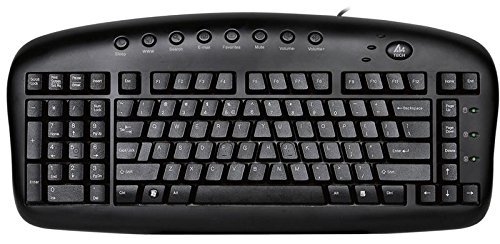
- Left-handed layout suits right-mouse PC setups
- Ergonomic shape helps reduce wrist and shoulder strain
- Wired USB design with 8 multimedia hotkeys
Best For: Left-handed PC users who want a straightforward ergonomic keyboard for daily office typing.
Best Split-Ergonomic Wired Pick
Perixx PERIBOARD-512B Ergonomic Keyboard

- Split one-piece layout supports a more natural wrist position.
- Tactile, long-travel keys feel responsive for daily typing.
- Wired USB connection keeps setup simple on a PC.
Best For: PC users seeking a straightforward split ergonomic keyboard for comfort-focused daily typing.
Best for Multi-Device Workflows
Perixx PERIBOARD-835BL Ergonomic Mechanical Keyboard

- Split layout supports more natural wrist positioning
- Switches between wired, Bluetooth, and 2.4 GHz connections
- Low-profile clicky switches suit tactile typists
Best For: PC users who want an ergonomic mechanical keyboard with multi-device flexibility and tactile feedback.
Best for Easy Setup
Arteck Split Ergonomic Keyboard with Wrist Rest

- Split ergonomic design supports a more natural typing position
- Soft cushioned wrist rest improves comfort for long sessions
- Plug-and-play wireless setup is quick and simple
Best For: PC users who want a comfortable split keyboard with minimal setup and a built-in wrist rest.
Best Split Keyboard Combo
Perixx Periduo-605 Wireless Ergonomic Combo

- Split-key keyboard encourages a more neutral wrist angle
- Vertical mouse complements the keyboard for full-hand comfort
- Plug-and-play setup keeps installation simple
Best For: PC users who want a straightforward ergonomic keyboard-and-mouse combo for wrist comfort.
Best for Full-Size Typing
X9 Wired Ergonomic Split Keyboard

- Split layout supports a more natural typing posture
- Cushioned wrist rest adds comfort for longer sessions
- Full-size 110-key design includes numpad and shortcuts
Best For: PC and Chrome users who want simple plug-and-play ergonomic comfort with a full-size layout.
Best Split Keyboard for Wrist Support – Logitech Ergo K860 Wireless Ergonomic Keyboard
If you’re comparing ergonomic keyboards for carpal tunnel pc users, the Logitech Ergo K860 is a strong pick because it combines a split key layout, a curved design, and a built-in wrist rest to help keep your hands in a more natural position during long typing sessions.
Best For: PC users who want a comfortable, full-size ergonomic keyboard with strong wrist support for all-day work.
Pros:
- Split, curved keyframe encourages a more relaxed typing posture
- Padded wrist rest adds support during long desktop sessions
- Bluetooth and USB connectivity make it easy to use on Windows or Mac
- Stain-resistant fabric helps keep the wrist rest looking cleaner
Cons:
- Large footprint may not suit smaller desks
- Learning curve if you’re new to split ergonomic layouts
For ergonomic keyboards for carpal tunnel pc users, this model stands out as a practical comfort-first option rather than a compact or minimalist one. It’s especially appealing if wrist support and a natural hand angle matter more than saving desk space.
Best Split Design – KINESIS Freestyle2 for PC
KINESIS Freestyle2 Ergonomic Keyboard for PC (9" or 20" Separation) (9" Separation)
Check Price On AmazonIf you’re comparing ergonomic keyboards for carpal tunnel pc users, the KINESIS Freestyle2 stands out for its adjustable split layout, which lets you separate the key modules up to 9 inches to better match your shoulder width and wrist angle. It keeps a familiar Windows layout while aiming to reduce awkward hand positioning during long typing sessions.
Best For: PC users who want a split ergonomic keyboard with easy plug-and-play setup and a standard Windows key layout.
Pros:
- Split design with up to 9 inches of separation for more natural arm positioning
- Standard Windows layout with hotkeys, media controls, and embedded numeric keypad
- Low-force membrane switches help reduce finger fatigue during extended use
- Simple plug-and-play operation with no special drivers required
Cons:
- Membrane keys won’t appeal to users who prefer a mechanical feel
- Only adjusts up to 9 inches, which may be limiting for some setups
For ergonomic keyboards for carpal tunnel pc users, this is a practical choice if you want a proven split keyboard that prioritizes comfort and familiarity over advanced customization. It’s especially appealing for office work, home typing, and anyone who wants an easier transition from a standard keyboard.
Best for Wrist Comfort – Logitech Wave Keys Ergonomic Keyboard
If you’re comparing ergonomic keyboards for carpal tunnel pc users, the Logitech Wave Keys stands out for its wavy key layout and cushioned palm rest, both designed to reduce strain during long typing sessions. It’s a practical wireless option if you want a familiar feel without giving up ergonomic support.
Best For: PC users who want a comfortable, easy-to-adapt ergonomic keyboard with strong wrist support for all-day work.
Pros:
- Wave-shaped layout helps keep hands, wrists, and forearms in a more natural typing position
- Memory-foam palm rest adds soft, supportive wrist cushioning
- Bluetooth, Logi Bolt, and Easy-Switch make it simple to use across devices
- Long battery life and multi-OS support improve everyday convenience
Cons:
- Not a split keyboard, so it may not relieve severe symptoms as much as more aggressive ergonomic designs
- Compact layout may feel small if you prefer a full-size board with a numpad
- Some customization requires the Logi Options+ software
For ergonomic keyboards for carpal tunnel pc users, Wave Keys is a solid middle-ground choice: supportive, easy to set up, and more approachable than many specialist ergonomic boards. It’s especially appealing if you want comfort first without a steep learning curve.
Best Left-Handed Option – A4tech Left-Handed Ergonomic Keyboard for PC
If you need ergonomic keyboards for carpal tunnel pc users and prefer a left-handed layout, this A4tech model is a practical, low-frills choice. It aims to reduce awkward wrist angles and shoulder reach while keeping a familiar wired USB setup for everyday office work.
Best For: Left-handed PC users, bookkeepers, and office workers who want a dedicated ergonomic layout to help ease wrist strain during long typing sessions.
Pros:
- Left-handed design can improve comfort for users who mouse with the right hand
- Ergonomic shape is built to help reduce RSI, wrist strain, and posture stress
- Wired USB connection keeps setup simple and dependable
- Includes 8 multimedia hotkeys for quick access to common functions
Cons:
- Specialized layout may not suit right-handed users
- Not a split or highly adjustable ergonomic keyboard
- Basic feature set compared with higher-end ergonomic models
This is a sensible pick if you want ergonomic keyboards for carpal tunnel pc users with a left-handed focus rather than a more advanced split design. It is most appealing for workstations where comfort, simplicity, and a familiar wired connection matter more than premium extras.
Best Split-Ergonomic Wired Pick – Perixx PERIBOARD-512B Ergonomic Keyboard
If you want one of the more straightforward ergonomic keyboards for carpal tunnel pc users, the Perixx PERIBOARD-512B is built around a split-key layout that helps keep your hands in a more natural position while typing. The wired USB connection keeps it simple for desktop use, and the curved rows and tactile key feel make long typing sessions a little easier to manage.
Best For: PC users who want a no-fuss, wired ergonomic keyboard with a split layout and a familiar typing feel for daily work.
Pros:
- Split one-piece design helps reduce wrist bending and support a more natural hand position.
- Long key travel with tactile feedback offers a comfortable, responsive typing feel.
- Curved rows and curved keycaps encourage better typing posture over extended sessions.
- Durable build rated for up to 20 million keystrokes.
Cons:
- May take 1–2 weeks to fully adapt to the ergonomic layout.
- Wired-only design may not suit users who prefer a clutter-free wireless desk.
- Membrane switches won’t feel as refined as mechanical keyboards.
This is a practical choice if you want ergonomic keyboards for carpal tunnel pc users without a steep setup process or extra features to learn. It focuses on comfort, familiar key spacing, and dependable everyday typing rather than premium extras.
Best Wireless Value – Wireless Ergonomic Keyboard & Mouse Combo
If you want ergonomic keyboards for carpal tunnel pc users that also keep the desk uncluttered, this 2.4G split keyboard and matching mouse combo is a practical pick. The sloped, low-force membrane keys and built-in PU wrist rest are designed to support a more natural hand position during long typing sessions.
Best For: PC and laptop users who want an affordable wireless ergonomic set with a wrist rest and matching mouse for everyday typing comfort.
Pros:
- Split, sloped layout helps reduce wrist and forearm strain
- Integrated PU wrist rest adds comfort for longer work sessions
- 2.4G wireless setup uses one USB receiver for both keyboard and mouse
- DPI-adjustable ergonomic mouse improves cursor control
Cons:
- Not Bluetooth, so it needs the USB receiver plugged in
- Runs on batteries instead of built-in rechargeable power
- Membrane feel may not suit users who prefer mechanical switches
For shoppers comparing ergonomic keyboards for carpal tunnel pc users, this combo stands out more for comfort and convenience than premium features. It’s a straightforward choice if you want a softer typing position, a wrist rest, and fewer cables without spending much.
Best for Multi-Device Workflows – Perixx PERIBOARD-835BL Ergonomic Mechanical Keyboard
If you want one of the more flexible ergonomic keyboards for carpal tunnel pc users, the Perixx PERIBOARD-835BL stands out for its split layout, curved key rows, and easy switching between wired, Bluetooth, and 2.4 GHz connections. It’s built for long typing sessions, but the clicky low-profile switches make it especially appealing if you like tactile feedback while working across multiple devices.
Best For: Typists who want an ergonomic mechanical keyboard with multi-device support, strong wrist-friendly shaping, and audible key feedback.
Pros:
- Split-key design and curved rows help reduce wrist bending
- Connects to up to four devices across wired, Bluetooth, and 2.4 GHz modes
- Low-profile blue mechanical switches provide fast, tactile, clicky typing
- RGB backlighting, macros, and remappable keys add workflow flexibility
Cons:
- Clicky switches may be too loud for shared offices
- Ergonomic shape can take a week or two to get used to
- Bulkier than standard compact keyboards
For ergonomic keyboards for carpal tunnel pc users who also need easy device switching, the PERIBOARD-835BL is a practical hybrid of comfort, customization, and productivity features. It’s not the quietest option, but it offers a well-rounded ergonomic setup for daily typing.
Best for Easy Setup – Arteck Split Ergonomic Keyboard with Wrist Rest
If you want one of the more straightforward ergonomic keyboards for carpal tunnel pc users, the Arteck Split Ergonomic Keyboard is built around a simple split layout and an integrated cushioned wrist rest. It aims to reduce strain without adding a complicated learning curve, making it a practical option for everyday Windows typing.
Best For: PC users who want a comfortable split keyboard with a soft wrist rest and quick plug-and-play setup.
Pros:
- Split design encourages a more natural wrist and forearm position
- Cushioned wrist rest adds comfort during long typing sessions
- Easy wireless setup with the included nano USB receiver
- Long battery life helps reduce charging interruptions
Cons:
- Wireless USB receiver means it is not ideal for USB-C-only workflows without an adapter
- Ergonomic split layout may take a little adjustment for first-time users
Overall, this is a solid pick for ergonomic keyboards for carpal tunnel pc users who value comfort, convenience, and a no-fuss setup over advanced customization. It is especially appealing if you want a budget-friendly wireless ergonomic keyboard that feels ready to use right away.
Best Split Keyboard Combo – Perixx Periduo-605 Wireless Ergonomic Combo
If you’re comparing ergonomic keyboards for carpal tunnel pc users, the Perixx Periduo-605 is built around a split-key layout plus a matching vertical mouse to help reduce wrist twisting during long sessions. It’s a practical pick for everyday Windows typing, especially if you want an easy plug-and-play setup without extra software.
Best For: PC users who want a simple ergonomic keyboard-and-mouse combo to ease wrist strain during typing and navigation.
Pros:
- Split-key design helps keep wrists in a more natural position
- Includes a vertical mouse with adjustable DPI for better control
- Plug-and-play setup with no driver installation required
- Adjustable palm rest adds support for longer typing sessions
Cons:
- Membrane keys won’t feel as crisp as mechanical switches
- Windows-only compatibility limits cross-platform use
- Compact layout may take time to get used to
As an all-in-one comfort bundle, this Perixx set makes sense for ergonomic keyboards for carpal tunnel pc users who want wrist-friendly positioning without a complicated setup. It’s not the most premium-feeling option, but the split keyboard and vertical mouse pairing is well aligned with daily strain reduction.
Best for Full-Size Typing – X9 Wired Ergonomic Split Keyboard
If you’re comparing ergonomic keyboards for carpal tunnel pc users, the X9 is a practical wired option that focuses on a more natural hand position, a cushioned wrist rest, and a full-size layout. It’s built for long desk sessions on a PC or Chromebook without adding setup complexity.
Best For: PC and Chrome users who want an easy plug-and-play ergonomic keyboard with a split design, numeric keypad, and wrist support for everyday typing.
Pros:
- Split, wave-style layout helps encourage a more natural wrist and hand position
- Cushioned integrated wrist rest adds comfort during longer typing sessions
- Full 110-key layout with shortcuts and numeric keypad improves productivity
- Plug-and-play USB connection keeps setup simple on laptops and desktops
Cons:
- Wired-only design may not suit users who prefer a wireless desk setup
- No backlighting, so it’s less appealing for low-light typing
- Split ergonomics can take a little adjustment if you’re used to standard keyboards
For ergonomic keyboards for carpal tunnel pc users, the X9 makes sense if you value straightforward comfort over advanced extras. It’s a solid choice for work-focused typing, especially if you want wrist support, a number pad, and no software headaches.
How We Picked the Best Ergonomic Keyboards for Carpal Tunnel PC Users
We focused on designs that support a more natural typing position, especially split or sculpted layouts, built-in wrist or palm rests, and features that make daily use easier on stressed hands. We also considered connection type, compatibility with Windows PCs, key feel, and whether the keyboard suits office work, heavy typing, or mixed desktop use.
Quick Comparison
Among Ergonomic Keyboards for Carpal Tunnel PC Users, the biggest differences usually come down to layout and feel. Split keyboards encourage a wider shoulder position, wave-shaped boards offer a gentler learning curve, and low-profile models can reduce finger travel. Wired options are simple and dependable, while wireless models add desk flexibility and travel convenience.
Key Buying Factors
Layout and Hand Position
Look for a design that keeps your wrists straighter and reduces inward twisting. A split keyboard can be especially helpful if you type for long stretches, while a contoured or wave design may feel more familiar right away.
Wrist and Palm Support
Padding helps, but support should feel stable rather than overly soft. A well-sized wrist rest can reduce pressure at the desk edge, though it should not force your hands upward.
Key Switch Type and Travel
For some users, low-profile keys reduce effort and finger extension. Others prefer a mechanical feel for clearer feedback. The best choice depends on whether you want light typing effort, tactile response, or quiet office use.
Connectivity and Compatibility
Most Ergonomic Keyboards for Carpal Tunnel PC Users work well with Windows, but it is still worth checking USB, Bluetooth, or 2.4G support. Wireless models are convenient, while wired keyboards avoid battery concerns and pairing issues.
Extra Features
Hotkeys, adjustable separation, multi-device switching, and bundled mice can improve productivity. Just make sure these extras do not distract from the main goal: a comfortable typing posture.
Who Should Buy Which Ergonomic Keyboards for Carpal Tunnel PC Users?
If you want the easiest transition, choose a wave or sculpted keyboard with palm support. If you have persistent wrist discomfort and want a more pronounced ergonomic change, a split model is usually the better fit. If desk space, portability, or battery-free reliability matters most, a wired keyboard may be ideal. For users who want a full comfort setup, a keyboard-and-mouse combo can be a smart value pick.
In short, the best option is the one that matches your typing habits, desk setup, and comfort needs. The right ergonomic keyboard should make long PC sessions feel more manageable without adding friction to your workflow.