A keyboard and mouse combo can make a long workday feel more comfortable—but only if its layout, mouse shape, and connection options suit the way you work. A split keyboard and vertical mouse offer a different experience from a gently curved wave keyboard and standard mouse.
These 10 picks cover both approaches, along with quiet keys, palm rests, backlighting, and wireless options. Use the guide below to narrow down the features worth paying for.
Best 10 Ergonomic Keyboard and Mouse Combo for PC Picks for 2026
Best for Multiple Devices

- Switch among up to three devices
- Split keyboard with cushioned wrist rest
- Both devices recharge via USB-C
Best For: Multi-device desk setups
Best Vertical Mouse Pairing

- Full-size split keyboard
- Cushioned palm rest
- Vertical mouse with four DPI settings
Best For: Users seeking a vertical mouse and split layout
Best Backlit Option

- 15 keyboard RGB lighting modes
- Quiet wave keys and soft wrist rest
- Rechargeable keyboard and mouse
Best For: Quieter workspaces that also want RGB lighting
Best Battery-Powered Quiet Pick
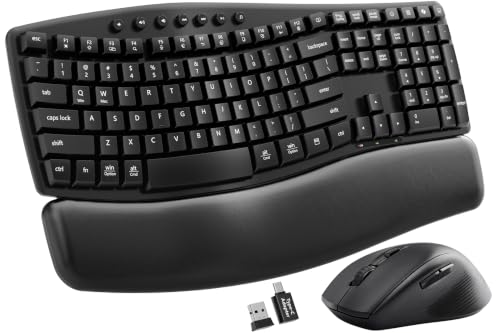
- Quiet keyboard and mouse clicks
- Cushioned wrist rest and two tilt angles
- One receiver; batteries not included
Best For: Shared workspaces and quiet home offices
Best Vertical-Mouse Pairing
Logitech Wave Keys & Lift Combo
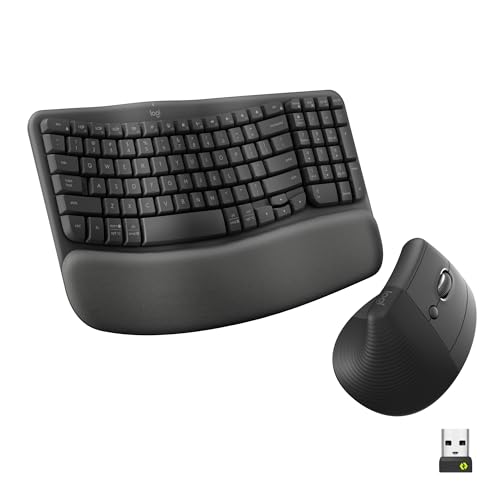
- Wave-shaped keyboard with memory-foam palm rest
- Right-handed 57° Lift vertical mouse
- Bluetooth or Logi Bolt connectivity
Best For: PC users with small to medium hands seeking a vertical mouse
Best Quiet Conventional Mouse
Logitech Wave Keys MK670 Combo

- Compact wave-shaped keyboard
- Memory-foam palm rest
- Quiet M550 L mouse with SmartWheel
Best For: Medium- to large-handed users who prefer a quieter conventional mouse
Best Rechargeable Setup

- Full-size keyboard with detachable tilt base
- Vertical mouse with three DPI settings
- USB-C rechargeable keyboard and mouse
Best For: Desktop users seeking adjustable tilt and rechargeable devices
Flexible Desk Setup
SABLUTE Wave Keyboard and Mouse
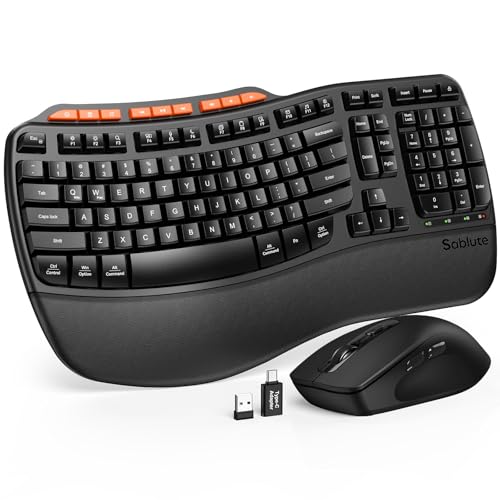
- Adjustable front and rear tilt legs
- Easy-clean leatherette wrist rest
- Nine productivity shortcut keys
Best For: Sit-stand office setups
Simple Wireless Pick

- Plug-and-play shared USB receiver
- Adjustable stand and wrist rest
- Windows/macOS layout switching
Best For: Straightforward wireless office use
Backlit Rechargeable Pick

- 4000mAh backlit keyboard
- Adjustable stands and soft palm rest
- Rechargeable RGB mouse with three DPI settings
Best For: Illuminated, rechargeable desk setups
Best for Multiple Devices – X9 Split Wireless Combo
If you need an ergonomic keyboard and mouse combo for PC but also work across other devices, the X9 pairs a split, cushioned keyboard with a sculpted right-handed mouse. Its Bluetooth and 2.4 GHz connections let you switch among up to three paired devices.
Best For: People who want a rechargeable ergonomic setup for a PC and other devices.
Pros:
- Split 100-key layout, integrated wrist cushion, and four kickstands for adjusting typing angle.
- Two Bluetooth channels plus one 2.4 GHz channel.
- USB-C rechargeable keyboard and mouse; the mouse has four DPI modes.
Cons:
- The mouse is designed for right-handed use.
- A split layout may take some adjustment if you are used to a straight keyboard.
Choose this set for its connection flexibility and adjustable keyboard position; check that its right-handed mouse and 100-key layout fit how you work.
Best Vertical Mouse Pairing – MEETION DirectorC Combo
The MEETION DirectorC is an ergonomic keyboard and mouse combo for PC shoppers who specifically want a vertical mouse. It pairs that mouse with a full-size split keyboard featuring curved, angled keys and a cushioned palm rest.
Best For: Desk workers who prefer a split keyboard and right-handed vertical mouse in one set.
Pros:
- Full-size split keyboard with a pillowed, non-slip wrist rest.
- Vertical mouse offers four DPI settings from 800 to 2400.
- Both devices are rechargeable and share one USB-A receiver.
Cons:
- The large keyboard needs ample desk space.
- The included USB-C piece is an adapter for the USB-A receiver, not a standalone receiver.
This is a practical pick if the vertical mouse is your priority. Measure your desk before buying: the keyboard is listed at 19.09 by 10.04 inches.
Best Backlit Option – COLIKES RGB Wave Combo
For an ergonomic keyboard and mouse combo for PC that adds adjustable lighting, the COLIKES set combines a wave-layout keyboard, soft wrist rest, and quiet keys with an RGB-lit mouse. The keyboard offers 15 lighting modes, including an option to turn the lights off.
Best For: Home-office users who want a quieter wave keyboard with customizable RGB lighting.
Pros:
- Two keyboard support angles and a soft, ventilated leather wrist rest.
- Keyboard has 15 RGB modes; the mouse has 13.
- Rechargeable devices, quiet input, and mouse DPI settings from 800 to 3200.
Cons:
- Uses a 2.4 GHz USB connection rather than Bluetooth.
- The wave layout is not a split keyboard.
Its main draw is the combination of lighting and quieter operation. If you do not need RGB, another set may be a simpler fit.
Best Battery-Powered Quiet Pick – SABLUTE Wave Combo
The SABLUTE is an ergonomic keyboard and mouse combo for PC users who value quiet typing and a straightforward wireless connection. Its wave keyboard has a cushioned leather wrist rest and two adjustable tilt angles, while both devices connect through one 2.4 GHz receiver.
Best For: Shared offices and home workspaces where low-noise typing matters more than rechargeable batteries.
Pros:
- Quiet keyboard and mouse clicks, with a claimed 30 dB typing level.
- Cushioned wrist rest, two tilt angles, and 12 productivity shortcuts.
- Single receiver with a USB-C adapter; spill-resistant keyboard.
Cons:
- Requires two AAA batteries for the keyboard and one AA for the mouse; batteries are not included.
- Some shortcuts are unavailable on macOS.
This set makes sense if you prefer replaceable batteries and want to keep desk noise down. Budget for batteries before setting it up.
Best Vertical-Mouse Pairing – Logitech Wave Keys & Lift Combo
If you want an ergonomic keyboard and mouse combo for pc work that addresses both typing posture and mouse grip, this pairs the compact Wave Keys with the right-handed Lift vertical mouse. The keyboard has a wave-shaped layout and memory-foam palm rest, while Lift positions the hand at a 57° angle.
Best For: Windows PC users with small to medium hands who want a vertical mouse alongside a supportive keyboard.
Pros:
- Compact, wavy keyboard layout lets you keep the mouse closer.
- Cushioned memory-foam palm rest and softly textured mouse grip.
- Bluetooth or Logi Bolt connectivity, plus customizable controls through Logi Options+.
Cons:
- Right-handed mouse is intended for small to medium hands.
- Uses replaceable batteries rather than built-in rechargeable batteries.
Choose this set if mouse posture is a priority; the vertical Lift is its clearest distinction from a conventional-mouse combo.
Best Quiet Conventional Mouse – Logitech Wave Keys MK670 Combo
For an ergonomic keyboard and mouse combo for pc desks where a vertical mouse is not the goal, the Wave Keys MK670 combines a compact, wave-shaped keyboard with the Signature M550 L mouse. Its memory-foam palm rest supports typing comfort, while the mouse is designed for quieter clicks.
Best For: People with medium to large hands who prefer a conventional mouse and want a quieter shared workspace.
Pros:
- Compact keyboard helps bring the mouse closer to your body.
- Memory-foam palm rest supports the wrists during typing.
- SilentTouch mouse clicks and SmartWheel scrolling suit document-heavy work.
Cons:
- The M550 L is a conventional mouse, not a vertical model.
- Keyboard Easy-Switch does not apply to the mouse.
This is the more familiar mouse shape of the two Logitech options here, with quiet clicking as its practical advantage. Choose the Lift pairing instead if a vertical grip matters more.
Best Rechargeable Setup – Perixx Periduo-614US Combo
The Perixx Periduo-614US is an ergonomic keyboard and mouse combo for pc users who want a full-size keyboard, a vertical mouse, and USB-C recharging. Its cushioned wrist rest and detachable tilt base offer ways to adjust your typing setup, while one USB nano receiver connects both devices.
Best For: Desktop users who want a full-size rechargeable set with a vertical mouse and adjustable keyboard tilt.
Pros:
- Detachable tilt base and cushioned wrist rest allow typing-position adjustments.
- Both devices recharge via USB-C and share one 2.4 GHz receiver.
- Vertical mouse offers three DPI settings and back/forward buttons.
- Keyboard includes a volume/mute knob and a Windows/Mac mode switch.
Cons:
- Full-size keyboard takes more desk space than a compact model.
- Wireless connection uses a USB receiver; Bluetooth is not listed.
This set makes sense if adjustability and recharging outweigh the space savings of a compact keyboard. The supplied estimate is up to one month per charge with 6–8 hours of daily use.
Flexible Desk Setup – SABLUTE Wave Keyboard and Mouse
If you want an ergonomic keyboard and mouse combo for PC that adapts to different desk positions, this SABLUTE set pairs wave-shaped keys with a cushioned leatherette wrist rest and adjustable front and rear tilt legs.
Best For: Office users who alternate between sitting and standing and want quick access to everyday shortcuts.
Pros:
- Front and rear tilt legs offer more ways to adjust the typing angle.
- Easy-clean leatherette wrist rest cushions the palms.
- Nine shortcut keys include screenshots, calculator, emoji, and media controls.
Cons:
- Calculator and emoji shortcuts are unavailable on macOS.
- Requires two AA batteries.
The adjustable keyboard is the main draw here; choose it if typing position and a low-maintenance wrist rest matter more to you than rechargeable power.
This ergonomic keyboard and mouse combo for PC keeps setup straightforward: one plug-and-play 2.4 GHz USB receiver connects the wave-key keyboard and contoured mouse, with no software download required.
Best For: Users who want an uncomplicated wireless setup with a wrist rest and Windows/macOS layout switching.
Pros:
- Wave keys, a wrist rest, and an adjustable keyboard stand support a customizable typing position.
- Right-hand mouse includes forward and back buttons.
- Keyboard and mouse enter sleep mode automatically to conserve power.
Cons:
- Requires one AA battery for each device; batteries are not included.
- The mouse is shaped for right-handed use.
Its practical appeal is easy setup rather than extras: check the back of the mouse for the USB receiver before getting started.
For an ergonomic keyboard and mouse combo for PC with lighting and rechargeable power, the SABLUTE MA31 Pro combines wave keys, a faux lambskin palm rest, a backlit keyboard, and an RGB mouse.
Best For: Users who want illuminated keys and mouse lighting alongside adjustable keyboard ergonomics.
Pros:
- Front and rear stands let you adjust the keyboard angle for sitting or standing.
- Keyboard has a stated 4000mAh battery; the mouse has a stated 700mAh battery.
- Backlit keyboard offers seven colors, while the six-button mouse has three DPI settings.
- One 2.4 GHz receiver includes USB-A and USB-C connectivity.
Cons:
- The mouse is specified for right-handed use.
- Its wireless connection uses a USB receiver rather than Bluetooth.
This is the feature-rich choice of the three, particularly if backlighting and rechargeable batteries are priorities; the shared USB receiver keeps pairing straightforward.
How We Picked the Best Ergonomic Keyboard and Mouse Combo for PC
We focused on the practical differences among the 10 selected products: keyboard shape, mouse design, palm support, connectivity, noise, and power needs. The lineup includes split and wave-style keyboards, vertical and conventional mice, and options aimed at shared spaces or backlit desks. Product descriptions are a starting point, not proof that a combo will prevent pain or suit every hand. Check current specifications and return policies before ordering.
Quick Comparison: Which Style Fits?
For a more noticeable change in hand position, start with a split-keyboard and vertical-mouse pairing, such as the MEETION or Perixx options. The X9 combines a split-style keyboard with a mouse and offers 2.4 GHz and Bluetooth connections. For a gentler move away from a flat keyboard, consider a wave layout: the Logitech Wave Keys pairings and several other picks use curved key arrangements. The Logitech Wave Keys and Lift pairing is worth comparing if a vertical mouse is a priority; do not assume the mouse bundled with every Wave Keys combo has the same shape.
If typing noise matters most, compare the quiet-key models, including Perixx and the wave combo advertised at 30 dB. If you want rechargeable power or illuminated keys, look at the rechargeable backlit choices from SABLUTE and the RGB-equipped wave combo. Confirm whether the mouse is rechargeable too; a rechargeable keyboard does not necessarily mean both devices are.
Key Buying Factors for an Ergonomic Keyboard and Mouse Combo for PC
Keyboard Layout and Adjustment
A split layout separates the hands more clearly, while a wave layout keeps a more familiar key arrangement with a gentler curve. Either may take time to learn. Look closely at keyboard width, key spacing, palm-rest feel, and whether the angle or support is adjustable. A built-in rest supports the palms during pauses; try not to press your wrists into it while typing.
Mouse Fit and Connections
A vertical mouse changes forearm orientation, but its size, button placement, and grip matter as much as its shape. If possible, compare the mouse dimensions with one you already use comfortably. Check whether the combo uses a USB receiver, Bluetooth, or both, and make sure your PC has a compatible port or Bluetooth connection. Also verify operating-system support, especially for shortcut keys and customization software.
Desk Setup and Ongoing Costs
Wireless sets reduce cable clutter but need batteries or charging. Backlighting can be useful in dim rooms, though it may shorten time between charges. Leave room to place the mouse close to the keyboard, and consider your chair height and monitor position alongside the devices.
Who Should Buy Which Ergonomic Keyboard and Mouse Combo for PC?
Choose a split keyboard with a vertical mouse if you want to try a more substantial change and are willing to adapt. Pick a wave-style combo if you prefer a familiar transition. Prioritize quiet keys for shared rooms, dual wireless connections if you switch between PCs, and rechargeable backlighting only if you will use it. The best Ergonomic Keyboard and Mouse Combo for PC is the one whose layout and mouse fit your hands, desk, and daily routine—not simply the one with the longest feature list.