A mechanical ergonomic keyboard can make long PC sessions more comfortable by changing the angle of your hands without giving up the switch feel you like. But a one-piece Alice layout and a two-piece split keyboard solve different problems.
These 10 selections span compact wired boards, wireless models, and more adjustable split designs. Use the guide below to narrow them down by fit, features, and how much of a layout change you want.
Best 10 Mechanical Ergonomic Keyboards for PC Picks for 2026
Compact Wireless Pick
RK Royal Kludge A72 Alice (Sky Blue)
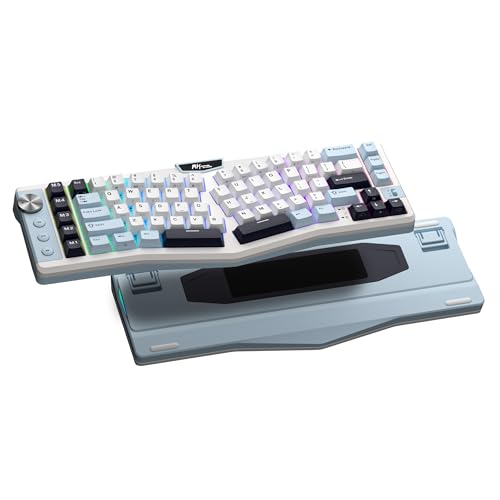
- 72-key angled Alice layout
- Bluetooth, 2.4GHz, or USB-C
- Hot-swappable switches and macro keys
Best For: Compact, customizable wireless PC setups
Matcha Desk Pick
RK Royal Kludge A72 Alice (Matcha Green)

- Angled 72-key Alice layout
- Gasket mounting with five dampening layers
- Web-based remapping and hot-swap support
Best For: Compact Alice setups in matcha green
Wired Tactile Pick

- Split-key, curved tenkeyless layout
- Three wrist-rest tilt settings
- Tactile brown switches and macros
Best For: Wired typing with tactile feedback
Full-Size Split Pick

- Halves separate up to 8 inches
- Full number pad and 10 macro keys
- Linear red switches with RGB
Best For: Adjustable split spacing with a number pad
Most Adjustable Split

- Two halves with eight adjustable feet
- Integrated wrist rests and five macro keys
- Bluetooth, 2.4GHz, or wired connectivity
Best For: Adjustable split positioning at a PC
Best for Custom Controls

- Angled Alice layout and adjustable stand
- Programmable joystick and multifunction knob
- Tri-mode connectivity and hot-swap switches
Best For: Angled typing with configurable work and gaming controls
Best for RGB Personalization
LEOBOG A75 Alice with Joystick
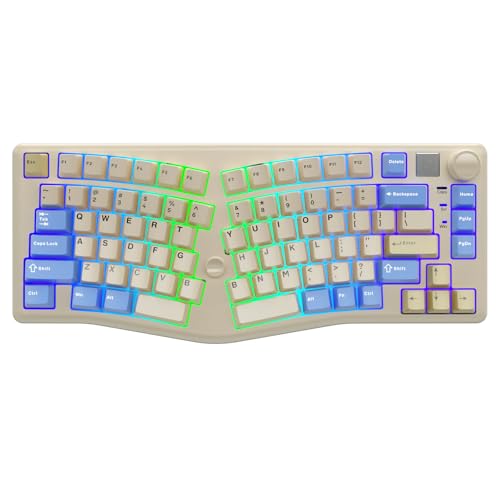
- Angled 75% Alice layout
- Hot-swap switches and programmable controls
- 17 listed RGB effects plus tri-mode connection
Best For: Custom lighting and controls in an Alice layout
Best for Extra Controls

- Angled 75% Alice layout
- Joystick and multifunction knob
- Three connection modes; hot-swappable switches
Best For: Wireless users who want extra navigation controls
Best for Hands-On Setup
ATTACK SHARK AKS068 Wired Alice

- 68-key Alice layout with wired USB-C
- VIA remapping and hot-swappable PCB
- Included switches and keycaps need installation
Best For: Buyers who enjoy setup and layout customization
Best for Multi-Device Typing
RK ROYAL KLUDGE A70 Wireless Alice

- Compact 65% angled Alice layout
- Bluetooth, 2.4GHz, and USB-C modes
- Gasket mount and hot-swappable switches
Best For: Multi-device users seeking a compact cushioned keyboard
Compact Wireless Pick – RK Royal Kludge A72 Alice (Sky Blue)
Among mechanical ergonomic keyboards for PC, the sky-blue RK A72 is a compact choice for buyers who want an angled Alice layout without giving up arrow keys. Its 72-key design pairs wireless flexibility with a gasket-mounted build.
Best For: PC users who want a compact, customizable Alice keyboard with wireless and wired options.
Pros:
- Split, angled layout and compact 68% footprint retain arrow keys.
- Bluetooth 5.0, 2.4GHz wireless, and USB-C wired connectivity.
- Hot-swappable 3- and 5-pin switch support, five macro keys, and a volume knob.
Cons:
- No dedicated number pad in the compact layout.
- RGB-on battery life is rated at 54 hours, versus up to 550 hours with lighting off.
The five-layer dampening and PBT keycaps add appeal for typing-focused setups. Choose this version if its sky-blue finish suits your desk and a compact Alice layout fits your workflow.
Matcha Desk Pick – RK Royal Kludge A72 Alice (Matcha Green)
The matcha-green RK A72 brings an angled Alice layout to shoppers comparing mechanical ergonomic keyboards for PC. Its 72-key, 68% format saves desk space while keeping arrow keys, and the three connection modes make it easy to use wired or wirelessly.
Best For: Buyers who want Alice-style positioning, customizable controls, and a matcha-green compact keyboard.
Pros:
- Split, angled key arrangement encourages a more natural hand position.
- Gasket mounting, five dampening layers, and Cherry-profile PBT keycaps.
- Browser-based key remapping, five macro keys, and a volume knob.
Cons:
- The 68% layout omits a dedicated number pad.
- A full recharge takes approximately 14 hours.
This is the same A72 feature set as the sky-blue option, so the matcha-green finish is the main reason to choose between them. Hot-swappable 3- and 5-pin switch support leaves room to change the typing feel later.
Wired Tactile Pick – Perixx PERIBOARD-335BR
For shoppers seeking mechanical ergonomic keyboards for PC with a straightforward wired connection, the Perixx PERIBOARD-335BR combines a split-key, curved frame with tactile brown switches. Its compact tenkeyless design leaves out the number pad while providing an integrated palm rest.
Best For: Typists who prefer tactile feedback, a wired USB connection, and adjustable wrist-rest tilt.
Pros:
- Split-key curved design and integrated palm rest.
- Wrist-rest tilt settings of 0, -4, and -7 degrees.
- Programmable key actions and macros, with Windows and Mac switching keys.
Cons:
- USB-only connectivity limits cable-free placement.
- Tenkeyless layout lacks a dedicated number pad.
The tactile switches offer distinct keypress feedback without the louder click described for clicky switches. It is a practical fit when adjustability and programming matter more than wireless convenience.
Full-Size Split Pick – Cloud Nine C989 Kailh Red
The Cloud Nine C989 stands out among mechanical ergonomic keyboards for PC because its two halves can be positioned up to 8 inches apart. Unlike compact alternatives, it keeps a full number pad and adds smooth Kailh linear red switches.
Best For: PC users who want an adjustable split distance without sacrificing a number pad.
Pros:
- Separating halves allow up to 8 inches of spacing.
- Built-in tenting and palm supports with a 7-degree wrist-rest angle.
- Full number pad, 10 programmable macro keys, RGB backlighting, and USB pass-through.
Cons:
- Wired USB connection offers no wireless mode.
- Full-size, two-piece design requires more desk space than compact layouts.
Consider this model when adjustable hand spacing and full-size productivity keys are priorities. Its linear switches suit buyers who prefer a smooth press rather than tactile feedback.
Most Adjustable Split – RK ROYAL KLUDGE RKS70
Among mechanical ergonomic keyboards for PC, the RKS70 stands out for its two movable halves, eight adjustable feet, and integrated wrist rests. Its 75% layout also makes room for dedicated macro keys without moving to a full-size board.
Best For: PC users who want to position each keyboard half separately and switch between wired and wireless setups.
Pros:
- Adjustable split layout and integrated palm support.
- Bluetooth 5.0, 2.4GHz, and wired connections.
- Hot-swappable silver linear switches and five programmable macro keys.
Cons:
- Integrated wrist rests cannot be removed.
- Key remapping and macro setup require RK software on Windows.
Choose this model if physical positioning matters more than an uninterrupted keyboard layout. The halves can also be linked with the included coiled cable when you prefer them together.
Best for Custom Controls – LEOBOG A75 Alice (Black)
The black LEOBOG A75 is an option among mechanical ergonomic keyboards for PC if you want an angled Alice layout rather than two separate halves. A programmable joystick, multifunction knob, and hot-swappable switches add hands-on customization.
Best For: Users who want an angled keyboard with configurable controls for work and gaming.
Pros:
- Alice layout positions the hands at gentle angles.
- Programmable joystick provides arrow and Enter controls; the knob adjusts volume and lighting.
- Bluetooth 5.0, 2.4GHz, and USB-C wired modes, plus hot-swappable switches.
Cons:
- The Alice layout does not let you reposition each half independently.
- Joystick remapping and custom lighting depend on driver software.
Its adjustable magnetic stand and sound-dampening layers round out a feature-heavy design. Pick it for integrated controls, not for the flexibility of a physically split board.
Best for RGB Personalization – LEOBOG A75 Alice with Joystick
This LEOBOG A75 combines an angled Alice layout with hot-swappable linear switches and extensive RGB settings. For shoppers comparing mechanical ergonomic keyboards for PC, it offers a fixed, splayed key layout rather than independently movable halves.
Best For: Users who want Alice-style hand positioning with customizable lighting and controls.
Pros:
- Angled 75% layout and multifunction volume-and-lighting knob.
- Joystick maps to arrow keys and Enter.
- Bluetooth 5.0, 2.4GHz, and wired connections; hot-swappable switches.
Cons:
- Fixed Alice layout cannot be spaced like a two-piece split keyboard.
- Key remapping and macros use proprietary driver software.
With 17 listed lighting effects, music-reactive modes, and programmable keys, this version makes sense if you expect to tune the board beyond its default settings.
Best for Extra Controls – LEOBOG A75 Alice Wireless
Among mechanical ergonomic keyboards for PC, the LEOBOG A75 stands out for pairing an angled Alice layout with a joystick-style arrow and Enter control. Its 75% layout also includes a knob for volume and RGB adjustments.
Best For: PC users who want Alice-style hand positioning, wireless flexibility, and dedicated controls in one keyboard.
Pros:
- Bluetooth 5.0, 2.4GHz wireless, and USB-C wired connection options.
- Joystick provides arrow inputs and Enter; the knob controls volume and lighting.
- Hot-swappable linear switches, RGB lighting, and remapping and macros through proprietary software.
Cons:
- The joystick-style arrow controls may take adjustment if you prefer conventional arrow keys.
- Its Alice layout is angled, but it is not a fully separated keyboard.
The A75 is a practical pick if its extra controls appeal to you. Choose it for the combination of connectivity and customization, rather than expecting a fully split design.
Best for Hands-On Setup – ATTACK SHARK AKS068 Wired Alice
The ATTACK SHARK AKS068 is a compact wired option among mechanical ergonomic keyboards for PC. Its 68-key Alice layout angles the key groups, while VIA support gives users a way to remap keys and the volume knob.
Best For: Buyers comfortable assembling the included switches and keycaps who want a compact, programmable wired keyboard.
Pros:
- VIA support for remapping keys and the knob, plus hotkeys and macros.
- Hot-swappable PCB supports most 3-pin and 5-pin switches; pre-lubed linear red switches are included.
- Gasket mounting and four layers of sound-damping material.
Cons:
- Requires installing the included switches and keycaps before use.
- USB-C wired only; no wireless mode is listed.
The AKS068 rewards buyers who want to tune their layout and switches. The assembly step is its clearest trade-off against a ready-to-type keyboard.
Best for Multi-Device Typing – RK ROYAL KLUDGE A70 Wireless Alice
For shoppers comparing mechanical ergonomic keyboards for PC, the RK ROYAL KLUDGE A70 offers an angled 65% Alice layout without moving to a fully split design. It supports Bluetooth, 2.4GHz wireless, and USB-C wired connections.
Best For: Users who switch between devices and want a compact Alice keyboard with a cushioned typing feel.
Pros:
- Bluetooth stores up to three devices, alongside 2.4GHz and wired modes.
- 7500mAh battery, with claimed use of up to 710 hours with RGB off or 62 hours with it on.
- Gasket mount, five soft layers, PBT keycaps, and hot-swappable linear switches.
Cons:
- The 65% layout omits a dedicated number pad.
- Claimed battery life drops substantially with RGB enabled.
The A70 makes sense if device switching and typing feel matter more than a full-size layout. Its battery display and volume roller add useful at-a-glance controls.
How We Picked the Best Mechanical Ergonomic Keyboards for PC
We focused on practical differences that matter when shopping for Mechanical Ergonomic Keyboards for PC: split versus Alice layout, keyboard size, connection choices, switch type, and features such as wrist rests, programmability, and hot-swappable switches. The selected list includes repeated listings for the RK A72 and LEOBOG A75, so compare each listing’s exact configuration and price rather than assuming every entry represents a different model. We did not treat an ergonomic label as proof that a keyboard will fit every user.
Quick Comparison: Which Layout Fits Your Desk?
Separate split halves: The RK RKS70 and Cloud Nine C989 let you position the left and right sections independently. They are worth a look if you want more control over hand spacing. Check their dimensions and cable or connection requirements before buying.
One-piece Alice boards: The RK A72, RK A70, LEOBOG A75, and ATTACK SHARK AKS068 angle the key groups within a single case. They offer a fixed hand position and are generally simpler to place and move than two separate halves.
Compact, low-profile option: The wired Perixx PERIBOARD-335BR pairs a compact ergonomic design with low-profile tactile switches. Consider it if you prefer a shorter key feel and do not need wireless connectivity.
Key Buying Factors for Mechanical Ergonomic Keyboards for PC
Layout and Adjustment
A fully split board gives you room to set each half where your shoulders and wrists feel comfortable; an Alice board sets the angle for you. Neither guarantees a neutral wrist position. Compare photos of the actual key layout, including the spacebars and modifier keys, with the shortcuts you use daily.
Size and Learning Curve
Compact 65% and 75% layouts free mouse space but may move or omit dedicated navigation keys. If you rely on a function row, arrows, or frequent shortcuts, verify their placement before choosing the smallest board. Expect an adjustment period when moving from a standard keyboard to either ergonomic style.
Switches, Connectivity, and Extras
Linear switches feel smooth, while tactile switches provide a noticeable bump; neither is universally better for comfort. Check the exact switch configuration on the listing. Wired keyboards avoid charging and pairing, while Bluetooth and 2.4 GHz options help reduce desk cables. Hot-swap support, RGB lighting, programmable controls, and included wrist rests can be useful, but prioritize layout and dependable PC connectivity first. Confirm software support for your version of Windows if macros or remapping matter.
Who Should Buy Which Mechanical Ergonomic Keyboards for PC?
Choose the RKS70 or C989 if independent half placement is your priority. Start with an A72, A70, A75, or AKS068 if you want angled keys without managing two pieces. Consider the Perixx if low-profile tactile switches and a wired connection appeal to you. For repeated models in this roundup, use the current switch, connection, and return-policy details to make the final call—especially if this will be your first ergonomic keyboard.