Choosing the right ergonomic keyboard can make long desk sessions feel noticeably easier on your hands, wrists, and shoulders.
Below, we focus on wireless ergonomic keyboards for desktop PC users who want a better typing angle, clutter-free setup, and all-day comfort.
Best 10 Wireless Ergonomic Keyboards for Desktop PC Picks for 2026
Best for Wrist Support
Logitech ERGO K860 Wireless Ergonomic Keyboard

- Split, curved keyframe promotes a more natural typing posture
- Memory-foam palm rest adds strong wrist comfort
- Bluetooth and USB receiver support flexible desktop use
Best For: Desktop users who want maximum wrist support and a familiar full-size ergonomic keyboard.
Best for Wrist-Friendly Typing
MOFII Wireless Ergonomic Keyboard & Mouse Combo
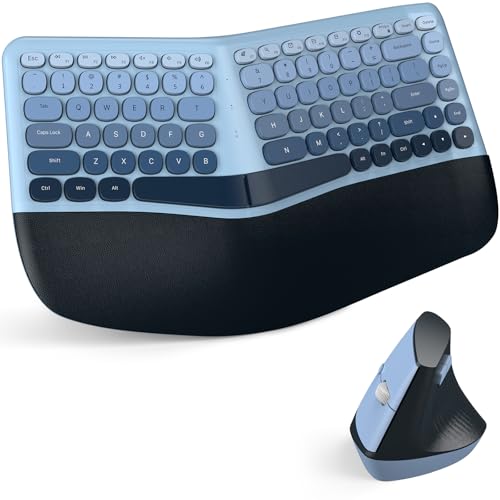
- Split curved keyboard with padded wrist rest for reduced strain
- Vertical ergonomic mouse included with adjustable DPI
- Single USB receiver offers easy plug-and-play setup
Best For: People who want a comfortable ergonomic keyboard-and-mouse bundle for long desktop typing sessions.
Best for Wired Ergonomic Typing
Perixx PERIBOARD-512B Split Keyboard

- Split layout reduces wrist bending for a more natural typing angle.
- Tactile long-travel keys deliver a responsive, comfortable feel.
- Durable build and wrist rest suit long daily desktop sessions.
Best For: Desktop typists who want ergonomic comfort and reliable wired USB connectivity.
Best for Multi-Device Switching
TECKNET Wireless Ergonomic Keyboard

- Split, curved key layout supports a natural typing position.
- Bluetooth 5.0 + 2.4GHz wireless works with up to 4 devices.
- Memory foam wrist rest and rechargeable battery add comfort and convenience.
Best For: Multi-device users who want a comfortable ergonomic keyboard for desktop work.
Best for Easy Setup
Perixx PERIBOARD-835BL Ergonomic Mechanical Keyboard

- Split ergonomic layout reduces wrist strain during long typing sessions
- Supports wired, 2.4 GHz, and dual Bluetooth connections
- Low-profile blue switches offer tactile, clicky feedback with RGB lighting
Best For: Users who want a tactile ergonomic keyboard with easy switching across multiple devices.
Best for Everyday Use
Wave Keys Ergonomic Keyboard Combo

- Wave keys and wrist rest for a more natural typing angle
- 2.4G plug-and-play connection with one USB receiver
- Includes matching ergonomic mouse with forward/back buttons
Best For: Desktop users who want a simple, comfort-focused wireless keyboard and mouse combo.
Best for Cushioned Comfort
Logitech Wave Keys Wireless Ergonomic Keyboard

- Wavy layout encourages a more natural typing position
- Cushioned memory-foam palm rest adds wrist support
- Bluetooth, Logi Bolt, and Easy-Switch for 3 devices
Best For: Desktop users who want a comfort-focused ergonomic keyboard with easy multi-device switching.
Best with Extra Features
Arteck Split Ergonomic Keyboard

- Split layout promotes a more natural typing posture
- Cushioned wrist and palm rest adds comfort
- USB nano receiver makes setup quick and simple
Best For: Desktop users who want an easy-to-use ergonomic wireless keyboard with added wrist support.
Best for Simple Dual-Device Setup
Wireless Wave Keyboard & Mouse Combo

- Wave keys and wrist rest support more comfortable typing
- One USB receiver handles both keyboard and mouse
- Works with Windows, Mac, desktops, and laptops
Best For: People who want an easy-to-use ergonomic keyboard and mouse bundle for everyday desktop work.
Best for Split-Key Comfort
Perixx Periduo-605 Wireless Ergonomic Combo

- Split-key keyboard reduces outward wrist bend
- Wireless vertical mouse with 1000/1500/2000 DPI
- Adjustable palm rest for added typing comfort
Best For: Desktop users who want a simple ergonomic combo with a split keyboard and vertical mouse.
Best for Wrist Support – Logitech ERGO K860 Wireless Ergonomic Keyboard
If you want one of the more comfortable wireless ergonomic keyboards for desktop pc use, the Logitech ERGO K860 is built around a split, curved layout that encourages a more natural hand position. The cushioned palm rest and adjustable tilt make it a strong choice for long typing sessions at home or in the office.
Best For: Typists who want a comfortable ergonomic upgrade with a full-size layout, strong wrist support, and easy wireless connectivity.
Pros:
- Split, sloped design helps improve typing posture and reduce wrist strain
- Memory-foam wrist rest adds noticeable support for long workdays
- Connects via Bluetooth or USB receiver for flexible desktop setup
- Quiet full-size keys keep the experience familiar and office-friendly
Cons:
- Bulkier than a standard keyboard, so it takes up more desk space
- Ergonomic layout may require a short adjustment period
For buyers comparing wireless ergonomic keyboards for desktop pc setups, the ERGO K860 stands out because it prioritizes comfort first without sacrificing a familiar full-size typing experience. It is especially appealing if wrist support and posture are higher priorities than compact size.
Best for Wrist-Friendly Typing – MOFII Wireless Ergonomic Keyboard & Mouse Combo
If you want one of the more comfortable wireless ergonomic keyboards for desktop pc use without a complicated setup, this MOFII combo is built around an easy, low-strain typing angle. The split curved keys and padded wrist rest aim to reduce pressure during long work sessions, while the included ergonomic mouse keeps the package simple for a home office or workstation.
Best For: Users who want a comfortable all-in-one keyboard and mouse set for everyday desk work, especially long typing sessions.
Pros:
- Split curved key layout and cushioned palm rest help ease wrist and forearm strain.
- Includes a vertical ergonomic mouse with 3 DPI levels for more controlled navigation.
- Single nano receiver connects both devices for simple plug-and-play use.
- Works with Windows PCs and desktop setups with no driver installation required.
Cons:
- Designed mainly for Windows users, so cross-platform flexibility is limited.
- Colorful styling may not suit those who prefer a plain office look.
For buyers comparing wireless ergonomic keyboards for desktop pc work, this MOFII combo stands out for comfort-first design and straightforward wireless operation rather than advanced features. It’s a practical pick if you want an ergonomic keyboard-mouse bundle that’s ready to use right out of the box.
Best for Wired Ergonomic Typing – Perixx PERIBOARD-512B Split Keyboard
If you want one of the more comfortable wireless ergonomic keyboards for desktop pc but prefer a dependable USB connection, the Perixx PERIBOARD-512B is built around split-key comfort, a wrist rest, and a curved typing layout. It’s a practical pick for users who spend long hours at a desk and want a familiar, easy-to-live-with ergonomic shape.
Best For: Desktop users who want an affordable ergonomic keyboard with a split layout, tactile feel, and a wired setup.
Pros:
- Split-key design helps reduce wrist bending and supports a more natural hand position.
- Long key travel and tactile feedback make typing feel responsive and comfortable.
- Built with durable materials and rated for up to 20 million keystrokes.
- Curved rows and keycaps improve posture and fingertip control during long sessions.
Cons:
- It’s wired, so it won’t suit buyers who specifically want a wireless desk setup.
- The ergonomic layout may take a week or two to feel completely natural.
As a result, this Perixx model is a strong value choice for anyone comparing wireless ergonomic keyboards for desktop pc but deciding that comfort and stability matter more than cable-free convenience. If you’re fine with USB connectivity, it delivers a thoughtful ergonomic shape without a steep learning curve.
Best for Multi-Device Switching – TECKNET Wireless Ergonomic Keyboard
If you want one of the more flexible wireless ergonomic keyboards for desktop pc use, the TECKNET split-layout model is built for comfort and convenience. It combines a curved key arrangement, padded wrist support, and both Bluetooth and 2.4GHz connectivity, making it a practical fit for mixed-device work setups.
Best For: People who want an ergonomic desktop keyboard that can switch between multiple devices without constant re-pairing.
Pros:
- Split, curved key layout helps support a more natural typing posture.
- Built-in memory foam wrist rest adds comfort for long work sessions.
- Bluetooth 5.0 and 2.4GHz wireless support up to 4 devices.
- Rechargeable battery and USB-C charging make it easy to keep powered.
Cons:
- Ergonomic split design may take time to get used to.
- Not ideal if you prefer a traditional straight keyboard layout.
- More feature-focused than minimalist, so it may feel bulky to some users.
This TECKNET option stands out if your priority is comfort plus flexibility, especially for home offices that rely on several devices. Among wireless ergonomic keyboards for desktop pc, it’s a strong pick for users who want wrist support, easy switching, and a straightforward rechargeable design.
Best for Easy Setup – Perixx PERIBOARD-835BL Ergonomic Mechanical Keyboard
If you want one of the more flexible wireless ergonomic keyboards for desktop pc setups, the Perixx PERIBOARD-835BL stands out with its split-key layout, low-profile clicky switches, and true multi-device support. It’s built for users who type for hours, switch between devices often, and want tactile feedback without giving up ergonomic positioning.
Best For: Typists who want an ergonomic mechanical keyboard with wireless convenience, multi-device switching, and a tactile clicky feel for work or coding.
Pros:
- Split one-piece ergonomic layout helps reduce wrist bend and improve hand positioning
- Switch between wired, 2.4 GHz, and two Bluetooth devices with easy plug-and-play pairing
- Low-profile blue mechanical switches deliver crisp, tactile feedback for fast typing
- RGB backlighting, macros, and programmable keys add useful customization
Cons:
- Clicky switches can be loud for shared or quiet workspaces
- Ergonomic split design may take a week or two to feel natural
- Larger footprint may not suit compact desks
This is a strong pick if you want wireless ergonomic keyboards for desktop pc use and value comfort plus device flexibility over a minimalist layout. The learning curve is real, but the mix of ergonomic shaping, mechanical feel, and multi-device switching makes it a practical productivity keyboard.
Best for Everyday Use – Wave Keys Ergonomic Keyboard Combo
If you want wireless ergonomic keyboards for desktop pc use without a learning curve, this 2.4G combo is a practical pick. The wave-style keys, wrist rest, and included mouse are designed to reduce strain while keeping setup simple and straightforward.
Best For: Desktop and laptop users who want an ergonomic full-size keyboard and mouse combo with quick plug-and-play convenience.
Pros:
- Wave key layout and wrist rest help support a more natural typing posture
- Single 2.4G USB receiver works for both keyboard and mouse
- Easy compatibility with Windows and Mac, plus no software required
- Mouse includes forward/back buttons and adjustable DPI
Cons:
- Uses AA batteries instead of a rechargeable design
- Right-hand mouse shape may not suit left-handed users
- USB receiver storage on the mouse is easy to miss at first
For shoppers comparing wireless ergonomic keyboards for desktop pc setups, this combo stands out for comfort-first design and hassle-free connectivity rather than advanced customization. It’s a solid everyday choice if you want a full-size layout with a matching ergonomic mouse.
Best for Cushioned Comfort – Logitech Wave Keys Wireless Ergonomic Keyboard
If you want one of the more comfortable wireless ergonomic keyboards for desktop pc use, the Logitech Wave Keys is built around a gentle wavy layout and a cushioned palm rest that helps reduce wrist strain during long typing sessions. It also supports Bluetooth or the Logi Bolt receiver, so it fits easily into a home office or mixed-device setup.
Best For: Desktop users who want a compact ergonomic keyboard with strong palm support, easy device switching, and broad OS compatibility.
Pros:
- Wavy key layout promotes a more natural hand and wrist position
- Memory-foam palm rest adds noticeable all-day comfort
- Easy-Switch support lets you move between up to 3 devices
- Works with Windows, Mac, iPadOS, and ChromeOS
Cons:
- Not a split keyboard, so it may not suit users wanting a more aggressive ergonomic angle
- Compact layout can feel smaller than a full-size desktop board
For shoppers comparing wireless ergonomic keyboards for desktop pc use, Wave Keys is a practical comfort-first option that balances everyday ergonomics with simple wireless flexibility. It’s especially appealing if you want easier typing without moving to a large or highly specialized ergonomic design.
Best with Extra Features – Arteck Split Ergonomic Keyboard
If you want one of the more straightforward wireless ergonomic keyboards for desktop pc use, the Arteck Split Ergonomic Keyboard is built around comfort and convenience. Its split layout encourages a more natural wrist and forearm position, while the cushioned wrist rest adds support for longer typing sessions.
Best For: Desktop and laptop users who want an easy-to-set-up ergonomic wireless keyboard with a soft wrist rest and no-fuss USB receiver.
Pros:
- Split ergonomic design helps reduce wrist and forearm strain
- Soft cushioned wrist and palm rest improves comfort during long work sessions
- Simple 2.4G USB receiver setup works instantly after plugging in
- Rechargeable battery is rated for up to 6 months per charge
Cons:
- 2.4G wireless only, so there is no Bluetooth option
- Ergonomic split layout may take time to get used to
For buyers comparing wireless ergonomic keyboards for desktop pc setups, this Arteck model stands out for comfort-first design and low-setup friction rather than advanced extras. It is a practical pick if you want a wireless keyboard that feels immediately usable and supports healthier typing posture.
Best for Simple Dual-Device Setup – Wireless Wave Keyboard & Mouse Combo
If you want wireless ergonomic keyboards for desktop pc that are easy to set up and comfortable for all-day typing, this wave-key combo is a practical pick. The full-size layout, wrist rest, and contoured mouse make it a solid choice for home offices and everyday work.
Best For: Users who want an affordable ergonomic keyboard-and-mouse bundle with straightforward plug-and-play convenience.
Pros:
- Wave key design and wrist rest help reduce strain during long typing sessions
- 2.4G plug-and-play connection works with one USB receiver for both devices
- Includes an ergonomic mouse with forward/back buttons and 3-level DPI adjustment
- Wide Windows and Mac compatibility for desktops, laptops, and Chromebooks
Cons:
- Batteries are not included
- Mouse is shaped for right-handed use
- Not a true premium mechanical or fully silent keyboard option
This combo is a strong fit if you want wireless ergonomic keyboards for desktop pc without a complicated setup. It focuses on comfort, basic productivity features, and broad compatibility rather than high-end extras.
Best for Split-Key Comfort – Perixx Periduo-605 Wireless Ergonomic Combo
If you want a practical entry in wireless ergonomic keyboards for desktop pc, the Perixx Periduo-605 focuses on reducing wrist strain with a split-key layout and a matching vertical mouse. It’s a straightforward combo for everyday office work, with low-profile membrane keys, an adjustable palm rest, and simple plug-and-play setup.
Best For: Users who want an affordable ergonomic keyboard-and-mouse combo that makes long typing sessions feel more natural.
Pros:
- Split-key layout helps keep wrists in a more neutral position while typing
- Includes a wireless vertical mouse with adjustable DPI settings
- Adjustable palm rest adds extra comfort for desktop work
- Plug-and-play setup keeps installation simple on supported Windows systems
Cons:
- Membrane keys won’t suit users who prefer mechanical typing feel
- Limited to Windows 7/8/10 compatibility
- Ergonomic design is more basic than higher-end split keyboards
For shoppers comparing wireless ergonomic keyboards for desktop pc, this Perixx combo is appealing because it bundles the two main ergonomic upgrades—split typing and vertical mouse support—into one easy-to-use package. It’s a solid choice if comfort and simplicity matter more than premium materials or advanced features.
How We Picked the Best Wireless Ergonomic Keyboards for Desktop PC
We focused on typing comfort, ergonomic shape, wireless connectivity, build quality, palm or wrist support, and whether each model suits everyday desktop use. We also looked for practical features like multi-device pairing, rechargeable power, and layouts that reduce strain without creating a steep learning curve.
Quick Comparison
In this group, split keyboards tend to offer the most dramatic posture change, while wave-style designs usually feel easier to adapt to. Combo sets can be a smart value if you want both a keyboard and mouse upgrade, and mechanical models appeal to users who want more tactile feedback. If you need a simple office-friendly option, a low-profile wireless board is often the easiest place to start.
Key Buying Factors for Wireless Ergonomic Keyboards for Desktop PC
Layout and Typing Feel
Split layouts place your hands closer to a natural shoulder width, while curved or wave-shaped boards soften the wrist angle. If you are new to ergonomics, a less aggressive shape may be more comfortable at first.
Wireless Connection Type
Look for Bluetooth if you switch between devices, or a 2.4G USB receiver if you want a stable plug-and-play connection for a desktop PC. Some models support both, which adds flexibility.
Palm Rest and Key Profile
A cushioned palm rest can reduce pressure during long sessions, especially for typing-heavy work. Low-profile keys may feel easier to adapt to and can help keep hand movement smaller.
Power and Convenience
Rechargeable batteries are convenient for frequent use, while replaceable batteries may appeal to users who prioritize long standby time. Extra features such as Easy-Switch buttons, media shortcuts, or multi-device pairing can improve daily workflow.
Who Should Buy Which Wireless Ergonomic Keyboards for Desktop PC?
If you want the most classic ergonomic desktop upgrade, choose a split keyboard. If you prefer a gentler learning curve, a wave-style wireless keyboard is often the better fit. If you work across a laptop and desktop PC, prioritize multi-device Bluetooth support. If you type for long hours, place wrist support and key comfort near the top of your list. For shoppers who want a full desk refresh, a keyboard-and-mouse combo can deliver better value than buying each piece separately.
For most buyers, the best choice among Wireless Ergonomic Keyboards for Desktop PC is the one that matches your hand position, desk space, and workflow—not just the feature list.