Old slides and negatives can fade, scratch, and get harder to view over time. A good scanner turns those memories into shareable digital files before more detail is lost.
We compared the best slide scanners for old photos based on image quality, scan speed, ease of use, film compatibility, and everyday convenience.
Best 10 Slide Scanners for Old Photos Picks for 2026
Budget-Friendly All-in-One Choice
KODAK Slide N Scan Film & Slide Scanner

- 22MP scanning with a 5-inch LCD screen
- Supports 135, 110, and 126 slides and negatives
- Saves JPEGs directly to SD or SDHC cards
Best For: Easy standalone scanning with broad film-format support
Fast Standalone Converter
Wolverine Titan 8-in-1 Film Converter
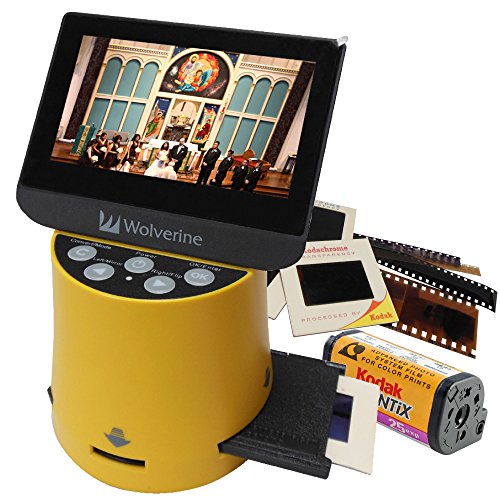
- Converts slides and negatives in about three seconds
- Supports 35mm, 127, 126, 110, and APS formats
- 4.3-inch screen with HDMI viewing output
Best For: Quick, no-computer digitizing across several film formats
Best Large-Screen Upgrade
KODAK Slide N Scan Max Film Scanner

- Tilts for photo-frame style viewing
- Supports 135mm, 110mm, and 126 film
- Saves directly to SD or SDHC cards
Best For: Users wanting a larger-screen, direct-to-card workflow
Best for Mixed Film Archives

- Supports 35mm, 110, 126, and Super 8 film
- 24MP output with a 5-inch display
- Saves to SD cards up to 128GB
Best For: Mixed archives with multiple film and slide formats
Standalone Film & Photo Scanner
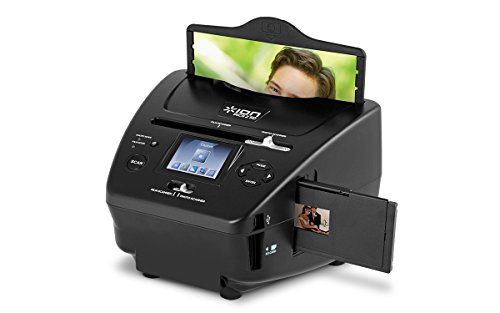
- No-computer scanning to included SD card
- Supports slides, negatives, and print photos
- 5.1 MP sensor with up to 2500 DPI
Best For: Simple home archiving without a PC
Large-Screen Film Scanner
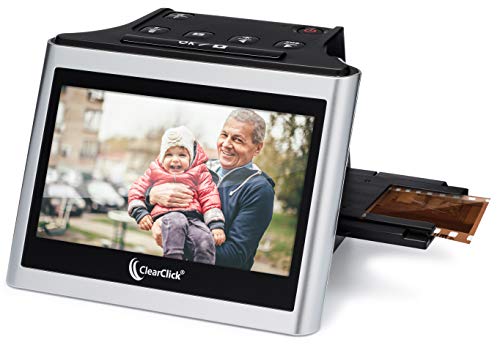
- 5-inch LCD for real-time previewing
- Scans 35mm, 110, and 126 formats
- Standalone use with SD card storage
Best For: People who want an easy-to-use scanner with a big screen
Touchscreen Slide Digitizer

- 7-inch touch LCD with preview/edit tools
- Quick-feed tray for batch scanning
- USB and HDMI connectivity
Best For: Users who want touchscreen convenience and batch scanning
Quick 1-at-a-Time Converter

- No computer or drivers required
- Scans photos, slides, and negatives one at a time
- Built-in battery and 5-inch LCD for portable use
Best For: Users who want simple standalone scanning for older photos and film
Compact All-in-One Viewer
KODAK Mini Digital Film & Slide Scanner

- Supports 135, 126, 110, Super 8, and monochrome film
- Easy-load adapters speed up loading
- Can save to SD card or view on TV
Best For: People who want a compact, easy-use scanner with broad film compatibility
Large-Screen Memory Saver
DigitPro C190 Film and Slide Scanner

- 5-inch LCD for preview and playback
- Converts negatives, slides, and Super 8 film
- USB and HDMI output for easy sharing
Best For: Families and hobbyists wanting a simple large-screen scanner
Budget-Friendly All-in-One Choice – KODAK Slide N Scan Film & Slide Scanner
If you want slide scanners for old photos that keep the workflow simple, this KODAK model is built for quick viewing, editing, and saving without needing a computer. It handles 35mm, 110, and 126 slides and negatives, then stores JPEG files directly to an SD or SDHC card for easy archiving.
Best For: Home users who want an easy, standalone scanner with a large screen and broad film support.
Pros:
- 22MP resolution with a 5-inch LCD for previewing and editing
- Supports 135, 110, and 126 slides plus matching negatives
- Quick-feed tray helps make batch scanning less tedious
- Connects via USB or HDMI and can also serve as a picture-frame-style display
Cons:
- SD or SDHC card is not included
- Not designed for film formats outside the supported size list
- Requires a separate card for direct saving
Overall, this is a practical pick if you want a straightforward film-and-slide scanner with a larger display and easy one-touch operation. It is especially appealing for mixed family archives where convenience matters more than advanced controls.
Fast Standalone Converter – Wolverine Titan 8-in-1 Film Converter
Among slide scanners for old photos, the Wolverine Titan stands out if speed and standalone use are your priorities. It converts 35mm, 127, 126, 110, and APS film into digital files in about three seconds, with a built-in screen for review and HDMI output for larger viewing.
Best For: Users who want a fast, no-computer film converter with support for several common legacy formats.
Pros:
- Converts film and slides in about three seconds
- Supports 35mm, 127, 126, 110, and APS formats
- 4.3-inch color screen makes on-device viewing simple
- HDMI output lets you view images on a TV or monitor
Cons:
- HDMI cable is not included
- Smaller screen than some competing models
- Does not require software, but also offers fewer editing-style extras
This is a strong fit for users who care most about speed and format flexibility. It keeps the process uncomplicated while still offering enough display features to manage scanning from the device itself.
Best Large-Screen Upgrade – KODAK Slide N Scan Max Film Scanner
If you’re comparing slide scanners for old photos and want a larger viewing experience, the KODAK Slide N Scan Max is a compelling step up. It supports 135mm, 110mm, and 126 film, saves directly to SD or SDHC cards, and uses a tray design that keeps the scanning flow moving smoothly.
Best For: People who want a bigger-screen scanner with direct-to-card saving and easy one-touch operation.
Pros:
- Tilting design can be used like a photo frame at different angles
- Handles 135mm, 110mm, and 126 slides and negatives
- Direct SD/SDHC saving avoids needing a computer
- One-touch editing keeps scanning simple
Cons:
- SD/SDHC card is not included
- Supports fewer film formats than some multi-format competitors
- Designed around convenience rather than advanced manual control
For families who want a polished scanner that is easy to use and pleasant to view, this model is a strong fit. Its larger display-ready design and direct-save workflow make it especially practical for regular home archiving.
Best for Mixed Film Archives – Magnasonic 24MP Film Scanner
For shoppers looking at slide scanners for old photos that can handle both slides and a wider mix of film types, the Magnasonic FS71 is a versatile pick. It converts 35mm, 110, 126, and Super 8 film plus 135, 126, and 110 slides into JPEG files, with built-in display and easy onboard adjustments.
Best For: Mixed home archives that include several slide and film formats and need simple standalone scanning.
Pros:
- Converts multiple film types, including Super 8, 35mm, 110, and 126
- 24MP output with a 5-inch LCD screen for direct viewing
- Stores files to SD cards up to 128GB
- No computer or driver installation required
Cons:
- SD card is not included
- HDMI cable is not included for external viewing
- Settings are functional, but the unit is geared more toward ease than deep control
This model makes sense if your photo archive spans more than one film format and you want a scanner that stays easy to operate. Its mix of format support, screen size, and direct saving makes it a versatile home digitizing tool.
Standalone Film & Photo Scanner – ION Pics 2 SD
If you’re looking for slide scanners for old photos that don’t require a computer, the ION Pics 2 SD keeps things simple. It scans 35mm negatives, 35mm slides, and 3×5, 4×6, and 5×7-inch prints directly to the included SD card, with a built-in color screen for quick viewing and a 5.1 MP sensor rated up to 2500 DPI.
Best For: Anyone who wants a straightforward standalone scanner for slides, negatives, and printed photos.
Pros:
- Standalone operation with no computer required
- Scans slides, negatives, and multiple print sizes
- Includes an SD card for saving scans right away
- Color screen helps you preview images on the device
Cons:
- 90-day warranty is shorter than many alternatives
- Lower megapixel count than some higher-end film scanners
For basic home archiving, this ION model is a practical pick when convenience matters more than advanced controls. It covers the core formats most people need and keeps the workflow simple from scan to storage.
Large-Screen Film Scanner – ClearClick Virtuoso 2.0
Among slide scanners for old photos, the ClearClick Virtuoso 2.0 stands out for its large 5-inch preview screen and no-computer workflow. It scans 35mm, 110, and 126 negatives plus 50mm slides to digital photos, and the SD-card-based design makes it easy to work through images without extra software or drivers.
Best For: Users who want a big preview screen and easy standalone scanning for multiple film formats.
Pros:
- Extra-large 5-inch LCD makes previewing easy
- Works with 35mm, 110, and 126 negatives plus 50mm slides
- No computer or drivers required
- Mini HDMI output lets you view scans on a TV
Cons:
- SD card is not included
- Mini HDMI cable is not included
This is a strong choice if you want a simple digitizing setup with a screen that makes framing and review more comfortable. The 2-year warranty and free U.S.-based tech support add confidence for long-term use.
Touchscreen Slide Digitizer – HP FilmScan 7
If you want slide scanners for old photos with a modern interface, the HP FilmScan 7 puts a 7-inch touch LCD front and center. It supports quick-feed scanning with a 50mm adapter for 135, 126, and 110 formats, and its on-screen editing tools let you preview, crop, and adjust images directly on the unit.
Best For: Users who want a touchscreen scanner with built-in preview and editing for batch conversion.
Pros:
- Large 7-inch touch display for previewing and editing
- Quick-feed tray supports batch scanning
- Works with 135, 126, and 110 film formats
- USB and HDMI connectivity for transfer or display
Cons:
- 1200 dpi resolution is lower than some competing models
- 1-year limited warranty is modest
This model is appealing if you value ease of use and on-device editing over maximum resolution. It combines a helpful touchscreen workflow with flexible connectivity, making it a solid all-in-one digitizer for family photo projects.
Quick 1-at-a-Time Converter – ClearClick QuickConvert 2.0
If you want slide scanners for old photos that keep the process simple, the ClearClick QuickConvert 2.0 is built for quick, standalone conversion of photos, slides, and negatives. It scans one item at a time, saves JPEGs to an SD card, and works without a computer or drivers, which makes it a practical pick for basic home digitizing.
Best For: People who want a no-computer scanner for 4×6 photos, slides, and film negatives with fast one-by-one scanning.
Pros:
- Scans 4×6 photos or smaller plus 35mm, 110, and 126 film
- No computer or drivers required; saves directly to SD memory card
- Built-in rechargeable battery supports cordless use
- 5-inch preview LCD helps you check scans on the device
Cons:
- Scans one item at a time and has no autofeeder
- Does not support 5×7 photos
- Best fit for straightforward conversion, not high-volume batch work
Overall, this is a convenient choice if you mainly need a self-contained scanner for older prints and film without setting up software. The quick scan time and built-in screen make it easy to use for casual archiving and family photo projects.
Compact All-in-One Viewer – KODAK Mini Digital Film & Slide Scanner
For shoppers comparing slide scanners for old photos, this Kodak Mini model focuses on fast loading and easy viewing. It handles 35mm, 126, 110, Super 8, and monochrome negatives and slides, then lets you scan, edit, save, or view images on its 2.4-inch LCD or on a TV with the included cable.
Best For: Users who want a compact film and slide scanner with simple controls and broad format support.
Pros:
- Supports 135, 126, 110, Super 8, and monochrome negatives and slides
- Easy-load adapters are designed for faster, continuous loading
- Can scan, view, edit, and save JPEGs to SD card
- Includes TV output cable plus US, EU, and UK power adapter accessories
Cons:
- Uses a small 2.4-inch LCD compared with larger-screen scanners
- Internal memory is limited to 128MB
- SD card is required for practical storage expansion and is not included
This is a solid pick if you want a compact, familiar scanner from a recognizable brand and do not need a large display. Its adapter-based design and multiple output options make it well suited to straightforward home conversion tasks.
Large-Screen Memory Saver – DigitPro C190 Film and Slide Scanner
If you are shopping slide scanners for old photos and want a larger built-in display, the DigitPro C190 is designed for quick standalone conversion. It supports 35mm, 110, 126, 50mm slides, and Super 8 film, then saves scans as digital JPEGs to internal memory or an external SD card.
Best For: Families and hobbyists who want a simple scanner with a 5-inch LCD and easy on-device editing.
Pros:
- Supports color and black-and-white negatives plus slides and Super 8 film
- 5-inch LCD makes previewing and playback easier
- One-touch scanning keeps the workflow simple
- Can transfer via Type-C USB or display on a TV with HDMI
Cons:
- Requires external SD card if you need more storage than built-in memory
- Not designed for automatic high-volume feeding
- Editing options are basic and handled on the device
The C190 is a practical choice if you want a bigger screen and quick conversion without relying on a computer. Its simple controls, included accessory kit, and multiple output options make it a good fit for family archive projects.
How We Picked the Best Slide Scanners for Old Photos
For this roundup, we focused on Slide Scanners for Old Photos that offer a practical balance of resolution, workflow, and ease of use. The best models make it simple to digitize slides and negatives without a computer, while still producing clean JPEG files that are easy to store, edit, and share.
We prioritized scanners with straightforward controls, useful LCD previews, broad film support, and features that reduce frustration during batch scanning. We also considered whether a model is better suited to occasional home archiving or larger, more frequent digitizing projects.
Quick Comparison
Most buyers will fall into one of three camps. If you want the simplest setup, choose a compact scanner with a built-in screen and direct-to-SD saving. If you care more about image quality and quicker handling, larger-screen models with better resolution and feed systems are usually the better fit. For mixed media archives, all-in-one units that handle slides, negatives, and sometimes prints can save time and desk space.
Key Buying Factors for Slide Scanners for Old Photos
Resolution and Image Quality
Higher megapixel ratings can help preserve detail, but they are only part of the story. Good optics, stable film holders, and accurate color handling matter just as much. If your goal is family archiving and sharing, a well-balanced scanner often beats a higher-number spec sheet.
Film and Slide Compatibility
Check which formats the scanner supports before buying. Common options include 35mm, 110, 126, APS, and Super 8. If your collection includes a mix of formats, choose a versatile scanner instead of a single-format model.
Screen Size and Workflow
A larger display can make framing, cropping, and reviewing scans much easier. Touchscreens and quick-feed designs can also speed up long sessions, especially if you have boxes of slides to process.
File Saving and Editing
Many scanners save directly to an SD card as JPEG files. That is ideal for simple archiving, but it means color correction and dust cleanup may happen later on a computer or in photo software. If you want a faster workflow, look for models with easy menus and repeatable settings.
Who Should Buy Which Slide Scanners for Old Photos?
If you are digitizing a modest family archive, a compact no-computer scanner is usually the best value. If you have a larger collection or want a smoother workflow, step up to a model with a bigger screen, better handling, and stronger resolution. If your slides are especially important or fragile, prioritize gentle loading, reliable alignment, and consistent color results over extra features you may not use.
In short, the right choice depends on how many memories you need to save, how much time you want to spend, and how much control you want over the final image.