If you have boxes of negatives or slide trays gathering dust, the right scanner can turn them into shareable digital files without a tedious workflow. The best models balance resolution, ease of use, and image cleanup tools.
Below, we’ve focused on film and slide scanners for PC buyers who want practical digitizing options for home archives, family history projects, and quick batch scanning.
Best 10 Film and Slide Scanners for PC Picks for 2026
Easy All-in-One Film Digitizing

- 22MP scanner with 5" LCD preview
- Supports 135, 110, 126, and 50mm slides
- Saves directly to SD/SDHC; USB-C for computer use
Best For: simple at-home scanning of mixed slides and negatives
High-Detail 35mm Scanning

- 7200 dpi scanning for 35mm film and slides
- Infrared dust and scratch removal
- Includes SilverFast SE Plus 9 software
Best For: detail-focused scanning on PC or Mac for 35mm originals
Standalone Multi-Format Scanning

- 24MP scanner with 5" LCD preview
- Handles film and slides in several formats
- No driver installation needed for basic use
Best For: quick home archiving with minimal setup
Large-Format Easy Loading

- Supports 135, 110, and 126 film/slides
- Direct SD/SDHC saving up to 32GB
- Tilting design works for viewing or frame use
Best For: easy everyday digitizing with flexible display and loading
Easy Standalone Scanning
ClearClick Virtuoso 2.0 22MP Film & Slide Scanner
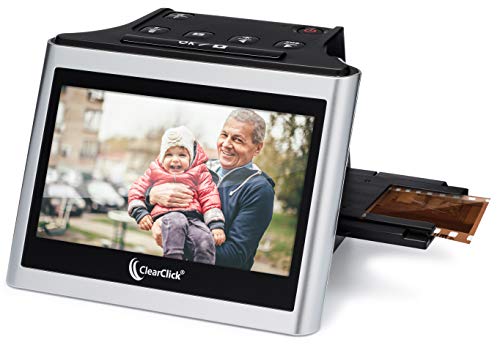
- Scans 35mm, 110, and 126 film plus 50mm slides
- 5" LCD preview screen shows scans in real time
- No computer or drivers required
Best For: simple home digitizing with a large preview screen
Budget Slide Feeder Pick
DIGITNOW! 135 Film Negative Scanner

- Scans 35mm film and slides to JPG files
- Includes adjustable rapid slide feeder
- Saves to SD card or computer
Best For: budget scanning of 35mm film and slides
Most Versatile Film Format Support
KODAK SCANZA Film & Slide Scanner

- Supports 35mm, 126, 110, Super 8, and 8mm formats
- Converts negatives and slides to JPEG files
- Includes HDMI, USB, video cable, and AC adapter
Best For: mixed archives needing broad film format support
Standalone Home Digitizer

- Supports 35mm, 126, 110, and Super 8 photo scans.
- 16MP standard or enhanced 22MP output.
- 5-inch LCD preview with SD card and HDMI output.
Best For: Home archiving without needing a PC
Touchscreen PC-Powered Option
HP FilmScan 5" Touchscreen Scanner

- USB-C power can come from a PC or external adapter.
- 5-inch touchscreen supports preview, editing, and gallery mode.
- Handles 35mm, 126, and 110 film and slides.
Best For: Buyers wanting USB-C power and on-device editing
Easy-Load All-in-One

- One-touch scanning with easy-load inserts and onboard edits.
- Supports 35mm/135, 110, 126, slides, and Super 8 photo.
- USB and HDMI output with included accessory kit.
Best For: Simple home digitizing with easy loading
Easy All-in-One Film Digitizing – KODAK Slide N Scan
If you want one of the most straightforward film and slide scanners for pc-adjacent use, the KODAK Slide N Scan keeps the workflow simple with a built-in 5″ LCD and direct SD card saving. It handles 135, 110, and 126 negatives plus 50mm slides, and it also connects by USB-C if you want to move files to a computer after scanning.
Best For: Home users who want a simple, screen-based scanner for preserving mixed old film and slides without a complex setup.
Pros:
- 22MP output with a clear 5″ LCD for previewing and editing on the device
- Supports 135, 110, and 126 negatives plus 50mm slides
- Direct SD/SDHC saving keeps the process easy and computer-light
- USB-C connectivity adds flexibility for PC use
Cons:
- SD or SDHC card is not included
- Best suited to casual archiving rather than advanced editing workflows
Overall, this model is a practical pick when convenience matters more than software control. It’s built for quick conversion of older memories into JPEG files with minimal fuss.
High-Detail 35mm Scanning – Plustek OpticFilm 8200i SE
Among film and slide scanners for pc users who care about detail, the Plustek OpticFilm 8200i SE is built around high-resolution 35mm digitizing. It uses USB connectivity, includes infrared dust and scratch removal, and comes with SilverFast SE Plus 9 software support for Windows and Mac.
Best For: PC and Mac users scanning 35mm negatives or mounted slides who want strong image quality and cleanup tools.
Pros:
- 7200 x 7200 dpi resolution for 35mm film and mounted slides
- Built-in infrared channel helps detect dust and scratches
- Includes Plustek QuickScan and SilverFast SE Plus 9 software
- Supports Windows and Mac, with 64-bit hardware/software support
Cons:
- Limited to 35mm film and mounted slides
- USB scanner workflow is more involved than one-touch standalone units
This is the most specialized option in the group and makes sense when scan quality is the priority. If you want more control over restoration and output, it’s a strong dedicated choice.
Standalone Multi-Format Scanning – Magnasonic FS71
The Magnasonic FS71 is a practical choice if you want film and slide scanners for pc use, but prefer a no-computer workflow most of the time. Its 5″ display, SD card saving, and direct on-scanner image adjustments make it easy to convert multiple formats into JPEGs without extra software.
Best For: Users who want a fast standalone scanner for mixed film and slide formats with optional computer connection.
Pros:
- Converts 35mm, 110, 126, and Super 8 film plus multiple slide formats
- 24MP output with a built-in 5″ LCD for direct viewing
- No driver installation required for the basic workflow
- Adjust brightness, RGB color, flip, and mirror on the scanner
Cons:
- SD card is not included
- Uses the scanner’s built-in controls instead of desktop software for most edits
For broad format support and quick turnaround, this model is easy to live with. It works especially well if you want to scan directly and only move files to a PC afterward.
Large-Format Easy Loading – KODAK Slide N Scan Max
The KODAK Slide N Scan Max is a strong fit for anyone looking for film and slide scanners for pc-friendly archiving, while still keeping the everyday workflow simple. It supports 135, 110, and 126 formats, saves directly to SD or SDHC cards, and includes a tilting design that can double as a photo-frame style display.
Best For: Users who want a large, easy-loading scanner for quick digitizing and flexible display use.
Pros:
- Supports 135, 110, and 126 negatives and slides
- Direct SD/SDHC saving up to 32GB keeps the process simple
- One-touch editing helps resize and convert images quickly
- Tilts to different angles for easier viewing or frame-style use
Cons:
- SD/SDHC card is not included
- Resolution is lower than the dedicated 35mm specialist model in this list
This model is best when convenience and versatility matter more than maximum technical depth. It’s a straightforward way to convert old slides and negatives into digital JPEGs with little setup.
Easy Standalone Scanning – ClearClick Virtuoso 2.0 22MP Film & Slide Scanner
If you want film and slide scanners for pc but prefer not to rely on software or drivers, the ClearClick Virtuoso 2.0 keeps the process simple. It scans 35mm, 110, and 126 negatives plus 50mm slides to digital photos, and the 5″ LCD lets you preview images in real time as you work.
Best For: Buyers who want an easy standalone scanner with a large preview screen and PC compatibility for basic photo digitizing.
Pros:
- Works with 35mm, 110, and 126 negatives plus 50mm slides
- Extra-large 5″ LCD preview screen shows scans in real time
- No computer or drivers required for scanning
- Mini HDMI output supports viewing on a TV
Cons:
- SD card is not included
- Mini HDMI cable is not included
- Resolution is interpolated rather than native
For straightforward home archiving, this model is appealing because it emphasizes convenience over setup. The included warranty and free tech support add confidence if you want an uncomplicated way to digitize old film.
Budget Slide Feeder Pick – DIGITNOW! 135 Film Negative Scanner
The DIGITNOW! 135 Film Negative Scanner is a practical choice if you want film and slide scanners for pc without extra software setup. It scans 35mm film and slides to JPG files on an SD card or computer, and the adjustable rapid slide feeder helps speed up batch work.
Best For: Budget-minded users who want a compact scanner for 35mm film and slides with simple file saving.
Pros:
- Converts 35mm film and slides to JPG files
- Can save scans to an SD card or computer
- Includes an adjustable rapid slide feeder
- Compact size makes it easy to store
Cons:
- Limited to 35mm film and slides
- Small 2.4″ LCD screen
- Maximum SD card support is up to 32GB SDHC
This is the most compact, no-frills option in the group, so it makes sense if your main goal is basic digitizing rather than a feature-rich workflow. Its Windows and Mac support also helps keep it flexible for different desktops.
Most Versatile Film Format Support – KODAK SCANZA Film & Slide Scanner
If you need film and slide scanners for pc that cover more than just standard 35mm, the KODAK SCANZA stands out for its broad format support. It converts 35mm, 126, 110, Super 8, and 8mm negatives and slides into JPEG files, with a built-in 3.5″ LCD and included cables for PC and TV use.
Best For: Users who want broad film format compatibility and an all-in-one scanner with included accessories.
Pros:
- Supports 35mm, 126, 110, Super 8, and 8mm film formats
- Converts negatives and slides to JPEG files
- Includes HDMI, USB, video cable, AC adapter, and cleaning brush
- Built-in 3.5″ LCD with adjustable brightness and tilt
Cons:
- SD card is not included
- Only certain film types are supported
- Uses a relatively compact 3.5″ display
For mixed archives, this is the strongest match because it handles more formats than the others here and ships with the accessories needed to get started. It is a good fit when compatibility matters more than a minimal footprint.
Standalone Home Digitizer – PORTTA 5" LCD Film Scanner
If you want a film and slide scanners for pc alternative that can digitize film at home without a computer, this PORTTA unit is built for straightforward use. It handles 35mm, 126, 110, and Super 8 photo scans, and lets you preview everything on the 5-inch LCD before saving.
Best For: Home users who want a simple standalone scanner with a larger screen and higher-resolution output options.
Pros:
- Supports 35mm, 126, 110, and Super 8 photo scanning.
- Offers 16MP standard or enhanced 22MP output.
- 5-inch LCD allows real-time preview and alignment.
- Can save directly to SD card and output to HDMI.
Cons:
- No computer is required, so it is not ideal if you specifically want PC-based scanning.
- Super 8 support is for photo only.
- SD card storage is required for saving scans.
For people focused on quick home archiving, this scanner keeps the process simple with on-device adjustments for brightness, color, and orientation. It is a practical choice when the priority is digitizing old film with minimal setup.
Touchscreen PC-Powered Option – HP FilmScan 5" Touchscreen Scanner
The HP Film & Slide Scanner fits buyers comparing film and slide scanners for pc because it can run from a PC USB connection or an external 5V adapter. It digitizes 35mm, 126, and 110 film and saves files straight to an SD card, while the 5-inch touchscreen handles preview and basic editing on the device.
Best For: Users who want flexible power options and a touchscreen scanner that can also connect through a PC USB port.
Pros:
- Can be powered through USB-C from a PC or external 5V adapter.
- 5-inch touchscreen supports preview and editing on the device.
- Supports 35mm, 126, and 110 film strips and slides.
- Gallery mode can turn it into a digital picture frame.
Cons:
- Uses 13MP capture with 22MP interpolation rather than a native 22MP sensor.
- Does not list direct scanning to a computer; files save to SD card.
- Compatibility is limited to Windows 10+ or macOS 10.15+ for system support.
This model is a good fit if you want a compact scanner that works with PC power but still operates independently. Its touchscreen controls and SD-card workflow make it easy to digitize older negatives and slides without complicated software.
Easy-Load All-in-One – DigitPro 5" LCD Film Scanner
If you are shopping for film and slide scanners for pc but want a standalone unit for fast turnaround, this DigitPro model keeps the workflow simple. It converts 35mm, 110, 126, and slide formats to digital JPEGs, with a 5-inch LCD for preview and a quick load process that is easy to use.
Best For: Users who want a simple one-touch scanner with easy loading and both USB and HDMI output.
Pros:
- Supports 35mm/135, 110, 126, slides, and Super 8 photo scanning.
- One-touch scanning with built-in adjustments for color, brightness, and date/time.
- 5-inch LCD makes previewing and playback easy.
- Includes USB and HDMI output plus film holders and accessories.
Cons:
- Storage is limited to built-in memory or a separate SD card.
- Super 8 support is for photo use only.
- Resolution is listed as 1080P rather than a megapixel figure.
This is a practical pick for people who want a guided, no-fuss digitizing process with useful accessories included. The PC transfer option via USB gives you flexibility, while the onboard controls keep scanning approachable for casual home use.
How We Picked the Best Film and Slide Scanners for PC
To choose the strongest Film and Slide Scanners for PC, we looked for a mix of image quality, supported film formats, ease of loading, file-saving options, and cleanup features such as dust and scratch reduction. We also favored scanners that are simple enough for casual users but still capable of producing useful results for archiving.
We prioritized models with clear displays, straightforward controls, and dependable export options to SD cards or computers, since a smooth workflow matters as much as raw resolution.
Quick Comparison
If you want the simplest path, all-in-one scanners with built-in screens are the easiest to use. If you want the best detail from 35mm originals, dedicated film scanners with higher optical resolution typically deliver stronger results. For mixed collections, look for a unit that handles negatives and slides across 35mm, 110, and 126 formats.
Key Buying Factors for Film and Slide Scanners for PC
Resolution and Output Quality
Resolution affects how much detail you can recover from aging film. Higher specs are useful for cropping, restoring, and printing larger images, but the real-world quality also depends on optics and software. If your goal is family viewing and web sharing, a midrange scanner can be enough.
Film Formats Supported
Not every scanner handles every type of media. Check whether the unit supports 35mm, 110, 126, and any larger formats in your collection. If you have a mix of negatives and mounted slides, broad compatibility saves time and extra equipment.
PC Workflow and File Handling
Some Film and Slide Scanners for PC connect directly to a computer, while others scan to an SD card and let you transfer files later. Choose the workflow that fits your comfort level. If you want faster imports and editing in desktop software, computer connectivity is helpful; if you prefer simple standalone use, onboard storage is fine.
Dust, Scratch, and Color Correction
Basic cleanup tools can make a noticeable difference, especially with older film. Infrared dust removal, auto exposure, and color correction help reduce manual editing. These features are especially valuable if you are digitizing a large archive.
Who Should Buy Which Film and Slide Scanners for PC?
Casual users with mixed family archives should look for a standalone scanner with a large screen and easy loading. Detail-focused hobbyists and restoration-minded users may prefer a higher-resolution dedicated film scanner. If you are scanning lots of slides quickly, prioritize speed, simple controls, and broad format support over extra features you may never use.
For most buyers, the best choice is the scanner that matches your film formats, your editing workflow, and the amount of cleanup you want to do afterward.