Shopping for an editing student? The best gifts are the ones that make long projects easier, faster, and more comfortable.
This roundup of gift ideas for video editing students focuses on useful tools they’ll actually use for classes, content creation, and portfolio work.
16 Gift Ideas for Video Editing Students to Consider in 2026
Shortcut Learning Aid
Premiere Pro Shortcut Keyboard Sticker Set
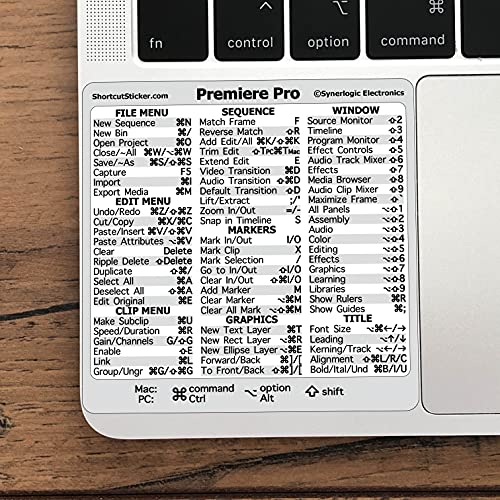
- Helps editing students learn common shortcuts faster
- Made for Premiere Pro quick reference, with broad editing use
- A practical gift for beginners building speed and confidence
Best For: Video editing students still learning keyboard shortcuts.
Screen Comfort Gift
Blue Light Blocking Computer Glasses

- Designed to ease digital eye strain during long screen sessions
- A helpful pick for late-night editing and study marathons
- Includes a case and suits men and women
Best For: Students spending long hours editing on a laptop or monitor.
Desk Lighting Upgrade

- Adds soft, screen-safe lighting for desk setups
- Useful for thumbnails, self-recording, and Zoom calls
- Portable clip-on design works well with laptops and monitors
Best For: Students who create content, record themselves, or need better desk lighting.
Fast File Backup

- Fast 2,000 MB/s transfers for large video files
- Great for project backups and moving edits between devices
- A reliable storage gift for students and professionals
Best For: Students handling large video projects, backups, and transfers.
Connectivity Upgrade
BENFEI 7-in-1 USB-C Hub with HDMI

- Adds HDMI, SD/TF card reading, and 3 USB 3.0 ports for editing gear.
- Supports 4K@60Hz and 100W Power Delivery for a laptop workflow.
- Broadly compatible and well reviewed, making it a practical student gift.
Best For: Laptop-based video editing students who need more ports for monitors, drives, and media cards.
Timeline Shortcut

- Wireless numeric keypad that can speed up numeric and timeline input.
- Simple, affordable accessory for laptop-based editing setups.
- Broad compatibility makes it an easy add-on gift for students.
Best For: Students who edit on laptops and want faster numeric input for timelines or spreadsheets.
Desk Comfort

- Includes keyboard wrist rest, mouse pad support, and a coaster in one set.
- Ergonomic gel design is made for long desk sessions and pain relief.
- A thoughtful gift for students spending hours editing at a computer.
Best For: Video editing students who sit at a keyboard and mouse for long stretches.
Ergonomic Desk Upgrade
Nulaxy Adjustable Laptop Stand

- Adjustable stand helps lift a laptop for a more comfortable setup.
- Ventilated design is useful for dorm desks and small editing spaces.
- Strong review history and broad compatibility make it a dependable gift.
Best For: Students with laptop editing setups in dorms, small rooms, or shared desks.
Cooling Desk Upgrade
havit HV-F2056 Laptop Cooling Pad

- Three quiet USB-powered fans help move air during long export and render sessions.
- Foldable design and two height settings add comfort for editing on a laptop.
- A practical gift for students whose laptops run hot while video editing.
Best For: Video editing students who work on laptops that get hot during exports and rendering.
Desk Audio Support
Sound Addicted Studio Monitor Isolation Pads

- Designed for small desktop speakers and bookshelf-style monitors.
- High-density dampening foam helps improve a student editing setup.
- Strong review base makes this a confidence-building gift for audio monitoring.
Best For: Video editing students using small speakers on a desk for clearer audio monitoring.
Quiet Editing Headphones
Audio-Technica ATH-M20x Studio Monitor Headphones

- Closed-back design is useful for quiet late-night editing and monitoring.
- 40mm drivers support reliable audio work for student projects.
- A practical budget-friendly pick with broad appeal for video editors.
Best For: Students who need dependable headphones for audio editing and late-night work.
Capture Ideas on the Go
EVISTR 64GB Digital Voice Recorder with Playback

- Voice activation and playback make it useful for interviews and narration notes.
- 64GB capacity and USB transfer support class recordings and quick file sharing.
- Portable size fits film and media students capturing ambient sound or reminders.
Best For: Video editing students who want a portable recorder for interviews, voice notes, and ambient sound.
Privacy Essential
6-Pack Ultra-Thin Webcam Cover
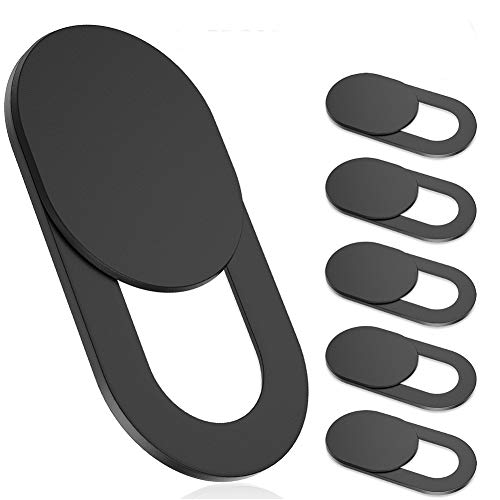
- Simple privacy gift for online classes
- Ultra-thin design works across multiple devices
- Practical pick for students who value webcam privacy
Best For: Video editing students who attend online classes and want a simple privacy upgrade.
Presentation Helper
Logitech Wireless Presenter R400

- Useful for presenting projects in class
- Trusted wireless remote with laser pointer
- Handy for screening edits and slides
Best For: Video editing students who present projects or screen edits in class.
Editing Workspace Upgrade

- 24-inch second screen for editing timelines
- IPS panel helps support color-friendly viewing
- Great upgrade from a laptop-only setup
Best For: Video editing students ready to expand into a dual-screen editing setup.
Color Accuracy Tool
Calibrite Display 123 Monitor Calibration

- Helps students check more accurate screen color
- Simple workflow with USB-C connection
- Ideal for color-conscious editing work
Best For: Video editing students who care about accurate color in their edits.
How to Choose the Right Gift for a Video Editing Student
The best Gift Ideas for Video Editing Students solve a real pain point in the editing workflow. Some students need faster file transfer and more storage, while others benefit from better posture, clearer audio, or a more efficient desk setup. Start by thinking about what stage they’re in: beginner editors usually appreciate simple, everyday essentials, while more advanced students may want gear that improves precision and productivity.
If they edit on a laptop, practical accessories often deliver the biggest impact. A USB-C hub, external SSD, laptop stand, cooling pad, or monitor can make a small workspace feel far more capable. For students who spend hours refining cuts and color, comfort items like wrist rests, blue light glasses, and monitor calibration tools can be especially valuable. The best Gift Ideas for Video Editing Students are useful without requiring a complicated setup.
Best Gifts by Budget
Budget is another easy way to narrow the list. Under $25, smaller upgrades like shortcut stickers, webcam covers, a presenter remote, or a digital voice recorder make thoughtful gifts without stretching your wallet. In the $25 to $75 range, you can often find highly practical accessories such as a laptop stand, mouse pad set, wireless keypad, or blue light blocking glasses. If you want a premium present, look at high-impact gear such as an external SSD, a quality monitor, studio headphones, a colorimeter, or a second display.
For gift buyers comparing several options, it helps to prioritize value over novelty. A student who already has enough gadgets may appreciate one reliable tool more than a flashy accessory. On the other hand, a student building their first editing setup may need multiple small items that work together. That is why versatile gifts tend to be the safest choice.
Personalization Tips That Make the Gift Feel Thoughtful
Personalization does not have to mean engraving. You can tailor a gift to the software they use, the size of their desk, or the kind of work they create. For example, shortcut stickers are especially smart for Premiere Pro users, while a calibration device makes sense for anyone serious about color accuracy. If they present projects in class often, a wireless clicker may be more helpful than another desk accessory.
It also helps to match the gift to their environment. Dorm-room editors often need compact, portable tools. Students working from home may prefer larger comfort upgrades or a monitor that expands their timeline space. When in doubt, choose a gift that improves the day-to-day editing process rather than something that only looks impressive.
Last-Minute Buying Advice
If you are shopping late, focus on items that are widely useful and easy to replace if needed. Accessories like a USB hub, webcam cover, laptop stand, or presenter remote are excellent last-minute gifts because they ship well and fit almost any setup. Digital gift cards to editing software, stock libraries, or storage services can also be a smart backup when time is tight.
For a polished finish, consider pairing a practical item with a simple note about why you picked it. A sentence like “for your next big edit” or “to make long projects easier” adds a personal touch without extra effort. The goal is to give something that feels supportive, useful, and aligned with their creative goals.
With the right mix of comfort, performance, and portability, these Gift Ideas for Video Editing Students can turn everyday editing into a smoother experience. Whether you choose one standout upgrade or a small bundle of essentials, practical gifts usually make the biggest difference.