If your desk feels crowded, the right monitor arm can make an immediate difference. The best space-saving computer monitor arms lift your display off the surface, improve viewing comfort, and create room for a keyboard, notebook, or second device.
In this 2026 roundup, we focused on mounts that balance stability, adjustability, and real-world compatibility so you can choose the right setup without overbuying.
Best 10 Space-Saving Computer Monitor Arms Picks for 2026
Compact Single-Arm Desk Saver
ErGear Single Monitor Mount for 13-32 Inch Screens

- Holds 13-32 inch monitors up to 17.6 lbs
- C-clamp or grommet mount frees desk space
- 360° rotation with tilt, swivel, and cable clips
Best For: One-monitor desks that need a cleaner, more ergonomic layout
Stacked Dual-Screen Space Saver
HUANUO Vertical Dual Monitor Mount

- Stacks two 17-32 inch monitors on one stand
- Saves desk space with a clutter-free vertical layout
- Offers tilt, swivel, rotation, and stable mounting
Best For: Dual-monitor users who want a compact stacked setup
Heavy-Duty Single Arm Organizer
WALI Adjustable Single Monitor Arm

- Fits up to 34-inch screens with strong load support
- Extends 19.3 inches and rises 17.3 inches above desk
- Cable management and full motion help keep setup tidy
Best For: One large monitor on a compact, organized desk
Fast-Install Dual Arm Space Saver

- Fits 13-32 inch monitors up to 19.8 lbs each
- Tool-free VESA mount speeds up installation
- Independent motion and cable clips save desk space
Best For: Two-monitor setups that need quick setup and clean cable routing
Space-Saving Desk Upgrade
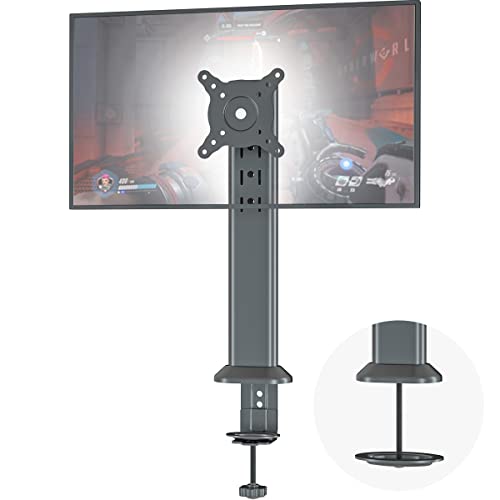
- Fits 13-32 inch flat or curved screens
- Holds up to 77 lbs with steel construction
- Includes cable clip and full articulation
Best For: A sturdy single-arm mount for cleaner desks and ergonomic viewing
Precision Motion Pick
HUANUO FlowLift Pro Monitor Arm

- Tool-free VESA plate for fast setup
- MechaSpring arm built for longer service life
- LockSteady system helps resist screen droop
Best For: A precise, ergonomic arm for focused work and frequent adjustments
Flexible Workspace Choice
Suptek Fully Adjustable Monitor Arm

- Fits 17-35 inch flat or curved monitors
- Clamp and grommet mounting options
- Cable routing and full-motion adjustment
Best For: A versatile arm for larger monitors and tidy desk setups
Space-Saving Pick
VIVO Single Ultrawide Monitor Arm

- Fits 13" to 32" screens, plus ultrawides up to 38"
- 22 lb capacity with full tilt, swivel, and rotation
- Includes clamp and grommet mounting plus cable clips
Best For: A single-monitor setup with broad screen compatibility and a small desk footprint
Most Adjustable
MOUNTUP Single Full-Motion Monitor Arm

- Fits 17" to 32" monitors from 4.4 to 19.8 lbs
- Long reach with 19.4" extension and 16.9" height adjustment
- Clamp or grommet install with built-in cable management
Best For: Buyers who want maximum movement and a cleaner desk layout
Dual Monitor Choice

- Supports two 13" to 30" monitors up to 22 lbs each
- Tilt, swivel, rotate, and height-adjust both arms
- C-clamp and grommet options help reduce desk clutter
Best For: A dual-screen workspace that needs adjustability without taking up desk surface
Compact Single-Arm Desk Saver – ErGear Single Monitor Mount for 13-32 Inch Screens
If you want space-saving computer monitor arms that still give you solid adjustability, this ErGear single mount is a practical pick for one-screen desks. It lifts your display off the tabletop, adds cable clips along the center pole, and uses either a C-clamp or grommet mount for a clean setup.
Best For: Single-monitor users who want a tidy, ergonomic desk setup with flexible mounting options.
Pros:
- Fits 13- to 32-inch monitors with 75x75mm or 100x100mm VESA patterns
- C-clamp or grommet installation helps free up desk space
- 360° rotation, ±45° tilt, and ±90° swivel support ergonomic positioning
- Integrated cable clips help keep cords organized and out of sight
Cons:
- Requires a compatible wooden desk with enough clearance underneath
- Weight limit tops out at 17.6 lbs
- Only supports one monitor
This is a straightforward choice if you need a compact arm for a home office or workspace with limited surface area. It focuses on the essentials: stability, cable management, and enough articulation to improve viewing comfort.
Stacked Dual-Screen Space Saver – HUANUO Vertical Dual Monitor Mount
For buyers comparing space-saving computer monitor arms, this vertical dual monitor mount stands out because it stacks two screens on one tall support. That layout keeps more of your desktop open while still giving each monitor tilt, swivel, and rotation adjustments.
Best For: Users who want two monitors stacked vertically to save desk space and improve workflow.
Pros:
- Holds two 17- to 32-inch monitors, up to 17.6 lbs each
- Vertical stacking design saves desk space and keeps the workstation clutter-free
- Fully adjustable with -45° to +45° tilt, -60° to +60° swivel, and 360° rotation
- Stable clamp or grommet base supports desks up to 3.14 inches thick
Cons:
- Requires both monitors to match the VESA 75x75mm or 100x100mm pattern
- Extra-tall stacked design may not suit every viewing preference
- Each monitor is limited to 17.6 lbs
This is a strong option if your priority is maximizing desk real estate without giving up a dual-monitor setup. The stacked layout is especially useful for users who want a more compact footprint and a cleaner work zone.
Heavy-Duty Single Arm Organizer – WALI Adjustable Single Monitor Arm
If you need space-saving computer monitor arms for a larger single display, this WALI model offers a lot of reach and load capacity. It lifts the monitor off the desk, adds built-in cable management, and gives you broad motion control for a more comfortable viewing position.
Best For: Users with one larger monitor who want strong support, long reach, and a tidy desktop.
Pros:
- Supports up to 34-inch flat or curved screens, with up to 26.4 lbs for flat displays
- Extends up to 19.3 inches and raises up to 17.3 inches above the desk
- Built-in cable management helps keep cords organized and out of the way
- Full motion adjustment includes swivel, tilt, and 360° rotation
Cons:
- Desk mounting is limited to wooden desks with 0.39-2.76 inch thickness
- Curved monitors have a lower weight limit than flat screens
- Single-monitor design only
This arm is a good fit when desk space is tight but your monitor is on the larger side. The combination of reach, weight capacity, and cable routing makes it a versatile option for everyday workstations.
Fast-Install Dual Arm Space Saver – ErGear Dual Monitor Arm
This ErGear dual arm is built for people who want space-saving computer monitor arms without a complicated setup. The tool-free VESA plate and cable clips make installation and cable management simpler, while the dual-arm design clears valuable desktop room.
Best For: Dual-monitor users who want quick installation and flexible positioning.
Pros:
- Supports most 13- to 32-inch flat or curved monitors up to 19.8 lbs
- Tool-free VESA mounting speeds up setup
- Each arm offers independent height, extension, tilt, swivel, and 360° rotation adjustments
- Upgraded cable clips help keep desks neat and organized
Cons:
- Requires VESA 75x75mm or 100x100mm mounting holes
- Wooden desks are recommended for installation
- Two-monitor support may be more than some small desks need
If you want a dual monitor arm that combines convenience with desk-saving benefits, this model delivers the basics well. It is especially appealing for buyers who value fast assembly and easy daily adjustments.
Space-Saving Desk Upgrade – HEMUDU Single Monitor Arm
If you’re shopping for space-saving computer monitor arms, this HEMUDU single desk mount is built for a clean, compact setup. It lifts your screen off the desk, adds cable clip organization, and supports flat or curved monitors from 13 to 32 inches with full articulation for easier positioning.
Best For: Users who want a heavy-duty single monitor arm with strong weight capacity and simple ergonomic adjustment.
Pros:
- Supports 13-32 inch flat or curved monitors with VESA 75x75mm and 100x100mm compatibility
- Heavy-duty cold-rolled steel build holds up to 77 lbs for stable positioning
- Offers 360° rotation, ±50° tilt, ±45° swivel, and height adjustment
- Cable clip helps keep wires organized and frees up desktop space
Cons:
- Single-monitor design only
- Requires VESA-compatible mounting holes
- Best suited for users who want a straightforward, manual adjustment setup
Overall, this is a practical pick if your priority is reclaiming desk room without giving up stability. Its high load rating and metal construction make it a solid option for everyday office setups that need a tidy, ergonomic monitor position.
Precision Motion Pick – HUANUO FlowLift Pro Monitor Arm
This HUANUO model is a strong choice for space-saving computer monitor arms when you want smoother adjustments and a minimalist footprint. It supports 13-32 inch monitors, uses a tool-free VESA mount, and combines a MechaSpring arm with a lock system designed to resist droop while keeping movement controlled.
Best For: Users who want a feature-rich monitor arm for focused work, gaming, or shared workspaces where precise positioning matters.
Pros:
- Tool-free InstaMount VESA plate speeds up installation
- MechaSpring arm is designed for longer service life than gas-based designs
- LockSteady system helps resist droop while allowing smooth one-finger adjustments
- ACA-endorsed ergonomic design and TUV Rheinland certification add confidence
Cons:
- Monitor and desk compatibility requirements are specific
- Recommended only for wood desks within the stated thickness range
- Weight limits are lower than some heavy-duty arms
In practice, this arm suits buyers who value easy setup, visual tension adjustment, and dependable positioning over maximum load capacity. If you want a polished, ergonomic desktop upgrade with clear compatibility guidance, it stands out.
Flexible Workspace Choice – Suptek Fully Adjustable Monitor Arm
For buyers comparing space-saving computer monitor arms, this suptek model offers a flexible balance of reach, height, and desk cleanup. It supports large 17-35 inch flat or curved screens, includes both clamp and grommet mounting options, and uses a gas spring system for smooth full-motion positioning.
Best For: People who want a wide-size-range monitor arm with strong adjustability and simple cable management.
Pros:
- Supports 17-35 inch monitors with VESA 75x75mm and 100x100mm compatibility
- Tool-free quick-install clamp plus grommet mounting options
- Full motion design includes 18.7 inches of height adjustment and 21.65 inches of extension
- Built-in cable routing helps keep the desk tidy and open
Cons:
- Maximum load is lower than heavier-duty single arms
- Needs a VESA-compatible monitor
- Bulkier monitors may need careful compatibility checking
This is a well-rounded option if you want a monitor arm that can handle larger screens while still clearing desk space. Its mix of quick installation, broad size support, and smooth adjustability makes it a practical everyday workstation upgrade.
Space-Saving Pick – VIVO Single Ultrawide Monitor Arm
If you want space-saving computer monitor arms that still feel sturdy and flexible, this VIVO single-arm mount is built for a wide range of setups. It supports most 13″ to 32″ monitors and even ultrawides up to 38″, while keeping your desk clearer with a clamp or grommet base and built-in cable clips.
Best For: Users who want a single monitor arm for a standard or ultrawide display with strong adjustability.
Pros:
- Supports screens from 13″ to 32″, plus ultrawides up to 38″, with 22 lb capacity.
- Offers +90° to -90° tilt, 360° swivel, 360° rotation, and up to 16″ height adjustment.
- Includes both C-clamp and grommet mounting options for flexible installation.
- Detachable cable clips help keep power and AV cables organized.
Cons:
- Requires VESA 75x75mm or 100x100mm compatibility.
- Desk clamp is limited to desks up to 3.25″ thick.
This is a practical all-around monitor arm if you need a compact footprint without giving up positioning range. Its ultrawide support makes it especially useful for larger single-monitor workstations.
Most Adjustable – MOUNTUP Single Full-Motion Monitor Arm
For shoppers comparing space-saving computer monitor arms, this MOUNTUP model stands out for its long reach and easy repositioning once tension is set correctly. It fits most 17″ to 32″ monitors within its weight range and uses a compact single-point desk attachment to help free up workspace.
Best For: People who want a highly adjustable single monitor arm with strong cable organization and desk-space savings.
Pros:
- Supports 4.4 to 19.8 lb monitors with 75x75mm and 100x100mm VESA patterns.
- Provides -45°/+90° tilt, ±180° swivel, 360° rotation, up to 19.4″ extension, and 16.9″ height adjustment.
- Includes clamp and grommet mounting options for desks 0.39″ to 2.76″ thick.
- Built-in cable management channels and snap-on covers keep cords hidden.
Cons:
- Tension must be adjusted after installation for proper balance.
- Heavier 15+ lb monitors may need multiple full turns of the hex key.
This is a strong pick if you want a monitor arm that can be dialed in for precise viewing angles and frequent repositioning. It also offers a clean, compact setup for small or crowded desks.
Dual Monitor Choice – VIVO Dual Monitor Desk Mount
If your goal is to save desk space while running two displays, this VIVO dual monitor arm is built for 13″ to 30″ screens and up to 22 lbs per monitor. It keeps the setup off the desk with a heavy-duty C-clamp or optional grommet mount, while cable clips help reduce clutter along the arms and center pole.
Best For: Users who need a dual-monitor arm for a compact, adjustable workstation.
Pros:
- Holds two 13″ to 30″ monitors, up to 22 lbs each, with 75x75mm or 100x100mm VESA support.
- Offers +90° to -90° tilt, 180° swivel, 360° rotation, and center-pole height adjustment.
- Allows portrait or landscape orientation for both monitors.
- Includes a C-clamp for desks up to 3.25″ thick plus an optional grommet mount.
Cons:
- Requires VESA-compatible mounting holes on each monitor.
- Single-desk placement still depends on having enough rear desk clearance for the dual-arm setup.
This is the most practical option here if you need two screens in a compact footprint. It balances sturdy construction with the flexibility needed for everyday office or home productivity.
How We Picked These Space-Saving Computer Monitor Arms
We prioritized models that deliver useful desk clearance without sacrificing stability or ease of use. Key factors included VESA compatibility, weight and size support, range of motion, mounting style, and whether the arm works well for standard displays, ultrawides, or dual-monitor setups.
We also looked for practical features that matter in everyday use, such as tool-free installation, smooth height adjustment, cable management, and enough joint tension to hold the screen in place after repositioning.
Quick Comparison
Single-arm models are usually the simplest way to maximize open desk space, while dual-monitor arms are better if you need a multi-screen workflow and still want a cleaner setup. Ultrawide-capable arms are the safest choice for larger, heavier displays, and stacked dual mounts are a good fit when desk width is limited but vertical space is available.
Key Buying Factors for Space-Saving Computer Monitor Arms
Screen Size and Weight Limits
Make sure the arm supports your monitor’s size and weight with some margin to spare. A model rated for 32-inch displays may still be a poor fit if your panel is especially heavy or uses a thicker back shell.
Mounting Style and Desk Compatibility
C-clamp mounts work well for most desks, but you should confirm desk thickness, edge clearance, and any obstructions underneath. Grommet mounts can be a better option if your desk layout does not allow a clamp.
Range of Motion
For ergonomic comfort, look for tilt, swivel, rotation, and height adjustment. The more flexible the arm, the easier it is to position the screen correctly and keep the desktop open.
Build Quality and Ease of Setup
Steel construction, secure joints, and straightforward assembly help a monitor arm feel dependable long term. If you plan to reposition your display often, a smoother spring or gas-assisted design can be worth paying for.
Who Should Buy Which Space-Saving Computer Monitor Arms?
If you want the simplest desk upgrade, choose a single-arm model for a standard monitor. If you work across spreadsheets, code, or trading platforms, a dual-monitor mount may be the more productive choice.
Choose an ultrawide-capable arm if your display is larger than a typical 27- or 32-inch monitor, and consider a stacked dual design if you need two screens but limited horizontal space. In short, the best Space-Saving Computer Monitor Arms are the ones that match your desk, your screen, and the way you work.