Premium monitor arms can transform a cluttered desk into a more ergonomic, flexible workspace. The right mount makes it easier to position your screen at eye level, free up surface space, and support larger displays with confidence.
In this roundup, we focus on premium computer monitor arms built for durability, smooth motion, and serious adjustability, including options for ultrawides, curved screens, and dual-monitor setups.
Best 10 Premium Computer Monitor Arms Picks for 2026
Top Premium Pick
Ergotron LX Pro Premium Single Monitor Arm

- Fits monitors up to 34 inches and 22 lbs
- Includes grommet mounting and cable management
- Offers 13 inches of lift with 360° rotation
Best For: A polished single-monitor setup with premium adjustability
Ultra-Wide Heavyweight

- Handles large flat and curved displays with VESA 100x100mm
- Mechanical spring design offers full positional adjustment
- Includes clamp/grommet mounting and cable management
Best For: Large-monitor owners who need strong support and full adjustability
Classic Premium Choice
Ergotron LX Single Monitor Arm

- Fits single monitors up to 34 inches and 25 lbs
- Clamp and grommet mounting included
- Provides 13 inches of lift and 360° rotation
Best For: A dependable premium single-arm mount with flexible desk installation
Value Premium Adjustable
HUANUO FlowLift Pro Monitor Arm

- Fits 13 to 32 inch screens with VESA 75x75 or 100x100
- Tool-free VESA plate makes setup quick
- MechaSpring design adds steady, smooth adjustment
Best For: Users who want an easy-to-install premium arm for smaller monitors
Dual-Display Ergonomics
BenQ ErgoArm BDH01 Dual Monitor Arm

- Supports two screens up to 35 inches
- Gas spring design for smooth adjustment
- Helps free up desk space
Best For: dual large-monitor setups that need flexible ergonomic positioning
Single-Arm Flexibility
HUANUO FlowLift Single Monitor Mount

- Fits 13 to 32 inch monitors
- Tilt, swivel, and rotation are highly adjustable
- Clamp and grommet mounting included
Best For: single-monitor workstations that need easy setup and wide adjustment
Ultrawide Heavy Duty
VIVO STAND-V101V Ultrawide Monitor Arm
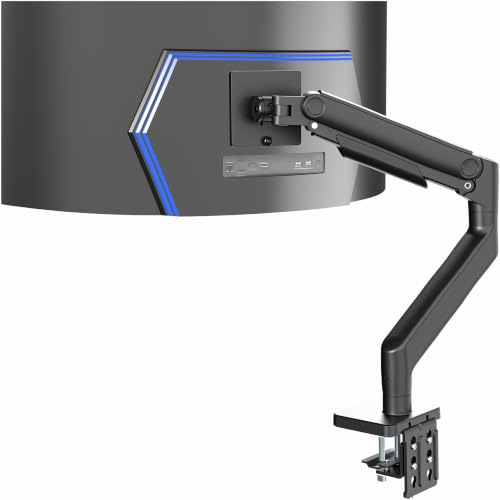
- Supports screens up to 49 inches and 44 lbs
- Spring-assist tension arm for smooth adjustment
- Integrated cable management covers
Best For: ultrawide monitor owners who need strong support and tidy cable routing
Heavy-Duty Choice
WALI Heavy Duty Monitor Arm for Large Curved Screens

- Holds up to 49-inch, 44 lb displays
- Full motion with strong reach and lift
- Cable management and dual mounting included
Best For: Large flat or 1000R curved monitors
RGB Premium Pick
MSI MPG MT201R V2 Premium Single Monitor Arm

- Heavy-duty gas spring arm supports up to 44 lbs
- RGB lighting adds a premium look
- Clamp and grommet bases improve desk compatibility
Best For: Style-focused buyers who still want strong support
Ultrawide Workhorse
VIVO Premium Aluminum Monitor Arm for 49-Inch Screens

- Supports ultrawide screens up to 49 inches
- Pneumatic lift and quick-release VESA plate
- Clamp and grommet mounting options
Best For: Ultrawide or curved monitors needing smooth adjustment
Top Premium Pick – Ergotron LX Pro Premium Single Monitor Arm
If you want premium computer monitor arms with a refined look and reliable movement, the Ergotron LX Pro is built for a clean single-screen setup. It supports monitors up to 34 inches and 22 lbs, and the tall pole plus wide tilt and rotation range make it easy to dial in a comfortable viewing angle.
Best For: Users who want a premium, sturdy single-monitor arm for a polished desk setup.
Pros:
- Supports flat or curved monitors up to 34 inches and 4 to 22 lbs.
- Grommet mount included for desks with compatible surface holes.
- 13 inches of lift, 360 degrees of rotation, and 85 degrees of tilt.
- Built-in cable management and a 10-year warranty.
Cons:
- Single-monitor only, so it is not for multi-screen setups.
- Grommet installation depends on having the right desk hole size.
The LX Pro focuses on stable movement, tidy cable routing, and broad monitor support, making it a strong premium choice if you want a dependable arm that blends into a professional workspace.
Ultra-Wide Heavyweight – ROG Ergo Monitor Arm AAS01R
For premium computer monitor arms that can handle larger displays, the ROG Ergo Monitor Arm is built around a mechanical spring design and broad adjustment. It supports flat and curved screens with VESA 100x100mm mounting, and the tension system is meant to help keep bigger monitors from sagging.
Best For: Owners of large or ultra-wide monitors who want strong adjustment range and a sturdy feel.
Pros:
- Supports flat screens up to 13.5 kg and curved screens up to 10.5 kg.
- Mechanical spring system allows height, tilt, swivel, pivot, rotation, and distance changes.
- Switchable desk clamp and grommet mounting options.
- Double-sided cable management helps keep the desk organized.
Cons:
- Requires VESA 100x100mm compatibility only.
- Curved monitor support is lower than flat-screen support.
This arm is best when you need a lot of movement and a stronger support system for a bigger display. The durability testing and anti-sag tension adjustment make it especially appealing for demanding desk setups.
Classic Premium Choice – Ergotron LX Single Monitor Arm
The Ergotron LX is one of the safest premium computer monitor arms to consider if you want a proven single-monitor mount with a wide adjustment range. It supports flat, curved, and ultrawide screens up to 34 inches, while the clamp and grommet options make it easier to fit different desk setups.
Best For: Buyers who want a proven premium arm for a single monitor and flexible desk mounting.
Pros:
- Supports monitors up to 34 inches and 7 to 25 lbs.
- Comes with both desk clamp and grommet mounting hardware.
- Offers 13 inches of lift, 360 degrees of rotation, and 75 degrees of tilt.
- Built-in cable management and a 10-year warranty.
Cons:
- Less tilt range than the LX Pro model.
- Single-monitor design only.
This is a solid all-around pick if you want premium construction and flexible placement without needing extra features aimed at ultra-heavy displays. It balances durability, motion, and compatibility well for most single-monitor desks.
Value Premium Adjustable – HUANUO FlowLift Pro Monitor Arm
If you want premium computer monitor arms with modern adjustment features and a more compact size range, the HUANUO FlowLift Pro is aimed at 13 to 32 inch screens. It uses a MechaSpring design, tool-free VESA installation, and a lock system that is meant to hold steady while still allowing smooth movement when you need it.
Best For: People with smaller premium monitors who want easy setup and ergonomic adjustability.
Pros:
- Supports 13 to 32 inch monitors with VESA 75x75mm or 100x100mm.
- Tool-free snap-in VESA plate speeds up installation.
- MechaSpring arm is designed for longer service life and stable support.
- TÜV Rheinland certified and tested at 3x its load.
Cons:
- Best suited to wood desks within the stated thickness range.
- Weight limits are lower than some larger premium arms.
This is a practical choice if you want a premium-feeling arm with straightforward installation and strong ergonomic benefits. It is especially appealing for office, coding, and gaming setups where adjustment convenience matters.
Dual-Display Ergonomics – BenQ ErgoArm BDH01 Dual Monitor Arm
For premium computer monitor arms that can handle a serious dual-screen setup, the BenQ ErgoArm BDH01 is built for larger displays and heavy-duty use. It supports two monitors up to 35 inches and 44 lbs each, while the gas spring design makes height changes feel smooth and controlled throughout the workday.
Best For: Users who want a sturdy dual monitor arm for large screens, flexible positioning, and a cleaner desk.
Pros:
- Supports two monitors up to 35 inches and 44 lbs each
- Gas spring mechanism allows easy repositioning and height adjustment
- Ergonomic arm positioning can help reduce neck and eye strain
- Frees up desk space with a full range of motion and rotation
Cons:
- Designed for dual-screen use, so it may be more than some setups need
- Best suited to desks that can accommodate a heavier mounting solution
Overall, this is a strong option if your priority is stable support for two large monitors with easy ergonomic adjustment. It leans more toward performance and flexibility than minimalism, which makes it a good fit for demanding desktop setups.
Single-Arm Flexibility – HUANUO FlowLift Single Monitor Mount
If you want premium computer monitor arms in a compact single-screen format, the HUANUO FlowLift focuses on broad compatibility and easy adjustment. It fits 13 to 32 inch monitors, supports 4.4 to 19.8 lbs, and offers a wide tilt, swivel, and rotation range for dialing in a comfortable viewing position.
Best For: People who want a stable single monitor arm with broad compatibility and fast installation.
Pros:
- Fits 13 to 32 inch monitors and supports 4.4 to 19.8 lbs
- Offers tilt from -50° to +85°, 90° swivel, and 360° rotation
- Can lift the screen up to 39.6 cm from the desk
- Includes clamp and grommet mounting options with simple setup
Cons:
- Only supports a single monitor
- Weight and size limits rule out larger or heavier displays
This is a practical choice for everyday ergonomics if you only need one screen mounted. Its combination of adjustability, mounting flexibility, and quick installation makes it easy to recommend for straightforward workstations.
Ultrawide Heavy Duty – VIVO STAND-V101V Ultrawide Monitor Arm
For premium computer monitor arms built around big ultrawide panels, the VIVO STAND-V101V is made to support screens up to 49 inches and 44 lbs. Its spring-assist tension arm helps counterbalance the monitor for smoother ergonomic positioning, which is especially useful in gaming or productivity setups with large displays.
Best For: Owners of ultrawide monitors who want a heavy-duty arm with smooth movement and clean cable management.
Pros:
- Supports ultrawide monitors up to 49 inches and 44 lbs
- Spring-assist arm helps with counterbalanced height adjustment
- Provides tilt, swivel, rotation, and 11 inches of height adjustment
- Integrated cable management covers help keep the desk tidy
Cons:
- Built specifically for large ultrawide screens, so it may be oversized for smaller monitors
- Desk thickness and mounting limits may narrow installation options
This model stands out if you need a strong mount for a very large display and want movement that still feels controlled. The combination of heavy-duty support and cable management makes it a polished option for high-end desk setups.
Heavy-Duty Choice – WALI Heavy Duty Monitor Arm for Large Curved Screens
If you want a premium computer monitor arm that can handle a large ultrawide or curved display, this WALI model is built for the job. It supports screens up to 49 inches and 44 lbs, while offering strong adjustability and built-in cable management for a cleaner desk setup.
Best For: Users with large flat or 1000R curved monitors who want a sturdy, space-saving arm for everyday work or gaming.
Pros:
- Supports monitors up to 49 inches and 44 lbs
- Full motion adjustment with extend, raise, swivel, tilt, and 360° rotation
- Built-in cable management helps keep the workspace tidy
- Includes both C-clamp and grommet mounting options
Cons:
- Only works with standard 75x75mm or 100x100mm VESA patterns
- Best suited to wooden desks without underside crossbeams
Overall, this is a practical pick if stability and broad compatibility matter more than extras. The heavier-duty design and wide range of motion make it a strong fit for larger screens that need precise positioning.
RGB Premium Pick – MSI MPG MT201R V2 Premium Single Monitor Arm
This premium computer monitor arm adds both function and style to a desk setup. The MSI MPG MT201R V2 supports monitors up to 44 lbs, uses a heavy-duty gas spring mount, and includes RGB lighting for users who want a more distinctive workspace.
Best For: Buyers who want a heavy-duty monitor arm with a premium look, RGB accents, and flexible mounting options.
Pros:
- Supports 17-49 inch screens and up to 44 lbs
- RGB lighting adds a visual upgrade to the desk
- Clamp and grommet bases fit a wide range of desks
- Quick-release plate and VESA compatibility simplify setup
Cons:
- Maximum supported screen size is listed as 35 inches in the detailed specs
- RGB styling may not suit minimalist workspaces
If you want a monitor arm that looks more upscale than a basic desk mount, this MSI model stands out. It combines strong weight support, practical adjustability, and installation flexibility with a more premium visual finish.
Ultrawide Workhorse – VIVO Premium Aluminum Monitor Arm for 49-Inch Screens
For shoppers comparing premium computer monitor arms for ultrawide displays, this VIVO model offers a balanced mix of strength and flexibility. It supports monitors up to 49 inches and 33 lbs, with pneumatic height adjustment, quick-release VESA mounting, and cable management built in.
Best For: Ultrawide or curved monitor users who want smooth height adjustment and a dependable desk mount.
Pros:
- Fits ultrawide monitors up to 49 inches and supports up to 33 lbs
- Pneumatic spring lift provides smooth height adjustment
- Quick-release VESA plate makes installation easier
- Includes both clamp and grommet mounting options
Cons:
- Lower weight capacity than some heavy-duty alternatives
- Requires VESA mounting holes or an adapter not included
This is a solid all-around option if you want a well-built arm for a large display without going to the highest-capacity category. Its aluminum construction and easy adjustability make it a sensible fit for daily workstations.
How We Picked the Best Premium Computer Monitor Arms
We prioritized Premium Computer Monitor Arms with strong load capacity, broad VESA compatibility, reliable build materials, and adjustments that actually hold position over time. We also looked for options that fit real-world setups: single ultrawides, dual displays, and heavier curved panels.
Quick Comparison
For most buyers, the best choice comes down to screen size, weight, and how much motion you need. If you want a clean single-monitor setup, a standard premium arm is usually enough. If you use a 49-inch ultrawide or a dual-screen desk, you need a heavier-duty model with a stronger spring or gas mechanism and a wider weight range.
Key Buying Factors for Premium Computer Monitor Arms
Weight and Screen Size Support
Always check both the advertised screen size range and the weight limit. Larger monitors can still be too heavy for lighter arms, especially if the monitor is curved or built with a thick chassis.
Mounting Style
Clamp mounts are fast to install and easy to remove, while grommet mounts provide a cleaner, more permanent setup. Many Premium Computer Monitor Arms include both, which is helpful if you may rearrange your desk later.
Range of Motion
Look for height adjustment, tilt, swivel, rotation, and enough extension to place the monitor where you actually need it. For productivity, smooth articulation matters more than flashy extras.
Desk and Cable Management
Heavier arms need a sturdy desk with enough edge clearance. Built-in cable routing is worth considering if you want a cleaner look and fewer snags when adjusting the screen.
Build Quality and Stability
Premium arms should feel solid, resist sagging, and keep their position after repeated adjustments. That matters most for ultrawides, which place more leverage on the arm and mounting point.
Who Should Buy Which Premium Computer Monitor Arms?
If you use a standard 24- to 32-inch monitor, a well-made single arm is usually the best value. If you run an ultrawide, choose a model specifically rated for higher weight and longer reach. Dual-monitor users should prioritize a dedicated dual arm rather than trying to force two singles into the same space. For creators, coders, and gamers who adjust their viewing angle often, Premium Computer Monitor Arms with smoother articulation and stronger tension control are worth the extra cost.
In short, buy for your monitor’s real weight, your desk setup, and how much flexibility you need day to day.