If you want a sharper workspace without crowding your desk, the right 4K display can make a big difference. These picks focus on compact designs, clean setups, and practical features for work, streaming, and light gaming.
From 27-inch staples to portable options, this roundup highlights space-saving 4K computer monitors that deliver strong image quality without demanding a huge footprint.
Best 10 Space-Saving 4K Computer Monitors Picks for 2026
Space-Saving 4K Pick

- 27-inch 4K IPS panel with a compact footprint
- 120Hz and FreeSync Premium for smoother motion
- 99% sRGB plus ComfortView Plus for long sessions
Best For: Small desks, office work, and color-conscious everyday use
Roomy Workspace Option

- 32-inch 4K UHD screen gives plenty of workspace
- HDR10 with over 1 billion colors
- Eye Saver Mode and flicker reduction support comfort
Best For: Users who want one large monitor for multitasking and creative work
Clean Desk Favorite

- 27-inch 4K IPS panel with a compact desk footprint
- Borderless white design suits minimalist setups
- HDR10 and up to 90% DCI-P3 support color work
Best For: Home offices and general productivity with a clean, minimal setup
Productivity-Focused 4K Workspace Monitor

- 27-inch 4K UHD IPS display
- HDR10 plus 178° viewing angles
- Display Manager tools for multitasking
Best For: Business users and multitaskers needing workspace tools
Portable Space-Saver 4K Pick
InnoView 23.8" Large Portable Monitor

- 23.8-inch 4K UHD portable display
- 100% sRGB with USB-C and HDMI
- Lightweight build with 180° kickstand
Best For: Users needing a portable 4K second screen
Best with Extra Features
32-Inch 4K UHD IPS Monitor with VESA Mount
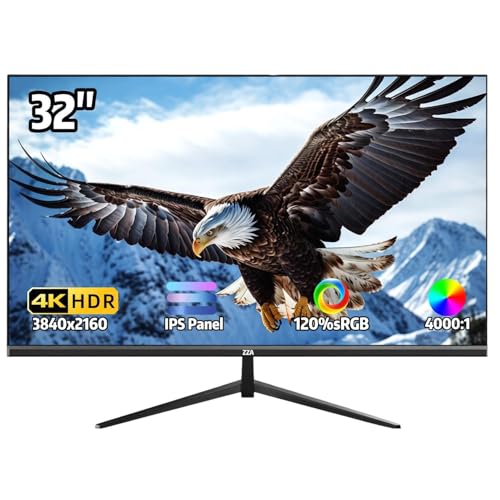
- 32-inch 4K IPS panel with 120% sRGB color
- Ultra-thin bezel and VESA mount support
- AMD FreeSync and HDMI/DisplayPort connectivity
Best For: A roomy 4K monitor that still fits a tidy, space-conscious setup
Compact Desk Choice
Philips 27" 4K IPS Monitor with Speakers

- 27-inch 4K IPS panel with frameless design
- Built-in speakers and wall-mount support
- Adaptive-Sync with Flicker-free and LowBlue Mode
Best For: A compact 4K monitor for small desks and everyday office use
Ergonomic Space Saver
LG 27UP650K-W 27-Inch 4K IPS Monitor

- 27-inch 4K IPS display with 95% DCI-P3
- Height, tilt, and pivot adjustable stand
- DisplayHDR 400 and Switch App multitasking support
Best For: A compact, adjustable 4K monitor for productive everyday setups
Space-Saving 4K Pick – Dell 27 Plus 4K Monitor
If you want a space-saving 4K computer monitor that still feels premium on a desk, the Dell 27 Plus 4K Monitor is a strong fit. Its 27-inch screen keeps the footprint manageable while delivering sharp 3840 x 2160 detail, 99% sRGB color, and a clean ultra-thin bezel design that looks tidy in compact workspaces.
Best For: Business users, photo/video editors, and anyone who wants a sleek 27-inch 4K monitor for a smaller desk.
Pros:
- 27-inch 4K IPS panel balances screen space with a compact desktop footprint.
- 120Hz refresh rate with AMD FreeSync Premium supports smoother work and casual gaming.
- 99% sRGB, HDR readiness, and ComfortView Plus are useful for long sessions.
- Ultra-thin bezels and ash white finish give it a minimalist look.
Cons:
- Not the largest screen here if you want maximum multitasking space.
- Built-in speakers are a convenience feature, not a dedicated audio upgrade.
Overall, this Dell is the most balanced choice when desk space matters but you still want modern 4K clarity and a smooth 120Hz panel. It is especially appealing if you want a monitor that feels refined without taking over the entire desk.
Roomy Workspace Option – Samsung ViewFinity S7 32-Inch
The Samsung 32-inch ViewFinity S7 is a good pick if you want a space-saving 4K computer monitor in the sense that it replaces a multi-monitor setup with one large, sharp display. Its 4K UHD resolution gives you plenty of room for detailed layouts, complex diagrams, and video timelines without crowding your desk with extra screens.
Best For: Professionals who want a single large 4K screen for multitasking, design work, and productivity.
Pros:
- 32-inch 4K UHD panel offers generous workspace for productivity.
- HDR10 and more than 1 billion colors improve contrast and color depth.
- HDMI and DP ports make setup straightforward.
- Eye Saver Mode and flicker reduction help reduce eye strain.
Cons:
- Its 32-inch size takes up more physical space than 27-inch models.
- It is a 60Hz monitor, so it is less suited to high-refresh gaming.
This Samsung is best viewed as a spacious, all-in-one desktop display rather than a compact monitor. If your goal is to simplify your workspace by using one large 4K screen instead of multiple smaller ones, it makes a lot of sense.
Portable Space-Saver – Upperizon 23.8-Inch Portable 4K
If portability is the main reason you’re shopping for space-saving 4K computer monitors, the Upperizon 23.8-inch portable model stands out. It combines a 4K UHD panel with a slim, lightweight design, so you can add a large secondary screen to a laptop setup without committing to a bulky desktop monitor.
Best For: Travelers, remote workers, and users who want a big external display that is easy to move and store.
Pros:
- 23.8-inch 4K UHD display delivers sharp detail in a portable form.
- USB-C and HDMI compatibility works with many laptops, consoles, and PCs.
- Frameless, ultra-slim design keeps the footprint compact.
- Built-in kickstand and 100x100mm VESA support add setup flexibility.
Cons:
- At 60Hz, it is more of a productivity and media display than a fast gaming monitor.
- USB-C connection requires a full-featured Thunderbolt or USB-C port.
This is one of the most practical options if you need 4K detail without giving up portability. It works well as a second screen for work trips, shared spaces, or a flexible home office setup.
Clean Desk Favorite – LG UltraFine 27US500-W
The LG UltraFine 27US500-W is a smart choice when you want a space-saving 4K computer monitor with a simple, uncluttered design. Its 27-inch IPS panel delivers detailed UHD sharpness, while the white borderless look and compact ergonomic stand help it blend neatly into a modern desk setup.
Best For: Users who want a tidy-looking 27-inch 4K monitor for office work, media, and general creative tasks.
Pros:
- 27-inch 4K UHD IPS display provides crisp detail without an oversized footprint.
- Borderless design and white finish create a clean, minimal look.
- HDR10 with up to 90% DCI-P3 adds helpful color range for content work.
- Onscreen Control and an ergonomic stand make adjustments easy.
Cons:
- 60Hz refresh rate limits appeal for high-refresh gaming.
- Brightness and contrast are solid but not class-leading.
For buyers who want a neat, space-conscious 4K monitor that still feels polished, the LG hits a nice balance. It is especially appealing for home offices where appearance, simplicity, and everyday productivity all matter.
Ultra-Clean 4K Value Pick – Sceptre Prime 4K IPS 27" UHD Monitor
If you want a space-saving 4K computer monitor that still gives you a sharp 27-inch workspace, the Sceptre Prime is a practical pick. Its IPS panel, 4K UHD resolution, and slim matte design make it easy to fit into a compact desk setup without giving up clarity or color coverage.
Best For: Budget-conscious buyers who want a compact 4K monitor for everyday work, light gaming, and a tidy desk.
Pros:
- 27-inch 4K UHD panel with 3840 x 2160 resolution for very detailed images
- IPS screen with 100% sRGB and wide viewing stability
- Up to 70+Hz over DisplayPort for smoother motion than standard 60Hz panels
- Built-in speakers and multiple inputs help reduce desk clutter
Cons:
- Built-in speakers are convenient, but not a replacement for dedicated audio
- Only one HDMI port may limit multi-device flexibility
- Less feature-rich than premium productivity-focused 4K monitors
This model makes sense if you want a straightforward 27-inch 4K display that balances desk efficiency with useful everyday features. It is especially appealing when you want a cleaner setup and do not need a large or highly specialized monitor.
Productivity-Focused 4K Workspace Monitor – Samsung ViewFinity S7 27"
The Samsung ViewFinity S7 is built for a cleaner, more efficient desk and fits well into the space-saving 4K computer monitors category. Its 27-inch 4K UHD IPS panel, HDR10 support, and productivity tools make it a strong option when you want crisp detail without moving up to a bulky display.
Best For: Business users, photo editors, and multitaskers who want a compact 4K monitor with strong productivity features.
Pros:
- 4K UHD resolution with high pixel density for sharp text and detailed visuals
- HDR10 and 178° viewing angles support better image consistency
- Samsung Display Manager adds split screen, brightness, KVM, and PIP/PBP tools
- Eye Saver Mode and flicker reduction help reduce eye strain during long sessions
Cons:
- 60Hz refresh rate is standard rather than high refresh
- 5ms response time is fine for work, but not ideal for fast competitive gaming
- Built for productivity first, so it is not the most feature-heavy gaming monitor
If your priority is a compact 4K monitor that helps you stay organized and productive, this Samsung is well aligned with that goal. It delivers practical workspace tools along with the resolution and clarity that make small desk setups feel more efficient.
Portable Space-Saver 4K Pick – InnoView 23.8" Large Portable Monitor
For anyone who needs a space-saving 4K computer monitor that can move with them, the InnoView 23.8-inch portable model is a flexible option. Its UHD panel, lightweight design, and adjustable stand make it useful for small desks, secondary setups, or travel-friendly workstations.
Best For: People who want a large portable 4K second monitor for work, travel, or flexible desk setups.
Pros:
- 23.8-inch 4K UHD display with 100% sRGB color coverage
- Lightweight, ultraslim build for easy portability
- 180° adjustable kickstand plus wall or arm mounting flexibility
- USB-C and HDMI support broad compatibility with laptops, phones, tablets, and consoles
Cons:
- Portable form factor may be less stable than a traditional desktop monitor
- 60Hz refresh rate is suitable for general use, not high-refresh gaming
- Larger portable size may still feel bulky for very tight carry needs
This is a smart choice when desk space is limited but you still want a roomy 4K screen. It works especially well as a second monitor because it combines portability, multiple stand options, and broad device support.
Best with Extra Features – 32-Inch 4K UHD IPS Monitor with VESA Mount
If you want space-saving 4K computer monitors with a larger canvas, this 32-inch model gives you plenty of screen real estate without adding clutter. Its three-sided ultra-thin bezel, tilt-adjustable stand, and 100x100mm VESA compatibility make it easier to fit into a compact desk setup or wall-mounted workstation.
Best For: Users who want a roomy 4K display for everyday work, casual gaming, and multi-monitor setups in a tidy desk layout.
Pros:
- 32-inch 4K UHD IPS panel with sharp 3840 x 2160 resolution and 120% sRGB color.
- AMD FreeSync helps reduce tearing for smoother casual gaming and video playback.
- Three-sided ultra-thin bezel and VESA 100x100mm mounting support save desk space.
- HDMI, DisplayPort, and audio jack provide flexible connectivity.
Cons:
- No built-in speakers, so external audio is needed.
- 60Hz refresh rate is fine for general use, but not aimed at high-refresh gaming.
- Stand only tilts, so height and pivot adjustments require a separate mount.
This is a practical pick if you want a big 4K screen with a cleaner footprint and simple setup options. It balances display size, color, and space-conscious design well for work or mixed-use desks.
Compact Desk Choice – Philips 27" 4K IPS Monitor with Speakers
For shoppers comparing space-saving 4K computer monitors, this 27-inch Philips model keeps the footprint modest while still delivering 3840 x 2160 resolution. The frameless design, built-in speakers, and wall-mount support make it a straightforward choice for smaller desks, home offices, or multipurpose setups.
Best For: Anyone who wants a compact 4K monitor for office work, media, or a small desktop setup with fewer accessories.
Pros:
- 27-inch 4K UHD IPS panel offers sharp detail and wide viewing angles.
- Built-in speakers reduce the need for separate desktop audio gear.
- Frameless design and wall-mount compatibility help save space.
- Adaptive-Sync, Flicker-free tech, and LowBlue Mode support comfortable everyday use.
Cons:
- 60Hz refresh rate is standard rather than fast-paced gaming focused.
- Only one HDMI input is listed, so connectivity may feel limited for some setups.
- Response time is rated at 4ms, which is fine for general use but not ultra-fast.
This Philips monitor is a sensible pick if your priority is keeping the desk clean and compact without giving up 4K detail. It works especially well for business, desktop use, and light creative tasks.
Ergonomic Space Saver – LG 27UP650K-W 27-Inch 4K IPS Monitor
If you’re looking for space-saving 4K computer monitors with a premium feel, the LG 27UP650K-W packs a 27-inch IPS panel into a relatively compact footprint. Its height, tilt, and pivot adjustable stand makes it easier to position on tighter desks, while the white finish and matte screen keep the setup clean and practical.
Best For: Users who want a compact 4K monitor with ergonomic adjustability for work, streaming, and mixed everyday use.
Pros:
- 27-inch 4K IPS display with up to 95% DCI-P3 color coverage.
- DisplayHDR 400 support adds stronger HDR capability than basic monitors.
- Height, tilt, and pivot adjustments make it easier to fit a small workspace.
- Switch App support can split the screen into up to 6 sections for multitasking.
Cons:
- 60Hz refresh rate and 5ms response time are oriented toward general use, not high-speed gaming.
- No built-in speakers are listed in the supplied details.
- The feature set is strong for productivity, but less specialized for competitive play.
This LG model stands out if you want a compact 4K display that also gives you flexible positioning. It is a strong fit for productive desks where ergonomics and a cleaner layout matter as much as image quality.
How We Picked the Best Space-Saving 4K Computer Monitors
We focused on monitors that offer strong 4K clarity in dimensions that make sense for smaller desks, home offices, and multi-use setups. That means prioritizing 27-inch and compact 32-inch models, thin bezels, efficient stands, VESA compatibility, and versatile ports like HDMI, DisplayPort, and USB-C.
We also weighed practical performance: IPS panels for wider viewing angles, decent refresh rates for smoother everyday use, and features such as HDR support, Reader modes, and flicker reduction. For portable displays, we looked at travel-friendly design and easy connectivity.
Quick Comparison
Most buyers will find the sweet spot in 27-inch Space-Saving 4K Computer Monitors, which usually provide the best balance of size, pixel density, and desk efficiency. Portable 4K monitors are the most compact choice for travel or second-screen use, while 32-inch models suit users who want more workspace but still need a clean, manageable setup.
If you care most about sharp text and productivity, choose a 27-inch IPS model. If you want more screen real estate for spreadsheets or multitasking, consider a 32-inch option. If your priority is flexibility, a portable 4K display is the easiest to move and store.
Key Buying Factors for Space-Saving 4K Computer Monitors
Screen Size and Desk Depth
Smaller desks usually pair best with 27-inch monitors because they deliver 4K detail without feeling oversized. A 32-inch screen can still work well, but it benefits from a little more viewing distance.
Stand Design and Mounting Options
Look for slim stands, height adjustment, tilt, or VESA mounting if you want to reclaim desk space. A monitor arm can dramatically improve ergonomics and free up room for a keyboard, laptop, or notepad.
Panel Type and Image Quality
IPS panels are the best all-around choice for Space-Saving 4K Computer Monitors because they provide accurate color and wide viewing angles. HDR support can improve contrast, though it varies by model and should be treated as a bonus rather than a guarantee of cinematic performance.
Ports and Connectivity
Make sure the monitor has the right inputs for your devices. USB-C is especially useful for laptop users who want a cleaner one-cable setup, while HDMI and DisplayPort remain the most common options for desktops, consoles, and docking stations.
Who Should Buy Which Space-Saving 4K Computer Monitors?
Choose a 27-inch 4K monitor if you want the best overall balance for office work, creative tasks, and general use. Pick a portable 4K model if you travel often, work from multiple locations, or need a second screen that stores easily. Go with a 32-inch monitor if you prefer larger text, more simultaneous windows, and a bit more immersion without moving into a very large display class.
For most shoppers, the best option is the one that fits both the desk and the workload. The goal is not simply to buy the smallest display possible, but to choose a screen that keeps your setup efficient, comfortable, and uncluttered.