Choosing the right monitor can make remote work feel faster, clearer, and less tiring. The best 4K display should sharpen text, support long work sessions, and fit your desk and workflow.
Below, we focus on 10 strong options for productivity-first setups, from compact 27-inch models to larger screens with better multitasking space.
Best 10 4K Computer Monitors for Remote Work Picks for 2026
Best All-Around Pick
Dell 27 S2725QC 4K IPS 120Hz USB-C

- 4K IPS panel with 99% sRGB color
- USB-C with up to 65W power delivery
- ComfortView Plus and 120Hz refresh rate
Best For: Remote workers who want a balanced 4K monitor with USB-C convenience
Office Docking Option
Dell P2723QE 27" 4K Office Monitor

- 4K UHD resolution with 27-inch workspace
- USB-C, Ethernet, HDMI, and DisplayPort support
- ComfortView Plus for everyday viewing
Best For: Remote professionals who want a connected office monitor
Color-Focused Value Pick
LG 27US500-W 27" 4K UltraFine IPS

- 4K IPS panel with HDR10 and 90% DCI-P3
- Flicker-Free, Reader Mode, and Onscreen Control
- Compact 27-inch design with matte finish
Best For: Remote workers who want a color-rich 4K monitor for everyday use
Simple Productivity Pick
Dell S2721Q 27" 4K IPS Monitor
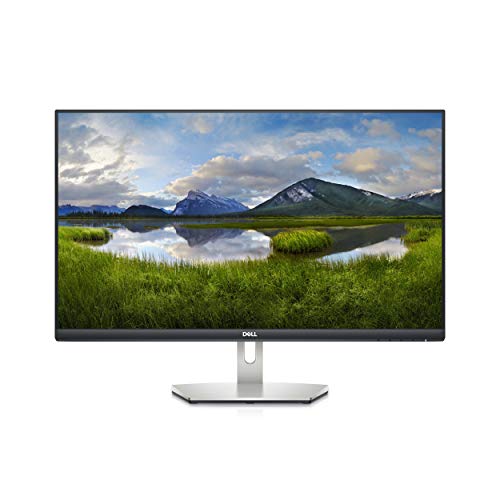
- 27-inch 4K IPS panel with ultra-thin bezels
- AMD FreeSync for smoother motion
- HDMI, DisplayPort, and VESA certification
Best For: Remote workers who want a simple, sharp 4K monitor
Samsung ViewFinity S7
4K Productivity Monitor for Detail Work

- 27-inch 4K UHD panel with high pixel density
- Eye Saver Mode and flicker reduction for comfort
- Display Manager adds split screen, KVM, and PIP/PBP
Best For: Remote workers who want crisp 4K detail and multitasking tools
LG UltraFine 32UR550K-B
Spacious 32-inch 4K Work Display

- 32-inch 4K UHD screen gives you more room for multitasking
- Switch app splits the display into up to 6 sections
- Height, tilt, and pivot adjustments improve comfort
Best For: Remote workers who want a larger 4K screen with flexible multitasking
ASUS VA27UQSB

- 27-inch 4K IPS panel with wide viewing angles
- Dual HDMI, DisplayPort, and USB hub for connectivity
- Tilt, swivel, pivot, and height adjustment for comfort
Best For: Remote workers who want a business-focused 4K monitor with strong ergonomics
Editor’s Pick
LG 27UP650K-W 27-inch 4K IPS Monitor

- 27-inch 4K IPS display with wide viewing angles
- DisplayHDR 400 and up to 95% DCI-P3 color
- Height, tilt, and pivot stand for better comfort
Best For: Remote workers who want a sharp, adjustable 4K monitor
Value Choice
LG 27US550-W 27-inch 4K IPS Monitor

- 27-inch 4K IPS screen with 1000:1 contrast
- HDR10 and up to 90% DCI-P3 color
- Adjustable stand with tilt, height, swivel, and pivot
Best For: Remote workers who want a clean, adjustable 4K monitor
Best All-Around Pick – Dell 27 S2725QC 4K IPS 120Hz USB-C
If you want 4K computer monitors for remote work that feel sharp for spreadsheets, video calls, and long document sessions, this Dell 27 is built for everyday versatility. The 27-inch 4K IPS panel delivers 99% sRGB color, while the 120Hz refresh rate and AMD FreeSync Premium add extra smoothness when you switch between work and downtime.
Best For: Remote workers who want a balanced 4K monitor with strong color, smooth motion, and USB-C convenience.
Pros:
- 4K IPS display with 99% sRGB for crisp text and vivid color
- USB-C connectivity with up to 65W power delivery helps reduce cable clutter
- ComfortView Plus reduces harmful blue light emissions by up to 35% for all-day use
- 120Hz refresh rate and FreeSync Premium make motion feel especially smooth
Cons:
- USB-C power delivery tops out at 65W, which may not suit every laptop
- Built-in speaker improvements are noted, but this is still not a replacement for dedicated audio
This is a strong choice if you want a modern 4K work monitor that combines ergonomic flexibility, neat single-cable connectivity, and more fluid performance than a basic 60Hz office display.
Office Docking Option – Dell P2723QE 27" 4K Office Monitor
Dell P2723QE 27" 4K UHD Monitor (Black/Silver) Bundle | For Home & Office | 3840 x 2160
Check Price On AmazonFor 4K computer monitors for remote work, this Dell P2723QE is the kind of display that fits a desk-based productivity setup first. It pairs a 27-inch 4K UHD panel with USB-C, DisplayPort, HDMI, USB, and Ethernet support, making it a practical choice if you want monitor-centered connectivity for a home office.
Best For: Remote professionals who want a straightforward 4K office monitor with broad connectivity and a built-in productivity focus.
Pros:
- 27-inch 4K UHD resolution gives you plenty of space for multitasking
- USB-C, DisplayPort, HDMI, USB, and Ethernet support make it flexible for office setups
- ComfortView Plus is included for easier everyday viewing
- 350 cd/m² brightness is solid for general desk use
Cons:
- 60Hz refresh rate is standard rather than fast
- Response time is rated at 5ms, so it is more work-focused than motion-focused
- Glossy screen finish may not be ideal in bright rooms
This monitor is best viewed as a dependable remote-work tool: practical, well-connected, and centered on productivity rather than premium motion features.
Color-Focused Value Pick – LG 27US500-W 27" 4K UltraFine IPS
If your remote work leans toward creative review, content viewing, or simply wanting a cleaner-looking 4K desktop, this LG 27US500-W is an appealing option. It combines a 27-inch 4K IPS panel with HDR10 support and up to 90% DCI-P3 color gamut expression, giving the screen a more vivid presentation than a basic office monitor.
Best For: Remote workers who want a color-rich 4K monitor for multimedia, light creative work, and everyday productivity.
Pros:
- 4K UHD IPS display with 1000:1 contrast ratio for detailed viewing
- HDR10 and up to 90% DCI-P3 color gamut support richer color
- Flicker-Free design and Reader Mode help with longer sessions
- Onscreen Control makes it easy to split the display and adjust settings
Cons:
- 60Hz refresh rate is standard for office use
- Brightness is listed at 300 cd/m², which is modest compared with some alternatives
- Ergonomic stand adjustments are limited to tilt
For remote workers who care about image quality more than docking features, this LG offers a polished 4K experience with useful software controls and eye-comfort features.
Simple Productivity Pick – Dell S2721Q 27" 4K IPS Monitor
Among 4K computer monitors for remote work, the Dell S2721Q is a straightforward pick when you want a clean 27-inch 4K desktop without extra complexity. The supplied details point to an IPS panel, ultra-thin bezels, AMD FreeSync, HDMI, DisplayPort, and VESA certification, making it a sensible fit for a tidy home-office setup.
Best For: Remote workers who want a simple, sharp 4K monitor for everyday office tasks.
Pros:
- 27-inch 4K UHD IPS panel for sharp text and plenty of workspace
- Ultra-thin bezel design helps create a cleaner desk look
- AMD FreeSync support adds smoother motion
- HDMI, DisplayPort, and VESA certification provide flexible setup options
Cons:
- No detailed contrast, brightness, or USB-C information is supplied
- Specific ergonomic adjustment features are not listed in the provided notes
If you mainly need a reliable 4K work monitor and prefer a simpler feature set, this Dell keeps the focus on image clarity and practical connectivity.
Samsung ViewFinity S7 – 4K Productivity Monitor for Detail Work
If you want a 4K computer monitor for remote work that prioritizes sharp text and efficient multitasking, the Samsung 27″ ViewFinity S7 is built for exactly that. Its 27-inch 4K UHD panel, HDR10 support, and 178° viewing angle make it a strong fit for long workdays, while HDMI and DisplayPort keep setup simple.
Best For: Remote workers who want crisp 4K detail, eye-comfort features, and easy split-screen productivity.
Pros:
- 4K UHD resolution on a 27-inch screen delivers high pixel density and clear detail.
- Eye Saver Mode and flicker reduction are designed to reduce eye strain.
- Samsung Display Manager supports split screen, brightness adjustment, KVM, and PIP/PBP.
- HDMI and DisplayPort inputs make it straightforward to connect a work laptop or desktop.
Cons:
- 60Hz refresh rate is aimed at productivity, not fast-motion use.
- Only one HDMI port is listed.
- Brightness is rated at 300 cd/m2, which is practical but not especially high.
Overall, this ViewFinity model focuses on useful office features rather than extras, which makes it a sensible pick for remote work setups where text clarity and screen organization matter most.
LG UltraFine 32UR550K-B – Spacious 32-inch 4K Work Display
For remote work, a larger screen can make a noticeable difference, and the LG 32UR550K-B gives you that with a 32-inch 4K UHD panel. It combines HDR10, up to 90% DCI-P3 coverage, and a multitasking-friendly Switch app, making it useful for anyone who juggles documents, calls, and streaming on the side.
Best For: Remote workers who want a larger 4K screen with flexible multitasking and adjustable ergonomics.
Pros:
- 32-inch 4K UHD display offers plenty of room for side-by-side work.
- HDR10 and up to 90% DCI-P3 support help deliver rich color and contrast.
- Switch app can split the screen into up to 6 sections and launch video calls with a hotkey.
- Height, tilt, and pivot adjustments help you dial in a comfortable viewing position.
Cons:
- 60Hz refresh rate is standard for office use, but not ideal for high-refresh needs.
- The notes emphasize work, streaming, and gaming features, so some extras may be unnecessary for pure office setups.
- No USB-C connection is mentioned in the supplied details.
As a remote-work monitor, the LG stands out for its spacious 32-inch canvas and practical app-based window management. It is a strong choice if you prefer more screen area over a tighter 27-inch format.
ASUS VA27UQSB – Ergonomic 4K Business Monitor
If you need a no-fuss 4K computer monitor for remote work, the ASUS VA27UQSB keeps the focus on clarity, ergonomics, and easy connectivity. Its 27-inch IPS 4K display, HDR10 support, dual HDMI, DisplayPort, and USB hub make it a straightforward business monitor for everyday productivity.
Best For: Remote workers who want a business-focused 4K monitor with strong ergonomics and broad connectivity.
Pros:
- 27-inch 4K IPS panel with 178° viewing angles provides sharp visuals.
- Dual HDMI, DisplayPort, and USB hub offer flexible connection options.
- Ergonomic stand supports tilt, swivel, pivot, and height adjustment.
- DisplayWidget Center makes it easier to change monitor settings.
Cons:
- No ultra-specific productivity features like built-in split-screen management are mentioned.
- Speakers are included, but the notes do not describe their performance.
- Like most office displays here, it runs at 60Hz.
For remote work buyers who value adjustability and simple setup over flashy features, this ASUS is a practical business pick. The combination of 4K resolution, flexible ports, and an ergonomic stand makes it easy to fit into a daily work routine.
Editor’s Pick – LG 27UP650K-W 27-inch 4K IPS Monitor
If you want one of the more balanced 4K computer monitors for remote work, the LG 27UP650K-W keeps the focus on clarity, comfort, and simple multitasking. Its 27-inch IPS panel, HDR support, and ergonomic stand make it a practical fit for long workdays, while the Switch app adds quick ways to split the screen and organize tasks.
Best For: Remote workers who want a sharp 4K display with flexible ergonomics and easy screen-splitting tools.
Pros:
- 27-inch 4K IPS panel with wide viewing angles and vibrant color
- DisplayHDR 400 and up to 95% DCI-P3 coverage for richer visuals
- Height, tilt, and pivot adjustments help fine-tune desk comfort
- Switch app supports up to 6-screen splits and quick video-call launching
Cons:
- 60Hz refresh rate is geared more toward office use than fast motion
- No USB-C power delivery, so laptop users may need separate cables
- Built-in smart features are less central than on LG’s Smart Monitor model
Overall, this is a strong all-around pick if your remote setup is mostly work, documents, and video calls. It offers the kind of sharpness and ergonomic adjustability that make a 4K monitor feel immediately useful every day.
Smart Work Hub – LG 27U730SA-W Smart 4K Monitor
The LG 27U730SA-W stands out among 4K computer monitors for remote work because it blends a true 4K IPS display with built-in webOS features. If you split time between productivity, video calls, streaming, and cloud access, this monitor can reduce how many extra devices you need on your desk.
Best For: Remote workers who want a monitor that doubles as a smart hub for work and entertainment.
Pros:
- Built-in webOS adds streaming apps and cloud PC access without needing a PC
- USB-C with up to 65W power delivery simplifies laptop connections
- 4K IPS panel delivers sharp detail and wide-angle viewing
- Tilt, height, swivel, and pivot adjustments support flexible setups
Cons:
- 60Hz refresh rate is standard for office use, not high-speed gaming
- Brightness is listed at 350 nits, lower than some higher-end 4K models
- Smart features add versatility, but may be more than some buyers need
For remote work, this model is especially appealing if you like the idea of one screen handling both productivity and entertainment. The USB-C power delivery and smart-platform features make it one of the most flexible options in this group.
Value Choice – LG 27US550-W 27-inch 4K IPS Monitor
The LG 27US550-W is a straightforward option for remote workers who want 4K clarity without extra smart features. It keeps the essentials front and center: an IPS panel, HDR10 support, a flexible stand, and the Switch app for organizing multiple tasks on screen.
Best For: Remote workers who want a clean, adjustable 4K monitor focused on productivity and everyday desk use.
Pros:
- 27-inch 4K IPS panel with 1000:1 contrast for crisp everyday viewing
- HDR10 and up to 90% DCI-P3 color add better color depth
- Height, tilt, swivel, and pivot adjustments support ergonomic workstations
- Switch app helps split the screen into up to 6 sections
Cons:
- 300-nit brightness is modest compared with brighter alternatives
- No USB-C port, so laptop users may rely on HDMI or DisplayPort
- Best suited to desktop productivity rather than feature-heavy smart use
This is a sensible pick if your remote-work setup is mostly spreadsheets, documents, and browser tabs. It delivers the core benefits of 4K in a clean, no-nonsense package with useful ergonomics.
How We Picked These 4K Computer Monitors for Remote Work
We prioritized productivity features that matter day to day: sharp 4K resolution, reliable panel quality, comfortable ergonomics, and practical connectivity. We also favored models with features that support long work sessions, such as eye-comfort modes, height adjustment, and good text clarity.
For remote work, a monitor should do more than look good on a spec sheet. It needs to reduce eye strain, work well with laptops and docking setups, and offer enough screen space for email, documents, spreadsheets, and video calls.
Quick Comparison
Most 27-inch 4K monitors hit the sweet spot for remote workers who want crisp text without taking up too much desk space. If you need more room for split-screen multitasking, a 32-inch model is often the better pick. Business-oriented monitors usually emphasize ergonomics and input options, while smart or feature-rich models may add built-in apps, speakers, or wireless casting.
Key Buying Factors for 4K Computer Monitors for Remote Work
Screen Size and Text Clarity
27 inches is the most common choice because it balances sharpness and desk footprint well. At 32 inches, you gain more visible workspace, but you may need to sit a little farther back. If you read and write all day, prioritize crisp text rendering and a comfortable scaling setup.
Ergonomics
Look for height, tilt, swivel, and pivot adjustment if you spend long hours at your desk. A monitor that lines up with your eye level can make a bigger difference in comfort than a small spec bump.
Connectivity
For remote work setups, USB-C can simplify cable management and laptop charging, but HDMI and DisplayPort still matter for compatibility. If you switch between a work laptop and a personal device, multiple input ports are especially useful.
Panel and Comfort Features
IPS panels are popular for remote work because they offer strong viewing angles and consistent image quality. Eye-care features such as flicker reduction, low blue light modes, and reader presets can also help during long sessions.
Refresh Rate and Extra Features
A 60Hz monitor is enough for most office tasks, but higher refresh rates can make scrolling feel smoother. Built-in speakers, smart features, and gaming extras may be nice to have, though they are usually less important than ergonomics and connectivity.
Who Should Buy Which 4K Computer Monitors for Remote Work?
If you want the safest all-around choice, choose a 27-inch 4K IPS monitor with adjustable height and strong port selection. If your work involves multiple windows side by side, consider a 32-inch model. If you work from a laptop and want a cleaner desk, prioritize USB-C or other simplified connectivity. If you split time between work and entertainment, a higher refresh rate or smart features may be worth paying for, but only after the productivity basics are covered.
In short, the best 4K Computer Monitors for Remote Work are the ones that match your desk space, laptop setup, and daily comfort needs—not just the highest number on the spec sheet.