Premium document cameras make it easier to teach, present, and demonstrate with sharp live images and simple setup. The right model can replace a scanner, webcam, and overhead projector in one tool.
Below, we focus on the best options for clarity, flexibility, and real-world classroom or office use so you can choose confidently.
Best 10 Premium Document Cameras Picks for 2026
Ultra-Portable Classroom Pick
IPEVO V4K 8MP USB Document Camera

- 8MP capture up to 3264 x 2448
- Streams at up to 30 fps for smooth demos
- Works with Mac, Windows, and Chromebook
Best For: USB-based teaching and conferencing setups
Feature-Rich Presentation Hub
Elmo TT-12W STEM-CAM Visual Presenter

- 192x zoom with 12x optical and 16x digital
- HDMI, USB, Ethernet, Wi-Fi, and RGB outputs
- Android support for educational apps
Best For: Classrooms needing advanced zoom and AV flexibility
Compact Classroom Workhorse
INSWAN INS-1 Classic USB Doc Camera

- 8MP SONY sensor with 3264 x 2448 capture
- Built-in LED light and anti-glare sheet
- Documate software adds annotation and recording
Best For: Desk-based teaching with lighting and software extras
Wireless Flexibility Leader
IPEVO VZ-X 8MP Wireless Document Camera

- Wi-Fi, HDMI, and USB connectivity
- Up to 9-12 hours of battery life
- 8MP Sony sensor with near-4K USB mode
Best For: Wireless teaching and flexible presentation setups
Teacher-Friendly 3-in-1 USB Doc Camera
3-in-1 USB doc camera with LED lighting

- Works as a document camera, webcam, or flipped presentation camera
- A3 capture area with macro focus down to 3.94 inches
- 3-level LED light and manual exposure controls
Best For: Teachers and presenters who need flexible classroom and remote-demo use
Wide-Angle 4K Conferencing Doc Camera
4K doc camera with 120° wide-angle lens

- 4K video with Sony CMOS sensor and swift autofocus
- 120-degree lens captures tabloid-size documents and larger objects
- AI noise reduction helps reduce background noise in calls
Best For: Home office and conferencing users who want a compact high-resolution visualizer
Dual-Mic 4K Classroom Visualizer
Foldable 4K doc camera with dual mics

- 8MP/2448P capture at 30 fps with autofocus
- Foldable A3-size body with adjustable brightness and image inversion
- Dual microphones support clearer online teaching and calls
Best For: Classrooms and distance-learning setups that need video plus built-in audio
Flagship 4K classroom workhorse
Elmo TT-12G Interactive Document Camera
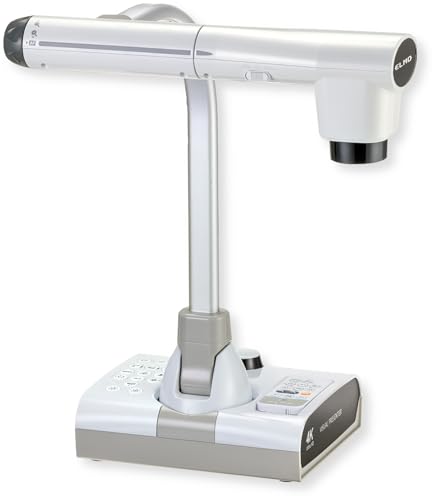
- 4K Ultra HD output with a 12MP sensor
- 192x total zoom for detailed demonstrations
- HDMI, USB, VGA, and Miracast support
Best For: Classrooms and presentations that need premium imaging and flexible connectivity
Compact USB visualiser

- 8MP capture with 2448P live transmission
- Foldable multi-joint body for easy storage
- 3-level LED lighting and broad OS support
Best For: Teachers and remote presenters who want a portable USB visualiser
Dual-mode premium presenter cam

- HDMI and USB dual mode for flexible use
- 13MP sensor with up to 4K output
- Built-in LED light and tactile image controls
Best For: Hybrid classrooms and meetings needing direct display support
Ultra-Portable Classroom Pick – IPEVO V4K 8MP USB Document Camera
If you want premium document cameras that stay simple, fast, and versatile, the IPEVO V4K is a strong USB-first option. It captures sharp 8MP images, streams smoothly at up to 30 fps, and works across Mac, Windows, and Chromebook setups for lessons, demos, and remote teaching.
Best For: Teachers, presenters, and remote trainers who want a plug-and-play camera with dependable image quality.
Pros:
- 8MP Ultra HD capture up to 3264 x 2448
- High frame rate streaming up to 30 fps at Full HD
- Fast autofocus with Sony CMOS for better low-light results
- Compatible with Mac, Windows, and Chromebook
Cons:
- USB-only design limits flexible placement
- No built-in wireless or HDMI output
- Needs stronger system specs for smoothest high-resolution use
The V4K focuses on core classroom performance rather than extra hardware features, which makes it easy to adopt if you need a reliable everyday presenter camera. Its compact build and multi-jointed stand also suit frequent repositioning on a desk.
Feature-Rich Presentation Hub – Elmo TT-12W STEM-CAM Visual Presenter
Among premium document cameras, the Elmo TT-12W stands out for users who need a presentation hub, not just a camera. It combines 192x zoom, multiple output options, Wi-Fi, Ethernet, and USB connectivity, making it built for classrooms that rely on flexible AV integration.
Best For: Schools, STEM rooms, and presenters who need advanced zoom and broad connection options.
Pros:
- 192x zoom with 12x optical and 16x digital magnification
- Wide connectivity: HDMI in/out, USB, Ethernet, Wi-Fi, and RGB out
- Built-in remote control dock helps keep accessories organized
- Powered by Android for access to educational apps
Cons:
- Lower 3.4MP sensor than some 8MP competitors
- Likely more complex than a basic plug-and-play USB model
- Best suited to structured installations rather than quick portability
This model is a strong fit when zoom range and system integration matter more than minimal setup. If your workflow includes displays, networks, and app-based teaching tools, the TT-12W offers a much deeper feature set than standard USB document cameras.
Compact Classroom Workhorse – INSWAN INS-1 Classic USB Doc Camera
If you want premium document cameras with a practical, everyday setup, the INSWAN INS-1 is built around high-resolution USB use. It delivers 8MP capture, smooth 30 fps streaming, and a space-saving multi-joint design that fits well on a crowded desk.
Best For: Educators and presenters who want a compact USB camera with extra lighting and software tools.
Pros:
- 8MP SONY sensor with capture up to 3264 x 2448
- Built-in LED light plus anti-glare sheet for tougher lighting
- Autofocus, macro capability, and image flip controls
- Documate software adds zoom, annotation, recording, and snapshots
Cons:
- USB-A connection may require adapters on newer devices
- Best features depend on bundled software use
- Not the most portable option for travel-heavy users
The INS-1 is a strong all-around pick if you value image quality and practical teaching tools over advanced wireless features. Its compatibility across PC, Mac, iPad, and Chromebook also makes it easier to slot into mixed-device environments.
Wireless Flexibility Leader – IPEVO VZ-X 8MP Wireless Document Camera
For premium document cameras that need to move between rooms or presentation modes, the IPEVO VZ-X is especially flexible. It supports Wi-Fi, HDMI, and USB, delivers up to near-4K quality in USB mode, and includes a battery for long untethered sessions.
Best For: Presenters and teachers who want wireless operation and multiple ways to connect.
Pros:
- Three connectivity modes: Wi-Fi, HDMI, and USB
- Near-4K USB capture with 8MP Sony sensor
- Battery life up to 9-12 hours for full sessions
- Built-in LED and 33-foot wireless range
Cons:
- Wireless and HDMI modes use lower 1920 x 1080 capture
- May be more feature-heavy than users who only need USB
- Setup can be more involved than a basic wired camera
The VZ-X is the most adaptable option here if you need a document camera that can work from a computer, a display, or a mobile device. Its combination of battery power, wireless range, and adjustable stand makes it a practical choice for mobile teaching and room-to-room use.
Teacher-Friendly 3-in-1 USB Doc Camera – 3-in-1 USB doc camera with LED lighting
If you want premium document cameras for teaching, demos, or video calls, this PAKOTOO model leans into flexibility. It works as a document camera, webcam, or flipped presentation camera, with an adjustable hose-style arm that can angle the lens for different viewing positions. The A3 capture size, 5MP/1944P output, LED fill light, and manual image controls make it practical for classroom work and remote instruction.
Best For: Teachers and presenters who want one camera for documents, live demos, and webcam use.
Pros:
- 3-in-1 design works as a doc camera, webcam, or flipped presentation camera.
- A3 coverage plus macro capture as close as 3.94″ helps with paper and small objects.
- 3-level LED fill light and 5-level exposure adjustment support difficult lighting.
- Compatible with Windows, Mac, Chromebooks, Zoom, Teams, Google Meet, and more.
Cons:
- Not plug and play; you need to select the USB Camera input in your software or OS.
- Best results rely on manual setup like focus, mirroring, and exposure adjustments.
This is a practical pick if you need a versatile classroom camera and are comfortable doing a little setup. Its strengths are in flexible positioning, useful lighting controls, and broad software compatibility rather than premium automation.
Wide-Angle 4K Conferencing Doc Camera – 4K doc camera with 120° wide-angle lens
For premium document cameras that double as a webcam, the IPEVO V4K PRO 120 focuses on image quality and ease of use. Its 120-degree wide-angle lens and 4K resolution are built to capture larger documents or objects, while the Sony CMOS sensor, swift autofocus, built-in LED light, and AI noise reduction support cleaner presentations and calls. USB plug-and-play setup keeps it straightforward for Mac, Windows, and Chromebook users.
Best For: Users who want a compact, high-resolution document camera for presentations, conferencing, and work-from-home setups.
Pros:
- 4K resolution with Sony CMOS sensor for crisp detail.
- 120-degree wide-angle lens captures tabloid-size documents and larger objects.
- Swift autofocus and built-in LED light help in everyday use.
- AI noise reduction is useful for video calls and streaming.
Cons:
- Wide-angle design may be more than you need for simple close-up document capture.
- Focused on USB use, so it’s less specialized for advanced classroom hardware setups.
This model stands out if you want a clean, modern document camera with strong conferencing features. It’s especially appealing when you need one device that can handle both larger visuals and everyday webcam duties without much setup.
Dual-Mic 4K Classroom Visualizer – Foldable 4K doc camera with dual mics
This THUSTAR model is a strong fit if you’re shopping premium document cameras for teaching, live demos, or remote lessons. It combines 8MP/2448P output, a foldable A3-size body, image inversion controls, and adjustable brightness with a 14-bead ring light. Dual microphones and broad compatibility with Windows, macOS, and Chrome OS make it useful for mixed classroom and conferencing needs.
Best For: Teachers and presenters who want a foldable, microphone-equipped doc camera for classroom or distance learning use.
Pros:
- 8MP/2448P video output at 30 fps for high-detail capture.
- Foldable A3-size design saves space and is easier to carry.
- Adjustable image inversion, autofocus, and brightness controls add flexibility.
- Dual microphones and wide app compatibility support online teaching and calls.
Cons:
- There are a lot of manual controls, so setup may take a little time.
- The foldable design is practical, but not as minimal as a fixed webcam.
Overall, this is the most feature-packed option here for users who need both video and audio in one device. It is especially well suited to classrooms where you want a document camera that can also handle live communication without extra accessories.
Flagship 4K classroom workhorse – Elmo TT-12G Interactive Document Camera
If you want a premium document camera for teaching, demos, or hybrid lessons, the ELMO TT-12G is built around image quality and flexibility. Its 4K Ultra HD output, 12MP sensor, and 192x total zoom make it well suited for showing fine details clearly, while HDMI, USB, and VGA outputs help it fit into newer and legacy setups.
Best For: Teachers, trainers, and presenters who need a high-end document camera with strong zoom, broad compatibility, and classroom-friendly flexibility.
Pros:
- 4K Ultra HD imaging with a 12MP sensor for sharp presentation visuals
- 192x total zoom helps reveal small details during instruction
- Flexible multi-angle arm and large capture area support bigger materials
- HDMI, USB, VGA, and Miracast support make it adaptable to many setups
Cons:
- Bulkier than foldable USB-only models at 6.6 pounds
- May be more camera than needed for simple one-person desk use
Overall, this is a strong premium choice if you need a document camera that feels purpose-built for classrooms and live demonstrations. The combination of zoom, lighting, recording, and multi-output connectivity makes it especially practical in teaching environments.
Compact USB visualiser – 4K 8MP A3 document camera
This premium document camera is aimed at teachers and presenters who want a compact, easy-to-use visualiser for live demos and online sessions. It offers 8MP output, 4K/2448P image transmission, a foldable design, and support for A3-sized materials, making it a practical fit for desks that need to stay uncluttered.
Best For: Educators and remote presenters who want a foldable USB document camera with strong compatibility and adjustable lighting.
Pros:
- 8MP sensor with high-resolution 2448P output for clear visuals
- Foldable, multi-joint design is easy to store and carry
- 3-level LED lighting and adjustable brightness help in difficult lighting
- USB-C plug-and-play compatibility works with Windows, macOS, and Chrome OS
Cons:
- USB-only design is less flexible than HDMI/USB dual-mode models
- Abrupt object movement may reduce the benefit of its focus behavior
For buyers who want a streamlined classroom or meeting-room camera, this model stands out for simplicity and portability. Its combination of image reversal, brightness control, and broad software compatibility makes it useful for live teaching and web conferencing.
Dual-mode premium presenter cam – IPEVO VZ-R Ultra 13MP
If you’re comparing premium document cameras and want maximum flexibility, the IPEVO VZ-R Ultra is a standout option. Its HDMI and USB dual-mode design lets you connect directly to displays without a computer or use software for online teaching, while the 13MP sensor and 4K output give you the detail needed for documents and larger materials.
Best For: Classrooms, meetings, and hybrid setups that need a durable document camera with direct display support and advanced imaging.
Pros:
- HDMI and USB dual mode supports both direct display and computer-based use
- 13MP sensor with up to 4K output for sharp document capture
- Built-in LED light and Sony CMOS sensor improve low-light performance
- Tactile controls make real-time adjustment easy during teaching
Cons:
- Advanced feature set may be more than casual users need
- Scanner upgrade module is optional, so scanning workflow may require extras
For buyers who value versatility and classroom-ready design, this model has a lot to offer. The direct-to-display HDMI mode, strong imaging, and durable stand make it a practical premium choice for teaching and presentations.
How We Picked the Best Premium Document Cameras
We prioritized image quality, sensor resolution, zoom range, lighting, autofocus performance, and compatibility with common platforms like Windows, Mac, and Chromebook. We also considered whether each camera works well for both live teaching and video conferencing, since Premium Document Cameras often need to serve more than one role.
Quick Comparison
At a glance, the best models tend to fall into three groups: USB-only cameras for simple plug-and-play use, dual- or multi-mode cameras for flexible classroom setups, and higher-end presenters with 4K output, stronger zoom, and broader connectivity. If you want the easiest setup, USB is usually enough. If you need to connect to displays, projectors, or interactive boards, HDMI-enabled models are often the better fit.
Key Buying Factors for Premium Document Cameras
Image Quality and Sensor Size
Look for higher resolution, but do not rely on pixel count alone. A good sensor, strong autofocus, and clean low-light performance matter just as much when showing worksheets, books, 3D objects, or detailed lab work.
Connectivity and Compatibility
Premium Document Cameras should match your workflow. USB models are straightforward for computers, while HDMI and wireless options are more versatile for classrooms, conference rooms, and hybrid meetings. Make sure the camera supports your operating system and any presentation software you use.
Zoom, Flexibility, and Coverage
Optical zoom is more useful than digital zoom for preserving clarity. A flexible arm, wide field of view, or adjustable head also helps when switching between close-up documents and larger teaching materials.
Lighting and Audio
Built-in LED lighting can improve visibility on matte paper or in dim rooms. Dual microphones or a clear integrated mic can also help if you plan to use the camera for demos or remote instruction.
Who Should Buy Which Premium Document Cameras?
If you want a simple classroom or home-office setup, choose a USB model with solid autofocus and built-in light. If you need more presentation flexibility, a wireless or HDMI-capable camera is a smarter choice. For demanding users who want the sharpest output, broader zoom, and the most polished live-demo experience, higher-end Premium Document Cameras are worth the upgrade.
In short, match the camera to your environment: easy plug-and-play for basic teaching, multi-connection models for shared spaces, and feature-rich options for professional presentations.