Choosing the right networked audio gear can make routing simpler, expand your system, and reduce cable clutter. The best audio-over-IP interfaces balance compatibility, channel count, and latency for your workflow.
In this roundup, we focus on practical options for studio, live, streaming, and install use so you can quickly narrow down the model that fits your signal path and budget.
Best 10 Audio-Over-IP Interfaces Picks for 2026
Dante USB Bridge
ToVi Dante USB to Network Audio Adapter

- USB-to-Dante bridge for 2-channel audio
- 24-bit audio with 44.1/48/96kHz support
- AES67 compliant with analog input/output support
Best For: Compact USB-to-Dante audio conversion in Dante/AES67 systems
Creator-Ready USB Interface

- Dual USB connectivity for computer, phone, and iPad
- Up to 70dB gain with 24-bit/192kHz recording
- Auto-Gain, loopback, and direct monitoring features
Best For: Streaming, podcasting, and mobile-friendly creator recording
4-Channel Dante Box
MAXSQUARE MSQ-3900D Network Interface
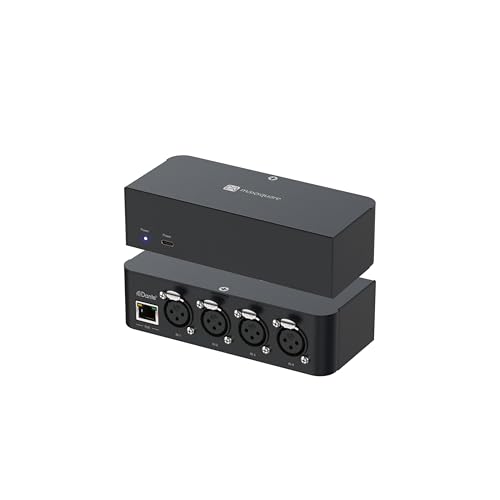
- Four XLR inputs for 4-channel analog capture
- Dante and AES67 transport support
- PoE-powered aluminum network interface
Best For: Installed pro audio systems needing 4-channel Dante input
Stereo Stream Interface

- Stereo RCA inputs for mixers and studio gear
- Loopback and direct monitoring for streaming
- Works with iPhone, iPad, Mac, PC, and Android
Best For: Stereo streaming and recording from mixers or studio gear
Stereo Dante Bridge
RDL SF-BNC2 Dante Stereo Bridge

- 2-in/2-out Dante interface for stereo audio
- Front-panel RCA and 3.5 mm unbalanced jacks
- PoE-powered with rack or surface mounting
Best For: Installed stereo systems needing compact Dante conversion
Creator Recording Interface
BlueAVS AR013 USB Audio Interface

- 2-in/4-out USB-C interface for recording and streaming
- 24-bit/192kHz support with zero-latency monitoring
- +48V phantom power and PAD switches for flexible inputs
Best For: Podcasting, streaming, and compact home recording setups
Portable Recording Interface
Mackie Onyx Artist 1x2 USB Interface

- 2-in/2-out USB recording up to 24-bit/192kHz
- Onyx mic preamp with 48V phantom power
- Bus-powered, compact, and built for mobile use
Best For: Solo tracking and portable computer recording
Hybrid Creator Interface
MAONO P2 USB-C Audio Interface

- Dual USB ports for computer and mobile workflows
- 24-bit/192kHz audio with 56dB gain and -130dB EIN
- Loopback, stream mode, and independent mute controls
Best For: Creators who want flexible dual-device recording and streaming
Pro-Grade Starter Interface

- 24-bit/192kHz audio with zero-latency monitoring
- Two combo inputs for mic, guitar, bass, or line-level
- Includes Ableton Live Lite, MPC Beats, and Splice trial
Best For: Beginners and podcasters wanting a simple USB-C upgrade
Portable Budget Interface

- Two combo XLR/line/instrument inputs with phantom power
- 48kHz recording and USB/Direct zero-latency monitoring
- Compact, lightweight design for portable setups
Best For: Budget-minded creators needing a simple portable interface
Dante USB Bridge – ToVi Dante USB to Network Audio Adapter
If you need a simple way to connect USB audio gear to a Dante network, this audio-over-IP interface is built to bridge that gap without adding much complexity. It acts like an external USB sound card while supporting AES67-compliant network audio for studio, broadcast, and live sound workflows.
Best For: Users who want a compact USB-to-Dante bridge for 2-channel network audio and straightforward system integration.
Pros:
- Bridges USB audio devices with Dante networks for 2-channel input and output.
- Supports 24-bit audio with 44.1kHz, 48kHz, and up to 96kHz sampling.
- AES67 compliant for interoperability in audio-over-IP setups.
- Includes microphone input and speaker output support for analog-to-network conversion.
Cons:
- Limited to 2-channel audio.
- Best suited to Dante/AES67 environments rather than general multi-channel routing.
Overall, this is a practical pick when the main goal is reliable USB-to-network audio conversion in a Dante system. It keeps the feature set focused on compatibility, clarity, and low-latency operation.
Creator-Ready USB Interface – MAONO P1 USB Audio Interface
This audio-over-IP interfaces roundup pick is really about creator-friendly recording and streaming on multiple devices, with flexible USB-C connectivity and workflow tools baked in. It’s designed for users who want strong microphone gain, direct monitoring, and simple routing for podcasting, streaming, and music content.
Best For: Creators who want a feature-rich USB interface for streaming, podcasting, guitar, and vocal recording across computer and mobile setups.
Pros:
- Dual USB ports with MFi-certified connectivity for computer, phone, and iPad use.
- Up to 70dB gain and 24-bit/192kHz recording for demanding microphones.
- Auto-Gain, loopback, and direct monitoring support streaming and content creation workflows.
- Includes ProStudio2 routing features for flexible audio management.
Cons:
- More focused on creator workflows than traditional multi-input studio recording.
- Feature set may be more than needed if you only want basic stereo capture.
As a practical buy, this interface stands out for its mix of gain, monitoring, and routing tools. It’s a strong option if you want one device to handle recording, streaming, and mobile content capture.
4-Channel Dante Box – MAXSQUARE MSQ-3900D Network Interface
If you need a compact audio-over-IP interface for bringing analog sources into a Dante system, this 4-channel network box is built for that exact job. It combines four XLR inputs, Dante and AES67 transport support, and PoE power for cleaner installation in professional audio setups.
Best For: Installers and pro audio users who need a 4-channel analog-to-Dante interface with PoE.
Pros:
- Four 3-pin XLR inputs support 4-channel analog audio capture.
- Supports Dante audio over IP and AES67 RTP transport formats.
- PoE class 0 power can simplify network-based installation.
- Aluminum housing and lifetime technical support add confidence for pro use.
Cons:
- Built for professional audio devices, so it is not a general consumer interface.
- Focused on input conversion rather than broader mixing or processing features.
This is a straightforward network interface for users who need dependable analog-to-Dante conversion with simple power options. Its 4-channel design makes it a practical fit for installed audio and other professional environments.
Stereo Stream Interface – IK Multimedia iRig Stream
For creators who want a simple way to move stereo audio into phones, tablets, or computers, this compact audio-over-IP interfaces category option keeps the workflow easy. It offers RCA input, loopback, and direct monitoring so you can record, stream, or talk over music with less setup friction.
Best For: Mobile and desktop creators who need stereo capture from mixers or studio gear with easy monitoring.
Pros:
- Stereo RCA inputs work with mixers, keyboards, audio players, and other gear.
- Supports iPhone, iPad, Mac, PC, and Android workflows.
- Loopback and direct monitoring help with streaming and recording.
- 24-bit, 96kHz recording with an easy level LED indicator.
Cons:
- Only 2 channels, so it is not aimed at larger multichannel setups.
- RCA input design may be less flexible than interfaces with more connection types.
This is a strong fit if your priority is clean stereo capture and simple monitoring across common devices. It’s especially useful for livestreaming, podcasting, and app-based recording where quick setup matters.
Stereo Dante Bridge – RDL SF-BNC2 Dante Stereo Bridge
If you need audio-over-IP interfaces for simple stereo analog-to-Dante conversion, the RDL SF-BNC2 is built for exactly that job. It provides two audio inputs and two audio outputs, with RCA and stereo 3.5 mm connections on the front panel for easy integration into compact consumer or installed-audio setups.
Best For: Installed systems and rack or surface-mounted setups that need a compact stereo Dante bridge with unbalanced I/O.
Pros:
- Two inputs and two outputs over Dante for bidirectional stereo routing
- Front-panel RCA jacks and 3.5 mm mini-jacks for flexible unbalanced connections
- Selectable 44.1, 48, 88.2, and 96 kHz sample rates
- 24-bit digital-to-analog conversion with RDL analog filtering
Cons:
- Designed for unbalanced stereo connections, not balanced studio I/O
- No special setup software is required, but that also means fewer advanced configuration features
- Limited to two channels in and two channels out
Overall, this is a straightforward audio-over-IP interface for users who want reliable stereo network bridging without extra complexity. The PoE-powered, rack- or surface-mountable design makes it especially practical for installed audio systems.
Creator Recording Interface – BlueAVS AR013 USB Audio Interface
For creators comparing audio-over-IP interfaces and USB recording gear, the BlueAVS AR013 stands out as a simple 2-in/4-out interface for podcasts, streaming, guitar, and home recording. It pairs dual XLR/TRS combo inputs with USB-C connectivity and supports high-resolution recording up to 24-bit/192kHz.
Best For: Podcasters, streamers, and home studio users who want a compact USB interface with phantom power and zero-latency monitoring.
Pros:
- 2 XLR/TRS combo inputs for microphones, guitars, and line-level sources
- 24-bit/192kHz recording with support for multiple sample rates
- Zero-latency monitoring with OFF, MONO, Crossfeed, and STEREO modes
- Independent +48V phantom power and PAD switches for demanding sources
Cons:
- USB interface rather than a networked audio-over-IP model
- Limited to two input channels
- No onboard mention of bundled production software beyond broad compatibility
This is a practical pick if you want a clean, portable recording interface with useful monitoring controls and solid compatibility. The BlueAVS AR013 focuses on core creator needs rather than advanced routing or network audio features.
Portable Recording Interface – Mackie Onyx Artist 1×2 USB Interface
If you are shopping for audio-over-IP interfaces but mainly need a portable USB recording solution, the Mackie Onyx Artist 1×2 offers a compact and rugged way to capture vocals or instruments. It includes a boutique-quality Onyx mic preamp, a Hi-Z 1/4-inch input, and 24-bit/192kHz recording for straightforward computer-based production.
Best For: Solo musicians and mobile recordists who want a durable, bus-powered USB interface with a quality mic preamp.
Pros:
- 24-bit/192kHz recording with 2-in/2-out operation
- Onyx mic preamp with 48V phantom power
- Hi-Z 1/4-inch input for guitar, bass, and similar instruments
- Bus-powered USB 2.0 design for easy mobile use
Cons:
- USB interface rather than a network-based audio-over-IP unit
- Only two channels, so it is not suited to multi-input recording
- Feature set is focused on basics rather than advanced routing
The Onyx Artist 1×2 is a no-fuss interface that prioritizes portability and dependable recording quality. Its compact build and direct monitoring make it a solid choice for simple computer recording setups.
Hybrid Creator Interface – MAONO P2 USB-C Audio Interface
If you want one of the more flexible audio-over-IP interfaces for solo content creation, the MAONO P2 is built around dual USB connectivity so you can work with a computer and a phone or iPad at the same time. It records at 24-bit/192kHz, supports dual XLR microphones, and adds loopback plus software routing tools for creators who need to stream, record, and publish without changing gear.
Best For: Streamers, podcasters, and musicians who want mobile-friendly dual-device recording with simple workflow control.
Pros:
- Dual USB ports with MFi-certified support for simultaneous computer and mobile use
- 24-bit/192kHz recording with 56dB gain and -130dB EIN for low-noise capture
- Independent mute controls, direct monitoring, and stream mode for cleaner live workflow
- ProStudio 2 routing, loopback, and VST support for creator-focused signal management
Cons:
- Only two XLR inputs, so it is not built for larger multi-person sessions
- Best suited to creator setups rather than more advanced studio routing needs
Overall, the P2 stands out if your priority is flexible recording across phone, tablet, and desktop with straightforward live-stream controls. It is a strong compact choice for creators who value convenience and clean audio over a bigger I/O count.
Pro-Grade Starter Interface – M-AUDIO M-Track Duo HD USB-C
The M-AUDIO M-Track Duo HD is a practical pick among audio-over-IP interfaces for anyone who wants a straightforward 2-in/2-out USB-C setup with higher-resolution recording. It offers 24-bit/192kHz audio, zero-latency monitoring, two combo inputs, and broad compatibility with Mac, PC, iOS, Android, and modern DAWs.
Best For: Beginners, podcasters, and musicians who want a simple USB-C interface with pro-level specs.
Pros:
- 24-bit/192kHz recording with zero-latency monitoring
- Two combo inputs for mic, guitar, bass, or line-level sources
- Independent headphone level control plus Direct/USB monitor switching
- Includes a software bundle with Ableton Live Lite, MPC Beats, and Splice trial
Cons:
- Only two inputs and two outputs, so it is aimed at compact setups
- May be more interface than casual users need if they only record basic voice tracks
In practice, this model is a solid step-up option when you want clean recording, easy monitoring, and enough flexibility for podcasting or home music production. It keeps the layout simple while still offering the sound quality and software extras many creators need.
Portable Budget Interface – M-AUDIO M-Track Duo USB
The M-AUDIO M-Track Duo is the more basic, budget-friendly option for audio-over-IP interfaces if you just need dependable recording for podcasts, streaming, or simple music sessions. It offers two combo XLR/line/instrument inputs, 48kHz recording, phantom power, and a USB/Direct monitoring switch for low-latency tracking.
Best For: Budget-conscious creators who want a portable two-channel interface for voice and instrument recording.
Pros:
- Two combo inputs with phantom power for condensers and other mics
- USB/Direct switch provides zero-latency monitoring flexibility
- Works with Mac, PC, iOS, Android, and common recording software
- Compact and lightweight for home, mobile, or gig bag use
Cons:
- 48kHz maximum sample rate is lower than the HD version
- Fewer premium features than newer creator-focused interfaces
This is the kind of interface that makes sense when you want a no-fuss way to get clean input and monitoring without spending on extras you may not use. It is especially appealing for portable setups and entry-level users who value simplicity.
How We Picked These Audio-Over-IP Interfaces
We prioritized compatibility with common networked-audio standards, practical I/O layouts, dependable power options, and clear use-case fit. For Audio-Over-IP Interfaces, that means looking beyond channel count and checking whether the unit will integrate cleanly with your existing Dante- or AES67-based setup, or whether it serves as a hybrid bridge with USB and analog connections.
Quick Comparison: What Matters Most
Start by matching the interface to the job. Install and venue users usually need network audio support, PoE, and balanced XLR connectivity. Streamers and creators may benefit more from USB interfaces with mobile support, low-latency monitoring, and simple gain control. If you need both worlds, hybrid units can bridge a computer, phone, or tablet with a networked audio system.
Key Buying Factors for Audio-Over-IP Interfaces
Protocol Support
Confirm whether the device supports Dante, AES67, or another standard your gear already uses. Compatibility matters more than raw specs if the interface has to join an existing network.
I/O Type and Channel Count
Choose balanced XLR, stereo line, USB, or combo inputs based on how many sources you actually need to move over the network. Overbuying channels adds cost without improving workflow.
Latency and Monitoring
Low latency is essential for live performance, talkback, and monitoring. Look for straightforward direct monitoring or a signal path that avoids unnecessary conversion stages.
Power and Installation
PoE can simplify installation and reduce wall-wart clutter. For portable use, bus-powered or USB-C options may be more convenient.
Build Quality and Environment
Metal housings, rack-friendly or compact enclosures, and compliance requirements can matter in studios, classrooms, houses of worship, and commercial installs.
Who Should Buy Which Audio-Over-IP Interfaces?
If you need a true networked-audio endpoint, choose one of the Dante- or AES67-capable Audio-Over-IP Interfaces. If your priority is podcasting, content creation, or mobile recording, a USB interface with strong preamps and phone/tablet support may be the better fit. For hybrid workflows, pick a model that can connect both to your computer and to your audio network so you do not have to choose one system over the other.
The best option is the one that matches your protocol, input needs, and deployment style today while leaving room to expand later.