Streaming control panels can speed up scene changes, trigger macros, and keep your live setup organized. For streamers, educators, and small production teams, the right deck can save time on every broadcast.
Below, we focus on practical choices for different workflows, from compact macro pads to full switchers and hybrid studio controllers.
Best 10 Streaming Control Panels Picks for 2026
Programmable Visual Macro Deck
Customizable Streaming Control Panel

- 18 programmable keys with 15 LCD visual keys
- Works with OBS, Streamlabs, and common desktop apps
- Includes RGB light ring and built-in utility plugins
Best For: Users who want a visual macro keypad for streaming and productivity
vMix Live Production Panel
Dedicated Production Control Surface

- Program and Preview rows with 16 buttons
- Four rotary knobs plus CUT and TAKE controls
- Built specifically for vMix live workflows
Best For: vMix operators who need compact, tactile switching controls
RGB Shortcut Stream Controller
15-Key RGB Streaming Shortcut Controller

- 15 customizable macro keys for scenes and chat
- Built-in software with plugins and tools
- USB controller with controllable RGB lighting
Best For: Streamers who want a simple shortcut pad for OBS-style tasks
HDMI Production Switcher
4-Input HDMI Live Stream Switcher

- Four HDMI inputs with multiview monitoring
- Built-in streaming, recording, and audio mixing
- Offers multiple transitions and keying tools
Best For: Creators and producers running multicamera live streams
Desktop Stream Control Deck
S15 Stream Controller, 15-Key LCD Studio Control Deck

- 15 customizable LCD keys for shortcuts and scene control
- 3 status panels show useful system information
- Preset pages separate streaming, editing, office, and gaming
Best For: Streamers and multitaskers who want shortcut control plus live status info
Portable Live Switcher Panel

- 8-channel switching with a 4-way mixer
- 16 keys for quick multi-screen source changes
- USB connectivity works with supported live production software
Best For: Compact live switching and broadcast-style production
Macro Deck with Audio Controls

- 10 customizable LCD keys with multi-step macro support
- 4 RGB knobs and a touch bar for hands-on control
- 500+ plugins expand streaming, editing, and audio workflows
Best For: Creators who want macros, audio controls, and customizable RGB visuals
Soft Key Light for Streaming Control Panels
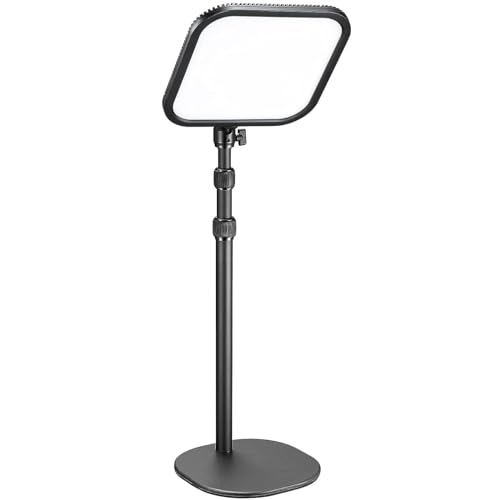
- Edge-lit soft light reduces harsh shadows
- 0-100% brightness and 2800K-6500K tuning
- App and manual controls with fanless operation
Best For: Quiet, adjustable desk lighting for streamers and video calls
15-Key Macro Deck for Streaming Control Panels

- 15 LCD buttons with dynamic graphics
- One-tap macros for OBS, Streamlabs, Discord, and more
- Includes tutorials and drag-and-drop customization
Best For: Beginners who want a visual macro keyboard for streaming and desktop workflows
Audio-Focused Streaming Control Panels

- 10 LCD keys, 4 RGB knobs, and a touch bar
- Macro support plus soundboard-style audio controls
- Built-in USB dock and adjustable ergonomic stand
Best For: Creators who want macros, audio triggering, and extra USB connectivity
Programmable Visual Macro Deck – Customizable Streaming Control Panel
If you’re looking for a flexible streaming control panel for OBS, shortcuts, and desktop automation, this VSDINSIDE macro keypad packs a lot into a compact layout. The 15 LCD visual keys plus 3 physical buttons can handle macros, app launches, media controls, and multi-step actions, while the RGB light ring adds a bit of desk visibility for gaming or late-night work.
Best For: Streamers, creators, and office users who want a programmable shortcut deck with visual keys and broad app compatibility.
Pros:
- 18 programmable controls, including 15 LCD keys and 3 physical buttons
- Supports JPG, PNG, and GIF icons for clear visual labeling
- Works with OBS, Streamlabs, YouTube, Discord, Excel, Word, and Photoshop
- Built-in tools include clock, stopwatch, weather, calendar, and reminders
Cons:
- Native Linux plug-and-play support is not available
- Requires Windows 11+ or macOS 11.0+ for compatibility
Overall, this is a practical macro deck for users who want customizable shortcuts without moving up to a more complex production surface. Its strength is versatility: it can serve streaming, productivity, and general desktop control from one USB-C device.
VMix Live Production Panel – Dedicated Production Control Surface
This vMix mini panel is a focused streaming control panel for live switching, previewing, and fast production workflows. With separate Program and Preview rows, rotary knobs, and direct transition buttons, it is built for operators who want tactile control instead of relying on mouse clicks during a live show.
Best For: vMix users who want a compact, dedicated hardware panel for live switching and production control.
Pros:
- Dedicated Program and Preview rows with 16 buttons total
- Includes 4 rotary knobs for precise adjustments
- Specialized CUT and TAKE buttons for quicker transitions
- Compact layout designed for streamlined operation
Cons:
- Purpose-built for vMix software, so it is less general than macro pads
- Smaller control set than larger broadcast panels
This panel makes sense if you already work inside vMix and want a more efficient hands-on workflow. It is less about customization and more about giving you the essential controls needed to switch scenes and manage a live production cleanly.
RGB Shortcut Stream Controller – 15-Key RGB Streaming Shortcut Controller
For buyers comparing streaming control panels, this FIFINE AmpliGame controller offers a straightforward 15-key setup aimed at quick scene changes, chat actions, and repetitive workflow tasks. It connects over USB, includes built-in plugins, and adds controllable RGB lighting for users who want a simple desktop-friendly streamer tool.
Best For: Streamers and multitaskers who want an easy-to-use shortcut controller with RGB lighting and built-in plugin support.
Pros:
- 15 customizable macro keys for scenes, chat, and shortcuts
- Built-in software includes plugins and tools
- USB plug-and-play setup for quick use
- Controllable RGB lighting for gaming or desk setups
Cons:
- Best performance tip is to use a USB 3.0 port
- Fewer keys than larger macro decks
In practice, this is a solid mid-size shortcut pad for streamers who want fast access to common actions without a complicated setup. Its value comes from combining macro control, lighting, and plugin-ready software in one compact unit.
HDMI Production Switcher – 4-Input HDMI Live Stream Switcher
This Blackmagic Design switcher is a more advanced streaming control panel for users who need camera switching, multiview monitoring, and built-in streaming in one box. It supports four HDMI inputs, multiple transition styles, keying tools, and a built-in audio mixer, making it a strong fit for live productions that go beyond simple macro shortcuts.
Best For: Multicamera streamers, educators, and event producers who need a full HDMI live production switcher.
Pros:
- 4-camera multiview for monitoring live sources
- Includes cut, mix, dip, wipe, and DVE transitions
- Built-in 6-input, 2-channel audio mixer
- Supports streaming, recording, and webcam output over USB-C
Cons:
- More specialized than a simple macro pad or shortcut deck
- Requires HDMI camera sources to make the most of its features
If you want a true live production hub rather than a desktop shortcut controller, this is the most capable option in the group. It is designed for hands-on multicamera switching, audio mixing, and streaming from a single dedicated device.
Desktop Stream Control Deck – S15 Stream Controller, 15-Key LCD Studio Control Deck
If you’re comparing streaming control panels for a desk setup that also handles editing and everyday productivity, the S15 is built around fast shortcut access and on-screen status at a glance. Its 15 customizable LCD keys cover app actions, OBS scene control, hotkeys, and repeated tasks, while the 3 status display panels can show useful system info like time, weather, or hardware monitoring data.
Best For: Streamers, editors, and multitaskers who want a compact macro deck with extra status displays.
Pros:
- 15 customizable LCD keys for shortcuts, macros, app launches, and OBS scene control
- 3 non-touch status display panels for live info such as CPU temperature, GPU status, or time
- Preset pages help separate streaming, editing, office, and gaming workflows
- STREONOR software supports action flows, plugins, icons, GIFs, and custom layouts
Cons:
- Linux is not supported
- Some third-party app connections may require an active account or subscription
- Setup notes recommend uninstalling similar controller software first to avoid conflicts
The S15 stands out if you want a flexible control deck that does more than trigger shortcuts. The extra status panels and preset pages make it especially practical for users who need both workflow control and quick system awareness.
Portable Live Switcher Panel – Mini Vmix Switch Panel
For users who want streaming control panels focused on switching and live production, this Mini Vmix panel is centered on broadcast-style operation in a compact form. It combines 8-channel screen switching, a 4-way mixer, 16 video switching keys, and USB connectivity for use with supported live production software on Windows or macOS.
Best For: Compact live switching, multi-screen production, and broadcast-style streaming workflows.
Pros:
- 8-channel switching and a 4-way mixer for live production tasks
- 16 video switching keys support fast multi-screen control
- USB interface connects to supported software like VMIX and OBS-related tools
- Combines switching, recording, webcasting, mixing, and special effects transitions
Cons:
- More specialized for video switching than general desktop macro use
- Heavy at 940 g compared with smaller macro decks
- Feature set depends on compatible software and platform support
This panel makes the most sense when your priority is live broadcast control rather than general productivity shortcuts. If you need a compact surface for switching sources and managing production elements, it offers a focused toolset.
Macro Deck with Audio Controls – VSD N4 Pro Stream Controller
Among streaming control panels, the VSD N4 Pro leans hard into customization and workflow automation. It gives you 10 fully configurable LCD keys, 4 RGB knobs, and an interactive touch bar for macros, scene changes, audio control, and repeated tasks, plus a plugin ecosystem that expands its use across streaming, editing, gaming, and office work.
Best For: Creators and streamers who want audio control, macro automation, and customizable visuals in one deck.
Pros:
- 10 customizable LCD keys with support for single commands and multi-step chained operations
- 4 RGB knobs and a touch bar add hands-on control for studio and audio tasks
- Works as a USB sound deck for play, pause, and audio-effect triggering
- Expandable plugin ecosystem with 500+ official plugins and custom media support
Cons:
- No built-in speakers; it only sends audio control commands to your computer
- Fewer keys than larger decks if you want a high-density control surface
- Advanced features rely on software and plugin setup
The VSD N4 Pro is a strong fit if you want a compact control surface that balances macros, audio tools, and visual customization. Its knobs, touch bar, and plugin support make it more versatile than a basic keypad.
Soft Key Light for Streaming Control Panels – Godox ES30 Desk Light
If you’re building a setup around streaming control panels, the Godox ES30 is a strong companion light for cleaner on-camera results. It uses edge-lit soft lighting to reduce harsh shadows, and the adjustable 2800K-6500K range makes it easier to match different rooms, moods, or camera setups.
Best For: Streamers, Zoom users, and creators who want a quiet desk light with app-based control.
Pros:
- Soft, edge-lit output designed for comfortable everyday use
- 0-100% brightness and 2800K-6500K color temperature control
- Manual knobs plus Godox Light app support for grouped control
- Fanless cooling keeps operation quiet for streaming
Cons:
- Primarily a light, not a full control panel or macro deck
- Requires desk space due to the stable extendable stand
- App-based multi-light control depends on compatible Godox devices
Overall, the ES30 is best if your streaming control panels setup needs better face lighting rather than more buttons. It focuses on soft, adjustable illumination and quiet operation, which makes it practical for content creation, live calls, and desk-based streaming.
15-Key Macro Deck for Streaming Control Panels – GuileKeys Stream Controller
For users shopping streaming control panels, this 15-key macro deck is built to speed up repetitive tasks in OBS, Streamlabs, Discord, Photoshop, and other desktop apps. The LCD buttons, drag-and-drop customization, and included video tutorials make it a practical entry point for stream control and workflow shortcuts.
Best For: Streamers and PC/Mac users who want an easy-to-configure macro keyboard with visual buttons.
Pros:
- 15 LCD buttons with dynamic graphics for quick visual recognition
- One-tap macros, media controls, and workflow actions in supported apps
- Built-in video guides and drag-and-drop setup for easier onboarding
- Works with Windows 11+ and macOS 14+ over USB-C
Cons:
- Only supports newer Windows and macOS versions listed by the seller
- Plastic enclosure may feel less premium than metal alternatives
- Best value depends on whether you’ll use the 15-button layout regularly
This deck makes sense if you want streaming control panels that are simple to learn but still flexible enough for macros, scenes, and custom workflows. Its focus on visual buttons and guided setup helps reduce the friction of configuring a first streaming deck.
Audio-Focused Streaming Control Panels – VSD N4 Pro Deck
If your streaming control panels setup needs more than scene switching, the VSD N4 Pro adds audio control, RGB knobs, and a touch bar to the mix. It’s aimed at creators who want programmable keys for macros, soundboard-style commands, and quick access to repeated tasks across streaming, editing, and office work.
Best For: Streamers and creators who want audio controls, customizable LCD keys, and extra desktop connectivity.
Pros:
- 10 fully customizable LCD keys plus 4 RGB knobs and a touch bar
- Supports one-tap macros and sequential actions without coding
- USB sound deck functions for triggering audio commands and effects
- Built-in passive USB dock adds useful extra ports
Cons:
- No built-in speakers; it only sends audio control commands to your computer
- Fewer keys than larger streaming decks with 15 or more buttons
- Feature-rich layout may be more than casual users need
The N4 Pro stands out if you want a control surface that blends macros, audio workflow tools, and desktop expansion. It is a good fit for streamers who value multi-function hardware and customizable visuals in one compact panel.
How We Picked These Streaming Control Panels
We prioritized button layout, workflow speed, software compatibility, display quality, build design, and value for different user types. Since Streaming Control Panels vary widely, we included both dedicated macro decks and broader live production tools so you can match the device to your setup.
Quick Comparison
If you want fast scene switching and stream automation, compact LCD decks are often the easiest entry point. If you need input switching, preview/program control, or a more broadcast-style workflow, larger control surfaces and HDMI switchers make more sense. For simple studio upgrades, a controller paired with lighting or audio control can be enough.
Key Buying Factors for Streaming Control Panels
Compatibility and Software Support
Check that the panel works with your streaming software, camera switcher, audio tools, and operating system. The best Streaming Control Panels feel seamless only when the software integration is solid.
Buttons, Displays, and Speed
LCD keys are helpful when you rely on many scene names, app actions, or custom icons. Physical buttons can be quicker if you prefer muscle memory over labels. Choose the interface that matches how often you switch actions live.
Automation and Macro Depth
Look for customizable macros if you need to launch scenes, mute microphones, trigger sound effects, or run multi-step commands. More programmable actions usually mean less on-air friction.
Studio Function Vs. Stream Function
Some Streaming Control Panels are built mainly for OBS-style control, while others are closer to video production switchers. If you manage multiple cameras or live inputs, prioritize preview/program workflow and hardware switching. If you mainly run a single-PC stream, macro control may matter more than switching hardware.
Physical Size and Desk Space
Compact decks suit portable setups and smaller desks. Bigger control panels are better when you want more dedicated controls and less menu diving. Match the footprint to your streaming environment before you buy.
Who Should Buy Which Streaming Control Panels?
Choose a compact macro deck if you want easy access to scenes, shortcuts, and app commands. Pick a broadcast-style controller or HDMI switcher if you run multi-camera productions, interviews, or more complex live shows. If your stream setup still needs a polish, a dedicated key light can improve on-camera quality just as much as a new controller.
In short, the best choice depends on whether you need speed, switching, automation, or a mix of all three. The right Streaming Control Panels should reduce clicks, tighten your workflow, and make live production feel more manageable.