Choosing the right control surface can make live production faster, cleaner, and far less stressful. The best panels reduce setup time, simplify camera control, and help teams work reliably under pressure.
Below, we focus on commercial-grade streaming control panels built for real-world use in studios, houses of worship, boardrooms, classrooms, and command environments.
Best 10 Commercial-Grade Streaming Control Panels Picks for 2026
All-in-One Live Production Console
Cinetreak C2 HDMI PTZ Switcher

- 5.5-inch display with MV and Meeting Mode
- Up to 4 HDMI inputs plus PGM/AUX outputs
- Built-in PTZ control for up to 4 cameras
Best For: Conference, event, and multi-camera streaming setups
Budget Macro Deck

- Four endless knobs with triple-action inputs
- Touchscreen for quick scene and page changes
- 10 customizable buttons with adjustable icons
Best For: Custom macro control for streamers and multitaskers
Rackmount Router Panel

- 1RU rackmount panel for KUMO routers
- Ethernet-based integration with RJ-45
- Internal Linux OS/web server for stability
Best For: Broadcast racks needing dedicated router control
PTZ Touch Controller
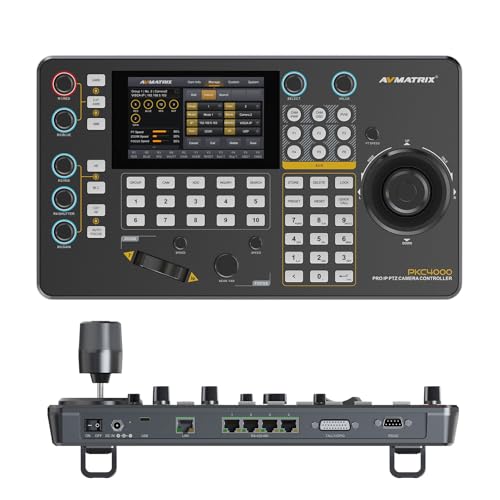
- 5-inch touchscreen with menu knob control
- Supports VISCA, ONVIF, and optional NDI
- PoE or DC power options for flexible setup
Best For: Churches and conferences using PTZ camera systems
Compact Wallplate Control
Black Box 8-Button RS-232 Wallplate

- Eight fully programmable buttons.
- Controls AV/KVM devices via RS-232.
- Also supports RS-485, IR, and relay control.
Best For: Wall-mounted AV, KVM, and device control in fixed installations.
Network PTZ Control
Marshall IP/NDI PTZ Camera Controller

- Controls IP/NDI, serial, and USB PTZ cameras.
- Supports up to 255 cameras via IP.
- Includes joystick, zoom rocker, iris knob, and LCD.
Best For: Live streaming and production teams managing multiple PTZ cameras.
Rackmount AV Control
PureLink VIP-STREAM-200-RACK4 Rackmount AV

- Professional AV signal handling for installed systems.
- EDID management helps maintain stable switching.
- Front panel, IR, and RS-232 control are built in.
Best For: Rack-mounted AV installations in boardrooms, classrooms, and command centers.
IP PTZ Control Hub
ZowieKBD 7D Joystick Controller

- NDI|HX3, ONVIF, and VISCA support
- 5-inch LCD plus 4K/30 HDMI out
- Group control for up to 4 cameras
Best For: Live production teams needing fast PTZ control and preview monitoring
Whole-Home Audio Controller
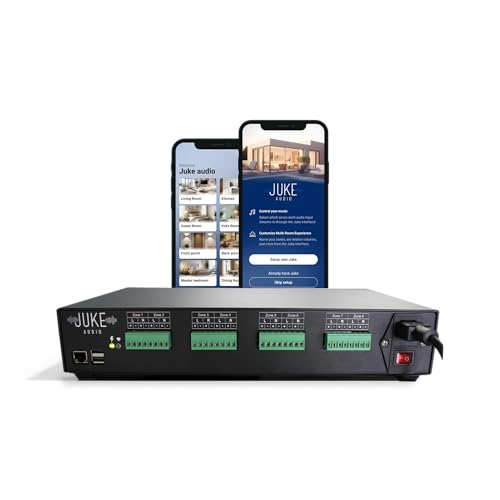
- All-in-one amplifier with built-in streaming
- AirPlay 2, Spotify Connect, and Bluetooth support
- App control for volume, groups, and inputs
Best For: Multi-room audio setups needing simple wireless control
Pro PTZ Stream Console
Super NDI Camera Controller Keyboard

- NDI, VISCA, ONVIF, and Pelco support
- 5-inch touch screen with 4K@60 preview
- Controls up to 999 PTZ cameras
Best For: Large PTZ installations in churches, campuses, and conference spaces
All-in-One Live Production Console – Cinetreak C2 HDMI PTZ Switcher
If you want commercial-grade streaming control panels that combine switching, PTZ management, recording, and output routing in one unit, the Cinetreak C2 is built for that kind of workflow. Its 5.5-inch screen, meeting mode, and support for multiple HDMI sources make it a practical fit for conference rooms, live events, and multi-camera productions.
Best For: Live productions that need switching, PTZ control, recording, and multi-source monitoring in one device.
Pros:
- 5.5-inch screen with MV Mode and Meeting Mode for managing multiple feeds
- Up to 4 HDMI inputs, plus PGM and AUX outputs for flexible routing
- Built-in PTZ control for up to 4 cameras via VISCA
- REC and playback features with customizable picture-in-picture layouts
Cons:
- Only HDMI-based workflow is described, so it may not suit SDI-heavy setups
- Some advanced networking features depend on device and protocol compatibility
- Best suited to users who need an all-in-one live production console, not a simple controller
The C2 stands out by packing several production tools into a single compact surface. For teams that want fewer boxes on the desk and more control at the operator’s fingertips, it offers a versatile middle ground between a switcher and a dedicated camera-control panel.
Budget Macro Deck – Mirabox Stream Dock N4E
Among commercial-grade streaming control panels, the Mirabox Stream Dock N4E is geared toward users who want tactile macro control, scene switching, and real-time feedback without paying flagship prices. It is software-driven, so it makes the most sense for operators who are comfortable configuring workflows and keeping up with updates.
Best For: Streamers and creators who want a customizable knob-and-button deck with scene switching.
Pros:
- Four endless knobs with clockwise, counter-clockwise, and press actions
- Built-in display strip shows knob functions and live status
- 10 customizable buttons with adjustable icons and brightness
- Touchscreen supports fast scene and page switching
Cons:
- Requires software and some technical patience to set up
- App-specific volume control is not supported yet
- Learning curve may be a poor fit for users who want plug-and-play simplicity
The N4E is a flexible control surface for people who like mapping their own shortcuts and macros. It is less about polished out-of-box simplicity and more about affordable, customizable control for streaming, productivity, and multitasking.
Rackmount Router Panel – AJA KUMO-CP Hardware Control
If your priority is dependable routing control rather than streaming bells and whistles, the AJA KUMO-CP is a straightforward hardware panel for KUMO routers. It is designed for professional video environments that need tactile, rackmount control with stable network integration.
Best For: Broadcast and production rooms that need dedicated hardware control for KUMO routing.
Pros:
- 1RU rackmount design keeps it compact and professional
- Dedicated hardware interface for KUMO router operation
- 10/100/1000 Ethernet with standard RJ-45 integration
- Internal Linux OS/web server for stable control behavior
Cons:
- Built specifically for KUMO routers, so compatibility is narrow
- No modern touchscreen or macro-style streaming features are listed
- Focused on routing control rather than all-in-one live production use
The KUMO-CP is a good fit when the job is clean, reliable router control in a rack-based workflow. It is not trying to be a general-purpose streaming surface; it is built to do one professional task well.
PTZ Touch Controller – AVMATRIX PKC4000 with PoE
For commercial-grade streaming control panels aimed at PTZ camera work, the AVMATRIX PKC4000 focuses on fast setup and precise camera handling. Its touchscreen interface, broad protocol support, and PoE option make it a strong fit for churches, conference spaces, and remote productions.
Best For: PTZ camera workflows that need touchscreen control and flexible network setup.
Pros:
- 5-inch full-color touchscreen with menu knob for setup and operation
- Supports VISCA, VISCA-IP, ONVIF, PELCO P&D, and optional NDI
- Controls pan, tilt, zoom, focus, iris, shutter, and tracking functions
- PoE support reduces cabling by combining power and control over Ethernet
Cons:
- NDI support is optional, not standard
- Designed specifically for PTZ camera control rather than switching or recording
- Best when your production already uses compatible IP or serial camera systems
The PKC4000 is a practical operator tool for teams that need smooth PTZ control without a complicated setup. Its blend of touchscreen access, protocol flexibility, and single-cable PoE convenience makes it well suited to active production environments.
Compact Wallplate Control – Black Box 8-Button RS-232 Wallplate
If you need commercial-grade streaming control panels that can live on a wall and trigger AV or KVM gear reliably, this Black Box unit is built around simple physical control and broad device compatibility. It supports RS-232 control and can also work with RS-485, IR, or relay-controlled AV devices, making it a practical fit for fixed installations that need direct button access.
Best For: Wall-mounted AV, KVM, and device control where eight programmable buttons and simple physical operation are enough.
Pros:
- Eight fully programmable buttons for customized control commands.
- Supports AV or KVM switches and scalers via RS-232.
- Also works with RS-485, IR, and relay-controlled devices.
- Wall-mount black metal wallplate design for installed setups.
Cons:
- Focused on button-based control rather than touchscreen-style operation.
- Limited to 8 positions, so it may not suit larger control needs.
- Designed for integration, so setup will depend on the connected equipment.
This is a straightforward commercial control panel for environments that want dependable physical buttons and multi-protocol device support in a compact wallplate format.
Network PTZ Control – Marshall IP/NDI PTZ Camera Controller
For commercial-grade streaming control panels centered on camera operation, this Marshall controller is built to manage PTZ cameras across IP, NDI, serial, and USB connections. Its joystick, zoom rocker, iris knob, keypad, and LCD screen give operators the hands-on control needed for live production and multi-camera environments.
Best For: PTZ camera control in live streaming, production rooms, and networked multi-camera setups.
Pros:
- Controls IP/NDI, serial, and USB PTZ cameras.
- Supports up to 255 cameras via IP.
- Includes a zoom rocker, joystick, iris knob, keypad, and LCD screen.
- Works with VISCA, Pelco P/D, and VISCA-over-IP.
Cons:
- Specialized for camera control rather than broader AV switching.
- May be more controller than needed for small single-camera setups.
- Its feature set is aimed at operator workflows, so it may require some setup time.
This is a strong choice when your control surface needs to handle multiple PTZ protocols and provide precise, hands-on camera operation for streaming or broadcast use.
Rackmount AV Control – PureLink VIP-STREAM-200-RACK4 Rackmount AV
In commercial-grade streaming control panels, this PureLink rackmount unit is aimed at stable AV handling in rooms like boardrooms, classrooms, command centers, and digital signage spaces. It focuses on reliable switching, EDID management, and built-in front panel, IR, and RS-232 control for straightforward integration into an AV control system.
Best For: Rack-mounted AV installations that need reliable switching and integrated control in professional spaces.
Pros:
- Designed for professional AV performance and reliable signal handling.
- EDID management helps keep displays awake and switching stable.
- Front panel, IR, and RS-232 control support integration.
- Built-in audio insertion/extraction reduces extra hardware needs.
Cons:
- More of a rackmount AV platform than a dedicated button controller.
- Best suited to installed systems rather than portable use.
- Feature set is centered on AV handling, not camera-specific control.
This model fits best when you want dependable rack-based AV control with cleaner handshakes, integrated audio handling, and professional installation-friendly operation.
IP PTZ Control Hub – ZowieKBD 7D Joystick Controller
If you need commercial-grade streaming control panels for PTZ camera workflows, the Zowietek ZowieKBD is built around fast discovery, live monitoring, and precise joystick control. Its 5-inch display and 4K/30 HDMI output make it easier to frame shots during live productions, while support for NDI|HX3, ONVIF, and VISCA gives it flexibility in modern IP setups.
Best For: Live event, worship, and multi-camera operators who want a compact PTZ controller with preview monitoring and group control.
Pros:
- Supports NDI|HX3, NDI|HX, ONVIF, and VISCA workflows for network camera control.
- 5-inch built-in LCD plus 4K/30 HDMI output for clearer monitoring and framing.
- One-touch auto-discovery helps speed up setup across compatible cameras.
- Group control can manage up to 4 cameras together with saved presets.
Cons:
- Does not support full NDI or NDI|HB.
- Built-in LCD turns off when HDMI is connected.
- Advanced group and protocol features may be more than basic users need.
This is a strong fit when you want a purpose-built controller that reduces manual setup and improves operator confidence. Its main appeal is the combination of preview, protocol support, and multi-camera grouping in a compact panel.
Whole-Home Audio Controller – Juke-8 Multi-Room Amplifier
For buyers comparing commercial-grade streaming control panels for distributed audio, the Juke-8 stands out as an all-in-one multi-room amplifier with built-in music streaming and wireless app control. It combines amplification, source handling, and zone management in one compact unit, making it a practical choice for whole-home or whole-building audio setups.
Best For: Home or light-commercial audio installations that need simple zone control, direct music streaming, and app-based management.
Pros:
- Combines streaming, amplification, and zone control in one box.
- Supports AirPlay 2, Spotify Connect, Bluetooth, Pandora, Tidal, and TuneIn.
- Lets users control volume, preset groups, input types, and speaker connections through the app.
- Supports simultaneous audio streams from different users across zones.
Cons:
- Designed for audio distribution rather than video or PTZ camera control.
- Tabletop form factor may not suit every rack-style installation.
- Feature set is centered on ease of use, not advanced production switching.
The Juke-8 is best when simplicity matters more than pro AV complexity. It’s a consolidated audio control solution for people who want straightforward streaming, multi-zone playback, and app management without stacking multiple components.
Pro PTZ Stream Console – Super NDI Camera Controller Keyboard
If your shortlist for commercial-grade streaming control panels includes a more fully loaded PTZ keyboard, this Super NDI controller brings a 5-inch touchscreen, 4D joystick, and broad protocol support to demanding live workflows. It is aimed at users who need real-time preview, precise camera movement, and flexible integration with common production software and network control standards.
Best For: Churches, campuses, conference rooms, and live production teams managing many PTZ cameras.
Pros:
- Supports NDI, VISCA, VISCA over IP, ONVIF, Pelco-D, and Pelco-P.
- 5-inch HD touch screen with 4K@60fps decoding for real-time preview.
- 4D joystick, shortcut keys, and speed knobs support precise camera operation.
- Can centrally manage up to 999 PTZ cameras.
Cons:
- Feature-rich layout may be more complex than a basic controller needs.
- Official NDI license is provided through support on request, not as a simple out-of-box note.
- Best suited to networked PTZ environments rather than simple single-camera setups.
This controller is the most expansive option here for large-scale PTZ control. Its value comes from the mix of preview, input flexibility, and high camera capacity, which makes it a better fit for structured production environments.
How We Picked the Best Commercial-Grade Streaming Control Panels
We prioritized build quality, control flexibility, protocol support, display quality, workflow speed, and fit for commercial environments. We also looked for features that matter in daily use, such as joystick precision, programmable buttons, PoE or rack-friendly power options, and compatibility with common PTZ and AV systems.
Quick Comparison
The strongest Commercial-Grade Streaming Control Panels tend to fall into a few categories: compact desktop controllers for PTZ cameras, rack-mounted control hardware for integrated AV spaces, and hybrid panels that combine touch screens with physical controls. The right choice usually depends on whether you need camera control, switching, routing, or multi-zone system management.
Key Buying Factors for Commercial-Grade Streaming Control Panels
Protocol and Device Compatibility
Make sure the panel supports the cameras, switchers, routers, or processors in your setup. Common requirements include VISCA, IP control, NDI workflows, RS-232, RS-485, and Pelco-style integration. If your environment uses mixed gear, broad protocol support is a major advantage.
Control Layout and Speed
For live work, tactile controls often outperform app-only solutions. Look for a responsive joystick, clearly labeled buttons, custom presets, and fast access to frequently used actions. Touchscreens are useful, but they work best when paired with physical controls for precision.
Installation and Environment
Consider whether the panel needs to sit on a desk, mount in a rack, or fit into a wallplate or permanent control position. Commercial spaces also benefit from dependable power options, network connectivity, and a footprint that matches the room size and operator workflow.
Reliability and Expansion
Commercial-grade systems should be easy to maintain and scalable over time. Choose panels that support macros, multiple camera presets, or multi-zone control if your operation may grow. In larger environments, consistency and serviceability matter as much as raw feature count.
Who Should Buy Which Commercial-Grade Streaming Control Panels?
If you need fast PTZ camera control for church, conference, or studio production, a dedicated camera controller is usually the best fit. If your priority is routing, switching, or centralized AV management, a rack or wall-mounted control panel may be better. For teams handling multiple rooms or sources, choose a more advanced panel with flexible integration and preset-based workflows. The best Commercial-Grade Streaming Control Panels are the ones that match your actual production pace, not just the longest spec sheet.