A good desk fan can make long workdays more comfortable without taking over your workspace. USB models are especially convenient for home offices because they can run from a computer, power bank, wall adapter, or docking station.
We selected 10 compact fans with different strengths, including quiet operation, adjustable speeds, rechargeable batteries, oscillation, and flexible positioning. Use the guide below to narrow the list based on your desk, noise tolerance, and cooling needs.
Best 10 USB Desk Fans for Home Offices Picks for 2026
Best Compact Pick
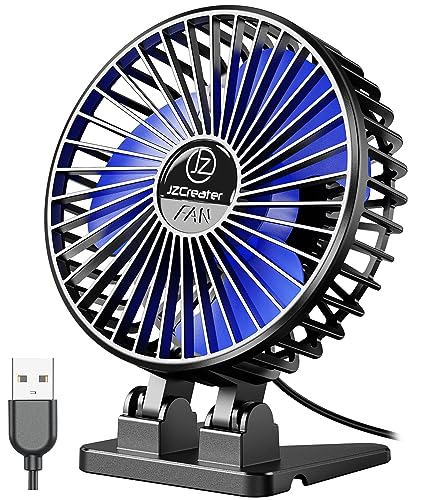
- Lightweight 4.1-inch footprint
- Three speed settings
- USB-powered with removable cover
Best For: Small desks and personal airflow
Best Cordless Flexibility
DIGIX 100-Speed Rechargeable Fan
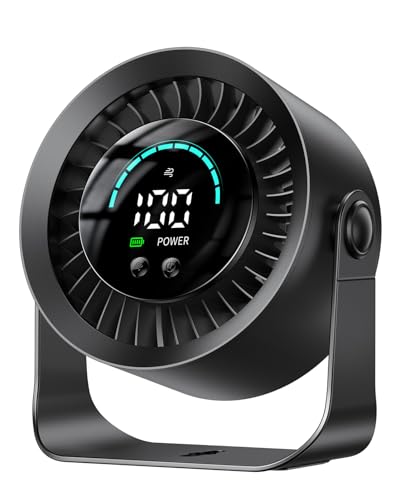
- Up to 17 hours on low
- 100 speeds and 360° rotation
- Tabletop or wall-mountable design
Best For: Flexible cordless office cooling
Best Air Circulation
Amazon Basics 11-Inch Desk Fan

- Three 7-inch blades
- 90-degree adjustable tilt
- Three speeds with corded power
Best For: Broader airflow in larger home offices
Best Simple Personal Fan

- About 4 ounces and compact
- Three speeds with 30° adjustment
- Works with common USB power sources
Best For: Affordable personal cooling in tight spaces
Most Versatile
100-Speed Rechargeable Air Circulator

- 100 speeds with digital battery and speed display
- 90° vertical and 120° horizontal oscillation
- 10,000mAh battery with approximately 10–18 hours of runtime
Best For: Users who want cordless, remotely controlled airflow with room-circulation capability
Best for Everyday Use

- Lightweight 6.3-ounce design for small workspaces
- Three speeds with 360° vertical rotation
- USB-A power from chargers, computers, or power banks
Best For: Travelers and desk users needing simple personal cooling in a tiny footprint
Best Fine-Tuning
KIMMOO 100-Speed Rechargeable Fan

- 100 speed levels with LED battery and speed display
- Up to 8.5 hours of runtime on a charge
- Compact 0.92-pound tabletop design
Best For: Users seeking precise rechargeable cooling in a portable office fan
Best Metal Mini Fan
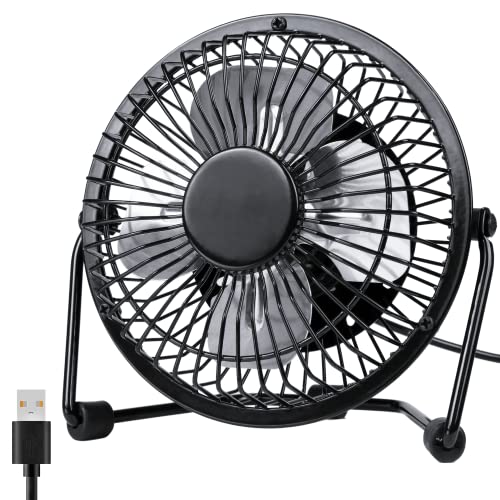
- Compact metal design with a 4-inch blade
- 360-degree rotation and two speeds
- Under-40 dB operation for work or study
Best For: Small, stable personal cooling at a USB-powered desk
Best Quiet Value Fan

- Three speeds with a broad 5.8-inch airflow area
- Quiet operation and 360-degree adjustment
- Removable front cover for easier cleaning
Best For: Adjustable, low-noise cooling for everyday desk work
Best Cordless Option
Otlonpe Rechargeable USB Desk Fan
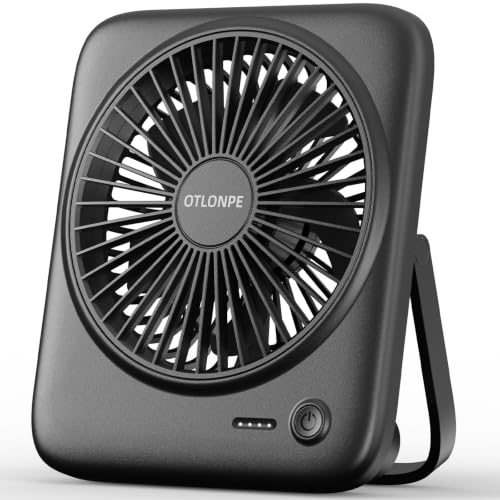
- 4000mAh battery with up to 23 hours of cooling
- Four speeds and quiet operation below 35 dB
- Foldable, portable design with USB-C power
Best For: Cordless cooling around the home, office, or while traveling
Best Compact Pick – JZCreater Mini USB Desk Fan
If you need USB desk fans for home offices that take up very little room, the JZCreater is a practical choice. This 4.1-inch fan weighs about 4.8 ounces, offers three speeds, and runs from a USB connection without requiring a built-in battery.
Best For: Compact desktop cooling near a computer, charger, or other USB power source.
Pros:
- Compact, lightweight design is easy to carry between rooms or on trips.
- Three speed settings provide simple airflow adjustment.
- Brushless motor is rated below 50 dB at high speed, with a removable front cover for cleaning.
Cons:
- No built-in battery, so it must remain connected to USB power.
- Its small size is intended for personal airflow rather than broad room circulation.
The JZCreater is a straightforward plug-in fan for anyone prioritizing portability and a small desk footprint. Its adjustable angle and easy-clean cover add useful everyday convenience.
Best Cordless Flexibility – DIGIX 100-Speed Rechargeable Fan
Among USB desk fans for home offices, the DIGIX stands out for cordless use and fine airflow control. Its rechargeable 3000mAh battery provides up to 17 hours on low, while 100 speed levels and a 360-degree rotating head make positioning highly adjustable.
Best For: Home-office users who want portable, rechargeable cooling and precise speed control.
Pros:
- Up to 17 hours of battery life on low speed.
- 100 speed settings allow very fine adjustments.
- Can sit on a tabletop or mount to a wall, and includes an LED display for speed and battery status.
Cons:
- Larger and heavier than the smallest mini USB fans.
- Rechargeable operation requires occasional battery charging.
The DIGIX is the most versatile option here for moving between a desk, bedroom, or travel bag. Its battery, wall-mounting option, and display make it especially convenient when outlet access is limited.
Best Air Circulation – Amazon Basics 11-Inch Desk Fan
For shoppers who want USB desk fans for home offices but need stronger general air movement, this Amazon Basics air circulator is a larger corded alternative. It uses three speed settings, three 7-inch blades, and a 90-degree tilt head to direct airflow around a room.
Best For: Home offices that need broader air circulation from a conventional tabletop fan.
Pros:
- Three 7-inch blades provide more substantial airflow than mini personal fans.
- 90-degree variable tilt helps aim air where needed.
- Three speeds and a portable 3-pound build support flexible indoor use.
Cons:
- It is corded electric rather than USB-powered.
- Its 11.1-inch width takes considerably more desk space.
- The listed noise level is 60 dB.
This model is not a USB fan, but it may suit buyers who value roomier airflow over USB convenience. Its larger blade setup and tilt range make it better for circulation across a home office than close-range personal cooling.
Best Simple Personal Fan – Gaiatop USB Desk Fan
The Gaiatop is a simple option for shoppers comparing USB desk fans for home offices. Its compact 4.6-inch-wide body weighs about 4 ounces, connects to common USB power sources, and offers three speed settings with a 30-degree vertical adjustment.
Best For: Personal cooling at a small desk, in a car, or while traveling.
Pros:
- Very light and compact, with a footprint suited to crowded desks.
- USB compatibility includes computers, power banks, adapters, and car chargers.
- Three speeds and 30-degree vertical adjustment provide basic control.
Cons:
- No built-in battery is listed, so it needs a USB power source.
- Third-speed operation requires a 5V/1A power source.
- Its 50 dB noise rating may be less quiet than some smaller alternatives.
The Gaiatop keeps things uncomplicated: connect it to USB power, choose a speed, and angle the head toward you. It is a sensible low-profile pick for close-up cooling rather than whole-room circulation.
Most Versatile – 100-Speed Rechargeable Air Circulator
For shoppers comparing USB desk fans for home offices, this rechargeable air circulator stands out for its broad speed range, remote control, and automatic oscillation. It can run from a USB source or its built-in battery, making it useful at a desk, during travel, or when an outlet is unavailable.
Best For: Home-office users who want highly adjustable airflow, cordless operation, and room circulation.
Pros:
- Offers 100 speed settings with a digital display for speed and battery readings.
- Combines 90° vertical and 120° horizontal automatic oscillation.
- 10,000mAh battery provides approximately 10–18 hours of runtime.
- Includes a remote control and operates at a stated 25dB noise level.
Cons:
- At 2.7 pounds, it is less lightweight than a basic mini desk fan.
- Requires approximately four hours for a full recharge.
- Its larger feature set may be more than needed for simple, close-range cooling.
This is the most feature-rich option in the group, particularly if you want to circulate air beyond one fixed spot. Choose it when battery life, remote operation, and precise airflow control matter more than minimum size and weight.
Best for Everyday Use – TriPole Mini USB Desk Fan
If you need straightforward USB desk fans for home offices, the TriPole is a small, corded option that takes up little workspace. Its three speeds, adjustable tilt, and 360° vertical rotation make it easy to direct a personal breeze from a computer, USB charger, or power bank.
Best For: Small desks, travel, and users who prefer a lightweight plug-in fan with simple controls.
Pros:
- Compact 4.5-inch design weighs only 6.3 ounces.
- 360° up-and-down rotation helps aim airflow where needed.
- USB-A power works with chargers, computers, and power banks.
- Wide base and silicone feet help improve stability and reduce vibration.
Cons:
- Only three speed settings are available.
- It does not have a built-in rechargeable battery.
- The manufacturer notes that the highest speed may require a 5V/1A USB charger.
The TriPole is a practical choice when desk space and portability are priorities. It lacks the battery and fine-grained controls of the larger rechargeable models, but its low weight and simple USB operation suit focused personal cooling.
Best Fine-Tuning – KIMMOO 100-Speed Rechargeable Fan
The KIMMOO is a convenient middle ground among USB desk fans for home offices, pairing rechargeable operation with precise 100-level speed adjustment. Its LED display, compact tabletop form, and flexible positioning make it suitable for controlled personal cooling without a full-size fan footprint.
Best For: Office users who want rechargeable convenience and precise speed control in a compact fan.
Pros:
- Provides 100 wind-speed levels for detailed airflow adjustment.
- LED display shows battery status and selected wind speed.
- Runs for up to 8.5 hours and recharges in approximately 2.5 hours with a 5V/2A adapter.
- Compact 0.92-pound design is easy to move between home, office, and travel.
Cons:
- Its stated 35dB lowest-speed noise level is higher than the quietest option here.
- It offers flexible positioning but does not specify automatic oscillation.
- Battery runtime is shorter than the 10,000mAh model’s stated maximum.
Choose the KIMMOO if you value a broad range of cooling intensity and quick recharging in a portable package. It is a strong fit for users who want more control than a three-speed mini fan while keeping the setup relatively compact.
Best Metal Mini Fan – Quiet 4-Inch USB Desk Fan
For shoppers comparing USB desk fans for home offices, the Zuvas QT-U401 is a compact, metal-bodied option with two speeds, a 360-degree rotating head, and USB-A power. Its under-40 dB operation is suited to work, study, or rest.
Best For: Home-office users who want a small, stable fan with a refined metal design and broad positioning flexibility.
Pros:
- Compact 4-inch blade design fits easily on a desk, shelf, or bedside table.
- 360-degree rotation helps direct airflow across a wider area.
- Two speed settings and noise below 40 dB support quiet personal cooling.
- Metal frame, aluminum blades, and silicone anti-slip rings provide a sturdy feel.
Cons:
- Only two speed settings are available.
- Requires a USB power source and does not include a built-in battery.
- Its small size is intended for personal airflow rather than cooling an entire room.
The Zuvas is a practical pick when desk space and quiet operation matter most. Choose it for a plugged-in workstation setup and a compact, more substantial alternative to lightweight plastic fans.
Best Quiet Value Fan – SWEETFULL Small USB Desk Fan
The SWEETFULL S1 is a straightforward choice among USB desk fans for home offices, offering three speed settings, a broad 5.8-inch airflow area, and operation under 25 dB according to the product description. Its 4.7-foot cable works with common USB power sources.
Best For: Office users who want adjustable airflow, quiet operation, and easy cleaning in a lightweight desktop fan.
Pros:
- Three speed levels make it easy to adjust cooling throughout the day.
- 360-degree tilt helps aim airflow where needed.
- Removable front cover simplifies cleaning the blades and grille.
- Anti-slip base helps reduce vibration on a desk.
Cons:
- No battery is included, so it needs a USB power source.
- Plastic construction may feel less substantial than a metal fan.
- The fan is designed for personal desktop cooling rather than whole-room circulation.
With three speeds and a detachable front cover, the SWEETFULL emphasizes everyday convenience. It is a sensible fit for a home-office desk where quiet airflow and simple maintenance are higher priorities than cordless use.
Best Cordless Option – Otlonpe Rechargeable USB Desk Fan
The Otlonpe S-F16B stands out among USB desk fans for home offices because it can run from USB-C power or its built-in 4000mAh battery. It adds four speed settings, a foldable bracket, quiet operation below 35 dB, and up to 23 hours of cooling in battery mode.
Best For: Home-office users who want cordless flexibility for moving between rooms, travel, or outdoor use.
Pros:
- 4000mAh rechargeable battery provides up to 23 hours of cooling in battery mode.
- Four speed settings offer more airflow control than the other listed models.
- Foldable bracket and 9.3-ounce weight support portability.
- Detachable fan frame helps with cleaning, and the fan includes emergency charging functionality.
Cons:
- Battery operation requires periodic recharging.
- Its plastic construction may not feel as substantial as the metal Zuvas.
- It costs more in features and complexity than a basic USB-only fan.
The Otlonpe is the most versatile option in this group. Its rechargeable battery and foldable design make it especially useful if you do not want to stay tethered to a laptop, wall adapter, or fixed desk setup.
How We Picked the Best USB Desk Fans for Home Offices
We focused on features that matter during real work sessions: useful airflow, speed control, adjustability, portability, noise-conscious design, and straightforward USB power. The selection includes simple plug-in fans as well as rechargeable models for flexible placement. We also considered footprint, controls, timers, digital displays, oscillation, and the ability to direct air where you need it.
Because fan performance can vary by room size and placement, specifications such as speed count or wattage should be treated as indicators rather than guarantees. A compact personal fan is generally best for one user, while a larger air circulator may move air across more of a room.
Quick Comparison
| Best For | Look For | Product Types in This List |
|---|---|---|
| Basic desk cooling | USB power, multiple speeds, adjustable angle | Compact plug-in mini fans |
| Precise airflow | Many speed levels and digital controls | 100-speed rechargeable or digital models |
| Flexible placement | Battery operation and USB recharging | Portable rechargeable fans |
| Broader room circulation | Larger housing, stronger motor, tilt adjustment | Air circulator-style desk fans |
| Hands-free coverage | Oscillation and timer controls | Remote-controlled oscillating models |
Key Buying Factors for USB Desk Fans for Home Offices
Power and Portability
Plug-in USB fans are convenient for a desk beside a computer or charger and do not depend on battery capacity. Rechargeable models are better when outlets are limited or when you want to move the fan between a desk, bedside table, and travel bag. Check whether the fan includes a battery and charging cable, and remember that a USB adapter may be required for wall power.
Speed Control and Airflow
Three speeds are often enough for simple personal cooling. Models with dozens of speed settings allow finer adjustments, but they may add cost and control complexity. For a larger room, prioritize a stronger air-circulator design over an unusually high speed count.
Noise, Size, and Positioning
For video calls and concentration, look for quiet operation and a stable base. A small footprint helps preserve desk space, while a rotating or tilting head makes it easier to aim airflow around a monitor. Oscillation can cool a wider area, but a fixed directional fan may be more efficient for one person.
Convenience Features
Timers, remote controls, digital displays, and memory settings can be useful for long work sessions or nighttime use. They are not essential, so prioritize them only if you will actually use them. Metal grilles, easy-to-clean surfaces, and durable controls can also improve everyday ownership.
Who Should Buy Which USB Desk Fans for Home Offices?
- Choose a basic USB mini fan if you want affordable, direct airflow with minimal controls.
- Choose a rechargeable model if you need cordless placement or frequently move between rooms.
- Choose a high-adjustment digital fan if you are sensitive to airflow changes and want precise speed control.
- Choose an oscillating fan with a remote if you want wider coverage without reaching across your desk.
- Choose an air circulator-style fan if you need more powerful room movement rather than close-range personal cooling.
For most home offices, the best choice balances quiet operation, a stable compact base, adjustable airflow, and a power setup that fits your routine.