The best professional laser projectors combine high brightness, long-lasting light sources, flexible installation, and dependable image quality. The right model depends on whether you need a presentation projector, a premium home theater display, or a short-throw solution for gaming and simulation.
Our selection includes bright WUXGA and Full HD business projectors, native 4K home theater models, and versatile laser options for demanding rooms. Use the guide below to compare the features that matter most before you buy.
Best 10 Professional Laser Projectors Picks for 2026
Best All-Around Business Pick
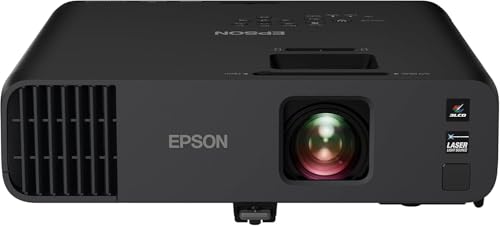
- 4,600-lumen 1080p output
- 20,000-hour laser source
- Wireless and dual-HDMI connectivity
Best For: Business presentations and video conferencing
Best for Bright Classrooms

- 7,000-lumen brightness
- WUXGA 1920 x 1200 resolution
- 1.6x zoom and six-point correction
Best For: Classrooms and brightly lit meeting rooms
Best for Large Fixed Installations

- 7,300-lumen WUXGA output
- Images up to about 500 inches
- Ceiling, front, and rear projection
Best For: Large venues and permanent AV installations
Best for Flexible Installation

- 5,000-lumen 1080p output
- 1.6x zoom and four-corner adjustment
- LAN control and 24/7 operation
Best For: Managed installations and flexible room layouts
Reference-Grade Home Cinema

- Native 4K SXRD resolution
- Up to 20,000-hour laser life
- 95% DCI-P3 color coverage
Best For: Dedicated home theaters and high-detail movie viewing
Bright Installation Workhorse

- 5,200-lumen WUXGA output
- 1.6x optical zoom and lens shift
- LAN and RS-232C control
Best For: Bright presentation rooms and flexible installations
HDR Home Theater Specialist

- 4K PRO-UHD pixel-shifted image
- 2,500-lumen color and white brightness
- HDR10+, HDR, and HLG support
Best For: Bright, HDR-capable home theater setups
Professional Presentation Pick

- WUXGA 1920 x 1200 resolution
- Up to 5,800 ANSI lumens
- 20,000-hour laser light source
Best For: Bright business, education, and presentation rooms
4K Home Theater Choice
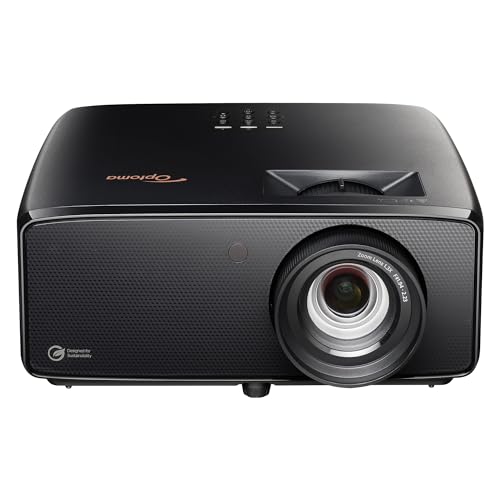
- Native 4K UHD resolution
- HDR and Filmmaker Mode
- 30,000-hour laser life
Best For: 4K movies and large-screen home entertainment
Short-Throw Gaming Pick

- Short-throw Full HD projection
- 4,200 ANSI lumens
- 30,000-hour DuraCore laser
Best For: Gaming, golf simulation, and bright rooms
Best All-Around Business Pick – Epson Pro EX11000
The Epson Pro EX11000 is a practical choice among professional laser projectors for business users who need bright, detailed presentations in rooms with ambient light. Its 1080p resolution, wireless features, and long-life laser source support meetings, video conferences, and large-format viewing.
Best For: Business presentations, video conferencing, and large-group meetings.
Pros:
- 4,600 lumens of color and white brightness for well-lit rooms
- 20,000-hour laser light source minimizes maintenance
- Miracast, two HDMI ports, USB power, and built-in Wi-Fi
- Projects images up to 300 inches with native 1080p resolution
Cons:
- Native resolution is lower than the WUXGA models in this roundup
- Its 9.5-pound design may be less suitable for permanent installations
The EX11000 balances brightness, connectivity, and portability well. It is especially appealing when easy setup and wireless presentation support matter as much as image size.
Best for Bright Classrooms – Panasonic PT-VMZ71
The Panasonic PT-VMZ71 is designed for professional spaces where presentations and lessons need to remain visible with the lights on. Its 7,000-lumen output, WUXGA resolution, and installation adjustments make it a strong option for meeting rooms and classrooms.
Best For: Bright classrooms, meeting spaces, and presentations on challenging surfaces.
Pros:
- 7,000 lumens support viewing with lights on and blinds open
- WUXGA 1920 x 1200 resolution provides a spacious presentation format
- 1.6x zoom, lens adjustment, and six-point screen correction aid installation
- Supports content delivery through mobile devices, USB flash drives, and wireless LAN QR code access
Cons:
- At 15 pounds, it is less portable than the Epson EX11000
- The supplied notes do not specify a light-source operating life
Choose the PT-VMZ71 when brightness and flexible placement are priorities. Its correction tools are particularly useful for rooms where a perfectly square projection surface is difficult to achieve.
Best for Large Fixed Installations – Epson PowerLite L790U
The Epson PowerLite L790U is a high-output option for professional laser projector installations that require WUXGA detail and a very large image. Its 7,300-lumen brightness, ceiling-mountable form, and support for front, rear, and ceiling projection suit larger venues and fixed AV systems.
Best For: Large venues, installed presentation systems, and oversized screens.
Pros:
- 7,300 ANSI lumens for high-brightness presentation environments
- WUXGA 1920 x 1200 resolution with a 21:9 native aspect ratio
- Supports images up to approximately 500 inches
- 20,000-hour operating life and a two-year warranty
Cons:
- Its large 23-inch-by-20.1-inch footprint is not intended for casual portability
- Listed at 415 watts, it has a higher power requirement than the other models here
- The supplied notes provide limited information about included wireless functions
The L790U is the installation-focused choice in this group. Its output and maximum image size make it a better fit for large spaces than tabletop or travel-oriented setups.
Best for Flexible Installation – ViewSonic LS741HD
The ViewSonic LS741HD combines 1080p laser projection with installation features that help professional users adapt to unusual room layouts. Its 5,000-lumen output, 1.6x optical zoom, geometric adjustments, and LAN control make it useful for classrooms, meeting halls, and managed AV systems.
Best For: Flexible ceiling installations, managed facilities, and golf simulation setups.
Pros:
- 5,000 ANSI lumens support clear images in bright rooms
- 1.6x optical zoom, H/V keystone, and four-corner adjustment simplify setup
- Supports 360-degree projection, portrait mode, and 24/7 operation
- LAN control works with Crestron, AMX, Extron, and PJ Link
Cons:
- Native 1080p resolution is less detailed than the WUXGA alternatives
- Its stated screen-size range of 80 to 150 inches is narrower than the maximum image specifications of some competitors
The LS741HD stands out for control and mounting flexibility rather than maximum resolution. It is a sensible pick for facilities teams that need remote management and precise image adjustment.
Reference-Grade Home Cinema – Sony VPL-XW5000ES
Sony VPL-XW5000ES 4K HDR Laser Home Theater Projector with Native 4K SXRD Panel, Black
Check Price On AmazonFor buyers seeking professional laser projectors for a dedicated home theater, the Sony VPL-XW5000ES combines native 4K SXRD resolution, 2,000 lumens, and Sony’s X1 Ultimate processing. Its long-life laser source and wide color coverage make it a strong fit for large-screen movie viewing.
Best For: Dedicated home theaters and viewers prioritizing native 4K detail, HDR color, and smooth motion.
Pros:
- Native 3,840 x 2,160 4K resolution from an SXRD panel.
- Laser light source is rated for up to 20,000 hours.
- 95% DCI-P3 coverage, TRILUMINOS PRO, and Wide Dynamic Range Optics support vivid, natural color.
- Supports 4K/60 Hz input with under 21 ms input lag and 2K/120 Hz with under 13 ms.
Cons:
- Its 2,000-lumen output is lower than the Panasonic and Epson options here.
- Stationary, ceiling-mount-oriented design is less suited to casual portable use.
The Sony stands out when image precision matters more than maximum brightness or portability. It is an especially compelling choice for a controlled theater room where native 4K detail and cinematic color can take center stage.
Bright Installation Workhorse – Panasonic PT-VMZ51S
Panasonic PT-VMZ51S WUXGA LCD Laser Projector, 5200 Lumens, No Digital Link, White
Check Price On AmazonThe Panasonic PT-VMZ51S is a practical pick among professional laser projectors for classrooms, meeting rooms, and other presentation spaces. Its 5,200-lumen output, WUXGA resolution, optical zoom, and lens shift help it deliver readable content across a range of installations.
Best For: Bright business, education, and presentation environments requiring flexible placement and control integration.
Pros:
- 5,200 lumens and 1920 x 1200 WUXGA resolution support charts, text, and video.
- 1.6x manual optical zoom, vertical and horizontal lens shift, and a 1.09-1.77:1 throw ratio simplify setup.
- Two HDMI inputs accept HDCP 1.4 and 4K/30p signals, while LAN and RS-232C support integration.
- Laser source is rated for approximately 20,000 hours in Normal/Quiet mode or 24,000 hours in Eco mode.
Cons:
- Its native resolution is WUXGA rather than 4K.
- Wireless connectivity requires an optional module.
With its high brightness and installation flexibility, the PT-VMZ51S is better suited to professional presentations than cinema-focused viewing. Choose it when legibility, room adaptability, and system control are more important than native 4K resolution.
HDR Home Theater Specialist – Epson Home Cinema LS11000
The Epson Home Cinema LS11000 is a strong option for professional laser projectors in a home theater, using 4K PRO-UHD processing, a 3LCD engine, and a laser array light source. Its 2,500 lumens, HDR10+ support, and high dynamic contrast are designed for detailed, colorful images even when some ambient light is present.
Best For: Home theater owners who want bright HDR performance, smooth motion, and flexible large-screen viewing.
Pros:
- 4K PRO-UHD processing produces a 3,840 x 2,160 image through pixel-shifting technology.
- Three-chip 3LCD design displays the full RGB signal continuously and avoids rainbowing issues noted with some projection technologies.
- 2,500 lumens of color and white brightness support viewing in rooms with some ambient light.
- Accepts HDR, HDR10+, and HLG with 10-bit processing and 16-step real-time HDR adjustment.
Cons:
- Its 4K image is produced through pixel-shifting rather than a native 4K panel.
- It is designed primarily for home theater installation rather than compact, everyday portability.
The LS11000 balances theater-oriented image quality with more brightness and HDR flexibility than many dedicated-room projectors. It is a particularly well-rounded choice for viewers who want large, sharp images while retaining strong color brightness and smooth 120 Hz-capable motion.
Professional Presentation Pick – Sony VPL-PHZ51
The Sony VPL-PHZ51 is a practical choice among professional laser projectors when bright, detailed presentation images matter. Its WUXGA resolution, laser light source, and portable form factor suit business, education, and other settings that need flexible installation.
Best For: Bright business, education, and presentation use with portable or tabletop placement.
Pros:
- WUXGA 1920 x 1200 native resolution supports detailed presentations.
- Up to 5,800 ANSI lumens of stated maximum white brightness helps images remain visible in brighter rooms.
- 20,000-hour laser light-source operating life reduces frequent light-source replacement.
- HDMI and USB connectivity support laptops, smartphones, and other compatible devices.
Cons:
- Its LCD display and WUXGA resolution are not designed for native 4K playback.
- At approximately 10 kg, portability is limited compared with smaller projectors.
- The listed maximum throw distance is 200 centimeters, which may limit longer-room placement.
Choose the VPL-PHZ51 for a brightness-focused professional setup where WUXGA clarity and flexible HDMI/USB connectivity are more important than native 4K resolution.
4K Home Theater Choice – Optoma UHZ36 4K UHD
The Optoma UHZ36 is a strong home-theater option among professional laser projectors, pairing native 4K UHD resolution with HDR support and Filmmaker Mode. Its 3,500-lumen brightness and long-life laser source make it suited to dedicated entertainment setups with tabletop or ceiling mounting.
Best For: 4K home theater viewing, HDR movies, and large-screen entertainment.
Pros:
- Native 3840 x 2160 4K UHD resolution delivers detailed images.
- HDR support and Filmmaker Mode target cinematic picture quality.
- 30,000-hour laser light-source operating life supports long-term use.
- Compatible with 4K Blu-ray players, Apple TV 4K, PS5, Roku 4K, and Xbox Series X.
Cons:
- Its 3,500-lumen brightness is lower than the Sony and GT2400HDR options listed here.
- The desktop unit weighs 10.4 pounds, so permanent installation may be preferable.
- Connectivity details list HDMI and USB hardware connections, while the primary connectivity field specifies RCA.
The UHZ36 is the better fit when native 4K detail and movie-focused features take priority over maximum brightness or compact portability.
Short-Throw Gaming Pick – Optoma GT2400HDR
The Optoma GT2400HDR stands out among professional laser projectors for gaming and simulation spaces that need a short-throw design. It combines Full HD 1080p resolution, 4,200 ANSI lumens, IP6X-rated dust protection, and a 30,000-hour DuraCore laser light source.
Best For: Gaming, golf simulation, and bright rooms where short-throw placement is useful.
Pros:
- Short-throw design supports placement from approximately 2.6 to 3.7 feet.
- 4,200 ANSI lumens provide substantial stated brightness for gaming and simulation.
- 30,000-hour DuraCore laser light source supports extended operation.
- IP6X-rated dust protection is useful in demanding installation environments.
Cons:
- Native resolution is Full HD 1920 x 1080 rather than native 4K.
- The supplied details list HDMI hardware connectivity without specifying USB.
- Its desktop-focused design and 9.4-pound weight may require careful placement.
Pick the GT2400HDR when short-throw convenience, brightness, and gaming-oriented use matter more than native 4K image resolution.
How We Picked These Professional Laser Projectors
We selected models across the main professional and enthusiast use cases, including corporate presentations, classrooms, meeting rooms, digital signage, home theater, gaming, and golf simulation. Our evaluation focuses on resolution, brightness, installation flexibility, connectivity, image adjustment features, laser lifespan, and overall suitability for the intended environment.
Because “professional” can mean different things, this list includes both commercial-grade projectors and premium home theater models. Brightness, color performance, contrast, throw distance, and input lag can vary significantly, so buyers should prioritize the specifications that match their room and content.
Quick Comparison
| Best For | Recommended Type | Key Priority |
|---|---|---|
| Business and education | WUXGA or 1080p laser projector | Brightness, wireless connectivity, and easy setup |
| Large rooms and venues | High-lumen installation projector | Light output, lens flexibility, and mounting options |
| Premium home theater | Native 4K laser projector | Contrast, HDR, color accuracy, and quiet operation |
| Gaming or golf simulation | Short-throw laser projector | Low input lag, placement flexibility, and image size |
Key Buying Factors for Professional Laser Projectors
Brightness and Room Lighting
Brightness is measured in lumens, but usable performance also depends on screen size, throw distance, and ambient light. Choose a higher-lumen model for conference rooms, classrooms, venues, or rooms with windows. A dimmer projector can produce a more cinematic image in a controlled, dark room.
Resolution and Aspect Ratio
Full HD is suitable for many presentations, video, and gaming applications. WUXGA provides additional vertical resolution for documents and multitasking, while native 4K models deliver sharper detail for large-screen movies and premium content. Check the projector’s native resolution rather than relying only on supported input formats.
Installation and Image Adjustment
Lens shift, optical zoom, keystone correction, four-corner adjustment, and 360-degree projection can make installation substantially easier. Optical adjustments generally preserve image quality better than heavy digital correction. Confirm the throw ratio and mounting requirements before purchasing.
Connectivity and Operating Costs
Look for HDMI inputs, network control, wireless presentation support, USB functionality, and compatibility with your source devices. Laser light sources typically offer long operating life, rapid startup, and less maintenance than lamp projectors, but replacement costs and warranty coverage still deserve attention.
Who Should Buy Which Professional Laser Projectors?
Choose a bright Panasonic, Epson, Sony, or ViewSonic business model for presentations, teaching, and fixed installations where reliability and flexible placement matter. Buyers seeking the most detailed movie image should consider a native 4K Sony home theater projector, while Epson and Optoma 4K laser models offer strong alternatives for large-screen entertainment.
For gaming, golf simulation, or rooms where the projector must sit close to the screen, a short-throw Optoma model is the more practical choice. Before ordering, measure the room, calculate the required image size, confirm available connections, and match brightness to the amount of ambient light.