Remote editing setups need more than a standard keyboard. The right combination of programmable keys, dials, jog wheels, and wireless connectivity can make trimming, timeline navigation, color adjustments, and repetitive commands faster without taking over your workspace.
We selected 10 video editing keyboards for remote work, including compact shortcut pads, dedicated editing controllers, and full-size keyboards designed for popular creative software. Use the guide below to match features, compatibility, and portability to the way you edit.
Best 10 Video Editing Keyboards for Remote Work Picks for 2026
Workflow Accelerator

- Dial, roller, and programmable display keys
- Profiles for major editing and work apps
- Customizable pages and icons
Best For: Remote creators seeking compact, tactile workflow controls
Multi-Platform Control

- Works with Windows, macOS, and iPadOS
- 14 customizable controls with macros
- Presets for Premiere, Final Cut Pro, and Resolve
Best For: Editors switching between desktop, laptop, and iPad
Portable Shortcut Hub

- 18 programmable keys plus a configurable dial
- Bluetooth 5.0 with up to 70-hour battery life
- Compact ambidextrous design for Windows and Mac
Best For: Portable editing setups and compact remote workstations
Shortcut-Focused Mac Keyboard

- 150+ printed, color-coded Final Cut shortcuts
- Wired USB-C connection with no battery charging
- Backlit full-size aluminum Mac layout
Best For: Mac editors working primarily in Final Cut Pro
Best Shortcut Keypad for Multi-App Editing
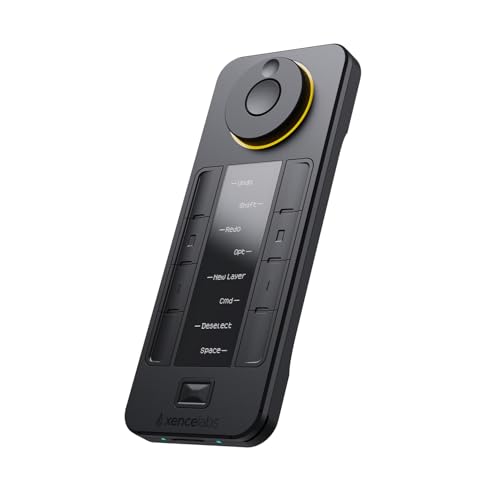
- Up to 40 shortcuts across five switchable sets
- OLED display shows active shortcut assignments
- Wireless, USB, and multi-platform support
Best For: Multi-app editors who want visible shortcut customization
Best Dedicated DaVinci Resolve Editor

- Dedicated controls match DaVinci Resolve edit functions
- Built-in search dial for timeline navigation
- Includes DaVinci Resolve 17 Studio activation card
Best For: DaVinci Resolve users building a focused remote editing desk
Precision Timeline Control

- Integrated jog and shuttle for timeline editing
- 68 programmable, individually backlit keys
- USB support for Windows, macOS, and Linux
Best For: Editors building a dedicated home-office timeline workstation
Best Simple Pick

- Three connection methods for flexible remote setups
- Up to 40 shortcuts across four customizable sets
- Compact 75 g design with about 300 hours of use
Best For: Mobile editors and creators who prioritize portability and shortcut layers
Workflow Accelerator – MX Creative Console
For remote editors who want fast access to frequently used commands, the Logitech MX Creative Console is a compact video editing keyboard alternative with a programmable keypad, control dial, and roller. Its app profiles support Premiere Pro, DaVinci Resolve, Final Cut Pro, Zoom, and other creative or work tools.
Best For: Remote creatives who want tactile controls and customizable shortcuts without replacing their main keyboard.
Pros:
- Supports profiles for Premiere Pro, Final Cut Pro, DaVinci Resolve, Zoom, and more.
- Combines a low-friction dial, roller, and nine programmable display keys.
- Allows customization across up to 15 keypad pages and supports custom icons.
- Includes a stand, USB-C cable, and claimed three-month Adobe Creative Cloud membership.
Cons:
- Its nine-key keypad is less expansive than a full-size keyboard.
- Uses two AAA batteries for power.
- Windows compatibility is listed from Windows 10 onward.
The MX Creative Console is a focused control surface rather than a traditional keyboard. It is a practical choice when remote video editing benefits from quick app-specific controls, precise timeline adjustments, and flexible desk placement.
Multi-Platform Control – TourBox Elite Plus
The TourBox Elite Plus gives remote editors a dedicated control surface for shortcuts, knobs, macros, and software-specific workflows. It connects by Bluetooth or USB and works with Windows, macOS, and iPadOS, making it a versatile option among video editing keyboards for remote work.
Best For: Editors who move between a desktop, laptop, and iPad and want one customizable controller for multiple creative applications.
Pros:
- Compatible with Windows, macOS, and iPadOS.
- Supports Premiere, Final Cut Pro, DaVinci Resolve, LumaFusion, and other creative software.
- Offers 14 controls, programmable functions, macros, and mouse-drag simulation.
- Includes Bluetooth 5.0 and USB connectivity with official software presets.
Cons:
- Its extensive customization may require time to learn.
- Battery-powered operation requires two AA batteries.
- It is a controller rather than a complete full-size keyboard.
With broad platform support and deep software integration, the Elite Plus is suited to remote workflows that span multiple devices. Its presets can shorten setup time, while advanced customization supports editors who want to build muscle memory around a dedicated controller.
Portable Shortcut Hub – HUION Keydial Mini
The HUION Keydial Mini is a compact Bluetooth keypad for remote video editing setups where desk space and portability matter. It provides 18 programmable shortcut keys plus a dial for timeline navigation, brush-size changes, and other functions configured through the Huion driver.
Best For: Mobile or space-conscious editors who want many customizable shortcuts in a lightweight, one-handed layout.
Pros:
- Offers 18 programmable keys and a dial with up to three switchable functions.
- Bluetooth 5.0 provides cable-free use with a listed range of up to 10 meters.
- Works with Windows and macOS and supports major editing applications.
- Thin, ambidextrous design provides up to 70 hours of battery life.
Cons:
- Shortcut customization requires the Huion driver and compatible software support.
- Its one-handed layout may not replace a standard keyboard.
- Anti-ghosting is specified for up to five keys.
The Keydial Mini balances portability with a generous number of programmable controls. It makes sense for remote editors who already use a standard keyboard or drawing tablet and want a dedicated shortcut panel that can move easily between workstations.
Shortcut-Focused Mac Keyboard – Final Cut Pro Keyboard
The KB Covers Final Cut Pro Backlit Aluminum Keyboard is a full-size wired option for Mac editors who want shortcuts printed directly on the keys. With more than 150 color-coded Final Cut Pro commands, it is designed to make video editing keyboards for remote work easier to reference during long editing sessions.
Best For: Mac users who primarily edit in Final Cut Pro and prefer a traditional full-size keyboard with visual shortcut guidance.
Pros:
- Prints more than 150 Final Cut Pro shortcuts directly on the keys.
- Color-coded command groups help identify editing, trimming, playback, and navigation controls.
- Wired USB-C connection avoids Bluetooth pairing, charging, and battery interruptions.
- Backlit keys and an aluminum body suit low-light studios and production desks.
Cons:
- Designed for Mac computers and a US macOS layout.
- Shortcut markings are specialized for Final Cut Pro rather than multiple editors.
- It is not water resistant.
This keyboard is a straightforward choice for Final Cut Pro users who value visible references over extensive programmability. Its wired connection and full-size layout are especially practical for a fixed remote editing desk where uninterrupted operation matters.
Best Wireless Creative Controller – TourBox Lite Bluetooth
The TourBox Lite is a compact alternative to traditional video editing keyboards for remote work. Its wireless Bluetooth connection, tactile controls, and customizable presets make it useful when moving between a home office, shared workspace, or mobile setup.
Best For: Remote creators who want simple, customizable controls for video editing and other creative applications.
Pros:
- Bluetooth connectivity works with macOS, Windows PCs, and Windows tablets.
- Eight customizable controls, including a knob and wheel, support frequent editing actions.
- Built-in presets and an on-screen HUD can reduce shortcut memorization.
- Lightweight design and ergonomic shaping suit portable and extended editing sessions.
Cons:
- The eight-key layout offers fewer dedicated controls than larger editing keyboards.
- The listed version does not include a USB cable or carrying case.
- It is battery powered and not water resistant.
The TourBox Lite is a good fit for editors who value portability and an approachable control layout over a full keyboard-style interface. Its software compatibility includes Premiere Pro, Final Cut Pro, and Filmora, along with several non-video creative apps.
Best Shortcut Keypad for Multi-App Editing – XENCELABS Quick Keys
The XENCELABS Quick Keys is a shortcut keypad designed for video editing keyboards for remote work setups. Its OLED display, switchable shortcut sets, and programmable dial help keep common commands accessible without requiring a full-size keyboard.
Best For: Editors who use multiple creative applications and want visible, customizable shortcuts in a compact device.
Pros:
- Eight keys across five sets provide up to 40 programmable shortcut commands.
- OLED display helps identify active shortcut sets and key assignments.
- Four dial modes support tasks such as timeline navigation, zoom, and brush-size adjustment.
- Supports Windows, macOS, and Linux, with wireless or USB connectivity.
Cons:
- It does not support macro commands, scripts, plugins, or multitasking automation.
- It is not compatible with iOS or Android devices, including iPads.
- The compact keypad supplements rather than replaces a conventional keyboard.
For a remote editing desk shared across video, photo, and audio work, the Quick Keys offers strong customization and visual feedback. The dedicated Bluetooth dongle and rechargeable battery also make it easier to reposition than a permanently wired shortcut pad.
Best Dedicated DaVinci Resolve Editor – Blackmagic Speed Editor
The Blackmagic Design DaVinci Resolve Speed Editor is a specialized choice among video editing keyboards for remote work. Its built-in search dial, dedicated edit-function shortcuts, and Bluetooth or USB connectivity are designed specifically around DaVinci Resolve workflows.
Best For: DaVinci Resolve users who want a compact, purpose-built editing controller with a bundled Studio activation card.
Pros:
- Dedicated keyboard shortcuts match DaVinci Resolve editing functions.
- Built-in search dial supports fast timeline navigation and control.
- Bluetooth and USB-C connectivity allow flexible desk placement.
- Bundle includes a DaVinci Resolve 17 Studio activation card.
Cons:
- Its specialized layout is less versatile for editors who primarily use other software.
- The product is compact, but it still requires a separate computer keyboard for general typing.
- Compatibility notes list PC and Mac requirements, including Windows 10 and macOS 10.15 or later.
This is the most workflow-specific option in the group. If DaVinci Resolve is your primary editor, the search dial and dedicated controls can be more practical than a general-purpose shortcut keypad; users working across several editing platforms may prefer a more configurable device.
Precision Timeline Control – X-keys XK-68 JGS
X-keys USB Programmable Jog & Shuttle Control for Editing or Instant Replay (68 Key, XK-68 JGS)
Check Price On AmazonFor editors seeking video editing keyboards for remote work, the X-keys XK-68 JGS focuses on hands-on timeline control. Its integrated jog and shuttle, programmable keys, and individual backlighting are useful for setting in and out points and selecting editing tools.
Best For: Remote editors who want dedicated jog-and-shuttle control and extensive programmable keys.
Pros:
- Integrated jog and shuttle for timeline editing
- 68 programmable keys for shortcuts, tools, and edit points
- Individual backlighting under each key
- Works with Windows, macOS, and Linux with the stated setup requirements
Cons:
- Its 1.6-pound size may be less convenient for highly portable setups
- Linux users should pre-program it in Hardware Mode before moving it to Linux installations
- Uses a USB connection rather than wireless connectivity
The XK-68 JGS is a specialized choice for editors who value tactile timeline navigation and a large shortcut surface over portability. It is particularly practical for a permanent home-office editing station.
Wireless Dial Workflow – ULANZI D100H
The ULANZI D100H is a compact option among video editing keyboards for remote work, combining a tactile control dial with customizable shortcut buttons. It is designed for tasks such as color grading, timeline adjustments, photo retouching, and everyday office controls.
Best For: Windows and Mac creators who want wireless dial control for editing and office shortcuts.
Pros:
- Aluminum control knob provides precise parameter adjustment with vibration feedback
- Seven customizable buttons and one multifunctional knob support shortcut combinations
- Bluetooth 5.1 can connect and switch between three devices
- Supports CapCut, DaVinci Resolve, Final Cut Pro, Photoshop, and Lightroom Classic
Cons:
- Compatible only with Windows 10+ and macOS 12+
- USB is for charging only, not a wired dual-mode connection
- Battery provides about 2.5 hours of continuous use after a full charge
The D100H suits remote creators who prefer a small wireless controller instead of a full-size editing keyboard. Its limited operating-system support and stated battery runtime are important considerations for longer editing sessions.
Best Simple Pick – XPPen ACK05 Keydial
The XPPen ACK05 is a lightweight choice among video editing keyboards for remote work, offering a dial and customizable shortcut keys in a compact wireless design. It can help streamline editing commands, zooming, canvas navigation, and other application-specific workflows.
Best For: Remote creators who want a portable shortcut controller with multiple connection options and long battery life.
Pros:
- Supports Bluetooth, Bluetooth dongle, or USB connections
- Ten keys can be configured across four sets for up to 40 shortcuts
- 1000 mAh battery provides about 300 hours of continuous working time
- Works with Windows, macOS, and Linux under the listed connection requirements
Cons:
- Driver installation is required to customize or program the keys
- Bluetooth compatibility varies by operating system version
- Charging input is limited to 5V-2A; higher-output fast chargers should not be used
The ACK05 is a strong fit for flexible home-office or mobile setups where portability and shortcut layers matter. Its driver requirement is a small setup step, but the three connection methods and long stated battery life add useful versatility.
How We Picked These Video Editing Keyboards for Remote Work
We focused on controls that can reduce mouse dependence during editing: programmable shortcut keys, rotary dials, jog and shuttle wheels, transport controls, and software-specific layouts. We also considered wireless flexibility, USB connectivity, portability, macOS and Windows support, build quality, and how easily each device can fit into a temporary or compact remote workstation.
Because editors use different applications, the list includes general-purpose programmable controllers alongside models tailored to Final Cut Pro or DaVinci Resolve. Customization matters, but so does the learning curve: a device is most useful when its controls can be mapped quickly and recalled consistently.
Quick Comparison
- Best for customizable control: Logitech MX Creative Console and TourBox Elite Plus.
- Best compact dial controllers: HUION Keydial Mini, ULANZI D100H, and XPPen ACK05.
- Best for shortcut-heavy workflows: XENCELABS Quick Keys and TourBox Lite.
- Best for DaVinci Resolve: Blackmagic Design DaVinci Resolve Speed Editor.
- Best for Final Cut Pro: KB Covers Final Cut Pro Backlit Aluminum Keyboard.
- Best for jog and shuttle control: X-keys XK-68 JGS.
Key Buying Factors for Video Editing Keyboards for Remote Work
Software Compatibility and Customization
Check whether the controller supports your operating system and editing application before buying. Generic programmable models are flexible across Premiere Pro, Final Cut Pro, DaVinci Resolve, and other software, while dedicated products may offer more efficient, ready-made layouts. Confirm whether profiles, macros, or remapping require companion software.
Controls That Match Your Workflow
Shortcut keys are valuable for commands you use constantly, while a dial can provide precise control for timeline scrubbing, audio levels, zoom, or parameter adjustments. A jog and shuttle wheel is especially useful for frame-by-frame navigation and transport control. Choose the control type that solves your biggest bottleneck rather than simply selecting the device with the most buttons.
Portability, Connectivity, and Desk Space
Bluetooth is convenient for laptop-based editing and temporary workspaces, but USB can offer a dependable connection and eliminate battery concerns. Measure the space beside your keyboard, monitor, or laptop stand. Compact keypads travel more easily; larger editing keyboards can be faster to use but may be less practical for shared or mobile desks.
Ergonomics and Setup Time
Look for clearly labeled or easily viewable controls, comfortable key spacing, and a layout that does not force awkward reaches. Backlighting, OLED labels, and adjustable profiles can help when working in dim rooms or switching between projects. Remember to budget time for mapping shortcuts and building a consistent muscle-memory layout.
Who Should Buy Which Video Editing Keyboards for Remote Work?
Choose a dedicated DaVinci Resolve controller if that software is central to your work and you want purpose-built transport controls. Final Cut Pro users may prefer a labeled keyboard that reduces memorization. Editors who move between applications should consider a programmable console or controller with multiple profiles.
For small remote desks, a compact Bluetooth keypad with a dial offers a strong balance of portability and control. If precise timeline navigation is your priority, choose a jog-and-shuttle model. Buyers who already have a comfortable keyboard may get the most value from adding a shortcut controller rather than replacing the entire setup.