Commercial-grade mini desktop computers deliver business-ready performance in a compact footprint, making them ideal for offices, reception desks, classrooms, and managed workstations.
This roundup compares 10 capable models from HP, Lenovo, and Dell, with options ranging from efficient everyday systems to high-performance workstation-class desktops.
Best 10 Commercial-Grade Mini Desktop Computers Picks for 2026
Trusted Business Essential

- 16GB DDR5 RAM with PCIe SSD storage
- Supports up to three 4K displays
- Windows 11 Pro, Wi-Fi 6, keyboard, and mouse included
Best For: Compact office setups and everyday business productivity
Enterprise Performance Pick
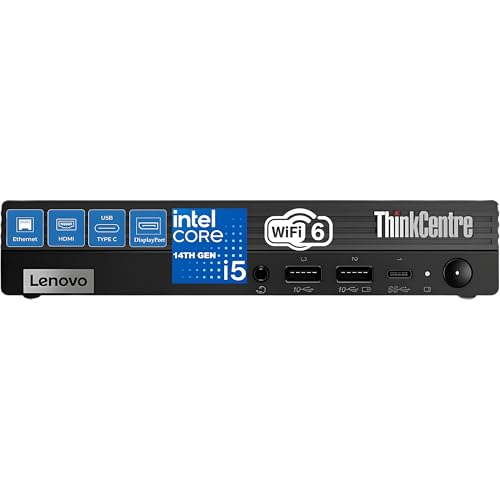
- 12th Gen Core i5-12500T with six cores and 12 threads
- 16GB RAM and 512GB PCIe SSD
- Toolless access, ThinkShield security, and Wi-Fi 6
Best For: Professional multitasking, development, and managed office deployments
High-Capacity Refurbished Choice

- 32GB RAM for extensive multitasking
- 1TB SSD for ample fast storage
- Core i5 processor, Wi-Fi 6, and dual DisplayPort
Best For: Office multitasking and storage-heavy business setups
Quiet AI-Ready Innovator

- Ultra-quiet 1L chassis with Snapdragon X processor
- Up to three monitors and Wi-Fi 6E connectivity
- ThinkShield security and AI-enhanced Windows features
Best For: Quiet, efficient workspaces and modern video conferencing
Best Balanced Business Pick

- 12th Gen Core i5-12500T with 32GB RAM
- 1TB NVMe SSD and Windows 11 Pro
- HDMI, dual DisplayPort, Wi-Fi 6, and Bluetooth 5.2
Best For: Office multitasking and multi-monitor business work
Best Workstation-Ready Option

- 14-core Core i5-14500 vPro processor
- ISV-certified for major professional applications
- Supports up to 8K DisplayPort output
Best For: CAD, engineering, and professional productivity
Best Modern Compact Office PC

- 14th Gen Core i5-14500T with DDR5 memory
- Micro form factor measures 1.42 inches thick
- Three DisplayPort outputs and Wi-Fi connectivity
Best For: Compact office desks and multi-monitor productivity
Compact Business Essential
Lenovo ThinkCentre neo 50q Tiny

- Core 5-210H processor with configurable DDR5 RAM and NVMe SSD
- Compact 2.5-pound design for offices and hybrid workspaces
- HDMI, DisplayPort, Ethernet, Wi-Fi 6 and dual-monitor support
Best For: Small-business and hybrid-work deployments needing a configurable compact PC
AI-Ready Multimonitor Workhorse
Dell Pro Micro Plus with Core Ultra 7

- 20-core Core Ultra 7 265 processor with 13-TOPS NPU
- Supports up to four independent 4K displays
- 16GB DDR5, 1TB PCIe SSD and compact VESA-mountable design
Best For: Professional workstations requiring strong multitasking and extensive display space
Flexible Enterprise Micro PC

- Core Ultra 7 265 with AI acceleration for business workloads
- Selectable 16GB–64GB RAM and 512GB–2TB SSD configurations
- Three DisplayPort outputs, Wi-Fi 6E and Windows 11 Pro
Best For: IT-managed offices needing configurable memory, storage and multimonitor support
Trusted Business Essential – HP Pro 400 G9 Mini PC
The HP Pro 400 G9 is a compact option for buyers comparing commercial-grade mini desktop computers for everyday business and home-office work. It combines Windows 11 Pro, 16GB of DDR5 memory, a PCIe SSD, modern wireless connectivity, and support for up to three 4K displays in a quiet, space-saving chassis.
Best For: Business users who need a compact desktop with Windows 11 Pro, flexible connectivity, and multi-monitor support.
Pros:
- Compact, lightweight design backed by HP’s business-focused build quality.
- 16GB DDR5 RAM and PCIe SSD provide a responsive foundation for everyday multitasking.
- Supports up to three 4K displays and includes HDMI, DisplayPort, USB-C, Ethernet, Wi-Fi 6, and Bluetooth 5.2.
- Includes a keyboard and mouse, with Windows 11 Pro installed.
Cons:
- The Intel Celeron G6900T dual-core processor is aimed at basic productivity rather than demanding workloads.
- Storage capacity is listed as 256GB in the product title, which may be limiting for large local files.
This HP is a practical choice when quiet operation, a small footprint, and broad display connectivity matter more than high-end processing power. Its business-ready software and included accessories make it easy to deploy for routine office tasks.
Enterprise Performance Pick – Lenovo ThinkCentre M70q Tiny
The Lenovo ThinkCentre M70q Tiny stands out among commercial-grade mini desktop computers for users who want stronger processing in a compact business chassis. Its 12th Gen Intel Core i5-12500T, 16GB memory, 512GB PCIe SSD, and Windows 11 Pro configuration are suited to office work, development, and heavier multitasking.
Best For: Business, developer, and everyday users who need capable processing in a tiny, manageable desktop.
Pros:
- Six-core, 12-thread Intel Core i5-12500T processor with Turbo speeds up to 4.40GHz.
- Toolless access makes the memory and PCIe solid-state drive easier to manage or upgrade.
- Compact chassis can be placed horizontally, vertically, or with an optional mounting kit.
- Includes Wi-Fi 6, Bluetooth 5.1, ThinkShield security features, Windows 11 Pro, keyboard, and mouse.
Cons:
- Integrated Intel UHD Graphics 770 is intended for productivity rather than demanding graphics workloads.
- The supplied notes specify support for up to two independent monitors.
- No built-in speakers are included.
With a faster business-class processor and service-friendly design, the M70q Tiny is a strong fit for professional environments that value deployment flexibility and security. It offers more headroom than entry-level mini PCs while retaining a very small footprint.
High-Capacity Refurbished Choice – Dell OptiPlex 7080 Micro
The renewed Dell OptiPlex 7080 Micro is a sensible contender among commercial-grade mini desktop computers for buyers prioritizing memory and storage. It pairs an Intel Core i5-10500T processor with 32GB of RAM, a 1TB SSD, Windows 11 Pro, Wi-Fi 6, and a broad selection of USB and DisplayPort connections.
Best For: Office users who need substantial memory and storage for multitasking, files, and business applications.
Pros:
- 32GB of RAM supports numerous applications and browser tabs at once.
- 1TB SSD provides generous capacity and fast boot and data-transfer performance.
- Six-core, 12-thread Core i5-10500T offers capable mainstream business performance.
- Includes Wi-Fi 6, Bluetooth, two DisplayPort outputs, USB-C, USB-A, Ethernet, and Windows 11 Pro.
Cons:
- As a renewed product, it has a stated 90-day limited warranty.
- Integrated Intel UHD Graphics are suited to productivity and display output, not demanding graphics work.
- The product information does not mention an included keyboard or mouse.
This OptiPlex makes the most sense for buyers who would otherwise need to upgrade a smaller configuration. Its 32GB memory and 1TB SSD are the main advantages, while the renewed status and shorter warranty deserve consideration before purchase.
Quiet AI-Ready Innovator – Lenovo ThinkCentre neo 50q QC
The Lenovo ThinkCentre neo 50q QC brings a newer, efficiency-focused approach to commercial-grade mini desktop computers. Its 1L chassis uses a Snapdragon X processor, 16GB of memory, a 512GB SSD, Windows 11 Pro, Wi-Fi 6E, and commercial-grade security features, while supporting up to three monitors.
Best For: Quiet modern workspaces, video calls, and energy-conscious users who want compact AI-focused computing.
Pros:
- Ultra-compact 1L design with TUV Ultra Low Noise certification for quiet operation.
- Supports up to three monitors and includes HDMI 2.1, DisplayPort, Ethernet, six USB ports, and Bluetooth.
- Windows Studio Effects and Live Captions support AI-enhanced calls and accessibility.
- ThinkShield, dTPM 2.0, a Kensington lock slot, and Secure Wipe provide business-oriented protection.
Cons:
- Memory is fixed at 16GB according to the supplied specifications.
- The Snapdragon platform may have software compatibility considerations compared with traditional Intel desktops.
- Integrated graphics are intended for productivity and display support rather than demanding graphics workloads.
The neo 50q QC is an appealing choice when low noise, low power use, and modern conferencing features are priorities. Its compact design and security tooling suit managed workspaces, provided the Snapdragon platform fits the user’s software requirements.
Best Balanced Business Pick – HP Pro Mini 400 G9
The HP Pro Mini 400 G9 is a practical choice among commercial-grade mini desktop computers for offices that need strong everyday performance, generous memory, and flexible display connectivity. Its 12th Gen Core i5 processor, 32GB of RAM, 1TB NVMe SSD, and Windows 11 Pro configuration are well suited to multitasking and business workflows.
Best For: Office productivity, multitasking, hybrid work, and multi-monitor business setups.
Pros:
- Six-core, 12-thread Intel Core i5-12500T processor with Turbo speeds up to 4.4 GHz.
- 32GB DDR4 RAM and a 1TB PCIe NVMe SSD provide ample working memory and fast storage.
- Includes Wi-Fi 6, Bluetooth 5.2, HDMI 2.1, two DisplayPort 1.4 outputs, and multiple USB ports.
- Compact 6.97 x 6.89 x 1.34-inch design includes Windows 11 Pro, keyboard, and mouse.
Cons:
- Integrated Intel UHD Graphics 770 is intended for business and general graphics workloads rather than dedicated-GPU performance.
- No optical drive is included.
For buyers wanting a well-rounded commercial mini PC, this HP combines substantial RAM and storage with a useful port selection. It is especially compelling when a ready-to-use Windows 11 Pro system and bundled peripherals matter.
Best Workstation-Ready Option – Lenovo ThinkStation P3 Tiny
The Lenovo ThinkStation P3 Tiny brings workstation-oriented features to the commercial-grade mini desktop computers category. Its Intel Core i5-14500 vPro processor, compact chassis, ISV certifications, and support for professional applications make it a strong fit for specialized business environments.
Best For: CAD, engineering, architecture, data analysis, STEM education, and professional multi-display work.
Pros:
- 14-core Intel Core i5-14500 vPro processor with Intel UHD 770 graphics supports demanding professional workloads.
- ISV-certified for applications including AutoCAD, SOLIDWORKS, ArcGIS, Creo, and MATLAB.
- Supports dual displays, including up to 8K at 60Hz through DisplayPort 1.4 and 4K at 60Hz through HDMI 2.1.
- Very compact design weighs about 3 pounds and includes Wi-Fi 6, Bluetooth 5.1, keyboard, and mouse.
Cons:
- The listing describes a resealed system upgraded for memory and SSD configuration.
- Exact RAM and storage capacity can vary because the listing offers multiple configuration options.
- Graphics are integrated rather than provided by a dedicated workstation GPU.
The P3 Tiny stands out when software certification, vPro capabilities, and compact workstation deployment are more important than dedicated graphics. Verify the selected memory and storage configuration before purchase, since the available options vary.
Best Modern Compact Office PC – Dell OptiPlex 7020 MFF
The Dell OptiPlex 7020 MFF is a space-conscious option among commercial-grade mini desktop computers, built around a 14th Gen Intel Core i5 processor and DDR5 memory. Its compact micro form factor, Windows 11 Pro installation, and three DisplayPort outputs suit modern office desks and multi-monitor workstations.
Best For: Business users, home offices, everyday productivity, and compact dual- or multi-display setups.
Pros:
- 14-core Intel Core i5-14500T processor with up to 4.8 GHz speeds supports multitasking.
- Compact 1.42 x 7.01 x 7.17-inch form factor can fit behind a monitor or in a tight workspace.
- 16GB DDR5 RAM, a PCIe SSD, Wi-Fi 6, USB-C, Ethernet, and three DisplayPort outputs support modern office use.
- Windows 11 Pro provides professional security and management features.
Cons:
- The listing specifies 16GB as the maximum RAM capacity, limiting future memory expansion.
- Integrated Intel UHD Graphics 770 is not intended for dedicated-GPU workloads.
- The supplied details mention both 1TB and 512GB SSD capacities; confirm the configuration before ordering.
This Dell is a strong fit for buyers prioritizing a current-generation processor and minimal desk footprint. Its three DisplayPort outputs are particularly useful for productivity-focused multi-screen installations, but storage capacity should be confirmed because the supplied listing details differ.
Compact Business Essential – Lenovo ThinkCentre neo 50q Tiny
The Lenovo ThinkCentre neo 50q Tiny is a practical choice among commercial-grade mini desktop computers for offices that need capable performance without giving up much desk space. Its Core 5-210H processor, configurable DDR5 memory and NVMe SSD options support everyday business multitasking in a compact 2.5-pound chassis.
Best For: Small businesses, hybrid workers, developers and front-desk or retail deployments that need a compact Windows 11 Pro desktop.
Pros:
- Compact 7.2 x 7.05 x 1.44-inch design weighing about 2.5 pounds.
- Configurable with up to 64GB DDR5 RAM and up to 2TB NVMe SSD storage.
- Useful connectivity includes USB-A, USB-C, HDMI, DisplayPort and Ethernet.
- Supports two monitors and includes Wi-Fi 6, Bluetooth 5 and Windows 11 Pro.
Cons:
- Uses integrated Intel graphics rather than a dedicated graphics card.
- The supplied listing notes that the computer has been resealed for memory and SSD upgrades.
- Warranty coverage is provided by the third-party seller rather than Lenovo.
This ThinkCentre is well suited to space-constrained business setups where dependable connectivity, easy deployment and configurable memory or storage matter more than high-end graphics performance. Verify the exact RAM and SSD configuration before ordering.
AI-Ready Multimonitor Workhorse – Dell Pro Micro Plus with Core Ultra 7
The Dell Pro Micro Plus is one of the more performance-focused commercial-grade mini desktop computers in this roundup. Its 20-core Intel Core Ultra 7 265 processor, dedicated NPU and 1TB PCIe SSD are designed for demanding office multitasking, data-heavy workflows and AI-enabled business applications.
Best For: Developers, analysts, content-focused professionals and businesses that need four-display productivity in a compact Windows 11 Pro system.
Pros:
- 20-core Core Ultra 7 265 processor with a dedicated 13-TOPS NPU.
- Supports up to four independent 4K displays through its display connectivity.
- Includes 16GB DDR5 RAM, a 1TB PCIe NVMe SSD and support for up to 64GB RAM.
- Compact, VESA-mountable chassis with Wi-Fi 6E, Ethernet and multiple USB ports.
Cons:
- Integrated Intel graphics are intended for productivity rather than dedicated-GPU workloads.
- The listed configuration may be more capability than basic office users require.
- The supplied details identify a compact 180W power adapter rather than an internal desktop power supply.
Choose this Dell when screen real estate and processor headroom are priorities. Its quad-display support and AI acceleration make it especially compelling for professional workstations, though simpler workloads may not need its full performance potential.
Flexible Enterprise Micro PC – Dell Pro Micro Plus Custom
This customized Dell Pro Micro Plus is a strong option among commercial-grade mini desktop computers for organizations that want enterprise-oriented features in a very small form factor. The Core Ultra 7 265 processor, configurable DDR5 memory and SSD capacity provide flexibility for business deployments, while Windows 11 Pro supports administration and security workflows.
Best For: IT teams, small businesses, developers and multi-monitor office deployments with changing memory and storage requirements.
Pros:
- Core Ultra 7 265 processor with integrated graphics and built-in AI acceleration.
- Configurable from 16GB to 64GB DDR5 RAM and 512GB to 2TB NVMe SSD storage.
- Three DisplayPort outputs support up to three external 4K monitors.
- Compact 2.7-pound chassis with USB-C, USB-A, Ethernet, Wi-Fi 6E and Bluetooth.
Cons:
- Display output is provided through DisplayPort, so adapters may be needed for other monitor inputs.
- The computer is resealed for memory and SSD upgrades, according to the supplied disclosure.
- The one-year warranty is supplied by the third-party seller.
This model stands out when deployment flexibility and multiple-monitor support matter. Its upgrade configurations can suit different office roles, but buyers should confirm the selected RAM and SSD tier and ensure existing displays support DisplayPort.
How We Picked the Best Commercial-Grade Mini Desktop Computers
We focused on business-oriented mini desktops with current or still-capable Intel, AMD, or Snapdragon platforms, practical memory and storage configurations, professional operating-system support, and features suited to long-term office deployment. We also considered connectivity, display support, wireless standards, upgrade potential, acoustics, and the needs of IT administrators.
Specifications can vary by configuration or seller, so verify the exact processor, RAM, storage, operating system, warranty, and included accessories before ordering.
Quick Comparison
| Priority | Best fit | What to look for |
|---|---|---|
| Everyday office work | Core i5 mini PCs | 16GB RAM, SSD storage, Wi-Fi, and multiple display outputs |
| Multitasking | 32GB business desktops | More memory, a larger SSD, and a stronger mobile-class processor |
| Heavy workloads | Workstation or Core Ultra models | Higher core counts, vPro or business management features, and expansion options |
| Quiet, low-power deployment | Ultra-compact or Snapdragon systems | Efficient processors, solid-state storage, and low-noise cooling |
Key Buying Factors for Commercial-Grade Mini Desktop Computers
Processor and Sustained Performance
For email, web applications, point-of-sale software, and productivity suites, a recent Core i5-class processor is usually sufficient. Choose a higher-core-count Core i5, Core Ultra 7, or workstation model for data analysis, software development, content creation, virtualization, or other sustained workloads. Benchmark labels alone are not enough; cooling and power limits affect real-world performance in small enclosures.
Memory and Storage
Sixteen gigabytes of RAM is a sensible baseline for business Windows use, while 32GB or more is preferable for large spreadsheets, multiple applications, virtual machines, and creative tools. An NVMe PCIe SSD improves boot and application responsiveness. Select at least 512GB when users store local documents, and consider 1TB or more for media, databases, or offline files.
Ports, Displays, and Networking
Check the exact number and type of display outputs, especially if the system will drive two or three monitors. USB-C, DisplayPort, HDMI, wired Ethernet, Wi-Fi 6 or Wi-Fi 6E, and convenient front-access ports can reduce adapter costs. For managed offices, business features such as Intel vPro, TPM support, Windows 11 Pro, and remote-management compatibility may matter more than peak speed.
Size, Serviceability, and Reliability
Measure the mounting area and confirm whether a VESA bracket, stand, or power adapter is included. Review access to RAM and storage, warranty coverage, operating temperature, and seller reputation. A slightly larger mini desktop may offer better cooling and easier maintenance than the smallest available chassis.
Who Should Buy Which Commercial-Grade Mini Desktop Computers?
Choose an HP Pro 400 or Lenovo ThinkCentre M70q for dependable general office work, compact deployments, and multi-monitor productivity. Choose a Dell OptiPlex 7080 or 7020 MFF when you want business-focused connectivity, familiar serviceability, and strong value.
Choose a Lenovo ThinkCentre neo 50q for an efficient, quiet workstation where everyday productivity is the priority. Choose the ThinkStation P3 Tiny for professional users who need workstation-oriented performance in a very small enclosure.
Choose a Dell Pro Micro Plus model when newer Core Ultra performance, high core counts, and built-in AI capabilities are more important than the lowest purchase price. For most buyers, prioritize the right RAM and SSD configuration first, then confirm display outputs, warranty, and management features before checkout.