A compact desktop can deliver a cleaner workspace, flexible monitor support, and dependable performance without taking over your desk. The best mini desktop computers for home offices balance processing power, memory, connectivity, and upgrade potential for the way you work.
This roundup compares 10 options ranging from modern Ryzen and Intel systems to renewed Dell business PCs, helping you match your budget and workload to the right compact computer.
Best 10 Mini Desktop Computers for Home Offices Picks for 2026
Best Sustained-Performance Pick
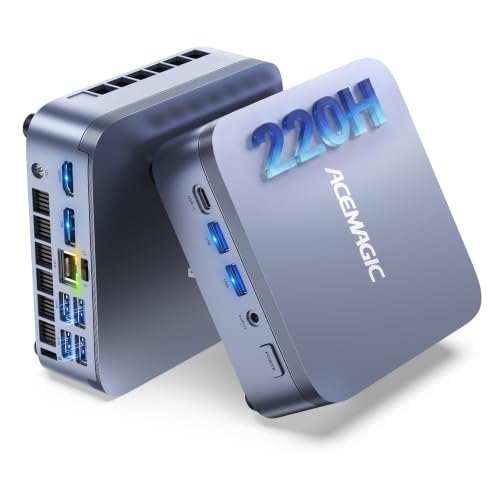
- Intel Core 5 220H with 12 cores and 16 threads
- 24GB LPDDR5 memory plus dual M.2 storage slots
- Triple 4K display support and Windows 11 Pro
Best For: Demanding multitasking, coding, trading, and virtual machines
Best Expandable Value

- Efficient Ryzen 3 PRO 7330U processor
- Dual RAM slots and dual storage bays
- Three 4K display outputs in a compact chassis
Best For: Everyday office work with future upgrade flexibility
Best Networking Features

- Ryzen 3 5300U with 4 cores and 8 threads
- Dual 2.5GbE LAN ports for advanced networking
- Upgradeable to 64GB RAM with triple 4K output
Best For: Home offices, home labs, NAS, and networking projects
Best Refurbished Business PC

- Six-core Intel Core i5-9500 processor
- Windows 11 Pro with 250GB SSD and wireless connectivity
- Compact, energy-efficient design with upgradeable RAM
Best For: Budget home offices and everyday business productivity
Best All-Around Value

- 16GB RAM and 512GB NVMe SSD
- Triple-display support with HDMI and USB-C
- Compact, VESA-mountable design
Best For: Home offices needing multitasking headroom and flexible display support
Best Refurbished Business Pick
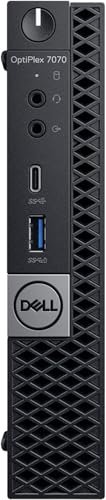
- Six-core Intel Core i5-9500T processor
- 16GB RAM with 256GB NVMe storage
- Windows 11 Pro in a compact business chassis
Best For: Office and education users seeking a refurbished Dell system
Performance Pick
KAMRUI Pinova P1 Ryzen R2544 Mini PC

- Ryzen R2544 processor with 16GB RAM
- 4K triple-display support
- Compact design with VESA mounting
Best For: Multitasking home offices and multi-monitor setups
Value Office Choice

- 8GB RAM and 256GB SSD for routine tasks
- Dual 4K monitor support
- Storage expansion up to 4TB
Best For: Basic office work and dual-monitor productivity
Best Sustained-Performance Pick – ACEMAGIC M5 Core 5 Mini PC
For demanding mini desktop computers for home offices, the ACEMAGIC M5 stands out with its Intel Core 5 220H processor, 24GB of LPDDR5 memory, and Windows 11 Pro. Its compact, VESA-mountable design fits neatly into a streamlined workspace while supporting heavy multitasking, coding, virtual machines, and large browser sessions.
Best For: Professionals, developers, traders, and home-office users who need sustained multitasking performance and flexible storage expansion.
Pros:
- 12-core/16-thread Intel Core 5 220H processor with boost speeds up to 4.9GHz.
- 24GB LPDDR5-5200 memory and dual M.2 storage slots, expandable up to 4TB total.
- Supports three 4K displays and includes Windows 11 Pro, Wi-Fi 6, Bluetooth 5.2, and extensive USB connectivity.
Cons:
- The 24GB onboard LPDDR5 memory is soldered and cannot be upgraded.
- Its performance-focused 45W design may be more than needed for basic office tasks.
The M5 is the strongest fit here for users who regularly push a mini PC with demanding workloads. It costs desk space only modestly but delivers considerably more headroom than entry-level office systems.
Best Expandable Value – ACEMAGIC Ryzen 3 PRO Mini PC
The ACEMAGIC Ryzen 3 PRO 7330U is a practical choice among mini desktop computers for home offices, especially if you want a compact system that can grow over time. It combines Windows 11 Pro, dual memory slots, dual storage bays, and three-display support in a small chassis.
Best For: Everyday office work, education, home entertainment, and buyers who want straightforward RAM and storage upgrade options.
Pros:
- Ryzen 3 PRO 7330U offers four cores, eight threads, and boost speeds up to 4.3GHz.
- Dual memory slots and M.2 SATA/NVMe storage support allow flexible expansion up to 4TB total.
- USB-C with DP 1.4, HDMI 2.0, and DisplayPort support three 4K monitors.
Cons:
- The included 8GB DDR4 RAM is less generous for heavy multitasking than higher-memory alternatives.
- Wi-Fi 5 and Bluetooth 4.2 are older than the wireless standards on some newer mini PCs.
This model balances current affordability with useful upgrade potential. It is well suited to normal home-office work today, with room to add memory or storage as requirements increase.
Best Networking Features – BOSGAME E5 Ryzen 3 Mini PC
The BOSGAME E5 is one of the more versatile mini desktop computers for home offices, pairing a Ryzen 3 5300U with upgradeable memory, triple 4K output, and dual 2.5GbE LAN ports. It works well as a conventional office computer but also offers features for home labs, NAS projects, and advanced networking setups.
Best For: Office users, programmers, traders, and home-lab enthusiasts who value fast wired networking and broad expansion options.
Pros:
- Ryzen 3 5300U processor with four cores, eight threads, and boost speeds up to 3.8GHz.
- Dual SODIMM slots support up to 64GB RAM, while a second M.2 slot supports additional NVMe storage.
- Dual 2.5GbE ports, triple 4K display support, and quiet operation rated below 25dB.
Cons:
- The base configuration includes only 8GB RAM and a 256GB SSD.
- Additional storage and memory upgrades are not included.
The E5 is especially compelling when networking matters as much as everyday productivity. Its upgrade path and dual 2.5GbE ports give it capabilities that typical compact office PCs do not provide.
Best Refurbished Business PC – Dell OptiPlex 3070 Micro
For budget-conscious shoppers comparing mini desktop computers for home offices, the renewed Dell OptiPlex 3070 Micro offers a familiar business-class platform in a small footprint. Its six-core Intel Core i5-9500, 8GB of DDR4 RAM, 250GB SSD, and Windows 11 Pro are suited to everyday productivity and general multitasking.
Best For: Basic business tasks, web browsing, education, and buyers who want a compact refurbished Dell system.
Pros:
- Six-core Intel Core i5-9500 processor with integrated Intel UHD Graphics 630.
- Includes Windows 11 Pro, a 250GB SSD, Wi-Fi, and Bluetooth connectivity.
- Small, energy-efficient form factor with six USB ports and support for up to 64GB RAM.
Cons:
- The included 8GB RAM and 250GB SSD are modest for large workloads or extensive media storage.
- The listing specifies a 30-day warranty.
- This renewed 2019-era system has older hardware than the newer mini PCs in this roundup.
The OptiPlex 3070 Micro makes sense when dependable everyday computing and a low entry price matter more than cutting-edge performance. Consider a memory upgrade if your home-office workflow involves frequent heavy multitasking.
Best All-Around Value – Getorli Ryzen 5 Mini PC
The Getorli GT100 is a capable option for shoppers comparing mini desktop computers for home offices. Its Ryzen 5 processor, 16GB of RAM, 512GB NVMe SSD, and triple-display support cover everyday productivity, video playback, online learning, and multitasking in a compact footprint.
Best For: Home-office users who want generous memory, expandable storage, and a flexible multi-monitor setup.
Pros:
- 16GB RAM and a 512GB PCIe 3.0 NVMe SSD provide a practical starting configuration.
- Supports up to three displays through dual HDMI and full-function USB-C.
- Compact 5.0 × 4.4 × 1.6-inch design with VESA mounting support.
- Includes WiFi 6, Bluetooth 5.3, Gigabit Ethernet, and a one-year warranty.
Cons:
- Integrated Radeon Vega 8 graphics are intended for everyday use and light gaming rather than demanding graphics work.
- The listed operating system is OS 11, so buyers should verify the exact software configuration before purchase.
With more RAM and storage than many entry-level mini PCs, the GT100 is a well-rounded choice for a compact home-office workstation. Its upgrade paths and VESA support add useful flexibility as your setup evolves.
Best Refurbished Business Pick – Dell OptiPlex 7070 Micro
The renewed Dell OptiPlex 7070 Micro is a business-oriented choice among mini desktop computers for home offices. Its six-core Intel Core i5-9500T, 16GB of DDR4 memory, 256GB NVMe storage, and Windows 11 Pro suit office applications, education, and general productivity.
Best For: Buyers who prefer a refurbished Dell business PC with Windows 11 Pro and a conventional office-focused configuration.
Pros:
- Six-core Core i5-9500T processor can handle standard productivity multitasking.
- Includes 16GB RAM and a fast 256GB NVMe SSD.
- Windows 11 Pro is installed for business and education use.
- Compact 7 × 7 × 1.5-inch chassis with DisplayPort and DVI video outputs.
Cons:
- Storage capacity is smaller than the other listed options.
- RAM is listed as non-expandable beyond 16GB.
- The renewed unit carries a 30-day warranty.
This OptiPlex is a sensible fit for straightforward home-office work, especially if Windows 11 Pro and Dell’s business-PC design are priorities. Its older renewed status and limited storage make it less appealing for buyers seeking maximum upgrade room.
Best for Expandable Workstations – C4 SE Ryzen 5 Mini PC
The C4 SE is designed for buyers who want expandable mini desktop computers for home offices. Its Ryzen 5 3500U, triple-display output, dual Gigabit Ethernet, and upgradeable memory and storage support remote work, study, video meetings, programming, and customized workstation setups.
Best For: Home-office users who need three displays, dual wired networking, and room to upgrade over time.
Pros:
- Supports up to three displays through HDMI, DisplayPort, and USB-C.
- Two SODIMM slots allow memory expansion up to 32GB.
- Additional M.2 SSD expansion slot provides storage flexibility.
- Includes dual Gigabit Ethernet, Wake-on-LAN, auto power-on, and a two-year quality guarantee.
Cons:
- Its included 8GB RAM and 256GB SSD are more modest than the Getorli’s starting configuration.
- Wireless connectivity is listed as WiFi 5 and Bluetooth 5.0 rather than newer standards.
- Integrated Radeon Vega 8 graphics are aimed at everyday computing, not demanding graphics workloads.
The C4 SE stands out when connectivity and future expansion matter more than having the largest starting configuration. It is particularly useful for multi-screen productivity, wired networking, and users who expect to add memory or storage later.
Performance Pick – KAMRUI Pinova P1 Ryzen R2544 Mini PC
For shoppers comparing mini desktop computers for home offices, the KAMRUI Pinova P1 stands out with its AMD Ryzen R2544 processor, 16GB of RAM, and Windows 11 Pro. Its compact footprint and VESA mount make it practical for a tidy workstation, while multiple display outputs support a flexible home-office setup.
Best For: Home-office users who need responsive multitasking, multiple displays, and a compact Windows 11 Pro computer.
Pros:
- Ryzen R2544 processor with 4 cores, 8 threads, and speeds up to 3.7GHz.
- 16GB RAM and a 256GB M.2 SSD provide a responsive everyday setup.
- Supports 4K at 60Hz and triple-screen configurations through HDMI, DisplayPort, and Type-C.
- Small 5.06-by-5.06-inch footprint with an included VESA bracket.
Cons:
- The 256GB SSD may be limiting for users with large media or project libraries.
- Wi-Fi 5 and Bluetooth 4.2 are older wireless standards than those found on some newer mini PCs.
The Pinova P1 is the strongest performance-oriented option in this group for office multitasking and multi-monitor productivity. It is especially appealing when desk space is limited, though storage-heavy users may eventually want additional capacity.
Value Office Choice – Bmax B3 Pro N4500 Mini PC
The Bmax B3 Pro is a straightforward choice among mini desktop computers for home offices, pairing an Intel N4500 processor with 8GB of RAM and a 256GB SSD. It focuses on routine office work, home entertainment, and efficient dual-monitor productivity in a compact Windows 11 Pro system.
Best For: Basic office work, web browsing, video playback, and home users who want expandable storage.
Pros:
- Compact Intel N4500 platform designed for everyday computing and office tasks.
- Dual HDMI 2.0 outputs support two 4K displays at 60Hz.
- Dual M.2 slot design allows storage expansion up to 4TB.
- Includes Wi-Fi 5, Bluetooth 5.0, Gigabit Ethernet, and a VESA mount.
Cons:
- 8GB of RAM is less generous for heavy multitasking than the other listed options.
- The two-core, two-thread processor is best suited to routine workloads rather than demanding applications.
The B3 Pro makes sense for buyers who prioritize a simple office computer, dual 4K output, and future storage flexibility. Its modest processor and memory configuration are better matched to everyday tasks than intensive editing or demanding software.
Storage Flexibility Pick – KAMRUI AK1PLUS N5030 Mini PC
For home-office buyers who want room to grow, the KAMRUI AK1PLUS combines an Intel N5030 processor with 12GB of RAM and several storage expansion paths. This compact mini desktop computer supports dual 4K displays and provides the ports needed for peripherals, meetings, and everyday productivity.
Best For: Home offices needing expandable storage, dual-monitor support, and dependable everyday computing.
Pros:
- Four-core Intel N5030 processor reaches speeds up to 3.1GHz for routine multitasking.
- 12GB RAM and a 256GB SSD support responsive startup and application loading.
- Supports up to 4TB total storage through M.2 and 2.5-inch SATA expansion.
- Dual HDMI 2.0 outputs support two 4K displays at 60Hz.
Cons:
- The supplied specifications list Windows 10 Pro rather than Windows 11 Pro.
- The N5030 platform is intended for everyday work, not demanding professional workloads.
The AK1PLUS is a practical middle ground for users who need more memory and expansion potential than an entry-level mini PC. Its dual-display support and upgradeable storage make it particularly useful for organized, file-heavy home-office setups.
How We Picked the Best Mini Desktop Computers for Home Offices
We focused on the specifications that matter most in a home-office setup: processor class, RAM, SSD capacity, display support, wireless connectivity, operating system, and physical size. The selection includes new and renewed systems so shoppers can compare newer entry-level hardware with proven business-class mini PCs at potentially lower prices.
We also considered practical flexibility. Models with 16GB or more of memory are better suited to heavier multitasking, while dual- or triple-display support can improve productivity for spreadsheets, research, communications, and creative workflows. Manufacturer warranties, seller ratings, upgrade options, and current pricing should still be checked before purchase.
Quick Comparison
- Best for demanding multitasking: Choose a newer Core 5 or Ryzen 5 system with 16GB or 24GB of RAM.
- Best value for general office work: Ryzen 3, Ryzen 5, or renewed Dell OptiPlex models offer capable everyday performance.
- Best for multiple monitors: Prioritize systems explicitly supporting dual or triple displays and verify the included ports.
- Best for basic tasks: Intel N-series models can handle documents, email, web browsing, and video calls while keeping costs low.
Key Buying Factors for Mini Desktop Computers for Home Offices
Processor and Workload
For email, web apps, word processing, and video meetings, an entry-level Intel N-series or Ryzen 3 chip may be sufficient. Frequent multitasking, large spreadsheets, light editing, and long work sessions favor Ryzen 5, Intel Core i5, or the newer Core 5 option.
Memory and Storage
Choose at least 8GB of RAM for basic office use, but 16GB is a more comfortable target for numerous browser tabs and productivity apps. A 256GB SSD works for documents and cloud storage; 512GB provides more room for local files and software while improving convenience.
Displays and Connectivity
Check the exact HDMI, DisplayPort, USB, Ethernet, Wi-Fi, and Bluetooth specifications. “Dual 4K” or “triple display” claims can depend on the ports, refresh rates, adapters, and simultaneous-resolution limits. A wired Ethernet port is useful for stable calls and large downloads.
Upgradeability and Condition
Some mini PCs support additional 2.5-inch storage or memory upgrades, while others have limited expansion. Renewed Dell systems can offer durable business hardware, but inspect the listing for cosmetic condition, included accessories, warranty coverage, and battery-free desktop power requirements.
Who Should Buy Which Mini Desktop Computers for Home Offices?
Remote professionals and power users should start with the ACEMAGIC Core 5 model or a 16GB Ryzen 5 system. Buyers seeking dependable business hardware should consider the renewed Dell OptiPlex 7070 or 3070. For affordable everyday work, the BOSGAME, Ryzen 3 ACEMAGIC, C4 SE, or KAMRUI Pinova P1 are sensible starting points. The Bmax and KAMRUI AK1PLUS are best suited to lighter office tasks, streaming, and basic browsing where price and compactness matter most.