The best budget mini desktop computers deliver capable everyday performance without taking over your desk. These compact systems can handle office apps, web browsing, streaming, and light multitasking while using less space than a traditional tower.
We selected 10 affordable models ranging from refurbished business PCs to newer AMD- and Intel-based mini desktops, with options for dual displays, extra storage, Windows 11, and low-power home use.
Best 10 Budget Mini Desktop Computers Picks for 2026
Best Refurbished Value

- Quad-core Intel i5-6500T processor
- 16GB DDR4 RAM with a 240GB SSD
- Keyboard, mouse, Windows 11 Pro, and 90-day warranty
Best For: Education and basic business computing
Best Triple-Display Budget Pick

- Ryzen 5 3500U with 8GB RAM and 256GB SSD
- Supports three displays via HDMI, DP, and USB-C
- Dual LAN plus Wi-Fi 5 and Bluetooth 5.0
Best For: Multi-monitor productivity and home entertainment
Best Complete Refurbished Setup

- Intel Core i5-6500T with 8GB RAM and 256GB SSD
- Includes Windows 11 Pro, keyboard, and mouse
- Six USB ports plus HDMI, DisplayPort, Wi-Fi, and Bluetooth
Best For: Ready-to-use home-office and business computing
Best Upgrade-Friendly Pick

- Ryzen 3 PRO 7330U supports everyday multitasking
- Dual RAM and storage expansion options
- Three-display 4K output in a compact chassis
Best For: Buyers who want affordable performance with room to upgrade
Best Refurbished Business Value
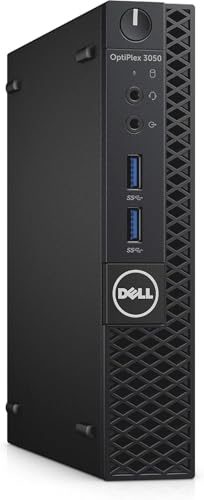
- Quad-core Intel Core i5-7500T processor
- 256GB SSD and Windows 11 Pro included
- Compact renewed business desktop with Wi-Fi and Ethernet
Best For: Basic office, education, and personal computing on a budget
Best Multitasking Configuration

- 16GB RAM and 512GB NVMe SSD included
- Triple 4K display support
- Wi-Fi 6 and Bluetooth 5.3 connectivity
Best For: Home office users who need generous memory and storage
Best Value for Dual Displays

- Intel N4500 with 8GB RAM and 256GB SSD
- Dual 4K HDMI display support
- Storage expansion up to 4TB
Best For: Home-office users needing dual monitors and expandable storage
Best for Multitasking

- Quad-core N5030 processor up to 3.1GHz
- 12GB RAM with 256GB SSD
- Dual 4K outputs and up to 4TB storage
Best For: Compact business and study setups with heavier everyday multitasking
Best Expandable Workstation – C4 SE Ryzen 5 Mini PC
For shoppers comparing budget mini desktop computers, the C4 SE stands out with a Ryzen 5 3500U processor, 8GB of RAM, and a 256GB SSD in a compact design. Its upgrade-friendly memory and storage options make it a practical choice for office work, study, browsing, and everyday multitasking.
Best For: Home offices, students, small businesses, and users who want a compact computer with room to expand.
Pros:
- Supports up to 32GB of memory through two SODIMM slots.
- Can drive up to three displays through HDMI, DisplayPort, and USB-C.
- Includes dual Gigabit Ethernet, Wi-Fi 5, and Bluetooth 5.0.
- Includes a VESA mount, HDMI cable, and 2-year quality guarantee.
Cons:
- Comes with 8GB of RAM and 256GB of storage, so heavier users may want to upgrade.
- Uses integrated Radeon Vega 8 graphics rather than a dedicated GPU.
The C4 SE is a well-rounded budget mini desktop computer for productive everyday use. Its triple-display support, dual LAN ports, and upgrade paths give it more flexibility than its small footprint suggests.
Best Refurbished Value – HP EliteDesk 800 G2 Mini PC
This renewed HP EliteDesk is a strong contender among budget mini desktop computers for buyers who prioritize memory and business-oriented hardware at a lower cost. It combines a quad-core Intel Core i5-6500T, 16GB of DDR4 RAM, a 240GB SSD, and Windows 11 Pro.
Best For: Education, basic business tasks, home-office work, and buyers comfortable with refurbished equipment.
Pros:
- Includes 16GB of DDR4 RAM and a 240GB SSD.
- Offers VGA and DisplayPort video outputs.
- Includes a USB keyboard and mouse.
- Certified refurbished, tested, cleaned, and backed by a minimum 90-day warranty.
Cons:
- Refurbished units may arrive in generic packaging.
- Uses an older sixth-generation Intel processor.
- The included storage is smaller than some newer mini PCs.
The EliteDesk 800 G2 makes sense when affordability and included accessories matter more than newer-generation hardware. Its 16GB memory configuration is useful for routine multitasking, while the renewed status helps keep the purchase budget-friendly.
Best Triple-Display Budget Pick – BOSGAME E4 Air Mini PC
The BOSGAME E4 Air is one of the more flexible budget mini desktop computers for users who want modern connectivity in a small enclosure. Its Ryzen 5 3500U processor, 8GB of DDR4 RAM, 256GB SATA SSD, and integrated Radeon Vega 8 graphics support everyday work, streaming, and multitasking.
Best For: Multi-monitor office setups, home entertainment, web browsing, and light productivity workloads.
Pros:
- Supports three displays through HDMI, DisplayPort, and USB-C.
- Provides dual Gigabit Ethernet, Wi-Fi 5, and Bluetooth 5.0.
- Supports Windows 11, Ubuntu, and Linux.
- Compact 1.2-pound design with dual storage slots supporting up to 4TB, excluding the included drive.
Cons:
- Includes only 8GB of RAM.
- Does not include a keyboard or mouse.
- Includes a 1-year whole-machine warranty rather than the longer parts coverage.
The E4 Air is a practical choice for buyers who value display flexibility and broad operating-system support. Its compact size and dual-network configuration also make it suitable for a home office or compact media setup.
Best Complete Refurbished Setup – Lenovo ThinkCentre M710q
The renewed Lenovo ThinkCentre M710q is a sensible option among budget mini desktop computers for buyers who want a ready-to-use business PC. It includes an Intel Core i5-6500T, 8GB of DDR4 RAM, a 256GB SSD, Windows 11 Pro, Wi-Fi, Bluetooth, and bundled keyboard and mouse.
Best For: Business tasks, home offices, and buyers who want a compact refurbished PC with the basic accessories included.
Pros:
- Includes a quad-core Intel Core i5-6500T processor.
- Provides six USB 3.1 Gen 1 ports plus HDMI and DisplayPort.
- Comes with Windows 11 Pro, a wired keyboard, mouse, and power adapter.
- Includes Wi-Fi, Bluetooth, and Ethernet connectivity.
Cons:
- Has 8GB of RAM with a listed maximum of 8GB.
- Renewed systems carry a 90-day warranty.
- Uses an older Intel processor and integrated graphics.
The M710q is appealing for straightforward office and business use where a keyboard and mouse save an additional purchase. Its small form factor and broad port selection make it easy to place in a compact workspace, though its limited listed memory ceiling reduces upgrade flexibility.
Best Upgrade-Friendly Pick – ACEMAGIC Ryzen 3 Pro Mini PC
For shoppers comparing budget mini desktop computers, the ACEMAGIC combines a compact design with a Ryzen 3 PRO 7330U processor, Windows 11 Pro, and useful room for future upgrades. Its 8GB of RAM and 256GB SSD suit everyday work, education, and general home use.
Best For: Buyers who want an affordable mini PC with expandable memory and storage.
Pros:
- Ryzen 3 PRO processor with 4 cores and 8 threads for everyday multitasking.
- Dual memory slots and dual drive bays support up to 32GB of RAM and up to 4TB of storage.
- Supports three 4K displays through HDMI, DisplayPort, and USB-C.
- Compact 128.2 × 128.2 × 41mm chassis includes a wall mount and Windows 11 Pro.
Cons:
- Only 8GB of RAM and 256GB of storage are included out of the box.
- Wi-Fi 5 and Bluetooth 4.2 are older than the wireless standards on some newer mini PCs.
The ACEMAGIC is a practical choice when upgrade flexibility matters as much as the starting price. It offers broad display support and a very small footprint, though buyers planning heavier multitasking may want to budget for memory or storage upgrades.
Best Refurbished Business Value – Dell OptiPlex 3050 Micro
Among budget mini desktop computers, this renewed Dell OptiPlex 3050 offers a familiar business-oriented platform at a potentially accessible price. The quad-core Intel Core i5-7500T, 8GB of DDR4 RAM, 256GB SSD, and Windows 11 Pro cover common office, education, and personal computing needs.
Best For: Basic office work, school tasks, web use, and buyers who prefer a recognizable refurbished business PC.
Pros:
- Compact Micro Form Factor fits discreetly into smaller workspaces.
- Quad-core Intel Core i5-7500T provides dependable everyday processing.
- 256GB SSD supports faster boot and application loading than a traditional hard drive.
- Includes Wi-Fi, Ethernet, USB 3.0, DisplayPort, and Windows 11 Pro.
Cons:
- Includes just 8GB of RAM and lists 8GB as the maximum supported memory.
- Display output is limited to DisplayPort, with a listed maximum resolution of 1920×1080.
- Renewed product has a 90-day warranty.
This Dell makes sense for straightforward productivity rather than demanding graphics or multi-display work. Its compact business-PC design and SSD are appealing, but the older platform, limited memory ceiling, and shorter warranty should be weighed against the purchase price.
Best Multitasking Configuration – Glorlin Ryzen 5 Mini PC
The Glorlin stands out among budget mini desktop computers by pairing a Ryzen 5 3501U with 16GB of RAM and a 512GB NVMe SSD. That configuration is well suited to home office work, browsing with many tabs, streaming, and general multitasking while keeping the system small and quiet.
Best For: Users who want more memory and storage from a ready-to-use mini PC for work, study, and media.
Pros:
- Ryzen 5 3501U offers 4 cores and 8 threads with speeds up to 3.7GHz.
- 16GB RAM and 512GB NVMe SSD provide a stronger starting configuration for multitasking.
- Supports three 4K displays through two HDMI ports and USB-C DisplayPort output.
- Includes Wi-Fi 6, Bluetooth 5.3, Windows 11 Pro, and six USB ports.
Cons:
- RAM is DDR4 and expandable only up to 32GB.
- The processor is designed for everyday computing rather than demanding workstation workloads.
With twice the included memory and storage of the other listed configurations, the Glorlin is an appealing all-around option for buyers who want less immediate upgrading. Its modern wireless connectivity and triple-display support add flexibility, while the Ryzen 5 platform remains best suited to everyday productivity and media use.
Best Value for Dual Displays – Bmax B3 Pro Mini PC
The Bmax B3 Pro is a practical choice among budget mini desktop computers for everyday work, browsing, streaming, and home-office tasks. Its Intel N4500 processor, 8GB of RAM, 256GB SSD, Windows 11 Pro, and compact design provide a capable starting point without the bulk of a traditional desktop.
Best For: Home-office users, students, and shoppers who want dual-4K display support and flexible storage expansion.
Pros:
- Supports two 4K@60Hz HDMI displays.
- Includes 8GB RAM and a 256GB M.2 SSD.
- Dual M.2 design supports storage expansion up to 4TB.
- Offers Wi-Fi 5, Bluetooth 5.0, Gigabit Ethernet, and Windows 11 Pro.
Cons:
- The N4500 is intended for routine computing rather than demanding workloads.
- RAM is listed as limited to 8GB.
Choose the B3 Pro when connectivity, dual-monitor productivity, and future storage flexibility matter more than high-end processing power. Its 1-year warranty and compact footprint add practical value for basic home and office setups.
Best for Multitasking – KAMRUI AK1PLUS N5030 Mini PC
The KAMRUI AK1PLUS stands out among budget mini desktop computers for users who want more memory and broad expansion options. Its quad-core Intel N5030 processor, 12GB LPDDR4 RAM, 256GB SSD, and dual-4K output suit everyday office work, online classes, video calls, and light multitasking.
Best For: Business users, students, and home offices that need extra RAM, multiple displays, and plentiful ports.
Pros:
- Quad-core N5030 processor reaches up to 3.1GHz.
- Includes 12GB RAM and a 256GB M.2 SSD.
- Supports two 4K@60Hz displays.
- Offers four USB 3.2 ports and storage expansion up to 4TB total.
Cons:
- Windows 10 Pro is installed rather than Windows 11.
- Designed for everyday computing, not demanding gaming or professional workloads.
The AK1PLUS is a strong fit if smoother multitasking and expandability are priorities. Its extra memory, dual-display support, and options for both M.2 and 2.5-inch storage make it particularly practical for small offices and compact workstations.
Best Ultra-Compact Option – Bmax B1 Plus Mini PC
The Bmax B1 Plus is one of the smallest budget mini desktop computers in this group, making it well suited to basic home, study, and office use. It combines an Intel J3355 processor, 6GB RAM, 128GB onboard storage, Windows 11 Home, and dual-HDMI output in a palm-sized enclosure.
Best For: Basic browsing, document work, study, media playback, and space-constrained desks.
Pros:
- Very compact 4.2-by-4.1-by-1.4-inch design weighing 0.49 pounds.
- Supports dual 4K@60Hz HDMI displays.
- Dual M.2 slots allow storage expansion up to 2TB.
- Includes a VESA bracket and quiet smart-fan cooling system.
Cons:
- 6GB RAM and 128GB onboard storage are modest starting specifications.
- The J3355 is suited to basic tasks rather than demanding applications.
The B1 Plus makes the most sense when minimizing desk clutter and keeping costs controlled are the main goals. The included VESA bracket, dual-display capability, and storage expansion help offset its modest memory and processor specifications.
How We Picked These Budget Mini Desktop Computers
We compared the selected mini PCs by processor capability, memory, storage, connectivity, operating system, display support, upgrade potential, and overall value. The list includes refurbished business-class systems as well as newer compact computers, so buyers can choose between proven office hardware and more modern features.
Because specifications vary considerably, we focused on practical use rather than headline speed alone. RAM capacity, SSD type, available ports, wireless standards, and support for additional storage can make a noticeable difference in daily use.
Quick Comparison
- Best for affordable general use: Ryzen 5 models such as the C4 SE and BOSGAME E4 Air offer a useful balance of multitasking performance and low cost.
- Best for business setups: The HP EliteDesk, Lenovo ThinkCentre, and Dell OptiPlex provide familiar business-oriented designs and Windows Pro configurations.
- Best for newer hardware: The ACEMAGIC model pairs a newer Ryzen 3 PRO processor with Windows 11 Pro.
- Best for compact, low-demand tasks: Bmax and KAMRUI systems suit browsing, documents, media playback, and basic home-server duties.
- Best for memory and storage: The Glorlin model stands out with 16GB of RAM and a 512GB NVMe SSD.
Key Buying Factors for Budget Mini Desktop Computers
Processor and Everyday Performance
For office work, browsing, video calls, and light multitasking, a modern Ryzen 5 or Core i5 system is generally the most comfortable choice. Celeron and older Intel chips can save money, but they are better suited to lighter workloads and fewer simultaneous applications.
RAM and Storage
Choose at least 8GB of RAM for everyday Windows use; 12GB or 16GB provides more room for multitasking. An SSD is essential for responsive startup and application loading. Check whether the computer uses SATA or NVMe storage and whether its expansion slot supports the capacity you need.
Ports, Displays, and Networking
Review the exact port selection before buying. HDMI, DisplayPort, or VGA support determines which monitors you can connect, while dual- or triple-display support is useful for productivity. Gigabit Ethernet, Wi-Fi 5 or Wi-Fi 6, and Bluetooth can also affect how easily the mini PC fits into your setup.
Operating System and Condition
Refurbished business PCs can offer excellent value, but confirm the seller’s warranty, cosmetic condition, included accessories, and Windows license. Newer models may provide longer feature support, while refurbished systems often have sturdier business-grade construction.
Who Should Buy Which Budget Mini Desktop Computers?
Choose a Ryzen 5 model if you want balanced performance for work, entertainment, and heavier multitasking. Pick a refurbished HP, Lenovo, or Dell if reliability, Windows Pro, and business connectivity matter more than having the newest platform. A newer Ryzen 3 PRO system is a sensible middle ground for buyers who want current hardware at a moderate price.
For basic browsing, documents, streaming, or a simple secondary computer, an Intel N-series, Celeron, or Pentium-class mini PC may be sufficient. Buyers planning to store large media libraries or run several applications should prioritize 16GB of RAM, a larger SSD, and clearly documented upgrade support.