A well-built monitor riser can improve viewing comfort while creating valuable storage space beneath your display. For busy offices, studios, and home workstations, the right stand should balance load capacity, surface width, stability, and organization.
We’ve selected 10 commercial-grade desktop monitor risers in several useful formats, from compact aluminum and steel shelves to extra-long wood-and-metal platforms for dual displays, printers, laptops, and accessories.
Best 10 Commercial-Grade Desktop Monitor Risers Picks for 2026
Best Aluminum Pick
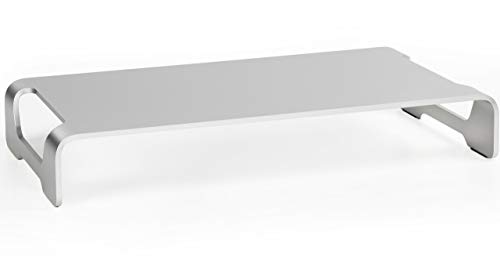
- 44-pound aluminum load capacity
- Anti-slip silicone padding
- No assembly required
Best For: Minimalist desks needing a sturdy, low-profile riser
Best Ventilated Shelf

- Perforated steel shelf improves airflow
- Raises displays 3.94 inches
- 44-pound capacity with storage below
Best For: Desks needing steel support and ventilation for laptops or monitors
Best Large Platform
Monoprice Clear Glass Monitor Stand

- 30.8-by-11-inch glass shelf
- 80-pound maximum capacity
- Polished clear-glass design
Best For: Wide desks needing a spacious, high-capacity platform
Best Adjustable Two-Pack

- Two stands for separate or stacked use
- 3 3/8- and 6 3/4-inch height options
- 80-pound capacity
Best For: Multi-monitor and gaming setups needing flexible configurations
Rustic Dual-Display Workhorse
WESTREE Dual Monitor Stand Riser

- Supports two monitors with a 68 kg listed capacity
- Steel legs and anti-slip pads promote stability
- Under-stand storage helps organize the desk
Best For: Dual-monitor productivity setups needing strong support and storage
Wide Black Workspace Riser
Simple Trending 38-inch Monitor Stand

- 38-inch surface fits two monitors and peripherals
- 150-pound listed load capacity supports heavy equipment
- Suction cups help limit sliding and wobbling
Best For: Wide desks with dual monitors, gaming gear, or extra devices
Extra-Long Multi-Screen Platform

- 55-inch top spans wide desks and multi-screen setups
- Steel footing supports a 44-pound listed capacity
- Silicone padding helps protect tabletops and prevent slipping
Best For: Extra-wide desks with multiple displays and accessories
Wide Workspace Pick
YAOHUOO 39-Inch Dual Monitor Riser

- 38.6-inch surface for two monitors
- Supports up to 100 pounds
- Under-shelf storage for accessories
Best For: Wide dual-monitor workstations
Heavy-Duty Value
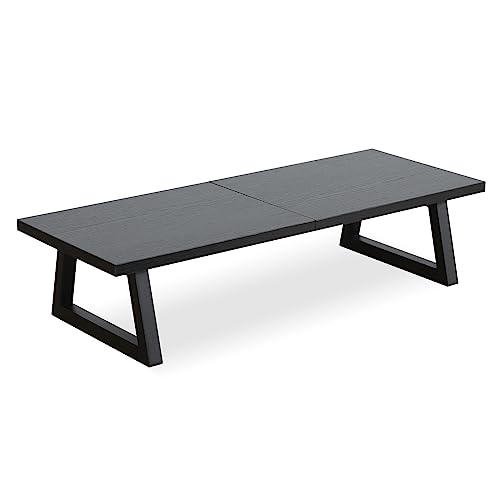
- Supports up to 150 pounds
- Steel frame with MDF top
- 4.5-inch storage clearance
Best For: Strong, compact office setups
Organization-Focused Pick

- Drawer and two pen holders
- Extends to 39 inches wide
- No installation required
Best For: Organized dual-monitor workspaces
Best Aluminum Pick – Silver 16-Inch Monitor Riser
For shoppers comparing commercial-grade desktop monitor risers, the VIVO STAND-V000H offers a sleek aluminum platform with a 44-pound load capacity. Its 16-inch width, low-profile design, and ready-to-use construction make it a practical way to raise a monitor while reclaiming desk space.
Best For: Minimalist workstations that need a sturdy, portable monitor platform without assembly.
Pros:
- Supports up to 44 pounds with a sturdy aluminum frame.
- Anti-slip silicone padding helps protect the desktop and keep the stand in place.
- Provides space underneath for a keyboard and mouse.
- Requires no assembly and includes a 3-year warranty.
Cons:
- The single-level, 16-inch-wide platform may not suit larger multi-monitor setups.
- Its low-profile design provides less elevation than taller risers.
This is a strong choice when you want clean styling, dependable support, and quick setup. Choose it over a taller shelf-style riser if a modest lift and under-stand storage are enough for your workspace.
Best Ventilated Shelf – HUANUO Steel Monitor Riser
Among commercial-grade desktop monitor risers, the HUANUO HNLL2 stands out for its powder-coated steel shelf and perforated design. It raises a screen by 3.94 inches while creating room underneath for a keyboard, papers, cables, or other desk accessories.
Best For: Home offices that need a ventilated, steel monitor or laptop shelf with under-platform storage.
Pros:
- Steel construction supports up to 44 pounds without wobble.
- Perforated shelf promotes airflow around laptops and other equipment.
- Non-slip legs help stabilize the stand and protect furniture.
- Assembles in about two minutes and includes a 5-year warranty.
Cons:
- Requires basic assembly.
- The 14.57-inch width may limit space for especially large equipment.
With its steel build, useful ventilation, and generous under-shelf storage, this model balances ergonomic lift with practical organization. It is especially versatile for monitors, laptops, printers, and similar equipment.
Best Large Platform – Monoprice Clear Glass Monitor Stand
For commercial-grade desktop monitor risers that prioritize surface area, the Monoprice 116356 provides a broad 30.8-by-11-inch polished glass shelf. It can raise a monitor or create an additional platform for laptops, home audio equipment, and other items, with an 80-pound maximum capacity.
Best For: Wide desks that need a large, polished shelf for monitors or additional equipment.
Pros:
- Large 30.8-by-11-inch surface accommodates substantial equipment.
- Supports up to 80 pounds.
- Clear 8mm glass complements varied décor.
- Can function as an extra shelf or monitor riser.
Cons:
- The glass-and-metal construction weighs 11.4 pounds.
- Its large footprint may be excessive for compact desks.
- The supplied notes do not specify an ergonomic lift height.
This model is best when platform size and high weight capacity matter more than portability. Its clear glass surface gives a more furniture-like appearance while providing substantial room for equipment.
Best Adjustable Two-Pack – TEAMIX Wood Monitor Risers
For flexible commercial-grade desktop monitor risers, the TEAMIX two-pack can be used separately for two displays or stacked into a two-tier setup. Each engineered-wood stand supports up to 80 pounds, while the two configurations provide either 3 3/8 or 6 3/4 inches of height.
Best For: Multi-monitor, gaming, or home-office setups that benefit from separate or stacked risers.
Pros:
- Two stands can be used side by side or stacked.
- Offers 3 3/8-inch and 6 3/4-inch height configurations.
- Supports up to 80 pounds.
- Designed to hold monitors, laptops, printers, or a game box.
Cons:
- Requires assembly.
- Engineered wood may not provide the same finish or feel as metal or aluminum.
- The 14-inch-wide individual platform may limit larger devices.
This two-pack is a practical value for users who want configuration flexibility rather than a fixed single platform. Stack the pieces for extra height or separate them to support two devices at once.
Rustic Dual-Display Workhorse – WESTREE Dual Monitor Stand Riser
For shoppers comparing commercial-grade desktop monitor risers, the WESTREE stands out as a sturdy dual-monitor option with thick steel legs, a rustic wood-finish top, and useful under-stand storage. Its 68 kg listed load capacity also gives it flexibility for printers, laptops, or other desktop equipment.
Best For: Dual-monitor workstations that need strong support, ergonomic lift, and extra desktop organization.
Pros:
- Designed to hold two monitors and supports a listed 68 kg load capacity.
- Thick alloy-steel legs and optional anti-slip pads help keep the stand stable.
- Creates storage space underneath for office supplies and accessories.
- Includes pre-drilled parts, hardware, and instructions for straightforward assembly.
Cons:
- The rustic brown finish may not suit minimalist or modern desk setups.
- At 35.8 inches wide, it may provide less span than extra-long alternatives.
The WESTREE is a practical choice when stability and storage matter more than a streamlined appearance. Its ergonomic height and dual-monitor layout make it especially useful for productivity desks.
Wide Black Workspace Riser – Simple Trending 38-inch Monitor Stand
This 38-inch Simple Trending model is a strong contender among commercial-grade desktop monitor risers for users who want broad workspace coverage. Its 38 x 10.25-inch surface accommodates two monitors or larger equipment, while the wood construction and 150-pound listed capacity support demanding desk setups.
Best For: Wide desks, dual-monitor arrangements, and work or gaming setups that need room for peripherals.
Pros:
- The 38-inch-wide surface can hold two monitors, a keyboard, or devices such as a printer or Xbox console.
- Supports up to 150 pounds according to the supplied specifications.
- Non-slip suction cups help reduce sliding and wobbling during typing or gaming.
- Includes step-by-step instructions and an installation video for quick assembly.
Cons:
- The black wood design may show dust or fingerprints more readily than lighter finishes.
- Its 5-inch height and 10.25-inch depth should be checked against available desk and monitor space.
Choose this riser when surface width is the priority. It offers a generous platform and high listed load capacity, making it well suited to crowded desks with multiple devices.
Extra-Long Multi-Screen Platform – VIVO 55-inch Desktop Riser
For especially wide workstations, the VIVO STAND-V000D5 offers one of the longest formats among these commercial-grade desktop monitor risers. Its 55-inch engineered-wood top spans the desk for multiple screens or accessories, while solid steel footing and a 44-pound capacity provide support in a slim, organized design.
Best For: Extra-wide desks with multiple displays, keyboards, laptops, or a TV that need a continuous raised platform.
Pros:
- The 55-inch desktop provides extensive room for multi-screen setups and accessories.
- Solid steel footing supports an ergonomic viewing position and a listed 44-pound load.
- The raised platform creates a second storage tier beneath the displays.
- Anti-slip silicone padding protects the tabletop and helps maintain stable footing.
Cons:
- The 55-inch length requires substantial desk space and may be excessive for compact workstations.
- Its 44-pound capacity is lower than the listed capacities of the other two options.
- The four-section assembly may require more setup than a single-piece riser.
The VIVO is the most suitable pick when maximum width and a clean multi-screen layout are the main goals. Measure the desk first, and keep the lower listed capacity in mind when planning heavier equipment.
Wide Workspace Pick – YAOHUOO 39-Inch Dual Monitor Riser
If you need commercial-grade desktop monitor risers for a multi-screen setup, the YAOHUOO offers a broad 38.6-inch surface for two monitors, a laptop, or even a TV. Its steel legs and 100-pound capacity make it a practical choice for heavier desktop equipment.
Best For: Dual-monitor workstations that need a wide riser and substantial weight support.
Pros:
- 38.6-inch-wide surface accommodates two monitors or other equipment.
- Supports up to 100 pounds with heavy-duty steel legs.
- Creates storage space underneath for a keyboard and accessories.
- Includes non-slip leg pads and assembly tools.
Cons:
- Its large footprint may not suit smaller desks.
- Assembly is required.
- The white finish may not match every workspace.
The YAOHUOO stands out when width and load capacity matter most. It is less suited to compact desks, but it provides a stable, organized platform for a substantial multi-device setup.
Heavy-Duty Value – TEAMIX 24-Inch Monitor Riser
The TEAMIX is a compact option among commercial-grade desktop monitor risers, combining an MDF top with thickened steel legs. Its 150-pound capacity provides substantial support, while the 23.6-inch width fits a monitor, laptop, or docking station.
Best For: Home or office desks needing strong support, cable organization, and under-shelf storage in a moderate footprint.
Pros:
- 150-pound load capacity is the highest among these options.
- Steel frame and MDF surface provide stable support.
- 4.5-inch clearance stores keyboards, cords, and office supplies.
- Works as a monitor, laptop, printer, or TV stand.
Cons:
- Assembly is required.
- The 23.6-inch surface may be limiting for two larger monitors.
- Its black MDF-and-steel design may not suit every décor.
Choose the TEAMIX if load capacity is your priority but you do not need an extra-wide riser. The built-in clearance and cable-management potential also make it useful for organized everyday workspaces.
Organization-Focused Pick – OPNICE Dual Monitor Riser
The OPNICE combines a dual-monitor riser with built-in organization, making it one of the more feature-focused commercial-grade desktop monitor risers for cluttered workspaces. A drawer and two hanging pen holders keep small supplies accessible, while the design can extend to 39 inches for two monitors.
Best For: Users who want dual-monitor elevation plus dedicated storage for pens, office supplies, and desktop accessories.
Pros:
- Drawer and two pen holders provide built-in desk organization.
- Extends to 39 inches wide for two monitors.
- Raises screens by 3.78 inches to support a more comfortable viewing position.
- Arrives ready to use with no installation required.
Cons:
- The supplied notes do not specify a load-capacity rating.
- Its storage-focused design may be more than needed for a single-monitor setup.
- The combination of metal and plastic may not feel as substantial as a wood-and-steel riser.
The OPNICE is the strongest fit for organization-minded users who want more than a simple platform. Its extendable width and ready-to-use design make it convenient for dual-monitor desks, while the unspecified weight rating warrants checking compatibility with your equipment.
How We Picked the Best Commercial-Grade Desktop Monitor Risers
We focused on stands that offer practical value for demanding desktop setups rather than choosing products based on appearance alone. Our selection considers construction materials, usable surface area, support for one or more screens, storage underneath, and compatibility with common office equipment.
Because “commercial-grade” can describe different use cases, the roundup includes compact single-monitor stands, reinforced shelves, dual-monitor platforms, and extra-long risers. We also considered features such as ventilation, drawers, pen holders, cable clearance, and surfaces large enough for laptops or printers.
Quick Comparison
- Best for compact desks: A 16-inch aluminum riser or a small steel-shelf design.
- Best for dual monitors: A 38- or 39-inch wood-and-steel platform.
- Best for large setups: A 55-inch extra-long riser for multiple screens and accessories.
- Best for organization: A model with drawers, pen holders, or open storage beneath the shelf.
- Best for a modern workspace: Clear glass or streamlined aluminum construction.
Key Buying Factors for Commercial-Grade Desktop Monitor Risers
Width, Depth, and Weight Capacity
Measure your monitor bases before ordering. A riser should provide enough depth for stable placement without hanging over the desk edge. For two displays, leave room for both stands and allow extra width for a laptop, speakers, or accessories. Check the manufacturer’s weight rating and include the weight of every item placed on the platform.
Construction and Stability
Steel and wood-and-steel designs generally suit heavier equipment and frequent office use. Aluminum is lighter and easier to move, while glass offers a clean appearance but may require more care. Look for broad support points, non-slip feet, and a rigid platform that does not flex under load.
Ergonomics and Storage
The ideal height depends on your chair, desk, and monitor size. Your primary screen should sit near eye level when you are seated comfortably. Open space below the riser can hold a keyboard, laptop, or documents; drawers and organizers are useful when reducing desktop clutter is a priority.
Ventilation and Everyday Practicality
Vented shelves are helpful when a laptop, docking station, or other heat-producing equipment will sit underneath or on the riser. Also check for smooth edges, easy assembly, accessible ports, and enough clearance for cables.
Who Should Buy Which Commercial-Grade Desktop Monitor Risers?
Choose a compact aluminum or steel riser for a small desk or single monitor. Pick a 24-inch option when you want extra room for a keyboard or laptop without committing to a full-width platform. Dual-monitor users should prioritize 38- or 39-inch models, while large multi-screen workstations will benefit from the 55-inch design. If desk clutter is the main issue, select a model with drawers, pen storage, or a shelf that keeps frequently used equipment within reach.