The best OLED televisions for content creators combine deep contrast, wide color, sharp 4K detail, and responsive smart features for editing, reviewing, and presenting video. The right display can also double as a comfortable entertainment screen after the workday.
This roundup compares 10 OLED models across premium QD-OLED, OLED evo, compact, large-format, and newer 2026 options. Use the guide below to match panel performance, inputs, size, and workflow needs with your budget and room.
Best 10 OLED Televisions for Content Creators Picks for 2026
Large-Format Flagship

- 77-inch canvas for immersive content review
- Brightness Booster Max for luminous detail
- Glare-free performance and Filmmaker Mode
Best For: Creators building a large, wall-mounted viewing and presentation setup
Studio-Focused Color

- QD-OLED panel with XR Triluminos Max
- Studio-calibrated modes for select services
- Matte finish and broad HDR format support
Best For: Creators prioritizing cinematic color and calibrated streaming playback
Versatile Creator Workhorse

- Bright 65-inch self-lit OLED display
- Filmmaker Mode and Dolby Vision support
- Up to 144Hz with 0.1ms response time
Best For: Creators wanting one display for review, streaming, and gaming
Large-Screen AI Pick

- 77-inch 4K OLED display
- NQ4 AI Gen3 upscaling processor
- 4K 144Hz VRR gaming support
Best For: Creators needing a spacious display for video review, gaming, and entertainment
Compact Reference Choice

- Compact 48-inch 4K OLED panel
- Cognitive Processor XR with OLED Contrast Pro
- Dolby Vision and HDMI 2.1 gaming features
Best For: Space-conscious creators reviewing footage, movies, and console games
Glare-Free Brightness Pick

- Glare Free OLED HDR+ display
- Listed 2,000-nit maximum brightness
- 165Hz gaming with G-SYNC or FreeSync Premium Pro
Best For: Creators working in bright rooms who want a large, reflection-resistant screen
Best All-Around Creator Pick

- Self-lit OLED pixels with 100% Color Volume and Fidelity
- 144Hz refresh rate, 0.1ms response time, and four HDMI 2.1 ports
- Filmmaker Mode, Dolby Vision, and five years of webOS updates
Best For: Creators needing a versatile OLED for editing, viewing, and gaming
Best Bundle for New Setups

- OLED, Brightness Booster, and AI-powered 4K upscaling
- Up to 165Hz with 0.1ms response time and VRR support
- Includes protection plan, two HDMI cables, and setup guide
Best For: Creators assembling a compact workstation with included extras
Best Large-Screen 2026 Model
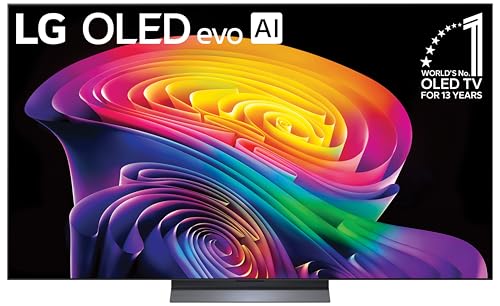
- 65-inch OLED with over 8.3 million self-lit pixels
- Up to 165Hz, 0.1ms response time, and VRR technologies
- Four HDMI 2.1 inputs for PCs, consoles, and other devices
Best For: Creators wanting a spacious OLED for footage review and connected workflows
Bright-Room Powerhouse – Samsung S95F 65-Inch OLED
For content creators seeking OLED televisions for content creators, the Samsung S95F emphasizes bright, detailed 4K playback and reduced reflections. Its glare-free display, HDR-focused processing, and high refresh rate make it a versatile choice for reviewing video, streaming, and gaming in varied lighting.
Best For: Creators working in bright rooms who also want fast gaming performance.
Pros:
- Glare-free screen helps limit distracting reflections.
- NQ4 AI Gen3 Processor uses 128 neural networks for 4K upscaling and picture optimization.
- Supports VRR gaming up to 4K 165Hz.
- OLED pixels provide pitch-black contrast with bright highlights.
Cons:
- Its 65-inch size may be excessive for smaller editing spaces.
- Samsung’s listed HDR support is HDR10+, without Dolby Vision listed in the supplied details.
The S95F is especially compelling when ambient light and motion performance matter. Creators should consider whether its bright-room strengths and Samsung-focused HDR format fit their production and playback workflow.
Large-Format Flagship – LG G5 77-Inch OLED evo
The LG G5 is a large OLED option for content creators who want a spacious 77-inch canvas for evaluating footage and enjoying films. Brightness Booster Max, glare-reduction certification, creator-oriented picture modes, and AI processing support both visual review and everyday viewing.
Best For: Creators who want a cinematic, wall-mounted display for detailed content review.
Pros:
- 77-inch screen provides ample space for viewing creative work.
- Brightness Booster Max and self-lit pixels support bright highlights and deep blacks.
- UL-verified Discomfort Glare Free performance is designed for bright rooms.
- Filmmaker Mode and Dolby Vision help present compatible content as intended.
Cons:
- The large 77-inch format requires substantial wall or room space.
- Its listed refresh rate is 120Hz, lower than some faster gaming-focused alternatives.
Choose the G5 when screen size and bright-room usability outweigh compactness. Its creator-friendly modes and strong processing make it suitable for presentation and review, while the one-wall design favors a dedicated installation.
Studio-Focused Color – Sony BRAVIA 8 II QD-OLED
Sony’s BRAVIA 8 II combines a QD-OLED panel with studio-calibrated picture modes, making it a strong candidate among OLED televisions for content creators who prioritize color presentation. XR processing, a matte screen finish, and support for major HDR formats add flexibility for both review and entertainment.
Best For: Creators who value studio-oriented viewing modes and broad cinematic format support.
Pros:
- QD-OLED technology and XR Triluminos Max deliver billions of stated real-world colors.
- Studio-calibrated modes target Netflix, Prime Video, and Sony Pictures Core content.
- Matte screen finish can help reduce the impact of reflections.
- Supports Dolby Vision, HDR10, HLG, IMAX Enhanced, and DTS:X.
Cons:
- The 120Hz refresh rate is less ambitious than higher-refresh gaming models.
- At 65 inches, it offers less workspace than the 77-inch LG G5.
The BRAVIA 8 II is a sensible fit for creators who want a polished, cinema-oriented reference experience without moving to a professional monitor. Its calibrated modes are particularly useful for checking how supported streaming content is intended to look.
Versatile Creator Workhorse – LG C5 65-Inch OLED evo
The LG C5 offers a balanced feature set for content creators who want OLED televisions for content creators without stepping up to an especially large display. Its self-lit pixels, Brightness Booster, AI processing, Dolby Vision, and creator-friendly Filmmaker Mode support editing-room review, streaming, and gaming.
Best For: Creators seeking a versatile 65-inch OLED for mixed production, viewing, and gaming.
Pros:
- Brightness Booster and self-lit pixels deliver bright detail and deep blacks.
- Filmmaker Mode and Dolby Vision support cinematic content review.
- 0.1ms response time, VRR, and up to 144Hz refresh support fast gaming.
- Four HDMI 2.1 inputs accommodate multiple modern devices.
Cons:
- Its 65-inch size provides less viewing area than the 77-inch G5.
- The supplied details identify a glossy screen finish, which may show reflections more readily than a matte display.
The C5 is the most balanced pick in this group for a creator who wants one display to handle content review, streaming, and gaming. Its feature mix is broad, though workspace lighting should be considered because of the glossy finish.
Large-Screen AI Pick – Samsung S90F 77-Inch OLED
For creators who need a large canvas for reviewing footage, this Samsung S90F is a compelling choice among OLED televisions for content creators. Its 77-inch 4K OLED display, NQ4 AI Gen3 processing, HDR10+ support, and 144Hz refresh rate are suited to detailed playback, editing-room monitoring, and smooth motion.
Best For: Content creators who want a large OLED screen for video review, entertainment, and high-refresh-rate gaming.
Pros:
- 77-inch 4K OLED panel delivers a spacious viewing area.
- NQ4 AI Gen3 processor uses 128 neural networks for 4K upscaling and picture enhancement.
- Supports up to 4K 144Hz VRR gaming with Motion Xcelerator 144Hz.
- HDR-like remastering can enhance compatible SDR content.
Cons:
- The 77-inch size requires substantial room and placement space.
- The supplied specifications list HDR10+ but do not mention Dolby Vision support.
This is a strong all-around option when screen size and processing matter most. It is especially practical for creators who also use their display for gaming and general entertainment, though buyers should confirm their preferred HDR format is supported.
Compact Reference Choice – Sony A90K 48-Inch OLED
The Sony A90K is a compact option among OLED televisions for content creators who work in smaller studios or desktop-adjacent setups. Its 48-inch 4K OLED panel combines XR processing, OLED Contrast Pro, Dolby Vision, and a 120Hz refresh rate for detailed viewing and smooth motion.
Best For: Creators with limited space who want a smaller OLED display for footage review, streaming, and console gaming.
Pros:
- 48-inch 4K OLED format fits more compact rooms and workspaces.
- Cognitive Processor XR and XR OLED Contrast Pro target deep blacks, contrast, and natural color.
- Supports Dolby Vision, 4K/120, VRR, and ALLM through HDMI 2.1 features.
- Acoustic Surface Audio+ produces sound from the screen and includes a built-in subwoofer.
Cons:
- The 48-inch screen provides less workspace than the 77-inch alternatives.
- Its 120Hz refresh rate is lower than the Samsung S90F’s listed 144Hz rate.
Choose the A90K when space, Dolby Vision support, and Sony’s processing are higher priorities than maximum screen size. It offers a well-rounded feature set for creators who need one display for visual work, movies, and gaming.
Glare-Free Brightness Pick – Samsung S90H 77-Inch OLED
The Samsung S90H is a forward-looking choice among OLED televisions for content creators, pairing a 77-inch 4K OLED display with OLED HDR+, Glare Free technology, and AI-based picture enhancement. Its listed 2,000-nit maximum brightness and 165Hz Motion Xcelerator support make it particularly appealing for bright rooms and fast-moving content.
Best For: Creators who want a large, bright, reflection-resistant OLED for reviewing video, gaming, and everyday viewing.
Pros:
- Glare Free technology is designed to reduce distracting reflections.
- Listed maximum brightness reaches 2,000 nits, with OLED HDR+ support.
- NQ4 AI Gen3 processing provides 4K AI upscaling and picture enhancement.
- Motion Xcelerator 165Hz works with NVIDIA G-SYNC or AMD FreeSync Premium Pro.
Cons:
- The 77-inch screen may be too large for smaller editing spaces.
- The supplied details list HDR10+ but do not mention Dolby Vision.
This model stands out for creators working in rooms where reflections can interfere with screen evaluation. Its large panel, high listed brightness, and advanced gaming features make it versatile, while buyers who require Dolby Vision should verify compatibility before purchasing.
Best All-Around Creator Pick – LG C4 OLED evo 65-Inch
For content creators seeking OLED televisions for content creators, the LG C4 combines self-lit pixel contrast, accurate color, and strong connectivity in a versatile 65-inch display. Its 4K resolution, Dolby Vision support, and 144Hz refresh rate suit both video review and responsive desktop or gaming use.
Best For: Creators who want a large, color-focused OLED for editing, reviewing footage, entertainment, and occasional gaming.
Pros:
- Over 8 million self-lit pixels with 100% Color Volume and Color Fidelity.
- Brightness Booster and a9 AI Processor Gen7 support detailed 4K images.
- Four HDMI 2.1 inputs, 144Hz refresh rate, 0.1ms response time, and VRR support.
- Filmmaker Mode, Dolby Vision, Dolby Atmos, and five years of webOS updates.
Cons:
- The 65-inch size may be excessive for smaller editing desks or rooms.
- Annual energy consumption is listed at 269 kWh.
The C4 is a well-rounded option when creators need accurate-looking images, smooth motion, and flexible device support without giving up premium smart-TV features.
Best Bundle for New Setups – LG C6 OLED evo AI 55-Inch
The 55-inch LG C6 is a practical choice for content creators building a new workstation or media setup. This bundle pairs OLED contrast and AI-enhanced 4K processing with an extra year of protection, two HDMI cables, and a setup guide.
Best For: Creators who value included setup accessories and extended coverage alongside a compact premium OLED.
Pros:
- Over 8.3 million self-lit pixels, Brightness Booster, and AI Picture Pro upscaling.
- Dolby Vision, Dolby Atmos, and Filmmaker Mode with Ambient Light Technology.
- Up to 165Hz refresh rate, 0.1ms response time, G-Sync, FreeSync Premium, and VRR.
- Includes a one-year Deco Essentials protection plan, two HDMI cables, and a guidebook.
Cons:
- The supplied details list a 120Hz display refresh rate despite the advertised 165Hz capability.
- A 55-inch screen provides less workspace than the 65-inch alternatives.
This bundle stands out for creators who want a straightforward start, combining a capable OLED display with useful accessories and additional protection in the box.
Best Large-Screen 2026 Model – LG C6 OLED evo AI 65-Inch
For creators who prefer a larger canvas, this 65-inch LG C6 delivers OLED contrast, AI-assisted image processing, and four HDMI 2.1 inputs. It is suited to reviewing detailed 4K footage, monitoring a connected computer, and switching between creative work and entertainment.
Best For: Video creators who want a spacious 65-inch OLED with modern PC and console connectivity.
Pros:
- Over 8.3 million self-lit pixels provide infinite contrast and advanced black levels.
- Alpha 11 AI Processor Gen3, Brightness Booster, and AI Super Upscaling enhance image processing.
- Up to 165Hz support, 0.1ms response time, G-Sync, FreeSync Premium, and VRR.
- Four HDMI 2.1 ports support native 120Hz and variable refresh rates up to 165Hz.
Cons:
- The supplied specifications list a 120Hz display refresh rate, while product features advertise up to 165Hz.
- The larger 65-inch footprint may require substantial desk or wall space.
- Annual energy consumption is listed at 286 kWh.
The C6 65-inch is a strong fit when screen area and connection flexibility matter most, especially for creators who also use a PC or gaming console.
How We Picked These OLED Televisions for Content Creators
We selected models that offer a useful combination of OLED contrast, 4K resolution, color performance, motion handling, smart-TV usability, and creator-friendly connectivity. The lineup includes premium QD-OLED televisions, LG OLED evo models, compact displays for smaller studios, and large screens suited to collaborative review sessions.
We also considered practical differences such as refresh rate, HDR format support, upscaling, glare control, processor features, available screen sizes, and the age of each model. Features can vary by region and firmware, so verify specifications and input support before buying.
Quick Comparison
| Best For | Models to Consider | Why They Stand Out |
|---|---|---|
| Premium color and bright-room viewing | Samsung S95F, Sony BRAVIA 8 II | QD-OLED performance, strong processing, and advanced HDR presentation |
| All-around editing and entertainment | LG C5, LG C6, LG C4 | Balanced OLED picture quality, smart features, and broad size availability |
| Large-format review work | LG G5, Samsung S90F, Samsung S90H | Large 77-inch screens for timelines, client review, and group viewing |
| Small rooms or secondary workstations | Sony A90K 48-inch | Compact OLED size with high contrast and 4K detail |
Key Buying Factors for OLED Televisions for Content Creators
Color and HDR
Look for accurate picture modes, broad color coverage, and support for the HDR formats used by your workflow. OLED’s pixel-level control makes shadow detail and contrast especially useful when checking dark scenes, but calibrate the television if color-critical delivery is involved. Avoid judging final color solely by vivid showroom modes.
Inputs, Refresh Rate, and Computer Use
Check the number and location of HDMI inputs, supported bandwidth, variable refresh rate, and high-refresh PC compatibility. A 120Hz-or-higher panel can make scrubbing, previews, and gaming feel smoother, while low input lag benefits interactive work. Confirm that your computer or production system can output the desired 4K resolution and refresh rate.
Size, Brightness, and Glare
Choose a screen size based on viewing distance and timeline layout rather than simply choosing the largest model. Glare control matters in daylight studios, while OLED brightness varies by picture mode, window size, and content. Direct sunlight can still affect any glossy display.
Burn-In and Long Editing Sessions
OLED televisions include protective features such as pixel shifting and panel maintenance, but static interfaces can still create long-term image-retention risk. Use screen savers, vary displayed content, hide fixed elements when practical, and consider an LCD reference monitor for uninterrupted static desktop work.
Who Should Buy Which OLED Televisions for Content Creators?
- Choose the Samsung S95F or Sony BRAVIA 8 II if premium HDR impact, rich color, and advanced processing are your top priorities.
- Choose an LG C5 or C6 for a versatile creator-and-home-theater display with strong gaming and smart-TV support.
- Choose the LG G5 when a 77-inch premium screen and wall-oriented design suit a larger studio or review room.
- Choose a Samsung S90F or S90H for large-screen OLED viewing with high-refresh-rate features and a broad entertainment focus.
- Choose the Sony A90K 48-inch for a compact editing station, bedroom studio, or secondary reference screen.
- Choose the LG C4 if an earlier-generation model offers meaningful savings while still meeting your resolution and connectivity requirements.
Before ordering, compare the exact model year, size, warranty, stand or wall-mount requirements, and return policy. For professional delivery, pair the television with a calibrated workflow and a dedicated reference display when accuracy is mission-critical.