A USB power meter can reveal why a phone, laptop accessory, hub, or rechargeable device is charging slowly. Instead of guessing whether the problem is the adapter, cable, port, or device, you can check key electrical readings directly.
This roundup compares 10 USB testers with different port types, measurement ranges, displays, and diagnostic features, helping you choose a practical meter for everyday home-office troubleshooting.
Best 10 USB Power Meters for Home Offices Picks for 2026
Most Versatile

- Seven display modes for voltage, current, power, and capacity
- Measures 3.2–30V and 0–5A
- Includes charging-protection alarms
Best For: Detailed testing of home-office USB chargers and cables
Best Simple Readout

- Simultaneously displays voltage and current
- Measures 3–9V and 0–3A
- Includes capacity and working-time memory
Best For: Routine checks of USB chargers and power banks
Best Two-Pack
2-Pack USB Voltage and Current Meters
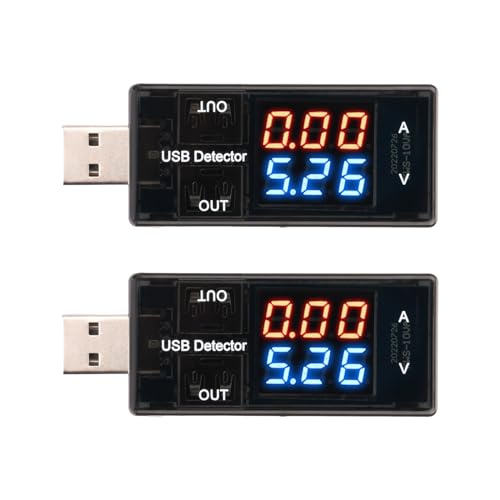
- Includes two USB testers
- Displays voltage and current together
- Offers 0.01V and 0.01A resolution
Best For: Keeping basic testers at multiple home-office work areas
Best USB-C Flexibility

- Accepts USB-A and USB-C input
- Seven modes cover voltage, current, power, and capacity
- Supports PD and QC 3.0 protocols
Best For: Mixed USB-A and USB-C home-office charging setups
Advanced USB-C Testing

- Measures 4–30V and up to 6.5A
- Supports multiple PD and fast-charge protocols
- Shows power, capacity, energy, temperature, and timing
Best For: USB-C home office charging diagnostics
Versatile Desk Diagnostics

- Supports USB-A and USB-C testing
- Measures up to 24V and 5A
- Adds impedance, temperature, capacity, and energy readings
Best For: Mixed-port home office charging checks
USB 3.0 Compatibility Pick

- Supports USB 3.0 and USB 2.0 devices
- Measures 3.7–30V and up to 4A
- Stores capacity and power data after shutdown
Best For: USB 3.0 peripheral and charger testing
Versatile USB-C Monitor
YOJOCK 2-in-1 USB-C Power Meter

- Measures voltage, current, capacity, power, and more
- Supports USB-C, USB-A, PD, QC, and BC1.2 protocols
- IPS display with safety protection features
Best For: Detailed USB-C charging diagnostics at a home-office desk
Clear-Display Tester

- High-resolution IPS screen with rotation
- Tracks voltage, current, capacity, power, and time
- Stores capacity data across power interruptions
Best For: Readable USB-A charging and power-bank monitoring
Protocol-Aware Meter
MakerHawk USB Multimeter with Type-C PD Support

- Supports Type-C PD and QC 2.0/3.0/4.0
- Rotating display works at different angles
- Flashing alerts flag temperature, voltage, and current limits
Best For: Mixed USB fast-charge testing and visual threshold alerts
Most Versatile – DROK 7-Mode USB Tester
For home offices that use several USB-powered devices, this USB power meter for home offices provides a broad view of charging performance. Its color display can show voltage, current, power, and capacity across seven selectable modes.
Best For: Users who want detailed monitoring for chargers, cables, power banks, and other USB equipment.
Pros:
- Displays voltage, current, power, and capacity in seven viewing combinations.
- Supports devices rated from 3.2–30V and 0–5A.
- Includes overvoltage, undervoltage, overcurrent, and short-circuit alarms.
- Has dual USB-A output ports, with protocol support for PD and QC 3.0.
Cons:
- Uses USB-A input rather than USB-C input.
- One output is intended for charging only and does not support data transfer.
- Its many display modes may be more than needed for basic checks.
The DROK 300043 is a strong all-purpose choice when you want more than a simple voltage reading. Its wide measurement range and safety alerts make it useful for troubleshooting office chargers and USB cables.
Best Simple Readout – HiLetgo USB Charger Tester
HiLetgo LCD USB Current Voltage Doctor Charger Capacity Tester Meter Power Bank
Check Price On AmazonThe HiLetgo USB meter is a straightforward option for checking charging behavior in a home office. It simultaneously displays voltage and amperage, while its memory function records working time and capacity when power is turned off.
Best For: Buyers who want an easy-to-read meter for phones, tablets, power banks, and USB chargers.
Pros:
- Shows amp and volt readings at the same time.
- Measures 3–9V and 0–3A with stated accuracy of ±1%.
- Memory function retains working time and capacity information after power-off.
- Resetting is simple: hold the reset button for three seconds.
Cons:
- Its 3–9V and 0–3A range is narrower than some multifunction meters.
- The supplied details do not list power measurement in watts.
- It is designed for USB-powered devices, not a broad range of electrical testing.
Choose this model if you primarily need live voltage and current readings without a more elaborate interface. It offers useful capacity and time memory for routine charger and power-bank checks.
Best Two-Pack – 2-Pack USB Voltage and Current Meters
This two-pack gives a home office two basic USB power meters for checking charging sources or comparing devices. Each meter displays voltage and current simultaneously and uses 0.01-unit resolution for both readings.
Best For: Home-office users who want spare or side-by-side meters for USB chargers and devices.
Pros:
- Includes two USB testers in one package.
- Displays voltage and current at the same time.
- Measures 4–30V and 0–3A.
- Provides 0.01V voltage and 0.01A current resolution.
Cons:
- Measures voltage and current but does not list capacity or wattage readings.
- The current range is limited to 0–3A.
- The supplied description does not identify USB-C-specific compatibility.
This is a practical value pick for basic diagnostics, especially if you want one tester at a desk and another in a cable or charger drawer. Its simultaneous readout keeps quick checks uncomplicated.
Best USB-C Flexibility – DROK USB-A/USB-C Tester
For a modern home office with mixed connectors, this USB power meter for home offices adds USB-C input alongside USB-A support. Its color display offers seven modes for tracking voltage, current, power, and capacity while charging compatible equipment.
Best For: Users testing both USB-A and USB-C charging setups, including laptop and power-bank equipment.
Pros:
- Supports USB-A and USB-C input connections.
- Offers seven display modes for voltage, current, power, and capacity.
- Measures devices from 3.2–30V and 0–5A.
- Supports PD and QC 3.0 protocols and includes multiple protection alarms.
Cons:
- USB-C input with USB-A output requires a five-second button press to start output.
- Some combined display modes cycle automatically.
- One output port is charging-only rather than data-capable.
The USB-C input makes this DROK model the more adaptable choice for newer desk accessories and chargers. It is especially useful when you need detailed readings across both connector types and fast-charging protocols.
Advanced USB-C Testing – Wide-Range USB-C Power Meter
For home offices using USB-C chargers, docks, tablets, and power banks, this tester provides a broad view of charging performance. It measures 4–30V and up to 6.5A, while supporting numerous fast-charging protocols and displaying key readings on a color LED screen.
Best For: USB-C home office setups, fast-charging troubleshooting, and users who want capacity, energy, temperature, and timing data.
Pros:
- Measures voltage from 4–30V and current from 0–6.5A.
- Supports PD 2.0/3.0, QC 2.0/3.0, FCP, SCP, AFC, DASH, VOOC, and Super VOOC protocols.
- Displays voltage, current, power, capacity, energy, time, temperature, and D+/D− readings.
- Includes a storage case and user manual.
Cons:
- Designed for USB-C devices rather than a broad mix of USB-A connections.
- Its many displayed measurements may be more than casual users need.
This is the most capable option here for a USB-C-centered desk. Its higher current range and extensive protocol support make it useful when comparing chargers or investigating inconsistent charging, while the one-button interface keeps the readings accessible.
Versatile Desk Diagnostics – DROK USB A/C Power Meter
This DROK meter is a practical choice for home offices with both USB-A and USB-C equipment. Its 1.44-inch color LCD reports charging data clearly and adds capacity, energy, impedance, and temperature measurements for evaluating chargers, cables, and power banks.
Best For: Mixed USB-A and USB-C workspaces, charger and cable checks, and users who want a readable color display.
Pros:
- Measures 4–24V and up to 5A, with capacity readings up to 99,999mAh.
- Displays voltage, current, power, capacity, energy, impedance, and temperature.
- Supports QC 2.0/3.0, Apple charging modes, Android DCP, and Samsung protocols.
- Screen can be rotated for easier viewing.
Cons:
- Fast-charge identification is described as reference-only and may not keep up with phone updates.
- Correct port orientation is required; USB-A male-to-USB-C output connections should not be used.
- Does not support Bluetooth.
With a balanced measurement range and support for both USB-A and USB-C connections, this is a flexible pick for a typical office desk. The clear display and broad diagnostic readout are particularly useful when checking whether a cable or charger is delivering expected performance.
USB 3.0 Compatibility Pick – MakerHawk AT34 Power Meter
The MakerHawk AT34 suits home offices where charging tests and USB 3.0 peripherals share the same workspace. It measures 3.7–30V and up to 4A, supports USB 3.0 connections, and stores capacity and power data when the connected mobile power source is switched off.
Best For: USB 3.0 hard drives and flash drives, charger comparisons, and users who value retained capacity and power readings.
Pros:
- Supports USB 3.0 while remaining compatible with USB 2.0 devices.
- Measures 3.7–30V and up to 4A.
- Stores capacity and power data after power is disconnected.
- 0.96-inch IPS color display offers a 160-degree viewing angle and supports Celsius/Fahrenheit switching.
Cons:
- Its 4A current limit is lower than the USB-C tester in this roundup.
- The display is smaller than the 1.44-inch screen on the DROK model.
- Listed fast-charge identification covers QC 2.0/3.0, Apple charging modes, and Android DCP, rather than the broader protocol range of the USB-C-focused option.
The AT34 stands out when USB 3.0 testing and retained measurement data matter more than maximum current capacity. Its ability to compare voltage under load and preserve capacity and power readings gives home-office users useful tools for checking chargers, cables, and portable storage connections.
Versatile USB-C Monitor – YOJOCK 2-in-1 USB-C Power Meter
For shoppers comparing USB power meters for home offices, the YOJOCK stands out as a broad USB-C diagnostic tool. It measures voltage, current, capacity, power, temperature, resistance, and charging time across a 3.6–32V and 0–8A range, making it useful for checking chargers, cables, power banks, and USB-C devices.
Best For: Home-office users who want detailed USB-C and charging-performance measurements.
Pros:
- Measures a wide range of charging and electrical data.
- Supports USB-C, USB-A, PD 2.0/3.0, QC 2.0/3.0, and BC1.2.
- IPS color display offers multiple viewing interfaces and larger-font modes.
- Includes over-voltage, over-current, under-voltage, and low-energy protection.
Cons:
- Power-bank capacity testing requires a full discharge process and specific calculation steps.
- Its feature-rich design may be more than needed for simple voltage checks.
The YOJOCK is a strong fit when you want one compact meter for troubleshooting modern USB-C chargers and monitoring detailed charging behavior. Its broad measurements and safety features make it especially useful for a busy desk with several devices and power sources.
Clear-Display Tester – Eversame USB 3.0 Power Meter
If you need USB power meters for home offices that are easy to read during routine troubleshooting, the Eversame pairs a high-resolution IPS display with real-time measurements. It monitors voltage, current, capacity, power, and time, while its 3.6–30V and 0–5.1A range covers common USB-A chargers, cables, laptops, and power banks.
Best For: Users who prioritize a readable screen and capacity tracking for USB-A equipment.
Pros:
- 12,800-pixel IPS color display supports screen rotation.
- Measures charging voltage, current, capacity, power, and elapsed time.
- Power-off memory can accumulate power-bank capacity data across sessions.
- Automatically detects several Apple, Android, Huawei, Samsung, and Qualcomm fast-charge protocols.
Cons:
- The listed test range is limited to 0–5.1A and 3.6–30V.
- The product information primarily describes USB-A compatibility rather than USB-C testing.
The Eversame is a practical choice for monitoring conventional USB-A charging setups. Its rotating display and memory function are particularly convenient when a power-bank test takes longer than one sitting or when the meter needs to be viewed from different angles.
Protocol-Aware Meter – MakerHawk USB Multimeter with Type-C PD Support
The MakerHawk is one of the USB power meters for home offices designed for flexible testing across chargers, computers, cables, and power banks. Its Type-C connection supports PD and multiple Qualcomm fast-charge protocols, while the rotating 1.44-inch display and alarm reminders help make readings easier to monitor during everyday troubleshooting.
Best For: Users testing mixed USB charging equipment who value protocol support and visual alerts.
Pros:
- Supports Type-C digital PD plus QC 2.0, 3.0, and 4.0 protocols.
- Measures USB charger, computer, cable, battery, and load performance.
- 360-degree display rotation supports different connection angles.
- Flashing reminders indicate temperature, voltage, and current thresholds.
Cons:
- The display is smaller than the larger IPS screens offered by some meters.
- PD testing has specific connection requirements and may not power the display until the Type-C plug is repositioned or the correct interface is used.
The MakerHawk makes sense for a home office with varied fast-charging hardware and a need for quick warnings when readings cross listed thresholds. Its protocol coverage is useful, but buyers should follow the stated Type-C connection procedure for PD testing.
How We Picked These USB Power Meters for Home Offices
We focused on meters suited to common desk setups: USB-A and USB-C chargers, docking stations, power banks, cables, phones, tablets, and other low-voltage accessories. The selection emphasizes readable displays, useful voltage and current ranges, support for modern charging standards where specified, and features such as capacity, power, temperature, or elapsed-time readings.
Because these are compact diagnostic tools rather than laboratory instruments, buyers should treat readings as practical comparisons and troubleshooting aids. Connector compatibility and the meter’s rated limits matter more than a long feature list.
Quick Comparison
| Feature | Why It Matters | Look For |
|---|---|---|
| Port type | Determines which chargers and cables you can test | USB-A, USB-C, or dual-port support |
| Measurement range | Sets the devices and chargers the meter can handle | Suitable voltage and current limits |
| Display | Makes readings easier to monitor at a desk | Color or IPS screen with clear units |
| Readings | Helps identify charging and cable problems | Voltage, current, watts, capacity, and time |
| Charging protocols | Can improve testing of fast-charge equipment | PD or QC support when needed |
Key Buying Factors for USB Power Meters for Home Offices
Connector Compatibility
Start with the equipment you use most. A USB-A meter is useful for older chargers and peripherals, while USB-C support is increasingly important for laptops, phones, hubs, and modern power banks. A dual-port design offers broader coverage but may cost more or have different operating limits by port.
Range and Accuracy
Check the maximum voltage and current before connecting a charger. A wider range provides more flexibility, but the meter should still be appropriate for the low-power devices typically found on a desk. For routine comparisons, consistent readings are often more useful than extreme maximum specifications.
Information Shown
Voltage and amperage are the essentials. Wattage helps you see actual charging power, while accumulated capacity and elapsed time are useful for testing power banks. Temperature monitoring can add context during longer tests. Choose a display that shows the readings you need without being difficult to read.
Fast-Charging Support and Safety
If you use USB Power Delivery or Quick Charge equipment, select a model that explicitly lists the relevant protocol support. Never exceed the tester’s stated voltage or current rating, and avoid forcing incompatible connectors or using a meter with damaged cables.
Who Should Buy Which USB Power Meters for Home Offices?
Choose a basic LCD meter if you mainly want quick voltage and current checks for standard USB-A chargers, cables, and small accessories. Choose a color-display model if you regularly monitor several readings or work in a dim or busy workspace. Choose USB-C and protocol support if your home office relies on USB-C charging, docks, modern phones, or PD power banks. Choose a wider-range tester if you want to compare higher-current chargers, track battery capacity, or perform more involved troubleshooting.