A good boom arm makes a desktop microphone easier to position, keeps your workspace clear, and helps you maintain a consistent speaking distance. The right choice depends on your microphone’s weight, your desk thickness, and how much adjustment you need.
We selected 10 desk boom arms for beginners across standard, low-profile, foldable, and cable-managed designs. Use the comparison and buying advice below to narrow the list quickly.
Best 10 Desk Boom Arms for Beginners Picks for 2026
Simple Starter Pick
Amazon Basics Adjustable Boom Arm

- Includes pop filter and windscreen
- Adjustable tension for standard microphones
- Clamp fits desks up to 2 inches thick
Best For: Beginners with standard microphone setups
Flexible White Option

- Rotating base and multi-angle positioning
- Folds away when not in use
- Supports up to 1.5 kg
Best For: Beginners wanting flexible positioning and compact storage
Compact Beginner Pick

- Foldable design saves desk space
- Clamp fits desks up to 2 inches thick
- Includes 5/8-inch to 3/8-inch adapter
Best For: Beginners with smaller desks and compatible microphones
Best Cable Management

- Built-in channels conceal microphone cables
- Includes extension riser for extra height
- Supports up to 3.5 pounds
Best For: Beginners wanting a tidy, long-reach setup
Stable Low-Profile Pick

- Sturdy all-metal construction
- Low profile fits beneath monitors
- Includes cable management and multiple adapters
Best For: Beginners with larger desks who want stable, monitor-friendly positioning
Simple Mic-Compatible Starter

- Works with many popular microphones
- Dual springs support stable positioning
- Pre-installed 3/8-to-5/8-inch adapter
Best For: Beginners using a compatible USB or dynamic microphone
Most Flexible Low-Profile Option
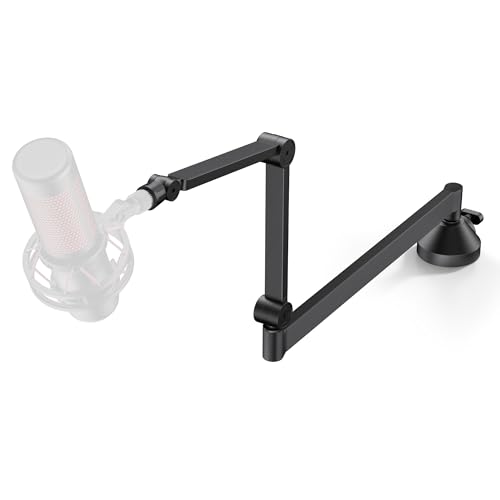
- 26.1-inch reach with 360-degree rotation
- Supports microphones up to 1.5 kg
- Fits desks up to 2.75 inches thick
Best For: Beginners who need broad adjustment and a versatile desk clamp
Complete Starter Kit

- All-in-one arm, mount, filter, and adapter kit
- Fits desks up to 2 inches thick
- Supports microphones up to 1.5 kg
Best For: Beginners wanting a bundled microphone-arm setup
Flexible Desk Reach

- 360° arm with 9.8-inch extension rod
- Supports microphones up to 1.8 kg
- Padded clamp fits desks up to 2 inches thick
Best For: Beginners needing extra reach around a monitor
Low-Profile Stability

- Low-profile design stays below the screen
- Supports microphones up to 2 kg
- 360° rotation with included adapters
Best For: Beginners wanting a discreet, stable workstation arm
Simple Starter Pick – Amazon Basics Adjustable Boom Arm
For beginners comparing desk boom arms for beginners, this Amazon Basics model offers a straightforward setup for standard microphones. Its adjustable tension, desk clamp, pop filter, and windscreen cover the essentials, though heavier microphone setups may require careful balancing.
Best For: Beginners using a standard microphone for basic recording, streaming, or voice work.
Pros:
- Includes a dual-layer pop filter and foam windscreen.
- Adjustable tension helps position the microphone.
- Clamp fits desks up to 2 inches thick.
- Supports up to 1.5 kg when properly adjusted.
Cons:
- Fully extended or unevenly loaded positions may need extra adjustment.
- Performance can vary with heavier microphones, shock mounts, or accessories.
This is a practical entry-level option when you want included audio accessories and a familiar clamp-mounted design. Take time to tighten the clamp and tune the tension for your microphone’s weight.
Flexible White Option – InnoGear Adjustable Mic Arm
This InnoGear arm is a flexible choice for beginners seeking desk boom arms for beginners with broad positioning control. Its rotating base, adjustable arm sections, fold-away design, and included adapter make it suitable for several common microphones.
Best For: New streamers, gamers, and home recordists who want flexible positioning and a white finish.
Pros:
- 360-degree base rotation and multiple adjustment points.
- Folds away for compact storage.
- Supports up to 1.5 kg with steel construction and springs.
- Includes a standard clip and 5/8-inch to 3/8-inch adapter.
Cons:
- Clamp requires a flat, squared desk edge up to 2 inches thick.
- Shock mount is not included.
Its combination of flexible movement and microphone compatibility makes it approachable for a first arm. Confirm that your desk edge is suitable before buying, especially if it is curved or slanted.
Compact Beginner Pick – FIFINE CS1 Scissor Boom Arm
The FIFINE CS1 keeps the setup focused for shoppers looking at desk boom arms for beginners. Its metal scissor-style arm, upgraded clamp, 180-degree adjustment, and foldable design provide useful flexibility without adding unnecessary complexity.
Best For: Beginners with limited desk space who use compatible Fifine or similarly threaded microphones.
Pros:
- Wider clamp opening fits desks up to 2 inches thick.
- Anti-scratch pad helps protect the desk surface.
- 180-degree up-and-down adjustment offers useful reach.
- Includes a 5/8-inch to 3/8-inch metal adapter.
Cons:
- Microphone is not included.
- Compatibility depends on the microphone’s mount and included adapter.
- Its listed maximum height is 13 inches.
For a first boom arm, the CS1 is appealing if portability and a smaller footprint matter. Check your microphone connection and desk thickness before ordering, then lock the clamp knob securely.
Best Cable Management – InnoGear Extended Mic Arm
For beginners building a cleaner recording setup, this InnoGear model stands out among desk boom arms for beginners because it routes cables through built-in channels. Its extension riser, long reach, and higher load capacity also make it suitable for larger microphones and monitor-spanning setups.
Best For: Beginners who want integrated cable management, extra reach, and support for heavier microphones.
Pros:
- Built-in cable channels reduce visible cable clutter.
- Includes a 6.3-inch extension riser for added height.
- Reaches up to 32.3 inches horizontally and 37.4 inches vertically.
- Supports up to 3.5 pounds.
Cons:
- Clamp fits desks up to 2 inches thick, so thicker desks are unsuitable.
- Shock mount is not included.
- Its larger reach may require thoughtful positioning to maintain stability.
This is the most feature-rich choice here for a beginner who values a tidy desk and room to position the microphone over a monitor. Its extended reach is useful, but proper clamp installation and balanced placement remain important.
Stable Low-Profile Pick – FIFINE BM88 Boom Arm
For beginners comparing desk boom arms for beginners, the FIFINE BM88 is a sturdy, low-profile option that keeps the microphone below the monitor while offering broad positioning control. Its metal construction, cable management, and included thread adapters make setup straightforward for gaming, streaming, podcasting, and recording.
Best For: Beginners who want a stable, monitor-friendly boom arm for a larger desk.
Pros:
- All-metal construction and a C-clamp designed to stay stable during use.
- Low-profile design can extend beneath a monitor without obstructing the view.
- Includes cable management and 1/4-inch, 3/8-inch, and 5/8-inch thread compatibility.
- Offers up to 29 inches of extension, 220-degree vertical adjustment, and 360-degree horizontal rotation.
Cons:
- The microphone is not included.
- The clamp fits desks from 0.8 to 2.4 inches thick.
- The section nearest the C-clamp cannot be adjusted vertically.
The BM88 is a practical beginner choice when stability and a clean, unobstructed workspace matter more than a compact folding design. Confirm your desk thickness and microphone connection before buying.
Simple Mic-Compatible Starter – SUNMON Suspension Boom Arm
The SUNMON suspension arm is a straightforward choice for beginners shopping for desk boom arms for beginners, especially those using popular microphones such as the Blue Yeti or HyperX QuadCast. Its dual springs, reinforced knobs, padded clamp, and pre-installed adapter help simplify initial setup.
Best For: New streamers using a compatible microphone and a desk up to 1.89 inches thick.
Pros:
- Compatible with microphones including Blue Yeti, HyperX QuadCast, SoloCast, Shure MV7, Fifine models, and others.
- Dual suspension springs and reinforced knobs help keep the arm positioned.
- Includes a 3/8-inch-to-5/8-inch adapter that is pre-installed.
- Padded desk clamp helps protect the desktop from scratches.
Cons:
- The microphone is not included.
- The clamp supports desktops up to 1.89 inches thick.
- Its listed maximum weight recommendation is 1.4 kg, so heavier microphones should be checked carefully.
Choose this SUNMON arm if you want broad compatibility and a beginner-friendly adapter setup. Its smaller clamp range makes measuring your desk especially important before ordering.
Most Flexible Low-Profile Option – InnoGear MS153 Mic Arm
For beginners seeking desk boom arms for beginners with flexible positioning, the InnoGear MS153 combines a low-profile build with extensive adjustment. It reaches 26.1 inches horizontally, rotates 360 degrees, supports microphones up to 1.5 kg, and uses a clamp that fits desks up to 2.75 inches thick.
Best For: Beginners who want a flexible arm with a wider desk-clamp range and extra workspace utility.
Pros:
- Low-profile design sits neatly beneath a monitor for an unobstructed view.
- Provides 360-degree horizontal rotation and substantial vertical adjustment at the joints.
- Supports microphones up to 1.5 kg and includes a 3/8-inch-to-5/8-inch adapter plus universal mic clip.
- Wide, padded C-style clamp fits desks up to 2.75 inches thick and includes a headphone hook.
Cons:
- The microphone is not included.
- It is heavier than the SUNMON arm at 1.22 kg.
- Beginners may need to spend more time learning its multiple adjustment points.
The MS153 is a strong all-around option when you need reach, rotation, and compatibility with a variety of microphones. Its generous clamp capacity also makes it easier to use with thicker desks.
Complete Starter Kit – InnoGear Medium Mic Boom Arm
For beginners comparing desk boom arms for beginners, this InnoGear set is a convenient all-in-one starting point. It includes the arm, clamp, shock mount, pop filter, adapter, and cable ties, with compatibility for many standard microphones and a maximum recommended load of 1.5 kg.
Best For: New streamers, podcasters, or creators who want a bundled setup with basic microphone protection included.
Pros:
- Includes a shock mount, double-screen pop filter, adapter, clamp, and cable ties.
- Supports 3/8-inch and 5/8-inch microphone connections.
- Spring-supported steel arm and protective clamp padding help with stability.
- Clamp fits desks up to 2 inches thick.
Cons:
- The included shock mount is not designed to fit the Blue Yeti.
- Its 1.5 kg maximum load is lower than some competing arms.
This is a practical beginner package when you need more than just an arm. Check your microphone’s weight and shock-mount fit before buying, especially if you use a Blue Yeti.
Flexible Desk Reach – M05 Pro 360° Boom Arm
The M05 Pro is a strong option for beginners choosing desk boom arms for beginners who need extra reach around a monitor. Its 360-degree arm, 9.8-inch extension rod, and 1.8 kg load rating make it suitable for common streaming, gaming, and podcast microphones.
Best For: Beginners with wider desks or monitor setups who want a foldable arm with added reach and a reinforced clamp.
Pros:
- 360-degree positioning and a 9.8-inch extension rod help clear monitors.
- Aluminum construction supports up to 1.8 kg.
- Clamp fits desks up to 2 inches thick and includes a silicone protective pad.
- Includes 3/8-inch and 5/8-inch connection options plus cable bands.
Cons:
- HyperX QuadCast requires an adapter that is not included.
- The package includes a mic clip but not a shock mount or pop filter.
Choose this arm if desk clearance and positioning flexibility matter more than bundled accessories. Its higher load rating is useful for heavier microphones, while the included extension rod can keep the arm from blocking your view.
Low-Profile Stability – Aokeo AK-58i Desk Mic Arm
For beginners seeking desk boom arms for beginners with a discreet footprint, the Aokeo AK-58i uses a low-profile design that runs along the bottom of the screen. Its steel construction, 2 kg capacity, and 360-degree arm movement suit gaming, streaming, recording, and podcasting desks.
Best For: Users who want a stable, visually unobtrusive arm that keeps the microphone cable tucked beneath the arm.
Pros:
- Low-profile layout reduces visual obstruction across the workspace.
- Steel construction supports up to 2 kg.
- Arms rotate 360 degrees, with 180-degree vertical movement on the microphone arm.
- Includes 3/8-to-1/4-inch and 3/8-to-5/8-inch adapters.
Cons:
- The flat base fits tables under 7 cm thick, so desk thickness must be checked.
- The package includes the microphone stand only; the microphone is not included.
This is a good fit for a tidy beginner workstation where stability and low visual clutter are priorities. Confirm your desk is under the stated thickness limit and that your microphone connection matches the included adapters.
How We Picked the Best Desk Boom Arms for Beginners
We focused on the details that matter most to first-time buyers: microphone compatibility, mounting hardware, arm movement, tension adjustment, desk-clamp practicality, cable management, and overall setup simplicity. The selection includes options for popular microphones such as the Blue Yeti, HyperX QuadCast, FIFINE models, Snowball, and Elgato Wave, while adapters help accommodate different thread sizes.
Because product specifications and included accessories can vary, confirm the current listing before ordering. Pay particular attention to weight limits, clamp opening, thread adapters, and whether a shock mount or pop filter is included.
Quick Comparison
| Type | Best For | What to Check |
|---|---|---|
| Standard scissor arm | General streaming and recording | Reach, tension, and clamp stability |
| Low-profile arm | Small desks and unobtrusive setups | Clearance and maximum vertical range |
| Foldable arm | Portable or tidy workspaces | Folding range and locking strength |
| Arm with shock mount | Reducing desk vibrations | Mount compatibility and microphone fit |
| Arm with cable management | Cleaner-looking desktops | Clip or channel capacity for your cable |
Key Buying Factors for Desk Boom Arms for Beginners
Microphone Compatibility
Check both the microphone’s weight and its mounting thread. A heavy USB microphone may need a sturdier arm than a compact model. Most arms use 3/8-inch or 5/8-inch connections, so an included adapter can prevent compatibility problems.
Desk Clamp and Available Space
Measure your desk thickness and inspect the area where the clamp will sit. A broad, padded clamp is generally more stable and helps protect the desktop. Also check whether the arm can clear monitors, shelves, or a wall behind the desk.
Adjustment and Reach
Beginners usually benefit from an arm that moves smoothly and holds its position without excessive tightening. Consider whether you need the microphone close to your mouth, above the monitor, or folded away when not in use.
Cable Routing and Included Accessories
Built-in clips or channels make USB and XLR cables easier to manage. A pop filter can help with plosive sounds, while a shock mount can reduce noise transmitted through the desk. These extras are useful, but compatibility matters more than accessory count.
Who Should Buy Which Desk Boom Arms for Beginners?
Choose a standard adjustable arm if you want an affordable, flexible starting point for gaming, video calls, or podcasting. A low-profile model is better for compact desks or setups where the microphone should stay below the monitor. Choose a foldable design if you regularly clear the desk or travel with your equipment.
Buy an option with cable management when appearance and organization are priorities. If keyboard taps, desk bumps, or stand vibrations are a recurring problem, prioritize a compatible shock mount and a rigid clamp. For beginners comparing Desk Boom Arms for Beginners, the best choice is usually the simplest arm that supports your microphone securely and reaches your preferred speaking position.