A useful computer accessory can make work, study, creative projects, or downtime at a desk more comfortable. This gift list includes options for different setups, from simple input devices to monitors and home networking.
17 Computer Accessory Gift Ideas
1. INNOCN 27-Inch 4K USB-C Monitor
A Clearer Creative Workspace
INNOCN 27-Inch 4K USB-C Monitor

- 27-inch 4K UHD display with HDR500 and DeltaE <1 factory calibration.
- USB-C supports video, data, and up to 90W laptop charging over one cable.
- Offers 4K at 120Hz or FHD at 240Hz, plus HDMI and DisplayPort inputs.
Best For: A laptop user who edits photos or video, works at a desk, or enjoys PC gaming.
2. TP-Link Deco 7 Pro Wi-Fi 7 Mesh System
Whole-Home Connection Upgrade
TP-Link Deco 7 Pro Wi-Fi 7 Mesh System

- Three-pack mesh system is listed for coverage up to 7,600 square feet.
- Supports Wi-Fi 7 and includes a 10G WAN/LAN port and four 2.5G ports.
- Deco app setup and management; a separate modem is required.
Best For: Someone who works or studies across multiple rooms and wants mesh Wi-Fi coverage.
3. Anker Prime 14-in-1 Laptop Dock
A More Connected Desk
Anker Prime 14-in-1 Laptop Dock

- Provides 14-in-1 connectivity, including dual HDMI and multiple USB ports.
- Offers up to 160W total output and data transfer up to 10Gbps.
- Supports USB-C, USB4, and Thunderbolt; check laptop display compatibility before gifting.
Best For: A laptop user who wants to connect peripherals and external displays at a desk.
4. SABRENT USB4 NVMe SSD Enclosure
5. HUANUO Adjustable Dual Monitor Arm
More Room for Two Screens
HUANUO Adjustable Dual Monitor Arm

- Fits two 13-to-32-inch monitors weighing 4.4 to 19.8 pounds each.
- Supports VESA 75x75mm or 100x100mm mounting and offers tilt, swivel, and rotation.
- Requires a compatible wooden desk; check desk thickness and monitor mounts first.
Best For: Someone with two compatible monitors who wants to free up desk surface.
6. SABLUTE Ergonomic Keyboard and Mouse Set
A Cushioned Typing Setup
SABLUTE Ergonomic Keyboard and Mouse Set

- Full-size split keyboard includes a memory-foam wrist rest and four tilt legs.
- Keyboard and mouse are rechargeable and connect wirelessly over 2.4GHz.
- Windows and Mac layouts are supported; the keyboard measures 19 by 10.45 inches.
Best For: A frequent typist with room for a full-size keyboard and mouse.
7. Nulaxy Adjustable Rotating Laptop Stand
A Flexible Laptop Riser
Nulaxy Adjustable Rotating Laptop Stand

- Raises laptops or tablets up to 17 inches and adjusts to a height of up to 18 inches.
- The platform rotates 360 degrees and the stand folds for storage.
- Supports up to 22 pounds; the maker suggests using an external keyboard and mouse.
Best For: A laptop user who wants an adjustable screen position for desk work or collaboration.
8. Acer A640 4K Webcam
A Video Call Refresh

- Captures video at 4K 30fps and supports 2K or 1080p at 60fps.
- Includes autofocus, an AI noise-canceling microphone, and a physical privacy shutter.
- Connects by USB with an included USB-A to USB-C adapter; it has no built-in speakers.
Best For: Someone who takes video calls, streams, or records at a computer.
9. FIFINE AM8 USB/XLR Microphone
A Voice Recording Upgrade

- Dynamic microphone supports USB and XLR connections; XLR cable is sold separately.
- USB mode includes tap-to-mute, RGB lighting, headphone monitoring, and gain control.
- The maker suggests placing the microphone 2 to 6 inches from the sound source.
Best For: A beginner podcaster, streamer, or gamer who wants a desktop microphone.
10. HUION Keydial Mini Shortcut Keypad
Shortcuts at Her Fingertips
HUION Keydial Mini Shortcut Keypad

- Bluetooth keypad has 18 programmable shortcut keys and a customizable dial.
- Compatible with Mac and Windows and supports listed creative apps such as Photoshop and Premiere Pro.
- One-handed, ambidextrous design has a listed battery life of up to 70 hours.
Best For: A digital artist, video editor, or designer who uses software shortcuts.
11. Logitech MX Ergo S Trackball Mouse
A Different Kind of Mouse
Logitech MX Ergo S Trackball Mouse

- Trackball design uses thumb control and includes an adjustable 20-degree tilt.
- Connects by Bluetooth or the included Logi Bolt USB receiver; it charges by USB-C.
- Has six customizable buttons through the Logi Options+ app.
Best For: A right-handed computer user curious about trackball control.
12. H1 Wireless Noise-Canceling Headphones
Focus for Work and Travel
H1 Wireless Noise-Canceling Headphones
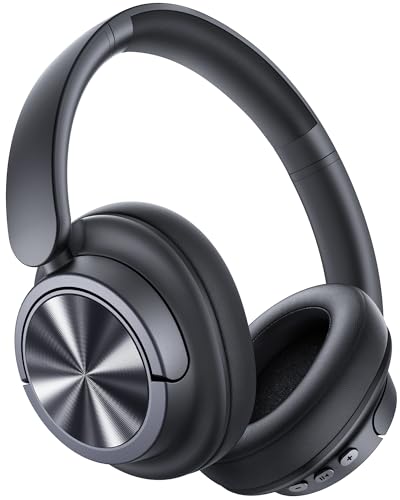
- Over-ear wireless headphones offer active noise cancellation and Bluetooth 6.0.
- The listing states up to 120 hours of playback and includes a 3.5mm AUX cable.
- Six microphones support call noise reduction; wired audio requires Bluetooth to be off.
Best For: Someone who listens to music or takes calls while working, commuting, or traveling.
13. Logitech Lift Vertical Wireless Mouse
A Vertical Mouse for Daily Work
Logitech Lift Vertical Wireless Mouse

- Right-handed vertical shape has a 57-degree angle, textured grip, and thumb rest.
- Connects over Bluetooth Low Energy or with the included Logi Bolt USB receiver.
- Designed for small to medium hands and includes customizable buttons.
Best For: A right-handed user with small or medium hands who wants a vertical mouse shape.
14. CyberPower 1500VA Battery Backup
Backup for Desk Electronics
CyberPower 1500VA Battery Backup

- Provides 1500VA/1000W battery backup with sine wave output.
- Has 12 outlets: six with battery backup and surge protection, plus six surge-only.
- Includes a color LCD panel and USB-A and USB-C charging ports.
Best For: Someone with a desktop computer, router, or other desk electronics to protect during outages.
15. cocopar 15.6-Inch Portable Monitor
A Second Screen That Travels
cocopar 15.6-Inch Portable Monitor

- 15.6-inch portable display offers 1080p resolution and a 60Hz refresh rate.
- Includes USB-C and HDMI connections, a magnetic cover stand, and VESA mounting holes.
- For single-cable USB-C display, the connected device must support DisplayPort Alt Mode or compatible Thunderbolt.
Best For: A laptop user who wants a second screen for travel, meetings, or different rooms.
16. AULA F75 Pro Hot-Swappable Keyboard
A Customizable Typing Gift
AULA F75 Pro Hot-Swappable Keyboard

- Compact 75% layout has 81 keys, arrow keys, and a multi-function knob.
- Connects by Bluetooth, 2.4GHz wireless, or USB-C and can connect to up to five devices.
- Hot-swap base supports 3-pin or 5-pin switches; RGB lighting can be turned off.
Best For: A keyboard enthusiast who enjoys customization for work or gaming.
17. BenQ ScreenBar Halo 2 Monitor Light
A Brighter Desk Without a Lamp Base
BenQ ScreenBar Halo 2 Monitor Light

- Front light is designed to illuminate the desk while reducing screen glare; it also has a backlight.
- Wireless controller adjusts brightness and color temperature from 2700K to 6500K.
- Clamp fits monitors 0.17 to 2.36 inches thick and curved screens from 1000R to 1800R.
Best For: Someone who works, studies, or reads at a monitor in a dim room.
Choosing a Computer Accessory for Her Setup
Start with how she uses her computer and what she already has. A remote worker may appreciate a dock, webcam, headset, or backup power supply. A creative user could make use of the programmable keypad, microphone, or an external display. For someone who types for hours, consider the ergonomic keyboard and mouse options. If her current desk feels crowded, a monitor arm or laptop stand may offer a more noticeable improvement than another small gadget.
Pay attention to whether a gift complements her existing setup. A monitor makes sense when she has space and a compatible computer connection. A portable screen can be handy for travel, but USB-C video support depends on the laptop. A microphone or webcam is most useful when she has frequent calls, streams, or records. A mesh Wi-Fi system can benefit a household with dead zones, but it needs a modem and requires placing multiple units around the home.
Match the Gift to Your Budget
For a relatively modest desk refresh, consider a mouse, shortcut keypad, laptop stand, or monitor light. These accessories address distinct routines and can be thoughtful without replacing a major device. A keyboard, webcam, microphone, or headphones may suit a midrange gift, depending on the specific model and the recipient’s needs. More involved upgrades include monitors, docking stations, mesh networking, and battery backup.
Since prices and bundles change, compare current listings before deciding what fits your budget. Also account for what may be needed alongside the main gift: the SSD enclosure requires an NVMe drive, XLR use of the microphone requires a separate XLR cable and audio interface or mixer, and dual monitor mounts may need compatible VESA hardware already on the screens. Checking these details helps avoid a gift that needs an unexpected companion purchase.
Check Compatibility and Personalization
Compatibility is a practical way to make a computer accessory gift feel personal. Check her computer’s operating system and available ports. The Anker dock has stated Windows, ChromeOS, and macOS display behavior, but its two external displays are mirrored on macOS. The Logitech trackball and vertical mouse have different hand orientations and shapes, so consider whether she is right-handed and what control style she might enjoy. The full-size SABLUTE keyboard needs considerable desk room.
For display mounts, verify monitor size, weight, VESA pattern, and desk type. The HUANUO arm has specific weight and desk requirements. Before choosing the BenQ light, measure monitor thickness and check its curve rating. For personalization, think about the colors and look of her workspace, whether she likes mechanical keys and lighting, and whether she prefers a minimal desk or more controls at hand. Those clues can guide the choice without assuming that every woman wants the same style of setup.
Timing and Last-Minute Decisions
For a Christmas gift, allow time to confirm compatibility and any additional pieces. If you are unsure which laptop ports she has, a mouse, headphones, or desk light may be easier to match than a dock or monitor. Check the current product listing for the exact included cables and accessories, and leave time to wrap or present any larger equipment comfortably.
When time is short, a useful accessory can still feel considered if you connect it to a routine you know well: long video calls, travel with a laptop, late-night work, digital art, or a crowded desk. For a more personal touch, include a brief note explaining why you chose it. The strongest computer accessory Christmas gift ideas for women are the ones that fit the recipient’s actual devices, workspace, and habits.