The best commercial-grade computer trackballs help reduce desk clutter while delivering precise pointer control in offices, control rooms, design environments, and industrial installations. Unlike conventional mice, they stay in place, making them useful where workspace, cleanliness, or consistent ergonomics matter.
This roundup compares wired, wireless, ergonomic, and panel-mount options across connection types, control layouts, durability, and everyday comfort. Use the guide below to narrow the choices by workload and installation needs.
Best 10 Commercial-Grade Computer Trackballs Picks for 2026
Slim Workspace Option
Kensington Slimblade Trackball

- Kensington SlimBlade series
- Battery-powered operation
- Red finish
Best For: Personal office setups seeking a Kensington model
Premium Wireless Comfort

- 20-degree ergonomic tilt
- Bluetooth and Logi Bolt wireless
- Six customizable buttons
Best For: Right-handed productivity users wanting rechargeable wireless comfort
Precision Office Workhorse
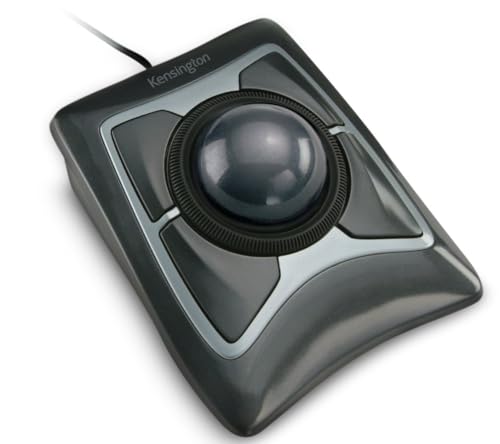
- Large 55mm optical-tracked ball
- Scroll ring and wrist rest
- Ambidextrous wired USB-A design
Best For: Document-heavy office work requiring precise navigation
Business Wireless Pick
Logitech Ergo M575 for Business

- Wireless Bluetooth and RF connectivity
- Up to 18-month battery life
- Ergonomic right-handed business design
Best For: Office fleets and tight workspaces
Ambidextrous Wired Pick
Kensington Orbit with Scroll Ring

- Optical tracking with scroll ring
- Ambidextrous wired USB design
- Includes wrist rest and five-year warranty
Best For: Shared desks and document-heavy workflows
Trusted Office Choice

- Thumb control saves desk space
- Bluetooth and Logi Bolt connectivity
- Ergonomic shape with three customizable buttons
Best For: Compact office workstations and everyday productivity
Budget Ergonomic Option

- Four DPI levels for adjustable tracking
- Wireless connection for up to three devices
- Rechargeable, right-handed ergonomic design
Best For: Right-handed users working in small or crowded spaces
Reliable Wired Classic – Logitech Trackman Marble
The Logitech Trackman Marble is a practical option for buyers seeking commercial-grade computer trackballs with dependable wired connectivity. Its ambidextrous shape stays in place, while the optical trackball and four programmable buttons support everyday office navigation and customized workflows.
Best For: Shared workstations, office users, and anyone who prefers a simple wired, ambidextrous trackball.
Pros:
- Ambidextrous sculpted design supports either hand.
- Wired USB or PS/2 connection requires no wireless pairing.
- Four programmable buttons include convenient Back and Forward controls.
Cons:
- Wired design limits desk flexibility.
- Supplied notes list older operating-system requirements alongside current compatibility information.
The Trackman Marble emphasizes straightforward installation, stable desk use, and customizable controls. It is a sensible fit when reliability and ambidextrous comfort matter more than wireless features.
Slim Workspace Option – Kensington Slimblade Trackball
The Kensington Slimblade is a compact-looking choice for shoppers comparing commercial-grade computer trackballs for an office or productivity setup. Its supplied specifications identify the SlimBlade series, a red finish, and battery-powered operation, making it worth considering when a Kensington design fits your workspace.
Best For: Buyers who want a Kensington SlimBlade trackball for a personal office setup.
Pros:
- Kensington SlimBlade series design.
- Battery-powered operation avoids a fixed cable connection.
- Distinctive red color adds visual contrast to a workstation.
Cons:
- Supplied notes provide limited detail about buttons, tracking, and ergonomics.
- Battery requirements and runtime are not specified.
Because the available product information is brief, verify the included features and compatibility before purchasing. The Slimblade is best evaluated as a specific Kensington option rather than chosen solely from its headline specifications.
Premium Wireless Comfort – Logitech MX Ergo S
The Logitech MX Ergo S targets users who want commercial-grade computer trackballs with wireless convenience and an ergonomic thumb-controlled design. Its 20-degree tilt, rechargeable battery, Bluetooth and Logi Bolt connectivity, and customizable controls make it a feature-rich choice for extended productivity work.
Best For: Medium- to large-handed right-handed users who want wireless connectivity, ergonomic support, and customizable shortcuts.
Pros:
- 20-degree tilt and sculpted grip are designed for improved forearm posture and comfort.
- Bluetooth and included Logi Bolt receiver provide dual wireless connectivity.
- Six customizable buttons and Smart Actions support productivity workflows.
- USB-C charging offers up to 24 hours from a one-minute charge and up to 120 days on a full charge.
Cons:
- Right-hand design does not suit left-handed users.
- Charging cable is not included.
- Requires Windows or macOS software for the full customization experience.
The MX Ergo S is the most modern and flexible option in this group for users prioritizing comfort and wireless operation. Its higher feature count is especially useful when programmable shortcuts and easy device switching justify a more advanced setup.
Precision Office Workhorse – Kensington Expert Trackball
Kensington Expert Trackball Mouse (K64325), Black Silver, 5"W x 5-3/4"D x 2-1/2"H
Check Price On AmazonThe Kensington Expert Trackball is a strong contender for commercial-grade computer trackballs when precise cursor control and full-size ergonomics are priorities. Its large 55mm ball, Diamond Eye optical tracking, scroll ring, detachable wrist rest, and wired USB-A connection are suited to focused office use.
Best For: Office professionals who want a large ambidextrous trackball with a scroll ring, wrist support, and wired reliability.
Pros:
- Large 55mm ball and Diamond Eye optical tracking support precise cursor control.
- Patented scroll ring makes vertical page navigation convenient.
- Ambidextrous design includes a detachable ergonomic wrist rest.
- Four buttons, cursor speed, and scroll speed are customizable through KensingtonKonnect.
Cons:
- Wired USB-A connection may be less convenient for newer ports.
- Customization is unavailable through KensingtonKonnect on ChromeOS, and Windows ARM support is not currently available.
- The full-size design may require more desk space than compact trackballs.
The Expert Trackball favors control and comfort over portability. Its large ball and scroll ring make it particularly suitable for document-heavy work, while the five-year warranty adds reassurance for a long-term office peripheral.
Extreme-Duty Panel Pick – Industrial 38mm USB Trackball
For commercial-grade computer trackballs in demanding installations, this industrial model emphasizes a stainless panel-mount design and a 38mm trackball. Its USB connection is suited to compatible computer setups where a fixed, durable control is preferred.
Best For: Industrial panels, fixed workstations, and extreme-duty computer control applications.
Pros:
- Stainless panel-mount construction
- 38mm trackball format
- USB connectivity
- Compact 7.09 x 7.09 x 1.97-inch package dimensions
Cons:
- Panel-mount design is less flexible than a desktop mouse
- Battery requirements are listed as unknown
- Supplied notes do not specify operating-system compatibility or button features
This is the most installation-focused option in the roundup. Choose it when stainless construction and panel mounting matter more than wireless convenience or detailed ergonomic features.
Business Wireless Pick – Logitech Ergo M575 for Business
The Logitech Ergo M575 is a practical choice for commercial-grade computer trackballs deployed across offices and business workstations. Its sculpted right-handed shape, wireless connectivity, and long battery life support comfortable everyday use, while Logitech Sync enables remote deployment and monitoring.
Best For: Business fleets, right-handed users, and tight desks where wireless operation and ergonomic support are priorities.
Pros:
- Bluetooth and radio-frequency wireless connectivity
- Up to 18 months from one included battery
- Ergonomic right-handed design with thumb-controlled tracking
- Five buttons with customizable shortcuts
Cons:
- Designed for right-handed use rather than ambidextrous operation
- Requires battery power
- Maximum sensitivity is listed at 2000 dpi
Choose the M575 when comfort, fleet management, and minimal desk movement are central requirements. It is better suited to office deployment than rugged panel installation.
Ambidextrous Wired Pick – Kensington Orbit with Scroll Ring
The Kensington Orbit is a straightforward option among commercial-grade computer trackballs for shared desks and fixed computer stations. Its wired USB connection, ambidextrous shape, optical tracking, and dedicated scroll ring make it practical for users who need predictable navigation without battery management.
Best For: Shared workstations, left- or right-handed users, and document-heavy workflows that benefit from a scroll ring.
Pros:
- Ambidextrous design for left- and right-handed users
- Optical tracking for precise cursor movement
- Dedicated scroll ring for documents and web pages
- Includes a detachable wrist rest and five-year warranty
Cons:
- Wired USB operation limits placement flexibility
- Only two programmable buttons
- Supplied compatibility details list macOS and Windows 11 requirements
The Orbit is a sensible low-maintenance choice for shared or stationary desks. Its scroll ring and ambidextrous layout give it an advantage where multiple users need comfortable, document-focused control.
Power User Pick – ProtoArc EM06
For shoppers comparing commercial-grade computer trackballs, the ProtoArc EM06 stands out with a large 55mm ball, dual sensors, and a gaming-grade chip aimed at precise tracking for design, editing, and office work. Its wired, 2.4G, and Bluetooth modes also make it practical for multi-device setups.
Best For: Multi-device users who want extensive customization, rechargeable power, and a wrist-rest-supported design.
Pros:
- Tri-mode connectivity supports wired, 2.4G, and Bluetooth connections for up to four devices.
- Offers five DPI levels, customizable buttons, and storage for up to four profiles.
- Large 55mm trackball, dual sensors, and a gaming-grade chip support precise cursor control.
- Rechargeable 930mAh battery and included wrist rest suit extended work sessions.
Cons:
- Requires regular trackball cleaning for smooth, accurate operation.
- Customization supports only 2.4G and wired connections, and the mouse may not be detected through some multi-port hubs.
- Has a learning curve of roughly one to two weeks for users new to trackballs.
The EM06 is the most feature-rich option here for users who need flexible connections and profile-based customization. Its larger design and added wrist rest favor a dedicated desk setup over minimalist portability.
Trusted Office Choice – Logitech Ergo M575S
Logitech Ergo M575S Wireless Ergonomic Trackball Mouse, Black/Blue (910-007026)
Check Price On AmazonThe Logitech Ergo M575S is a straightforward choice among commercial-grade computer trackballs for office users who want thumb-controlled cursor movement without moving the mouse across the desk. Bluetooth and the included Logi Bolt receiver provide two connection options, while its compact footprint suits smaller work areas.
Best For: Office and space-constrained setups that prioritize familiar ergonomics, simple connectivity, and long battery life.
Pros:
- Thumb-controlled trackball works on any surface and helps conserve desk space.
- Connects through Bluetooth or the included Logi Bolt USB receiver.
- Ergonomic shape supports the hand and helps realign the forearm during use.
- Includes an AA battery and provides three customizable buttons with shortcut support.
Cons:
- Offers fewer customization options than models with extensive programmable controls.
- Uses a replaceable AA battery rather than a rechargeable built-in battery.
- Its listed maximum sensitivity is 2000 DPI, which may be limiting for some precision-focused workflows.
The M575S keeps the trackball experience simple and office-friendly, with dependable connection choices and a compact stationary design. It is a sensible fit when ease of use matters more than advanced profile management or wired operation.
Budget Ergonomic Option – Nulea M501
For buyers seeking commercial-grade computer trackballs without a crowded desktop setup, the Nulea M501 combines thumb control, four DPI levels, and wireless connectivity for up to three devices. Its rechargeable battery and curved right-handed design make it suited to everyday productivity in tight spaces.
Best For: Right-handed users who want rechargeable wireless operation and basic multi-device convenience.
Pros:
- Thumb-operated ball reduces the need to move the wrist and arm.
- Supports Bluetooth or a 2.4G USB dongle with switching across up to three devices.
- Provides four DPI levels for adjustable cursor control.
- Rechargeable battery eliminates the need for disposable cells.
Cons:
- Buttons are not programmable.
- Designed for right-handed use only.
- Requires the included cable or a standard 5V USB source for charging; fast chargers should not be used.
The M501 offers the core benefits of a wireless thumb trackball at a practical feature level. It is a good match for users who value comfort, rechargeable power, and compact-surface flexibility but do not need advanced button remapping.
How We Picked the Best Commercial-Grade Computer Trackballs
We focused on practical performance factors for professional and demanding environments: connection reliability, tracking control, button layouts, ergonomic design, maintenance, portability, and installation flexibility. The selection includes established office models from Logitech and Kensington, adaptable wireless options, and an extreme-duty stainless panel-mount trackball for specialized equipment.
Because “commercial-grade” can mean different things, we separated everyday business durability from industrial construction. A dependable office trackball does not necessarily suit a machine enclosure, while an industrial unit may be excessive for a desk-based user.
Quick Comparison
| Best For | Recommended Type | Connection | Notable Advantage |
|---|---|---|---|
| General office work | Ergonomic desktop trackball | Wired or wireless | Comfort and stable control |
| Multiple computers | Tri-mode wireless model | USB, 2.4GHz, Bluetooth | Flexible device switching |
| Large, precise cursor movement | Finger-operated trackball | Usually wired or wireless | Reduced thumb strain |
| Industrial equipment | Panel-mount trackball | USB | Sealed, rugged installation format |
Key Buying Factors for Commercial-Grade Computer Trackballs
Trackball Layout and Ergonomics
Thumb-controlled designs are compact and familiar for mouse users, but finger-operated models can provide finer control and distribute movement across more of the hand. Consider whether the device will be used for short interactions or continuous pointer work. A scroll ring, programmable buttons, and accessible controls can also reduce repetitive keyboard and mouse actions.
Wired Versus Wireless Connectivity
Wired USB models are usually the simplest choice for fixed workstations, shared terminals, and environments where battery management is undesirable. Wireless models reduce cable clutter and can improve desk flexibility, but check battery life, receiver storage, Bluetooth compatibility, and whether the connection is permitted in your workplace.
Durability and Cleaning
For commercial deployment, inspect construction quality, button ratings when available, surface materials, and the ease of removing or cleaning the ball. Industrial applications may require a stainless panel-mount design, resistance to dust or moisture, and compatibility with a specific enclosure. Do not assume a consumer ergonomic model is suitable for exposed factory-floor conditions.
Software and Compatibility
Programmable controls and configuration software can be valuable for productivity, but verify operating-system support and administrator requirements before purchasing in bulk. For managed environments, basic plug-and-play compatibility may be more important than advanced customization.
Who Should Buy Which Commercial-Grade Computer Trackballs?
Choose a wired Logitech or Kensington model for dependable office deployment and shared workstations. Select a wireless ergonomic option when desk flexibility and long-session comfort matter. A tri-mode model is the better fit for users moving between computers or operating systems. Finger-operated Kensington designs suit detailed navigation, while the industrial 38mm stainless unit is intended for equipment builders and demanding panel installations rather than ordinary desktops. Finally, prioritize programmable buttons, scroll controls, or adjustable DPI only when those features directly support your workflow.