The best compact photo booth printers make it easier to turn event photos into physical keepsakes without the footprint of a full commercial booth. The options below range from portable 4-by-6-inch printers to complete touchscreen booth systems.
When choosing among compact photo booth printers, focus on print technology, media cost, wireless reliability, operating speed, and whether you need only a printer or a complete photo booth setup.
Best 10 Compact Photo Booth Printers Picks for 2026
Best for High-Volume Events

- Approximately 19-second 4x6-inch prints
- Includes WCM Plus Wi-Fi module
- 150-sheet media capacity with glossy or matte output
Best For: Weddings, rentals, and repeat event printing
Best Complete Booth Setup

- Includes booth, 13MP camera, printer, and touchscreen
- 300-plus templates and adjustable fill lighting
- Comes with ribbon and 60 sheets of paper
Best For: Weddings, parties, trade shows, and pop-up events
Best for Wireless Inkjet Detail

- Borderless 4x6- and 5x7-inch photo printing
- Wireless printing from smartphones and tablets
- Portable 6-pound design with high listed resolution
Best For: Personal events and wireless borderless photo printing
Best Compact Dye-Sublimation Printer

- Vibrant laminated 4x6 prints
- Includes 100 sheets and 3 cartridges
- Connects up to 5 devices
Best For: Families and small gatherings needing durable 4x6 prints
Best All-in-One Event Booth
HP Sprocket Photo Booth Machine

- 10.1-inch touchscreen and LED ring light
- 250+ frames, stickers, and event controls
- Prints or shares 3x4 photos by QR code
Best For: Parties and events needing a self-contained photo booth
Best Docking Photo Printer
KODAK Dock Plus 4x6 Photo Printer
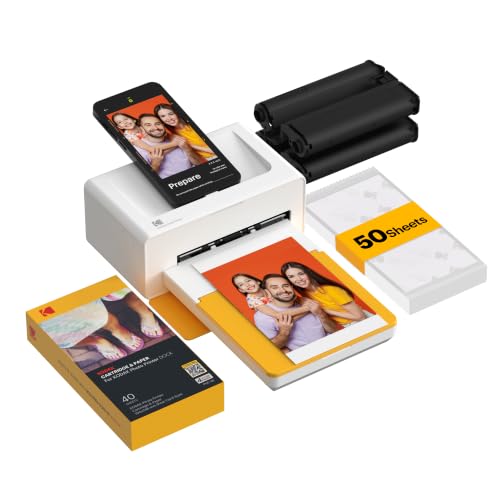
- 4PASS prints with protective lamination
- Dock and charge a compatible smartphone
- Edits through the KODAK mobile app
Best For: Home printing, albums, gifts, and family events
Complete 4x6 Bundle

- 108 sheets, three cartridges, and cloth included
- Vibrant water-resistant 4x6 dye-sub prints
- Wi-Fi printing in a compact design
Best For: Events, scrapbooking, and home 4x6 printing
Dual-Format Portable Pick
Liene Amber M110 Bluetooth Photo Printer

- Prints 4x6 photos and 3x3 stickers
- Includes 80 sheets and two cartridges
- Bluetooth and app-based customization
Best For: Portable printing, stickers, and creative journaling
White Event-Ready Kit

- Includes 108 sheets and three cartridges
- Wireless dye-sub printing for 4x6 photos
- Compact white design for events or home use
Best For: Parties, gifts, and dependable 4x6 printing
Best All-Around Pick – Canon SELPHY CP1500
The Canon SELPHY CP1500 is a versatile choice among compact photo booth printers for users who want portable 4×6-inch prints, flexible connectivity, and simple photo editing. Its dye-sublimation output is water resistant and designed to stay vibrant for up to 100 years, while the optional battery support makes it useful beyond a fixed setup.
Best For: Home users, parties, and portable photo sharing with smartphones, cameras, memory cards, or USB drives.
Pros:
- Compact 5.24-by-7.17-by-2.27-inch design with optional battery support.
- Supports Wi-Fi, USB, and memory card connections.
- Built-in 3.5-inch display supports viewing, editing, and filter effects.
- Prints water-resistant photos in several sizes, including 4×6-inch, square, and mini formats.
Cons:
- Its maximum print size is limited to 4×6 inches.
- The optional battery pack is needed for printing away from an outlet.
The CP1500 balances portability, connection options, and convenient onboard controls, making it a strong general-purpose pick for compact photo booth-style printing.
Best for High-Volume Events – DNP QW410
DNP QW410 4.5" Dye Sublimation Printer with WCM Plus Wi-Fi Module and 4x6" Printer Media Kit
Check Price On AmazonThe DNP QW410 is a practical choice for event operators who need compact photo booth printers with faster output and larger media capacity. It produces 4×6-inch dye-sublimation prints in about 19 seconds and includes a Wi-Fi module for use with mobile and desktop devices.
Best For: Weddings, rentals, parties, and other event setups where quick repeat printing matters.
Pros:
- Prints 4×6-inch photos in approximately 19 seconds.
- Includes WCM Plus Wi-Fi connectivity for iOS, Android, Windows, and macOS devices.
- Supports glossy and matte finishes with YMC plus overcoat ribbon technology.
- 150-sheet media capacity is suited to repeated event printing.
Cons:
- At 22.2 pounds, it is substantially heavier than highly portable home photo printers.
- Its listed maximum media size is 4×6 inches.
With fast output, included wireless connectivity, and high-capacity media, the QW410 is better suited to professional or rental workflows than casual occasional printing.
Best Complete Booth Setup – Zylosian Desktop Photo Booth
The Zylosian desktop photo booth is more than a printer: it combines a 13MP camera, 10.1-inch touchscreen, adjustable lighting, booth software, and a dye-sublimation printer. For shoppers seeking compact photo booth printers as part of a ready-to-use event station, this package includes 60 sheets, a ribbon, and more than 300 frame templates.
Best For: Weddings, parties, corporate events, trade shows, pop-ups, and small event-rental businesses.
Pros:
- Includes the camera, touchscreen booth, printer, base, stand, lighting, ribbon, and paper.
- 10.1-inch touchscreen and adjustable-angle tabletop design simplify setup.
- Software includes 300-plus templates plus effects, props, stickers, and social sharing tools.
- Three adjustable light color temperatures help adapt to indoor conditions.
Cons:
- The 17-pound, 14-by-18-by-12-inch unit is less portable than a standalone printer.
- Printer connectivity is listed as USB rather than wireless.
- Only 60 sheets are included in the package.
This is the most complete event-focused option in the group, but its larger footprint and bundled booth hardware make it less appropriate if you only need a compact standalone printer.
Best for Wireless Inkjet Detail – Epson PictureMate PM-400
The Epson PictureMate PM-400 offers a compact wireless inkjet alternative for shoppers comparing compact photo booth printers. It handles borderless 4×6- and 5×7-inch photos, connects to smartphones and tablets over Wi-Fi, and can produce a 4×6-inch photo in as fast as 36 seconds in the stated default mode.
Best For: Personal events, gatherings, and users who want wireless borderless prints in both 4×6- and 5×7-inch sizes.
Pros:
- Prints borderless 4×6- and 5×7-inch photos.
- Supports wireless printing from iPhone, iPad, tablets, and smartphones.
- Compact portable design with a listed 6-pound weight.
- Offers up to 5760×1440 dpi color resolution.
Cons:
- Uses Epson Genuine Cartridges exclusively according to the supplied notes.
- Inkjet output may be less immediately event-oriented than dye-sublimation printing.
- Its listed dimensions are larger than the Canon SELPHY CP1500.
The PM-400 is a sensible fit when borderless output, wireless convenience, and the extra 5×7-inch format matter more than dye-sublimation convenience or the smallest possible footprint.
Best Compact Dye-Sublimation Printer – Liene M100 4×6 Photo Printer
The Liene M100 is a practical choice among compact photo booth printers when you want colorful 4×6-inch prints from a phone, tablet, or computer. Its dedicated Wi-Fi hotspot avoids reliance on an outside network, while the included paper and cartridges make it ready for a substantial batch of prints.
Best For: Families, small gatherings, and anyone who wants durable 4×6 prints with app-based editing.
Pros:
- Thermal dye-sublimation printing produces vibrant, laminated photos designed to resist water, scratches, fingerprints, and fading.
- Includes 100 sheets of 4×6 photo paper and three color cartridges.
- Supports up to five simultaneous device connections through its built-in hotspot.
- The app offers borders, filters, brightness and contrast adjustments, plus ID and visa photo layouts.
Cons:
- Uses proprietary Liene cartridges and paper.
- The maximum sheet capacity is listed as 20 sheets at a time.
- Users should clean the print head if smudges appear and ensure the cartridge clicks into place.
Choose the M100 if print durability, a generous included supply, and multi-device sharing matter more than printing directly from a built-in photo booth screen.
Best All-in-One Event Booth – HP Sprocket Photo Booth Machine
The HP Sprocket Photo Booth Machine stands apart from typical compact photo booth printers by combining a 10.1-inch touchscreen, camera features, LED ring light, and instant printing in one portable unit. It is designed for events where guests can customize photos, print copies, or share digital versions by QR code.
Best For: Event planners, parties, and group gatherings that need a self-contained photo booth experience.
Pros:
- Built-in flash and LED ring light support better-lit photos.
- 10.1-inch touchscreen provides live previews and control over layouts, frames, and filters.
- Offers more than 250 frames and stickers, with event controls for guest access, print limits, and sharing.
- ZINK prints require no ink or toner and are designed to resist water, smudges, and tears.
Cons:
- Compatible only with HP 3×4 ZINK paper.
- At 7.3 pounds, it is portable but substantially larger than pocket-size photo printers.
- Printing is limited to 3×4-inch media and the listed speed is about one page per minute.
This HP model is the strongest fit when the booth experience itself is the priority. Its touchscreen controls, lighting, templates, cloud storage, and QR sharing provide more event functionality than a basic phone-connected printer.
Best Docking Photo Printer – KODAK Dock Plus 4×6 Photo Printer
The KODAK Dock Plus is a straightforward option among compact photo booth printers for desktop use. Its integrated phone dock provides a stable connection while charging a compatible smartphone, and Bluetooth pairing with the KODAK app lets you edit and print 4×6 photos without a complicated setup.
Best For: Home users who want reliable 4×6 prints for albums, frames, gifts, and family events.
Pros:
- 4PASS dye-sublimation printing applies three color layers plus a protective lamination layer.
- Produces 4×6-inch prints designed to resist fingerprints, water, and fading.
- Integrated docking station can connect to and charge a compatible phone while printing.
- KODAK app supports cropping, editing, and customization on iOS and Android devices.
Cons:
- Designed for powered desktop use rather than fully cordless operation.
- Bluetooth connectivity is centered on compatible smartphones and the KODAK app.
- The listed print speed is approximately one page per minute, or about 55 seconds per photo.
The Dock Plus is a sensible pick for buyers who prefer a stable home printing station over a camera-equipped booth. Select it for larger 4×6 output, simple phone docking, and durable dye-sublimation prints.
Complete 4×6 Bundle – Canon Selphy CP1500 Black
The Canon Selphy CP1500 bundle is a practical choice for shoppers seeking compact photo booth printers with ready-to-use supplies. Its dye-sublimation system produces vibrant, water-resistant 4×6 prints, while Wi-Fi connectivity supports printing from smartphones, tablets, and computers. The bundle includes 108 sheets of paper, three color ink cartridges, and a cleaning cloth.
Best For: Events, home photo printing, scrapbooking, journaling, and gifting.
Pros:
- Includes 108 sheets, three color cartridges, and a cleaning cloth.
- Produces water-resistant, fingerprint-resistant 4×6 photos.
- Supports wireless printing from phones, tablets, and computers.
- Compact design suits desks, shelves, and travel bags.
Cons:
- Limited to a maximum media size of 4×6 inches.
- Prints only; it does not provide scanning or copying functions.
With matched paper and ink included, this black CP1500 kit minimizes setup decisions and is well suited to gatherings where dependable 4×6 prints are the priority.
Dual-Format Portable Pick – Liene Amber M110 Bluetooth Photo Printer
The Liene Amber M110 stands out among compact photo booth printers for its dual-format flexibility. It can print standard 4×6 photos and 3×3-inch sticker sheets through separate trays, connecting to phones and other devices over Bluetooth. The bundle includes 60 4×6 sheets, 20 square sticker sheets, and two cartridges.
Best For: Portable photo sharing, stickers, journaling, and users who want both 4×6 and square prints.
Pros:
- Supports both 4×6-inch and 3×3-inch sticker media.
- Includes 80 sheets across two paper formats and two cartridges.
- Bluetooth pairing is designed to connect in about 13 seconds.
- App supports borders, filters, brightness adjustments, and ID or Visa photos.
Cons:
- Cartridges are compatible only with Liene 4×6 and 3×3 media.
- Maximum sheet capacity is listed as 20, so larger jobs may require reloading.
- Print resolution is listed as 300 x 300 dpi.
This is a versatile option when a photo booth setup needs more than standard snapshots. Its two trays and sticker support add creative flexibility, though the proprietary media requirement is worth considering before purchase.
White Event-Ready Kit – Canon Selphy CP1500 White
This white Canon Selphy CP1500 bundle offers a straightforward route to compact photo booth printers for parties and home use. It uses dye-sublimation printing for vibrant, long-lasting 4×6 photos and includes 108 sheets, three color cartridges, and a cleaning cloth. Wi-Fi connectivity lets you print from compatible devices without cables.
Best For: Parties, gifts, scrapbooking, journaling, and users who prefer a white compact printer.
Pros:
- Complete kit includes paper, three color cartridges, and a cleaning cloth.
- Creates water-resistant and fingerprint-resistant 4×6 prints.
- Wireless printing supports convenient app-based operation.
- Compact format fits desks, shelves, or travel bags.
Cons:
- Maximum media size is 4×6 inches.
- Designed for printing only, without scanning or copying functions.
The white CP1500 kit is essentially an event-friendly, supply-ready photo printer. It makes sense for buyers who want consistent 4×6 output and a clean-looking compact unit rather than multiple print sizes.
How We Picked the Best Compact Photo Booth Printers
We selected these models based on the features that matter most for parties, weddings, fundraisers, family gatherings, and small event businesses. The lineup includes dye-sublimation printers, compact wireless photo printers, smartphone-focused models, and all-in-one photo booth machines. We considered print size, portability, connectivity, included supplies, advertised throughput, ease of use, and the availability of replacement paper or media.
Because event needs vary, this list does not treat the most expensive or fastest printer as automatically best. A portable home printer may be a better fit for casual use, while a dedicated event printer or touchscreen booth can make more sense for repeated bookings.
Quick Comparison
- Best for portable 4-by-6-inch prints: Compact dye-sublimation models such as the Canon Selphy, Kodak Dock Plus, and Liene printers.
- Best for higher-volume events: The DNP QW410 is designed for more demanding photo booth workloads and compatible event media.
- Best complete booth setup: The touchscreen photo booth machines include display hardware, templates, lighting, and a color printer.
- Best for simple home use: The Epson PictureMate and Canon Selphy models offer straightforward wireless printing.
Key Buying Factors for Compact Photo Booth Printers
Print Technology and Quality
Dye-sublimation printers generally produce smooth, detailed prints with a protective finish and consistent color. Four-pass systems can be particularly convenient because the finished print is typically dry and ready to handle immediately. Thermal or instant-print models may be smaller, but verify their resolution, color performance, and long-term media cost before buying.
Speed, Volume, and Media Cost
For an occasional party, a modest print rate may be sufficient. Weddings and business events can create long queues, so check rated print times, maximum recommended volume, paper capacity, and replacement media prices. Bundles with paper and cartridges can lower the initial cost, but compare the per-print price after the included supplies run out.
Connectivity and Setup
Wi-Fi, Bluetooth, smartphone apps, and USB connections each suit different workflows. Confirm compatibility with the phones, tablets, cameras, or booth software you plan to use. A reliable connection and simple app can matter more at an event than advanced editing features.
Size and Booth Compatibility
Measure your table, cart, or enclosure before purchasing. Also check whether the printer supports the paper size your templates use, especially standard 4-by-6-inch prints. Complete booth systems require additional space for the touchscreen and lighting but reduce the need to assemble separate components.
Who Should Buy Which Compact Photo Booth Printers?
Choose a Canon Selphy, Kodak Dock Plus, or Liene model if you want compact 4-by-6-inch prints from a phone. Pick the Epson PictureMate for simple home photo printing. Consider the DNP QW410 if speed, durability, and event volume are priorities. If you want an integrated guest experience with a touchscreen, templates, and lighting, choose one of the complete photo booth machines. Finally, compare the two Canon Selphy bundles by included supplies and current price rather than print performance, since their core printer is essentially the same.