The best photo booth printers for content creators make it easier to turn selfies, event moments, and branded activations into shareable physical keepsakes. The right setup balances print quality, touchscreen control, camera performance, portability, and operating cost.
This roundup covers compact HP Sprocket-style systems, portable enclosed booths, DSLR-equipped models, and interactive magic mirrors. Use the guide below to match the equipment to your space, workflow, and audience.
Best 10 Photo Booth Printers for Content Creators Picks for 2026
Best Portable Dye-Sub Pick

- 4 x 6-inch dye-sub color prints
- 300+ templates and adjustable fill light
- Includes 60 sheets and ribbon
Best For: Creators and event rentals needing durable tabletop prints
Best Large-Format Mirror Setup
MWE 32-Inch Magic Mirror Booth
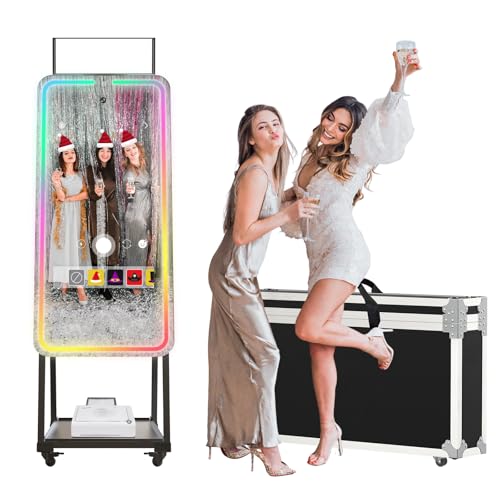
- 32-inch touchscreen and HD camera
- 20+ adjustable RGB lighting modes
- Supports USB printer connections
Best For: Social creators and events wanting an immersive mirror booth
Best Lightweight ZINK Option

- Portable 7.3-pound design
- Ink-free 3 x 4 sticker prints
- Includes 100 sheets and 250+ frames
Best For: Mobile creators and small events needing simple sharing
Best Music-Synced Mirror Booth

- Prints via USB in about 20 seconds
- 30+ music-sync lighting modes
- App and remote-controlled ChackTok effects
Best For: Party creators and events built around dynamic lighting
Best Portable Starter Bundle

- Portable 7.3-pound design with carrying case
- 10.1-inch touchscreen, flash, and LED ring light
- Includes 110 sheets of 3x4 ZINK paper
Best For: Creators and event planners seeking a ready-to-use portable booth
Best Full Event Setup

- 15.6-inch touchscreen with built-in Intel i5 mini PC
- Includes printer, paper, props, cases, and red carpet
- Five-year warranty with remote technical support
Best For: Event planners and rental operators building a complete booth station
Best for Digital Sharing

- Prints 3x4 ZINK photos and supports QR-code downloads
- Cloud storage enables later sharing and management
- Touchscreen, ring light, and 250-plus creative options
Best For: Creators and hosts combining physical prints with social sharing
Best Portable Creator Booth

- 4K camera with built-in adjustable fill light
- Includes printer and 240 sheets of paper
- Flight case supports mobile setups
Best For: Creators needing social sharing and instant 4-by-6-inch prints
Best Adjustable Event Booth

- 15.6-inch Full HD touchscreen
- Removable 4K camera and adjustable lighting
- Includes dye-sublimation printer and rolling case
Best For: Indoor events, rentals, and mobile content stations
Best Premium Magic Mirror
Interactive Touchscreen Photo Booth

- Built-in Intel i5 PC with HD touchscreen
- RGB lighting and customizable digital frames
- Supports DSLR, printing, and multiple sharing methods
Best For: Professional branded events and premium rental experiences
Best Portable Dye-Sub Pick – Zylosian Desktop Photo Booth
For content creators who need photo booth printers for content creators, this compact Zylosian setup combines a 13MP camera, 10.1-inch touchscreen, adjustable fill light, and a standalone 4 x 6-inch dye-sublimation printer. It is a practical choice for creating polished event content and physical keepsakes from a tabletop station.
Best For: Creators, event hosts, and rental businesses that want durable 4 x 6-inch prints with customizable templates.
Pros:
- Includes a dye-sublimation printer, ribbon, and 60 sheets of photo paper.
- Offers 300+ templates plus customizable effects, props, and stickers.
- Adjustable 3000K, 4000K, and 6000K fill-light settings help with varied indoor conditions.
- Prints are water-repellent, fingerprint-resistant, and UV-resistant.
Cons:
- At 17 pounds, it is less lightweight than the most portable options.
- Its maximum print size is 4 x 6 inches.
- The included ChackTok VIP access lasts four months.
This is a strong all-in-one option when print longevity and flexible lighting matter more than minimal size. The tabletop design also makes it easier to reposition for events, pop-ups, and creator stations.
Best Large-Format Mirror Setup – MWE 32-Inch Magic Mirror Booth
Among photo booth printers for content creators, this MWE magic mirror emphasizes presentation and interactive content. Its 32-inch touchscreen, wide-angle HD camera, RGB surround lighting, and ChackTok software support creator-focused photos, videos, livestream visuals, and optional instant printing.
Best For: YouTubers, TikTok creators, artists, and event operators who want a prominent mirror-style content station.
Pros:
- Large 32-inch touchscreen creates an engaging user interface.
- Built-in RGB lighting offers more than 20 modes with adjustable brightness.
- ChackTok includes effects, digital props, stickers, frames, music, and social sharing.
- Supports the included printer design or compatible USB printers.
Cons:
- It is a much larger installation than a tabletop photo booth.
- The supplied notes specify printer support but do not confirm included paper quantities.
- Windows 10 use requires connection to another Windows system player.
This model is best when the booth itself should become part of the visual experience. Its lighting and large display are especially useful for branded activations, parties, and social-first installations.
Best Lightweight ZINK Option – HP Sprocket Photo Booth
For creators prioritizing portability, the HP Sprocket is one of the more approachable photo booth printers for content creators. It weighs just over 7 pounds and combines a 10.1-inch touchscreen, LED ring light, built-in flash, Wi-Fi sharing, and ink-free 3 x 4-inch ZINK sticker prints.
Best For: Mobile creators, small events, and social stations that need easy-to-carry prints and digital sharing.
Pros:
- Lightweight 7.3-pound design is easy to transport.
- ZINK printing requires no ink or toner and produces waterproof, tear-resistant sticker photos.
- Includes 250+ frames and 100 sheets of 3 x 4 ZINK paper.
- QR-code sharing and cloud storage help guests access digital copies.
Cons:
- It is compatible only with HP 3 x 4 ZINK Paper.
- Prints are smaller than standard 4 x 6-inch photo-booth prints.
- The listed color print speed is one page per minute.
The HP Sprocket is a practical fit when setup speed, low carrying weight, and sticker-style keepsakes matter most. Its paper limitation is worth planning for, but the included supply and sharing tools make it event-ready.
Best Music-Synced Mirror Booth – MWE RGB Magic Mirror Booth
This MWE model stands out among photo booth printers for content creators with music-synchronized RGB lighting and USB printing designed around quick event sharing. Its wide-angle HD camera, ChackTok effects, remote or app control, and mirror format create a visually active station for videos, photos, and branded experiences.
Best For: Party creators, livestreamers, and event businesses that want animated lighting and fast physical prints.
Pros:
- Connects to a printer by USB and can print a photo in about 20 seconds.
- Offers 30+ strip-light color modes, including music synchronization.
- Includes ChackTok tools for effects, props, stickers, frames, music, and sharing.
- Supports Android 13 and can also work with Windows 10 through another system player.
Cons:
- The mirror format requires more assembly and space than a compact booth.
- The supplied notes do not specify included paper quantity or printer consumables.
- Six months of VIP software access is included, rather than permanent VIP access.
Choose this version when atmosphere is central to the content. Music-reactive lighting can make party clips and branded activations more dynamic, while USB printing adds a tangible takeaway for guests.
Best Portable Starter Bundle – HP Sprocket Photo Booth
If you want photo booth printers for content creators that are simple to transport and ready for casual events, this HP Sprocket bundle is a practical option. It combines a 10.1-inch touchscreen, flash, LED ring light, customizable layouts, and ZINK printing in a compact package weighing about 7.3 pounds.
Best For: Content creators, scrapbookers, and event planners who want a portable booth with included paper and a carrying case.
Pros:
- Includes 110 sheets of 3×4 ZINK paper and a padded carrying case.
- Built-in flash and LED ring light support better-lit photo sessions.
- Touchscreen previews, customizable frames, filters, and guest-print controls.
- ZINK paper requires no ink or toner and produces water-, smudge-, and tear-resistant prints.
Cons:
- Compatible only with HP 3×4 ZINK paper.
- Listed print speed is approximately one page per minute.
- Print capacity is limited to 20 sheets at a time.
This is a strong fit when portability and an all-in-one setup matter more than high-volume printing. The included supplies make it easier to start creating immediately, while the touchscreen controls add useful customization for events and social content.
Best Full Event Setup – Enwozp DSLR Photo Booth
For creators comparing photo booth printers for content creators with a more complete event-production setup, this Enwozp system offers a touchscreen booth, built-in Windows mini PC, printer, accessories, and protective transport equipment. Its Intel i5 platform and 15.6-inch display are designed for interactive photo sessions and sharing.
Best For: Event planners, rental businesses, weddings, exhibitions, and creators who need a full-size booth system with included accessories.
Pros:
- Includes an Intel i5 mini PC, 8GB RAM, 256GB SSD, and Windows 10.
- 15.6-inch capacitive touchscreen supports layouts, styles, backgrounds, stickers, and startup animations.
- Package includes a printer, 108 sheets of paper, two ink cartridges, props, masks, a flight case, and red carpet.
- Five-year manufacturer warranty and online engineer-assisted support are included.
Cons:
- The listed configuration does not include a camera.
- Its full-size design and protective cases are less convenient for lightweight, grab-and-go use.
- Windows 10 and the included computer add setup considerations compared with simpler instant printers.
This model is better suited to serious event use than casual home printing. It provides a richer interactive experience and more bundled equipment, but buyers should plan for a larger installation and provide a compatible DSLR camera.
Best for Digital Sharing – HP Sprocket QR Photo Booth
Among photo booth printers for content creators, this HP Sprocket model stands out for combining instant 3×4 ZINK prints with QR-code and cloud sharing. Its touchscreen, LED ring light, customizable event controls, and mobile compatibility make it useful for creators who want both physical keepsakes and digital distribution.
Best For: Social-content creators and event hosts who want guests to print photos or download digital copies through QR codes.
Pros:
- Generates QR codes for downloading and sharing digital copies when connected to Wi-Fi.
- Automatically stores photos in the cloud for later sharing and management.
- 10.1-inch touchscreen, flash, LED ring light, and more than 250 frames and stickers support customization.
- Portable 7.3-pound design uses ink-free, sticky-backed 3×4 ZINK paper.
Cons:
- Digital sharing features require a Wi-Fi connection.
- Compatible only with HP 3×4 ZINK paper.
- Listed print speed is approximately one page per minute, with a 20-sheet capacity.
This is the most versatile choice of the three for blending printed favors with social sharing. It is especially appealing when guests need quick digital access, though Wi-Fi availability and ongoing HP paper compatibility should be part of the buying decision.
Best Portable Creator Booth – Portable Tripod Photo Booth
For content creators looking for photo booth printers, this MWE setup combines a 4K camera, built-in fill light, touchscreen operation, and instant 4-by-6-inch printing. Its included software supports effects, frames, stickers, music, and one-click social sharing.
Best For: YouTubers, TikTok creators, selfie enthusiasts, and mobile event setups that need both digital sharing and printed photos.
Pros:
- 4K video capture and a 1200-pixel camera with a 76.3-degree wide-angle view.
- Includes a printer, 240 sheets of paper, and two printer ribbons.
- Built-in lighting offers three modes with adjustable brightness.
- Extendable tripod and rolling flight case simplify transport and setup.
Cons:
- Printing is limited to 4-by-6-inch photos.
- The booth is not water resistant.
- Software VIP access is included for six months.
This is a practical all-in-one choice for creators who want a portable booth with strong video capability, soft adjustable lighting, and ready-to-use printing supplies. The five-year replacement coverage and U.S. on-site repair support add reassurance for frequent use.
Best Adjustable Event Booth – Portable Photo Booth Machine
Among photo booth printers for content creators, this LumaVue package emphasizes straightforward event operation. It pairs a 15.6-inch Full HD touchscreen with a removable 4K USB camera, adjustable lighting, a dye-sublimation printer, and a rolling flight case.
Best For: Mobile creators, event operators, wedding vendors, and rental businesses serving indoor parties and brand activations.
Pros:
- Complete package includes the booth, dye-sublimation printer, printer tray, case, and media set.
- 15.6-inch 1920-by-1080 touchscreen supports self-service operation.
- Removable 4K camera and built-in light with three color modes and four brightness levels.
- Adjustable aluminum tripod accommodates different guests and shooting angles.
Cons:
- Designed for indoor use and is not water resistant.
- Included media is limited to 120 sheets of paper and one ribbon.
- ChackTok membership is included for six months.
The adjustable stand, organized rear printer tray, and rolling case make this a well-suited option for creators who move between indoor events. It offers a balanced combination of guest-friendly controls, flexible lighting, and bundled printing hardware.
Best Premium Magic Mirror – Interactive Touchscreen Photo Booth
For creators who want photo booth printers with a more immersive presentation, this QRSTUI magic mirror combines a large interactive touchscreen, built-in Intel i5 computer, RGB lighting, and instant-print and sharing support. Its customizable frames and startup screens also suit branded content experiences.
Best For: Professional event creators, wedding vendors, rental businesses, and brands seeking a polished magic-mirror activation.
Pros:
- Available with 22-, 32-, or 43-inch HD touchscreens and a built-in Intel i5 PC.
- Supports DSLR cameras, mini printers, SMS, email, QR-code, and social sharing.
- RGB fill light provides more than 18 effects with adjustable brightness.
- Detachable metal frame and lockable-wheel flight case support transport.
Cons:
- Mini printer and DSLR camera compatibility may require additional equipment.
- The larger mirror format may be less convenient for small workspaces.
- The product is not water resistant.
This is the most feature-rich option for creators building a premium, customizable booth experience. Its integrated computer and extensive sharing options reduce dependence on a separate workstation, while the DSLR and mini-printer compatibility allows a more tailored setup.
How We Picked the Best Photo Booth Printers for Content Creators
We focused on the features that matter when a photo booth must work reliably for content production, parties, pop-ups, and client activations. Our comparison considers camera quality, touchscreen usability, print format, included media, lighting, software flexibility, portability, and setup requirements.
We also separated compact instant-print bundles from larger all-in-one booths. A lightweight unit can be ideal for a creator traveling between venues, while a magic mirror or DSLR booth may be better for premium branding and higher-volume events.
Quick Comparison
- Best for portable content: Compact HP Sprocket-style booths with included Zink paper and carrying cases.
- Best for polished portraits: DSLR-equipped booths with larger touchscreens and stronger camera control.
- Best for interactive events: Magic mirror booths with large touch displays, HD cameras, and built-in computers.
- Best for flexible setup: Portable tripod and enclosed booth designs that are easier to transport.
- Best for ready-to-use packages: Bundles that include paper, templates, lighting, and protective cases.
Key Buying Factors for Photo Booth Printers for Content Creators
Print Technology and Running Cost
Zink printing is compact, mess-free, and convenient because it does not require ink cartridges, but print sizes and color control may be limited. Dye-sublimation printers generally deliver more polished, durable photos and are better suited to frequent event use. Check the cost and availability of replacement media before buying.
Camera, Lighting, and Workflow
An HD camera can handle casual portraits, while a DSLR setup offers better image quality and greater control over lenses and exposure. Built-in LED rings or light strips simplify setup, especially in dim venues. Confirm whether the system supports your preferred sharing, branding, and template workflow.
Size, Transport, and Setup
Measure doorways, vehicles, and storage areas before choosing a large mirror or enclosed booth. A flight case or padded carrying case is valuable for frequent travel. Also check assembly time, power requirements, and whether the touchscreen and printer are integrated or separate.
Screen and Software Features
Larger touchscreens make posing, reviewing, and selecting templates easier for guests. Look for customizable frames, digital overlays, social-sharing tools, and a built-in mini PC when you want a more complete event-production system.
Who Should Buy Which Photo Booth Printers for Content Creators?
Choose a compact HP Sprocket bundle if portability, quick setup, and included paper matter most. These systems suit creators making casual prints at small events or on location.
Choose a portable tripod or enclosed booth if you need a self-contained setup that can move between venues without the footprint of a full mirror system.
Choose a DSLR photo booth if portrait quality and professional client work are priorities. It is the stronger choice for weddings, brand activations, and creators who want more control over the final image.
Choose a magic mirror booth if guest interaction and visual impact are central to the experience. These models need more space and transport planning, but their large displays can create a premium centerpiece at events.